BLOGS
BLOGS  NEWSROOM
  CASE STUDIES
  WEBINARS
  PODCASTS
  ASSET HUB
  EVENT CALENDAR
























TL;DR
- Off-the-shelf EMRs built for primary care or general medicine often fail ophthalmology practices in three specific places: surgical center billing, vision correction data capture, and referral workflow automation.
- Canvas Medical, Medplum, and OpenEMR offer customization paths that general vendors don’t.
- And for practices with complex ASC operations or proprietary workflows, a custom build frequently costs less over five years than retrofitting a standard platform.
- This guide covers what to look for, how the major platforms compare, and how to make the build-vs-buy call honestly.
Ask a practice administrator at a 10-provider ophthalmology group which EMR they’re using, and there’s a good chance you’ll get a sigh before the answer.
The software works, mostly. But the workarounds have become part of the job. The surgical center billing runs through a separate spreadsheet. The referral follow-up is tracked in a shared inbox. The vision correction data that should auto-populate the post-op summary gets entered twice by two different staff members.
I’ve seen this at multiple ophthalmology practices. The EMR wasn’t the wrong choice when they bought it. It was designed for a different kind of practice. And because ophthalmology sits at the intersection of clinical care, surgical operations, and specialized imaging, the gaps show up in the exact places that cost money.
The global ophthalmology EMR software market was valued at $1.5 billion in 2024. It’s projected to reach $3.2 billion by 2033, growing at 9.2% annually (Verified Market Reports, 2024). That growth is driven partly by consolidation (private equity rolling up optometry and ophthalmology groups) and partly by a real need: practices that scaled up without upgrading their clinical systems now face a reckoning.
Three questions worth asking before you pick any platform:
- Does it handle surgical center billing natively, or will you be patching a general-medicine billing module?
- Can it capture biometric and vision correction data in a structured format, not just a free-text note?
- What’s the referral workflow, and does it close the loop automatically?
Three questions. If you can’t get clean answers to all of them, keep reading.
Related read: Epic Kaleidoscope in Ophthalmology: A Complete Guide for Providers
I. What Makes Ophthalmology EMRs Different? (And Why General EHRs Often Fail)
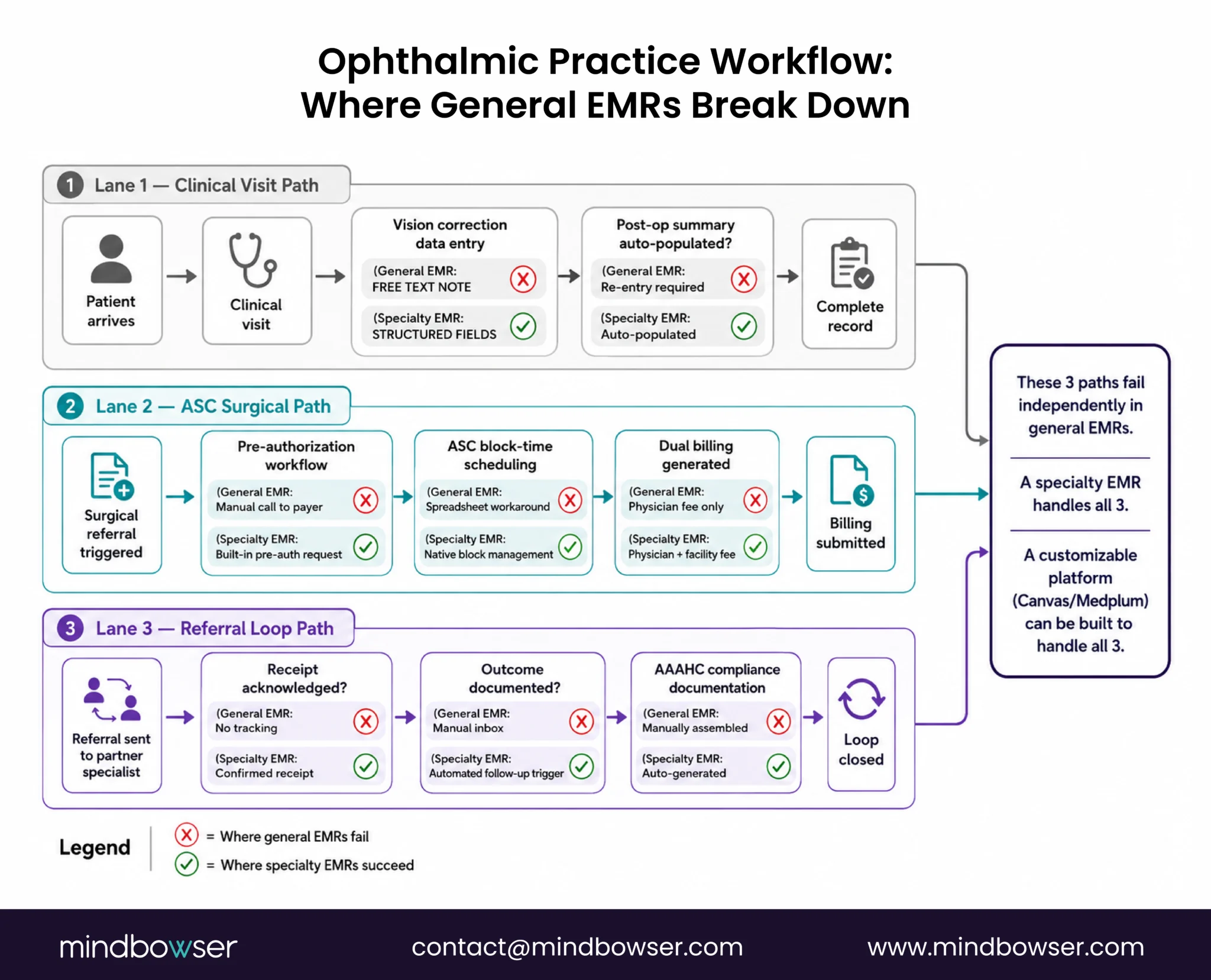
General EHRs were built around the SOAP note and the primary care visit. Ophthalmology doesn’t fit that model cleanly.
Not even close.
Here’s what’s actually different:
- Surgical scheduling is separate from clinical scheduling. An ophthalmologist running a practice with an attached ambulatory surgery center (ASC) needs two scheduling systems that talk to each other. The clinical visit triggers a surgical referral, which generates a pre-authorization workflow, which feeds into ASC block-time scheduling, which generates facility fee billing. A general EMR handles the clinical visit well. The rest is often manual.
- Vision correction data has structure that general fields don’t capture. Sphere, cylinder, axis, add power, OD and OS separately. These aren’t custom notes. They’re structured data points that should feed automatically into the post-op record, the glasses or contact lens prescription, and the billing record. Most general EHRs treat this as free text. No search. No trend tracking. No automation.
- Referral workflows need to close loops. Ophthalmology practices send and receive referrals constantly: to retinal specialists, to cornea specialists, from optometrists, from primary care. A referral sent without a confirmed receipt and a follow-up trigger is revenue at risk. The AAAHC (Accreditation Association for Ambulatory Health Care) mandates documentation of referral outcomes for accredited ASCs. In practices I’ve worked with, referral tracking was often the single biggest manual-process bottleneck.
- Imaging integration is not optional. OCT (optical coherence tomography), fundus photography, visual field testing, corneal topography: these devices generate images and data that belong in the patient record. Ophthalmology practices that can’t integrate their imaging systems with their EMR end up with a fragmented record. The physician reviews the Zeiss device output separately from the EMR. The billing team doesn’t see the imaging codes automatically. The picture taken at visit two can’t be compared to the one taken at visit one without manual retrieval.
- ASC billing has its own codes. CMS requires ASC-specific modifiers, facility fees, and supply charge tracking that differ from physician-fee billing. Practices running both a clinic and an ASC often end up with two separate billing workflows because the EMR only handles one model well.
This isn’t a niche problem. Ophthalmology is consistently ranked among the top specialties for EHR dissatisfaction, specifically around imaging and workflow limitations that general platforms handle poorly. It’s not underserved because it’s obscure. It’s underserved because it requires specificity that general platforms weren’t built to provide.
For a broader view of how specialty EHR needs differ across clinical verticals, the specialty EHR development guide covers the architecture tradeoffs in more detail.
II. Platform Comparison: Specialty-Native EMRs vs. Customizable Platforms
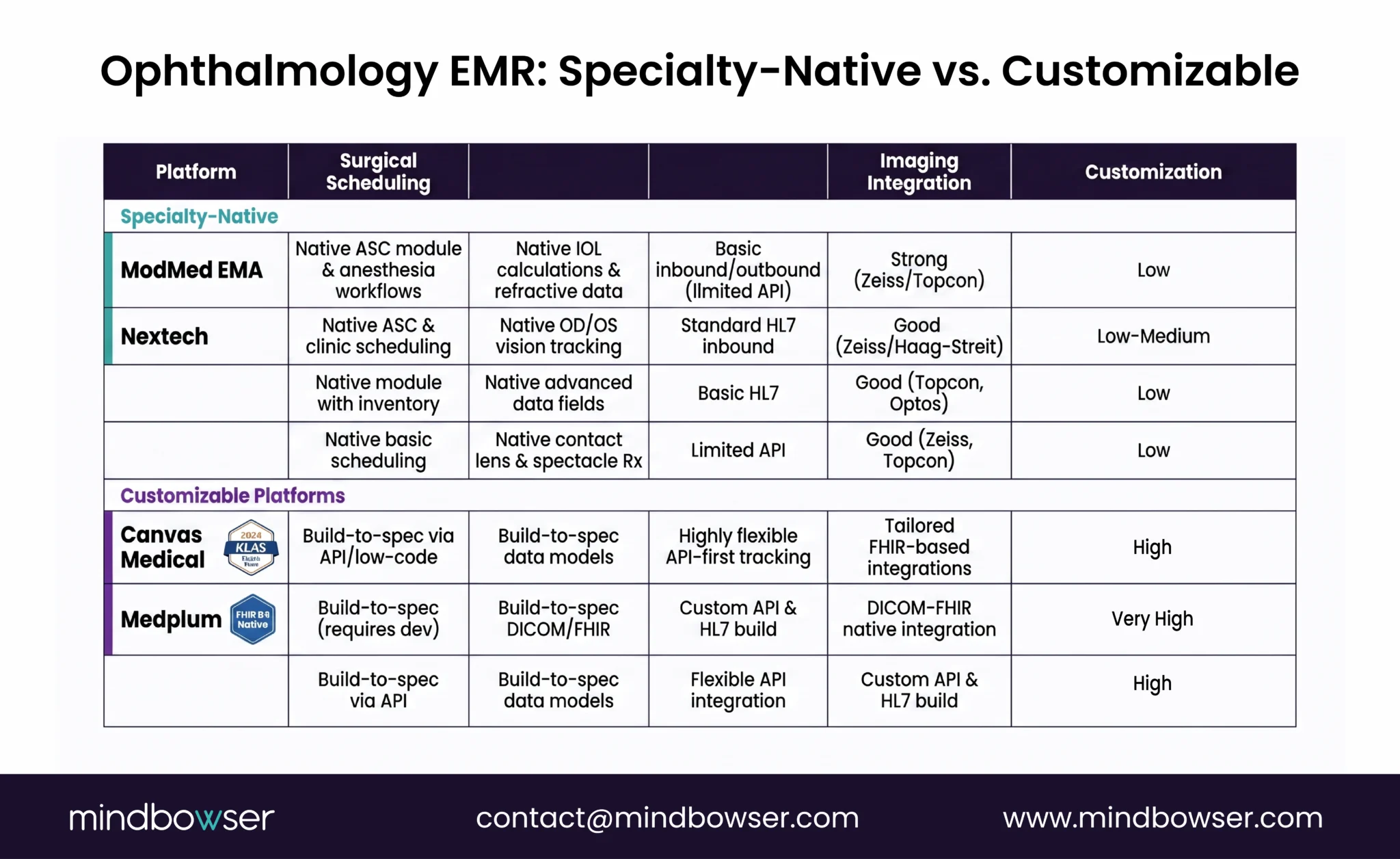
There are two categories of EMR worth evaluating for ophthalmology. Conflating them is where most practices go wrong.
Category 1: Specialty-native ophthalmology EMRs. Built for eye care from the ground up. They speak your workflow natively.
Category 2: Customizable platforms. FHIR-native or headless-EHR architectures that can be extended to ophthalmology workflows with the right implementation partner. More work upfront. Much more flexibility long-term.
Here’s how the main options compare:
Specialty-Native Ophthalmology Platforms
- ModMed (Modernizing Medicine), EMA. The most widely used ophthalmology-specific platform. Built around adaptive learning (the system suggests diagnoses and plans based on historical data). Handles ASC scheduling, ophthalmology-specific billing, and most device integrations natively. Strong ICD-10 and CPT workflow for eye care. Limitation: expensive, less flexible for practices that need custom workflows outside the standard ophthalmic model.
- Nextech (formerly IntelleChart). Long-standing ophthalmology EMR, now owned by a PE group. Good device integrations (Zeiss, Topcon, Haag-Streit). Handles vision correction data well. Referral workflow is functional but not modern. UI feedback since the acquisition has been mixed. Worth tracking before you commit.
- EyeMD EMR. Cloud-based, ophthalmology-specific. Reasonable pricing for smaller practices. Handles most specialty billing codes. Limited customization and API access. Fine if you don’t need to build anything on top of it. A real ceiling if you do.
- RevolutionEHR. Strong in optometry (OD-heavy practices). Worth considering if your practice has an OD component. Less suited to surgical ophthalmology. The ASC billing complexity is higher than RevolutionEHR was designed for.
Customizable Platform Options
Canvas Medical. Won Best in Class in the 2026 KLAS Ambulatory Specialty EHR category (PR Newswire, February 4, 2026). Canvas is a headless-EHR architecture: you build the clinical workflow on top of a FHIR-native data layer. It doesn’t come with ophthalmology workflows out of the box. But it can be configured to handle them, and the resulting system fits your practice’s specific model, not a template of what an ophthalmology practice looks like. The right choice if you have an implementation partner who knows ophthalmology workflows well. For a comparison of Canvas against Medplum and OpenEMR, the headless EHR comparison goes into depth on architecture differences.
Medplum. FHIR R4-native, open-source core with commercial support available. Strong for practices that want to own their data model and build custom referral or surgical scheduling logic. We’ve built custom clinical workflows on Medplum for practices in adjacent specialties. The Medplum integration services page covers what we typically scope.
Not a plug-and-play for ophthalmology. But highly extensible for practices with real integration requirements (PACS, imaging systems, ASC billing platforms).
OpenEMR. Open-source, zero license cost, PHP/MySQL stack. Has an ophthalmology module in the community build. The module handles basic vision data capture and referral tracking. Requires in-house technical staff or an implementation partner to deploy reliably.
If you have the resources, it’s worth a serious look. OpenEMR implementation has the setup overview.
Quick Comparison Table
| Platform | Surgical Scheduling | Vision Correction Data | Referral Tracking | Imaging Integration | Customization | Pricing |
|---|---|---|---|---|---|---|
| ModMed EMA | Native | Native | Native | Strong (Zeiss, Topcon) | Low | $$$ |
| Nextech | Native | Native | Functional | Good | Low-medium | $$ |
| EyeMD EMR | Basic | Native | Basic | Moderate | Low | $ |
| RevolutionEHR | Limited (OD-focused) | OD-optimized | Basic | Moderate | Low | $ |
| Canvas Medical | Configurable | Configurable | Configurable | Via integration | High | $$-$$$ |
| Medplum | Build-to-spec | Build-to-spec | Build-to-spec | Via integration | Very high | $-$$ |
| OpenEMR | Module-based | Module-based | Module-based | Community-supported | High (with dev) | Free/$ |
A broader overview of how to evaluate these general EHR vendors side-by-side is worth reading if you’re still in early evaluation.
III. Specialty Features Checklist: What to Look for in an Ophthalmology EMR
Before you sign anything, run every platform against this list. These aren’t nice-to-haves. Each item below is something I’ve personally seen create billing errors, staff workarounds, or patient care gaps when it was missing.
- Surgical center billing. ASC modifiers (SG modifier, facility fees, supply charge tracking) handled natively, not through a workaround. The platform should distinguish between physician-fee billing and facility-fee billing for the same procedure.
- Vision correction data capture. Sphere, cylinder, axis, add power, prism, OD and OS as separate structured fields. Not a free-text note. The data should be searchable, trendable, and usable in post-op summaries without re-entry.
- Referral workflow with automated follow-up. The system should track referral sent, referral acknowledged by receiving provider, appointment scheduled, outcome documented. AAAHC-accredited ASCs require documentation of referral outcomes. A manual inbox is not a referral workflow.
- Imaging device integration. OCT, fundus photography, visual field (Humphrey or Octopus), corneal topography. Images and structured data should flow into the patient record, not sit on a separate device workstation. Ask vendors specifically which device brands they support natively.
- Insurance pre-authorization for surgical procedures. Cataract surgery, retinal procedures, and LASIK have different pre-auth pathways depending on payer. The system should support pre-auth request generation and tracking within the patient record, not as a manual call to the payer.
- ASC block-time scheduling. Surgical scheduling tied to clinic scheduling, with block-time management for the operating room. If your ASC uses blocks assigned to specific surgeons, the EMR should support that model natively.
- Multi-location support. If you operate a main practice, satellite clinics, and an ASC, the EMR should maintain a unified patient record across all locations with location-specific scheduling and billing.
- Interoperability: HL7/FHIR for referral partners. Your referral partners (primary care, retinal specialists, optometrists, hospitals) are increasingly using FHIR-based referral exchange. The platform you choose should have an HL7 v2 or FHIR R4 interface for inbound and outbound referrals. This matters now, and it will matter more in 2027-2028 as CMS prior-authorization API mandates roll out (CMS-0062-P, proposed January 2025).
- HIPAA-compliant imaging storage. Fundus photographs and OCT scans are PHI. The EMR or its integrated image management system must handle storage and access controls compliantly. Ask how the platform handles imaging PHI separately from clinical notes.
- Reporting and analytics for surgical outcomes. Visual acuity outcomes pre- and post-op, complication rates, re-operation rates. These matter for MIPS reporting and for practice quality improvement. A spreadsheet export is not a reporting module. Ask vendors to show you the actual MIPS dashboard, not the marketing slide of it.
- IRIS Registry integration. The AAO IRIS Registry is the largest ophthalmic clinical registry in the world. As of 2017, 43 EHR systems had integrated with it (AAO Journal, 2018); the current list of eligible EHR systems is maintained on the AAO IRIS Registry site. Practices with direct IRIS integration submit MIPS quality measures automatically; those without submit manually, with higher rates of coding errors and missed measures. Ask each vendor specifically: is your system an integrated IRIS Registry EHR, and does the integration automate MIPS quality measure submission?
Not every practice needs every item above at the same depth. A single-location optometry-heavy practice and a 15-provider surgical ophthalmology group have very different requirements. The ambulatory EHR guide has a good breakdown of how requirement depth scales with practice complexity.
Custom Ophthalmology EMRs Built for ASC Billing and Imaging.
IV. Build vs. Buy: When Custom Development Makes Financial Sense for Ophthalmology Practices
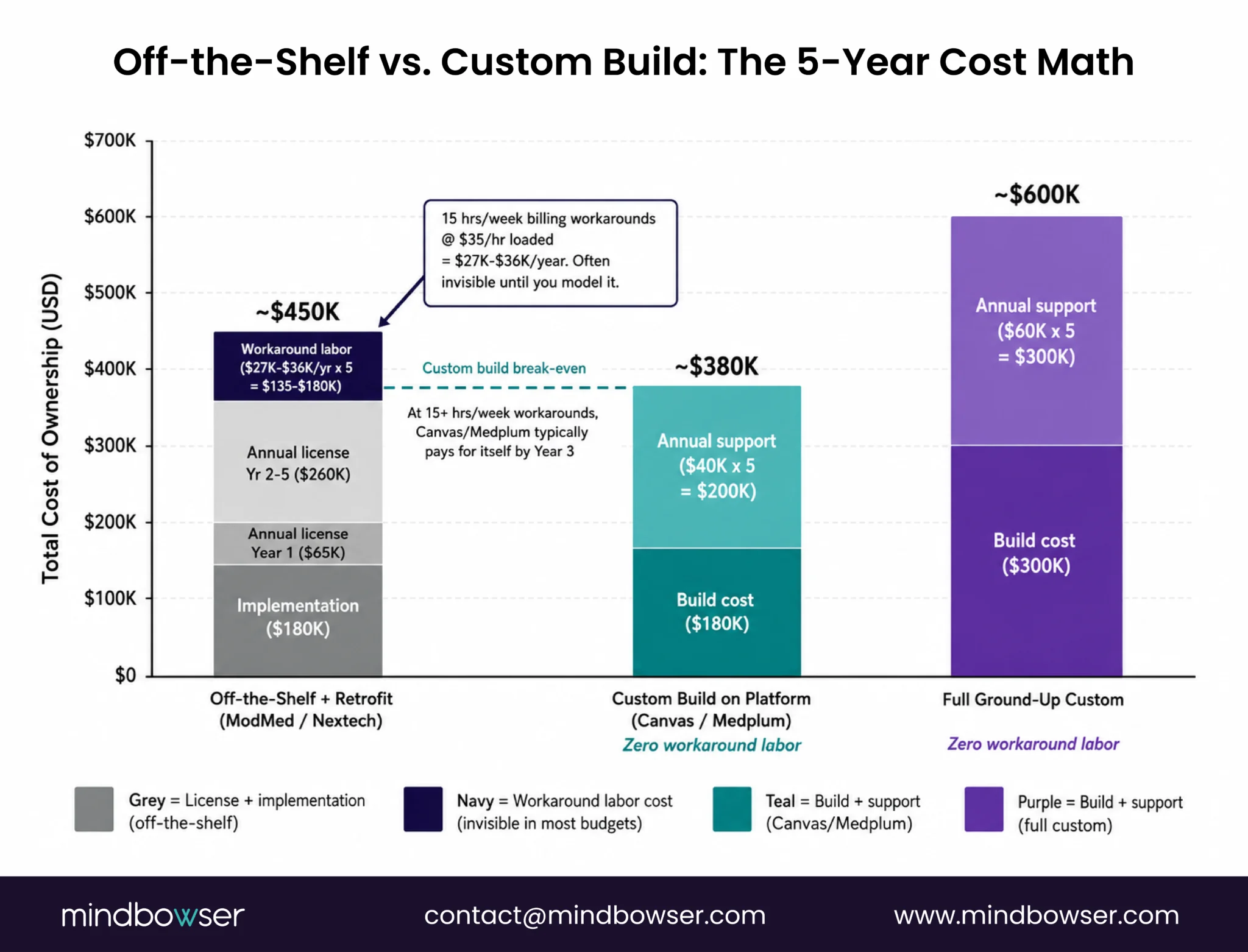
The standard advice is: buy off-the-shelf unless you have unusual needs. I’d reframe that.
The real question is: what does “unusual” actually cost you?
Most practices never do that math.
Off-the-shelf ophthalmology EMRs handle most standard workflows well. Single-location, multi-provider general ophthalmology group, standard insurance mix, no ASC: ModMed or Nextech will probably work. Implementation is 3-6 months. You’re not inventing anything.
But I’ve talked to practice administrators who are spending 15-20 staff hours per week on billing workarounds because their EMR’s ASC billing module doesn’t handle their facility’s specific modifier requirements. At a fully loaded staff cost of $35/hour, that’s $27,000-$36,000 per year in manual labor on a problem the software should solve. Over five years, that’s $135,000-$180,000 spent patching a gap in a system they’re already paying $60,000+ per year to license.
That math changes the build-vs-buy calculus. Completely.
When buying off-the-shelf makes sense:
- Single clinic, no ASC, standard insurance mix
- Fewer than 8 providers, low surgical volume
- Existing IT staff familiar with one of the specialty-native platforms
- Timeline pressure (need to be live in under 6 months)
When a custom build or customizable platform makes financial sense:
- ASC with complex billing requirements (multiple facility types, non-standard modifier combinations)
- Multi-location model requiring unified patient record across clinic + ASC + satellite
- Proprietary workflows: a practice with a unique refractive surgery protocol, a research component, or clinical trial patient tracking
- Integration requirements: existing PACS, imaging system, or patient portal that the off-the-shelf platform won’t connect to cleanly
- Long-term ownership preference: practices that want to own their data model, not be dependent on a vendor’s roadmap
For the middle case (a practice that’s grown past what its current system handles but isn’t ready for a full custom build), Canvas Medical and Medplum offer a third path: start with the platform’s FHIR-native core and build the ophthalmology-specific modules on top, which lets you move faster than a ground-up build while retaining the flexibility to define your own surgical scheduling logic, referral automation rules, and imaging integration architecture rather than inheriting a vendor’s decisions.
A detailed comparison of the ready-made vs. custom EHR decision is worth reading before you get into vendor demos. And the EHR software cost guide has a TCO breakdown that’s useful for the 5-year comparison.
V. Implementation Realities: Timeline, Integration, and Change Management
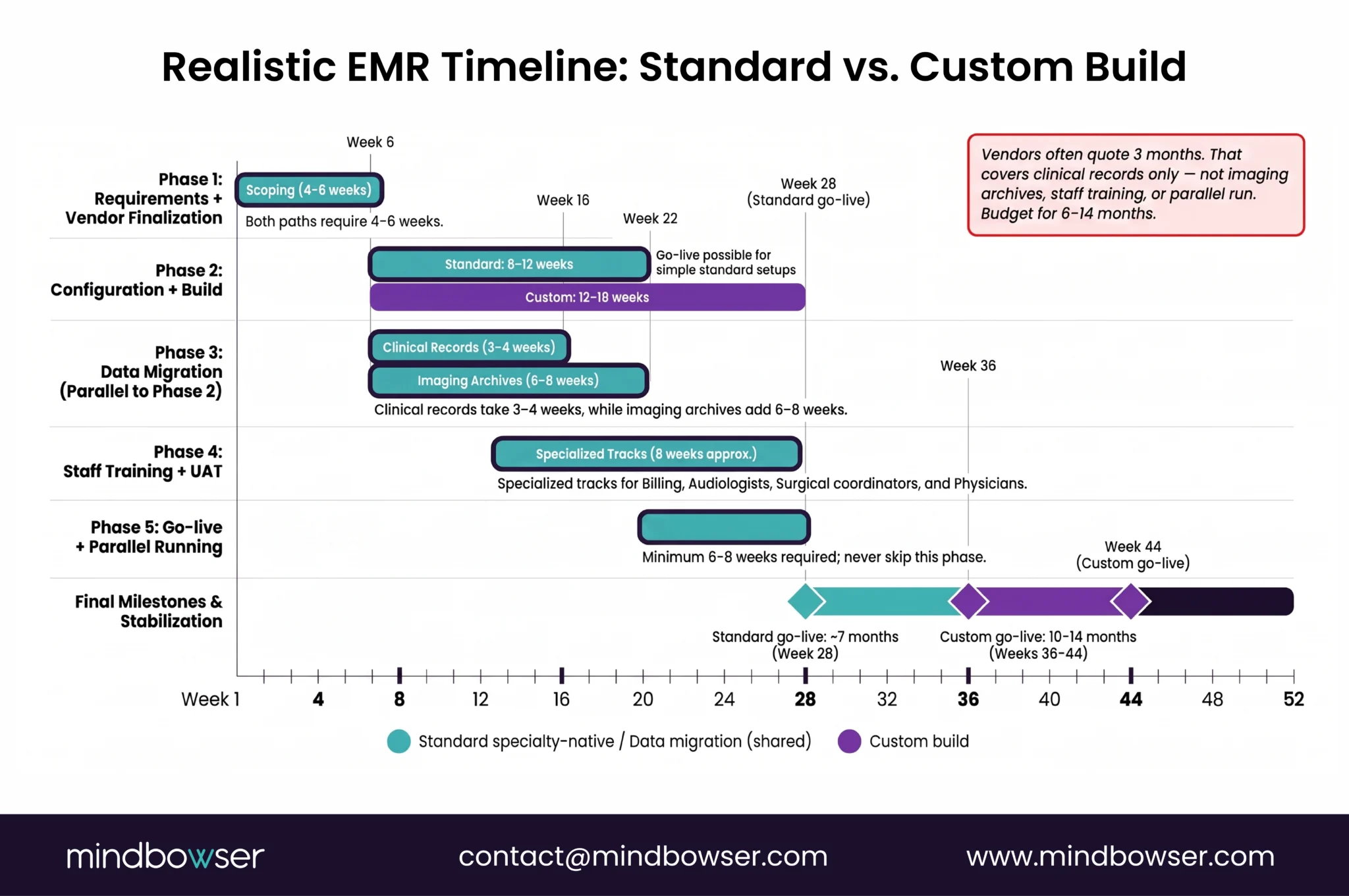
Every platform I’ve mentioned above has a demo that looks clean. The real world is different.
The ones that go wrong share a few common failure patterns. Worth naming them before you’re six months into an implementation and wondering what happened.
Data migration is messier than the vendor says.
Moving patient records from one ophthalmology EMR to another sounds straightforward. It isn’t. The structured fields I described earlier (vision correction data, surgical history, imaging links) often don’t map cleanly from one system to another. Vision data captured as free text in the old system becomes orphaned in the new one. Imaging studies stored in a proprietary PACS format require custom translation. Surgical records from the old ASC module may not import into the new ASC workflow at all.
This is the one that surprises practices most.
The real data migration timeline for a practice with 5+ years of surgical history is usually 8-12 weeks, not the 3-4 weeks vendors quote. The gap exists because vendors are quoting the time to move clinical records, not the time to reconcile imaging archives, rebuild structured vision data from free-text fields, and validate that surgical history imported correctly into the new ASC billing module.
Actually, let me be more specific: the translation of structured clinical data takes 3-4 weeks. It’s the imaging data migration that blows the timeline. Every practice I’ve seen try to move imaging archives in parallel with the clinical record migration has ended up with a phased approach anyway. Plan for it to be phased from the start.
Staff training is not one session.
Ophthalmology staff interact with the EMR across multiple workflows: front desk scheduling, clinical staff device integration and vision data entry, the surgical coordinator handling pre-auth and block-time scheduling, the billing team handling dual physician-fee and facility-fee billing, and the clinical team reviewing post-op outcomes against pre-op imaging. Those are five different training tracks. Most EMR training programs treat it as one.
Budget 6-8 weeks of parallel running (old system + new system simultaneously) for a practice of 10+ providers. Skipping it is the fastest path to a go-live billing disaster. I’ve never seen a practice skip parallel running and not regret it.
Integration delays come from outside your practice.
The referral partners, imaging device vendors, and payers your EMR needs to connect with have their own integration timelines. A FHIR-based referral interface with a major retinal specialist network might take 8-12 weeks to get live, because the specialist network has their own IT queue. A Zeiss or Topcon device integration might require a specific driver version that the device vendor controls.
Build those delays into your go-live plan. Don’t promise staff a fully integrated system on day one. You won’t have one. Plan for it honestly.
For a list of what commonly goes wrong across EHR implementations (not just ophthalmology), the EHR implementation mistakes guide covers the patterns we see most often.
Typical implementation phases:
| Phase | What happens | Realistic duration |
|---|---|---|
| Requirements and vendor finalization | Workflow mapping, contract signing, data audit | 4-6 weeks |
| Configuration and build | Workflow configuration, custom module build (if applicable), integration setup | 8-16 weeks |
| Data migration | Clinical record migration, imaging archive migration | 6-12 weeks (often parallel with configuration) |
| Training and UAT | Staff training tracks, user acceptance testing | 4-6 weeks |
| Go-live + parallel running | Both systems active, error correction | 4-8 weeks |
| Stabilization | Post-go-live optimization, billing audit | 4-6 weeks |
Total: 6-10 months for a standard implementation. 10-14 months for a complex one (multi-location + custom build). If a vendor quotes you 3 months, ask specifically which of those phases they’re excluding.
If you get to the point where a custom build looks right, the custom EHR architecture guide includes a list of 10 questions and 5 red flags to use when evaluating a development partner before signing.
VI. Interoperability and the Future: FHIR Readiness and Referral Networks

FHIR interoperability is not a future consideration for ophthalmology. It’s present. And there’s a hard deadline coming.
In January 2025, CMS proposed CMS-0062-P, which extends prior-authorization API mandates to drug and procedure authorizations using FHIR-based implementation guides. If finalized in its proposed form, that rule would directly affect how your ASC handles pre-auth for surgical procedures with commercial payers and Medicare Advantage plans across your entire cataract, retinal, and refractive surgery case mix. The practices best positioned for that change are the ones that already have FHIR-native infrastructure.
But the regulatory mandate is almost secondary to the practical issue. Your referral network is increasingly expecting structured, FHIR-based data exchange. Primary care physicians referring patients for cataract evaluation want the consult note back in their own system, formatted correctly, without a fax or a phone call. Retinal specialists want the OCT results from your clinic in their FHIR patient record before the patient arrives.
The practices that can do that electronically are winning referrals on that capability alone.
Here’s how the platforms in the comparison table above handle FHIR:
- Canvas Medical and Medplum were built FHIR R4-first. Every data transaction in those systems is a FHIR resource. Building a referral interface to a FHIR-capable partner is a configuration task, not a development project.
- ModMed and Nextech have FHIR APIs. They’re not FHIR-native architectures, but they can do structured data exchange with the right implementation. The limitation is that complex custom workflows (like a multi-step surgical referral that needs to carry imaging attachments and pre-auth status simultaneously) require considerably more integration work than you’d need on a platform where FHIR is the native data model.
- OpenEMR has FHIR R4 support in its current versions. The quality of that implementation varies by the version and the specific workflow. If you’re evaluating OpenEMR, test the FHIR interfaces specifically against your actual referral partners before committing.
- EyeMD EMR and RevolutionEHR have limited FHIR support. Suitable for practices with simple referral networks and no immediate plan to connect to health system partners via structured data exchange.
The regulatory trajectory is clear. ONC’s HTI-1 final rule (89 FR 1192, published January 2024) mandated USCDI v3 as the standard for certified health IT and required real-time access to USCDI data via FHIR R4 APIs. That standard applies to any certified EHR you’re evaluating today.
Practically: any platform you choose now should handle FHIR R4 without major limitations. The next five years of regulatory changes are being written around that assumption. Get ahead of it now or migrate under pressure later.
For a detailed look at how FHIR-based workflows connect ophthalmology practices to their referral and imaging partners, the EHR integration guide covers the technical architecture.
If you’re evaluating FHIR-ready options for your practice, start a conversation with our interoperability team before you finalize a platform decision.
Choosing an Ophthalmology EMR: Start with Your Workflows, Not the Vendor’s Demo
The platforms covered in this guide serve different practice types, and there’s no single right answer. A high-volume surgical ophthalmology group with an ASC and a complex referral network has different requirements than a four-provider medical ophthalmology practice seeing 80 patients a day.
What I’d recommend: before you sit through a single vendor demo, map your top three workflow pain points. Specifically: where are you creating workarounds today, how many staff hours per week do those workarounds take, what would the eliminated labor cost over five years, and would that number fund a custom build that solves the problem permanently rather than annually patching around it? That analysis tells you whether you’re shopping for a specialty-native platform or seriously evaluating whether a custom build makes more financial sense.
The FHIR interoperability piece is a planning horizon, not an immediate crisis. But build it into your platform decision now. The practices choosing FHIR-native architecture today won’t have to replatform in 2028 when the regulatory requirements catch up.
If you want to talk through the build-vs-buy decision specifically for your practice’s situation, our team has scoped both paths for ophthalmology groups. We’ll tell you honestly which one makes sense.
Have a FHIR integration challenge or an EMR decision you’re working through? Reply and tell me what you’re hitting. I’d like to compare notes.
It depends on your surgical volume and billing complexity. A single-location practice with one or two providers doing mostly medical ophthalmology (no ASC) can function with a well-configured general EHR. But once you add a surgical center, multi-provider scheduling, or referral network complexity, a general EHR starts to create manual work that adds up fast. The three specific gaps that hurt practices most are ASC billing, vision correction data capture, and referral loop closure. Check those three against any platform you’re evaluating before anything else.
A custom build using a FHIR-native base (Canvas or Medplum) with ophthalmology-specific modules runs $120,000-$280,000 for the initial build, depending on scope. A full ground-up custom system without an existing platform base can run $300,000-$600,000+. Those numbers look large next to a $50,000-$80,000 annual SaaS license for a specialty-native platform. But for practices spending 15-20 hours per week on billing workarounds, or practices with custom workflows that no off-the-shelf vendor supports, the 5-year TCO on a custom build is often lower. Do the math on your current workaround labor before ruling it out. The EHR software cost guide has a 5-year TCO comparison framework worth running through.
Yes, but plan for a longer migration timeline than the vendor will quote you. The challenge isn’t the clinical record. It’s the imaging archive and the structured vision correction data. Free-text vision data from your current system doesn’t import automatically into Canvas or Medplum’s structured FHIR resources. You’ll need a data transformation layer built specifically for your old system’s data model. Budget 6-12 weeks for that work specifically.
Yes. Imaging is a core part of the ophthalmology clinical record. An OCT result that lives on the Zeiss workstation but not in the patient record creates a documentation gap and a billing gap. Device-native integrations (direct Zeiss, Topcon, or Haag-Streit connectors) are the most reliable path. DICOM-to-FHIR translation is the second path, used when a native connector doesn’t exist. Ask every vendor you’re evaluating specifically: which devices do you support natively, and what’s the integration path for devices outside that list?
Not immediately if your referral network is primarily fax-and-phone. But two things are changing that timeline: first, larger health systems and specialist networks are starting to require structured referral data as a condition of their preferred-partner relationships. Second, CMS-0062-P, if finalized, will require FHIR-based prior-auth APIs for surgical procedures (which directly affects ophthalmology ASCs). Choosing a FHIR-native or FHIR-ready platform now costs very little extra and avoids a forced migration in 3-5 years. Read about how we handle EHR integrations for the technical specifics.
Standard implementation with a specialty-native platform: 6-9 months. Custom build on Canvas or Medplum: 10-14 months. Both timelines assume a dedicated project manager on the practice side: someone who can make workflow decisions, coordinate staff training, and manage the imaging migration. The biggest delays we see come from practices that understaff the project management side. The vendor’s implementation team does the build. The practice’s internal team owns the adoption. Both are full-time jobs during go-live.