BLOGS
BLOGS  NEWSROOM
  CASE STUDIES
  WEBINARS
  PODCASTS
  ASSET HUB
  EVENT CALENDAR


























TL;DR
- Choosing between a ready-made EHR and a custom EHR is not just a technology decision; it is a long-term decision about workflow fit, interoperability, compliance, and cost control.
- Ready-made EHRs offer faster deployment and lower upfront effort, but they often create workflow compromises, integration constraints, and rising long-term costs.
- Custom EHRs provide greater flexibility, deeper alignment with clinical operations, and stronger control over integrations and data governance, but they require more upfront investment and the right engineering strategy.
- For many healthcare organizations, a hybrid or headless approach can offer the best balance, combining a stable clinical backbone with custom workflows, integrations, and user experiences that support long-term growth.
- Deep clinical workflows
- Rich specialty modules
- Revenue cycle capabilities
- Prebuilt analytics dashboards
For organizations with simpler workflows and fewer integrations, this feature density can be sufficient, but it may limit workflow precision as needs evolve.
C. Vendor-Managed Upgrades, Support, and Security
With a ready-made EHR, the vendor owns:
- Infrastructure
- Patches and releases
- Maintenance schedules
- Regulatory alignment updates (e.g., HIPAA rule changes, CMS reporting updates)
This reduces operational burden for IT departments.
D. Examples of Ready-Made EHR Systems
Common ready-made EHR platforms include:
- Epic – Widely used by large health systems, offering comprehensive inpatient and outpatient modules with strong interoperability capabilities.
- Cerner (Oracle Health) – Known for enterprise hospital deployments and population health tools.
- Athenahealth – Cloud-based EHR commonly used by ambulatory practices.
- Allscripts (Altera Digital Health) – Modular EHR solutions for hospitals and specialty clinics.
- NextGen Healthcare – Often used in specialty and mid-sized provider settings.
These platforms provide standardized workflows, built-in compliance frameworks, and established integration ecosystems. However, customization depth, API access, and cost structures vary significantly across vendors.
IV. Limitations of Ready-Made EHR Systems
Despite the strengths, CIOs and CMIOs frequently encounter barriers that affect productivity, scalability, and cost.
A. Limited Workflow Fit and High Reliance on Workarounds
Commercial EHR workflows are built for the “average” organization. In practice, hospitals end up with:
- Documentation flows that don’t match clinical reality
- Screens that increase click burden
- Siloed specialty workflows
- “Shadow systems” in spreadsheets and point solutions
The more your teams rely on workarounds, the greater your operational and compliance risks become.
B. Integration Constraints with Existing Systems
Most ready-made systems support interoperability, but often with restrictions:
- Limited API access
- Additional fees for FHIR endpoints
- Vendor-controlled data availability
- Slow integration approval processes
- Incomplete mappings across HL7 v2 and FHIR resources
Organizations with complex digital ecosystems, remote monitoring tools, care management apps, custom models, or population health platforms may accumulate integration debt.
C. Total Cost of Ownership Often Exceeds Initial Estimates
While entry costs appear low, hidden expenses accumulate:
- Ongoing licensing
- Add-on modules
- Data storage fees
- Support tiers
- Custom development charges
- Integration fees
Over 3–5 years, many hospitals discover that the all-in cost is far higher than expected.
- Per-seat licensing
- API access fees
- Premium support charges
- Add-on module costs
- Proprietary integration fees
Organizations pay only for what they need, nothing more.
E. Direct Access to the Engineering Team
Custom EHRs provide:
- Immediate fixes
- Rapid enhancements
- Full visibility into code, schemas, and workflows
- Ability to adopt new regulatory requirements without waiting for vendor cycles
This becomes a strategic advantage in a shifting compliance landscape.
F. Examples of Custom EHR Approaches
Custom EHR solutions are typically built in scenarios such as:
- A digital health company creating a proprietary care management platform integrated with hospital EHRs through HL7 and FHIR.
- A specialty hospital is developing a workflow-specific EHR module for oncology, behavioral health, or maternal care.
- A provider network is building a hybrid system that uses a commercial EHR core but customizes specialty workflows through SMART-on-FHIR applications.
- A population health organization is designing its own longitudinal patient data platform with real-time interoperability across multiple hospital systems.
In these cases, the goal is not to replace every core function of a commercial EHR, but to design workflows and integrations that align precisely with operational and care-delivery needs.
VIII. Limitations of Custom EHR Solutions
1. Higher Upfront Investment
Build vs Buy? Compare 10 EHR Vendors First
IX. How Do Custom and Ready-Made EHR Solutions Compare Across Critical Decision Factors?

Healthcare leaders rarely choose an EHR based solely on features. The decision typically hinges on five dimensions:
- Total Cost of Ownership (TCO)
- Workflow and Functional Fit
- Implementation Timeline
- Support and Vendor Dependency
- Compliance and Interoperability Requirements
Below is a structured comparison aligned with the criteria leadership teams evaluate during RFPs, digital transformation programs, and EHR modernization roadmaps.
Why Traditional Build vs Buy Models Often Stall?
Healthcare organizations typically face two options:
Buy Off-the-Shelf
- Limited workflow flexibility
- Vendor lock-in
- Long onboarding cycles
- Restricted API access
Build In-House
- 4–8 months per integration
- $50K–$200K per EHR connection
- Rewrites for each new hospital
- Heavy HL7/FHIR talent dependency
Simplifying Healthcare Integrat…
A third approach: cloud-native, managed healthcare integration layers compress go-live timelines from months to days while preserving workflow flexibility.
A. Cost: Upfront vs Long-Term Value
Ready-Made EHR
- Lower upfront licensing and onboarding fees
- Typically subscription-based (per-user, per-module)
- Additional charges for integrations, APIs, customization, analytics, and storage
- TCO increases over 3–5 years due to recurring fees and add-ons
Custom EHR
- Higher upfront investment
- No recurring licensing fees
- You own the platform, eliminating vendor lock-in
- Long-term TCO is lower when workflows are stable and integrations are extensive
Best for: Organizations seeking long-term control over cost and architecture.
B. Functionality and Workflow Alignment
Ready-Made EHR
- Broad core features across clinical, administrative, and billing workflows
- Built for general-use patterns, not specialty-specific workflows
- Customization options vary and may be fee-based
- Workarounds are common when workflows don’t match vendor defaults
Custom EHR
- Designed to fit clinical and operational workflows exactly
- Eliminates workaround-driven inefficiencies
- Supports unique service lines, hybrid care models, and multi-site operations
- Easier to integrate AI tools, decision support, and automation
Best for: Organizations with specialized workflows or strong cross-department dependencies.
“Managing electronic health records efficiently leads to better workflow and response times for patient care.” – Julie Harrigan
C. Implementation Timeline
Ready-Made EHR
- Deployment can occur within weeks to a few months
- Requires workflow adaptation to fit vendor templates
- Faster path to basic go-live, but slower path to optimization
Custom EHR
- Longer development and testing timeline
- Driven by discovery, architecture, integration planning, and compliance design
- Produces an environment optimized for long-term operational efficiency
Best for: Organizations prioritizing precision and long-term workflow quality over speed.
D. Support, Maintenance, and Flexibility
Ready-Made EHR
- Vendor-managed support
- Release cycles and updates are controlled externally
- Limited flexibility for rapid enhancements
- API and integration access may be restricted
Custom EHR
- Direct access to engineering teams
- Full visibility into codebase, logs, and data models
- Faster iteration cycles
- Can integrate new modules, FHIR endpoints, or tools without vendor approval
Best for: Teams requiring agility and tight control over workflows, performance, and integrations.
E. Compliance, Security, and Interoperability
Ready-Made EHR
- Generally compliant with HIPAA, CMS, and ONC standards
- Vendor controls security roadmap and PHI governance
- FHIR/HL7 support may require additional fees or modules
Custom EHR
1. Designed to match internal security frameworks
2. Supports HIPAA, RBAC/ABAC, audit logs, encryption, and zero-trust patterns
3. Full control over interoperability using:
- HL7 v2 (ADT, ORU, ORM)
- FHIR R4
- SMART-on-FHIR apps
- CCD/CCDA exchange
4. Ideal for hospitals requiring granular compliance and data governance
Best for: Organizations with complex interoperability needs or strict internal security models.
X. What Core Capabilities Should a Modern EHR System Deliver?
EHR systems have evolved far beyond digital charting. For healthcare organizations modernizing clinical operations, the EHR serves as the enterprise’s data, workflow, and compliance engine.
Below are the essential features that define a mature, scalable, and interoperable EHR.

A. Comprehensive, Structured Clinical Data Management
A modern EHR must support standardized, longitudinal patient records across:
- Demographics and encounters
- Problem lists and diagnoses
- Medications, allergies, and immunizations
- Orders, procedures, and care plans
- Radiology, labs, and diagnostics
- Clinical notes and documentation templates
Data should be expressed in structured formats (FHIR R4 resources, LOINC, SNOMED, RxNorm) to enable analytics, automation, and AI-driven insight.
B. Clinical Decision Support (CDS) and Safety Controls
Enterprise-grade EHRs incorporate CDS mechanisms that:
- Surface relevant clinical alerts
- Provide drug–drug and drug–allergy interaction checks
- Suggest evidence-based order sets
- Flag abnormal results or risk indicators
- Support population-level risk stratification
These capabilities must operate with low alert fatigue, configurable thresholds, and strong audit logging to support quality and safety programs.
B. Interoperability Across Systems and Care Settings
Interoperability is no longer optional. A mature EHR should support:
- HL7 v2 messaging (ADT, ORU, ORM, SIU)
- FHIR R4 APIs for real-time data exchange
- SMART-on-FHIR applications for custom workflows
- CCD/CCDA document exchange
- Integration with HIEs, labs, pharmacies, and imaging systems
- Wearable and remote monitoring data ingestion (accelerators like our wearable data integration layer streamline this)
Interoperability is foundational for coordinated care, analytics, and automation.
D. Workflow Automation and Operational Efficiency
EHRs must streamline, not complicate clinical and administrative workflows. Robust systems support automation across:
- Charting and documentation
- Order management and routing
- Handoff and referral workflows
- Care coordination
- Prior authorization data exchange
- Billing and claims preparation
Custom EHRs often excel here because workflows can be designed around actual practice patterns rather than vendor defaults.
E. Compliance, Security, and Auditability
Enterprise EHRs must be built with strict PHI governance in mind. This includes:
- HIPAA technical safeguards
- RBAC/ABAC-based access control
- End-to-end encryption (AES-256 at rest; TLS 1.2+ in transit)
- Intrusion detection and audit logging
- BAA-backed vendor relationships
- Data retention and archival policies
- Zero-trust or hybrid-cloud architectures
Audit trails should capture every access, modification, and transaction for regulatory reporting.
F. Analytics and Reporting Capabilities
An effective EHR should enable:
- Clinical quality reporting (CMS, MIPS, HEDIS)
- Operational dashboards
- Population health analytics
- Predictive modeling using structured data
- Real-time monitoring of throughput, utilization, and bottlenecks
Advanced organizations integrate tools like our automated clinical documentation module or FHIR-native interoperability accelerator to automate data processing and improve clinical insight.
G. Extensibility and Scalability
Enterprise-grade EHRs should support:
- Modular design
- API-driven extensibility
- Upgrades without downtime
- Ability to integrate new care models
- Multi-site, multi-specialty scalability
Custom EHRs often outperform vendor systems here because they allow full control over how new modules and capabilities are deployed.
XI. What Drives the Cost of Building a Custom EHR?
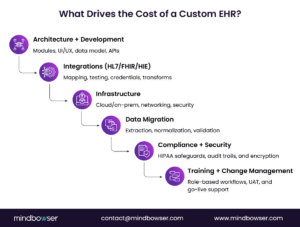
Custom EHR development isn’t just a software project; it is an infrastructure investment that touches workflows, compliance programs, integration architecture, and long-term scalability. For teams evaluating the build path in detail, this guide on how to build an EHR system offers a practical planning framework.
Leaders evaluating a custom path should understand the major cost drivers across the lifecycle.
Below is a structured breakdown aligned with typical healthcare budgeting and procurement processes.
- Application servers
- Database servers
- Load balancers
- VPN gateways
- Backup and failover components
2. Workstations and Mobile Devices
Equipping clinicians and staff may add $1,000–$10,000 per user, depending on device type and security requirements.
Cloud-native EHRs typically reduce on-prem hardware costs but require careful planning around availability zones, redundancy, and PHI isolation.
C. Integration Architecture and Workflow Alignment
1. System Configuration and Integration
Integrating with legacy and external systems can range $2,000–$10,000+ per connection, depending on complexity.
Common integration use cases:
- ADT feeds
- Lab/radiology systems
- Pharmacy networks
- Billing and RCM platforms
- HIE participation
- Wearables and RPM devices (accelerators like our wearable data integration layer reduce this cost)
2. Data Migration
Migration can represent a major cost driver:
- Extracting historical data
- Normalizing formats (HL7, FHIR, CCDA, CSV)
- Validating accuracy
- Backloading into the new EHR
Typical ranges: $10,000–$50,000, depending on volume and legacy system quality.
D. Training, Testing, and Change Management
1. Initial Staff Training
Training clinicians and administrative staff generally ranges from $1,000 to $5,000 per user, including:
- Role-based workflow sessions
- Sandbox environments
- Job aids and quick guides
2. User Acceptance Testing (UAT)
Testing cycles add cost but are critical for safety and adoption:
- Clinical workflow validation
- Edge case handling
- Compliance testing
- Regression testing for future updates
3. Ongoing Support & Maintenance
Annual maintenance for security updates, enhancements, and user support ranges $2,000–$10,000 per year, depending on complexity.
E. Compliance, Security, and Regulatory Alignment
Meeting HIPAA and ONC requirements introduces additional investment:
- HIPAA risk assessments
- Security rule compliance (access, audit controls, integrity, transmission security)
- Encryption, logging, and monitoring systems
- Penetration testing
- Documentation for audits
Modern EHR strategies should also account for USCDI v3 data requirements, which expand the standardized data elements expected for interoperable exchange and certified health IT environments.
Typical budget allocation: $5,000–$20,000 annually.
Security measures (e.g., encryption, intrusion detection, zero-trust configuration) may add $2,000–$10,000 per year.
F. Opportunity Costs and Operational Impact
Productivity Decline During Transition
Any major EHR shift impacts productivity as teams adapt:
- Temporary decline in throughput
- Documentation time increases during the transition
- Operational disruption if training is incomplete
This cost varies widely but should be factored into the ROI model.
XII. Hidden Costs of Integration When Choosing an EHR Path

For many digital health companies, the real cost of choosing an EHR strategy emerges only when integration work begins
A CTO evaluating how to connect to hospitals often ends up choosing between building a custom integration stack or using a managed healthcare integration layer. Both move data, but the long-term cost profile and engineering burden diverge sharply.
A. Scenario: A digital health startup preparing its first hospital deployment
The engineering team chooses the custom route. They assemble a stack using familiar tools: MirthConnect for HL7 channels, Kafka for event flow, custom microservices for transformation, and a demo EHR to validate workflows.
AI helps generate initial Mirth connectors, but engineers still spend time validating mappings, fixing malformed segments, and stabilizing ACK logic.
From there, the hidden work begins:
- HL7 mappings and version drift
- ACK/NACK reconciliation
- VPN/IPSec setups
- Smart-on-FHIR authentication
- Backups, audit logs, HIPAA-compliant infrastructure
- Scaling, uptime, and operational monitoring
Manual integrations often add 3–6 months to product timelines. Industry experience shows teams can waste up to 40% of engineering hours just connecting systems instead of building differentiated clinical workflows. Senior engineers are tied up building plumbing rather than product features.
B. The alternative: A managed integration layer deployed inside the company’s cloud
Deployment finishes in 20–25 minutes and includes HL7/FHIR parsers, mappers, ADT/SIU support, TCP/HTTP nodes, Smart-on-FHIR tools, and auto-scaling. With workflows and credentials ready, teams move from sandbox to production in a couple of days, not months.
The first subscription usually includes 40 hours of SME-led workflow setup and training, eliminating most trial-and-error. Teams can also bundle sandbox EHR connections during evaluation, reducing friction when working with multiple hospitals.
Pricing becomes predictable with per-connection models rather than per-API-call billing.
C. Why it Matters
Integration isn’t only a technical choice; it’s a strategic allocation of engineering resources. Custom integrations provide control but divert months of engineering effort into maintaining pipelines rather than advancing the roadmap. Cloud-native interoperability models and managed integration layers can reduce integration cycles by up to 10x, lower engineering effort by approximately 60%, and reduce ongoing costs compared to repeated manual builds.
For leadership, the question becomes:
Should your engineers focus on building clinical workflows or debugging HL7 ACKs and VPN tunnels?
D. How to use this cost model?
Accurate cost modeling helps leaders determine whether custom EHR development:
- Reduces long-term operating expenses
- Eliminates vendor dependency
- Strengthens security and governance
- Improves workflow efficiency
- Creates measurable ROI over 3–7 years
The right custom EHR becomes an enabler, not an expense.
Ready to explore the custom path? See how we build custom EHRs
Making an EHR Decision That Strengthens Your Organization for the Next Decade
Choosing between a ready-made EHR, a custom platform, or a hybrid model isn’t just a technology decision; it is a long-term strategic commitment that shapes clinical efficiency, interoperability maturity, compliance posture, and the pace at which your organization can innovate.
Hospitals and digital health companies that thrive in the next decade will be those that:
- Align EHR systems with real-world workflows
- Strengthen interoperability through FHIR, HL7, and API-driven architectures
- Reduce engineering drag by selecting integration approaches that scale
- Build data foundations capable of supporting AI, automation, and population health
- Invest in systems that grow with organizational complexity rather than constrain it
Whether you adopt a commercial EHR with targeted extensions or design a platform that reflects your unique workflows, the goal remains the same: enable clinicians to deliver high-quality care while giving leadership the flexibility to evolve rapidly.
With a cloud-native, interoperability-first strategy, your EHR can become not just a system of record but a scalable foundation for AI-ready, secure, and rapidly deployable healthcare innovation.