BLOGS
BLOGS  NEWSROOM
  CASE STUDIES
  WEBINARS
  PODCASTS
  ASSET HUB
  EVENT CALENDAR
























TL;DR
EHR integration is the process of connecting external healthcare systems, apps, and medical devices with a central Electronic Health Record. This enables the real-time exchange of structured and unstructured clinical data, creating a single source of truth that supports safe, coordinated care.
A strong EHR integration approach ensures that data is not trapped in separate systems. Clinicians and care teams see the full patient picture, including allergies, medications, vitals, histories, diagnostics, and care notes. This reduces clinical risk and improves the precision of care decisions.
EHR integrations are more important than ever. Healthcare leaders must support virtual care, AI-driven analytics, Remote Patient Monitoring (RPM), and payer reporting. None of this works without reliable, modern, and compliant integration patterns.
Mindbowser has built and deployed FHIR-native EHR integrations for digital health companies, including a SMART-on-FHIR integration between a childbirth platform and Epic. These builds required mastering HL7 SIU message parsing, ACK routing, VPN tunneling, and data normalization work that off-the-shelf middleware tools do not handle out of the box.
I. What is EHR data integration, and how does it work?
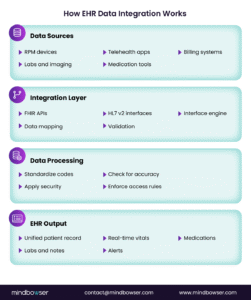
EHR data integration refers to the deeper capability to map, normalize, validate, and distribute clinical and operational data across systems. It ensures data flows accurately, consistently, and securely without manual work.
How EHR data integration drives ROI?
- Better clinical decision-making, since providers see complete patient histories and live updates.
- Reduced administrative burden, because workflows run on automated data movement instead of manual copying.
- Improved value-based care performance through complete and high-quality measurement data.
- Lower error rates, due to integrated Clinical Decision Support Systems that surface alerts at the point of care.
- Stronger analytics and AI readiness, since data pipelines are clean and standardized.
Organizations that implement structured EHR data integration often report major reductions in duplicative testing, lower documentation time, and fewer patient safety incidents.
II. How do leading EHR integrations enhance patient data management?
Hospital and digital health teams increasingly ask how advanced EHR integrations can improve data management. The answer lies in consistency, timeliness, and clarity of information.
Advanced integrations allow systems to:
- Push patient vitals, alerts, and diagnostics to the EHR in real time.
- Sync billing and coding data directly into workflows.
- Maintain a clean, longitudinal patient record.
- Support accurate risk scoring and chronic condition management.
This removes the guesswork from clinical decisions and simplifies population health analytics.
III. Core Use Cases: Integrations That Deliver Immediate Value
The table below compares the most common EHR integration methods and their impact on clinical workflows.
| Integration Method | Purpose | Typical Data | Pros | Cons |
|---|---|---|---|---|
| FHIR API | Real-time modern data exchange | Vitals, allergies, medications | Fast, scalable | Vendor variability |
| HL7 v2 | Legacy interoperability | Labs, ADT messages | Widely supported | Inconsistent formats |
| Flat File / Batch | Bulk data sync | Claims, reports | Simple | Not real-time |
| Bidirectional Sync | Read and write capabilities | RPM vitals, encounter notes | Enables automation | Higher complexity |
| SMART on FHIR | Launch apps inside EHR context | Patient context, auth tokens | EHR-native UX, no separate login | App Gallery approval required |
A modern digital health ecosystem depends on integration with EHR systems. The following categories drive the most measurable ROI.
For a technical breakdown, see our FHIR API testing guide.
A. Telemedicine Platforms
Telemedicine systems rely on EHR connectivity to:
- Pull the full patient history before a consultation.
- Record diagnoses, notes, and orders back into the EHR automatically.
- Ensure compliance through complete encounter documentation.
Integrated platforms prevent manual data entry and support safer virtual care.
B. Remote Patient Monitoring (RPM)
RPM is only effective when its data reaches the clinician’s primary workspace.
Integrated RPM systems push:
- Blood pressure readings
- CGM values
- Heart rate and oxygen saturation
- Weight and activity metrics
- Escalation alerts
Data moves into the EHR as structured FHIR resources. This supports proactive care and helps prevent unnecessary emergency visits.
To see real-world examples of integrated RPM systems, explore our Case Studies on Remote Patient Monitoring.
C. Medication Adherence and Care Management Tools
Medication management tools sync with the EHR to reconcile prescriptions, track adherence, and issue alerts. This improves chronic care outcomes and reduces preventable readmissions.
D. Billing and Revenue Cycle
Integrated billing systems pull clinical documentation and codes directly from the EHR. This creates real-time claims, reduces denials, and shortens the revenue cycle.
These use cases prove that organizations cannot scale digital health without strong EHR integration software and a reliable data exchange architecture.
Planning an EHR integration?
IV. EHR Integration Best Practices and Common Failure Points
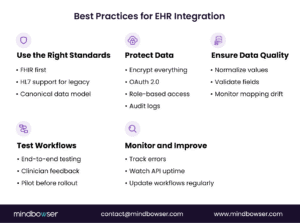
A. Technical Challenges and How to Overcome Them
Despite clear benefits, organizations face predictable obstacles when integrating with EHRs.
B. Why Custom-Built Integrations Fail in Practice (Real CTO Lessons)?
Many digital health teams still rely on CSV uploads to drive engagement workflows because they lack EHR connectivity. This breaks automation as volume grows.
Appointment cancellations or confirmations often cannot be entered into the EHR, creating scheduling workflow inconsistencies.
Engineering teams underestimate the complexity of:
- HL7 message parsing
- SIU/ADT routing
- ACK handling
- VPN tunneling
- Smart-on-FHIR authentication
- Data mapping to canonical models
These are not edge cases. On a recent integration project, our team handled 11 distinct HL7 message types across a multi-site Epic deployment each with different ACK behavior per hospital. Mapping this to a FHIR-compatible canonical model took 6 weeks of dedicated engineering time. Teams that treat this as a weekend sprint routinely restart from scratch.
All of these require dedicated specialists.
Custom integrations typically stretch 3–6 months per hospital, slowing revenue and pilot timelines.
Many teams believe tools like Mirth + n8n will simplify integration, but they still require maintaining multiple components, scaling, backups, and monitoring.
C. Legacy EHRs and Limited API Support
Many older systems still depend on HL7 v2, which is inconsistent and costly to work with.
Legacy integration gaps are especially common in major hospital environments. Learn practical mitigation approaches in Addressing Epic Integration and Legacy Data Systems.
Solution:
Create an abstraction layer using interface engines that translate legacy messages into FHIR. This reduces long-term technical debt and improves consistency.
D. Vendor Restrictions
Large EHR vendors sometimes restrict API access or impose complex approval steps.
Solution:
Use open standards and a vendor-agnostic integration layer. This keeps your architecture independent of vendor lock-in.
E. Data Standard Variation
Even when two systems say they support FHIR, real-world implementations differ.
Solution:
Use normalization and semantic mapping tools. Maintain a canonical data model that is not vendor-specific.
F. Security Risk and PHI Exposure
Healthcare continues to face the highest data breach costs of any industry. PHI movement increases risk if not handled properly.
Best practices:
- Encrypt all data in transit and at rest.
- Use OAuth 2.0 for secure API access to EHR integration.
- Enforce role-based access controls.
- Maintain detailed audit logs.
For deeper requirements, refer to Mastering HIPAA Compliance in your internal resources.
V. A Proven Roadmap for Successful EHR Integration
Step 1: Readiness and Requirements
Start by auditing your current EHR capabilities, available APIs, interfaces, and required data flows. Identify your primary integration targets, such as RPM, billing, and telemedicine.
Step 2: Standards and Governance
Define your use of FHIR, API naming conventions, data dictionaries, role-based permissions, and data-mapping ownership.
Step 3: Build and Test
Run detailed testing across performance, error handling, data accuracy, and workflow fit—pilot with a small user base before full deployment.
Step 4: Deploy and Iterate
Monitor live data flows for reliability and accuracy: track latency, throughput, errors, and mapping drift. Optimize workflows based on clinician feedback.
Integration is not a one-time effort. It is an ongoing capability that must evolve with regulations, vendor updates, and new digital health partnerships.
Don’t Underestimate Mapping, Testing, and EHR Behavior Differences:
Real teams often underestimate the effort required to align HL7 SIU messages or map appointments to FHIR Appointment resources.
EHR vendors implement FHIR differently; mapping drift and ACK variations must be tested thoroughly.
Integration cannot go live without VPN setup and endpoint whitelisting, which slows internal teams.
Accelerating Integration with ConnectHealth
ConnectHealth provides prebuilt connectors, standard APIs, compliance controls, and expert technical oversight. It helps organizations reduce integration timelines and cost while maintaining high security and accuracy.
Key strengths include:
- Standardized API patterns for multi-app ecosystems
- Data normalization and mapping libraries
- HIPAA-compliant security frameworks
- Support for FHIR-first architectures
- Real-time audit trails and consistency checks
CoPilot is ideal for teams looking to build scalable, repeatable integrations rather than one-off point solutions.
EHR integration connects external healthcare applications and devices to the electronic health record, enabling data to move between systems in real time. This eliminates manual work, reduces clinical errors, and supports accurate, unified patient records.
Custom-built integrations using tools like Mirth, Kafka, and custom microservices often require three to six months per EHR connection.
Modern integration platforms can establish sandbox and production connections in days when credentials and workflows are clear.
CSV uploads are common when EHR credentials or API access are not yet available.
Teams use them for appointment reminders, post-discharge calls, or outreach. These workflows break at scale because they cannot stay synchronized with real-time EHR scheduling.
True scheduling write-back requires SIU/ADT message support to enable bi-directional updates.
Many platforms read appointment data but cannot write changes back, creating workflow gaps.
Yes, if building integrations internally. Engineers must handle:
1. HL7 parsing
2. ACK handling
3. SIU/ADT routing
4. VPN configuration
5. Smart-on-FHIR authentication
6. Mapping to canonical data models
These tasks were major concerns in the transcript discussion.
Common blockers include:
1. VPN setup and endpoint whitelisting
2. Key provisioning for OAuth / Smart-on-FHIR
HL7 ACK requirements
3. Mapping drift across environments
4. Vendor variability in FHIR implementations
These issues often create delays if not planned upfront.
Each hospital typically needs its own sandbox, production environment, credentials, and mapping.
Without a dedicated integration platform, teams must maintain several microservices and transformations, increasing operational cost.
Custom-built integrations require teams to maintain HIPAA controls, backups, audit logs, and disaster recovery.
Platform-based deployments may inherit compliance and monitoring from HIPAA-aligned cloud services.
Yes. Most organizations use a sandbox for each hospital integration.
Buyers commonly ask whether sandbox connections incur cost or can be bundled during evaluation.
Custom builds offer full control but require significant engineering effort, compliance oversight, and long-term maintenance.
Managed integration platforms shorten time-to-market and simplify interoperability, but they require adopting a standard workflow model.
Evaluation factors include:
1. Engineering distraction
2. Complexity of SIU/ADT + ACK workflows
Compliance overhead
3. Cost and time to scale to many hospitals
These were the core decision points raised in the transcript.