BLOGS
BLOGS  NEWSROOM
  CASE STUDIES
  WEBINARS
  PODCASTS
  ASSET HUB
  EVENT CALENDAR






















TL;DR
Electronic Health Records (EHRs) have become a core part of how healthcare is delivered and documented today. From digitizing patient history to enabling real-time collaboration across care teams, EHRs hold the promise of better coordination, faster decisions, and fewer administrative bottlenecks.
But here’s the catch: EHR integration isn’t just about picking the right software and going live. It’s a significant organizational change. And too often, it’s where things start to break. Despite the good intentions, many EHR implementations fall short. Not because the technology doesn’t work, but because the process wasn’t built around how people work.
Whether you’re a hospital, a specialty clinic, or a digital health startup, avoiding the common pitfalls can make all the difference between a smooth transition and a chaotic one.
In this blog, I’ll walk you through the most common EHR implementation mistakes we’ve seen across projects, and more importantly, how to avoid them. Where it makes sense, I’ll also mention solution accelerators we’ve built at Mindbowser to make some of these challenges easier to handle.
Let’s start with the first one, which can trip up even the most experienced teams.
I. Mistake 1 – Inadequate Planning and Strategy
One of the most common mistakes we see is diving into EHR implementation without a solid plan. It usually starts with good intentions, modernizing the system, improving workflows, and staying compliant. But without a clear strategy, teams often end up reacting to problems instead of preventing them.
A. No Clear Goals
Many projects begin without defining what success looks like. Is it faster charting? Better care coordination? Reduced documentation errors? If those targets aren’t set upfront, it’s hard to measure progress or course-correct when needed.
B. Missing Roadmap or Timeline
Another issue is skipping over the “how” and “when.” A roadmap isn’t just a Gantt chart. It’s a reality check that keeps everyone aligned on scope, milestones, resource allocation, and deadlines. Without it, timelines stretch, budgets bloat, and trust erodes.
C. Misalignment with Organizational Objectives
A well-implemented custom EHR should support your care goals, not disrupt them. We’ve seen setups where the EHR added tasks instead of addressing them, simply because the implementation didn’t consider the day-to-day realities of providers and support staff.
How We Help?
To avoid these early stumbles, we recommend starting with a structured assessment during the planning phase. This helps teams clarify their priorities, map out workflows, and identify potential blockers before any development begins. With the right visibility into timelines, goals, and dependencies, you can reduce guesswork and set a strong foundation for the entire implementation.
II. Mistake 2 – Insufficient Stakeholder Engagement
It’s easy to treat EHR implementation like an IT project. But the truth is, it’s a people project. If the people who use the system every day aren’t heard, the system won’t work the way it should.
A. Excluding Frontline Users from Decisions
When decisions are made without input from physicians, nurses, medical assistants, or admin staff, you miss valuable insights. These are the people who know what happens on the floor. Ignoring their perspective often leads to systems that look great on paper but don’t function in real life.
B. No Feedback Loops
Another red flag is rolling out features without testing them with real users. You end up with clunky workflows, extra clicks, and frustration. And when feedback isn’t invited or acted upon, users disengage. The system becomes something they tolerate, not something they trust.
C. The Cost of Silence
The impact? Low adoption, increased resistance, and a lot of shadow systems. Users will find workarounds, which defeat the purpose of having a centralized EHR in the first place.
How We Help?
To avoid these early stumbles, we recommend starting with a structured assessment during the planning phase. This helps teams clarify their priorities, map out workflows, and identify potential blockers before any development begins. With the right visibility into timelines, goals, and dependencies, you can reduce guesswork and set a strong foundation for the entire implementation.
III. Mistake 3 – Poor Vendor Selection
Choosing the right vendor isn’t just a box to tick; it’s a long-term partnership. And yet, too many organizations select vendors based on flashy demos or price tags without thoroughly examining their fit, support, or domain expertise.
A. Cost Over Capability
It’s tempting to go with the lowest bid, especially when budgets are tight. But cheaper upfront often means more patchwork down the line; custom modules, manual workarounds, or additional third-party integrations that weren’t factored in initially.
B. Lack of Healthcare Context
Healthcare isn’t like any other industry. A general-purpose vendor might not understand things like prior authorizations, clinical pathways, or the nuance of interoperability standards like FHIR. That gap leads to slower builds, more errors, and systems that don’t comply with regulatory expectations.
C. Scalability and Flexibility Overlooked
You need a system that can grow with you, whether that means adding locations, new specialties, or remote care workflows. If the vendor’s tech stack can’t adapt, you’re looking at another implementation in a few years.
How We Help?
We’ve seen poor vendor choices lead to integration headaches later. That’s why it’s important to assess how easily a system can connect with others and support future needs like interoperability. Taking time to evaluate these factors early, using proven integration approaches like a FHIR-native integration layer helps avoid lock-in and ensures smoother scaling as your needs grow
IV. Mistake 4 – Underestimating Training Requirements
You can have the most powerful EHR in the world, but if your team doesn’t know how to use it, it won’t matter. One of the biggest reasons EHR rollouts stall or fail is that training is treated like a checkbox, not a process.
A. One-Time Training Isn’t Enough
Training sessions often happen just before go-live, and that’s it. But learning a new system takes time, especially when it’s layered over already busy schedules. Without refresher sessions or just-in-time help, users end up guessing, or worse, abandoning key features altogether.
B. Generic Training Misses the Mark
Not everyone uses the EHR the same way. Front-desk staff, nurses, billing teams, and physicians each need a different lens. When everyone is given the same generic training, it leads to confusion, inefficiency, and mistakes in documentation or workflows.
C. No Ongoing Support
Even after go-live, users need a way to ask questions, resolve roadblocks, and stay updated on new features. Without that, frustration builds and productivity takes a hit.
How We Help?
We design onboarding workflows that focus on role-specific training and continuous feedback during rollout. This helps teams spot where users are struggling and address issues early, before they turn into bigger problems.
V. Mistake 5 – Data Migration Errors
Migrating data from legacy systems into a new EHR isn’t just a technical task, it’s a clinical responsibility. If the migration isn’t handled carefully, it can create gaps in care, regulatory risks, and broken trust.
A. Incomplete or Inaccurate Data Transfers
One of the most common issues is losing critical patient history during the switch. Lab results, medications, allergies, or even progress notes might be left behind or mapped incorrectly. This isn’t just an inconvenience, it can be dangerous for patient safety.
B. Skipping Data Validation
Some teams rely too heavily on the migration tool or vendor script without verifying the quality of the data post-migration. That’s risky. If corrupted or mismatched data slips through, your clinical and billing workflows can both be compromised.
C. No Backup or Rollback Plan
Things can go wrong. If there’s no clear rollback strategy or versioned backup, you’re left with no safety net. That can mean days of downtime, or even worse, loss of patient trust due to misfiled or missing information.
How We Help?
We approach data migration as a phased, test-driven process. Each step is carefully monitored to catch issues early, ensure data accuracy, and maintain traceability, reducing the risk of disruptions or compliance concerns later on.
One multi-location specialty group avoided a costly failed EHR migration by rebuilding on cloud-native infrastructure before the deadline cutting infrastructure costs by 30-40% and eliminating the data silos that caused the original failure.
Related Read: Elevating Healthcare Experiences: A Deep Dive into UI/UX in Healthcare
VI. Mistake 6 – Ignoring Workflow Integration
A well-designed EHR should support the way your team already works, not force everyone to adapt to a rigid system. Ignoring clinical workflows during implementation is a sure way to add friction, slow down productivity, and frustrate users.
A. No Mapping of Existing Workflows
Many teams skip the foundational step of documenting current workflows. That means the new system is built in isolation, without understanding how information flows between departments, what bottlenecks exist, or which processes rely on quick decision-making.
B. Introducing Redundant Steps
Instead of simplifying things, the EHR sometimes adds more steps, extra clicks to chart a note, multiple screens to schedule an appointment, or unnecessary handoffs. These small inefficiencies pile up fast and lead to burnout.
C. Poor UI/UX Design
If the interface isn’t intuitive, users will either take longer to complete tasks or find workarounds. And when providers start spending more time on screens than with patients, it defeats the purpose of digital transformation.
How We Help?
We always begin by closely analyzing existing clinical workflows to understand how tasks, handoffs, and data flow across teams. This helps uncover inefficiencies, spot redundancies, and identify where automation or integration can make a meaningful impact, without disrupting how care is delivered today.
Related Read: How AI Integration is Transforming Mental Healthcare and EHR Workflows
VII. Mistake 7 – Neglecting Compliance and Security Measures
When implementing an EHR system, overlooking privacy and security is a serious mistake; one that can have both regulatory and reputational consequences. HIPAA violations, patient data breaches, and access mismanagement are not just IT problems; they directly affect patient trust.
A. Weak Data Protection Practices
Not all EHR systems come with security by default. If access controls, encryption, and audit trails aren’t configured properly, sensitive health information could be exposed or manipulated. Even a small misstep in PHI handling can result in legal trouble.
B. Lack of Role-Based Access
Access should be based on the principle of least privilege. When everyone in the organization has access to everything, intentionally or not, it increases the risk of misuse and unauthorized exposure.
C. No Regular Security Audits
Security isn’t a one-time setup. Without ongoing audits, penetration testing, or monitoring systems in place, threats go unnoticed until it’s too late. Many organizations falsely assume that once the EHR is deployed, the security box is checked.
How We Help?
We treat compliance as a core part of the implementation process, not something to bolt on later. By addressing privacy, security, and regulatory requirements from the start, teams can avoid costly rework and maintain patient trust.
VIII. Mistake 8 – Lack of Change Management Strategy
Rolling out an EHR is not just a tech shift; it’s a cultural shift. Teams are changing the way they work, communicate, and deliver care. When that change isn’t managed well, even the best software can feel like a burden instead of a solution.
A. No Communication Plan
Without clear communication, rumors spread faster than facts. Staff might think their jobs are at risk or that the new system will slow them down. If the “why” behind the change isn’t communicated, you’ll face resistance before the rollout even starts.
B. Resistance from Staff
People don’t resist change, they resist change that’s forced on them. If they don’t see how the system benefits their day-to-day work, they’ll default to the old ways. That leads to low adoption, missed documentation, and a patchwork of disconnected processes.
C. Overlooking Culture and Workflow Readiness
Sometimes leadership is ready, but the floor isn’t. If staff don’t have time to adapt or if their feedback loops are ignored, change fatigue sets in. That’s when even the smallest technical issue can trigger bigger frustrations.
How We Help?
We treat change management as part of the implementation, not an afterthought. By building in clear communication, role-specific updates, and regular feedback points, teams stay informed, aligned, and better equipped to adapt throughout the process.
IX. Mistake 9 – Over-Customization
It’s natural to want your EHR to do everything your way. But chasing perfection too early can lead to unnecessary complexity, rising costs, and long-term maintenance headaches.
A. Trying to Do Too Much Too Soon
Many teams get caught up in customizing every little feature, adding new templates, altering workflows, and integrating third-party tools, before fully understanding the base system. This leads to bloat, delays, and a system that’s hard to scale or troubleshoot.
B. Custom Features Without Maintenance Plans
Custom modules can feel like a win during development, but quickly become liabilities without version control, documentation, or ownership. When staff turnover happens or system updates roll out, these features often break, causing critical issues in clinical workflows.
C. Higher Costs, More Downtime
More customization means more testing, more maintenance, and more risk. What starts as a simple improvement could lead to cascading failures if it’s not aligned with core EHR upgrades or compliance protocols.
How We Help?
We encourage teams to prioritize flexibility over over-engineering. Rather than customizing everything from scratch, focus on solutions that can evolve alongside your needs, without making the system harder to maintain or scale later.
When Customization IS the Answer
That said, not all customization is a red flag. There are scenarios where tailoring your EHR is not just justified; it’s necessary. Specialized care settings like oncology, behavioral health, or long-term care often have documentation needs that no out-of-the-box system fully addresses. Similarly, when a workflow gap is causing consistent clinical errors, a targeted custom solution is far better than a workaround. The key distinction is intent and scope: customization done to solve a well-defined, high-impact problem, with a clear owner, documentation, and a maintenance plan, adds real value. The trouble starts when customization becomes a habit rather than a deliberate decision. Before building anything custom, ask: Does this solve a problem the base system genuinely can’t? If the answer is yes, build it right. If not, resist the urge.
X. Mistake 10 – Skipping Post-Go-Live Support
A successful go-live is just the beginning, not the end. But many organizations treat it like the finish line. When post-launch support is skipped or underfunded, small issues fester, users feel abandoned, and momentum is lost.
A. Assuming the Job Is Done
Once the system is live, teams often shift their focus elsewhere. But this is exactly when users start facing real challenges. Without continued support, adoption stalls, and the system drifts from what it was intended to do.
B. No Dedicated Support Channel
Providers need someone to call when they hit a wall. Whether it’s a question about documentation workflows, integration bugs, or performance issues, support shouldn’t just be a helpdesk ticket lost in a queue.
C. Failure to Monitor and Improve
Post-launch, it’s important to track usage, measure adoption, identify inefficiencies, and continuously refine workflows. If there’s no feedback loop, the system slowly becomes outdated, no matter how modern it was at launch.
How We Help?
A strong post-go-live plan should include regular check-ins, usage monitoring, and workflow reviews. This ongoing process helps identify what’s working, where users are struggling, and how the system can be refined over time.
XI. Why “Standards-Compliant” EHR Integrations Still Fail in Practice?
A. Standard Exists, but Consistency Does Not
There are different versions of standards, like FHIR and HL7, which are being used by different Health Systems. While integrating any application with any of these health systems, these standards are the first thing to be considered, and the versions or profiles will be the other. Sometimes the EHRs & integrating application might not work as expected due to discrepancies in the versions or profiles. Also, the SMART Framework methodologies defined by Health Level Seven are considered as a base for integrating any third-party application into the EHR, the integration methods defined by EHRs are not consistent across various EHRs, which eventually leads to unnecessary changes in the application integration method/code.
B. APIs Share Data, Not Workflow Context
Many Health IT vendors/Developers follow the EHR’s public API documentation while starting the app integration development process. These documents generally specify the FHIR APIs which are publicly available for integration purposes and don’t really answer the usability part. Clinical workflows are stateful, Time-Sensitive & Role Dependent. APIs expose the snapshots of data, but not the reason why the data exists, when it should be used, or who is responsible for acting on it. Without the workflow context, applications feel
disconnected, and clinicians feel burdened.
C. Read Is Easy. Write Is Where Everything Breaks
The easier part of the application integration is to read the data from the health records, and it is relatively safe. Writing data back to EHRs is not as easy as it seems and requires more security and authorization of the data before writing it back into the specific patient’s records. While writing back any patient details into health systems, the availability of write APIs as well as authorization to write back the data in a specific format needs to be verified. For example, some health systems allow the clinical notes to be written in a specific format,
sometimes they allow uploading PDF files for the clinical notes via HL7 Integration, and some may allow it via direct FHIR APIs. So understanding these different methodologies is important while writing back into health systems.
D. Workflow Misalignment Is the Silent Killer
When any healthcare application is built, it eventually has to be reused on different health systems. Each of these health systems handles workflows such as Registration, Patient-Intake, Orders, Documentation, Billing, etc. but each system handles them differently. When an application is built on the assumption of a “Standard Workflow” and tries to integrate with different systems, then it fails in the real environment. One app rarely fits into all settings without significant customization if different healthcare systems’ workflows is missing while building an application for integration.
E. Security, Consent & Access Limitations
Major hurdles for integrations are OAuth scopes, consent rules, and organizational policies, which often define the success of your app’s integration. Each organization uses different health systems, which already have different restrictions for data access & modification. Along with it these organizations add different levels of restriction on apps for accessing and modifying the health data. Patient-Level access always varies from provider-level access, and consent varies by every state to organization.
Conclusion
EHR systems are meant to simplify care, streamline operations, and support better decisions. But too often, they fall short, not because the technology failed, but because the implementation missed the mark.
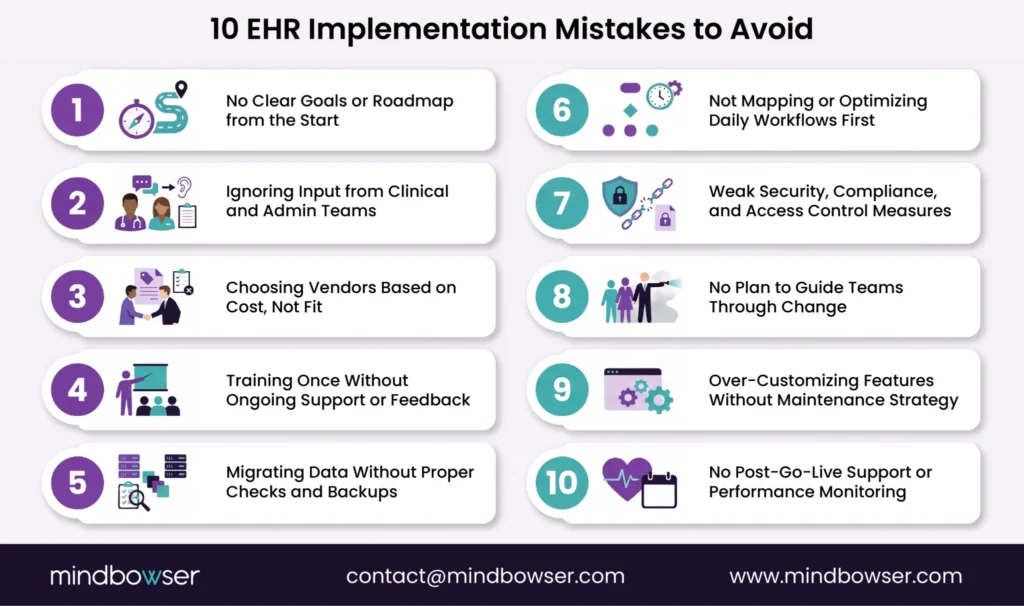
From poor planning to post-launch neglect, each of the EHR implementation mistakes we’ve covered can be avoided with the right mindset and process. It’s not about doing everything at once. It’s about doing the right things at the right time, and keeping your team involved, informed, and supported at every stage.
Our approach is shaped by real-world challenges we’ve seen during EHR rollouts. Success doesn’t come from tech alone; it’s about combining the right tools with thoughtful planning, clear processes, and a deep understanding of how care teams work.
Need help avoiding these EHR pitfalls? Let’s schedule a quick call to assess your readiness and map the next steps; no strings attached.
The most common mistake is inadequate planning, rushing into implementation without a clear roadmap, defined goals, or alignment with clinical workflows.
Timelines vary, but a typical implementation can take 6 to 18 months, depending on the size of the organization, data migration needs, and customization requirements.
Start by involving users early, offering role-specific training, and maintaining feedback loops. Workflows like ChatIQ help drive ongoing support and engagement.
Excessive customization early on can complicate maintenance. Start with core workflows and utilize modular solutions like Appointly or AutoConfirm AI, then evolve the system based on real usage data.