BLOGS
BLOGS  NEWSROOM
  CASE STUDIES
  WEBINARS
  PODCASTS
  ASSET HUB
  EVENT CALENDAR
























TL;DR
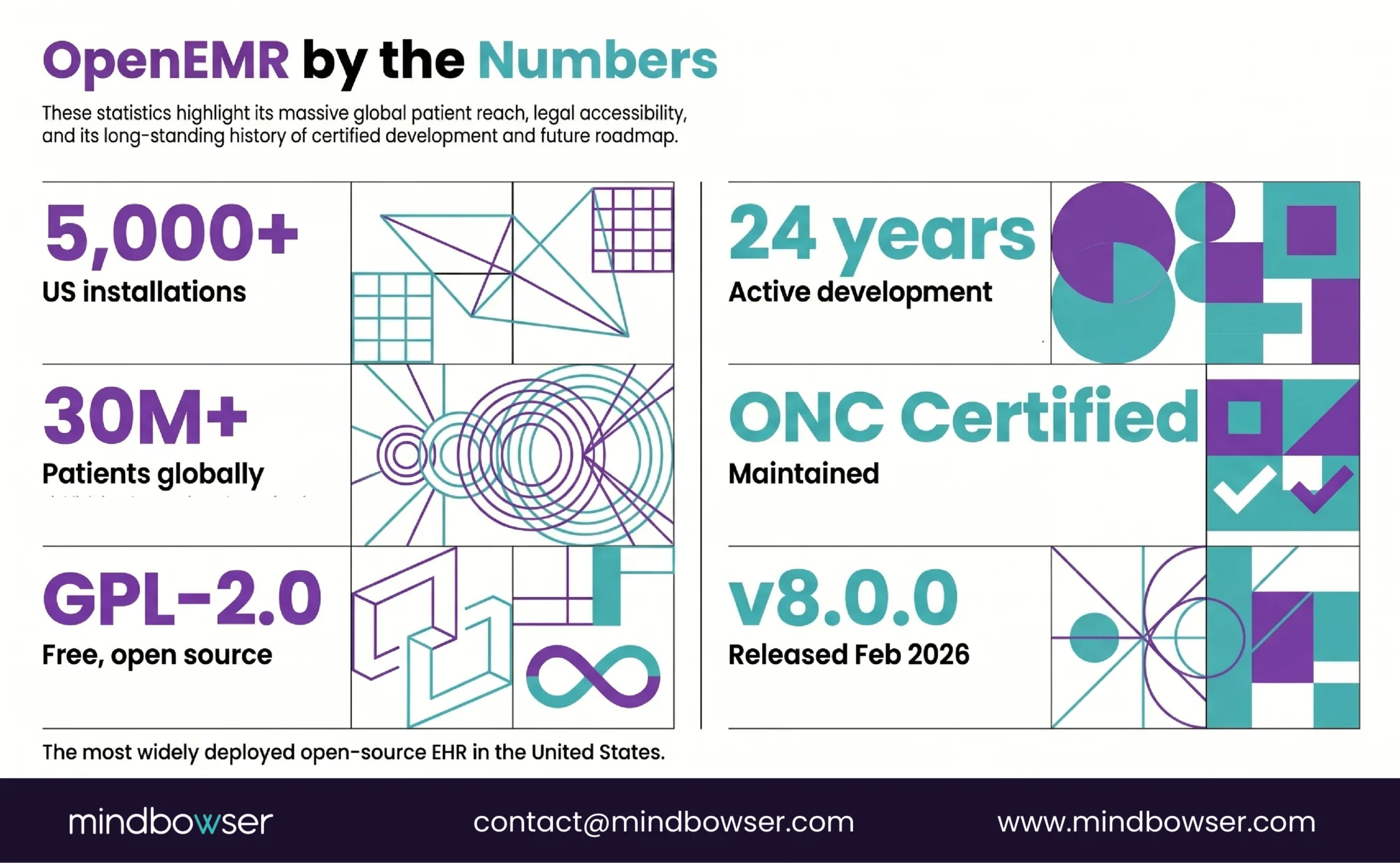
- OpenEMR has 5,000+ US installations and 30M+ patients on a GPL-2.0 open-source license. The software is free. The implementation isn’t.
- Here’s who should use OpenEMR (FQHCs, developing countries, vendor-independence seekers), who shouldn’t (teams needing FHIR-native or managed hosting), the 7-step implementation process with real timelines (8-24 weeks), and when to modernize OpenEMR with FHIR vs migrate to a modern platform like Medplum.
OpenEMR released version 8.0.0 on February 11, 2026. Twenty-four years after its initial release, it’s still the most widely deployed open-source EHR in the United States – and one of the most deployed globally.
The appeal is obvious: free software (GPL-2.0), no per-provider licensing, no vendor lock-in, full source code access. For an FQHC running on thin margins or a health ministry in a developing country building national health infrastructure, the “$0 license fee” line item changes the entire cost equation.
But “free software” doesn’t mean “free to implement.” The server setup, security hardening, module configuration, data migration, training, and ongoing maintenance all cost money. The question isn’t whether OpenEMR is free. It’s whether the total cost of implementation and ownership is lower than the alternatives – and whether the platform fits your technical reality in 2026.
I. What is OpenEMR and Who Uses It?
A. OpenEMR at a glance
- License: GPL-2.0 (free, open source, full code access)
- Current version: 8.0.0 (released February 11, 2026)
- Installations: 5,000+ in the US alone
- Patients: 30M+ globally
- Stack: PHP, MySQL/MariaDB, Apache/Nginx
- ONC Certified: Yes (actively maintaining certification)
- FHIR: R4 API available with US Core alignment and SMART on FHIR
B. What OpenEMR includes out of the box
- Patient scheduling and appointment management
- Clinical documentation (customizable encounter forms)
- Electronic billing (837/835, claim management, ERA posting)
- e-Prescribing (Surescripts integration available)
- Patient portal (secure messaging, lab results, appointment requests)
- Lab integration (HL7 v2 for orders and results)
- Multilingual support (40+ languages)
- Reporting and clinical decision support rules
The scale proof: OpenEMR isn’t a hobby project. It’s used by FQHCs, community health centers, international health ministries, and small practices across 100+ countries. The OpenEMR community held its most recent admin meeting on April 7, 2026 – active development, active governance, active roadmap.
C. Who uses OpenEMR
- FQHCs and community health centers – budget-constrained organizations serving underserved populations. OpenEMR’s $0 license fee is the difference between affording an EHR and not.
- International health ministries – developing countries building national health infrastructure. OpenEMR’s multilingual support and low licensing cost make it the default choice.
- Small independent practices – 1-5 providers who want full control over their EHR without per-provider SaaS fees.
- Academic and research institutions – using OpenEMR as a testing platform for FHIR integrations, clinical workflows, and health IT research.
II. Who Should Use OpenEMR – and Who Shouldn’t?
Honest assessment. OpenEMR is excellent for some organizations and wrong for others.
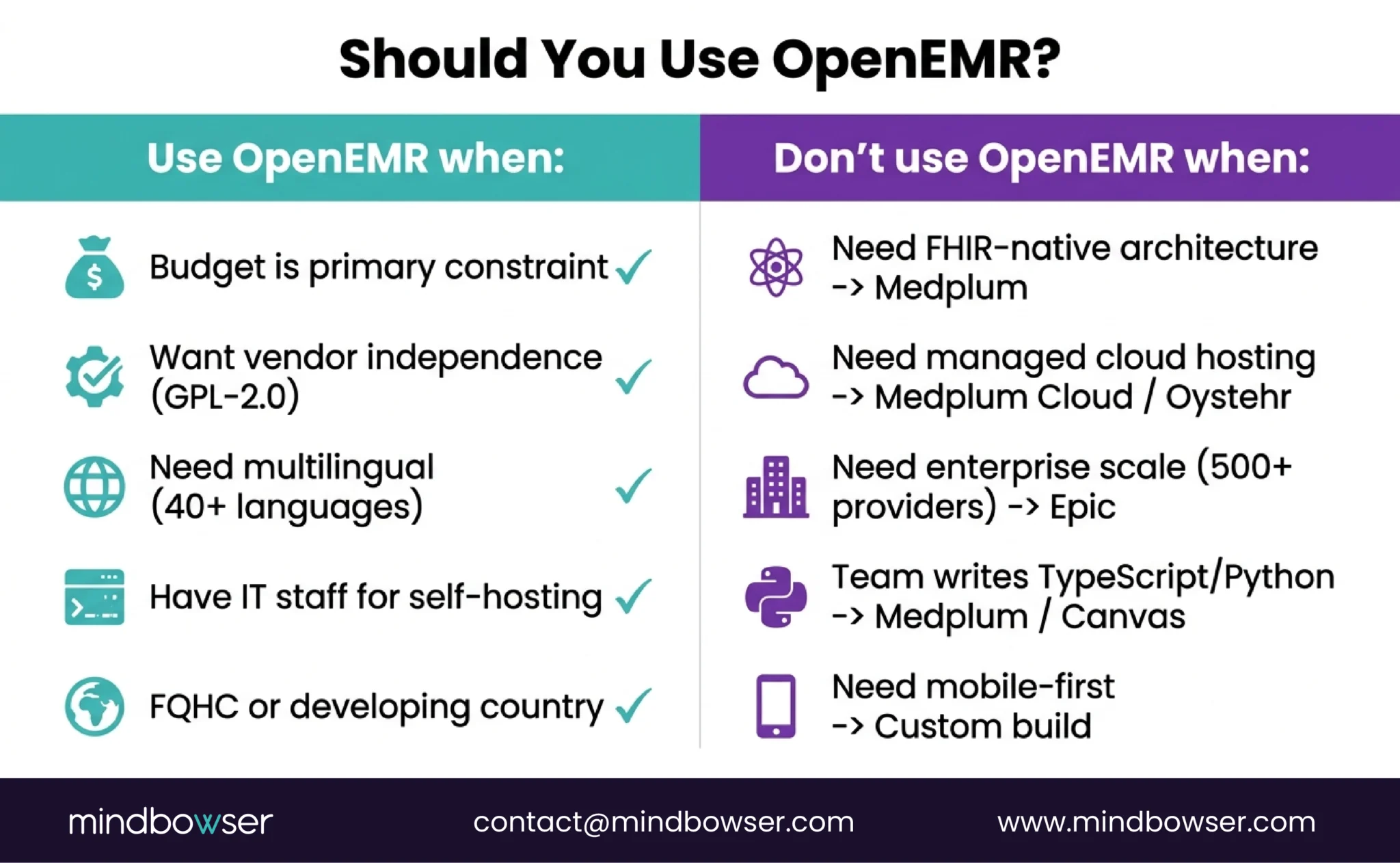
A. OpenEMR is the right choice when:
- Budget is the primary constraint. $0 license fee. Implementation costs $20K-$100K depending on scope (vs $50K-$200K+ for commercial alternatives). For FQHCs operating on federally qualified reimbursement rates, this math matters.
- You want full vendor independence. GPL-2.0 means you own the code. No license renewals. No vendor can sunset your EHR. No API access fees. You can fork it, modify it, and deploy it on your own terms.
- Multilingual and international deployment. 40+ language support. Configurable for different country regulatory requirements. No commercial EHR matches this out of the box.
- You have or can hire IT staff. OpenEMR is self-hosted. You need someone to manage the server, apply security patches, handle backups, and troubleshoot issues.
B. OpenEMR is probably NOT the right choice when:
- You need FHIR-native architecture. OpenEMR has an FHIR R4 API, but it’s built on top of a PHP/MySQL application, not a FHIR-native data model. If your applications need deep FHIR integration, Medplum (FHIR-native from the data store up) is a better foundation.
- You need managed hosting. OpenEMR is self-hosted. No official managed cloud offering exists (though third-party hosting is available). If you want “set up and go” without server management, cloud platforms like Oystehr or Medplum Cloud eliminate that burden.
- You need enterprise scale. OpenEMR works for small-to-medium organizations. Multi-hospital health systems with 500+ providers typically need enterprise platforms with dedicated support organizations.
- Your development team wants a modern stack. OpenEMR is PHP/MySQL. If your team writes TypeScript or Python, building on Medplum (TypeScript) or Canvas (Python) will be faster and more natural.
- You need a mobile-first architecture. OpenEMR is desktop-centric. Mobile EHR for home health or field care needs a different architecture.
The honest framing: OpenEMR is the most battle-tested open-source EHR in production. But “battle-tested” means a 24-year-old codebase. If you’re building a modern clinical platform in 2026, evaluate whether you need OpenEMR’s breadth of features or a modern platform’s developer experience. Both are valid choices for different buyers.
Build a Custom EHR with Mindbowser
III. How Does OpenEMR Compare to Medplum and Oystehr?
Three open-source platforms, three different philosophies and the basis for most OpenEMR reviews online.
| Dimension | OpenEMR | Medplum | Oystehr |
|---|---|---|---|
| Type | Full-featured EHR | Headless EHR platform | Headless EHR cloud service |
| License | GPL-2.0 (free) | Apache 2.0 (free) | Proprietary backend (Ottehr frontend open) |
| Stack | PHP, MySQL, Apache | TypeScript, PostgreSQL, Node.js | TypeScript, Serverless |
| FHIR | R4 API (added on top) | R4 native (data store IS FHIR) | R4, R4b, R5 native |
| Out-of-box EHR | Yes (scheduling, billing, docs, portal) | No (you build it) | No (Ottehr frontend optional) |
| ONC Certified | Yes | Yes (CHPL #11745) | Yes (13 criteria) |
| Hosting | Self-hosted only | Self-hosted or cloud (~$2K/mo) | Cloud only (usage-based) |
| Pricing | $0 license + self-host costs | $0 (self) or ~$2K/mo (cloud) | ~$500/mo (startup volume) |
| Best for | FQHCs, developing countries, budget-first | Custom platforms, TypeScript teams | Earliest-stage, FHIR R5, serverless |
| Maturity | 24 years, 5K+ installs | 4 years, 20M+ patients | 2 years, emerging |
A. Decision framework:
- “I need a working EHR now for the lowest possible cost” -> OpenEMR. $0 license, full features out of the box.
- “I need to build a custom clinical platform on modern infrastructure” -> Medplum. FHIR-native, TypeScript, Apache 2.0.
- “I need the lowest entry cost with FHIR R5 and native medical services” -> Oystehr. Usage-based, serverless, $0.001/API call.
For the full comparison, including Healthie EHR, see our headless EHR comparison.
IV. What Does OpenEMR Implementation Actually Look Like?
Seven steps. The software download takes 5 minutes. The implementation takes 8-24 weeks, depending on the organization’s size and complexity.
“Free software, not free implementation.” This is the phrase we use with every organization evaluating OpenEMR. The license is $0. The server, security, configuration, data migration, training, and ongoing maintenance are not.
A. Step 1: Server Setup (Week 1)
- Linux server (Ubuntu 22.04+ or Debian recommended) – physical, VM, or cloud instance (AWS EC2, Azure VM, GCP Compute)
- Docker deployment also available (faster setup, easier updates)
- Minimum specs for small practice: 4 CPU cores, 8GB RAM, 100GB SSD
- For FQHC multi-site: 8+ cores, 32GB RAM, 500GB+ SSD with RAID
B. Step 2: Database Configuration (Week 1)
- MariaDB or MySQL installation and tuning
- Character set: UTF-8 (required for multilingual support)
- Backup strategy: automated daily backups with off-site replication
- Test restore from backup before go-live. Untested backups aren’t backups.
C. Step 3: Security Hardening (Week 2)
- HTTPS with valid SSL/TLS certificate (Let’s Encrypt or commercial)
- Firewall configuration (only ports 443/80 exposed)
- AES-256 encryption for database at rest
- Access controls: role-based user permissions configured per OpenEMR’s ACL system
- PHP hardening: disable unnecessary modules, set strict error handling
- Regular security patch cadence established
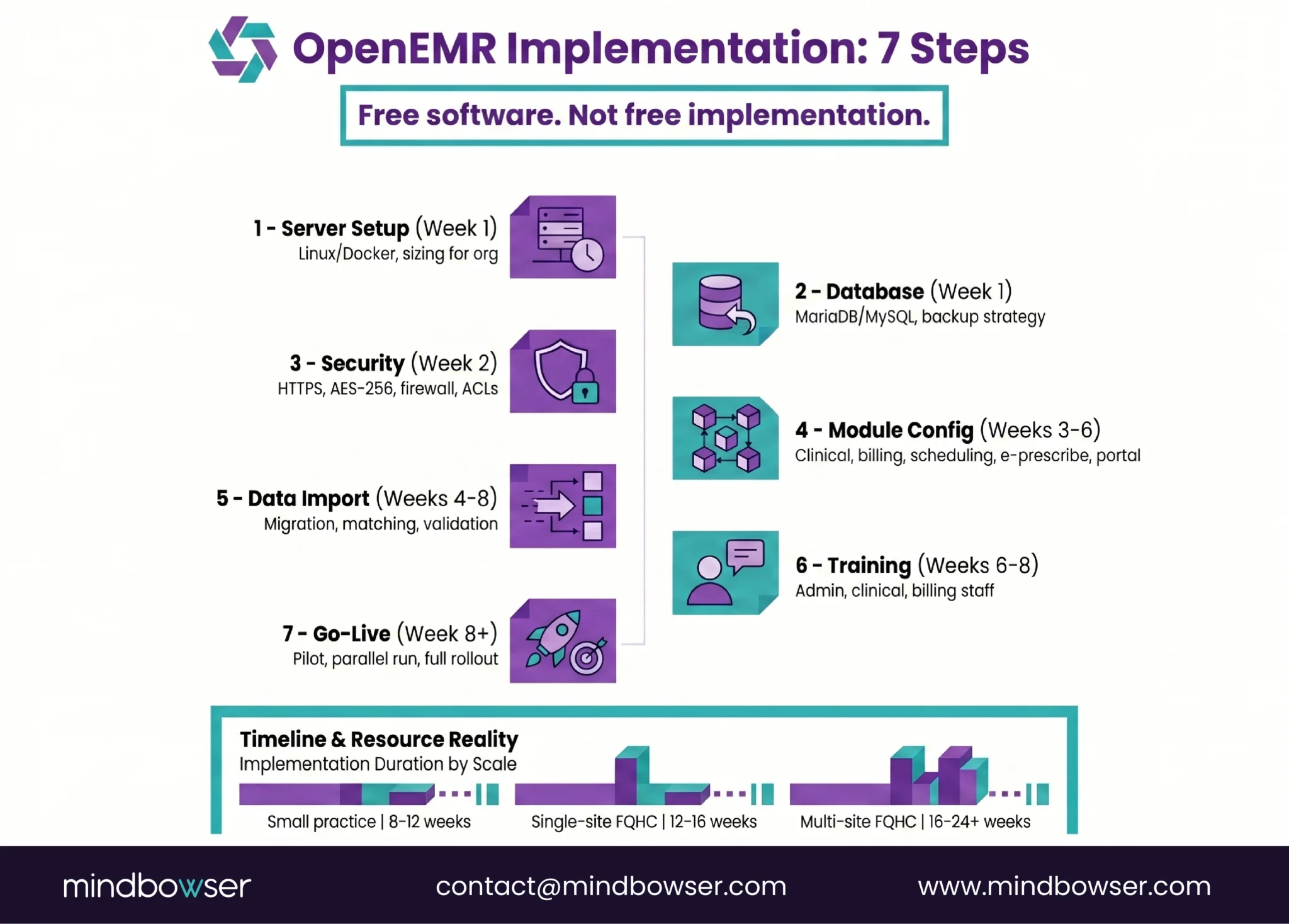
D. Step 4: Module Configuration (Weeks 3-6)
- Clinical modules: Encounter forms customized per specialty, problem list configuration, medication list setup
- Billing module: Payer setup, fee schedules, claim rules. For FQHCs: PPS/GBR logic, 340B, sliding fee scale
- Scheduling module: Provider schedules, appointment types, recurring appointment rules,
- e-Prescribe: Surescripts integration (requires separate registration and fees)
- Patient portal: Enable secure messaging, lab results viewing, and appointment requests
- This is the longest step. Configuration is where “free software” becomes a real project.
E. Step 5: Data Import (Weeks 4-8, if migrating)
- From existing EHR: export patient demographics, problem lists, medications, allergies (PAMI+P)
- Import format: CSV, HL7 CCD, or direct database migration
- Patient matching and deduplication (target <3% duplicate rate)
- Validation: compare record counts and field values between source and target
F. Step 6: User Training (Weeks 6-8)
- Admin training: system configuration, user management, reporting
- Clinical training: documentation workflows, order entry, e-prescribe
- Billing training: claim submission, denial management, reporting
- Budget 2-4 hours per user for initial training. Plan for refresher training at 30 and 90 days.
G. Step 7: Go-Live and Support (Week 8+)
- Pilot with 1-2 providers for 1-2 weeks before full rollout
- Parallel run with old system (if migrating) for validation
- Designated support contact for go-live week issues
- Establish ongoing maintenance cadence: security patches, backups, version upgrades
H. Timeline by organization type:
- Small practice (1-5 providers): 8-12 weeks
- Single-site FQHC: 12-16 weeks
- Multi-site FQHC/CHC: 16-24+ weeks – driven by data migration, 340B, dental/behavioral modules, and HIE interfaces
V. How Do You Modernize OpenEMR with FHIR and AI?
OpenEMR has FHIR. But “has FHIR” and “is FHIR-native” are different things.
A. What OpenEMR’s FHIR API provides today:
- FHIR R4 endpoints for core clinical resources
- US Core Implementation Guide alignment
- SMART on FHIR authorization
- OAuth 2.0 + OpenID Connect for API auth
- Bulk Data export capability
B. What it doesn’t provide:
- FHIR-native data store (data lives in MySQL, gets translated to FHIR on API calls)
- Real-time FHIR subscriptions (event-driven architecture)
- Modern FHIR tooling (TypeScript SDK, React components)
- Managed cloud hosting
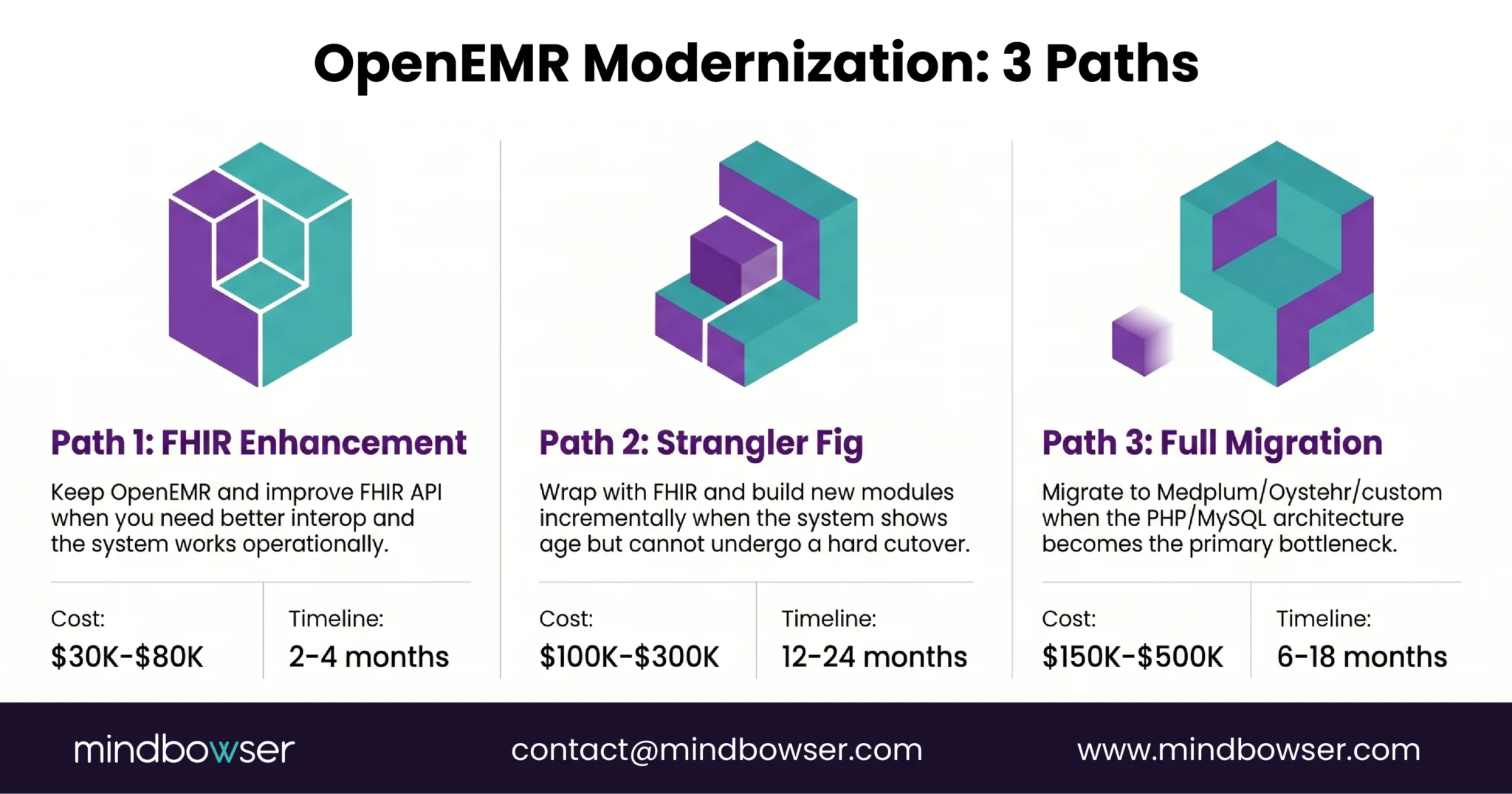
C. Three modernization paths
1. Path 1: FHIR API Layer Enhancement (Lowest effort)
Keep OpenEMR as-is. Improve the FHIR API to cover more resources and improve performance. Build modern applications that connect through the FHIR API.
- When: Your OpenEMR installation works well operationally, you just need better interoperability
- Cost: $30K-$80K for API enhancement + application development
- Timeline: 2-4 months
2. Path 2: Strangler Fig Modernization (Medium effort)
Wrap OpenEMR with a FHIR API layer. Build new modules on a modern stack (Medplum, custom React). Gradually replace OpenEMR components while keeping it running. This is the strangler fig pattern from our modernization guide.
- When: OpenEMR is showing its age (slow, hard to customize, PHP limitations), but you can’t do a hard cutover
- Cost: $100K-$300K over 12-18 months (incremental)
- Timeline: 12-24 months (but value delivered incrementally)
3. Path 3: Full Migration to Modern Platform (Highest effort)
Migrate data from OpenEMR to Medplum, Oystehr, or a fully custom FHIR-native platform. Rebuild clinical workflows on the modern stack. Decommission OpenEMR.
- When: The PHP codebase, MySQL data model, and desktop-first architecture are the bottleneck, not just the features
- Cost: $150K-$500K including data migration + new platform build
- Timeline: 6-18 months
Adding AI to OpenEMR:
OpenEMR’s architecture can support AI features through external integration:
- AI clinical documentation: Third-party ambient scribe pushing notes to OpenEMR via FHIR API
- AI coding assistance: NLP service reading clinical notes and suggesting ICD-10 codes via API
- Predictive analytics: External ML models consuming OpenEMR data via Bulk FHIR export
The limitation: These are external integrations, not native AI capabilities. For an AI-native EHR architecture where AI is in the event loop (Medplum Bots, real-time subscriptions), you need a platform designed for it. OpenEMR can consume AI services. It wasn’t built to embed them.
Is OpenEMR Right for Your Organization?
OpenEMR is real, production-proven, and free. It is the right choice for organizations where budget is the primary constraint and vendor independence matters more than developer experience. With more than 5,000 US installations, over 30 million patient records, 24 years of development, and ONC certification, OpenEMR is not a beta product. It is a mature clinical platform that supports real-world healthcare delivery at scale.
However, “free software” means a $0 license, not a $0 implementation. Server setup, security hardening, module configuration, data migration, user training, and ongoing maintenance typically cost between $20K and $100K+, depending on the size of the organization. It is important to budget not only for the initial implementation but also for annual maintenance costs, which generally range from 15–25% of the implementation investment.
OpenEMR also provides a clear modernization path. Its FHIR R4 API enables integration with the modern healthcare data ecosystem, while the strangler fig pattern allows organizations to modernize incrementally without a hard cutover. If the underlying PHP/MySQL architecture eventually becomes a limitation, migration to Medplum or another FHIR-native platform is a well-defined next step.
The software is free – GPL-2.0 open-source license with no per-provider fees, no licensing costs, and full source code access. The implementation is not free. Server hosting ($50-$500/month, depending on scale), security configuration, module customization, data migration, user training, and ongoing maintenance all have costs. For a small practice: $20K-$50K total implementation + $5K-$15K/year maintenance. For a multi-site FQHC: $50K-$100K+ implementation + $15K-$30K/year maintenance. Compare to: commercial SaaS at $200-$700/provider/month with no server management burden.
7 steps, 8-24 weeks depending on org size: (1) Set up Linux server (Ubuntu/Debian) or Docker container. (2) Install and configure MariaDB/MySQL database. (3) Security hardening: HTTPS, firewall, AES-256 encryption, access controls. (4) Configure modules: clinical forms, billing (PPS/GBR for FQHCs), scheduling, e-prescribe. (5) Import data from existing system if migrating. (6) Train users: admin, clinical, billing staff. (7) Go-live with pilot providers, then full rollout. Current stable version: OpenEMR 8.0.0 (released February 11, 2026). Download from open-emr.org.
OpenEMR is HIPAA-capable, not HIPAA-compliant out of the box. HIPAA compliance depends on how you configure and host it. You need: AES-256 encryption at rest and TLS in transit (your responsibility to configure), access controls (OpenEMR’s ACL system supports role-based access), audit logging (built in but must be enabled), backup and disaster recovery (your responsibility), and physical/administrative safeguards (policies, training, BAAs with hosting providers). A properly configured OpenEMR installation on a HIPAA-ready cloud environment (AWS with BAA, for example) meets HIPAA technical requirements. An improperly configured installation on a bare-metal server without encryption does not.
Choose OpenEMR when: You need a complete working EHR (scheduling, billing, documentation, portal) for the lowest possible cost, your team can manage PHP/MySQL infrastructure, and you value 24 years of production maturity. Best for: FQHCs, small practices, developing countries, organizations prioritizing $0 license fee. Choose Medplum when: You need to build a custom clinical platform with modern developer experience, your team writes TypeScript, you want FHIR-native architecture (not FHIR bolted on), and you need managed cloud hosting or self-hosting flexibility. Best for: digital health startups, custom specialty platforms, organizations building a product (not just using an EHR). The key question: do you need a ready-made EHR (OpenEMR) or a platform to build your own (Medplum)? Full comparison in our headless EHR guide.