BLOGS
BLOGS  NEWSROOM
  CASE STUDIES
  WEBINARS
  PODCASTS
  ASSET HUB
  EVENT CALENDAR























B. Complete List of Epic EHR Modules by Category
Bookmark this page for the always-current Epic module reference. For a printable version, use your browser’s Print to PDF on this section.
Clinical and Care Delivery
Epic’s clinical modules cover documentation, imaging, lab, surgical, specialty, and care delivery workflows.
- Epic EpicCare Ambulatory: outpatient documentation, orders, scheduling, and inbox management
- Epic EpicCare Inpatient: inpatient documentation, care plans, and hospital-based workflows
- Epic ClinDoc: nursing documentation, MAR, and assessment tools
- Epic Beaker: Laboratory Information System (LIS) for clinical and anatomic pathology
- Epic Radiant: radiology workflow, PACS integration, and imaging result documentation
- Epic OpTime: OR scheduling, case documentation, and perioperative management
- Epic Stork: labor and delivery, fetal monitoring, and newborn workflows
- Epic Beacon: oncology: chemo ordering, regimen management, and clinical trial tracking
- Epic Lumens: endoscopy and procedure suite documentation
- Epic ASAP: emergency department triage, tracking boards, and ED documentation
- Epic Aura: genomics and precision medicine within the Epic ecosystem
- Epic Bugsy: infection surveillance and control for IP/IC teams
- Epic Bones:orthopedic and musculoskeletal clinical documentation
- Epic Phoenix: transplant management, donor/recipient coordination, and pre/post-transplant workflows
- Epic Anesthesia: anesthesia documentation, pre-op assessments, and intraoperative records
- Epic Cosmos: de-identified clinical data network for population health and research
Revenue Cycle
Epic’s revenue cycle modules handle financial and administrative workflows from registration through claims and denial management. Epic’s revenue cycle modules — Resolute, Prelude, Cadence, Tapestry, and Grand Central — handle the full financial workflow from patient registration through claims and denial management.
- Epic Cadence: Epic’s core scheduling module for appointments and access management
- Epic Prelude: patient registration and insurance verification
- Epic Grand Central: patient flow, ADT (admit/discharge/transfer), and bed management
- Epic Tapestry: health plan and payer-side operations, member management, and claims adjudication
- Epic Resolute: hospital billing, professional billing, and denials management
- Epic Cheers: patient engagement CRM: outreach, marketing, and lifecycle management
- Epic Cupid: cardiology documentation and cardiovascular workflow management
Patient Engagement and Access
Modules that put data directly in patients’ hands or extend Epic to mobile and remote settings. Epic Cadence is Epic’s core scheduling module; it works alongside Prelude (registration) and Grand Central (patient flow) to manage the full access and scheduling workflow.
- Epic MyChart: patient portal: scheduling, secure messaging, test results, and telehealth access
- Epic MyChart Bedside: in-room tablet app for inpatients: education, care team communication, and meal ordering
- Epic Haiku: mobile EHR access for physicians (iPhone/Android)
- Epic Rover: mobile nursing workflows: MAR, barcode scanning, vitals capture
- Epic Canto: iPad-native EHR for physicians
- Epic In Basket: unified messaging, task routing, and care team communication hub
- Epic Garden Plot: patient self-scheduling and online access tools
- Epic Care Everywhere: patient data exchange: pulling records from outside health systems into Epic
- Epic Kaleidoscope: ophthalmology-specific documentation and workflow
- Epic Wisdom: dental module: oral health documentation, treatment plans, and billing
Analytics and Operations
Epic’s data, reporting, and decision-support modules. Epic’s diagnostics and imaging modules — Radiant (radiology), Beaker (laboratory), Aura (genomics), and Lumens (endoscopy) — each integrate diagnostic results back into the patient’s active chart.
- Epic Cogito: analytics platform: dashboards, reporting workbench, SlicerDicer, and Nebula cloud lakehouse
- Epic Caboodle: analytics data warehouse (dimensional star schema) for population health and cross-domain analysis
- Epic Clarity: relational read-only database for operational reporting and custom SQL queries
- Epic SlicerDicer: self-service cohort exploration without SQL
- Epic Chronicles: the real-time operational database (the core of Epic’s architecture)
- Epic Database Access Guide: how to access Epic data via FHIR APIs, HL7, App Orchard, and direct DB methods
- FHIR API Pagination in Epic: technical reference for Epic FHIR API pagination patterns
Implementation and Training
Resources for Epic rollouts, training, and configuration.
- Epic Implementation guide: the step-by-step playbook for an Epic rollout
- Epic EHR Training guide: role-based training paths, certification, and formats
- Epic Showroom: the self-guided demo environment for evaluating modules before go-live
- Epic Emmie: project management and implementation tracking within Epic
- Epic Sandbox & POC guide: how to run a proof-of-concept in Epic’s sandbox environment
- Epic SMART on FHIR / Care Everywhere: interoperability workflows and data exchange
- Epic Onboarding for providers: onboarding workflows and go-live support for clinical staff
C. A Note on SMART on FHIR
If your team plans to extend Epic’s functionality, whether with AI-assisted documentation, external devices, or new analytics layers, you’ll likely rely on SMART on FHIR. It’s a standard that allows secure, scalable app development on top of Epic without touching the core codebase.
We Improved Predictive Accuracy in Childbirth with Advanced EHR Integration
Hospitals utilize it to develop tools for various applications, including remote monitoring, rehabilitation dashboards, and automated symptom screening. It’s a major enabler for hospitals that want to innovate without waiting for the next Epic upgrade cycle.
III. Why Mid-Sized Hospitals Struggle Without the Right Epic Modules?
Implementing an EHR like Epic is one thing. Using it well is another. For mid-sized hospitals, the difference often lies in the selection of modules and the rollout strategy. The right modules can help a lean team move faster, document better, and bill more efficiently. The wrong ones—or too many at once—can lead to frustration, rework, and poor adoption.
Below is a breakdown of common issues we’ve seen when hospitals implement Epic Modules without a clear match to their existing workflows or infrastructure.
A. Real Talk: The Excel Workaround
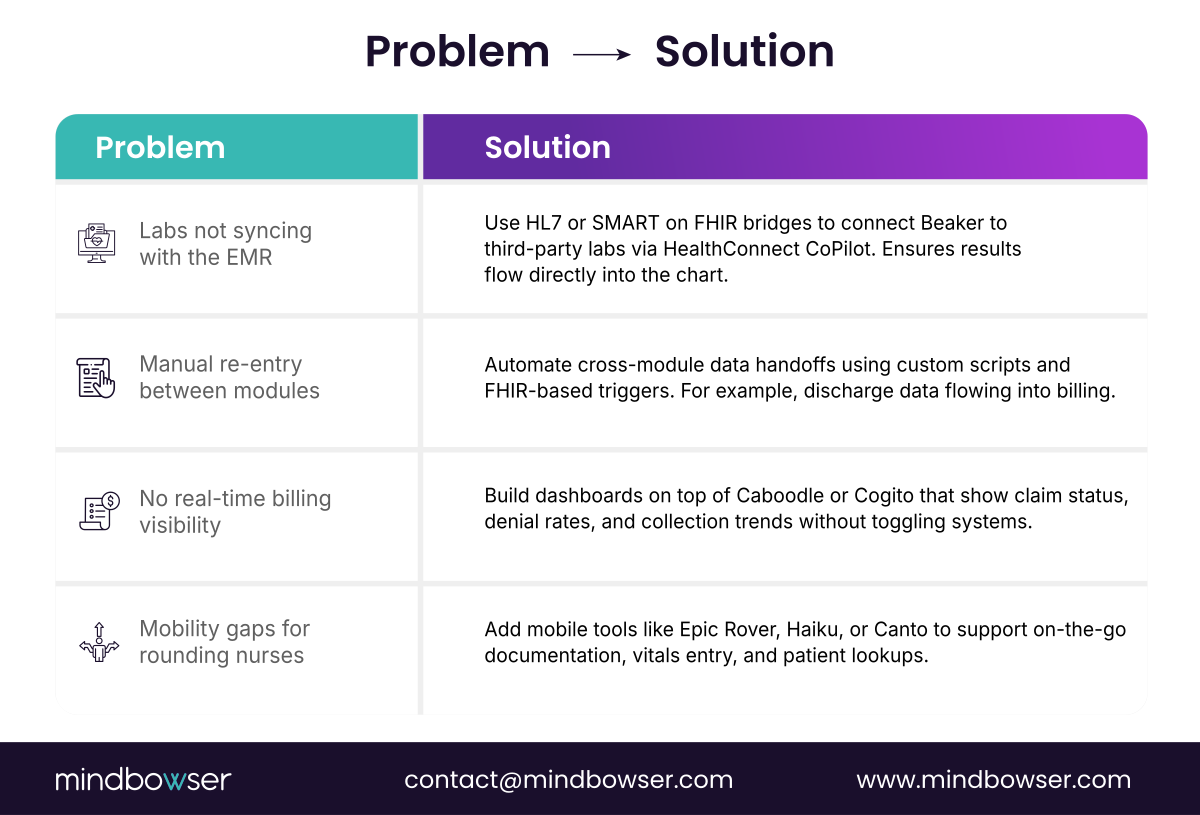
If your care teams are still printing patient lists, using sticky notes to track procedures, or updating Excel manually to reconcile billing, it’s not a training problem—it’s a module gap. These workarounds emerge when hospitals bypass modules like Cadence, MyChart Bedside, or Cogito due to budget constraints or unclear priorities during the purchasing process.
Over time, this creates inefficiencies that hurt clinical quality, increase documentation burden, and delay reimbursements.
B. Why This Hits Mid-Sized Hospitals Harder?
Unlike large health systems, mid-sized hospitals don’t have layers of admin staff or dedicated IT analysts to patch process holes. Every gap in documentation, coding, or scheduling gets absorbed by overworked teams, and the ripple effects are real: claim denials, longer LOS, and lower HCAHPS (Hospital Consumer Assessment of Healthcare Providers and Systems) scores.
C. The Missed Opportunity
Epic’s strength is its modular architecture. That means hospitals can (and should) implement only what they need. However, without an internal Epic roadmap—driven by clinical and operational priorities, rather than just IT—many mid-sized hospitals end up with a solution that appears complete on paper but is fragmented in practice.
⚠️ If you’re not using modules like Resolute for billing or MyChart for patient access, you’re likely duplicating work that Epic already solves.
Some hospitals have found success in embedding clinical decision tools directly into Epic to accelerate high-stakes processes, such as those related to surgical readiness. One example is a preoperative platform that integrates with Epic using Clinical Decision Support (CDS) hooks, allowing care teams to automate lab and test orders without toggling screens or re-entering patient data. The result was fewer missed labs, less clinician frustration, and a smoother pre-op workflow.
Building a Custom Platform? Make It Epic-Ready from Day One
IV. Which Epic Modules Move the Needle?
With over 40 modules available, Epic can feel like a massive toolbox. But for mid-sized hospitals, the goal isn’t to use everything—it’s to use what drives real outcomes. Whether you’re focused on improving cash flow, reducing ED wait times, or enhancing the patient experience, some modules have a greater impact than others.
We’ve organized the 20 most effective Epic Modules below by functional area, with context on what they do and why they matter.
A. Clinical & Care Delivery
These modules directly affect how care teams deliver and document treatment.
1. EpicCare Ambulatory
Tailored for outpatient and specialty clinics, this module allows providers to chart quickly, manage chronic conditions, and handle referrals without navigating multiple systems. Built-in decision support reduces unnecessary tests and improves care coordination.
2. EpicCare Inpatient
Supports the full inpatient journey—from admission to discharge. Providers can track vital signs, medications, and care plans in real-time. It reduces redundant charting and allows multi-disciplinary teams to collaborate within the same workflow.
3. Epic ASAP
Epic ASAP is an emergency department module designed for high-speed decision-making. It includes tools for triage, orders, and rapid documentation, helping to reduce door-to-doctor time and improve throughput without sacrificing safety.
4. Epic OpTime + Anesthesia
Epic OpTime handles everything from OR scheduling to case tracking and post-op documentation. When paired with the Epic Anesthesia module, it supports anesthesiologists with intraoperative charting and medication management. These modules are essential for hospitals with moderate to high surgical volume.
5. Epic Bones
Epic Bones is focused on orthopedics. This module includes templates for joint replacements, sports injuries, and post-op rehab tracking. It simplifies documentation for ortho-specific visits and integrates with imaging and surgical planning tools.
6. Epic Beacon
This supports oncology care by managing treatment protocols, chemotherapy dosing, and follow-up schedules. Epic Beacon helps teams avoid medication errors, streamline infusion scheduling, and track patient response over time.
7. Epic Stork
Built for labor and delivery units, Epic Stork includes tools for fetal monitoring, prenatal documentation, labor tracking, and postpartum discharge. It integrates tightly with inpatient and nursery systems, helping OB teams improve safety and satisfaction.
8. Epic Wisdom
For hospitals with in-house dental services or affiliated dental clinics, Epic Wisdom supports streamlined charting, coding, and scheduling in a way that mirrors core ambulatory workflows.
B. Labs & Imaging
These modules are essential for hospitals running internal diagnostic departments.
9. Epic Radiant
Epic Radient handles everything from imaging orders to report distribution. Radiologists can view images, dictate findings, and send structured reports directly into the patient chart. Epic Radiant improves coordination between radiology and referring providers.
10. Epic Beaker
Epic’s lab information system (LIS), Epic Beaker, supports both clinical and anatomic pathology labs. It automates specimen tracking, result posting, and regulatory reporting, reducing manual errors and accelerating turnaround times.
11. Epic Lumens
Designed for GI, pulmonary, and surgical specialties, Epic Lumens streamlines endoscopy workflows. It includes procedure templates, scope tracking, photo capture, and post-procedure notes. It’s especially helpful for hospitals performing frequent outpatient endoscopic procedures.
C. Revenue Cycle
These modules are crucial for reducing denial rates, effectively managing claims, and enhancing cash flow.
12. Epic Resolute
Epic’s main billing engine, Epic Resolute, supports hospital and professional billing, including charge capture, insurance verification, denial management, and collections. It provides billing staff with real-time insights to shorten revenue cycle timelines.
13. Epic Tapestry
Built for hospitals managing payer contracts or at-risk populations, Epic Tapestry supports claims adjudication, capitated payments, member management, and utilization tracking. It’s particularly useful for ACOs or integrated delivery networks.
To improve efficiency in financial assistance processes, some hospitals are integrating external tools into Epic that utilize HL7 and FHIR standards to retrieve patient data securely. This enables real-time eligibility checks and faster approvals for financial aid, improving patient retention and billing efficiency. For a client, we integrated Epic with a financial navigation platform, resulting in a 90% reduction in manual data entry, which freed up staff time and reduced errors. Integrations like these help extend the reach of modules like Resolute and Tapestry without requiring additional manual effort from frontline staff.
14. Epic Prelude & Cadence
Epic Prelude handles patient registration and insurance details, while Epic Cadence manages scheduling across departments. When combined, they help front-desk and registration teams avoid eligibility issues and appointment delays that slow down billing.
15. Epic Garden Plot
Some mid-sized systems managing both central hospitals and independent practices opt for Epic Garden Plot. It provides a scaled-down method for extending Epic access to affiliated providers without overloading the core instance.
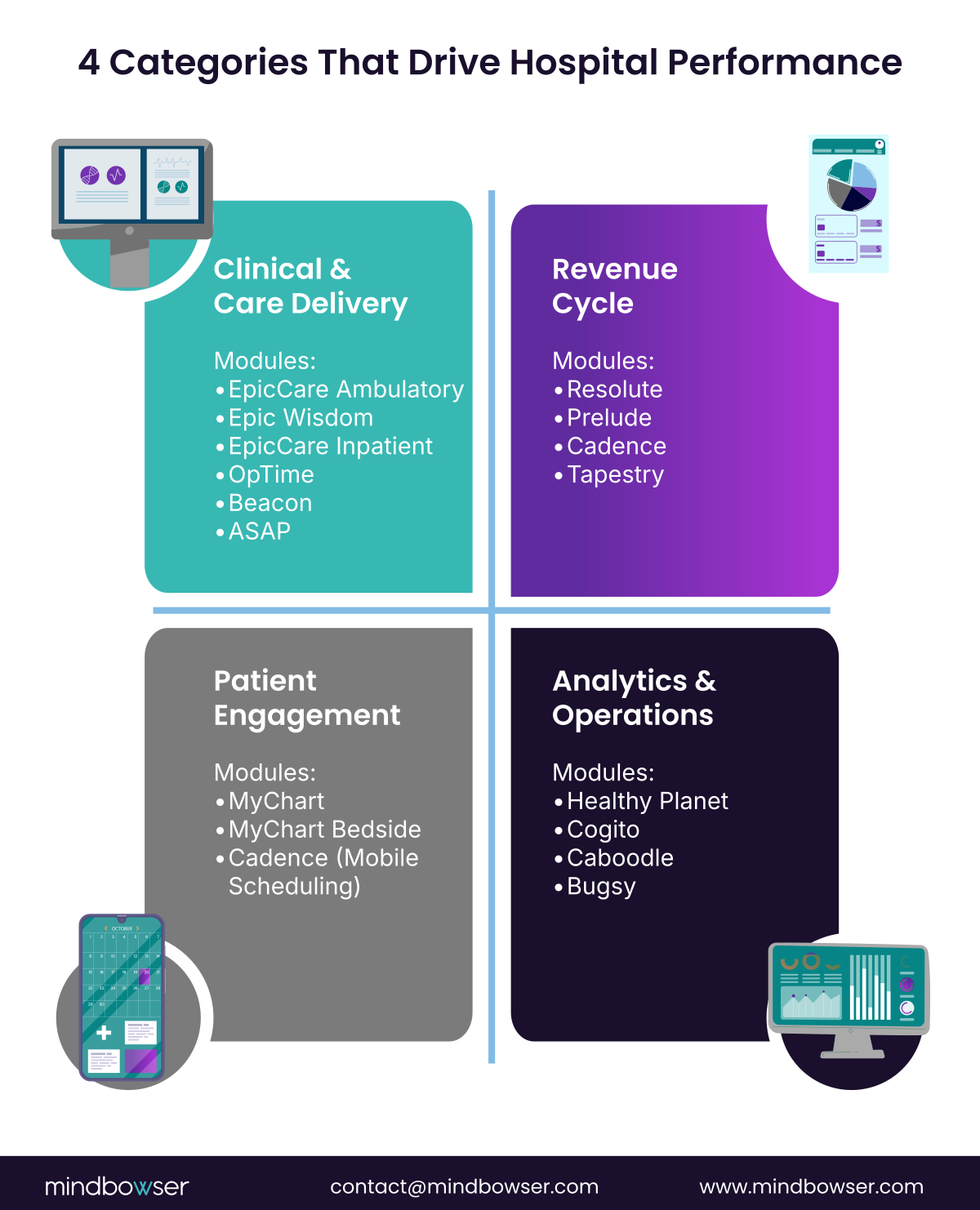
D. Patient Engagement
These modules support digital front doors, self-service, and the in-hospital experience.
16. Epic MyChart
Patients can view their records, request appointments, refill prescriptions, and send messages to their providers. MyChart also supports proxy access for family caregivers and integrates with third-party applications, such as Apple Health.
“If messages go unanswered… patient portals can do more harm than good.”
— David D. Bennett, CEO of PCare. Source – YouTube
17. Epic MyChart Bedside
An inpatient-facing extension of MyChart that runs on tablets. Patients can view their schedule, identify who’s on their care team, access educational materials, and even request comfort items—all from the comfort of their room.
18. Epic Cadence + Epic MyChart Integration
When paired together, these modules enable patients to schedule appointments and receive reminders directly through MyChart, reducing missed appointments and easing the pressure on scheduling staff.
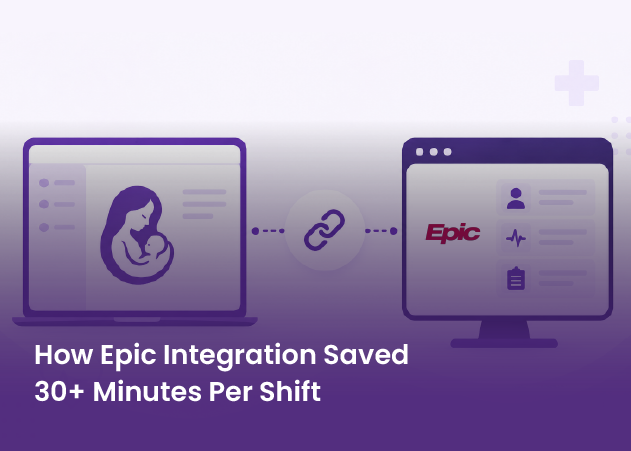
Some organizations have taken patient engagement even further by layering predictive tools into their Epic instance. For example, a maternity care platform integrated with Epic enabled clinicians to predict expected delivery windows with 94% accuracy based on real-time vitals, such as cervical dilation, BMI, and fetal station. The system synced directly with Epic using MRNs and pushed finalized delivery notes directly into the EHR, cutting post-delivery documentation time by over 40%.
E. Analytics & Operations
These modules provide decision-makers with the data needed to improve care quality and operational efficiency.
19. Epic Healthy Planet
Supports population health management by aggregating data across visits, providers, and systems. Epic Healthy Planet identifies care gaps, stratifies patient risk, and enables outreach, making it ideal for managing chronic diseases or implementing value-based contracts.
20. Epic Cogito
Epic Cogito provides real-time dashboards and quality reports that are integrated within the EHR. Clinicians and leaders can track performance metrics without relying on external analytics platforms.
21. Epic Caboodle
Epic’s enterprise data warehouse, Epic Caboodle, stores structured and unstructured data from across the system. Analysts use it to build reports on utilization, clinical trends, and financial KPIs.
22. Epic Bugsy
A public health and infection control module. Epic Bugsy supports surveillance, outbreak tracking, and antimicrobial stewardship. It helps hospitals meet infection prevention standards and report directly to public health agencies.
V. How to Prioritize & Roll Out Epic Modules (Without Burning Budget)
Buying Epic modules isn’t the hard part—rolling them out correctly is. Too often, mid-sized hospitals attempt to go live with too much at once, or they choose modules based on vendor recommendations rather than operational priorities. The result? Missed adoption, delayed ROI, and staff who still default to paper or spreadsheets.
Here’s how to make sure your Epic rollout delivers.
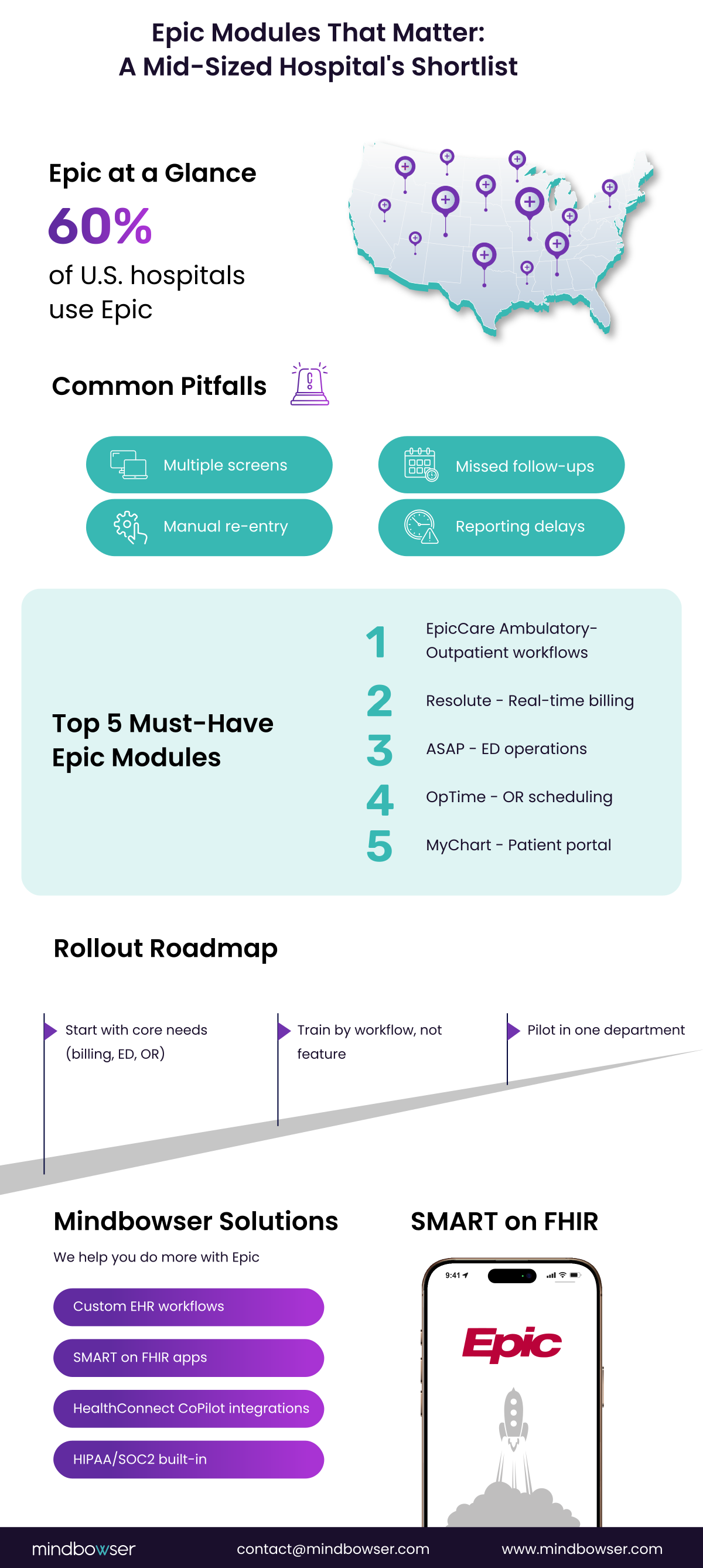
A. Start with What You Do Most
Don’t build around features. Build around your most-used workflows.
Q) Do you bill patients?
A) Start with Epic Resolute and Epic Prelude. These modules give you the foundation for claims, insurance eligibility, and collections.
Q) Do you run an Emergency Department?
A) Epic ASAP is built for rapid documentation, tracking, and throughput. It’s faster than trying to customize an inpatient tool for ED flow.
Q) Do you operate an OR or surgical clinic?
A) You need Epic OpTime + Epic Anesthesia. These streamline OR scheduling and ensure that your surgical teams aren’t required to document across two systems.
Q) Do you offer primary or specialty care?
A) Begin with EpicCare Ambulatory and Epic MyChart. These support outpatient visits and patient self-service, reducing the need for calls and missed appointments.
Q) Do you care for complex populations or value-based contracts?
A) Look at Epic Healthy Planet and Epic Tapestry. These support population health, chronic care, and bundled payment models.
B. Funding Tip: Look for Grants and Reimbursement Programs
Modules like Epic Healthy Planet or Epic Bugsy often align with federal programs and reporting initiatives. That means:
- CMS value-based care programs may cover population health tools
- NIH grants can support data-driven care initiatives
- Public health reporting requirements can justify investments in Epic Bugsy
C. Implementation Advice from the Field
Rollouts work best when they’re phased, focused, and team-driven.
- Train by workflow, not by module.
Nurses, schedulers, and providers don’t need to know every button—they need to know how to do their job inside Epic. - Run pilot rollouts by department.
Go live with one clinic, one OR, or one floor. Fix real-world issues there, then scale. This limits disruption and builds internal champions. - Involve your frontline teams early.
Too many rollouts are done “to” users instead of “with” them. Listen to how departments work today and build that logic into your Epic workflows.
VI. How Mindbowser Helps You Do More with Epic EHR?
Rolling out Epic successfully isn’t about having more features. It’s about connecting the right ones—and ensuring your people can use them effectively. That’s where Mindbowser comes in.
We’ve worked with care teams and health tech vendors to implement Epic-integrated tools ranging from surgical decision support and maternity care models to financial assistance automation and patient transport coordination. These projects have helped mid-sized hospitals reduce friction, strengthen compliance, and scale smarter—without having to rebuild their workflows from scratch.
Whether you’re adding a new module, fixing a broken one, or trying to build functionality that Epic doesn’t offer out of the box—we’ve done it.
A. Custom EHR Development
We work with your existing Epic setup to build custom modules, extensions, and workflows that reflect how your teams work—no forced templates. No workarounds. Just clean, effective EHR experiences for the people who use them every day.
Examples:
- Surgical checklist extensions for OpTime
- Pre-op risk calculators integrated into Ambulatory
- Registration enhancements tied to Cadence
B. SMART on FHIR App Development
Epic supports SMART on FHIR, which means you don’t have to wait for upgrades to roll out innovation. We build apps that integrate directly with Epic, delivering functionality that aligns with your strategy.
What this looks like:
- AI charting assistants for clinicians
- Rehab dashboards inside MyChart
- Symptom triage tools that flag high-risk patients before they arrive
Looking to Build a Custom EHR?
C. ConnectHealth — Epic Integration Accelerator
When a module’s value depends on data it doesn’t natively hold, pulling external lab results into Beaker, pushing wearable vitals into a flowsheet, reconciling payer data against Resolute, you integrate via Epic’s FHIR/HL7 APIs. ConnectHealth, our healthcare integration platform, ships pre-built Epic connectors so that work takes days, not the usual 6-month custom build, and deploys inside your own AWS VPC so patient data never leaves your environment.
D. Purpose-Built Add-Ons
Sometimes the data’s there—it just needs to be useful. We build custom dashboards, alerts, and automation layers on top of modules you already have.
Examples:
- Oncology outcome dashboards layered on top of Beacon
- Predictive no-show models tied to Cadence scheduling
- Analytics overlays for Cogito and Caboodle
E. Compliance From Day One
We build everything to meet HIPAA and SOC 2 standards, with built-in audit trails, access controls, and secure data exchange, retrofitting needed.
F. 50+ Solution Accelerators
From population health templates to billing error alerts, we’ve already built the components most hospitals need. That means shorter build times, smoother go-lives, and predictable outcomes.
Conclusion: Don’t Buy the Entire Epic Suite, Build What You Need
Epic is one of the most powerful EHR platforms in healthcare, but power without precision can become a problem. For mid-sized hospitals, success with Epic isn’t about how many modules you install. It’s about whether those modules solve real problems—such as billing delays, fragmented care, missed revenue, or patient drop-off.
The truth is, you don’t need 40 Epic Modules.
You probably need 10 to 20 that align with your hospital’s care delivery model, operational workflows, and growth goals.
The smartest hospitals are doing two things:
1. Rolling out Epic strategically, not reactively
They focus on core workflows—ED, OR, registration, outpatient visits—and bring in other modules as adoption builds.
2. Using tools like SMART on FHIR to fill the gaps
Instead of waiting for new features or building in-house from scratch, they’re using extensible apps that plug directly into Epic, improve staff experience, and reduce time to value.
Connect with us and we’ll help you build a Custom EHR with Epic Integration Capabilities
Epic Modules are individual components within the Epic EHR system. Each module is designed for a specific function, such as billing, patient scheduling, surgery, labs, or care coordination. Hospitals select the ones they need based on their services and priorities.
Epic Resolute is the core module for billing and financial management. It helps manage claims, track payments, reduce denials, and gives finance teams visibility into the revenue cycle. For scheduling and registration, Prelude and Cadence work alongside it.
Yes. Using SMART on FHIR, you can build and plug in apps directly into Epic. These apps can handle tasks such as AI documentation, remote monitoring, or chronic care tracking—without modifying the core Epic setup.
MyChart gives patients access to their health records, lab results, upcoming appointments, and secure messaging. It also enables online scheduling and telehealth, which helps reduce no-shows and enhances patient satisfaction.
Yes. With workflows like Mindbowser’s ConnectHealth and Epic’s FHIR/HL7 interfaces, hospitals can integrate Epic with external labs, imaging systems, wearable devices, and payer platforms.