BLOGS
BLOGS  NEWSROOM
  CASE STUDIES
  WEBINARS
  PODCASTS
  ASSET HUB
  EVENT CALENDAR























TL;DR:
Google discontinued Google Fit in 2025 and replaced it with Health Connect, a unified platform that handles data from wearables, fitness apps, and healthcare systems. This guide covers what changed, why FHIR support matters, and how clinical teams can bring wearable data into existing EHR workflows.
Google has been winding down the Google Fit APIs in stages. On May 1, 2024, the company stopped accepting new developer signups for the Google Fit REST and Android APIs. Both APIs are scheduled for end-of-service in late 2026, with Health Connect named as the recommended Android replacement and Fitbit Web API positioned for cross-platform use cases (per Google’s official deprecation notice and Android Health migration guide). For any team still pulling data from Google Fit in 2026, the migration window is closing. As one of the most popular platforms for tracking health and fitness, Google Fit has long been a go-to for users and app developers. This decision paves the way for a more integrated and future-focused solution.
Google Health Connect is set to take the reins as the company’s primary health data platform. Designed to bridge gaps between apps, devices, and healthcare systems, it aims to make data-sharing simpler and more efficient. For users of the best fitness apps and health and wellness apps, this shift could mean greater compatibility and convenience across multiple tools and services.
This transition highlights a broader priority in healthcare: different systems need to share data reliably. With EHR Integration and better connectivity among Health Connect partners, Google Health Connect is a step toward a unified system for managing personal health and fitness data, one that benefits both individual users and the healthcare providers who rely on accurate, accessible information.
I. Why Google Is Moving Away from Google Fit?
Google Fit started as a fitness-tracking platform and never evolved into the data infrastructure that healthcare needs. The deprecation timeline reflects that gap. Google Fit was not built for FHIR, was not designed around Android’s modern on-device permission model, and predated the regulatory pressure that healthcare apps now face. Health Connect is the architecture Google chose to carry forward — and the API surface healthcare teams need to design against from this point on. Its limitations in managing complex healthcare data highlighted the need for a more integrated and scalable solution. Let’s understand more about it in more detail:
Challenges in Managing Modern Healthcare Data
Google Fit has been a trusted tool for fitness tracking, yet it struggles with the growing complexity of healthcare data. With the increasing need for platforms to manage detailed medical records, patient histories, and real-time health metrics, Google Fit’s infrastructure feels outdated. It wasn’t designed to handle the intricacies of healthcare interoperability or meet the demands of EHR integration.
1. Demand for Standardized Healthcare Data Protocols
The healthcare industry embraces standardized protocols like FHIR (Fast Healthcare Interoperability Resources) to enable smoother data exchange between systems. Google Fit lacks support for these evolving standards, making it less compatible with modern health and wellness apps and platforms. This shift towards standardized solutions is crucial for ensuring data consistency and improving communication across healthcare systems.
2. Need for Stronger Interoperability Frameworks
Health Connect, Google’s new platform, is designed to meet the demands of healthcare interoperability. Unlike Google Fit, it provides a more comprehensive framework for integrating data from multiple health and fitness apps. Health Connect partners benefit from improved data sharing and connectivity, ensuring users get a more unified experience across various fitness apps and healthcare solutions.
Related Read: The Interoperability Challenge in Healthcare
3. Addressing Limitations with Health Connect’s Features
Google Fit was primarily focused on fitness tracking, which left gaps in areas like secure data sharing and advanced health monitoring. Health Connect helps fill this gap by providing a strong system that helps healthcare providers and application developers build better health and wellness apps. This transition reflects Google’s commitment to enabling smarter, more efficient health solutions.
4. Aligning with the Future of Health and Wellness
As the focus shifts from general fitness to integrated health management, Google is aligning its strategy to stay ahead. Health Connect supports healthcare interoperability and ensures compatibility with the best health apps. This makes it a better choice for managing the complex requirements of modern healthcare systems while catering to a growing demand for personalized wellness solutions.
II. What is Google Health Connect?
Google Health Connect is a platform designed to unify health and fitness data from various apps, allowing users to track and manage their well-being in one place. Connecting different health and fitness apps offers users an easy way to monitor progress, set goals, and gain insights from their health data. The shift from Google Fit to Health Connect improves how data is shared, managed, and used across various health platforms, making it a step forward for better health tracking and accessibility.
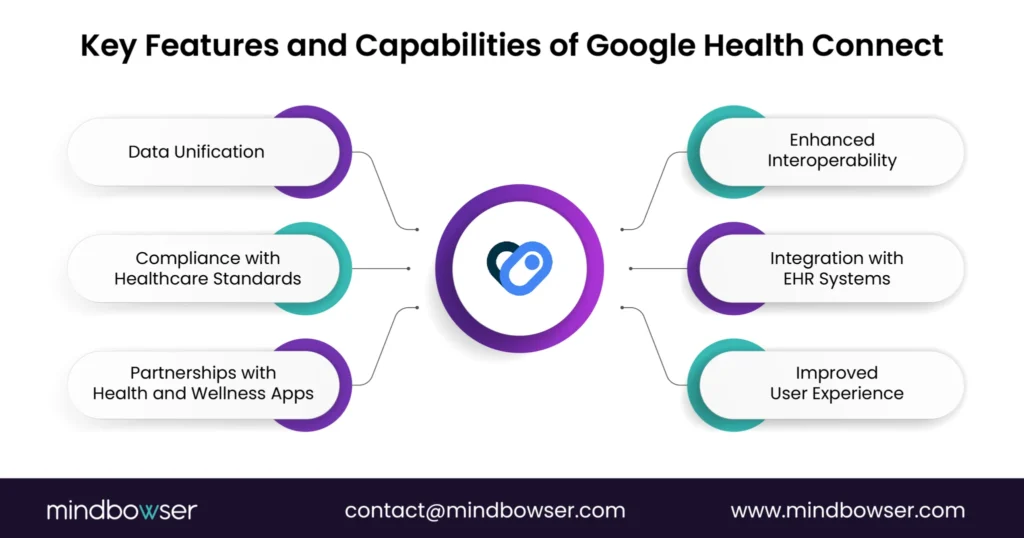
Key Features and Capabilities of Google Health Connect
1. Data Unification
Health Connect brings together data from a variety of apps and devices. This unification means users no longer have to juggle information across multiple platforms. Instead, all the health data—from steps to sleep patterns—is aggregated into one central location, offering a clearer overview of health.
2. Enhanced Interoperability
One of the core benefits of Health Connect is its focus on interoperability. It ensures that data from different fitness apps and devices can be exchanged across platforms, allowing for better integration with healthcare systems and ensuring a more holistic view of a user’s health.
Related Read: The Future of Interoperability in Healthcare
3. Compliance with Healthcare Standards
Health Connect has been built with privacy and security, adhering to healthcare standards HIPAA and other data protection regulations. This makes it a reliable option for users who want to ensure their data is managed according to industry best practices, establishing trust with users and health professionals.
4. Integration with EHR Systems
The platform supports integration with Electronic Health Records (EHRs), making it easy for healthcare providers to access relevant fitness and health data. This integration reduces manual steps in workflows and offers a more comprehensive view of a patient’s health, enabling better decision-making.
5. Partnerships with Health and Wellness Apps
Health Connect partners with top fitness and wellness apps, ensuring users can access a wide range of tools that help monitor their well-being. These partnerships allow the platform to expand its reach and provide more functionalities, making it one of the best health apps available today.
6. Improved User Experience
The platform prioritizes ease of use, allowing healthcare providers and patients to review health data quickly and effectively. With intuitive design and user-friendly interfaces, Health Connect is optimized to help users access insights without any unnecessary complexities.
III. The Role of Interoperability in Modern Healthcare
Healthcare interoperability enables different health systems and platforms to share and use patient data seamlessly. Data from EHRs, wearables, and fitness apps must integrate smoothly to improve patient care and streamline healthcare delivery.
Platforms like Health Connect and integration layers such as ConnectHealth advance interoperability by connecting wearables and health-tracking apps with clinical systems. This integration gives healthcare providers a complete view of a patient’s health, enabling informed care decisions and better health management.
For providers, interoperability reduces manual data entry, allowing more focus on patient care. Patients benefit from personalized treatment, improved care outcomes, and fewer errors through data-driven decisions.
IV. Migrating From Google Fit to Health Connect: The Actual Steps
Migration is not a flag-flip. Google’s own guidance is explicit: “Don’t ask users to disconnect from Google Fit.” Instead, you offer Health Connect as a parallel option, prompt the user to grant permissions, and read from Health Connect going forward. There is no automatic data transfer between the two platforms.

Five concrete steps for an Android team:
1. Confirm your platform baseline.
Health Connect ships as a system component on Android 14 (API 34) and above. On Android 9 through 13, Health Connect is available as a separate APK from the Play Store — your app needs to handle the “Health Connect not installed” case. Plan for both paths if your install base spans both.
2. Add the Jetpack dependency.
dependencies {
implementation "androidx.health.connect:connect-client:1.1.0-alpha07"
}
(Use the current stable version from the Jetpack Health Connect release notes at publish time.)
3. Replace OAuth scopes with Android manifest permissions.
Google Fit used OAuth scopes for data access. Health Connect uses Android manifest permissions plus an on-device permission flow handled by the Health Connect PermissionController. Declare each data type you need in your manifest:
<uses-permission android:name="android.permission.health.READ_STEPS" />
<uses-permission android:name="android.permission.health.READ_HEART_RATE" />
<uses-permission android:name="android.permission.health.READ_SLEEP" />
There is no OAuth round-trip. Permissions are granted by the user inside the Health Connect app on-device, which is a meaningful privacy and friction improvement.
4. Map your existing Fit reads to Health Connect record types.
- Google Fit API → Health Connect Equivalent
- Recording API (steps) → StepsRecord
- History API (aggregates) → HealthConnectClient.aggregate()
- Session API (workouts) → ExerciseSessionRecord
- Sleep tracking → SleepSessionRecord
- Heart rate samples → HeartRateRecord
- SpO2 → OxygenSaturationRecord
- Body weight → WeightRecord
- Sensor API (real-time) → Android SensorManager + FusedLocationProviderClient
Note: There is no direct Health Connect equivalent to Fit’s Sensor API for real-time sensor streaming. For RPM use cases that require live data, you will route through the Android sensor framework (or a wearable SDK like the device manufacturer’s) and write summarized records to Health Connect for persistence.
5. Initialize the client and request permissions.
val healthConnectClient = HealthConnectClient.getOrCreate(context)

val permissions = setOf(
HealthPermission.getReadPermission(StepsRecord::class),
HealthPermission.getReadPermission(HeartRateRecord::class)
)

val granted = healthConnectClient.permissionController
.getGrantedPermissions()

if (!granted.containsAll(permissions)) {
// Launch permission request via PermissionController
}
For end-to-end implementation, Google’s Health Connect migration guide and the Health Connect codelab are the authoritative references and are kept current with the deprecation timeline.
V. What This Means for Remote Patient Monitoring (RPM) Apps
Any Remote Patient Monitoring platform that has been ingesting steps, heart rate, sleep, or weight from Google Fit needs a migration plan in production well before the late-2026 cutoff. The patient-facing app changes are not large in lines of code, but the user-experience flow does change: instead of a single OAuth consent screen at signup, your patients will be routed into the Health Connect app to grant permissions. Onboarding scripts and support documentation need to reflect that.
For a deeper dive on the wearable-app side of the build, see our wearable app development guide and the security expectations in our RPM data security guide. Teams already pulling Fit data continuously should also revisit our older Fetch Google Fit Data Continuously walkthrough because that pattern now needs replanning around Health Connect’s record-based model.
VI. How ConnectHealth Fits Into the Health Connect Ecosystem
As wearable data moves from Google Fit into Health Connect, there’s still a gap between device data and clinical systems. ConnectHealth is Mindbowser’s integration layer that ingests wearable and Health Connect data, converts non-FHIR formats to FHIR R4, and syncs it to clinical systems inside your own AWS VPC – HIPAA-compliant by design.
For smaller clinics and digital-health startups, this means pulling wearable data into clinical workflows without a multi-month integration build. ConnectHealth handles the FHIR conversion and EHR hand-off, so your team works with structured clinical data rather than raw device payloads.
Google Fit is a fitness tracking platform, while Health Connect acts as a data-sharing hub, enabling apps to exchange health and fitness information across platforms.
Yes. Google stopped accepting new developer signups for the Google Fit APIs (REST and Android) on May 1, 2024. Both APIs are scheduled for end-of-service in late 2026. Existing apps continue to function until then, but new development should target Health Connect on Android (or the Fitbit Web API for cross-platform use cases).
Wearable API integration involves linking wearable device data to other software applications, such as healthcare or fitness apps. Through integration, applications can access real-time data from wearables, providing users with personalized insights and supporting features like health monitoring and activity tracking.
Health Connect is replacing Google Fit as Google’s unified platform for managing health and fitness data across multiple apps with improved compatibility and functionality.
There is no automatic data migration. The four practical steps are:
1. add the Jetpack androidx.health.connect:connect-client dependency to your Android project;
2. replace your Google Fit OAuth scopes with Android manifest permissions for each data type you read;
3. map your Fit API calls to the equivalent Health Connect record types (Steps, HeartRate, Sleep, ExerciseSession, etc.);
4. prompt users to grant permissions inside the Health Connect app on-device. Existing Google Fit data does not transfer automatically — users connect each data source to Health Connect themselves.
End of 2026. Per Google’s developer documentation, the Google Fit APIs (including the REST API) will be supported only until the end of 2026. New developer signups have been closed since May 1, 2024.
No. Health Connect is an Android-only data layer. For iOS and web use cases, Google’s deprecation guidance points developers to the Fitbit Web API for fitness data, and to Apple HealthKit for iOS-native integrations. Cross-platform apps will need a parallel iOS implementation rather than a single Health Connect integration.