BLOGS
BLOGS  NEWSROOM
  CASE STUDIES
  WEBINARS
  PODCASTS
  ASSET HUB
  EVENT CALENDAR























Healthcare technology is experiencing a paradigm shift with the emergence of Anthropic’s Model Context Protocol (MCP). But what exactly is Model Context Protocol, and why is it particularly transformative for healthcare applications? Let’s break it down in simple terms before exploring its application in healthcare.
Understanding Model Context Protocol: The Three Stages of LLM Evolution
As one widely-cited breakdown of LLM evolution explains, LLMs have progressed through three distinct stages:
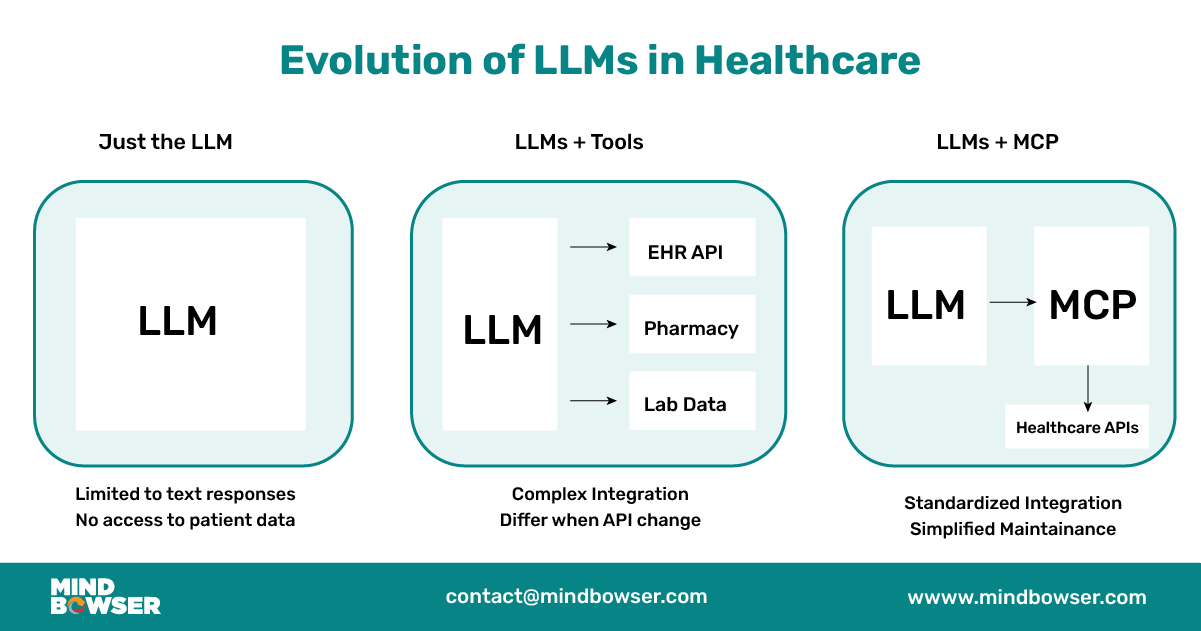
1. Basic LLMs: Limited to Text Generation
LLMs can only predict the next word in a sequence in their basic form. While impressive for writing content or answering knowledge-based questions, they cannot perform meaningful actions in the real world.
“LLMs by themselves are incapable of doing anything meaningful… the only thing an LLM in its current state is good at is predicting the next text.”
This limitation severely restricts their utility in healthcare, where accessing patient records, processing medical data, and taking clinical actions are essential capabilities.
2. LLMs + Tools: Adding Capabilities Through Direct Integration
The second evolution came when developers connected LLMs to external tools and APIs. This approach allows LLMs to search the internet, access databases, process emails, and perform specific tasks:
“The next evolution was when developers figured out how to take LLMs and combine them with tools, and you can think of a tool like an API, for example.”
This might mean connecting an LLM to a patient database, medication reference service, or clinical guidelines repository in healthcare. However, this approach comes with significant challenges:
“It gets frustrating when you want to build an assistant that does multiple things… You become someone who glues different tools to these LLMs, and it can get very frustrating and cumbersome.”
This becomes particularly problematic for healthcare applications, where multiple data sources and tools are essential. Maintaining connections between an LLM and various healthcare systems (EHRs, pharmacy databases, lab systems, etc.) quickly becomes a nightmare of integration points.
To better understand its power and flexibility, here’s a quick look at how Model Context Protocol functions at the technical level.
3. LLMs + MCP: Standardized Protocol for Consistent Integration
Model Context Protocol represents the third evolution – a standardized protocol that sits between the LLM and external services:
“MCP, you can consider it to be a layer between your LLM and the services and the tools, and this layer translates all those different languages into a unified language that makes complete sense to the LLM.”
Rather than directly connecting an LLM to dozens of healthcare systems with different APIs and data formats, Model Context Protocol provides a standardized way for these interactions to occur. This is revolutionary for healthcare, where system interoperability has been a persistent challenge.
The MCP Architecture: Understanding the Components
To implement MCP in healthcare contexts, it’s important to understand its core components:
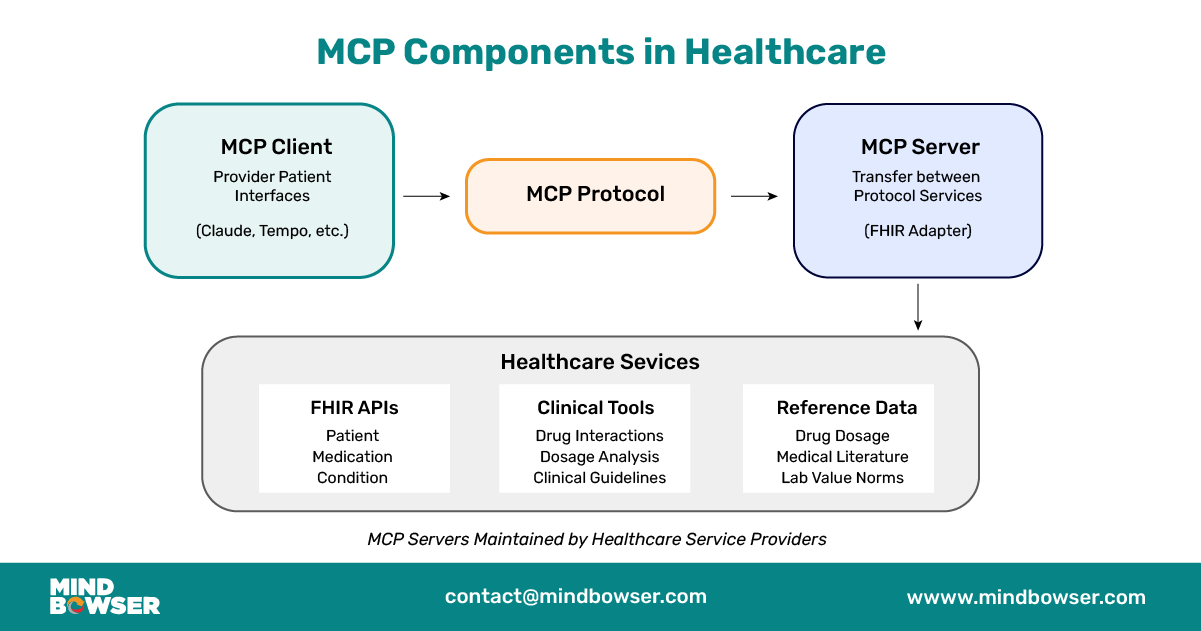
1. MCP Client
The MCP client is the interface that connects directly to the LLM. Examples include Anthropic’s Claude or other implementing platforms like Tempo, Windsurf, and Cursor.
In healthcare, this could be the provider-facing interface where clinicians interact with the AI assistant or a patient-facing application for medication management or care guidance.
2. MCP Protocol
The protocol is the standardized set of conventions governing how information is exchanged between the client and server. This ensures consistent communication regardless of which tools or services are being used.
3. MCP Server
The MCP server translates between the MCP protocol and the actual services or tools:
“The service provider now manages the MCP server. As the development team or tool provider, we are responsible for setting up and configuring the MCP server to ensure the client has full access and functionality.“
For healthcare companies, this means developing MCP servers that expose their FHIR APIs, clinical tools, and medical databases in a standardized way.
4. Services
The actual healthcare services – FHIR databases, clinical decision support tools, medication interaction checkers, etc. – connect to the MCP server.
MCP in Healthcare: A Perfect Match for FHIR
The healthcare industry has invested heavily in FHIR (Fast Healthcare Interoperability Resources) as the standard for electronically exchanging healthcare information. FHIR’s structured, consistent data model with well-defined resources (Patient, Medication, Condition, etc.) aligns perfectly with MCP’s standardized approach.
Why is MCP + FHIR revolutionary for Healthcare Chatbots?
- Standardized Access to Clinical Data: The Model Context Protocol provides a consistent way for LLMs to access FHIR resources across EHR systems and healthcare platforms.
- Tool Integration Without the Headache: Healthcare requires numerous specialized tools (medication interaction checkers, clinical guideline engines, etc.) that can now be integrated through the standardized MCP approach.
- Maintenance Simplified: When APIs change (as they frequently do in healthcare), only the MCP server needs updating, not the entire application.
- Cross-System Communication: Healthcare data lives in many systems Model Context Protocol enables consistent communication across these boundaries
Implementing an MCP-Based Healthcare Chatbot: Practical Example
Let’s explore how we might implement an MCP-based healthcare chatbot that interacts with FHIR resources. I’ll show the key components using code examples.
1. Setting Up the MCP Client for a Clinical Assistant
First, let’s define our MCP client that will interact with Claude:
// mcp-client.ts

import { Claude } from '@anthropic/sdk';

import { MCPClient } from '@anthropic/mcp-sdk';

// Initialize Claude client

const claude = new Claude({

apiKey: process.env.CLAUDE_API_KEY,

model: 'claude-3-5-sonnet'

});

// Create MCP client

const mcpClient = new MCPClient({

claude,

tools: [

{

name: 'fhir_service',

description: 'Access patient medical records via FHIR API',

serverUrl: 'https://mcp.health-provider.com/fhir-service'

},

{

name: 'medication_analyzer',

description: 'Analyze medication interactions and dosing',

serverUrl: 'https://mcp.health-provider.com/med-analyzer'

},

{

name: 'clinical_guidelines',

description: 'Access evidence-based clinical guidelines',

serverUrl: 'https://mcp.guidelines.org/mcp-server'

}

]

});

// Handle provider query

export async function handleProviderQuery(query: string, patientContext?: string) {

const response = await mcpClient.generateContent({

prompt: `You are a clinical assistant helping a healthcare provider.

${patientContext ? `Current patient context: ${patientContext}` : ''}

Provider query: ${query}`,

maxTokens: 2000,

temperature: 0.3

});

return response;

}
2. Implementing an MCP Server for FHIR Resources
Now, let’s implement an MCP server that exposes FHIR resources:
// fhir-mcp-server.ts

import express from 'express';

import { FHIRClient } from '@medplum/fhirclient';

const app = express();

app.use(express.json());

// Initialize FHIR client

const fhirClient = new FHIRClient({

baseUrl: process.env.FHIR_API_URL,

auth: {

type: 'client_credentials',

clientId: process.env.FHIR_CLIENT_ID,

clientSecret: process.env.FHIR_CLIENT_SECRET

}

});

// MCP server endpoint for patient search

app.post('/mcp/patient-search', async (req, res) => {

try {

const { name, identifier } = req.body.params;

// Construct FHIR search parameters

const searchParams = new URLSearchParams();

if (name) searchParams.append('name', name);

if (identifier) searchParams.append('identifier', identifier);

// Execute FHIR query

const result = await fhirClient.search('Patient', searchParams);

// Return standardized MCP response

res.json({

status: 'success',

data: result.entry?.map(entry => entry.resource) || [],

metadata: {

total: result.total || 0,

source: 'FHIR Patient Resource'

}

});

} catch (error) {

res.status(500).json({

status: 'error',

message: error.message

});

}

});

// MCP server endpoint for medication data

app.post('/mcp/patient-medications', async (req, res) => {

try {

const { patientId } = req.body.params;

// Get MedicationRequests for patient

const medications = await fhirClient.search('MedicationRequest', new URLSearchParams({

patient: patientId,

status: 'active,completed'

}));

res.json({

status: 'success',

data: medications.entry?.map(entry => entry.resource) || [],

metadata: {

total: medications.total || 0,

source: 'FHIR MedicationRequest Resource'

}

});

} catch (error) {

res.status(500).json({

status: 'error',

message: error.message

});

}

});

// Start server

app.listen(3000, () => {

console.log('FHIR MCP Server running on port 3000');

}
3. Implementing a Specialized Clinical Tool as an MCP Server
Let’s also implement a medication analysis tool that follows the Model Context Protocol.
// medication-analyzer-mcp-server.ts

import express from 'express';

import { DrugInteractionService } from './services/drug-interaction';

import { DosageAnalyzer } from './services/dosage-analyzer';

const app = express();

app.use(express.json());

// Initialize clinical services

const interactionService = new DrugInteractionService();

const dosageAnalyzer = new DosageAnalyzer();

// MCP server endpoint for medication interaction analysis

app.post('/mcp/analyze-interactions', async (req, res) => {

try {

const { medications } = req.body.params;

// Extract medication codes

const medicationCodes = medications.map(med => {

return med.medicationCodeableConcept?.coding?.[0]?.code || '';

}).filter(code => code);

// Check for interactions

const interactions = await interactionService.checkInteractions(medicationCodes);

res.json({

status: 'success',

data: {

interactions: interactions,

severity: interactions.map(i => i.severity),

recommendations: interactions.map(i => i.recommendation)

}

});

} catch (error) {

res.status(500).json({

status: 'error',

message: error.message

});

}

});

// MCP server endpoint for dosage analysis

app.post('/mcp/analyze-dosage', async (req, res) => {

try {

const { medications, patientDetails } = req.body.params;

// Analyze dosages considering patient factors

const dosageAnalysis = await dosageAnalyzer.analyzeDosages(

medications,

patientDetails

);

res.json({

status: 'success',

data: {

dosageIssues: dosageAnalysis.issues,

recommendations: dosageAnalysis.recommendations

}

});

} catch (error) {

res.status(500).json({

status: 'error',

message: error.message

});

}

});

// Start server

app.listen(3001, () => {

console.log('Medication Analyzer MCP Server running on port 3001');

});
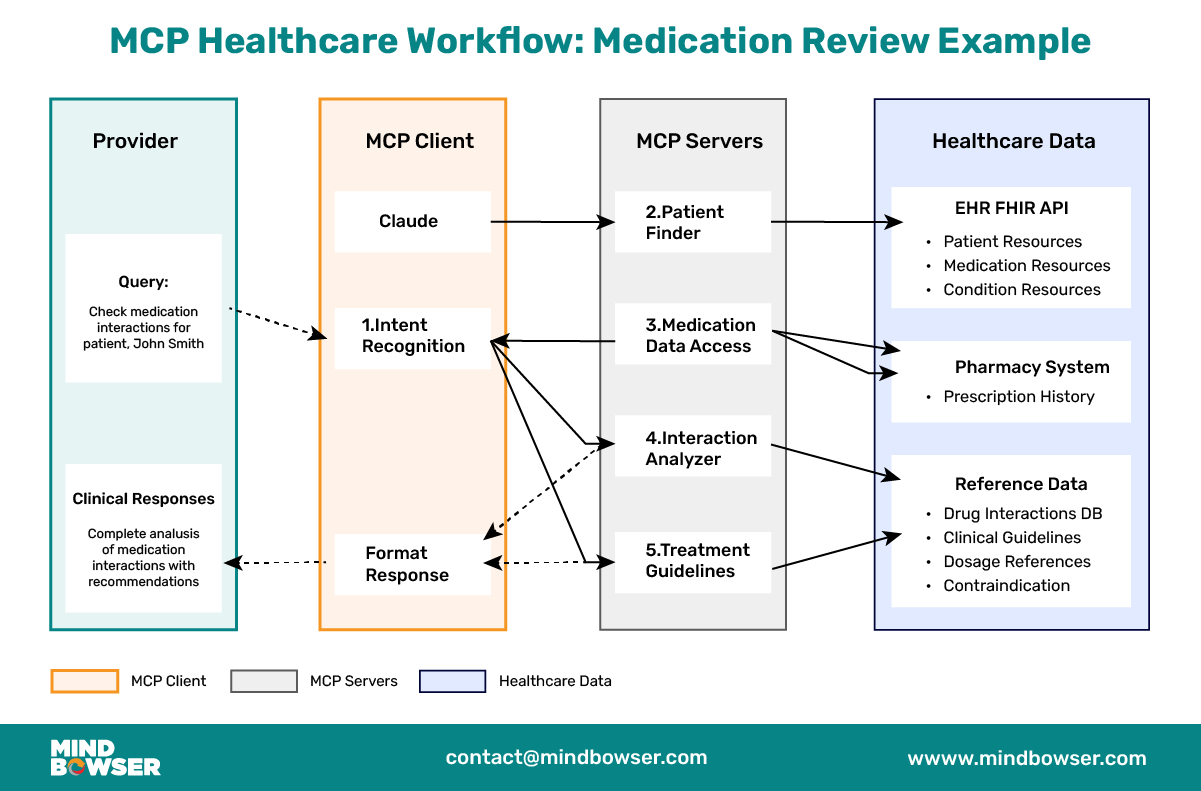
How It All Works Together: A Clinical Scenario
Let’s walk through how this MCP architecture handles a real clinical scenario:
1️⃣ Provider Query:
🔸 A physician asks, “Check for potential medication interactions for patient John Smith, recently prescribed lisinopril.”
2️⃣ MCP Client Processing:
🔸 The MCP client (built with Claude) receives the query
🔸 It recognizes that this requires both patient data and medication analysis
🔸 The client formulates standardized MCP requests to the appropriate servers
3️⃣ FHIR MCP Server Actions:
🔸 Receives request to find patient “John Smith”
🔸 Executes FHIR search query
🔸 Finds the patient and returns standardized patient data
🔸 Receives request for the patient’s medications
🔸 Returns medication data in a standardized format
4️⃣ Medication Analyzer MCP Server Actions:
🔸 Receives medication list from FHIR data
🔸 Performs interaction analysis
🔸 Returns standardized results about potential interactions
5️⃣ Response Generation:
🔸 The MCP client combines all this information
🔸 Claude generates a comprehensive, clinically relevant response
🔸 The physician receives a clear summary of potential interactions
The beauty of this approach is that each component focuses on what it does best, with the MCP protocol providing standardized communication throughout.
Advantages of MCP for Healthcare Applications
The advantages of implementing MCP in healthcare contexts are significant:
For Provider-Facing Applications
- Direct EHR Integration: Connect to multiple EHR systems through standardized MCP servers rather than custom integrations for each.
- Clinical Decision Support: Easily incorporate specialized clinical tools for medication review, treatment planning, and diagnostic assistance.
- Adaptable Architecture: As healthcare APIs evolve, only the MCP servers need updating, not the entire application.
- Cross-System Intelligence: Draw insights from multiple health systems and data sources with consistent access patterns.
For Patient-Facing Applications
- Medication Management: Connect to pharmacy systems, interaction checkers, and adherence tools through a unified interface.
- Care Plan Support: Integration with multiple providers’ systems to create comprehensive care guidance.
- Health Education: Personalize education by accessing patient-specific data and relevant clinical guidelines.
- Multi-Provider Support: Help patients manage care across different health systems and providers.
FHIR as the Data Layer for AI in Healthcare
The emerging challenge in healthcare AI is not building the model — it is getting the model reliable, real-time access to clinical data. FHIR is becoming the answer: as the mandated API standard for EHR data access under ONC’s 21st Century Cures Act, FHIR is the natural data layer for AI agents, clinical decision support tools, and LLM-based assistants working with patient information.
FHIR API for AI: The FHIR API gives AI systems structured, real-time access to patient data, medications, diagnoses, lab results, and vitals without requiring custom EHR integrations per system. An AI assistant that reads FHIR resources can work across Epic, Cerner, and Athenahealth using the same query structure.
FHIR AI and model grounding: LLMs used in clinical settings for chart summarization, prior auth drafting, and care gap identification need structured, grounded data to avoid hallucination. FHIR resources provide that structure: a FHIR Patient resource is a known schema, and a FHIR MedicationRequest has typed fields. FHIR AI in practice means using FHIR resources as the structured context layer that keeps the model’s outputs anchored to real patient data.
MCP as the connection layer: Model Context Protocol is how the LLM connects to the FHIR server at inference time. Instead of baking FHIR queries into the model or writing one-off integrations, MCP servers expose FHIR endpoints as callable tools. The result is AI interoperability in healthcare: one agent, many EHRs, one protocol.
For the broader healthcare AI agent architecture, see how MCP, FHIR, and clinical decision support fit together; see our FHIR and AI agents in healthcare guide.
Implementation Considerations and Challenges
While Model Context Protocol offers significant advantages, there are important considerations for healthcare implementations:
1. Security and Privacy
Healthcare applications must maintain strict compliance with HIPAA and other regulations:
🔸 Ensure all MCP servers implement proper authentication and authorization
🔸 Encrypt all data in transit between components
🔸 Implement audit logging for all data access
🔸 Consider data residency requirements for healthcare information
2. Clinical Validation
Healthcare tools require clinical validation:
🔸 Involve clinical experts in the development and testing of MCP servers
🔸 Implement validation logic to catch clinically inappropriate recommendations
🔸 Consider regulatory requirements for clinical decision support tools
3. Technical Challenges
Healthcare implementations should:
🔸 Establish clear DevOps processes for managing MCP server deployments
🔸 Implement robust monitoring and alerting for MCP components
🔸 Create fallback mechanisms when MCP servers are unavailable
Conclusion
Model Context Protocol represents a significant advancement for healthcare AI applications. MCP addresses the fundamental challenge of healthcare system interoperability that has plagued the industry for decades by providing a standardized way for LLMs to access healthcare data and tools.
Model Context Protocol offers a more sustainable, scalable approach for developers building healthcare chatbots and clinical assistants than direct tool integration. The alignment with FHIR standards makes it particularly well-suited for healthcare implementations, where structured data and reliable access patterns are essential.
Exposing your FHIR data as an MCP server is the connective tissue, and it is the same mapping problem as any integration: every EHR models its FHIR a little differently. ConnectHealth’s pre-built connectors and Helix AI mapping give an MCP server a clean, consistent FHIR surface to sit on, so the AI assistant reads the same resource shape regardless of which EHR is behind it.
As the MCP ecosystem matures, we can expect to see increasingly sophisticated healthcare applications connecting directly with the complex web of systems comprising modern healthcare IT infrastructure. The future of healthcare AI isn’t just about more innovative models; it’s about smarter ways for those models to interact with the healthcare ecosystem.
Building an MCP server over your FHIR data? Talk to our integration team → Contact us
MCP is an open standard (introduced by Anthropic) that lets an LLM connect to external tools and data through a consistent interface. Instead of hand-coding a separate integration for every API, the LLM talks to MCP servers that expose tools and data in healthcare, meaning FHIR APIs, clinical decision support, and medication services in one standardized way.
An MCP client (the app connected to the LLM, e.g., Claude), the protocol (the standardized message format), MCP servers (which expose specific tools and data, like a FHIR server), and the underlying services (the actual EHRs, databases, and clinical tools).
In AI, MCP is the standard that lets an LLM-based assistant access live tools and data safely and consistently, the “USB-C port” for connecting models to systems rather than bespoke integrations per tool. In healthcare, that means one AI assistant can query FHIR APIs, clinical guidelines, and medication databases through a single protocol instead of custom code for each.
A healthcare team builds an MCP server that exposes FHIR resources (Patient, MedicationRequest, Observation) to the LLM. The AI assistant requests data through the MCP server in a standardized way, so the same agent works across different EHRs, Epic, Cerner, and Athenahealth without custom integration per system. This is the same pattern shown in the FHIR MCP server code examples above.