BLOGS
BLOGS  NEWSROOM
  CASE STUDIES
  WEBINARS
  PODCASTS
  ASSET HUB
  EVENT CALENDAR























TL;DR
EpicCare Link is a secure, web-based portal that offers external providers read-only access to Epic EHR. It enables real-time visibility, referrals, and care coordination, integrating with core Epic modules. However, it has limitations in interoperability depth and often requires custom integration layers to support enterprise-scale workflows.
What if there were a way for external healthcare providers to seamlessly access patient data without needing full access to an EHR system?
Enter EpicCare Link, a secure, web-based portal that bridges the gap between hospitals and external providers by offering real-time visibility into patient information.
We explore how EpicCare Link works, its benefits and limitations, and how it fits into the larger Epic ecosystem, helping healthcare organizations improve care coordination and operational efficiency.
I. What Is EpicCare Link? (And Why Health Systems Rely on It)
EpicCare Link is a secure, web-based portal that provides external providers with read-only access to Epic’s Electronic Health Record (EHR) system.
It serves as an extension of the Epic ecosystem, allowing healthcare organizations to share critical patient data with stakeholders outside their immediate network.
By enabling external physicians, care teams, and other healthcare providers to view a patient’s clinical information, EpicCare Link plays a key role in improving collaboration and communication across different care settings.
This portal effectively acts as a “read-only bridge” between the hospital’s Epic EHR and external providers, granting them access to essential patient information without the need for full integration into the EHR. This type of access is especially beneficial for healthcare systems that need to coordinate care with community physicians, post-acute facilities, and other external providers while ensuring that sensitive patient data remains secure.
EpicCare Link’s primary benefit lies in its ability to extend the capabilities of Epic EHR beyond the hospital walls, allowing for real-time data exchange and ensuring that care teams have access to accurate, up-to-date patient information. This connectivity helps foster continuity of care, reduce redundancy, and ultimately improve patient outcomes.
However, while it provides critical access to patient data, EpicCare Link is not a complete solution for external workflows.
It cannot modify or update patient data, which limits its functionality in certain care coordination scenarios. Furthermore, it requires integration with other systems or custom development for comprehensive workflow automation and full interoperability across healthcare networks.
II. How Does EpicCare Link Work? (Architecture + Data Flow)
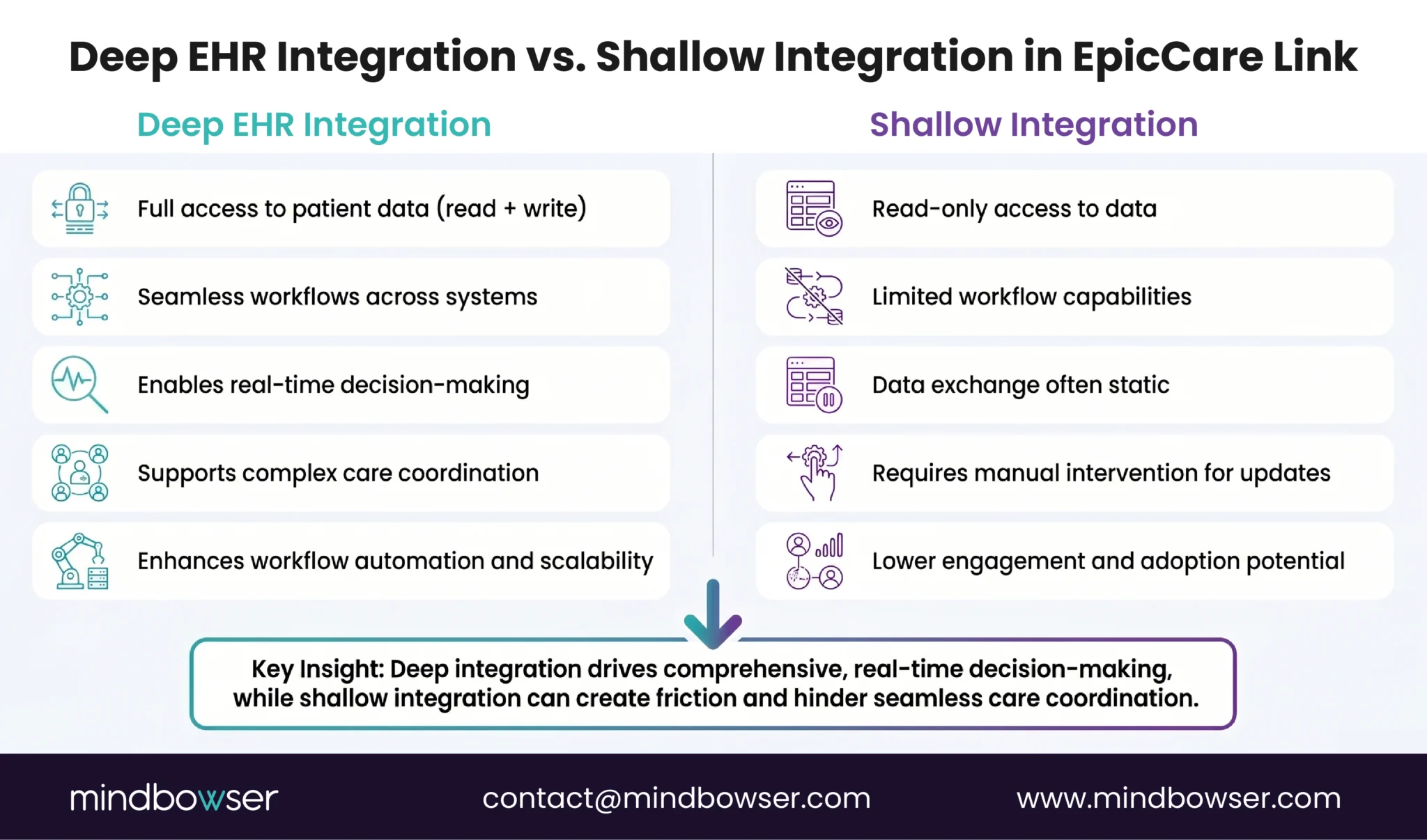
EpicCare Link operates as a secure, browser-based portal, enabling external healthcare providers to access essential patient data within the Epic EHR system. Below, we’ll explore its core functionality, data flow, and the types of data available to users.
A. Core Functionality
EpicCare Link is a web-based solution, meaning that it does not require software installation or complex setup for external users. As long as the provider has access to the internet and a compatible browser, they can log in and view patient data from anywhere.
Access to EpicCare Link is granted through role-based authentication, ensuring that only authorized users can access patient data. This approach allows healthcare organizations to maintain strict control over data privacy and security while enabling authorized care providers to quickly view the necessary information.
Once logged in, external providers can view real-time data synced directly from the Epic system. Any updates made within Epic are immediately reflected in EpicCare Link, ensuring that external users always have the most current patient information available for decision-making.
B. Data Available to Users
EpicCare Link allows external providers to access a wide range of clinical data, depending on the permissions granted by the healthcare organization. The following types of data are typically available to users:
- Labs: Results from laboratory tests and diagnostic procedures.
- Imaging: Radiology images and reports, enabling external providers to view diagnostic images directly from the portal.
- Notes: Clinical notes, including progress notes, physician assessments, and other documentation from the patient’s care team.
- Medications: A list of prescribed medications, including dosages, start/end dates, and refill information.
- Allergies: A record of the patient’s allergies to medications, foods, or other substances.
- Discharge Summaries: Important information provided after a patient is discharged, including follow-up care instructions.
- Referral Tracking: Status of patient referrals, providing transparency for both referring and receiving providers.
This comprehensive set of data enables external providers to make informed decisions based on the most up-to-date patient information available.
III. Interoperability with Epic Modules (How EpicCare Link Fits into the Ecosystem)
EpicCare Link is not a standalone solution; rather, it functions as an extension of the Epic ecosystem, enabling external providers to gain visibility into internal workflows.
By connecting with core Epic modules, EpicCare Link bridges the gap between hospitals, clinics, and external providers, but it does not offer deep interoperability outside of the Epic system. Below, we’ll explore how EpicCare Link interacts with various Epic modules to provide a seamless experience for external providers.
A. EpicCare Inpatient (ClinDoc) & Ambulatory
EpicCare Link provides access to clinical documentation across both inpatient and outpatient settings. External providers can view detailed patient records, including visit history, clinical notes, medications, and allergies. This is essential for continuity of care, as it allows external providers to gain insights into a patient’s complete medical history, whether they are being seen in a hospital or in an outpatient clinic.
EpicCare Link facilitates real-time synchronization between inpatient and ambulatory records, ensuring that healthcare providers have access to accurate, up-to-date information regardless of the care setting. This integrated view supports better coordination between care teams across different environments and improves patient outcomes.
B. Radiant (Radiology) & Beaker (Laboratory)
EpicCare Link offers access to diagnostic imaging reports and laboratory results, providing external providers with the tools they need to make faster clinical decisions. By enabling access to radiology reports and imaging directly from the portal, EpicCare Link helps external providers quickly evaluate a patient’s diagnostic data without needing to wait for physical copies or additional communications.
Additionally, real-time access to laboratory results enhances care coordination by ensuring that external providers are immediately aware of any changes in a patient’s condition that could impact their treatment plan. This capability supports more timely and informed decision-making.
C. ASAP (Emergency Department)
EpicCare Link enables real-time alerts when patients visit the Emergency Department (ED), ensuring that external providers are immediately notified of important events such as admissions, discharges, and transfers. This visibility allows providers to coordinate follow-up care more effectively, ensuring that patients receive timely care after an ED visit.
Furthermore, the ability to track patient status in real-time reduces gaps in communication and ensures that external providers are well-informed about any immediate actions that need to be taken, improving the patient care experience.
D. Referrals & Orders Integration
EpicCare Link allows external providers to submit referrals directly into the Epic system, reducing the need for manual intake or faxing. Referrals are tracked within the system, making it easier to monitor the status of referrals and ensuring that no steps are missed in the referral process.
By integrating referral and order workflows into the Epic system, EpicCare Link helps reduce administrative overhead and accelerates the care coordination process. This integration supports faster transitions of care and helps ensure that patients are seen by the appropriate specialists in a timely manner.
E. Care Everywhere (Cross-Organization Interoperability)
EpicCare Link extends its interoperability by leveraging Epic’s Care Everywhere feature, which enables the pulling of external records from other health systems. This allows for a broader view of a patient’s health history, even if the patient has received care outside of the Epic ecosystem.
Care Everywhere enhances collaboration across healthcare organizations and ensures that all providers involved in a patient’s care are informed of the most up-to-date information. This feature is crucial for patients who seek care across different institutions, ensuring seamless transitions between providers.
F. MyChart + “Happy Together” Feature
EpicCare Link aligns the provider view (EpicCare Link) with the patient view (MyChart), thanks to the “Happy Together” feature. This feature aggregates data from multiple Epic organizations, ensuring that providers and patients have access to the same, consistent information.
By aligning the patient and provider perspectives, this integration improves the accuracy of care coordination and enhances patient-provider communication. Patients can more easily share their health information with their care teams, leading to more informed and collaborative care.
Key Insight (Important for Buyers)
While EpicCare Link provides visibility interoperability, it does not offer full workflow interoperability. For more advanced integration, health systems will still need to implement FHIR/HL7 integrations, custom APIs, or middleware orchestration solutions to support enterprise-scale workflows.
IV. Who Uses EpicCare Link? (Use Cases by Role)
EpicCare Link serves a variety of roles within the healthcare ecosystem, enabling external stakeholders to access critical patient data, improve coordination, and enhance the quality of care. Below, we explore the key user groups that benefit from EpicCare Link, along with example workflows that highlight its impact.
A. Community Physicians
Community physicians often rely on EpicCare Link to gain real-time access to patient records from hospitals and outpatient facilities within the Epic network. By having visibility into their patients’ hospitalizations, lab results, and imaging studies, these physicians can provide more informed and coordinated care in their outpatient practices. This access reduces the need for duplicate testing and improves clinical decision-making.
Example Workflow:
- A community physician receives a referral from a hospital, reviews the patient’s discharge summary, and orders follow-up tests through EpicCare Link. The physician can track the referral status and ensure that the patient follows through with the recommended follow-up care.
B. Post-Acute Care Facilities
Post-acute care facilities, such as skilled nursing and rehabilitation centers, use EpicCare Link to access patient records from hospitals and specialists. This ensures that post-acute care teams are fully informed about the patient’s history, medications, allergies, and discharge instructions. EpicCare Link helps streamline care transitions by improving communication between the hospital and post-acute care providers.
Example Workflow:
- A patient is discharged from the hospital to a rehabilitation center. The post-acute care team uses EpicCare Link to review the patient’s discharge summary and medication list, ensuring they are prepared for the patient’s care and avoiding any medication errors.
C. Office Staff
Office staff at physician practices and clinics also benefit from EpicCare Link by gaining access to essential patient information needed for scheduling, patient intake, and billing. By viewing clinical notes, labs, and imaging reports, office staff can ensure that patients receive the appropriate care at each visit and improve operational efficiency.
Example Workflow:
- The office staff schedules an appointment for a patient, using EpicCare Link to review the patient’s recent lab results and imaging reports. This allows them to prepare for the visit and ensure that the physician is fully informed prior to the appointment.
D. Care Managers
Care managers use EpicCare Link to track patient progress, monitor treatment adherence, and coordinate care across multiple providers. They can access patient health data in real-time, making it easier to identify care gaps, track referrals, and support patients through chronic disease management.
Example Workflow:
- A care manager monitors the health status of a patient with chronic conditions using EpicCare Link. They access the patient’s recent ED visits, lab results, and medications to coordinate follow-up appointments and ensure that the patient’s care plan is being followed.
V. Key Features That Drive Adoption
EpicCare Link provides several key features that make it an attractive tool for external providers, driving its widespread adoption. These features enable real-time access to patient data, simplify workflows, and enhance care coordination. Below are the standout features of EpicCare Link that contribute to its success in the healthcare ecosystem.
A. Real-Time Data Access
One of the most compelling features of EpicCare Link is its ability to provide external providers with real-time access to patient data. This ensures that care teams have up-to-date information when making clinical decisions. Whether it’s lab results, imaging reports, or clinical notes, real-time data access helps external providers make faster and more informed decisions, which can ultimately lead to better patient outcomes.
B. Referral & Order Workflows
EpicCare Link streamlines referral and order workflows by allowing external providers to submit referrals directly into the Epic system. This eliminates the need for manual entry, faxing, or other time-consuming processes. By automating these workflows, EpicCare Link reduces administrative burdens, accelerates care transitions, and improves overall efficiency in the care coordination process.
C. Secure Messaging
Secure messaging within EpicCare Link allows healthcare providers to communicate with each other while ensuring patient privacy and HIPAA compliance. This feature facilitates direct communication between external providers, hospitals, and specialists, ensuring that everyone involved in a patient’s care is on the same page. The secure messaging feature supports quick decision-making and efficient care coordination.
D. Event Notifications
EpicCare Link includes event notifications that alert external providers when there are significant updates to a patient’s care, such as a new lab result, a visit to the emergency department, or a referral status change. These notifications help external providers stay informed and take timely actions, reducing delays in care and improving patient outcomes.
E. Web-Based Access (No Install, No Cost)
EpicCare Link is a browser-based platform, meaning that external providers can access the system from any device with an internet connection and a compatible browser. This eliminates the need for costly software installations and allows providers to access patient data from virtually anywhere. The lack of installation requirements makes EpicCare Link an accessible, low-cost solution for healthcare organizations looking to extend the value of their Epic system to external providers.
VI. EpicCare Link Benefits (Where It Actually Moves the Needle)
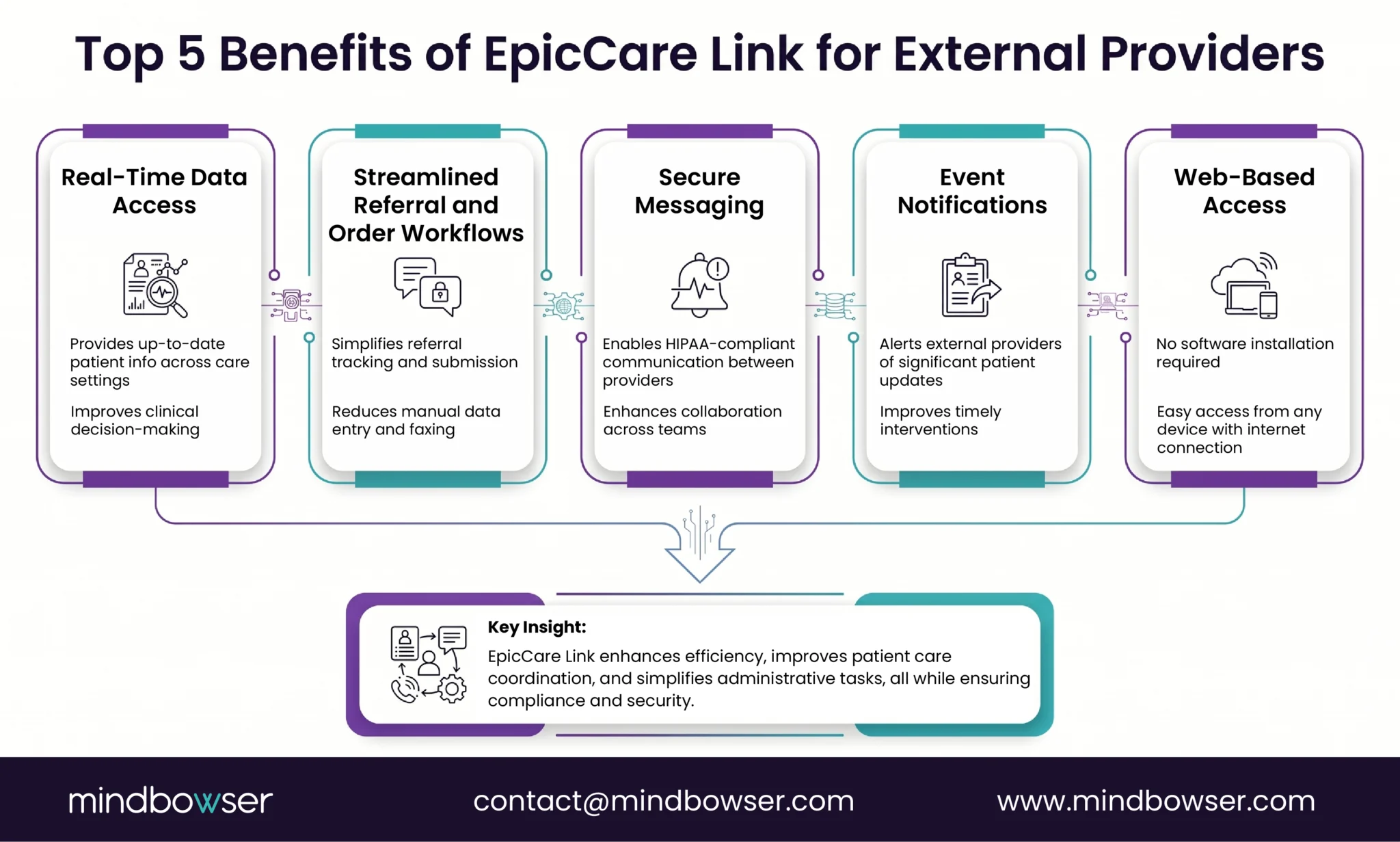
EpicCare Link offers a range of benefits that can significantly improve care coordination, operational efficiency, and patient outcomes. Below, we explore the key advantages of EpicCare Link, focusing on where it truly makes a difference in healthcare settings.
A. Faster Coordination
EpicCare Link enables real-time access to patient data, which accelerates communication and coordination among healthcare providers. With the ability to view patient information instantly, external providers can make quicker decisions about care, leading to faster responses to changes in patient conditions. This speed in coordination reduces delays in treatment, improves time-sensitive interventions, and enhances overall care delivery.
B. Improved Continuity of Care
By offering external providers access to detailed, up-to-date patient information, EpicCare Link plays a crucial role in maintaining continuity of care. This is especially important when patients transition between different care settings, such as from a hospital to a post-acute care facility or from an outpatient clinic to a specialist. With a comprehensive view of the patient’s health record, all care team members can stay informed, leading to fewer gaps in care and more seamless transitions.
C. Reduced Administrative Burden
EpicCare Link reduces the administrative workload for healthcare providers by streamlining referral processes, eliminating the need for paper-based records, and reducing the reliance on faxing. With automated workflows and digital data access, external providers can avoid the time-consuming administrative tasks that often slow down care delivery. This not only improves efficiency but also reduces the potential for errors associated with manual data entry.
D. Better Provider Satisfaction
Healthcare providers experience greater satisfaction with EpicCare Link because it simplifies their workflow, reduces the time spent on administrative tasks, and allows them to spend more time focused on patient care. By enabling real-time data access and streamlining referral processes, EpicCare Link improves the overall experience for both providers and their patients. This leads to enhanced provider engagement, fewer frustrations, and a more productive healthcare environment.
Talk to our Epic integration team
VII. EpicCare Link Limitations (What CIOs Should Know Before Scaling)
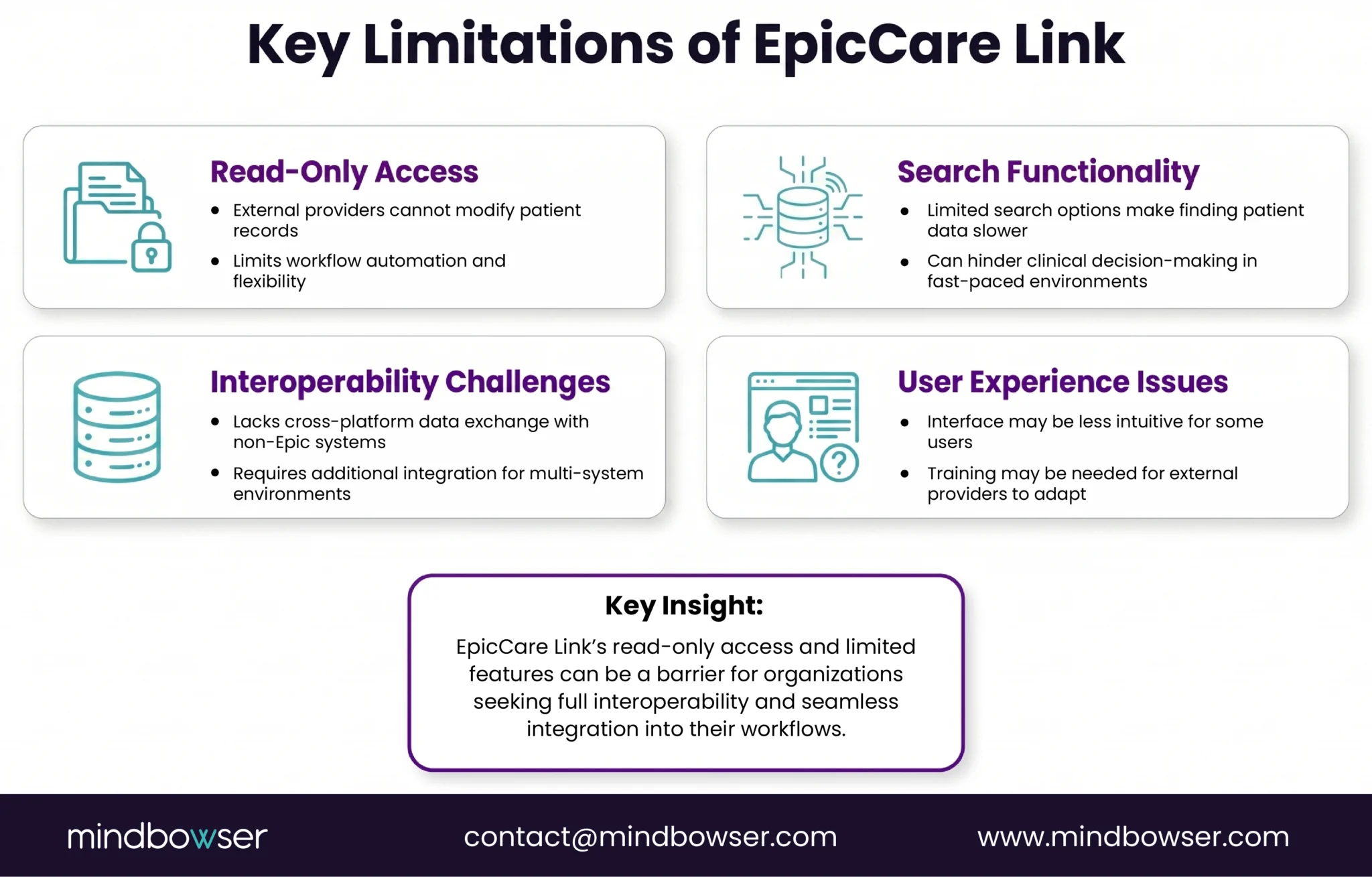
While EpicCare Link offers significant advantages for external providers, it also has several limitations that CIOs should consider before scaling its use across their organization. Below are some of the key challenges and constraints associated with EpicCare Link.
A. Read-Only Constraints
One of the primary limitations of EpicCare Link is its read-only functionality. External providers can view patient data, but they cannot modify or update any information within the system. This restriction can be limiting in scenarios where external providers need to make updates to a patient’s record or directly influence care pathways. For organizations seeking deeper integration between external providers and internal systems, this limitation may require additional solutions, such as custom APIs or middleware for full workflow automation.
B. UX Challenges
While EpicCare Link provides essential access to patient data, the user experience (UX) is often described as less intuitive compared to more modern healthcare tools. External providers may find the interface less user-friendly, especially if they are accustomed to other systems with more seamless, interactive design elements. CIOs should be aware that addressing these UX challenges may require additional training or even customization to improve usability.
C. Search Limitations
EpicCare Link has limited search functionality compared to full Epic EHR integrations. Users may experience challenges in finding specific patient data quickly, especially when dealing with large datasets or complex patient histories. While the platform supports access to a range of clinical data, the search limitations can slow down workflows and reduce overall efficiency. For high-volume environments or enterprise-scale implementations, these limitations may hinder the platform’s effectiveness.
D. Interoperability Gaps Outside Epic
EpicCare Link is deeply integrated with the Epic ecosystem, but it does not offer full interoperability with non-Epic EHRs and external systems. While EpicCare Link provides visibility into patient data from within the Epic system, accessing data from other health systems or platforms may require additional integrations, such as FHIR/HL7 APIs or middleware. For organizations operating in a multi-system environment or those involved in cross-platform care coordination, EpicCare Link’s limited interoperability outside of Epic can be a significant challenge.
E. Security/Access Friction
As a secure, web-based platform, EpicCare Link relies on robust access controls to protect sensitive patient data. However, these access controls can also introduce friction for users. Providers may need to go through multi-factor authentication and other security measures, which can create barriers to quick access. For healthcare organizations with large numbers of external users or those looking to scale EpicCare Link, balancing security with ease of access can be a challenge.
F. Restricted Data Visibility
While EpicCare Link provides access to a wide range of patient data, the level of detail visible to external providers may be restricted depending on the organization’s settings. For example, sensitive or highly confidential information may be withheld from external providers to ensure patient privacy. This restricted visibility can limit the effectiveness of the platform, especially when external providers need comprehensive, in-depth access to all available data for clinical decision-making.
VIII. EpicCare Link vs Full EHR Integration, What’s the Difference?
One of the key decisions healthcare organizations must make is whether to use EpicCare Link or opt for a full EHR integration. While both solutions provide access to patient data, they serve different purposes and have distinct capabilities. Below, we compare the key differences between EpicCare Link and a full Epic EHR integration.
A. Capability
- EpicCare Link: EpicCare Link provides read-only access to patient data, allowing external providers to view clinical information but not modify it. This is ideal for scenarios where external providers need to stay informed without directly interacting with the EHR.
- Full EHR Integration: A full EHR integration provides both read and write access, enabling external providers to update patient records, create orders, and directly participate in care workflows. This option is best suited for organizations that require deep integration between external providers and internal workflows.
B. Data Access
- EpicCare Link: With EpicCare Link, external providers can view essential data such as clinical notes, lab results, medications, and imaging reports. However, they cannot alter or add data, which can be a limitation in some use cases.
- Full EHR Integration: Full integration allows external providers to access and modify patient data, including updating clinical notes, prescribing medications, and placing orders. This offers more comprehensive data access and supports more dynamic care coordination.
C. Workflow Automation
- EpicCare Link: EpicCare Link offers limited workflow automation. It enables external providers to submit referrals and view the status of patient referrals, but it cannot automate more complex workflows, such as order management or care coordination.
- Full EHR Integration: Full EHR integration supports advanced workflow automation, such as order management, real-time updates to care plans, and automated alerts. It allows for seamless integration across the entire patient journey, from admission to discharge.
D. Interoperability
- EpicCare Link: EpicCare Link’s interoperability is limited to the Epic ecosystem. While it can pull data from various Epic modules (e.g., Radiant, Beaker, etc.), it doesn’t support full cross-platform interoperability. Connecting with non-Epic systems often requires additional integrations or middleware.
- Full EHR Integration: Full EHR integration supports greater interoperability across different platforms, including external health systems, other EHRs, and third-party applications. It offers more flexibility and scalability for multi-system healthcare networks.
E. Customization
- EpicCare Link: Customization options for EpicCare Link are limited. While organizations can control which data is visible to external providers, they cannot tailor workflows or deeply personalize the user experience.
- Full EHR Integration: Full EHR integration provides greater customization options, allowing healthcare organizations to tailor the system to their specific needs. This includes configuring workflows, designing custom forms, and integrating with third-party solutions.
Summary Comparison Table
| Feature | EpicCare Link | Full EHR Integration |
|---|---|---|
| Data Access | Read-only | Read and Write |
| Workflow Automation | Limited | Advanced |
| Interoperability | Epic-centric | Cross-platform |
| Customization | Low | High |
| Cost | Lower, no installation required | Higher, full system integration required |
IX. When EpicCare Link Is Not Enough (Common Scaling Challenges)
While EpicCare Link serves as a valuable tool for extending the Epic EHR system to external providers, there are several scenarios where it may not meet the needs of a growing or complex healthcare organization.
As organizations scale or adopt new care models, the limitations of EpicCare Link become more apparent. Below are some common challenges healthcare CIOs and CTOs face when trying to scale EpicCare Link.
A. Multi-System Networks
For healthcare organizations that operate in a multi-system environment, EpicCare Link may not provide sufficient interoperability. EpicCare Link is tightly integrated with Epic’s ecosystem but lacks the ability to seamlessly connect with other EHRs or non-Epic systems.
In a network that involves multiple health systems or where patients receive care across different organizations with different EHR platforms, the lack of cross-system interoperability can hinder care coordination and information sharing.
To fully integrate care across these networks, organizations often need to invest in additional integration solutions, such as FHIR/HL7 interfaces, middleware, or third-party EHR platforms that can bridge the gap between different systems.
B. Value-Based Care Models
Value-based care models rely on continuous patient monitoring, real-time decision-making, and deep coordination between providers across multiple settings. While EpicCare Link provides real-time data access, its limited functionality (e.g., read-only access, lack of workflow automation) may not be sufficient for organizations that need to support more dynamic, outcome-driven care models.
To support value-based care initiatives, organizations may need to augment EpicCare Link with additional tools, such as population health management platforms, predictive analytics, and advanced care coordination tools, to facilitate deeper integration and enhance care outcomes.
C. Population Health Initiatives
EpicCare Link is designed primarily to provide visibility into a patient’s clinical data, but does not offer the full range of features necessary for managing large populations. Population health initiatives require more than just access to data; they require tools that allow for risk stratification, patient engagement, and care management at scale.
For example, while EpicCare Link allows providers to view patient records, it doesn’t provide the advanced analytics needed to identify at-risk populations or engage patients proactively. To fully support population health initiatives, organizations may need to integrate EpicCare Link with specialized population health platforms or analytics tools that can provide actionable insights and drive care coordination across entire patient populations.
D. Digital Health Integrations (RPM, AI, etc.)
As healthcare organizations increasingly adopt digital health solutions, including remote patient monitoring (RPM) and artificial intelligence (AI) tools, EpicCare Link may not provide the necessary capabilities to integrate these technologies into the broader care workflow. While EpicCare Link can offer visibility into clinical data, it lacks the depth of integration needed to incorporate real-time data from RPM devices, AI-driven insights, or other digital health solutions into patient care plans.
To ensure smooth integration of these technologies, healthcare organizations may need to build custom APIs or middleware solutions that allow EpicCare Link to work seamlessly with RPM devices, AI tools, and other digital health platforms.
X. How Mindbowser Builds Custom EHR with Epic Integration Capabilities
While EpicCare Link offers essential data visibility, it often requires additional solutions for deep integration, workflow automation, and scalability. Mindbowser specializes in building custom EHR solutions that enhance Epic’s capabilities, addressing the gaps where EpicCare Link falls short. Below, we’ll explore how Mindbowser integrates Epic with other healthcare technologies to provide a seamless, comprehensive EHR experience.
A. Extending Beyond Native Epic Interoperability
EpicCare Link’s interoperability is limited to the Epic ecosystem, but Mindbowser expands these capabilities by incorporating FHIR and HL7 integrations. These integrations enable Epic to communicate with other EHR systems, health information exchanges (HIEs), and third-party applications. Mindbowser’s expertise in cross-platform data orchestration ensures that patient information flows seamlessly between different systems, improving care coordination and reducing gaps in the patient journey.
B. Workflow-Centric System Design
Mindbowser focuses on building customized workflows that enhance the user experience and reduce administrative burdens. For instance, we develop custom referral engines that automate the referral process across different providers and systems, ensuring that patients are tracked and monitored throughout their care journey. Additionally, we create unified care coordination dashboards that provide healthcare teams with a centralized view of patient data, facilitating better decision-making and collaboration.
C. AI-Powered Enhancements
Mindbowser integrates AI technologies to enhance the capabilities of Epic systems. Tools such as AI-driven medical summaries, CarePlan AI, and Readmission Risk models support decision-making by providing insights based on patient data. These AI-powered tools help healthcare providers predict patient outcomes, identify high-risk patients, and automate routine tasks, ultimately improving both patient care and operational efficiency.
D. Integration Across Ecosystems
EpicCare Link is primarily designed for Epic systems, but Mindbowser’s custom EHR solutions enable seamless integration with non-Epic EHRs, digital health tools, and remote monitoring platforms. We build robust, scalable integrations that allow healthcare organizations to leverage data from multiple sources, ensuring that all providers involved in patient care have access to the necessary information in real-time.
E. Proven Use Cases
Mindbowser has successfully implemented Epic integrations across a range of use cases, including:
- Referral Automation: We’ve developed custom referral workflows that allow providers to submit, track, and manage referrals directly within the Epic system, improving care coordination and reducing delays.
- Post-Acute Coordination: By integrating Epic with post-acute care platforms, we’ve enhanced continuity of care for patients transitioning from hospitals to rehabilitation centers, skilled nursing facilities, and home health services.
- Unified Patient Longitudinal Records: We’ve built solutions that combine data from multiple EHRs and digital health tools into a unified, longitudinal patient record, providing a comprehensive view of the patient’s health history.
XI. Implementation Considerations (For CIOs & CTOs)
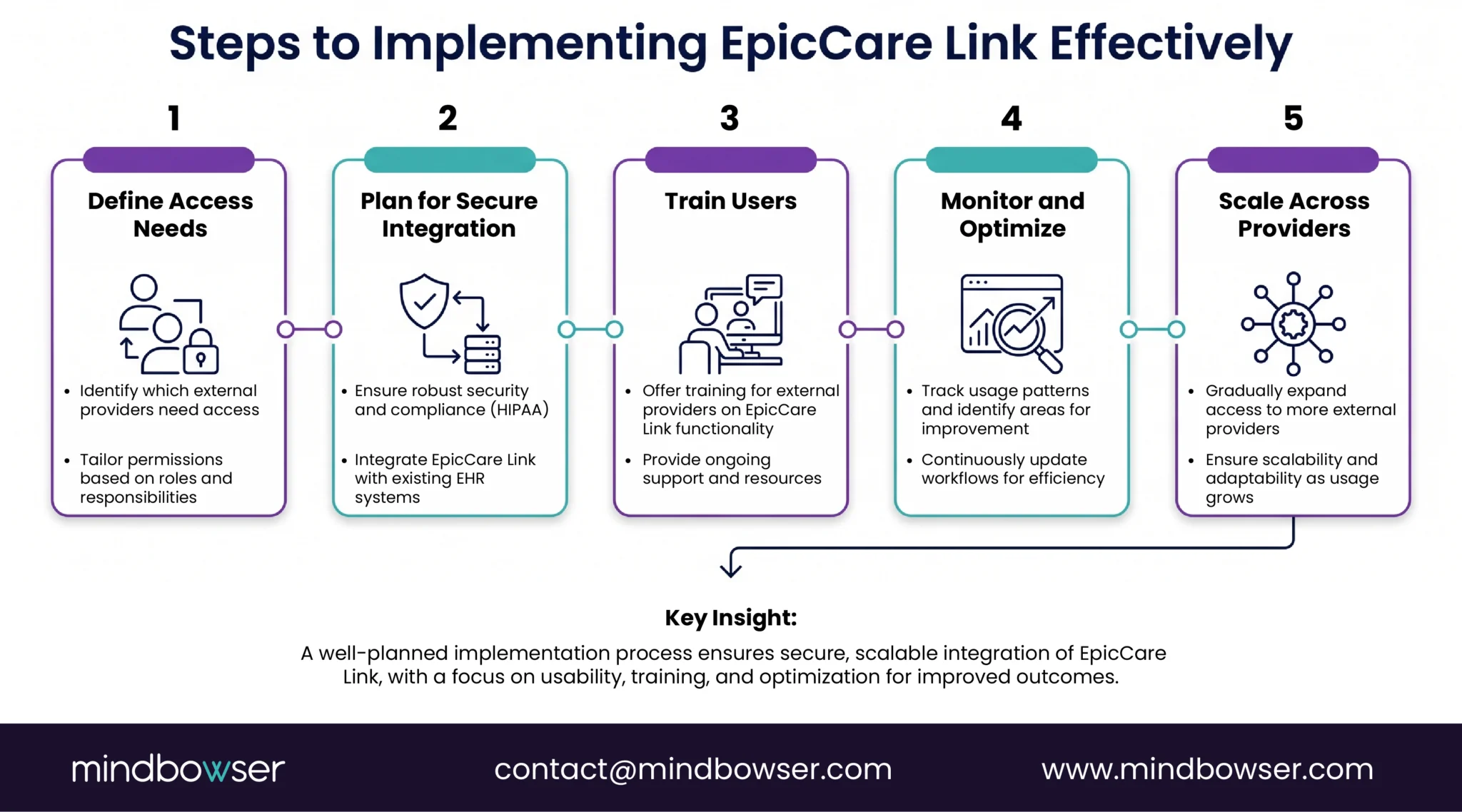
When scaling EpicCare Link or integrating Epic into a broader healthcare ecosystem, CIOs and CTOs need to carefully consider several factors to ensure successful implementation and adoption. Below are the key considerations for organizations looking to implement or expand their use of EpicCare Link.
A. Access Governance
Access governance is a critical aspect of any EHR implementation, particularly when extending access to external providers through platforms like EpicCare Link. CIOs must ensure that only authorized individuals have access to patient data, while also maintaining a smooth user experience. This requires implementing role-based access controls (RBAC), multi-factor authentication (MFA), and strict audit trails to track who accesses patient information.
As healthcare regulations such as HIPAA impose strict requirements for data privacy and security, ensuring that access governance is robust and compliant is vital to prevent unauthorized access and potential data breaches.
B. Adoption Strategy
An adoption strategy is essential to ensure that all stakeholders are effectively onboarded and using EpicCare Link to its full potential. This strategy should include training programs for external providers, ongoing support, and clear communication regarding the platform’s capabilities and limitations. It is also essential to manage expectations and educate users on how EpicCare Link can fit into their existing workflows.
CIOs should consider creating a phased implementation plan, starting with a pilot group of providers, before scaling to larger cohorts. This approach allows for testing and adjustments before rolling out the platform across the entire organization.
C. Integration Roadmap
For organizations aiming to scale EpicCare Link, it is essential to have a clear integration roadmap that outlines how Epic will interact with other systems within the healthcare ecosystem. This roadmap should consider factors such as cross-system interoperability, custom API integrations, and data flow management between Epic and third-party applications.
CIOs should also ensure that integration plans are flexible enough to accommodate future innovations and digital health tools, such as AI or remote monitoring platforms, which may require additional integration points.
D. Compliance (HIPAA, Data Segmentation)
Compliance with healthcare regulations is a top priority when implementing EpicCare Link. CIOs must ensure that patient data is protected in accordance with HIPAA and other relevant privacy laws. Additionally, organizations should consider data segmentation to limit access to sensitive information based on the user’s role and needs.
EpicCare Link can provide a secure platform for managing patient data, but careful attention must be given to ensuring that access controls and data protection protocols are in place. Organizations should work closely with legal and compliance teams to ensure that all data handling processes are compliant.
EpicCare Link Is a Visibility Layer, Not a Full Integration Strategy
EpicCare Link is a valuable tool for extending Epic EHR’s reach beyond hospital walls, offering real-time data access and enhancing care coordination with external providers. While it excels at improving visibility and streamlining workflows, it is not a full integration solution and has limitations in interoperability, customization, and workflow automation.
For organizations seeking deeper integration and advanced features, EpicCare Link must be supplemented with custom solutions and additional technologies.
By understanding its strengths and limitations, healthcare organizations can effectively leverage EpicCare Link as part of a broader strategy to improve care coordination and patient outcomes.
EpicCare Link is a secure, web-based portal that provides external healthcare providers with read-only access to Epic EHR data. It enables real-time visibility into patient information, allowing external providers to view clinical notes, lab results, imaging reports, and more, without modifying the data.
EpicCare Link is primarily designed for external providers such as community physicians, post-acute care facilities, office staff, and care managers. It provides them with essential patient information to improve care coordination and streamline workflows without requiring full access to Epic EHR.
While EpicCare Link offers valuable data access, it has limitations such as read-only access (no data modification), limited search functionality, and restricted interoperability with non-Epic systems. It also faces user experience challenges and requires additional integrations for full workflow automation.
EpicCare Link offers limited customization for data visibility, but more advanced workflow customization often requires additional integrations or third-party solutions. Healthcare organizations can extend EpicCare Link’s functionality by using APIs, middleware, or custom-built integrations to meet specific needs.
EpicCare Link enhances care coordination by providing external providers with real-time access to crucial patient data. This allows for faster decision-making, reduces redundancy in tests, and ensures seamless transitions of care, especially when patients move between different care settings such as hospitals, outpatient clinics, and post-acute facilities.