BLOGS
BLOGS  NEWSROOM
  CASE STUDIES
  WEBINARS
  PODCASTS
  ASSET HUB
  EVENT CALENDAR

























TL;DR
Epic Hyperspace is a legacy, desktop-based EHR interface, while Epic Hyperdrive is its modern, web-based replacement. CIOs must weigh whether to optimize existing Hyperspace installations or migrate to Hyperdrive for enhanced performance, security, and scalability. Successful transitions demand strategic planning around integration architecture, clinical workflows, and end-user experience.
I. What Is Epic Hyperspace?
Epic Hyperspace functions as the central interface for Epic’s Electronic Health Record system, enabling healthcare organizations to manage patient care, clinical documentation, and workflows efficiently. It serves as the gateway to various Epic modules spanning scheduling through clinical documentation.
How Epic Hyperspace Works
Hyperspace operates as a desktop application or through Virtual Desktop Infrastructure (VDI) or Citrix environments, necessitating dedicated hardware and server infrastructure. This thick-client architecture enables customized, role-based dashboards tailored to specific user requirements, whether physicians reviewing charts or nurses documenting medication administration. However, this approach demands substantial IT infrastructure investment for deployment and maintenance.
Key Components:
- Role-based dashboards and menus customized for specific users (physicians, nurses, care coordinators)
- Access to all Epic modules (Ambulatory, Inpatient, Radiology, etc.)
- Delivery via desktop installations, VDI, or Citrix environments
- Seamless access to clinical and administrative workflows across health systems
Who Uses Epic Hyperspace?
- Clinicians (physicians, nurses, healthcare providers)
- Care Coordinators
- Revenue Cycle Teams
- Health IT Administrators
- Population Health Teams
II. What Is Epic Hyperdrive? (The Evolution)
Epic Hyperdrive is the next evolution of Epic’s Electronic Health Record (EHR) interface, designed to address the growing demands for modern healthcare IT systems. Epic developed this replacement to address healthcare’s increasing shift toward web-based solutions.
Why Epic Introduced Hyperdrive
The shift from a thick-client system (Hyperspace) to a web-native architecture (Hyperdrive) is part of a broader trend in the healthcare IT industry to embrace cloud-based technologies and reduce reliance on on-premises hardware.
Several key objectives drove Epic’s decision to introduce Hyperdrive:
- Reduce infrastructure dependency: Hyperdrive eliminates the need for complex desktop installations and VDI setups, which can be costly and resource-intensive.
- Improve update cycles: With web-based deployment, updates and patches can be rolled out more quickly, ensuring that the system stays current and secure.
- Enhance performance and scalability: Hyperdrive offers a more responsive experience with faster load times, reduced latency, and the ability to scale across a wider range of devices and networks.
These advantages enable healthcare organizations to streamline their operations, improve clinician efficiency, and reduce IT overhead.
Key Shifts:
- Transition from a desktop-based to a web-native platform.
- Lower infrastructure costs by reducing hardware and server dependencies.
- Faster, more frequent software updates and enhancements.
- Scalable architecture that supports diverse use cases and devices
How Epic Hyperdrive Works
Hyperdrive operates on a secure, Epic-specific browser framework. Unlike the traditional desktop-based system, it simplifies deployment and ongoing maintenance by relying on a centralized, web-based infrastructure.
This allows healthcare organizations to deploy Epic applications faster and with fewer resources.
The web-native architecture not only improves the overall user experience by reducing load times and latency but also enables easier integrations with modern technologies and systems.
Hyperdrive also offers better support for mobile devices, telehealth applications, and remote work, allowing clinicians to access patient data from virtually anywhere.
Key Features:
- Web-based deployment using a proprietary Epic browser framework.
- Simplified IT management with fewer infrastructure requirements.
- Optimized for mobile, remote, and telehealth access.
- Built to support modern integration standards (e.g., SMART on FHIR, HL7, APIs).
Who Uses Epic Hyperdrive?
- Clinicians: Physicians, nurses, and other healthcare providers continue to use Hyperdrive for managing patient care.
- Remote Clinicians / Telehealth Teams: Hyperdrive’s web-based design makes it ideal for clinicians working remotely or within telehealth models.
- Distributed Health Systems: Enables seamless access across geographically dispersed health systems, supporting interoperability and unified workflows.
- Digital-First Care Models: Health systems focused on digital health and patient-centered care benefit from Hyperdrive’s flexibility and scalability.
III. Epic Hyperspace vs Epic Hyperdrive (Core Differences)
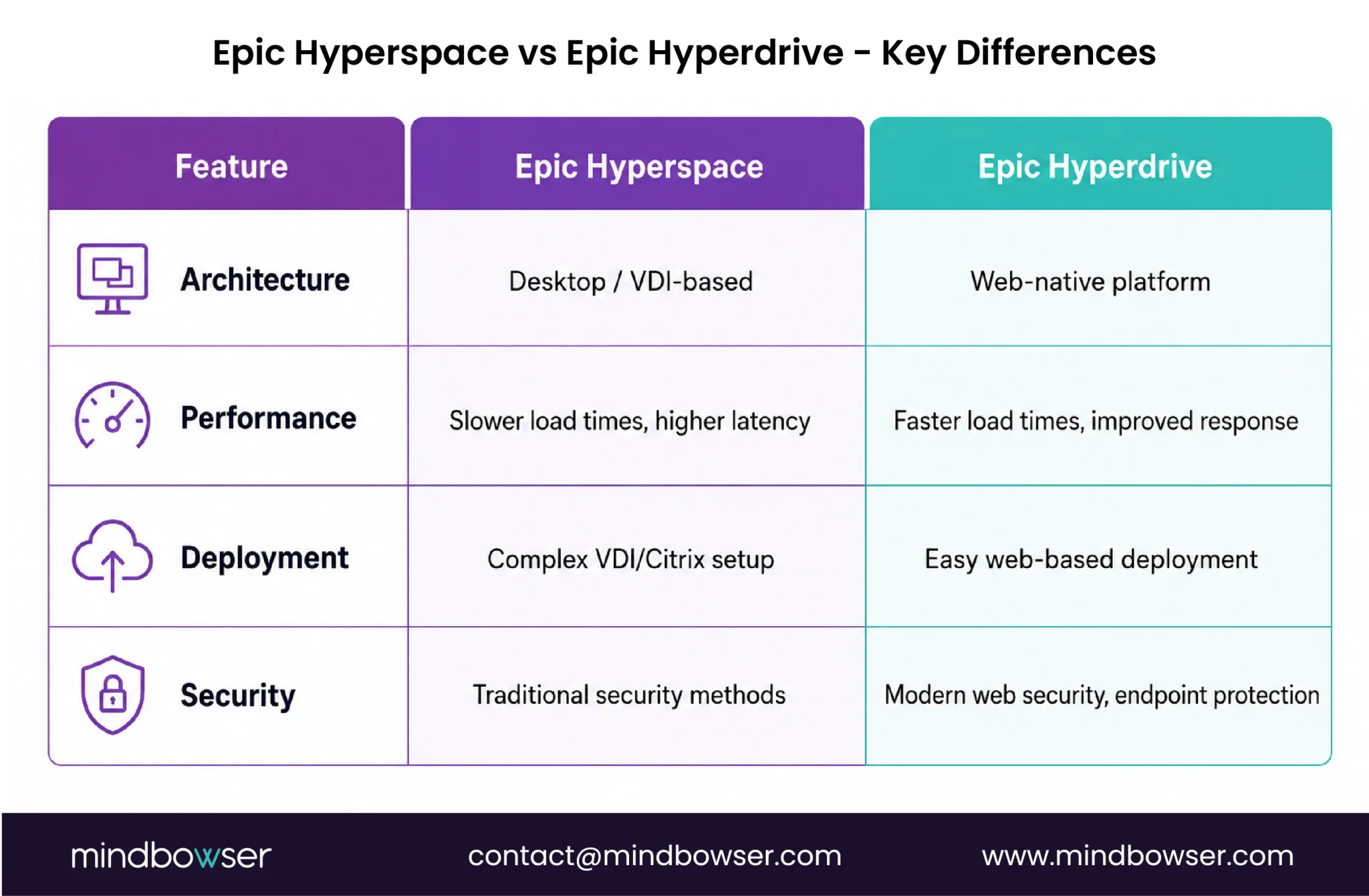
While Epic Hyperspace and Epic Hyperdrive serve the same purpose of providing access to Epic’s EHR system, they differ significantly in terms of architecture, performance, deployment, and security.
These differences have important implications for healthcare IT leaders deciding between the two options.
A. Architecture Comparison
The most notable difference between Epic Hyperspace and Epic Hyperdrive lies in their underlying architecture.
- Hyperspace is a desktop-based system, typically delivered through Virtual Desktop Infrastructure (VDI) or Citrix environments. This “thick client” architecture requires significant IT resources to deploy and maintain, including dedicated hardware and server infrastructure.
- Hyperdrive, on the other hand, is a web-native platform built to run within a secure browser framework. This shift from desktop-based to web-based architecture reduces dependence on on-premises infrastructure and enables more scalable, flexible deployment options.
1. Epic Hyperspace:
- Desktop / VDI-based architecture.
- Requires significant IT infrastructure, hardware, and server support.
- Deployment typically involves complex setups, including Citrix and virtual desktop environments.
2. Epic Hyperdrive:
- Web-native platform that runs through a secure Epic-specific browser framework.
- Requires less infrastructure and is easier to deploy.
- Enables faster scalability and updates through web-based access.
B. Performance and User Experience
When it comes to performance, Epic Hyperdrive offers a clear advantage over Hyperspace.
- Faster Load Times: Hyperdrive’s web-based architecture delivers faster access to patient data and clinical workflows, reducing wait times for screen loads.
- Improved Responsiveness: The Hyperdrive user interface is optimized for modern web standards, ensuring a smoother, more responsive experience, even during peak usage.
- Reduced Latency: Because it is not reliant on complex desktop setups, Hyperdrive offers lower latency, making it ideal for healthcare environments where real-time data access is critical.
1. Epic Hyperspace:
- Slower load times due to desktop-based architecture and VDI/Citrix dependency.
- Can experience lag during high-demand periods, impacting clinician productivity.
2. Epic Hyperdrive:
- Faster load times and improved responsiveness due to web-native design.
- Reduced latency, improving the speed of real-time interactions and data retrieval.
C. Deployment and Maintenance
One of the major benefits of Epic Hyperdrive is the ease of deployment and maintenance compared to Hyperspace.
- Hyperspace requires complex deployments, including VDI and Citrix installations. This can involve significant IT overhead and longer setup times, especially for large health systems with multiple locations.
- Hyperdrive simplifies this process by allowing healthcare organizations to deploy Epic applications through a web browser. The reduced infrastructure needs and easier update cycles make maintenance less resource-intensive and more cost-effective.
1. Epic Hyperspace:
- Requires heavy IT overhead for deployment and ongoing maintenance.
- Updates can be time-consuming and require manual intervention.
2. Epic Hyperdrive:
- Easier to deploy and maintain due to web-based architecture.
- Faster updates and patches, reducing downtime and manual intervention.
D. Security and Compliance
Both Epic Hyperspace and Epic Hyperdrive meet stringent security and compliance standards, but they differ in how they address security needs.
- Epic Hyperdrive offers enhanced authentication methods and better endpoint security by leveraging the latest web-based security protocols.
- Epic Hyperspace, being a legacy system, may require additional security measures to secure desktop environments and data flow.
1. Epic Hyperspace:
- Security is handled through traditional methods (e.g., Citrix, VDI).
- Additional endpoint security measures may be required to protect desktop environments.
2. Epic Hyperdrive:
- Built-in web-native security features, including enhanced authentication and endpoint protection.
- More streamlined compliance with modern healthcare security standards (e.g., HIPAA).
IV. Pros and Cons of Epic Hyperspace
Advantages:
Despite being a legacy system, Hyperspace offers several key advantages for healthcare organizations that continue to rely on it.
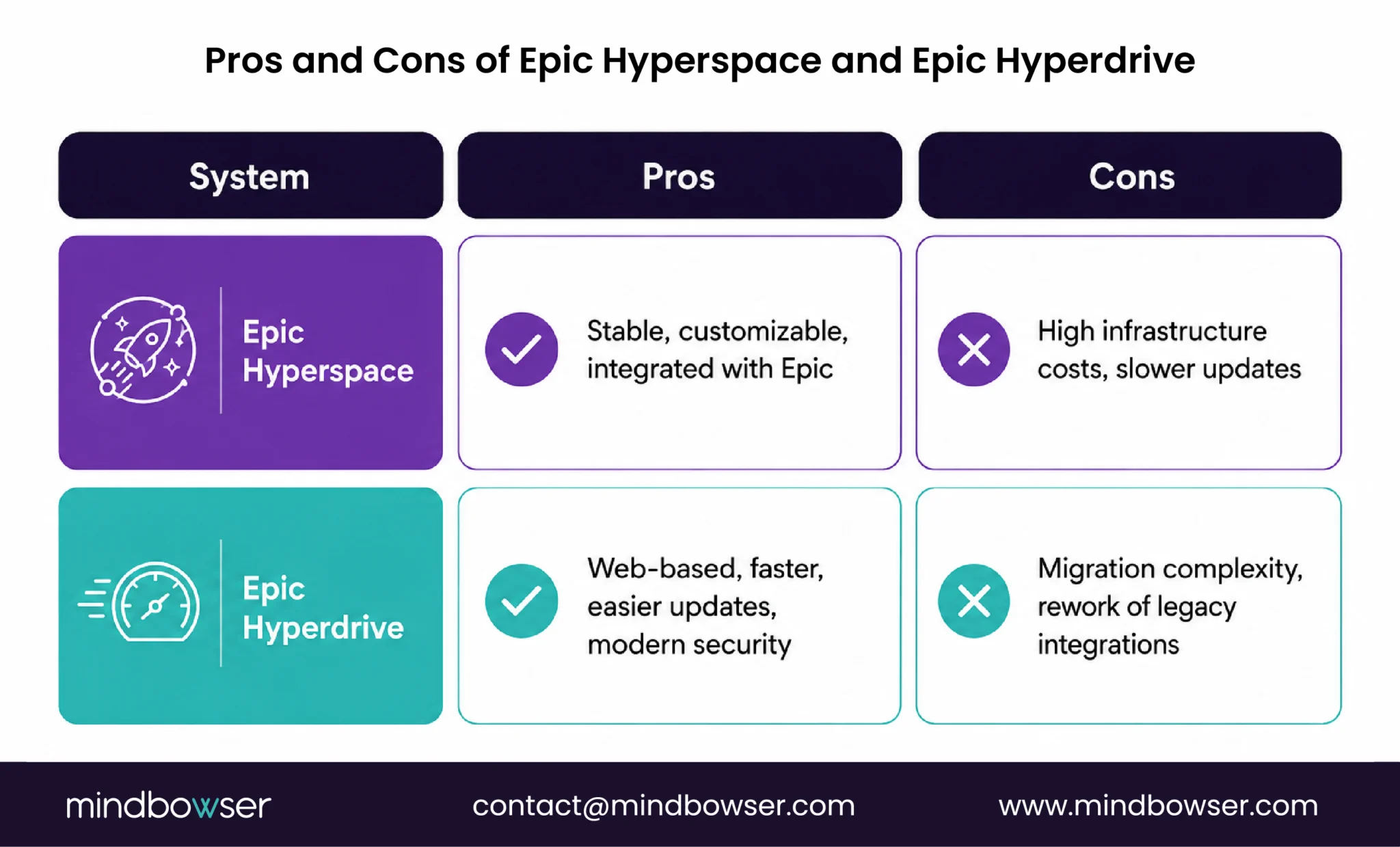
- Mature, Stable Environment: As an established platform, Hyperspace has undergone years of refinement, making it a stable and reliable choice for healthcare IT.
- Deep Customization for Workflows: Hyperspace provides extensive customization options, allowing healthcare organizations to tailor workflows and user interfaces to their specific needs.
- Strong Integration with Existing Epic Modules: Hyperspace integrates seamlessly with the full range of Epic modules, supporting everything from patient care management to billing and scheduling.
- Familiar UI and Lower Training Burden: Many clinicians and staff are already familiar with the Hyperspace interface, reducing training time and costs compared to new systems.
Epic Hyperspace Benefits Summary:
- Proven reliability and stability.
- Highly customizable to specific departmental needs.
- Integrated with all Epic modules and tools.
- Familiar interface reduces training costs.
Limitations:
However, Hyperspace also comes with its own set of challenges and limitations that might encourage healthcare organizations to seek alternatives, such as Hyperdrive.
- High Infrastructure Costs: Running Hyperspace requires substantial investments in hardware for VDI and Citrix environments, increasing both capital and operating expenditures.
- Slower Updates and Upgrades: The desktop-based nature of Hyperspace means that updates and upgrades are often slower and more resource-intensive. This can delay access to new features and security improvements.
- Limited Flexibility for Remote or Mobile Use: Because it relies on desktop setups, Hyperspace does not offer the same level of flexibility for mobile, remote, or telehealth use as newer web-based platforms.
- Legacy Integration Constraints: Many legacy systems and third-party applications rely on older COM-based APIs, making them difficult to integrate with newer technologies.
1. Epic Hyperspace Drawbacks Summary:
- Significant infrastructure investment required. – Slower update cycles and innovation.
- Less mobile and remote-friendly.
- Integration challenges with newer technologies.
V. Pros and Cons of Epic Hyperdrive
Epic Hyperdrive addresses many of Hyperspace’s limitations, offering a more modern, scalable solution. However, like any new system, it also comes with trade-offs that healthcare organizations need to consider.
Advantages:
Epic Hyperdrive introduces a range of improvements that can benefit healthcare organizations looking to modernize their EHR systems.
- Web-Based Access: Hyperdrive’s web-native design enables greater flexibility, allowing clinicians to access patient data and workflows from virtually any device, anywhere, at any time.
- Faster Upgrades and Innovation Cycles: With a web-based platform, Epic can roll out updates and new features more rapidly, ensuring healthcare organizations stay on the cutting edge.
- Improved Performance and Usability: Hyperdrive provides a more responsive user interface, reducing latency and improving the overall user experience.
- Better Support for Modern Integrations: Hyperdrive is built to support modern integration standards like SMART on FHIR and RESTful APIs, making it easier to connect with newer applications and technologies.
1. Epic Hyperdrive Benefits Summary:
- Greater flexibility for remote and mobile access.
- Faster updates and easier software maintenance.
- Enhanced performance and user experience.
- More seamless integration with modern systems.
Limitations:
Despite its many advantages, Epic Hyperdrive does have limitations that CIOs must carefully consider during the migration process.
- Requires Rework of Legacy Integrations: Many healthcare organizations have legacy integrations built on COM-based APIs, which will need to be refactored to work with Hyperdrive’s web-based architecture.
- Migration Complexity: Transitioning from Hyperspace to Hyperdrive is not a simple process. It requires careful planning, user retraining, and thorough testing to ensure that workflows remain uninterrupted.
- Parallel Environments During Transition: Healthcare organizations will need to maintain both Hyperspace and Hyperdrive during the migration phase, which can increase IT complexity and resource demands.
1. Epic Hyperdrive Drawbacks Summary:
- Requires legacy integration updates.
- The migration process is complex and time-consuming.
- Dual-environment setup needed during transition.
VI. Interoperability with Epic Modules and External Systems
A. Native Epic Module Interoperability
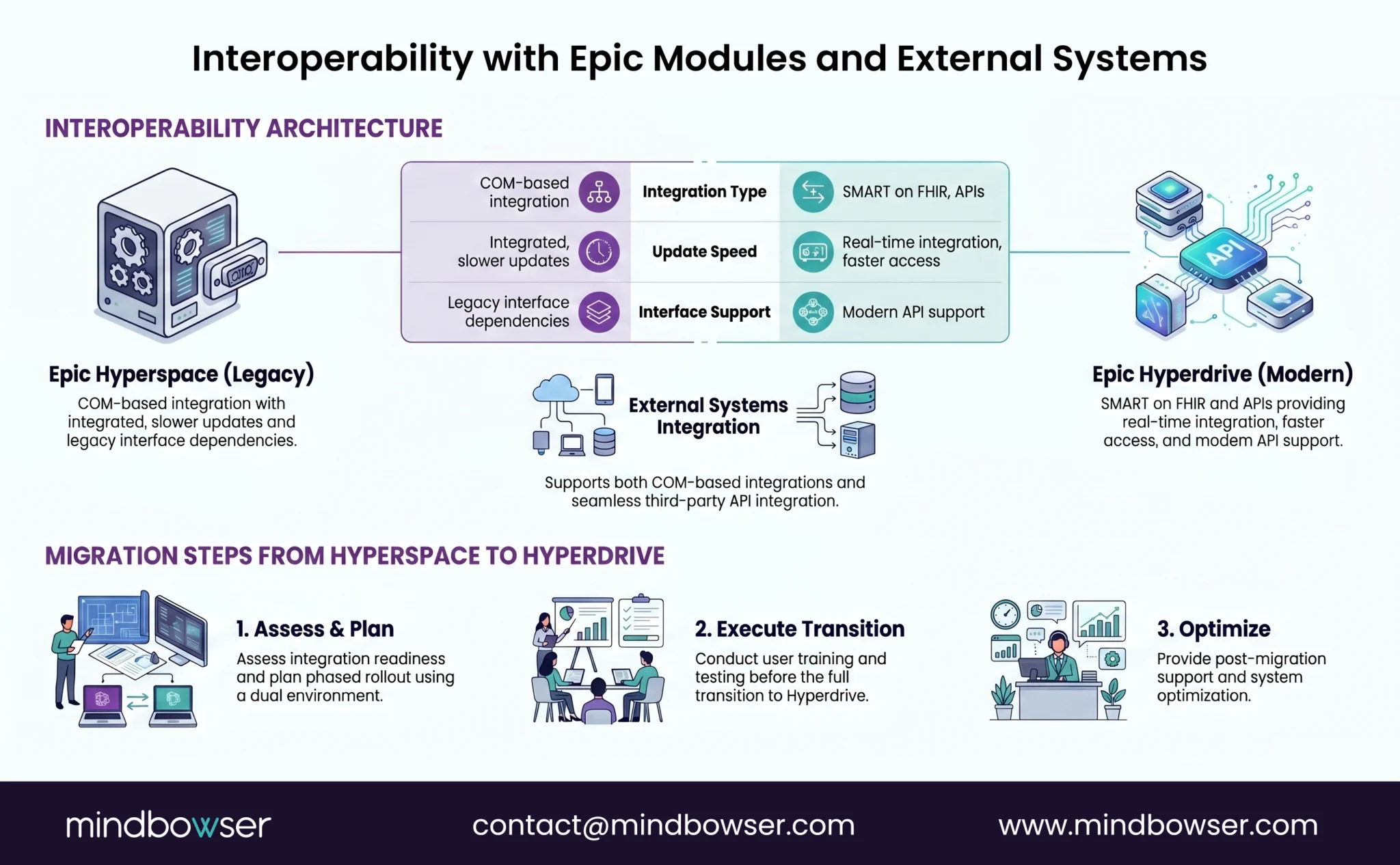
Epic EHR offers a broad range of integrated modules, each designed to handle different aspects of patient care and administration. Both Hyperspace and Hyperdrive can interact with these modules, but the integration methods vary by system architecture.
- Epic Hyperspace: Because it is desktop-based, Hyperspace relies on COM-based integrations to communicate with Epic’s various modules. This legacy integration method can be more challenging to maintain and update as new technologies emerge.
- Epic Hyperdrive: With its web-native design, Hyperdrive offers more modern integration capabilities. It supports newer standards such as SMART on FHIR and RESTful APIs, making it easier to integrate with both Epic modules and third-party applications.
1. EpicCare (Ambulatory/Inpatient)
– Both Hyperspace and Hyperdrive integrate with EpicCare, the core Epic module for patient care, including clinical documentation and order management. However, Hyperdrive offers faster and more efficient data retrieval, improving clinician workflows.
2. MyChart
– Epic’s patient portal, MyChart, is fully supported by both Hyperspace and Hyperdrive. However, Hyperdrive delivers better performance and a more responsive user experience, particularly on mobile.
3. Radiant, Beacon, and Cupid
– Both systems support these modules for Radiology, Oncology, and Cardiology. Still, Hyperdrive’s ability to support modern integration protocols makes it more adaptable for future upgrades.
B. External Interoperability
When considering interoperability with external systems, the differences between Hyperspace and Hyperdrive become even more pronounced.
- Epic Hyperspace: As a legacy system, Hyperspace relies on older integration methods like COM-based APIs and interfaces, which can be more difficult to update and maintain. This can present challenges when integrating with modern third-party systems and technologies.
- Epic Hyperdrive: Hyperdrive supports modern integration standards, including SMART on FHIR, HL7, and RESTful APIs. These standards make it easier for healthcare organizations to connect with external systems such as health information exchanges (HIEs), telemedicine platforms, and other digital health solutions.
1. Epic Hyperspace Integration Limitations:
– COM-based integrations may require custom development or specialized expertise to maintain.
– Legacy interface dependencies can complicate connections with newer systems.
2. Epic Hyperdrive Integration Advantages:
– Supports modern integration standards like SMART on FHIR and HL7.
– Easier integration with external systems and applications due to open API architecture.
Planning Your Epic Migration?
VII. What This Means for CIOs
For CIOs, the decision between Epic Hyperspace and Epic Hyperdrive is not just a technical choice; it’s a strategic decision that impacts workflows, infrastructure, clinician experience, and long-term IT planning.
A. Shift from Embedded Desktop Integrations to API-First, Web-Native Interoperability
One of the biggest shifts from Hyperspace to Hyperdrive is the move from embedded desktop integrations to API-first, web-native interoperability.
This change represents a broader trend in healthcare IT toward more flexible, scalable systems that integrate easily with a wide range of technologies.
CIOs must consider how this shift aligns with their organization’s digital transformation goals, particularly in terms of supporting remote work, telehealth, and mobile access.
Moving to a web-native platform will enable healthcare organizations to access and share patient data more efficiently across different systems and locations.
1. Key Strategic Considerations:
- Scalability: Hyperdrive’s web-native design allows for easier scaling as the healthcare organization grows.
- Flexibility: The ability to integrate with a wider range of modern technologies offers increased flexibility.
- Long-Term IT Roadmap: CIOs must assess how moving to Hyperdrive fits into their long-term IT strategy, including cloud adoption, AI, and data analytics initiatives.
B. Migration Considerations — From Hyperspace to Hyperdrive
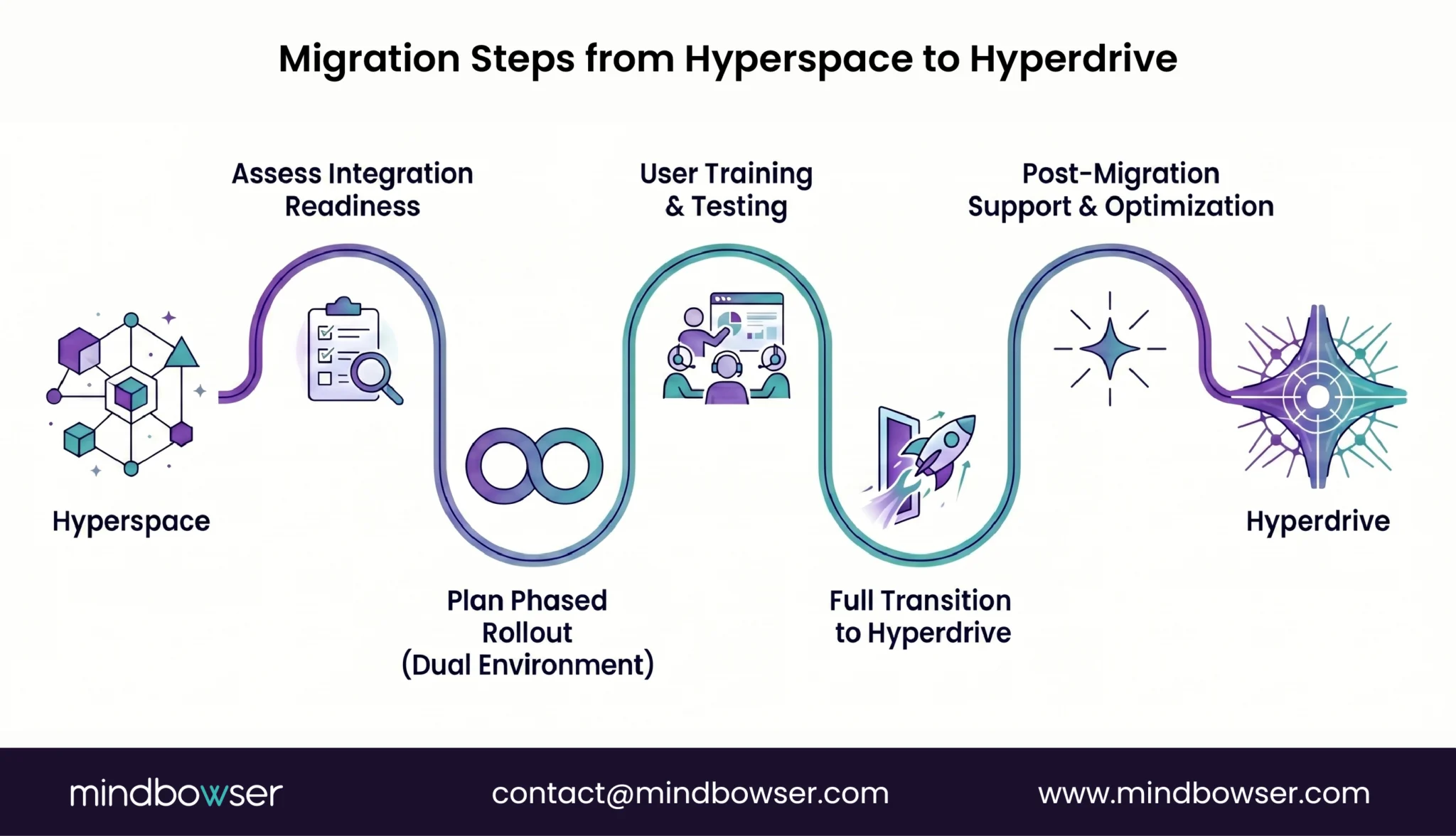
CIOs must carefully evaluate the challenges and benefits of transitioning from Hyperspace to Hyperdrive. This migration is not a one-size-fits-all process, and it requires thorough planning, testing, and communication.
Key challenges to consider include:
- Integration Refactoring: Many legacy integrations will need to be updated to work with Hyperdrive’s modern architecture.
- User Retraining: Clinicians and staff will need to be trained on the new system, which may temporarily affect productivity.
- Vendor Dependencies: Existing vendor relationships (e.g., PACS, transcription) may need to be re-evaluated to ensure compatibility with Hyperdrive.
- Parallel Environments: During the transition, organizations will need to maintain both Hyperspace and Hyperdrive, which can complicate workflows and IT management.
1. Recommended Migration Approach:
- Phased Rollout: Deploy Hyperdrive in stages to reduce disruptions.
- Performance Benchmarking: Test system performance to ensure that Hyperdrive meets organizational needs.
- Integration Readiness Assessment: Evaluate whether existing integrations are compatible with Hyperdrive.
- Change Management Plan: Ensure that a strong change management strategy is in place to support users through the transition.
VIII. When Should You Stay on Hyperspace vs Move to Hyperdrive?
The decision to either remain on Epic Hyperspace or transition to Epic Hyperdrive is not always straightforward. There are several factors to consider, ranging from organizational goals to IT capabilities, that will guide CIOs in making this crucial decision.
A. Stay on Hyperspace If
There are situations where continuing to use Hyperspace may be the best option for a healthcare organization. These include scenarios in which infrastructure, legacy systems, and workflows are deeply integrated into the existing system, with limited capacity for large-scale change.
- Heavy Reliance on Legacy Integrations: If your organization depends on legacy integrations that are difficult or costly to update, staying on Hyperspace might be the most practical choice in the short term.
- Limited IT Bandwidth for Migration: Transitioning to Hyperdrive requires significant IT resources for migration, testing, and retraining. If your IT team is already stretched thin, maintaining Hyperspace might be more feasible.
- Stable Workflows with Minimal Change Needs: For organizations with well-established workflows that do not require significant updates or innovation, the benefits of migrating to Hyperdrive may not justify the costs and effort.
1. Reasons to Stay on Hyperspace:
- Existing legacy integrations are critical to operations.
- Limited IT resources for large-scale migration.
- Stable workflows with minimal disruption required.
B. Move to Hyperdrive If
Transitioning to Epic Hyperdrive may be the right move for organizations looking to future-proof their operations, enhance clinician flexibility, and embrace modern integration standards. Here are the key indicators that moving to Hyperdrive may be advantageous:
- Scaling Digital Health or Telehealth: As healthcare organizations increasingly embrace digital health solutions and telemedicine, Hyperdrive offers the necessary scalability and flexibility to support these initiatives.
- Need for Faster Innovation Cycles: If your organization needs faster access to new features, updates, and security patches, Hyperdrive’s web-native design enables faster upgrade cycles than Hyperspace.
- High Infrastructure Costs from VDI: Organizations experiencing high VDI or Citrix-based infrastructure costs may find that migrating to Hyperdrive significantly reduces these expenses.
- Planning Long-Term Epic Roadmap: For organizations focused on long-term planning and digital transformation, moving to Hyperdrive can help align their IT infrastructure with modern API standards, interoperability, and cloud-based services.
1. Reasons to Move to Hyperdrive:
- Scaling digital health, telehealth, or remote work.
- Need for faster updates, improvements, and security patches.
- High infrastructure costs associated with VDI and Citrix.
- Planning for long-term growth and digital transformation.
IX. How Mindbowser Builds Custom EHR with Epic Integration Capabilities
At Mindbowser, we specialize in building custom Electronic Health Record (EHR) solutions with deep Epic integration.
Our approach to Epic-centric ecosystems ensures seamless integration with your organization’s existing workflows and infrastructure while maximizing the potential of modern technologies like Epic Hyperdrive.
A. Our Approach to Epic-Centric Ecosystems
We adopt an API-first approach when building EHR systems, focusing on modern integration standards like FHIR, HL7, and SMART on FHIR.
This ensures your organization can seamlessly integrate Epic with external systems, including digital health platforms, third-party applications, and telemedicine solutions.
Our solutions are designed to be modular and customizable, allowing healthcare organizations to expand and adapt their EHR systems as needed.
We ensure that Epic’s clinical and financial modules are fully integrated, optimizing both patient care and operational workflows.
1. Key Features of Our Approach:
- API-first architecture with FHIR, HL7, and SMART apps.
- Modular EHR extensions tailored to specific workflows.
- Seamless integration with both clinical and financial Epic modules.
B. Accelerators We Bring
Our custom EHR solutions are enhanced by a suite of accelerators that streamline healthcare workflows and improve outcomes. These accelerators leverage AI, machine learning, and predictive analytics to provide advanced capabilities for clinicians, care teams, and administrators.
- AI Medical Summary: Provides automated, concise summaries of patient health data, allowing clinicians to make faster, more informed decisions.
- CarePlan AI: Enhances care coordination by automating the creation of personalized care plans based on patient data.
- RPM Check AI: A remote patient monitoring solution that integrates with Epic’s modules to track patient health in real-time.
- Population Health Analytics Overlays: Provide advanced analytics tools to manage population health initiatives better.
1. Key Accelerators:
- AI-driven medical summaries and care plans.
- Real-time remote patient monitoring with Epic integration.
- Advanced population health analytics.
C. What Sets Us Apart
Mindbowser is deeply embedded within clinical workflows, not simply adding bolt-on solutions. We bring deep expertise in Epic integrations, interoperability frameworks, and compliance with healthcare standards, including HIPAA and HL7.
This ensures that our custom EHR systems deliver tangible value to healthcare organizations by streamlining workflows, improving data retrieval, and ultimately enhancing patient care outcomes.
1. What Sets Mindbowser Apart:
- Custom EHR extensions embedded directly into clinical workflows.
- Expertise in Epic integrations and interoperability frameworks.
- Strict adherence to compliance and security standards (e.g., HIPAA, HL7).
D. Example Outcomes
Our solutions have delivered measurable outcomes for healthcare organizations, including:
Reduced Clinician Clicks: Streamlined interfaces that reduce the number of steps required to access and document patient information.
Faster Data Retrieval: Enhanced data integration for quicker access to patient records across systems.
Improved Care Coordination KPIs: Increased efficiency in managing patient care by automating care coordination tasks.
Final Takeaway for Healthcare Leaders
Epic Hyperdrive is not just a UI change; it is a significant architectural shift that CIOs must carefully consider. Migration decisions should reflect integration readiness, workflow alignment, and long-term IT strategy. Successful transitions require planning, phased approaches, and strong change management, ultimately improving performance, scalability, and clinician satisfaction.
Epic Hyperspace is a desktop-based (thick client) interface, while Epic Hyperdrive is a web-based platform. Hyperdrive reduces infrastructure needs and improves performance for modern healthcare environments.
Yes, Hyperdrive generally offers faster load times and better responsiveness due to its web-native architecture, improving clinician experience through reduced patient data access delays.
Legacy COM-based integrations used in Hyperspace often need to be updated to FHIR, HL7, or API-based integrations for Hyperdrive compatibility.
Yes, most organizations adopt phased migration approaches with both environments running in parallel to minimize disruption.
Not necessarily. Organizations with heavy legacy dependencies or limited IT resources may stay on Hyperspace temporarily, though long-term strategies typically favor Hyperdrive for scalability and innovation.