BLOGS
BLOGS  NEWSROOM
  CASE STUDIES
  WEBINARS
  PODCASTS
  ASSET HUB
  EVENT CALENDAR
























TL;DR
Epic Secure Chat is Epic’s HIPAA-compliant real-time messaging tool for clinical staff, distinct from In Basket (inbox and task routing) and from consumer messaging apps. For compliance and legal teams, the most common questions are whether messages are monitored, whether they are discoverable in litigation, and how long they are retained. For IT teams, the questions center on configuration, audit log access, and whether Secure Chat data can be exported to external archiving systems. This page covers both.
An attending physician sends a quick message to the on-call resident about a patient, not a task, not a care plan update, just a real-time question about whether the potassium result warrants a callback. That is Secure Chat’s use case. In Basket handles the structured task routing. Different tools, different rules. The distinction matters because Secure Chat and In Basket have different data retention policies, different audit log surfaces, and different eDiscovery exposure.
If you run IT or compliance at an Epic shop, the questions you actually need answered about Secure Chat are the ones Epic’s user documentation does not cover. That is why this page exists.
What Is Epic Secure Chat, and How Does It Differ from In Basket?
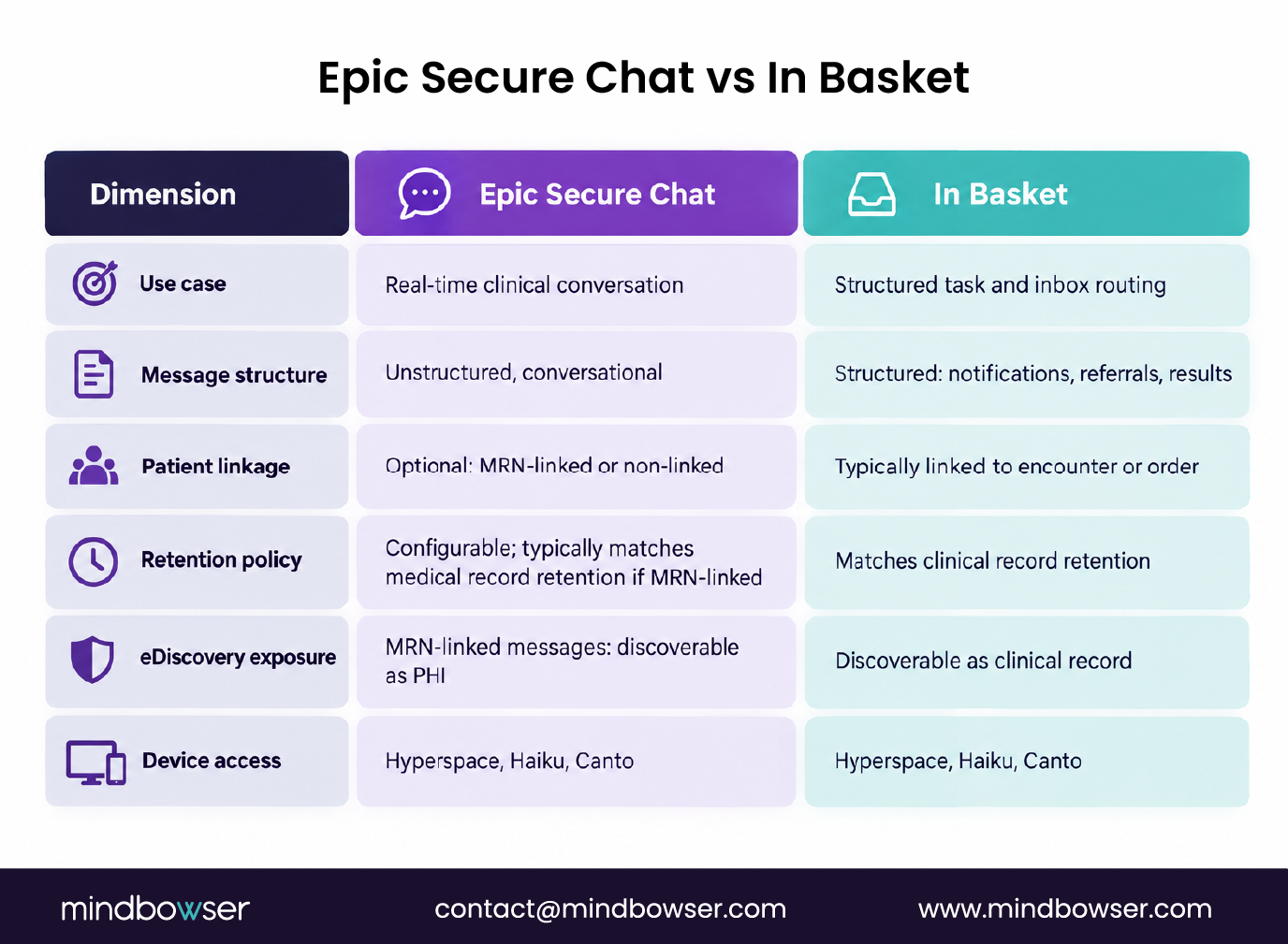
Epic Secure Chat is designed for real-time, asynchronous-tolerant clinical messaging: HIPAA-compliant, stored within Epic, accessible across Hyperspace (desktop), Haiku (mobile), and Canto (tablet). Think secure SMS inside Epic. Unstructured, conversational, cross-device. It is one of the Epic modules most IT and compliance teams interact with daily without treating it as its own governance surface.
In Basket is Epic’s task and inbox routing layer. It handles structured messages: order notifications, referrals, results routing, patient messages that require documentation or action. Secure Chat is what happens between those structured workflows, the real-time clinical conversation layer.
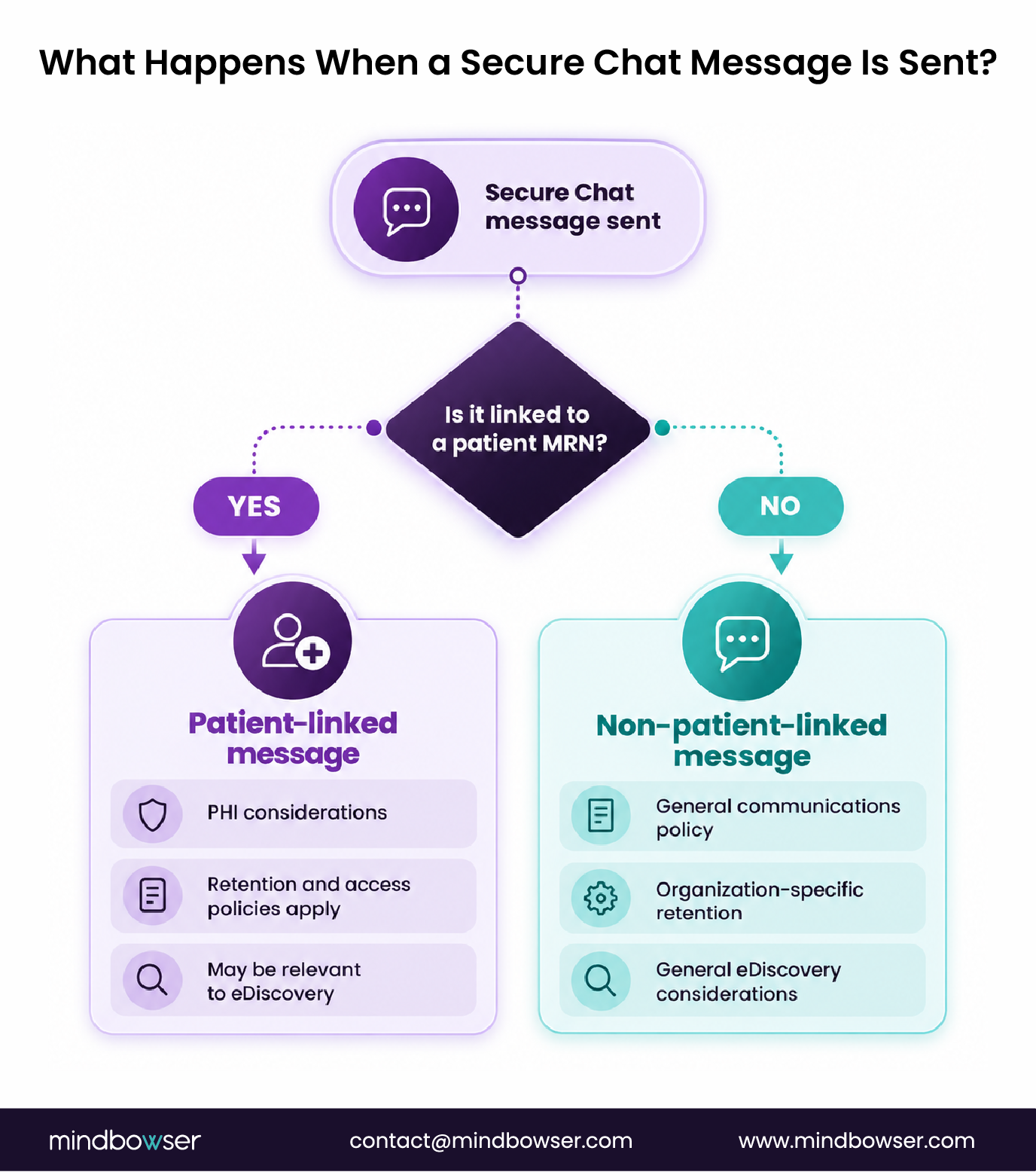
The compliance-critical difference: Secure Chat messages can be linked to a patient MRN. When they are, those messages are tied to the patient record, which is what triggers the “is it discoverable” question. A conversation linked to a patient’s encounter is part of that patient’s record in Epic’s database.
Secure Chat is one of several Epic modules that carry distinct compliance profiles. Treating it as a single monolithic “Epic messaging” surface misses exactly the nuance this page is walking through.
Is Epic Secure Chat Monitored?
This is the most-searched compliance question about Secure Chat, and the answer depends entirely on how the health system configures the system and what it discloses to staff.
Epic Secure Chat messages are stored in the Epic Chronicles database. That storage is always on. Whether messages are actively “monitored” (reviewed by supervisors or compliance staff in real time) depends on the health system’s policy, not Epic’s default configuration.
Epic’s audit trail logs who sent what message, when, and to whom. That audit capability is always on and cannot be disabled. Compliance and security staff with appropriate Epic security roles can access and review message logs at any time, retroactively, not necessarily in real time.
In practice, most health systems do not have continuous real-time monitoring of Secure Chat conversations. But the technical capability for retrospective review exists by default, and it is always available to appropriately credentialed staff.
The workforce governance implication is the part most teams underestimate. Your staff should be told during onboarding that Secure Chat on a hospital system is not private. This is both a workforce training obligation under 45 CFR 164.530(b) and a policy governance question. The monitoring question is as much about what staff are told as it is about what Epic technically does.
MRN-linked Secure Chat conversations, where the patient record is the context, are subject to the same access, retention, and disclosure rules as other PHI in the patient record. Non-MRN-linked messages (staff communication without patient context) fall under the health system’s general communications policy.
Get Epic Secure Chat compliance-ready
Is Epic Secure Chat Discoverable in Litigation?
For legal and compliance teams, this is the sharper version of the monitoring question. And the answer is: it depends on whether the message is MRN-linked.
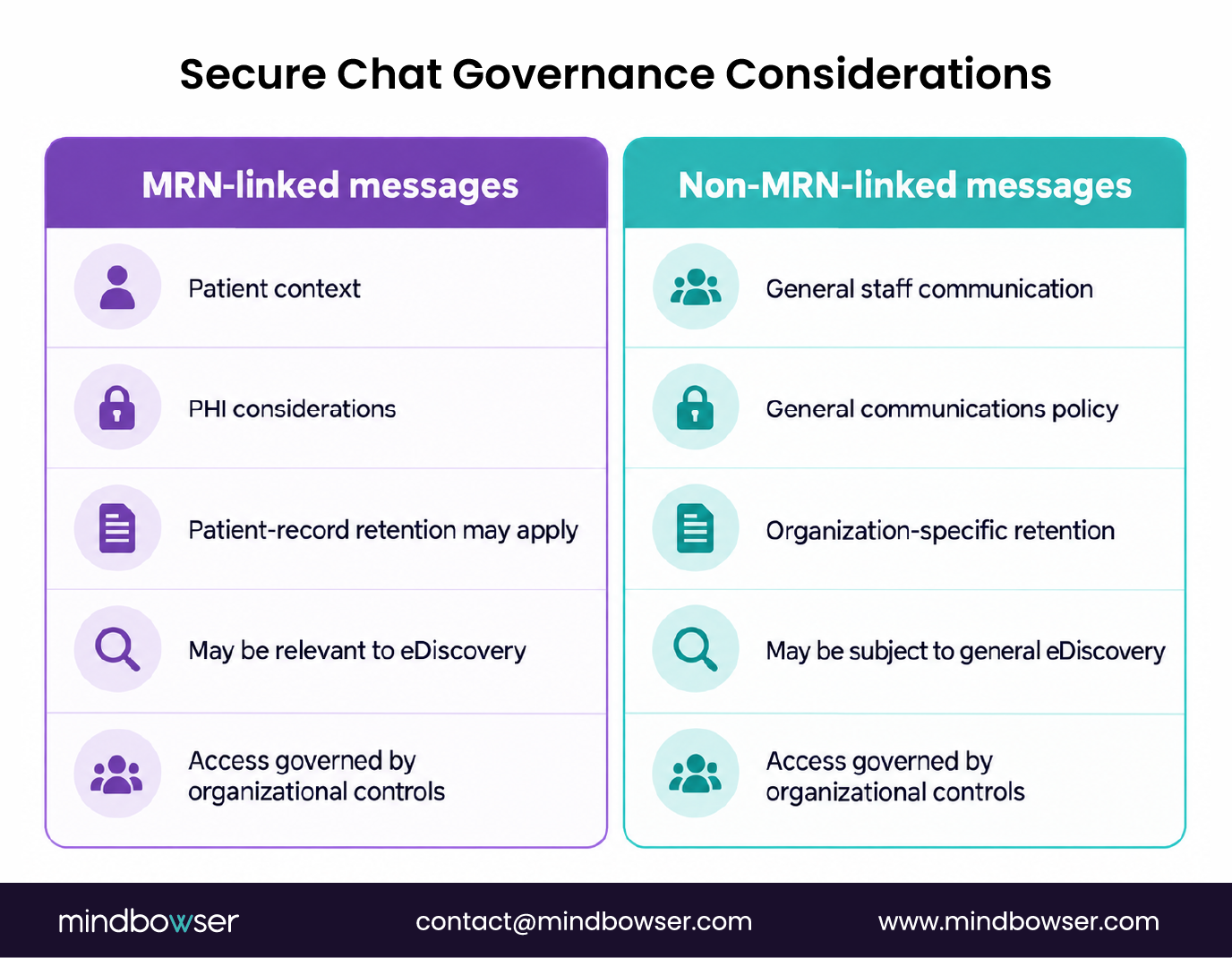
MRN-linked Secure Chat messages are part of the patient record under HIPAA’s definition of a designated record set (45 CFR 164.501). That means they can be requested by the patient via right-of-access, and they are discoverable in litigation involving that patient encounter. If a physician-to-nurse message about a patient’s deterioration went through Secure Chat and carried the MRN, it is part of the discoverable record in a malpractice case. Plan for that before you need to.
Non-MRN-linked messages, general staff communications without patient context, are internal communications. They fall under the health system’s general communications retention and eDiscovery policies, not HIPAA’s medical record rules. They are still discoverable in litigation, under general communications rules rather than PHI rules.
The legal hold gap most health systems have: eDiscovery readiness plans usually cover email, EHR structured records, and shared drives. Secure Chat rarely makes that list. When a patient encounter becomes a litigation matter, a legal hold that does not specifically trigger Secure Chat message preservation creates a defensibility risk.
Retention periods for Secure Chat messages are configurable at the Epic system level. For MRN-linked messages, health systems apply medical record retention rules, commonly 7-10 years for adult records, though state-specific rules vary and should be verified before configuring the policy. For eDiscovery production, Secure Chat data can be exported via Epic’s report tools, but the export format rarely matches what litigation hold platforms expect natively. Budget for a transform step.
Compliance teams reviewing their business associate agreement obligations should explicitly assess whether Secure Chat data flows to any BAA-covered downstream system, particularly if an archiving or eDiscovery platform is in scope.
Start a Conversation, we work with healthcare IT and legal teams on Epic data governance, including Secure Chat audit scope and configuration.
How Do IT Teams Configure and Audit Epic Secure Chat?
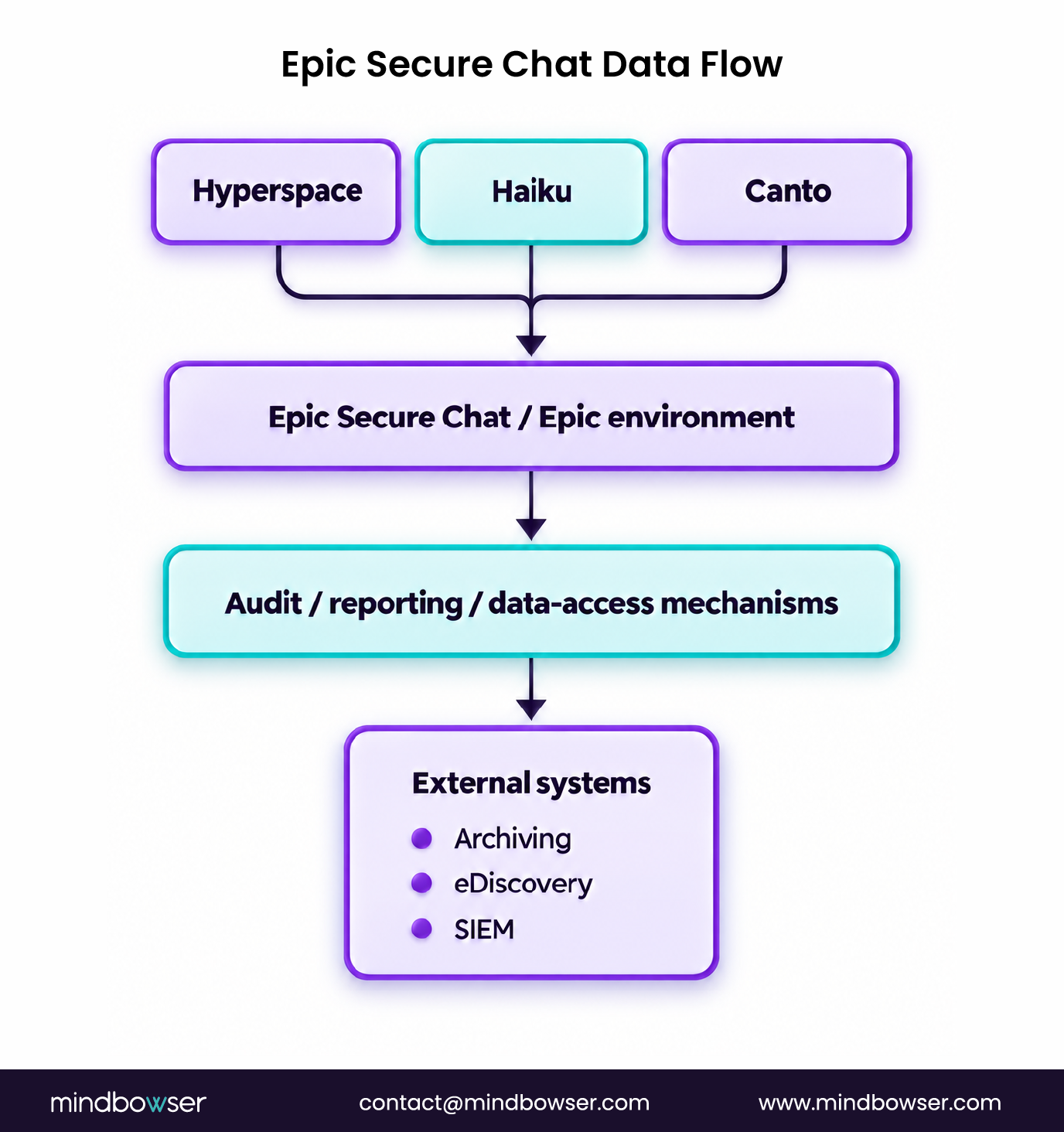
Those compliance questions turn into three configuration decisions you own: what gets retained, who can access the audit logs, and whether Secure Chat data feeds anything outside Epic.
Secure Chat configuration lives in the Epic Chronicles database. Retention period, user access tiers, and message archiving are controlled via Epic’s security model and Chronicles configuration, not via a separate admin UI. Changing any of it means pulling in your Epic security team, and for retention policy, your medical records department too. Budget the calendar time, not just the build time.
Audit log access requires an Epic security role assignment, and the audit-control obligation behind it sits in 45 CFR 164.312(b). Access is usually limited to compliance, security, and IT administration. Not to clinical managers. The audit log shows who sent, who received, when, and whether the message was patient-linked. It will not show you message content in a searchable dashboard. Content retrieval means a report pull against Chronicles.
External archiving integration, for organizations that want Secure Chat data flowing into a third-party compliance archiving platform for legal hold, requires custom interface work. Epic does not have a native Secure Chat export API. Data must be pulled via Epic reporting tools or direct Chronicles access, which requires Epic DBA-level access (what MB’s Epic practice refers to as “Chronicles DBA access”). Unlike the structured HL7 feeds that run through Epic Bridges, Epic’s native interface engine for routine data exchange, Secure Chat archiving sits outside that pathway entirely and has to be built as a standalone extract. This is a real integration build, not a configuration toggle.
SIEM integration, for organizations that want to monitor Secure Chat access patterns as part of security event monitoring, is possible via Epic’s audit log export. The log format is Epic-native, so expect to parse and transform it before any standard SIEM will take it.
One platform note: organizations running Epic Hyperdrive (web client) versus Hyperspace (thick client) have the same Secure Chat functionality. The difference is in deployment, mobile access, and MDM policy governance differ by client type.
Can Epic Secure Chat Be Integrated with External Messaging or Archiving Platforms?
Some health systems want Secure Chat data to flow into enterprise archiving for legal hold, unified communications dashboards, or nurse call systems. Here is what that integration actually involves.
Epic does not publish a native Secure Chat API for external integration. Integration requires Chronicles database access or Epic’s Report Delivery tools, both of which require Epic DBA-level technical access. This is not a point-and-click integration, it is dedicated Epic interface work that touches the same access layer as any custom Epic integration project.
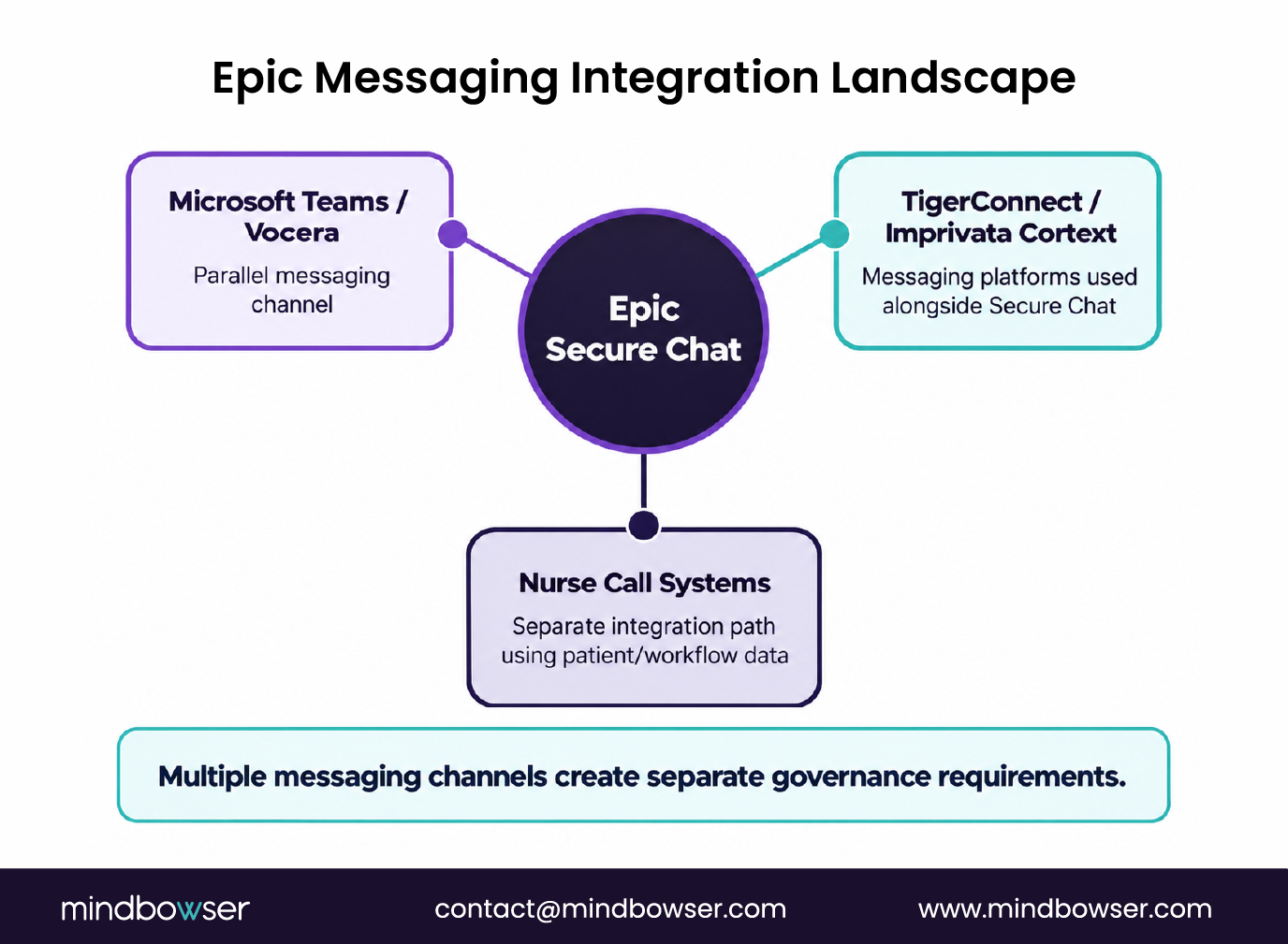
Nurse call system integration: Rauland, Hill-Rom/Baxter, Ascom; these systems interface with Epic primarily for patient data (ADT events, room assignments, care team assignments). Clinical messaging alerts route via Epic Care Everywhere and ADT event triggers, not via Secure Chat payloads. Secure Chat remains within the Epic clinical messaging layer.
Unified communications platforms like Microsoft Teams and Vocera can integrate with Epic for care team messaging, but these integrations bypass Secure Chat and create a parallel messaging channel. The governance question this creates is: which channel carries PHI, and who governs each? Health systems that deploy Teams or Vocera alongside Secure Chat need an explicit policy for which conversations go where.
Third-party HIPAA-compliant messaging platforms, TigerConnect and Imprivata Cortext, are sometimes deployed alongside Secure Chat in organizations where mobile messaging predates their Epic deployment. That leaves you with dual-channel governance: two HIPAA-compliant systems carrying clinical conversation, each with its own audit log, its own retention policy, and its own eDiscovery exposure. Two systems, two sets of obligations.
We have built Chronicles-level access for Epic integrations at health systems, which is the same access surface a Secure Chat archiving or eDiscovery build depends on. If you are scoping one, that is the layer to get right first.
Request an Assessment, we help healthcare IT teams map Epic messaging governance and integration requirements, including Secure Chat data flow and archiving feasibility.
What Healthcare IT and Compliance Teams Should Settle Before Epic Secure Chat Goes Live
Secure Chat is not just a messaging tool. It is a clinical record system with compliance, legal, and integration implications that most go-live plans underestimate.
Three decisions to settle before go-live:
- Retention policy: Does MRN-linked Secure Chat follow medical record retention policy? Who owns that configuration, and is it aligned with the medical records and legal teams?
- Staff disclosure: Are users informed at onboarding that messages are stored, auditable, and discoverable? This is both a HIPAA workforce training item and a risk management decision.
- eDiscovery readiness: Is the legal hold process updated to include Secure Chat? Does litigation hold extend to Epic message preservation, or only to structured records?
Looking ahead: Epic’s messaging roadmap is consolidating. Secure Chat and In Basket are evolving toward a more unified clinical communication layer in Hyperdrive. The governance decisions made now, retention, disclosure, archiving, will need to be reviewed as that architecture shifts. Monitor Epic UserWeb release notes for governance implications as Hyperdrive feature parity expands.
Epic Secure Chat is Epic’s HIPAA-compliant real-time messaging tool for clinical staff. It is distinct from In Basket (task and inbox routing). Secure Chat is for unstructured, conversational clinical communication across Hyperspace, Haiku, and Canto.
Epic Secure Chat messages are stored in the Epic Chronicles database and can be reviewed retroactively by compliance, security, or IT staff with appropriate Epic security roles. Whether active real-time monitoring occurs depends on the health system’s policy. Staff should be informed at onboarding that messages are stored and auditable.
MRN-linked Secure Chat messages, conversations tied to a patient record, are part of the designated record set under HIPAA and can be discoverable in patient-related litigation. Non-MRN-linked messages fall under general communications policy. Legal hold processes should explicitly address Secure Chat.
Retention is configurable at the Epic system level. For MRN-linked messages, most health systems apply medical record retention policy, commonly 7-10 years for adult records, with state-specific variation. Verify applicable rules before configuring.
Secure Chat is for real-time, unstructured clinical conversation. In Basket handles structured task routing: order notifications, referrals, results, patient messages that require action or documentation. They have different retention policies, audit surfaces, and eDiscovery exposure.
Yes, but it requires custom interface work. Epic does not have a native Secure Chat export API. Data must be pulled via Epic reporting tools or direct Chronicles database access, which requires Epic DBA-level technical access.
Epic Secure Chat is designed to be HIPAA compliant. PHI-linked messages are stored within the Epic environment, access is role-controlled, and audit logging is always on. Compliance posture depends on how the health system configures retention, access controls, and staff disclosure policies.