BLOGS
BLOGS  NEWSROOM
  CASE STUDIES
  WEBINARS
  PODCASTS
  ASSET HUB
  EVENT CALENDAR


























TL;DR
- The cloud holds and serves the images. Capture still runs on the operatory computer, so ask what happens when the connection drops.
- An imaging bridge is what opens the right patient’s images from the PMS chart. It works by passing a patient identifier, and mismatched identifiers put images on the wrong chart.
- DICOM, the international standard for medical images, keeps images portable. The ADA has published DICOM requirements for dentistry. Proprietary formats tie the images to one viewer.
- One reading service reports a CBCT study as hundreds of files, or tens to hundreds of megabytes as one file. Upload and viewing have to be designed for it.
- Under HIPAA, your cloud host is a business associate even if it can’t read the files. HIPAA sets no retention period for records; state law does.
- Imaging AI reads images through the same path, and FDA clears it one stated use at a time.
Cloud-based dental imaging software still needs software at the chair, because the X-ray sensor plugs into a computer in the operatory. I work on healthcare integrations, and that’s the first thing I check on any cloud imaging design: what runs locally, what it hands to the cloud, and what happens to the image in between.
Take one scan. A patient has a cone beam CT (CBCT, the 3D dental scan) in office 3 of a six-location dental group. An oral surgeon across town needs it before Thursday’s implant consult. An AI service needs to read it. The practice management system (PMS) chart needs to show it, on the right patient, in every office. Each section below moves that scan one step. If you’re building the product that does this, we build dental imaging software and the integrations around it, and this is how the pieces fit together.
What Moves to the Cloud, and What Stays at the Chair
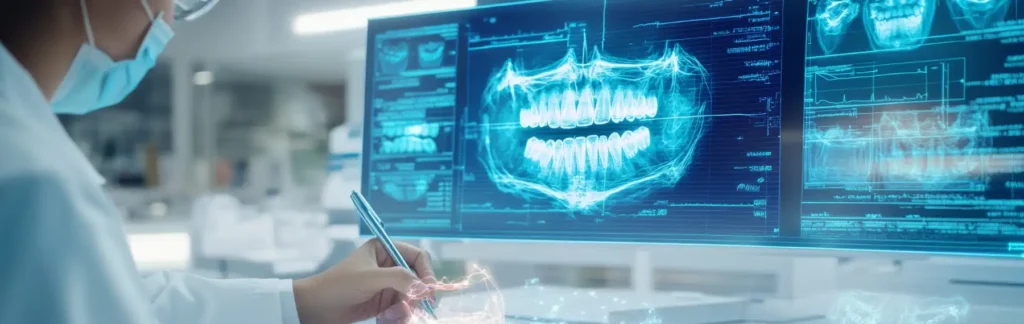
Cloud-based dental imaging software stores, views and shares X-rays, intraoral photos, scans and CBCT volumes on internet-hosted servers instead of an imaging server in the back office. Capture still happens on a workstation in the operatory, which hands each image to the cloud for storage, viewing and sharing.
There are three models, and most groups sit in the middle one for a while.
| On-premises server | Hybrid | Cloud-first | |
|---|---|---|---|
| Where images live | A server in the office | A local copy plus a cloud copy | Hosted servers; a short local queue |
| Who keeps it running | The practice or its IT provider | Both | The vendor, under your contract |
| How the surgeon across town sees a CBCT | Exported to disc, drive or e-mail | Shared from the cloud copy | A share link to the hosted study |
| What happens if the internet drops | Nothing changes | Local copy keeps working | Depends on the local capture software |
| What leaving the vendor takes | Copying files you already hold | Exporting the cloud copy | A bulk export the contract allows |
For a group running several offices, the hosted copy is the point: one image store that every location and every referring doctor can reach. The wider technology choices for multi-location groups sit in our guide to multi-location groups.
Capture Still Runs on the Computer at the Chair
An intraoral sensor is usually a USB device that runs through its manufacturer’s driver on the operatory computer. A browser tab can’t load that driver on its own, so cloud imaging products ship something local: a capture app, a background agent, or a plug-in that talks to the driver, receives the image, tags it to the patient and queues the upload.
That local piece decides most of what a dental assistant actually feels. Four things to pin down:
- Devices, by model. Vendors publish device lists, but support depends on each sensor and camera maker’s software kit and the terms that come with it, so the list is a commercial question before it’s a technical one. Check every sensor, intraoral camera, pano unit and CBCT unit you own against it by model number, including older units still in use.
- The patient tag. The image has to leave the chair already attached to the right patient and tooth, or someone fixes it by hand later.
- The queue. Images wait locally until the upload succeeds. Ask how long they can wait and how staff can see what’s stuck.
- Offline behavior. When the connection drops mid-morning, can staff keep taking X-rays? Where do the images wait, how do they sync when the line comes back, and what stops the same image landing twice?
Offline behavior is rarely documented on product pages, so get the answer in writing. Some buyer guides describe cloud imaging as needing nothing more than a device with internet access. The sensor driver, the local software and the upload queue are all still on site, and they’re the first place to look when an image goes missing.
The example CBCT never touches a browser at capture. It’s acquired on the CBCT unit’s own workstation and software, which then exports it, and that export format is the decision in the section after next.
The Imaging Bridge: How the PMS Opens the Right Patient’s Images
An imaging bridge is a link from the practice management system that opens the imaging program on the patient the user already has open. Click the imaging button in the chart, and the imaging software comes up on that patient instead of making someone search for them.
Open Dental’s manual shows the mechanics plainly. Its Program Links window “lists all the program bridges that can be linked from Open Dental”, and it recommends “having a Business Associate Agreement (BAA) in place with a third-party before enabling a program link.” On one imaging bridge’s setup page, Open Dental sends “the selected patient’s last name, first name, date of birth, and patient number or chart number” to the imaging program, and the practice chooses which of those two numbers serves as the patient ID (Open Dental manual, header v24.4, read October 25, 2026).
That choice is where bridges fail. If the PMS passes its internal patient number and the imaging program filed earlier images under the chart number, the bridge opens the wrong patient, or a blank new one. So before go-live:
- Pick one identifier and use it on both sides.
- Match existing patients in both systems before the first click.
- Test with patients who share a name, and with a patient whose chart number changed.
When both the PMS and the imaging software are cloud products, the bridge becomes an API call between two vendors’ systems, and whether the PMS vendor allows that call is a per-vendor question.
In the example, the bridge is how staff in any of the group’s six offices open the CBCT from the patient’s chart without searching for it. The surgeon across town works outside the group’s PMS, so the scan reaches them another way, covered under CBCT below.
DICOM or Proprietary: The Format Decides Whether You Can Leave
Ask one question before anything else: can I export every radiograph, CBCT included, as DICOM with the patient data still attached?
DICOM (Digital Imaging and Communications in Medicine) describes itself as “the international standard for medical images and related information“, published as ISO 12052 and used in dentistry as well as radiology.
The American Dental Association lists its dental imaging documents on its imaging standards page, including Technical Report 1023, Implementation Requirements for DICOM in Dentistry, written “with the goal of increasing interoperability between digital radiographic systems”, and Technical Report 1057, Guidelines for Digital Imaging Systems and Interoperability in Today’s Dental Practice.
Proprietary formats work fine inside the software that wrote them. The trouble starts at the edges. A CBCT reading service’s own export guide asks practices to send .dcm files, “not proprietary formats like .xstd or .opt”. The same question comes up when the surgeon’s planning software, an AI service, or your next imaging vendor tries to read what your current one saved.
Intraoral scans follow different rules. Scanners save 3D surface models as mesh files such as STL and PLY, which labs and aligner software expect, and one scanner maker’s native scan format even shares the .dcm extension without being DICOM. How those files reach the lab is covered in our guide to dental lab and orthodontic software.
For a team building a cloud product, the web side of the standard matters most. DICOMweb is “the DICOM Standard for web-based medical imaging”, a set of RESTful services: STOW-RS to store images, QIDO-RS to search for them and WADO-RS to retrieve them. A product that speaks DICOMweb can take images from imaging software that exports DICOM and serve them to any viewer that reads it.
The CBCT opens in the surgeon’s planning software because it left the scanner workstation as DICOM. When sending images with a referral, the same rule holds; what else has to travel with them is in our guide to sending images with a dental referral.
CBCT: The File That Tests Every Cloud Design
A bitewing is one image. A CBCT is a volume.
One oral radiology reading service’s export guide describes a multi-file DICOM export as “typically 150-600+ files depending on scan volume”, and a single-file export as “typically 20-200 MB in size”, adding that an export under 20 MB “may be incomplete or at reduced resolution” (BeamReaders, read October 2026). Every design decision for CBCT follows from that size:
- Upload that resumes. Hundreds of files from one workstation, on a practice’s business internet, have to survive a dropped connection without restarting from file one. For scale, 200 MB is 1,600 megabits: about 80 seconds at a steady 20 Mbps upload, and about 5 minutes at 5 Mbps, before anything else on the office line competes for it (illustrative arithmetic).
- Viewing that streams. The surgeon needs the slices around the implant site on screen first, while the rest of the study loads. DICOMweb retrieval supports pulling the instances a viewer needs.
- Sharing with a record. A share link with an expiry and an access log replaces the disc or the e-mail. ADA Technical Report 1048 covers attaching DICOM datasets to e-mail, the older route, which works until the files outgrow the inbox.
The surgeon opens the scan from a share link on Wednesday night. Nobody burned a disc and nobody e-mailed a zip file. Store-and-forward review for remote consults follows the same pattern, covered in store-and-forward teledentistry.
Connect Dental Imaging Across Multiple Locations. Let’s Talk to Our Experts!
HIPAA for Dental Images in the Cloud: The BAA, the SLA, and Retention
The cloud host is a business associate even if it can’t open a single file. HHS’s guidance on HIPAA and cloud computing answers that directly: a cloud provider that stores only encrypted electronic protected health information (ePHI) without the decryption key is still a business associate, because “lacking an encryption key for the encrypted data it receives and maintains does not exempt a CSP from business associate status.”
So every company that stores your images has to be under a business associate agreement (BAA): the imaging vendor signs one with you, and its hosting provider signs one with the vendor.
The same HHS guidance lists what a service level agreement (SLA) can address: “System availability and reliability; Back-up and data recovery … Manner in which data will be returned to the customer after service use termination; Security responsibility; and Use, retention and disclosure limitations.”
It also notes the BAA must require the provider to return or destroy the data when the agreement ends, where feasible, and that servers outside the United States are allowed if a BAA is in place and the HIPAA Rules are otherwise met (HHS, content last reviewed December 23, 2022).
Retention is the question that’s easiest to miss. HHS’s own FAQ says the HIPAA Privacy Rule “does not include medical record retention requirements“, and “State laws generally govern how long medical records are to be retained.” So the contract has to say how long old images stay, who deletes them and when, and that has to match the rules in every state where you have an office.
We build to a HIPAA-compliant architecture, sign a BAA with our clients, and hold SOC 2 Type II (report shared under NDA); more on that in HIPAA-compliant software development.
Where Imaging AI Plugs In
AI reads the same images through the same path. The image leaves through the bridge or a DICOM export, reaches the AI service, and the findings come back linked to the image and tooth in the chart, where the dentist reviews them. The build side is covered in dental AI development.
Two checks belong at this step. First, clearance: deep-learning dental radiograph AI has been cleared since May 2021, starting with K210187, and each device is cleared for its stated indication, so check that the indication covers the images you take. FDA’s term is “cleared”. FDA keeps a public list of AI-enabled medical devices; the evidence and the clearances are walked through in what FDA has cleared in dental AI. Second, claims: the image attached to a claim should be the clean one, without AI overlays, which is covered in clean images on dental claims.
For radiology outside dentistry, the same image path is covered in AI in medical imaging.
Choosing or Replacing a Cloud Imaging System: What to Ask
Most of the answers you need aren’t on the product page, so ask for them in writing. Ten questions cover the ground:
- Which of our sensors, cameras, pano and CBCT units do you support, by model number, and through which manufacturers’ software kits?
- What does the local capture software do when the internet drops, and how do queued images sync?
- Which PMSs do you bridge to, and which patient identifier does each bridge pass?
- Can we export every radiograph and CBCT as DICOM with patient data attached, and every intraoral scan in an open mesh format?
- How is a CBCT uploaded, and does the viewer stream it or download it first?
- How do we share a study with an outside specialist, and is that access logged?
- Will you sign a BAA, and does your hosting provider sit under one too?
- What does the SLA say about availability, backup and recovery, and returning our data?
- How long do you keep images, and how do we set deletion to match our states’ rules?
- For any AI feature: what’s the FDA 510(k) number (the premarket clearance record), and does its indication cover our image types?
Replacing an on-premises server adds a migration. This order keeps the risk down:
- Export every radiograph and CBCT from the old system as DICOM with patient data attached, and scans in their open mesh format.
- Count images per patient on both sides and reconcile before cutover.
- Re-match patient identifiers so the new bridge opens the right charts.
- Re-point the PMS imaging button and test it on known patients in every office.
- Keep the old server read-only until the counts match and staff have used the new system for a few weeks.
If you’re also choosing the practice management system itself, our dental practice management software comparison covers that decision.
Building Cloud Imaging Into a Dental Product
If you’re the team building it, the work sits in four places:
- Capture. Integrating with each sensor and camera maker’s software kit, plus the local agent, queue and offline sync. Ask early which device kits your product has rights to: access terms aren’t published, so ask each manufacturer.
- The bridge or API. One per PMS your customers run, each on that vendor’s terms, with patient matching tested before launch.
- The store and viewer. A DICOMweb store that takes images in and serves them out, a viewer that streams CBCT, and share links with logging.
- Patient-data controls. Access by role and location, audit logs, retention and deletion rules per state, and a BAA with every host.
What to Use Off the Shelf, and What to Build
Some layers don’t need writing from scratch. Each major cloud offers a managed DICOM store with DICOMweb APIs: AWS HealthImaging, which “offers DICOMweb conformant APIs”; Google’s Cloud Healthcare API, with its own “implementation of DICOMweb”; and the DICOM service in Azure Health Data Services, built to exchange images “with any DICOMweb-enabled systems or applications”.
In open source, Orthanc is a free DICOM server whose official plugin adds “a basic, reference implementation of WADO-URI, WADO-RS, QIDO-RS and STOW-RS”, and the OHIF Viewer is an MIT-licensed viewer that “runs entirely in your browser”. Which one fits depends on your cloud, your scale and who will run it (all read October 2026).
The dental-specific layers sit outside any DICOM store: the capture agent at the chair, the bridge or API into each PMS, and matching patients across systems. Those are the parts a dental product builds for its own customers’ offices.
We build these for dental product companies, along with the imaging-AI integration covered above. Outside dentistry, we built a DICOM processing pipeline for a remote endovascular-robotics device company: patient-identifiable fields in DICOM files from CT scans, X-rays, fluoroscopy and angiography are converted to non-reversible hash keys before the images go into model training, and processing time dropped from weeks to a single day (DICOM de-identification pipeline).
There’s no packaged accelerator for dental imaging; it’s a custom build, scoped to the PMSs and devices your customers use. Hosting sits on cloud infrastructure for healthcare products, and the rest of the product (PMS modules, patient apps, DSO platforms) is covered on our dental software development page.
If your product also needs data from medical records, ConnectHealth, our integration platform, connects products to 20+ EHRs, including Epic and athenahealth. Run it yourself in your own cloud, or have us build on it. See ConnectHealth for Epic and athenahealth.
What’s Changing Next (as of October 2026)
Four things in the pipeline will change what a good cloud imaging setup looks like. The ADA lists proposed ANSI/ADA Standard 1114, covering DICOM conformance for storage, retrieval, archival and reporting, and Standard 1098 for cone beam CT quality assurance. Both are in development (ADA imaging standards). If you build, write a DICOM conformance statement now. If you buy, ask for one.
Federal imaging interoperability is evolving. ASTP/ONC published a request for information on diagnostic imaging interoperability standards and certification on January 30, 2026 (91 FR 4054), to inform potential future rulemaking. Comments closed March 16, 2026, with no rule issued as of October 2026. If you build, keep images in DICOM and expose them through DICOMweb.
The HIPAA Security Rule update is another development. HHS proposed stronger requirements on January 6, 2025 (90 FR 898), with no final rule published as of October 2026. The proposal would require encryption of all ePHI at rest and in transit, with limited exceptions. Encryption remains addressable under the current rule, but encrypt images now.
The claims attachments final rule (CMS-0053-F), published March 24, 2026, requires compliance by May 26, 2028. It adopts standard attachment transactions, so plan how a clean image leaves your imaging store for the claim. Thursday’s consult starts with the scan already open on the surgeon’s screen. Before your next vendor call, take the ten questions above and ask for the vendor’s DICOM conformance statement.