BLOGS
BLOGS  NEWSROOM
  CASE STUDIES
  WEBINARS
  PODCASTS
  ASSET HUB
  EVENT CALENDAR





















TL;DR
EHR in Clinical Decision Support Systems turns static patient records into real-time decision engines. When CDSS is embedded inside an integrated EHR, clinicians receive evidence-based guidance at the point of care, reducing errors, improving outcomes, and saving time.
For healthcare leaders, the value is clear: fewer adverse events, stronger guideline adherence, better value-based performance, and measurable ROI. The real differentiator is not just having clinical decision support in EHR, but implementing it with clean data, smart alert governance, and interoperable architecture.
Health systems that treat EHR and clinical decision support as a strategic platform, not a feature, will lead the next era of safer, faster, data-driven care.
How can healthcare organizations leverage technology to make faster, more accurate clinical decisions while improving patient outcomes?
The answer lies in integrating Clinical Decision Support Systems (CDSS) within Electronic Health Records (EHR).
EHRs are central to modern healthcare operations, but when paired with CDSS, they provide real-time, evidence-based recommendations that help clinicians make better decisions at the point of care. This integration can significantly reduce errors, improve workflow efficiency, and ensure standardized care. Healthcare leaders, such as CIOs, CTOs, and CMIOs, are increasingly turning to EHR-CDSS solutions to drive both clinical and operational improvements.
By embedding decision support directly into EHR systems, organizations can enhance patient safety, detect risks earlier, and ultimately improve patient care. This combination offers a powerful tool for healthcare decision-makers seeking to meet regulatory requirements, reduce costs, and improve care outcomes, while optimizing workflow.
Watch: Why EHR Matters in Clinical Decision Support
I. The Importance of EHR in Clinical Decision Support Systems (CDSS)
The integration of EHR systems with CDSS is a game-changer for modern healthcare, significantly improving decision-making at the point of care. To fully understand its value, it’s essential to break down why this integration is critical for healthcare organizations.
A. Enhancing Decision-Making Capabilities
- Evidence-Based Recommendations:
EHR-CDSS integration ensures that clinicians have immediate access to evidence-based guidelines and recommendations tailored to the patient’s specific condition. These real-time suggestions enable better-informed decision-making, which leads to more accurate diagnoses and treatment plans. This capability is particularly important in managing complex and chronic conditions, where timely interventions can significantly improve patient outcomes. - Real-Time Alerts and Reminders:
One of the most notable features of EHR-CDSS is the ability to deliver alerts and reminders directly within the clinician’s workflow. This function helps prevent medication errors, avoid adverse drug interactions, and flag potential issues such as allergies or drug contraindications, reducing the risk of harm to patients.
Clinical decision support systems (CDSS) rely on artificial intelligence to provide insights that drive better decision-making. Discover how AI is used in clinical decision-making and how it’s shaping the future of clinical care.
B. Improving Patient Safety
- Reduction of Medical Errors:
Medical errors are a significant concern in healthcare, with estimates suggesting that 30-50% of errors can be reduced through the use of clinical decision support. By integrating decision support within the EHR, clinicians can be alerted to potential issues before they become critical, leading to a substantial reduction in errors and adverse events. - Early Detection of Risks:
EHR-CDSS enhances patient safety by facilitating early detection of risks such as sepsis, infections, or deteriorating conditions. With real-time monitoring and decision support, healthcare providers can intervene sooner, preventing complications and improving patient outcomes.
C. Workflow Efficiency and Standardization
- In-Context Support:
EHR-CDSS provides clinicians with seamless decision support integrated into their daily workflow, eliminating the need to switch between systems or sources of information. This integration streamlines workflows, allowing clinicians to focus more on patient care rather than navigating multiple platforms. - Standardizing Care:
By embedding clinical guidelines and protocols directly into the EHR system, CDSS helps standardize care practices across the organization. This leads to more consistent treatment outcomes, reducing variability and improving overall quality of care across different patient populations.
II. What Are Clinical Decision Support Systems (CDSS)?
Clinical Decision Support Systems (CDSS) are software capabilities that help clinicians make safer, faster, and more consistent decisions during care delivery. Instead of relying solely on memory or manual lookups, CDSS surfaces relevant guidance when a clinician is prescribing, ordering, documenting, or planning care.
A. What CDSS Does in Day-to-Day Care
1. Alerts and safety checks
CDSS flags risks like drug interactions, allergy conflicts, contraindications, and duplicate therapies before harm occurs.
2. Reminders and guideline prompts
CDSS nudges clinicians toward evidence-based practices, such as preventive screening reminders, chronic care monitoring prompts, and protocol-based order suggestions.
3. Predictive suggestions
More advanced clinical decision support uses risk signals and patient history to highlight patients who may be trending toward deterioration, helping clinicians intervene earlier.
B. Where CDSS Fits in Modern Clinical Workflows
1. It works best when it is in the workflow
CDSS is most effective when it integrates into the clinician’s normal workflow, not in a separate dashboard. That is why EHRs in Clinical Decision Support Systems matter: the EHR is where decisions are made.
2. The goal is decision support, not decision replacement
CDSS should support clinical judgment, not override it. The best systems give a clear rationale, allow the clinician control, and keep the experience fast.
Want to Learn More About EHR-CDSS Integration?
III. The Role of Electronic Health Records (EHR) in Clinical Decision Support
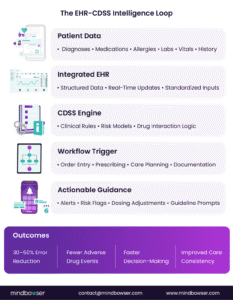
Figure 1: The EHR-CDSS Intelligence Loop
If CDSS provides intelligence, the EHR provides the fuel.
Electronic Health Records serve as the primary data source for EHR clinical decision support. Without structured, up-to-date patient data, clinical decision support systems lack context, accuracy, and reliability.
A. EHR as the Central Clinical Data Hub
1. Comprehensive Patient Data
The EHR captures structured data, including medical history, diagnoses, medications, allergies, laboratory results, imaging, vitals, and demographic information. This consolidated record forms the foundation for clinical decision support in EHR environments.
2. Real-Time Updates
Modern integrated EHR platforms update data continuously during encounters. Medication changes, lab results, and new diagnoses are reflected in real time, enabling CDSS to respond dynamically rather than relying on static snapshots.
B. How EHR Powers Clinical Decision Support
1. Structured Data Feeds into CDSS Engines
Clinical decision support EHR models rely on clean, standardized inputs. Problem lists, coded diagnoses, and medication records are analyzed against evidence-based rules and algorithms to generate actionable guidance.
Without integrated EHR data, CDSS cannot deliver patient-specific recommendations.
2. Context Creates Accuracy
When EHR and clinical decision support operate together, alerts and recommendations are based on the patient’s full clinical profile. Age, comorbidities, allergies, medication history, and lab trends all shape the logic of the recommendation.
This context is what transforms generic alerts into meaningful clinical decision support.
C. Why Integration Is Non-Negotiable
Standalone tools create friction. Embedded systems create adoption.
Clinical decision support in EHR ensures that guidance appears during prescribing, order entry, and care planning. The clinician does not leave the workflow. The intelligence meets the decision at the exact moment it matters.
EHRs in Clinical Decision Support Systems are not add-on models. It is an integrated architecture in which patient data and decision logic operate as a single system.
D. Better Inputs: When Documentation Feeds the Decision, Not Just the Record
Decision support is only as good as the data it reads, and most of the clinically useful detail in an encounter never reaches a structured field. It is spoken, then summarised, then typed under time pressure. A rule cannot fire on something nobody recorded.
This is why ambient clinical documentation matters to decision support and not only to clinician burden. Systems that capture the encounter and generate structured notes from it are, in effect, widening the input layer that CDS logic runs against — problem lists that stay current, medication histories that reflect what was actually discussed, follow-up intent captured at the point it was agreed rather than reconstructed later.
We built exactly this for a primary-care group: an AI documentation layer that captures the encounter, generates a structured SOAP note, and feeds the result back into the clinical workflow. Documentation time fell by 70%, and post-visit follow-up dropped by 60% — the second number matters more here, because it means the decisions were being closed inside the visit rather than chased afterwards.
Better documentation is not an adjacent problem to better decision support. It is the same problem, upstream.
IV. Key Benefits of Integrating CDSS in the EHR
Embedding CDSS directly within an integrated EHR transforms decision-making from reactive to proactive. When intelligence lives inside the workflow, impact becomes measurable across safety, efficiency, and care quality.
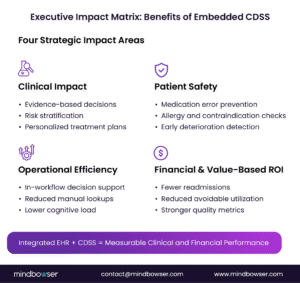 Figure 2: Executive Impact Matrix: Benefits of Embedded CDSS
A. Better Clinical Decision-Making
1. More Accurate, Evidence-Based Recommendations
Clinical decision support in EHR delivers patient-specific guidance during order entry and care planning. Drug interaction alerts, allergy checks, and guideline prompts appear before decisions are finalized, improving diagnostic precision and treatment accuracy.
2. Risk Identification at the Point of Care
Clinical decision support EHR models analyze patient data in real time to flag high-risk conditions such as sepsis or readmission likelihood. Earlier insight enables earlier intervention.
B. Improved Patient Safety
1. Reduced Medication Errors
One of the strongest advantages of EHR clinical decision support is its ability to prevent adverse drug events. Alerts for contraindications and dosing errors prevent unsafe orders from reaching the patient.
2. Early Risk Detection
Integrated CDSS continuously monitors labs, vitals, and medication changes. Real-time detection of deterioration reduces complications and avoidable admissions.
C. Workflow Efficiency
1. In-Context Support
Because decision support is embedded within the EHR, clinicians do not need to consult separate systems. Guidance appears exactly where decisions are made.
2. Reduced Administrative Burden
Pre-configured order sets and automated checks minimize manual lookups, saving time and lowering cognitive load.
D. Standardized Care
1. Guideline-Based Practice
EHR and clinical decision support together reinforce evidence-based protocols across departments and locations.
2. Reduced Variation
Standardized logic within CDSS promotes consistent treatment pathways, improving quality metrics and value-based performance.
When properly implemented, EHRs in Clinical Decision Support Systems improve accuracy, strengthen patient safety, streamline workflows, and promote consistency across the enterprise.
V. How EHR Embedded Decision Support Works
Understanding how EHR in Clinical Decision Support Systems functions operationally is critical for executive oversight. Embedded decision support is not a standalone application. It is a coordinated interaction between real-time data, clinical logic, and workflow triggers.
A. Real-Time Data Flow
1. Continuous Access to Updated Patient Information
As clinicians document, prescribe, and order tests, the integrated EHR updates in real time. Lab results, medication changes, and new diagnoses feed directly into CDSS engines in real time.
This continuous flow ensures recommendations are based on current data, not outdated snapshots.
2. Structured Data as the Foundation
Clinical decision support in EHR relies on coded diagnoses, medication lists, allergies, and standardized lab values. Clean, structured inputs improve the accuracy of alerts and recommendations.
B. Rule Engines and Algorithms
Every EHR ships with a rules engine. What separates a decision-support programme that works from one that gets switched off is not the engine — it is what an organisation does with it after go-live.
1. Rule authoring: who writes it, and against what evidence
A rule is a clinical claim expressed in logic, and it should be traceable to something. In practice that means a named guideline, a formulary decision, or a documented internal protocol — not a preference. The question worth asking of any proposed rule is what would have to be true for it to be wrong, and who would notice. Rules authored without an evidence line behind them are the ones nobody can defend when a clinician asks why the alert fired.
2. Tiering: which rules interrupt, and which log silently
Not every rule deserves the same surface. A rule that stops an order and a rule that records a recommendation for later review are different products of the same engine, and treating them as one is the fastest route to alert fatigue. A workable split is three tiers: hard stops for the small set of genuinely unsafe actions, interruptive advisories for decisions a clinician should reconsider now, and passive logging for everything that is useful in aggregate but not urgent at the point of care.
The evidence for getting this wrong is unambiguous. A 2019 JAMIA study across 10 sites found 95.7% of 16,011 alerts were overridden, and for the highest-severity drug-drug interactions only 0.5% of overrides were judged clinically appropriate. Volume is not the same as safety.
3. Lifecycle: how a rule is retired, and who may retire it
Rules accumulate. Almost every organisation has a documented path for adding one and no path at all for removing one, which is why year-three maintenance costs more than year-one build and why alert burden only ever moves in one direction. A study of one hospital’s move to a commercial EHR found drug-drug interaction alerts rising from roughly 2 to 11 per 100 orders and total medication alerts from 9 to 36 per 100 orders — same clinicians, same patients, four times the volume, with override rates flat at 90% or higher.
A lifecycle means a named owner per rule, a review date set when the rule is created, and an explicit answer to who is allowed to switch it off. Without the last one, nothing is ever retired.
4. Override instrumentation: capture why, not just that
If a clinician dismisses a recommendation and the system records only that it was dismissed, there is nothing to tune. Structured override reasons are what turn dismissals into a signal — and they have to be designed in, not requested later as a report. The same JAMIA study recorded 177 distinct override reasons, most of which had nothing to do with the interaction being flagged. That is the finding that tells you which rules to fix.
Free-text override capture looks thorough and analyses badly. A short, fixed list of reasons that a clinician can pick in one click produces data somebody will actually use.
5. Governance: the committee, the cadence, the audit trail
Rule governance is the part that gets deferred and then blamed. It needs three things and they are not complicated: a group with the authority to approve, change and retire rules; a review cadence that happens whether or not anyone complains; and an audit trail showing what changed, when, and on whose decision. Clinical, pharmacy, informatics and IT all need a seat, because a rule that is clinically sound and operationally impossible fails in exactly the same way as one that is wrong.
One more distinction worth drawing, because it is increasingly blurred: a rules engine and an AI agent are not the same instrument. A rules engine applies deterministic logic to homogeneous, structured data, and it is auditable by design — you can point at the rule that fired. A model working across heterogeneous data that varies from encounter to encounter is a different governance problem and needs a different validation standard. Buying the second while governing it like the first is where most AI decision-support programmes come apart.
| EHR System | CDS Tool | Key Features | User Interface |
|---|---|---|---|
| Epic | Best Practice Advisories (BPA) | – Real-time alerts for clinical guidelines, drug interactions, and lab results. – Provides actionable recommendations at the point of care. | – Integrated directly into the clinician’s workflow. – Alerts are non-disruptive and context-driven. |
| Cerner | Discern Expert Systems | – Uses rules-based logic to analyze patient data and prevent errors. – Provides alerts for drug interactions, allergies, and abnormal lab results. | – Customizable alerts based on institutional needs. – Alerts can be integrated within the clinician’s existing workflow. |
| Athena | Athena Rules | – Customizable alerts for medication dosing, lab results, and care guidelines. – Provides real-time decision support for clinicians. | – Alerts presented at the point of care. – Non-intrusive and easy to navigate in a clinician-friendly interface. |
C. Contextual Alerts Within Workflow
1. Triggered by Clinical Actions
Decision support activates when clinicians take specific actions, such as prescribing medication or updating a diagnosis. Alerts appear inside the workflow rather than in external dashboards.
2. Designed for Intervention, Not Interruption
Well-designed CDSS prioritizes high-risk alerts and minimizes unnecessary notifications. The goal is actionable guidance without slowing care delivery.
Embedded EHR and clinical decision support operate as a synchronized system: real-time data enters, clinical logic processes it, and recommendations surface at the moment decisions are made.
That integration is what makes decision support effective.
VI. Real-World Use Cases & Examples
The value of EHR in Clinical Decision Support Systems (CDSS) becomes clearest in real clinical environments. When embedded properly, decision support influences outcomes at the exact moment care decisions are made.
A. Medication Safety at the Point of Prescribing
1. Real-Time Drug Interaction Alerts
A physician begins prescribing an anticoagulant. As the order is entered, CDSS evaluates the patient’s active medications, allergies, renal function, and recent lab values within the integrated EHR.
If a high-risk interaction is detected, an alert appears immediately. The clinician can adjust dosage, select an alternative therapy, or override with a documented rationale.
This intervention occurs before harm, not after.
2. Dosing Guidance Based on Patient Context
EHR clinical decision support can automatically adjust recommendations based on age, weight, kidney function, or comorbidities. Instead of relying on manual reference checks, dosing logic is applied instantly.
B. Clinical Pathways and Risk-Based Care
1. Standardized Care Pathways
In large health systems using integrated EHR platforms such as Epic or Cerner, embedded CDSS reinforce specialty-specific pathways. For example, heart failure patients may automatically trigger guideline-based medication checks and prompts to schedule follow-up.
Consistency improves across providers and locations.
2. Predictive Models in Obstetric Care
In advanced implementations, predictive algorithms embedded within clinical decision support EHR environments analyze labor progression, maternal vitals, and fetal indicators to flag elevated risk earlier.
A practical example of this approach is this case study on improving predictive accuracy in childbirth through advanced EHR integration.
This demonstrates how integrated EHR and CDSS logic can improve risk detection and support earlier clinical action.
C. Population Health and Value-Based Programs
1. Chronic Disease Monitoring
Clinical decision support in EHR environments identifies gaps in care for patients with diabetes, hypertension, or COPD. Missed screenings, uncontrolled lab values, or overdue follow-ups trigger prompts during encounters.
2. Readmission Risk Identification
CDSS evaluates discharge plans, comorbidities, and historical utilization to flag patients at high risk of readmission. Care teams can intervene to schedule follow-up or make care coordination adjustments before discharge.
These real-world applications show that CDSS is not theoretical. See more clinical decision support system examples to understand how leading health systems apply CDS across medication safety, predictive risk, and care pathways.
D. What This Looks Like in Delivered Work
Ordering-workflow support, Epic. For a perioperative surgical practice, missing pre-operative labs surface as a decision-support card at the moment an order is signed, rather than as a report someone reads later. Missed labs fell from 15% to 2%, and 87% of providers engaged with the prompt, the engagement number being the one that matters, because a recommendation clinicians dismiss is worse than none at all.
Predictive support inside the record, SMART on FHIR. For an obstetric analytics product, a prediction model runs against the patient record and surfaces inside the Epic session rather than in a separate dashboard. The model reached 83% prediction accuracy, and the same integration work cut coding denials by 76%.
Neither of these is unusual technology. What made both usable was that the output arrived inside the system the clinician was already working in.
Interested in seeing how clinical decision support can improve your EHR workflow
VII. Barriers to Effective EHR-CDSS Integration
While EHR in Clinical Decision Support Systems offers clear advantages, integration can fail without disciplined execution. The most common barriers are not technological limitations, but design and adoption missteps.
A. Alert Fatigue
1. Too Many Notifications
When CDSS generates excessive or low-value alerts, clinicians become desensitized. High override rates reduce trust and weaken the impact of critical warnings.

2. Desensitization Risk
If every alert feels urgent, none feel urgent. Over-alerting undermines patient safety rather than strengthening it.
B. Interoperability Issues
1. Fragmented Systems
EHR and clinical decision support platforms may operate on different architectures. Without standardized data exchange, information gaps limit accuracy and responsiveness.
2. Inconsistent Data Flow
If labs, pharmacy systems, or external health exchanges do not update in real time, CDSS recommendations may be delayed or incomplete.
Interoperability directly affects reliability.
C. User Adoption and Training
1. Resistance Without Proper Planning
Clinicians may resist CDSS if it disrupts workflow or increases clicks. Poor rollout strategies can reduce engagement before value is realized.
2. Insufficient Training
Without clear education on the system’s benefits and functionality, clinicians may underutilize embedded decision-support tools.
Adoption determines performance.
Effective EHR clinical decision support requires more than system activation. It demands thoughtful alert governance, interoperable architecture, and structured change management.
When these barriers are addressed early, CDSS becomes a trusted clinical partner rather than a workflow obstacle.
D. The Dashboard Trap
Decision support that lives in its own dashboard is a report, not decision support. It requires the clinician to remember it exists, leave the chart, log in somewhere else, and return with the answer. In practice they do that during the pilot, when someone is watching, and stop within weeks of go-live. Adoption numbers collapse and the conclusion drawn is usually that clinicians resisted the tool. They did not. They were asked to leave their workflow to use it.
E. The FHIR-Only Trap
A FHIR API is a data-access mechanism, not an integration. It tells you what a patient’s record contains; it does not tell you when a decision is being made. Without a workflow trigger — a chart opening, an order being selected, an order being signed — a service that speaks perfect FHIR still has no idea when to speak. Teams that budget for FHIR conformance and nothing else discover this after the data layer is finished and there is no moment to attach to.
VIII. Best Practices for Successful CDSS Integration
Implementing EHR in Clinical Decision Support Systems (CDSS) requires more than enabling alerts. Sustainable value depends on workflow design, governance discipline, and clinician ownership.
A. Embed Alerts Intuitively Within Workflows
1. Deliver Support at the Point of Action
Clinical decision support in the EHR must be available during prescribing, order entry, and care planning. If clinicians must leave the chart to access recommendations, adoption drops.
Integration should feel native, not layered on top.
2. Align with Existing Clinical Patterns
Configuration should reflect how clinicians already practice. Poor placement increases friction and override rates.
B. Minimize Clicks and Interruptions
1. Reduce Cognitive Load
CDSS should simplify decisions, not complicate them. Inline recommendations and pre-configured order sets improve speed without removing clinician autonomy.
2. Limit Interruptive Alerts
Reserve hard-stop alerts for high-risk scenarios. Excessive interruptions increase fatigue and reduce effectiveness.
C. Involve Clinician Champions
1. Engage Early Adopters
Physician and nursing leaders should participate in system design and refinement. Peer advocacy accelerates trust.
2. Establish Feedback Loops
Continuous feedback ensures the system evolves with clinical needs and reduces resistance over time.
D. Prioritize High-Value Alerts
1. Focus on Safety-Critical Interventions
High-impact alerts, such as severe drug interactions or life-threatening conditions, should take priority.
2. Monitor and Optimize
Track override rates and adjust thresholds regularly. CDSS performance improves with active governance.
Successful integration of EHR and clinical decision support depends on thoughtful embedding, minimal disruption, clinician engagement, and disciplined alert management.
When these best practices are applied, CDSS strengthens decision quality without slowing care delivery.
Learn more about the best practices to ensure successful EHR-CDSS integration. Check out the future trends in clinical decision support systems and discover how advanced decision support models are shaping the future of healthcare.
Transform Your EHR into a Clinical Intelligence Platform
IX. The Future: Advanced Decision Support and AI
The next phase of EHR in Clinical Decision Support Systems (CDSS) moves beyond rule-based alerts toward predictive and adaptive intelligence embedded directly into care delivery.
A. AI-Enabled Decision Support Within EHR
1. Early Risk Detection
Artificial intelligence models integrated into EHR clinical decision support environments can identify subtle clinical patterns that precede deterioration. Signals for sepsis, heart failure exacerbation, or readmission risk can surface earlier than traditional rule-based triggers.
Earlier insight enables proactive care.
2. Personalized Clinical Recommendations
Machine learning models analyze patient history, comorbidities, lab trends, and treatment responses to generate individualized recommendations. This strengthens precision in treatment planning and chronic disease management.
B. Predictive Models for Proactive Care
1. Moving from Reactive to Predictive
Traditional CDSS respond to defined thresholds. Advanced systems anticipate risk based on evolving data patterns. This shift supports earlier intervention and reduces preventable complications.
2. Supporting Value-Based Performance
Predictive capabilities embedded within an integrated EHR help health systems manage population risk, improve quality metrics, and strengthen performance under value-based reimbursement models.
For a deeper look at modern workflows powered by AI and CDS Hooks, see this webinar:
A Deep Dive into Modern Clinical Workflows with AI Agents & CDS Hooks
The future of EHR and clinical decision support lies in intelligent, predictive systems that operate seamlessly within clinical workflows. Organizations that invest in AI-ready, interoperable architectures today will be better positioned for proactive, data-driven care delivery.

Figure 4: The Future of EHR in Clinical Decision Support Systems
X. How Mindbowser Helps
Implementing EHRs in Clinical Decision Support Systems (CDSS) requires deep technical alignment, a clear understanding of workflows, and regulatory awareness. Mindbowser supports healthcare organizations with structured, outcome-driven integration strategies.
A. Custom EHR-CDSS Integrations
1. Tailored Architecture
Mindbowser designs integrated EHR solutions that embed clinical decision support directly into clinician workflows. Configurations are aligned to specialty-specific protocols, safety priorities, and performance goals.
2. Interoperable, Standards-Based Design
Using FHIR-enabled APIs and modern integration frameworks, systems are built for real-time data exchange and long-term scalability.
B. Enhanced Patient Outcomes
1. Real-Time Alerts and Predictive Insights
Mindbowser helps implement contextual alerts and predictive models that improve early risk detection and reduce preventable errors.
2. Evidence-Based Alignment
Clinical logic is mapped to established guidelines to promote consistent, high-quality care across departments.
C. Expertise with Leading Platforms
1. Epic and Enterprise EHR Experience
Mindbowser works with major EHR ecosystems, including Epic, to integrate clinical decision support EHR capabilities that operate natively within existing infrastructure.
2. Workflow-Centered Configuration
Solutions are designed to minimize disruption and reduce alert fatigue while preserving clinician autonomy.
D. Continuous Support and Optimization
1. Governance and Performance Monitoring
Post-implementation support includes monitoring override rates, refining alert thresholds, and aligning metrics with value-based objectives.
2. Ongoing System Evolution
As regulatory requirements and care models evolve, Mindbowser supports continuous optimization to ensure sustained ROI and compliance.
Mindbowser approaches EHR and clinical decision support integration as a strategic transformation initiative rather than a technical add-on. The focus remains on measurable improvements in safety, efficiency, and long-term financial performance.
Future of EHR-CDSS Integration: A New Era
The future of EHR in Clinical Decision Support Systems is not about more alerts; it is about smarter, embedded intelligence.
As healthcare shifts toward value-based care, AI-driven insights, predictive models, and interoperable architectures will transform CDSS from reactive rule engines into adaptive, learning systems that improve over time.
For healthcare leaders, this is a strategic inflection point. EHR and clinical decision support must function as a unified, governed platform, measurable, optimized, and aligned with quality and financial performance.
Organizations that invest in strong data architecture and intelligent integration today will define the next era of safer, faster, and more personalized care.
EHR-CDSS integration offers a strong ROI by reducing clinical errors, improving patient outcomes, and increasing efficiency. Benefits such as fewer readmissions, reduced medication errors, and time savings for clinicians contribute to both direct and indirect cost savings.
Implementation can take several months to a year, depending on the system’s complexity and the organization’s size. The process includes system selection, training, testing, and full deployment. A phased approach is often recommended to ensure a smooth integration without disrupting workflows.
By streamlining workflows and offering real-time decision support, EHR-CDSS reduces administrative burdens and allows clinicians to spend more time with patients. This results in greater confidence in decision-making and higher job satisfaction, while also decreasing clinician burnout.
Challenges include interoperability issues, alert fatigue, clinician resistance, and data quality concerns. These can be addressed by selecting compatible systems, prioritizing high-value alerts, providing effective training, and maintaining rigorous data governance.
EHR-CDSS systems can be tailored by adjusting clinical guidelines, decision support tools, and alerts to meet the needs of specific specialties. Customization ensures that the system delivers relevant recommendations, improving efficiency and accuracy across diverse clinical practices.
CDS systems can be integrated into EHR platforms through various means, such as via APIs or specific CDS hooks that trigger when certain conditions in patient data are met. Epic, Cerner, and Athena each have their own methods for embedding CDS within their workflows.
Real-time decision support ensures clinicians have up-to-date, evidence-based recommendations as they make critical decisions. This minimizes errors, improves patient outcomes, and enhances workflow efficiency by presenting alerts or suggestions at the point of care.
CDS rules help identify potential clinical issues, such as drug interactions or abnormal test results. By flagging these concerns at the point of care, CDS systems guide clinicians in providing more accurate, timely interventions, leading to better clinical outcomes.
EHR systems like Epic, Cerner, and Athena have embraced CDS Hooks, which are designed to facilitate real-time decision support. These hooks can call decision support services based on the patient’s data and clinical context.


![10 Clinical Decision Support System Examples With Real Metrics [2026]](https://www.mindbowser.com/wp-content/uploads/2025/08/Clinical-Decision-Support-System-1024x324.jpg)