BLOGS
BLOGS  NEWSROOM
  CASE STUDIES
  WEBINARS
  PODCASTS
  ASSET HUB
  EVENT CALENDAR



























TL;DR
- Most IV therapy clinics run on general wellness EMRs that don’t understand infusion workflows: concurrent station occupancy, bag inventory tracking, and infusion-specific charting.
- The 2026 shortlist that actually works is Charm Health, PatientNow, DrChrono, Jane App, and PracticeQ, each with honest trade-offs.
- For clinics running 6+ concurrent chairs, multi-location operations, or custom infusion protocols, off-the-shelf systems hit structural walls. That’s when custom development becomes the stronger economic decision.
Why IV Therapy Practices Can’t Just Use Any EMR
Here’s the core problem: appointment-based EMRs assume one patient per time slot. One provider. One place. That works for primary care. It breaks down instantly in an IV therapy clinic.
Walk into an infusion center on a Tuesday morning. Four patients are in chairs. Three nurses rotate between them. Two more patients check in while the first drip finishes. One chair clears. The second patient moves up. A new patient takes the empty chair. The nurse documentation trail is now parallel, not serial. One patient is 15 minutes in. Another is at the 45-minute mark. A third is waiting for the IV to finish so they can move to the recovery area.
Generic EMRs can’t model that. They assume you’re documenting one encounter at a time. In sequence. One at a time.
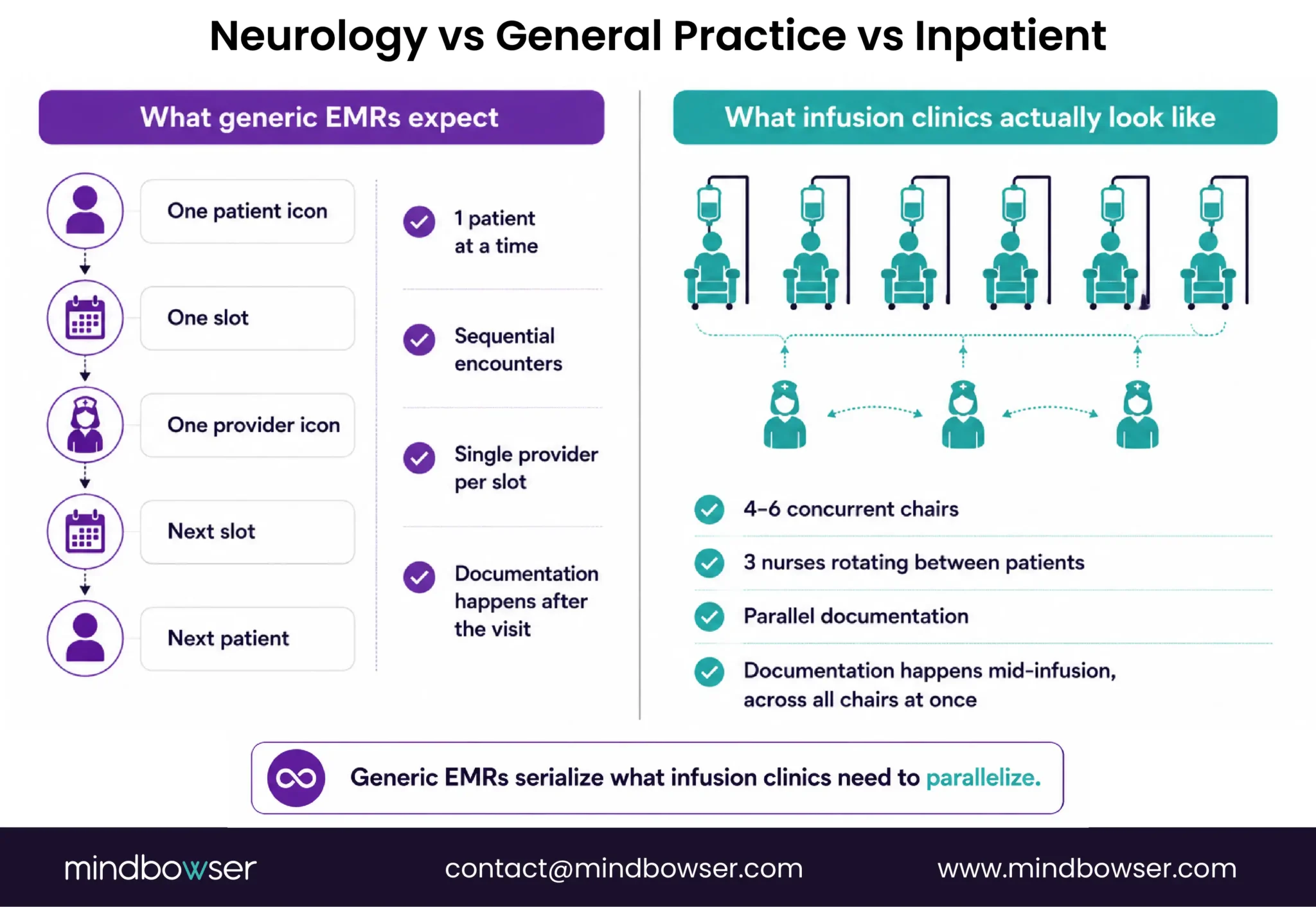
That’s the first problem. There are four more.
1. Infusion-specific charting fields don’t exist in standard EMRs: Drip type (Myers, high-dose Vitamin C, NAD+, ketamine). Bag volume. Infusion rate in mL/hour. Reaction monitoring. Nurse rotation logs. Pre-infusion vital signs. Post-infusion assessment. These aren’t optional. They’re the documentation skeleton for IV therapy. Most EMRs have checkboxes for “patient tolerated procedure.” They don’t have fields for “bag emptied at 47 minutes, no adverse reaction, patient instructed to increase water intake.”
2. Inventory management is a mess: IV therapy clinics track expensive consumables: B vitamins, compounded formulations, therapeutic-grade NAD+, ketamine (when applicable). Tracking happens in spreadsheets. A separate POS system. A handwritten log. Nobody knows exactly how many Myers bags they have left until someone physically counts. When an EMR doesn’t integrate inventory, you end up with the worst of both worlds: clinical charting in one system and stock management in another.
3. Billing gets complicated fast: CPT codes 96360 through 96379 define infusion services. Add-on codes layer on top. If a patient gets an infusion plus one push medication, you’re coding 96365 (initial therapeutic infusion) plus 96375 (IV push, each additional sequential push of a new substance). A generic EMR doesn’t know this logic. You end up with billing staff manually correcting codes, rejected claims, and slow reimbursement cycles.
4. HIPAA applies even to wellness-only IV bars: When a licensed provider is involved, patient data is Protected Health Information. Even if you’re offering “Myers cocktails” and “NAD+ infusions” in a wellness setting, the moment a registered nurse or physician is administering them, HIPAA requirements kick in. HHS.gov guidance is clear on this. You need a compliant system. Most generic EMRs have HIPAA features bolted on. IV therapy EMRs have them baked in.
That’s why a practice scheduling system, a patient portal, or a generic clinic management platform falls short. You’re not just managing appointments. You’re managing concurrent workflows, specialized charting, inventory, billing complexity, and compliance all at once.
What to Look for in an IV Therapy EMR (The Evaluation Criteria)
Before naming systems, here’s the framework. A shortlist only makes sense against clear criteria.
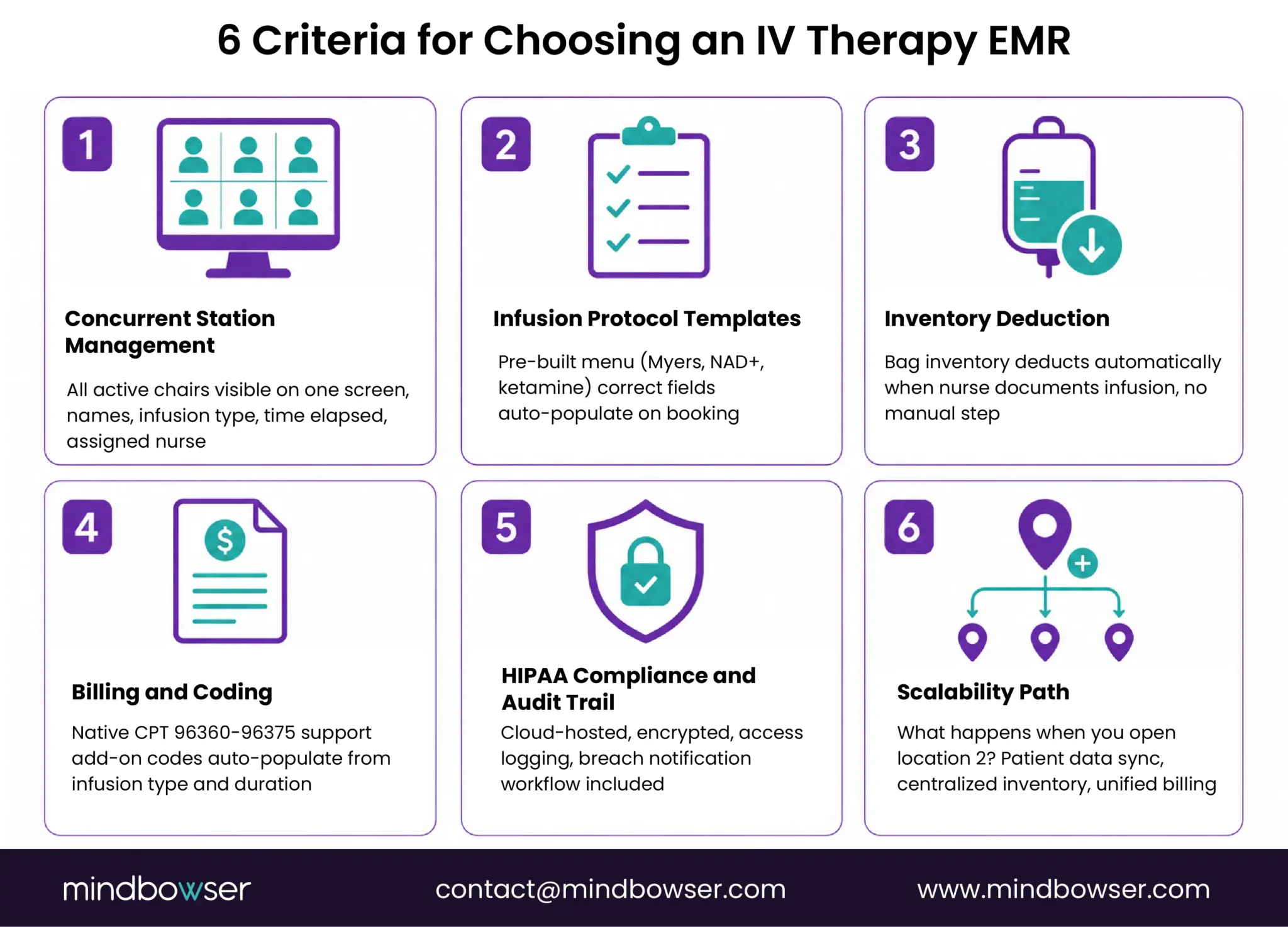
When you’re evaluating an IV therapy EMR, six things matter:
1. Concurrent station management: Can the system show you all active chairs on one screen? Patient names. Infusion type. Time elapsed. Assigned nurse. If the answer is “you can view them one at a time” or “you need a separate dashboard,” keep looking. The core need is visibility across all concurrent stations at once.
2. Infusion protocol templates: Can you build a menu of your standard infusions? When a patient books a Myers Cocktail, do the right charting fields auto-populate? Does a ketamine infusion pull in different fields than a Myers? If the system requires manual template selection or doesn’t let you customize what fields appear, the friction is permanent.
3. Inventory deduction: Does the system deduct IV bag inventory automatically when a nurse documents the infusion? Or is that a separate manual step? Manual steps compound. They become the reason your inventory is always wrong.
4. Billing and coding: Does the system natively support CPT 96360-96379 (hydration/infusion/push, initial and add-on)? Do add-on codes populate correctly based on the infusion type and duration? If billing staff have to code manually, you’re just shifting the problem downstream.
5. HIPAA compliance and audit trails: Is the system cloud-hosted with explicit HIPAA compliance? Can you audit who accessed a patient record and when? Is there a breach notification workflow? These aren’t nice-to-haves. They’re mandatory.
6. Scalability path: What happens when you open location 2? Does patient data sync between locations? Is inventory centralized or per-location? Can you manage one multi-location billing system or do you suddenly need two separate setups? If the answer is murky, the vendor hasn’t thought through growth.
These six dimensions separate systems that work from systems that create workarounds.
The 5 Best IV Therapy EMR Systems in 2026 (And Where Each One Breaks)
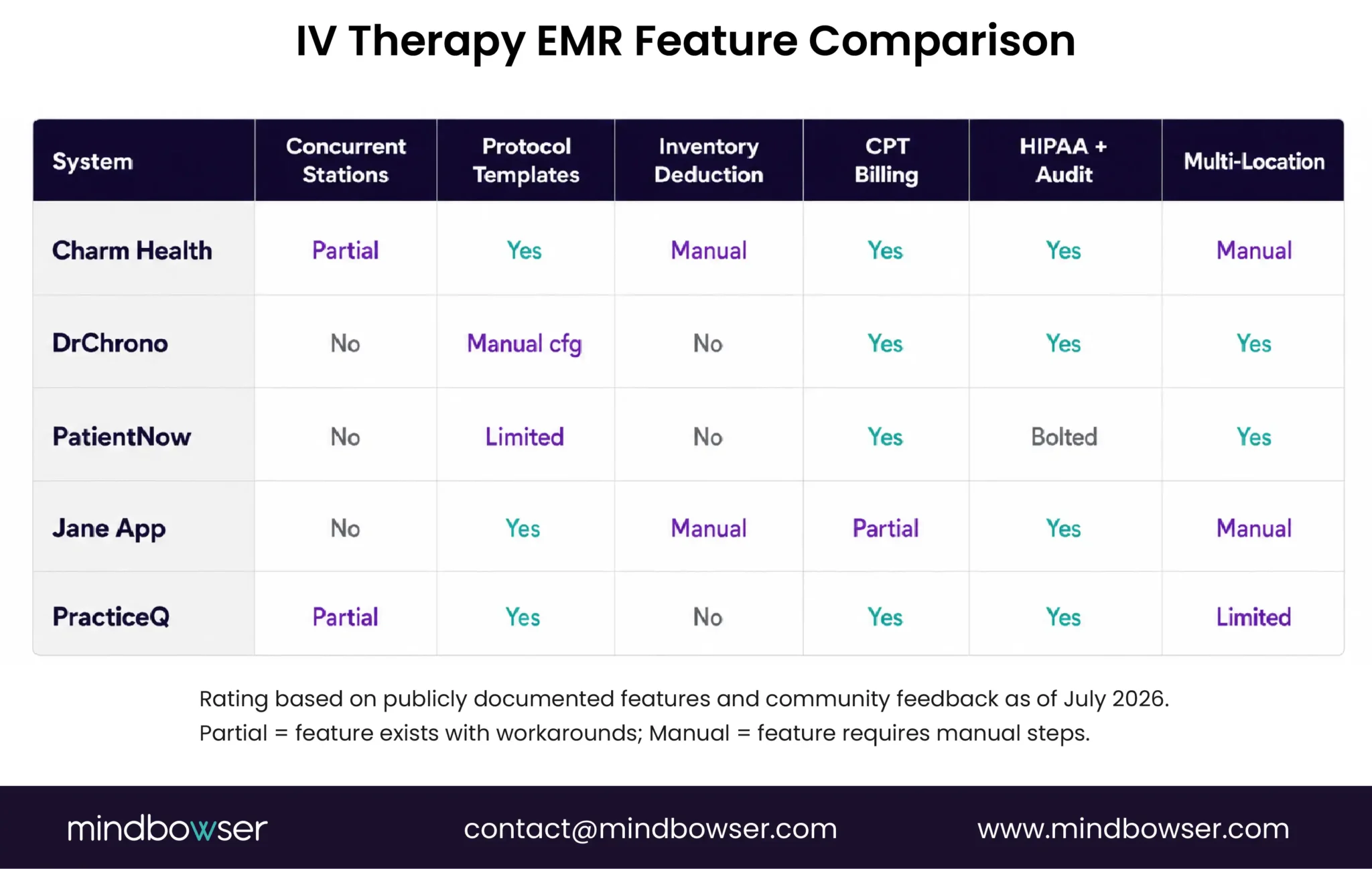
I’m going to name the five systems with real traction in IV therapy and aesthetics clinics. For each one, here’s what it does well and where it hits a wall. The vendor sales pages won’t tell you the second part.
Charm Health: Best Overall for Independent IV Clinics
Charm is built for independent practitioners: therapists, acupuncturists, functional medicine clinics, and infusion centers. It gets the basics right.
It’s cloud-hosted and compliant. The interface is clean. You can customize intake forms. Appointment scheduling is intuitive. The freemium model means you can try it for a single provider before committing.
CPT billing is supported. Telehealth is built in. Patient communication is solid.
Here’s where it breaks: there’s no native concurrent station view. You can manage one patient at a time. For a 4-chair clinic, that’s friction but survivable. For 8+ chairs running full capacity, this becomes the blocker that makes you consider something else. Inventory management also requires a workaround: the system logs what was used, but deduction isn’t automatic.
That said, Charm is the most commonly recommended option I hear from independent IV therapy clinic owners. If you’re 2-6 chairs and okay with some manual station routing, Charm works.
Learn more: Charm Health integration with Mindbowser custom builds
DrChrono: Best for Mobile and Concierge IV Services
DrChrono is iPad-first. That matters if your documentation happens at the chair, not at a desktop. Mobile IV concierge services especially benefit from this. You’re at the patient’s home or office. An iPad in hand documenting in real-time is different from charting later.
The mobile app is genuinely solid. Offline capabilities exist. The interface is built for speed.
The problem is the learning curve. It’s steeper than Charm or PracticeQ. And infusion-specific templates aren’t out-of-the-box. You’re building them yourself or configuring them with support help. Reddit threads from IV clinic staff mention support responsiveness issues.
For a clinic with iPads at every chair and staff trained on mobile-first workflows, DrChrono is viable. For a clinic that expects to plug something in and go, it’s probably not.
PatientNow: Most Popular in Aesthetics, Expanding to IV
PatientNow started in medical aesthetics. That lineage shows. The patient communication tools are strong. Before-and-after photo capability is built in. The booking flow is clean.
The crossover appeal is real. If your IV clinic also runs aesthetics services, skin tightening, or other cosmetic procedures, PatientNow’s interface is familiar. The reporting is clean.
The trade-off: it’s aesthetics-first, not clinical-first. Infusion protocol customization is more limited than clinical-focused systems. The HIPAA compliance is there, but it feels bolted on rather than foundational. For a multi-service practice blending clinical infusions with cosmetic services, it can work.
Learn more: Best EMR for Medical Spas (overlap between aesthetics and IV clinic EMR selection)
Jane App: Clean UX, Popular With Functional Medicine and Naturopathic IV
Jane App has a loyal following among functional medicine and naturopathic practitioners. The interface is genuinely clean. Online booking is strong. Telehealth is native.
If you’re running ketamine-assisted therapy, IV nutritional therapy, or other complementary protocols, Jane App is popular. The community is supportive.
The limitation is station concurrency. Like Charm, it’s built for sequential encounters, not parallel station occupancy. And there’s a Canadian-origin legacy that creates some friction with US billing. Insurance claim integration isn’t as smooth as domestic-first systems.
For a single-location, 2-4 chair functional medicine IV clinic, Jane App is solid. For anything larger or more complex, the limitations start to bind.
PracticeQ: Best Intake Forms, Growing Platform
PracticeQ is newer. The team understands modern SaaS. The intake form builder is genuinely the best I’ve seen in this category. Pre-populating patient data through smart forms saves the front-desk staff minutes per patient.
The interface is intuitive. Cloud-native. Built on modern infrastructure.
The gap is maturity. The platform is newer. The integration library is thinner. There aren’t as many IV therapy clinics running PracticeQ yet, so the community for benchmarking is smaller. If something breaks, support is responsive, but the knowledge base is still growing.
It’s a solid choice for a clinic willing to be an early adopter on a platform that’s clearly well-built. For clinics that need a deep community and lots of out-of-the-box templates, the newness might be friction.
Build an IV Therapy EMR Around Your Exact Workflow
Two Scenarios Where Off-the-Shelf IV Therapy EMRs Stop Working
Most clinics with 2-4 chairs and a single location can get by with one of the five systems above. Two scenarios change that calculation.
Scenario 1: You’re at 6 chairs and growing.
Every chair generates concurrent documentation. A nurse is charting one patient while a second nurse pulls the first patient’s IV. A third nurse starts a new patient. Five minutes later, all three patients are getting post-infusion vitals. The EMR suddenly needs to serialize work that happens in parallel. Staff ends up doing paper backfill or using workarounds that break audit trails.
I watched this happen at a Phoenix-based IV clinic last year. They’d outgrown Jane App but weren’t ready for a full build. They spent two months trying to retrofit their process into a system designed for sequential encounters. By month three, they were back on paper for peak hours.
Scenario 2: You’re opening a second location.
Patient records need to move between locations. Inventory needs to be centralized. Billing needs to flow through one system. Most of the vendors above were built for a single location. Multi-location is a “yes, but…” feature. You get one database, but each location still feels like a separate setup.
For a practice with two locations and different protocols at each, the management overhead becomes real.
And then there’s the emerging-modality problem. Ketamine infusion clinics are growing fast. FDA-adjacent documentation, physician oversight, follow-up monitoring: these need more sophisticated workflows than generic EMRs offer. Same with oncology infusions or other specialty protocols.
When to Consider a Custom Build
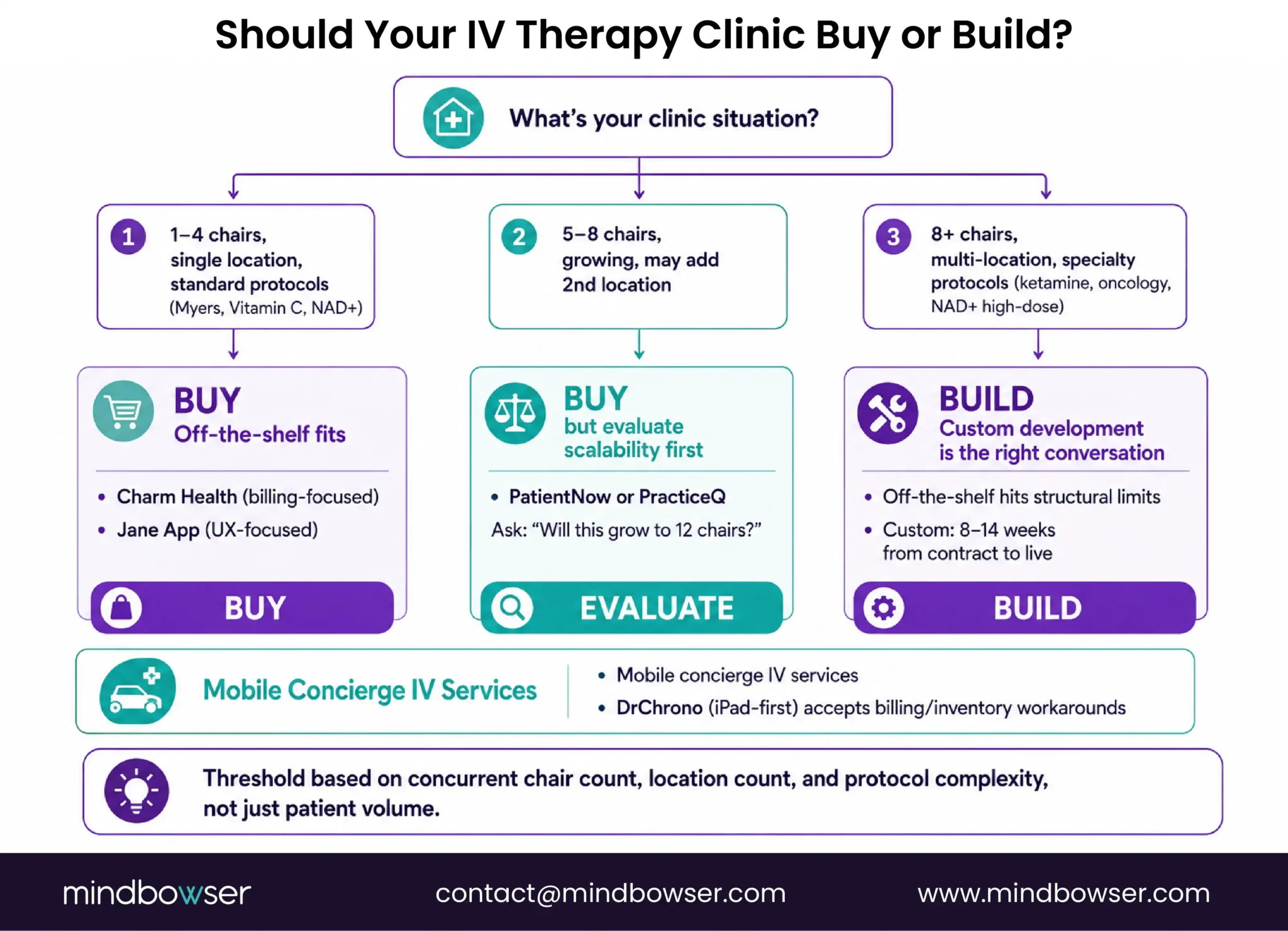
Here’s the honest threshold: if you’re at 8+ concurrent chairs, running multi-location, or building custom protocols, you’re at the point where off-the-shelf systems hit structural limits.
That’s also the point where a custom EMR becomes economically viable.
A national health system required a fully custom Electronic Health Record with no viable off-the-shelf equivalent at their budget and compliance requirements. A custom build isn’t always a seven-figure decision. For an IV therapy clinic with clear workflows and a mid-market budget, it’s increasingly accessible.
What a custom build brings that off-the-shelf can’t:
Native multi-station concurrency. Built to your layout. Four chairs, eight chairs, twelve chairs: the system is designed around your actual footprint, not retrofitted.
Protocol-specific fields. Ketamine has a different documentation requirement than a Myers Cocktail. Custom build owns that distinction.
Inventory integration. When a nurse charts an infusion, bag inventory deducts automatically. No manual step. No spreadsheet.
Pre-built accelerators that compress the timeline. A Patient Questionnaire Form module automates pre-infusion intake. PHISecure handles HIPAA compliance by default. Patient Referral Manager handles follow-up scheduling. These are already-built components. You’re not starting from scratch.
And here’s the thing: custom doesn’t mean slow. With proven components and a clear scope, you’re typically looking at 8-14 weeks from contract to live.
Learn more: EHR Software Cost Guide: What Custom Development Actually Costs
How to Evaluate an IV Therapy EMR Before You Buy (Or Build)
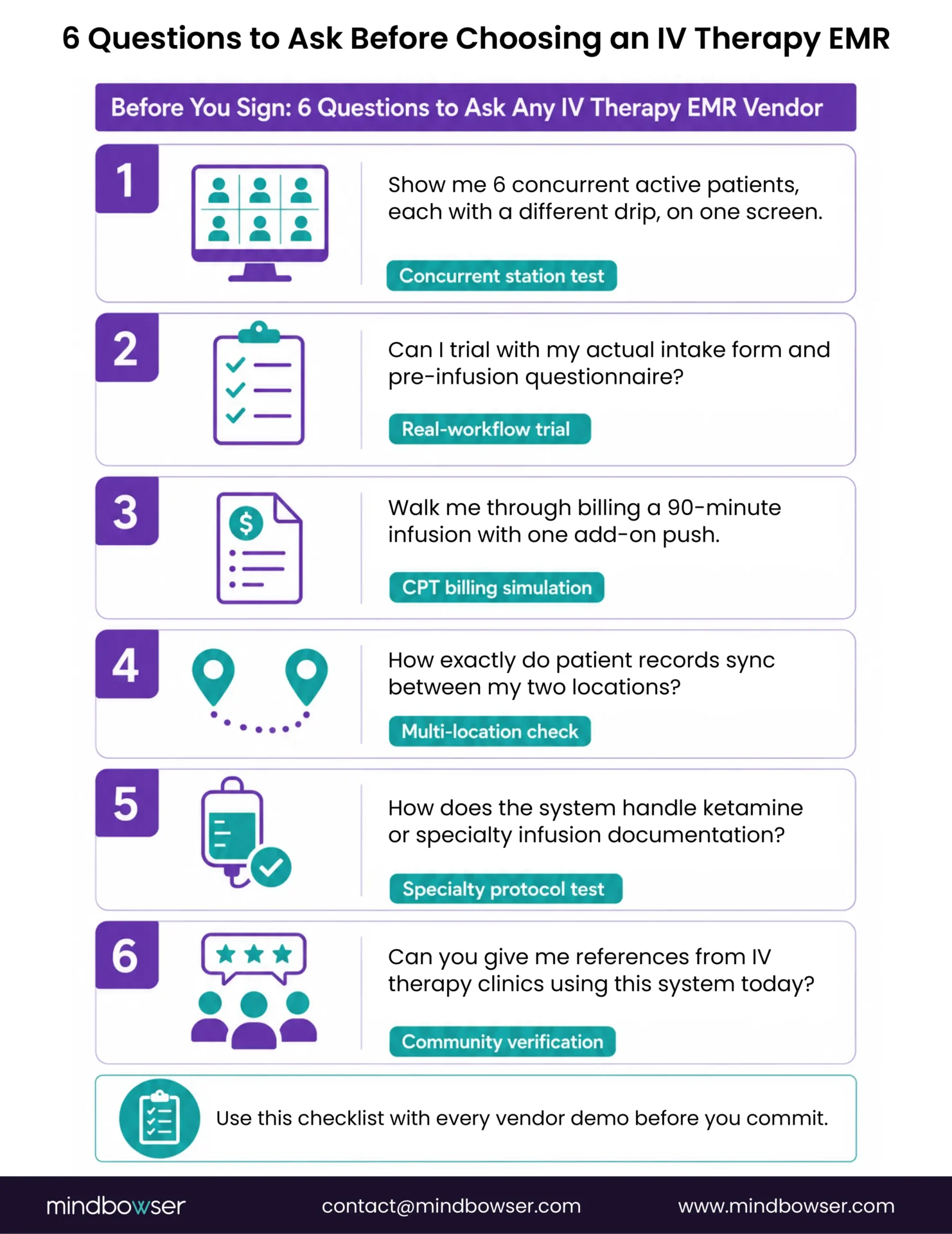
If you’re comparing vendors or considering custom, run this six-point evaluation.
1. Ask for a real demo: “Show me six concurrent active patients, each with a different drip, all visible on one screen.” If they can’t do it, they don’t have it. If they show you a workaround, they don’t have it. If they say “that’s an add-on module,” move on.
2. Request a trial with your actual intake form: Don’t use their template. Upload your consent form, your pre-infusion questionnaire, any intake documents you actually use. Can the form builder accommodate your workflow without modification? If they can’t, friction is permanent. You’ll be explaining workarounds to staff every single day.
3. Run a billing simulation: Enter a 90-minute infusion with one add-on push medication. How many clicks does it take? What CPT codes auto-populate? What requires manual entry? If the vendor is vague or if the process feels cobbled together, that’s your answer.
4. Ask about multi-location: If you’re planning to expand, ask exactly how patient records are shared between locations. Is inventory centralized? Can you run unified billing? Ask for a reference from another multi-location clinic using the same system. Call them.
5. Ask about specialty protocols: Specifically, how does the system handle ketamine-adjacent infusions? Does it have a separate treatment record type? Is there physician oversight built in? If the vendor isn’t sure or if they “could probably set that up,” the answer is no.
6. Check the community: How many IV therapy clinics are actively using this system right now? Can the vendor give you references? Not “here’s our customer list.” References. People you can call.
Learn more: Medical Specialty EHR Development Guide
Which IV Therapy EMR Is Right for Your Clinic?
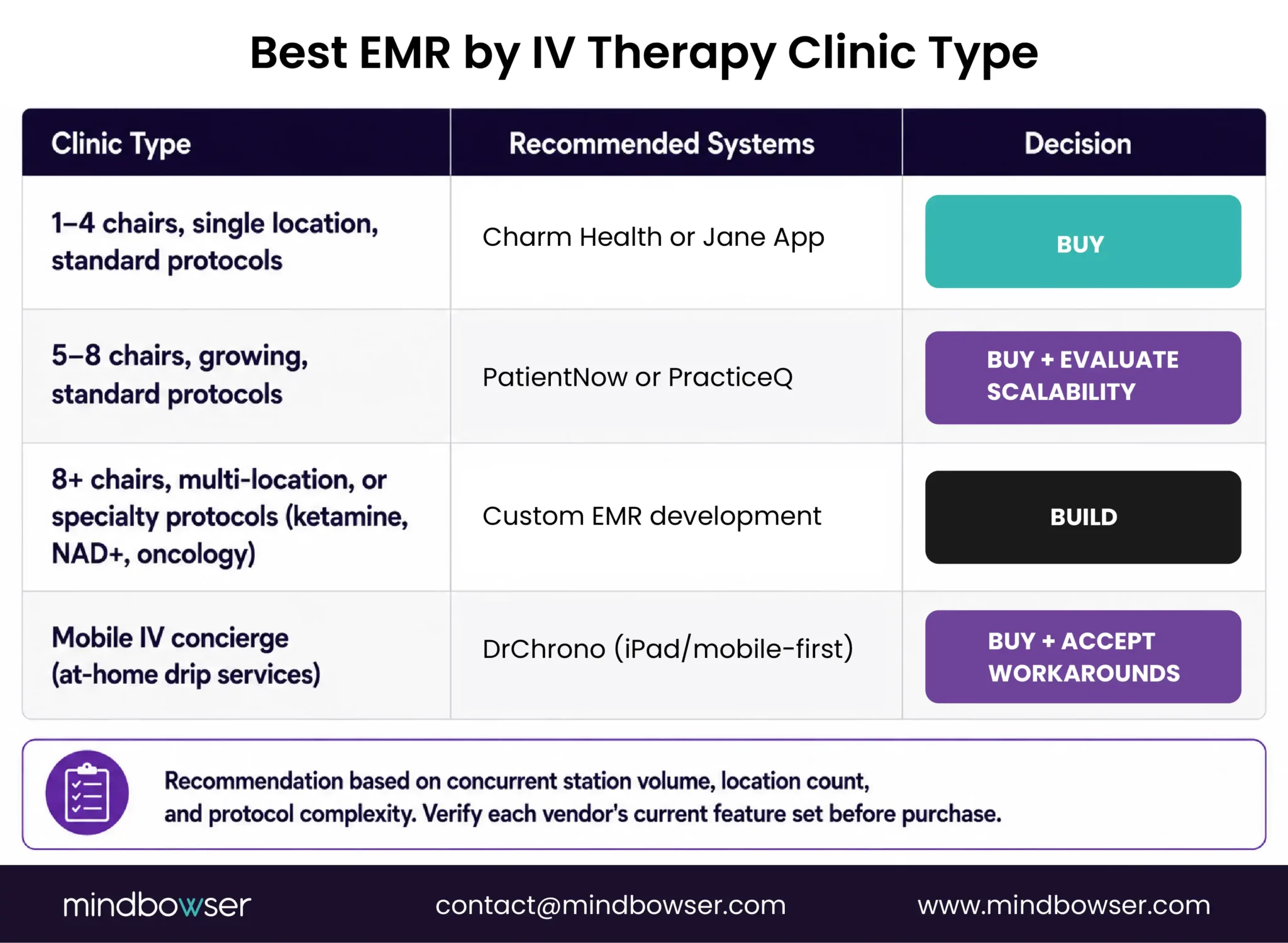
The answer depends on your current size and your 18-month growth plan. Not which system has the prettiest interface.
1-4 chairs, single location, standard protocols:
Charm Health or Jane App, depending on whether you prioritize billing support (Charm) or clean UX (Jane). Buy.
5-8 chairs, growing, standard protocols:
PatientNow or PracticeQ. Buy, but evaluate their scalability path first. Will opening location 2 create friction? Will the system grow with you to 12 chairs, or will it become a problem at 8?
8+ chairs, multi-location, or specialty protocols (ketamine, NAD+, oncology):
Off-the-shelf hits structural limits. Custom build is the conversation to start now, not after you’ve already outgrown two systems.
Mobile IV concierge:
DrChrono for mobile form factor. Accept that inventory and billing will require workarounds unless you build.
Conclusion
None of the five systems here are bad software. That’s not the takeaway. The takeaway is that every one of them was designed around a single-encounter, one-patient-at-a-time model, and infusion care doesn’t work that way. Charm and Jane App get you through 2-4 chairs.
PatientNow and PracticeQ stretch that to 5-8 if you’re honest about the trade-offs. DrChrono earns its place if your workflow is mobile-first. Past that, you’re not choosing between vendors anymore; you’re choosing between building workarounds forever or building the system once, correctly.
The 8-chair, multi-location, specialty-protocol line isn’t arbitrary. It’s the point where the manual patching costs more, in staff time and billing errors, than a custom build does. If you’re already there, the shortlist above is a stopgap, not a strategy.