BLOGS
BLOGS  NEWSROOM
  CASE STUDIES
  WEBINARS
  PODCASTS
  ASSET HUB
  EVENT CALENDAR

























TL;DR
- HL7 v2 is still the dominant clinical message format in US health systems. Understanding segment structure isn’t optional for any EHR integration engineer.
- MSH, PID, PV1, OBX, ADT, ORU, ORM, and MDM cover most of what integration engineers run into in production.
- Every OBX observation result needs a LOINC code in OBX.3 for semantic interoperability. The field is required; the mapping is where implementations go wrong.
- MLLP is the TCP transport wrapper that carries HL7 v2 messages. FHIR REST is replacing it in new builds, but MLLP still runs most existing US lab and ADT feeds.
Every HL7 v2 message starts with an MSH segment, and if you’ve ever had an interface engine reject a message at 2am, you know exactly which field you’re checking first.
We’ve built and maintained HL7 v2 integrations for hospitals, labs, and digital health platforms for over a decade, and the segment structure hasn’t changed much in that time. What has changed is how many teams are encountering it for the first time, often while migrating off a legacy system like Cerner DSTU2 and needing to understand what they’re actually moving away from.
This guide is the reference we wish existed when we onboarded new engineers: every major segment and message type in one place, with the production context that tells you why each field matters, not just what it’s called.
What Is HL7 v2 and Why It Still Runs Most US Clinical Systems
HL7 (Health Level Seven) Version 2 is a messaging standard for exchanging clinical, administrative, and financial data between healthcare systems. It’s built around pipe-and-carat-delimited segments, each carrying a defined set of fields, and it’s been the default transport for lab results and patient administrative data in US hospitals since the late 1980s.
HL7 International’s Version 2 product suite traces back to a draft standard presented in October 1987, with Version 2.0 formally released the following year (HL7 International). HL7 v2.5.1 is the version most widely deployed in production today, and it’s also the version named directly in federal regulation.
The Centers for Medicare & Medicaid Services (CMS) Interoperability and Patient Access final rule (CMS-9115-F) requires hospitals with a compliant electronic system to conform to the HL7 v2.5.1 content exchange standard at 45 CFR 170.205(d)(2) when sending admission, discharge, and transfer notifications (CMS, effective May 1, 2021). It’s not a suggestion, it’s the rule.
FHIR (Fast Healthcare Interoperability Resources), HL7’s newer REST-based standard, is where new regulatory weight is landing. For how the two standards actually differ in scope and use case, see our HL7 vs FHIR comparison.
But that mandate is layered on top of existing HL7 v2 infrastructure, not replacing it outright. Most lab result and ADT feeds running in production hospitals today still run on HL7 v2, and the two coexist through bridging layers rather than a clean cutover.
One practical effect: Oracle Health’s Cerner DSTU2 deprecation, effective December 2025, is pushing a wave of engineers to relearn HL7 v2 fundamentals as they figure out exactly what they’re migrating away from.
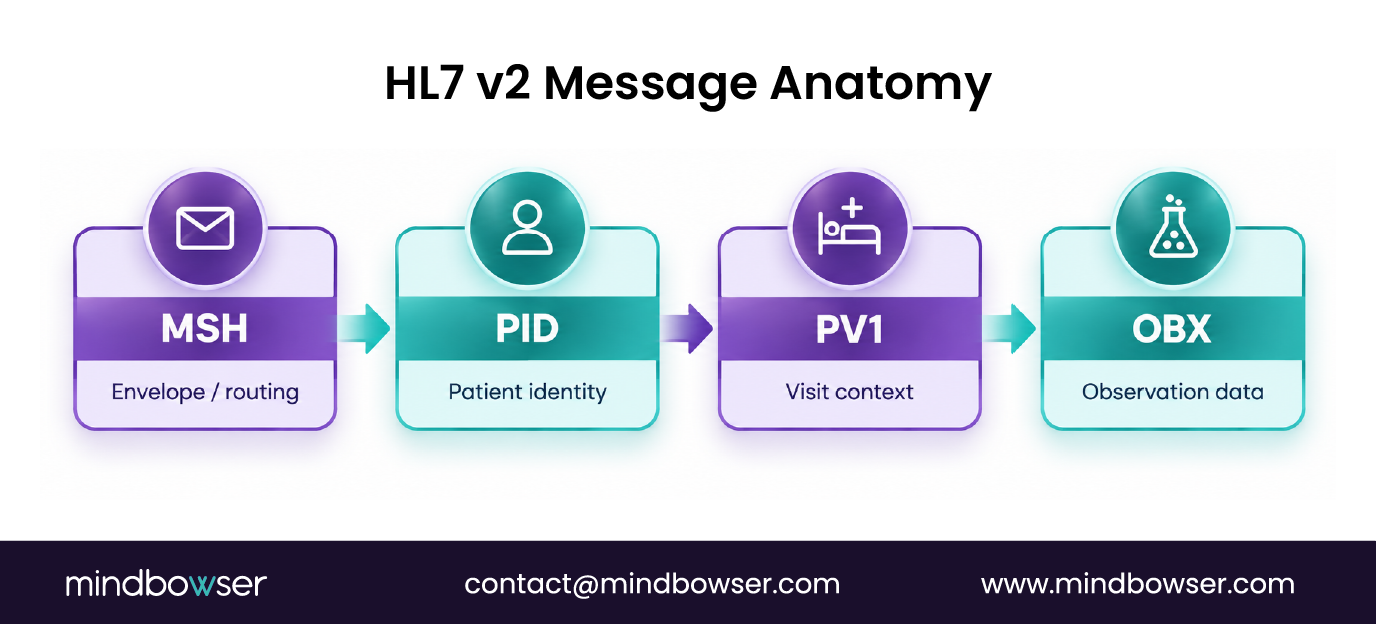
MSH: The Message Header, Every Message Starts Here
The MSH segment is the envelope of every HL7 message. Interface engines read it first to know what kind of message they’re receiving and where it came from.
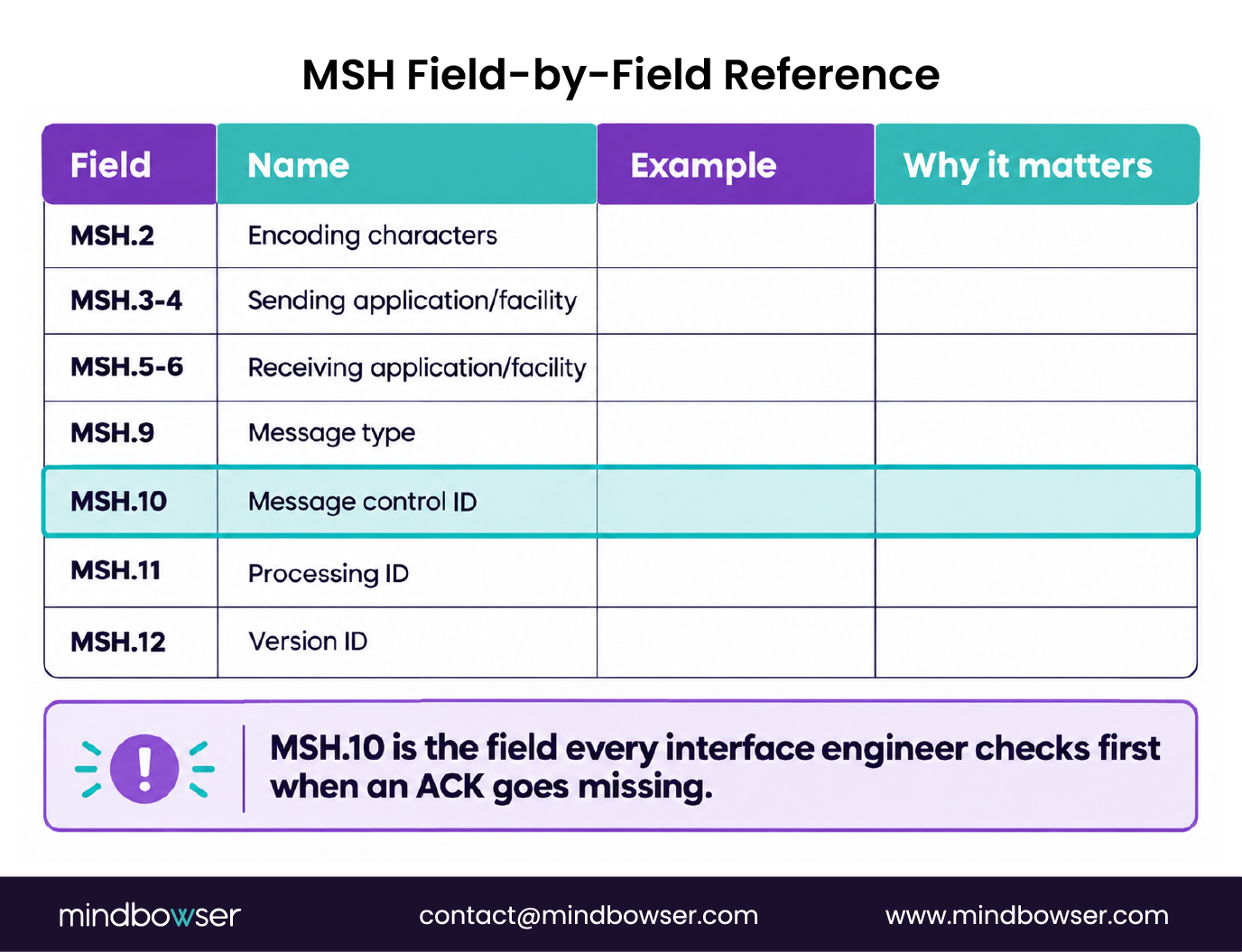
The fields that matter most in production:
- MSH.2: Encoding characters (^~&), the four characters every HL7 v2 parser expects to see and uses to delimit components, repetitions, escapes, and subcomponents
- MSH.3 / MSH.4: Sending application and sending facility
- MSH.5 / MSH.6: Receiving application and receiving facility
- MSH.9: Message type, for example ADT^A01 for an admit notification or ORU^R01 for an observation result
- MSH.10: Message control ID, the unique identifier used to match the message against its acknowledgment
- MSH.11: Processing ID (P for production, T for training, D for debugging)
- MSH.12: Version ID, identifying which HL7 v2.x revision the message conforms to
When we’re debugging a failed interface, MSH.9 tells us what message type we’re dealing with, and MSH.10 is what we match against the ACK. If MSH.10 is null or non-unique, acknowledgment queues pile up and you end up chasing phantom failures instead of the real one.
MSH.9’s event codes are worth understanding on their own. We cover the full list in our HL7 trigger events guide.
ADT Messages: Admit, Discharge, Transfer, the Heartbeat of the Health System
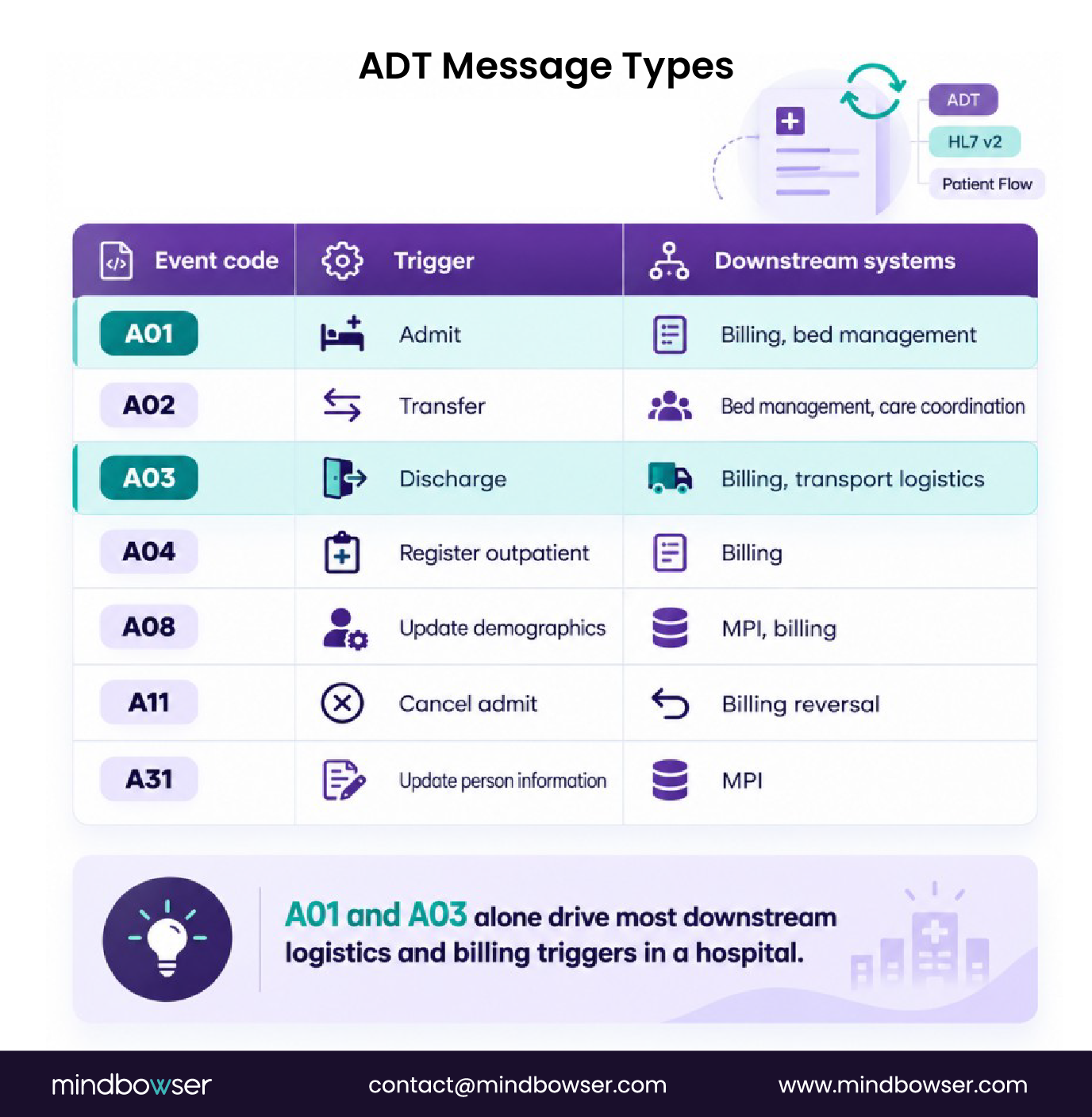
ADT messages are the most common HL7 message type in a hospital. Every admission, transfer, and discharge generates one, and downstream systems (billing, care coordination, transport logistics) run on them.
The event codes that show up most often in production:
- ADT^A01: Admit or visit notification
- ADT^A02: Transfer, patient moved within the facility
- ADT^A03: Discharge
- ADT^A04: Register outpatient visit
- ADT^A08: Update patient information (demographic change)
- ADT^A11: Cancel admit
- ADT^A31: Update person information, commonly used in master patient index updates
CMS-9115-F made hospital ADT notifications a Condition of Participation, codified at 42 CFR 482.24(d): hospitals running a compliant electronic system have to transmit patient event notifications, and the ADT feed is how they do it (CMS). That’s a provider-to-provider requirement, distinct from the separate Payer-to-Payer data exchange provision in the same rule.
We’ve seen the practical value of this firsthand. On one transport coordination platform, ADT A01 and A03 feeds triggered patient logistics workflows automatically, cutting service request time by 70% compared to the manual dispatch process it replaced.
If you’re working through a DSTU2-to-current migration, the ADT feed is usually one of the first things to remap. More on that in our Cerner DSTU2 migration guide.
PID and PV1: Patient Identity and Visit Segments
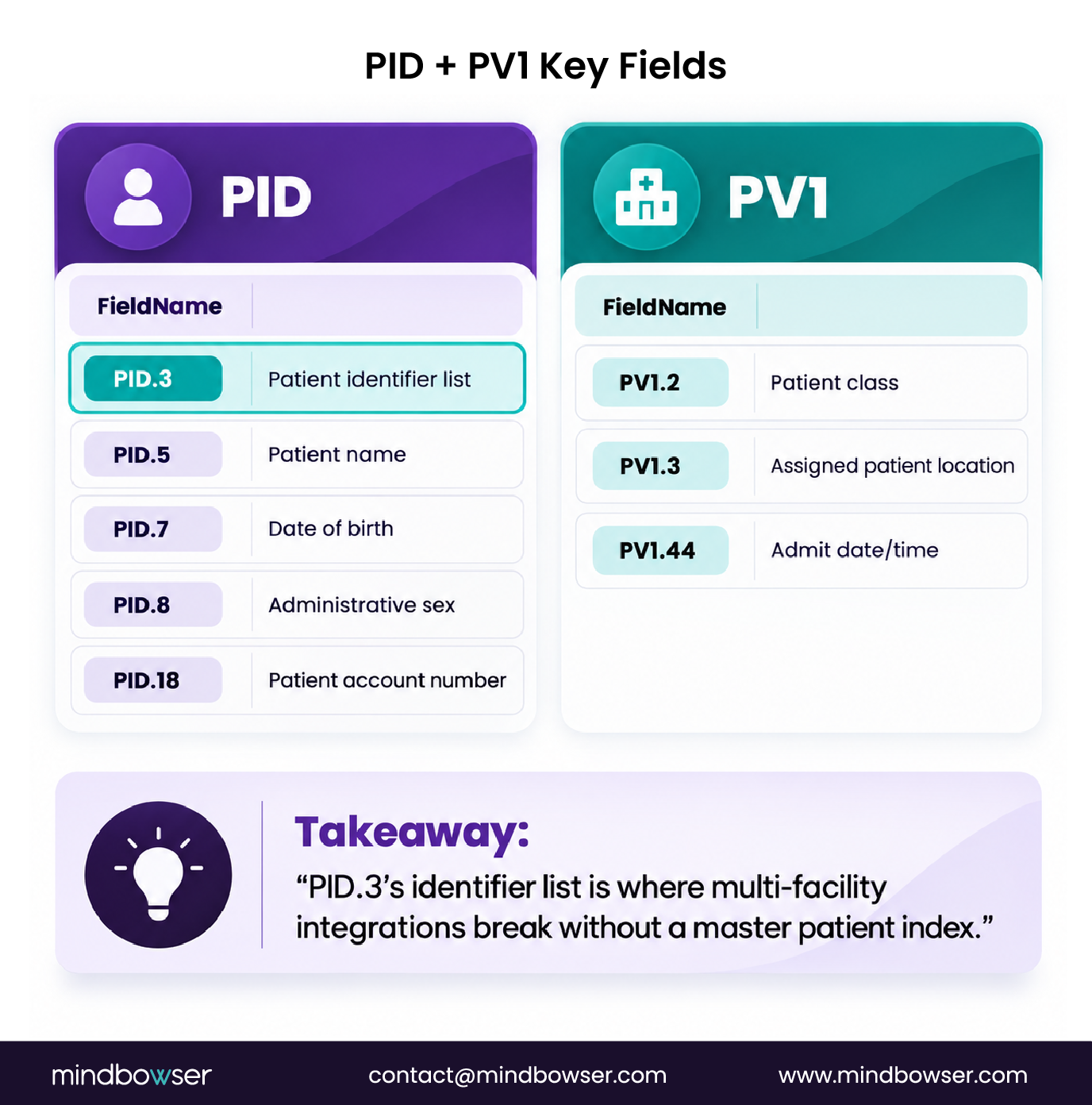
PID is the patient. PV1 is the visit. Together they’re the minimum context every downstream system needs to make sense of a clinical message.
PID fields that carry the most weight:
- PID.3: Patient identifier list (CX data type), the extended composite ID that includes the facility OID
- PID.5: Patient name (XPN data type: family, given, middle, suffix, prefix, degree)
- PID.7: Date of birth, in HL7 DTM format (YYYYMMDD)
- PID.8: Administrative sex
- PID.18: Patient account number, what billing systems use to match the patient
PV1 fields:
- PV1.2: Patient class (I for inpatient, O for outpatient, E for emergency, P for preadmit, R for recurring patient)
- PV1.3: Assigned patient location (facility, building, floor, room, bed)
- PV1.44: Admit date and time, the timestamp billing systems use to open the encounter
In multi-location EHR integrations, PID.3’s identifier list is where the headaches live. Different facilities use different OIDs, and a patient at Location A and Location B looks like two different people until PID.3 gets normalized against a master patient index. We’ve had to build that normalization layer more than once. Actually, “build” undersells it: it’s closer to ongoing maintenance, since new facilities and new source systems keep introducing new OID variants.
For the FHIR side of this mapping, see our HL7 v2 to FHIR mapping guide.
Facing HL7 Integration Challenges? Talk to Our Experts Today.
OBX: Observations and Results, Where Lab Data Lives
OBX is the observation segment. It carries lab results, vital signs, and clinical findings. Every ORU message contains at least one OBX, and the most important field in it is OBX.3.
- OBX.1: Set ID, the sequence number when a message carries multiple OBX segments
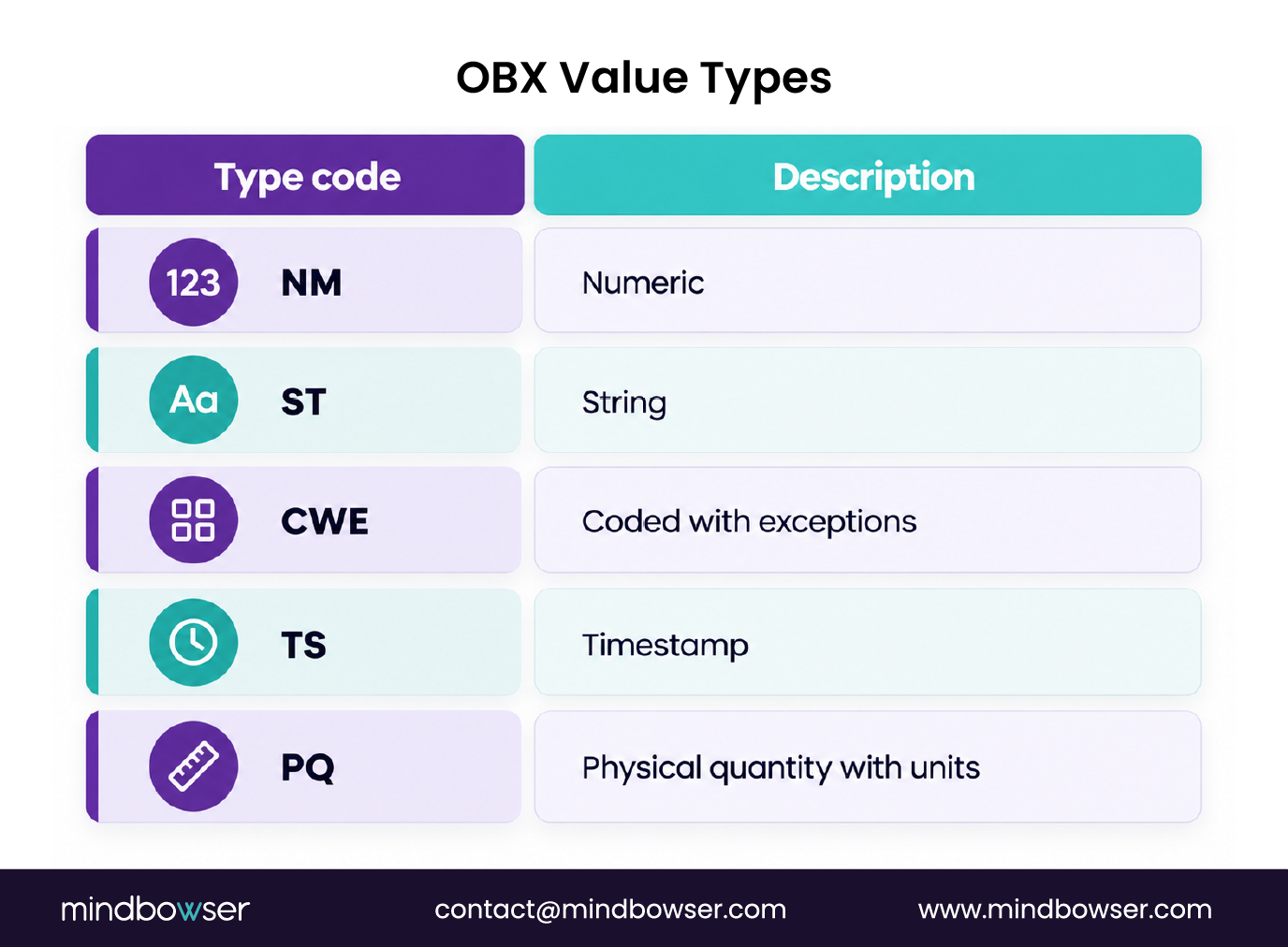
- OBX.2: Value type (NM for numeric, ST for string, CWE for coded with exceptions, TS for timestamp, PQ for physical quantity with units)
- OBX.3: Observation identifier, and this should be a LOINC (Logical Observation Identifiers Names and Codes) code for semantic interoperability. Example: 2160-0^Creatinine^LN, where the LN suffix identifies LOINC as the coding system (LOINC.org, Regenstrief Institute)
- OBX.5: Observation value, the actual result
- OBX.6: Units, typically UCUM (Unified Code for Units of Measure) for numeric results
- OBX.8: Abnormal flags (H for high, L for low, A for abnormal, AA for critically abnormal)
- OBX.11: Observation result status (F for final, P for preliminary, C for corrected, X for cannot be obtained)
In a lab result integration we built for a patient financial assistance platform, the OBX.3 LOINC code was the join key that matched results to the correct care protocol. A wrong or missing LOINC code meant the match failed silently, no error, just a result that never got routed. Fixing that mapping and enforcing LOINC on ingest cut manual data entry by 90% on that project.
That’s the pattern worth internalizing: OBX.3 isn’t a formality. It’s the field that lets a downstream system understand what was measured without a human reading the string.
For how OBX maps to FHIR’s Observation resource, see our ORU vs FHIR Observation comparison.
ORU, ORM, and MDM: The Order and Document Message Types
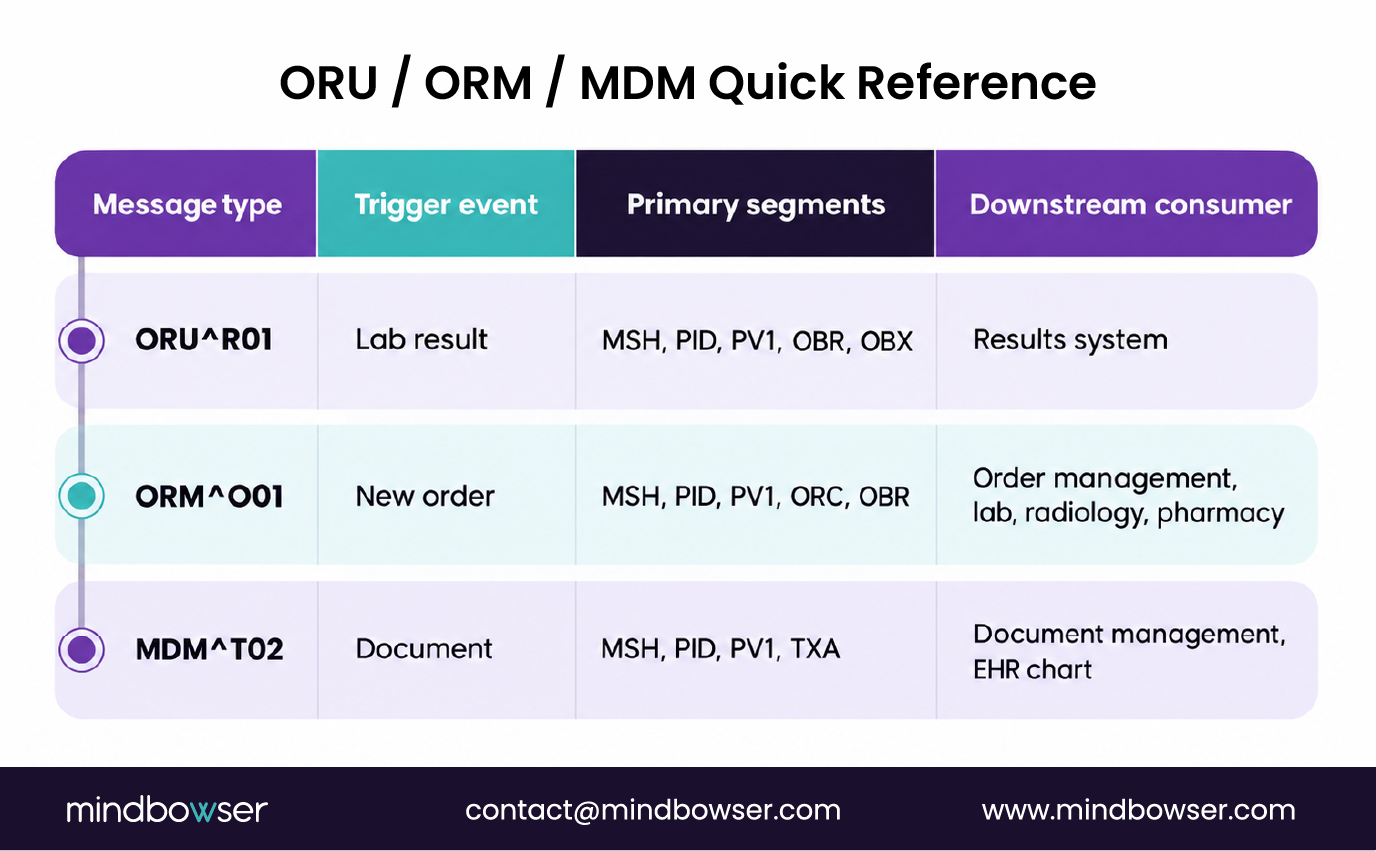
Beyond ADT and lab results, three message types cover most of the remaining clinical workflow: ORU (results), ORM (orders), and MDM (documents).
- ORU^R01: Observation Result, Unsolicited, the standard lab result message. Structured as MSH, PID, PV1, OBR, OBX.
- ORM^O01: Order Message, carrying a new order for lab, radiology, or pharmacy. The ORC segment (Order Common) holds the order control code, and OBR (Observation Request) holds the specifics of what was ordered.
- MDM^T02: Medical Document Management, carrying transcribed reports, clinical notes, and imaging reports. The TXA segment is the transcription document header.
Two segments worth knowing on their own:
- OBR (Observation Request): OBR.4 is the universal service ID, the test or procedure ordered, again ideally a LOINC code. OBR.7 is the observation date and time.
- ORC (Order Common): ORC.1 is order control (NW for new order, CA for cancel, OC for order changed). ORC.12 is the ordering provider.
Interface engines handling ORM-to-ORU workflows need to match OBR.4 (the test ordered) against OBX.3 (the test resulted). A mismatch between the ordering system’s LOINC code and the lab’s LOINC code is one of the most common sources of result routing failures we’ve had to troubleshoot in production, or more precisely, the most common one that isn’t a plain connectivity failure.
For a broader look at how these message types fit into a full integration build, see our guide on HL7 v2 integration workflows.
MLLP: The Transport Layer That Carries HL7 Messages
HL7 messages don’t travel by themselves. They need a transport protocol, and MLLP (Minimal Lower Layer Protocol) is the TCP wrapper that’s been doing that job since the early 1990s.
- MLLP wraps each HL7 message with a start-of-block byte (0x0B), an end-of-block byte (0x1C), and a trailing carriage return (0x0D)
- It runs over TCP/IP. Port 2575 is the de facto industry standard, though MLLP itself has no formal IANA port assignment (HL7 International MLLP Transport Specification)
- Every MLLP message expects an HL7 ACK response: AA for application accept, AE for application error, AR for application reject
- MLLP carries no native TLS or encryption. Encrypted MLLP (MLLP over TLS) is required for HIPAA-compliant transmission over untrusted networks
- FHIR REST over HTTPS is replacing MLLP in new builds, but HL7 v2 over MLLP still runs the majority of existing lab and ADT interfaces in production
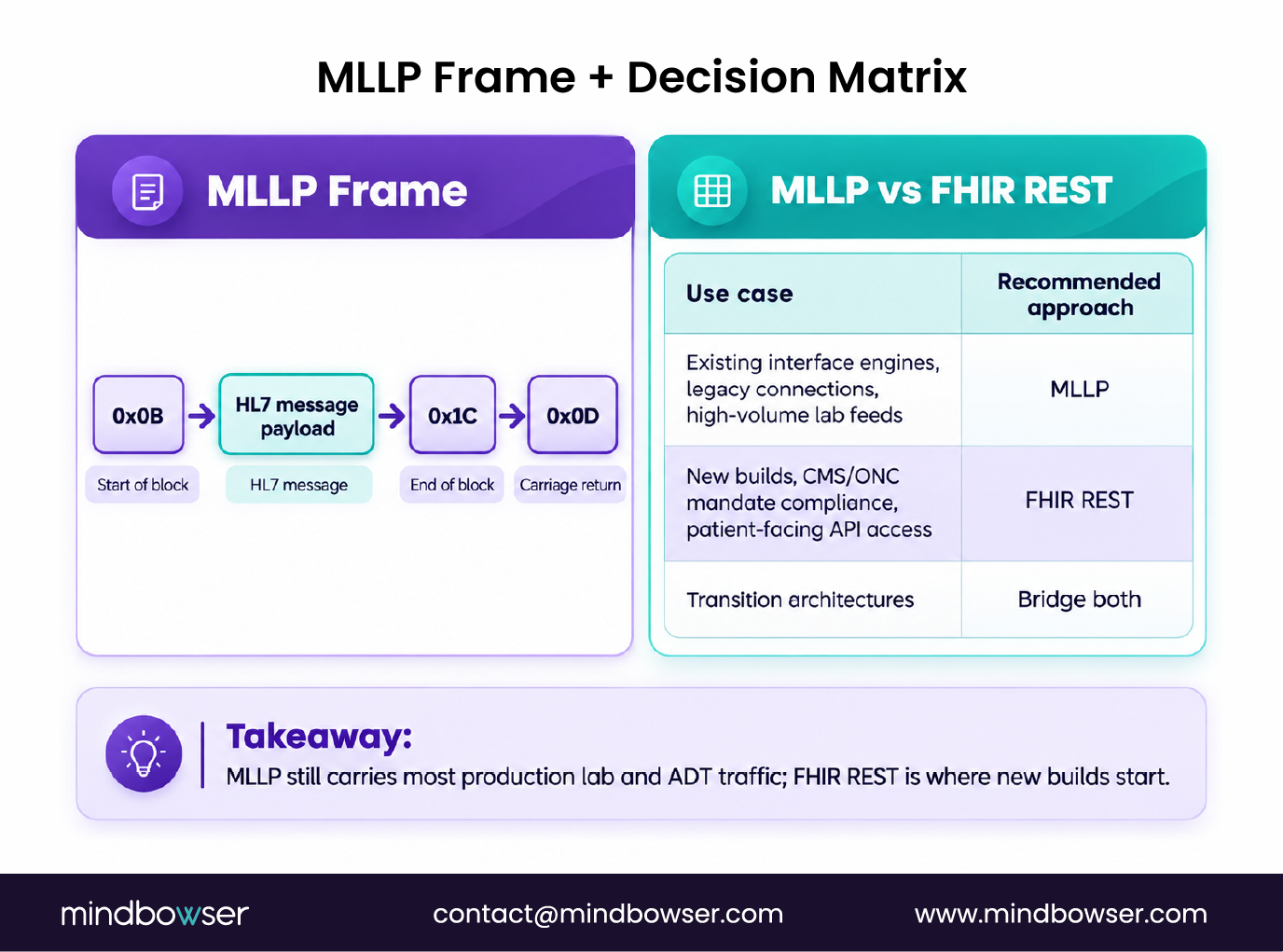
When should you use which? In our experience:
- Use MLLP for existing interface engines (Mirth, Rhapsody, Cloverleaf), legacy EHR connections, and high-volume lab result feeds where the sending system only speaks HL7 v2
- Use FHIR REST for new builds, for meeting CMS and ONC mandate requirements, and for patient-facing API access
- Bridge both in transition architectures that translate HL7 v2 feeds into FHIR resources for downstream consumption
Connecting HL7 Segments to FHIR Resources: The Migration Bridge
If you’re moving from HL7 v2 to FHIR, the resource mapping isn’t one-to-one. Each HL7 segment maps to one or more FHIR resources, and some fields split across resource boundaries.
- PID → Patient: PID.5 maps to name, PID.7 to birthDate, PID.3 to the identifier array
- PV1 → Encounter: PV1.2 maps to class, PV1.44 to period.start
- OBX → Observation: OBX.3 maps to code (carrying the LOINC value), OBX.5 to value, OBX.8 to interpretation
- ADT^A01 → Encounter (status: in-progress) plus a Patient resource update
- ORM → ServiceRequest: OBR.4 maps to code, ORC.12 to requester
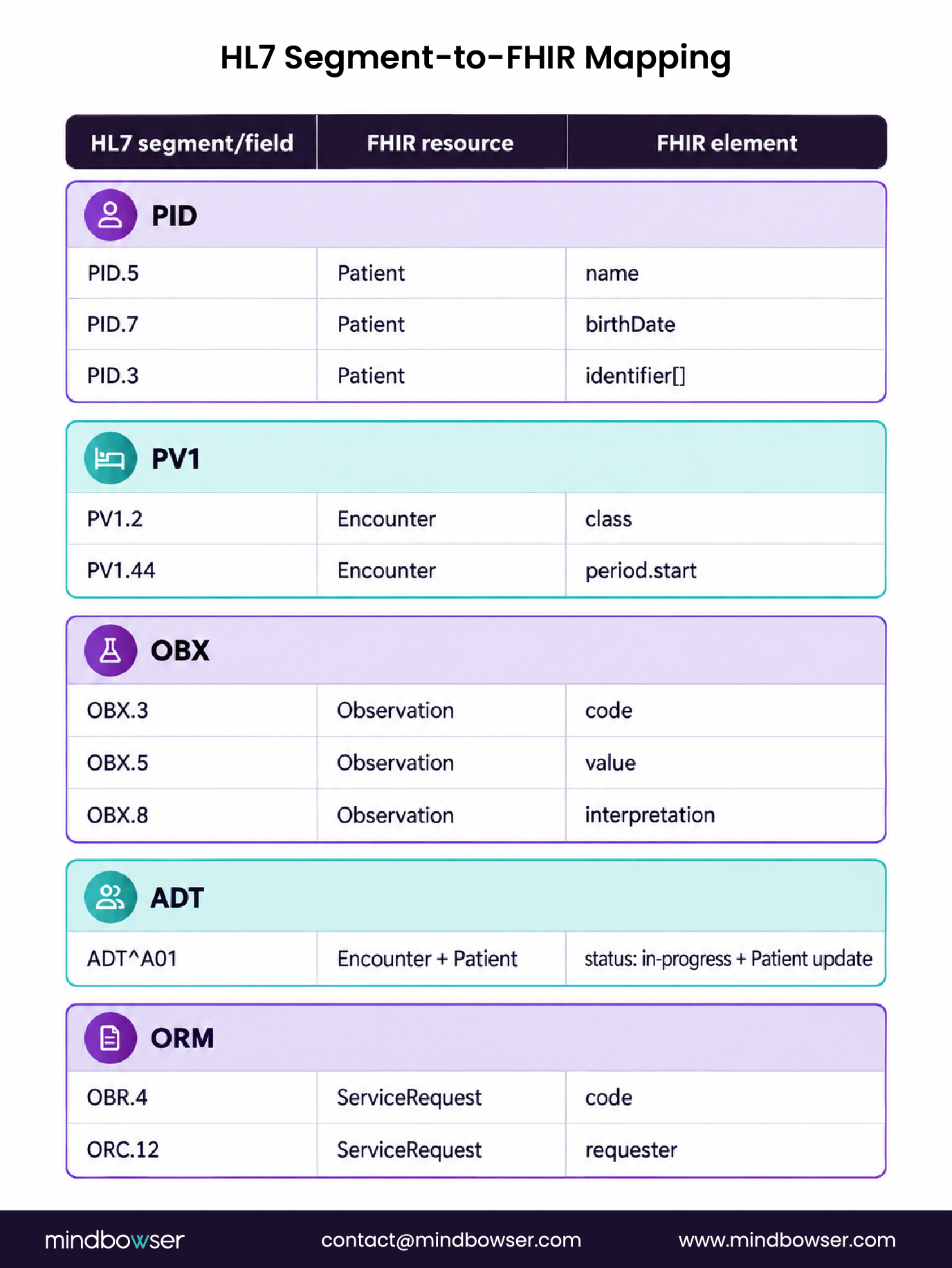
This is the piece most engineers need right after they’ve internalized the segment structure above, which is why it sits here rather than in a separate guide. For the full field-level mapping reference, see our HL7 v2 to FHIR mapping guide.
When to Use ConnectHealth vs Build Your Own Interface Engine
If you’re reading this as a developer building a single HL7 interface, you probably don’t need an accelerator. Write the parser, test it against a few hundred real messages, ship it.
If you’re a platform connecting to 20 health systems, each running a slightly different HL7 v2.x dialect with non-standard extensions, and a mix of MLLP and FHIR endpoints on the other end, the segment-level work multiplies fast. Every new connection means re-solving the same normalization problem: different OIDs in PID.3, inconsistent OBX.3 LOINC usage, message type variants nobody documented.
That’s the workflow ConnectHealth handles as a pre-built use case: normalizing MSH, PID, and OBX across connections into a single FHIR R4 layer, roughly 80% built out of the box, with the remaining 20% configured to your specific rules (which fields your master patient index prioritizes, which OBX value types you accept, your acknowledgment timeout thresholds). PHISecure handles the HIPAA-compliant transmission layer alongside it.
To be clear about where this makes sense: single-interface implementations don’t need it. The ROI shows up once you’re maintaining five or more connections and re-solving the same segment-parsing problems on each one, whether that’s through a packaged accelerator or a custom EHR integration build scoped to your specific mix of source systems.