BLOGS
BLOGS  NEWSROOM
  CASE STUDIES
  WEBINARS
  PODCASTS
  ASSET HUB
  EVENT CALENDAR
























We Improved Predictive Accuracy in Childbirth with Advanced EHR Integration
2. The CharmHealth API: A Developer’s Toolkit
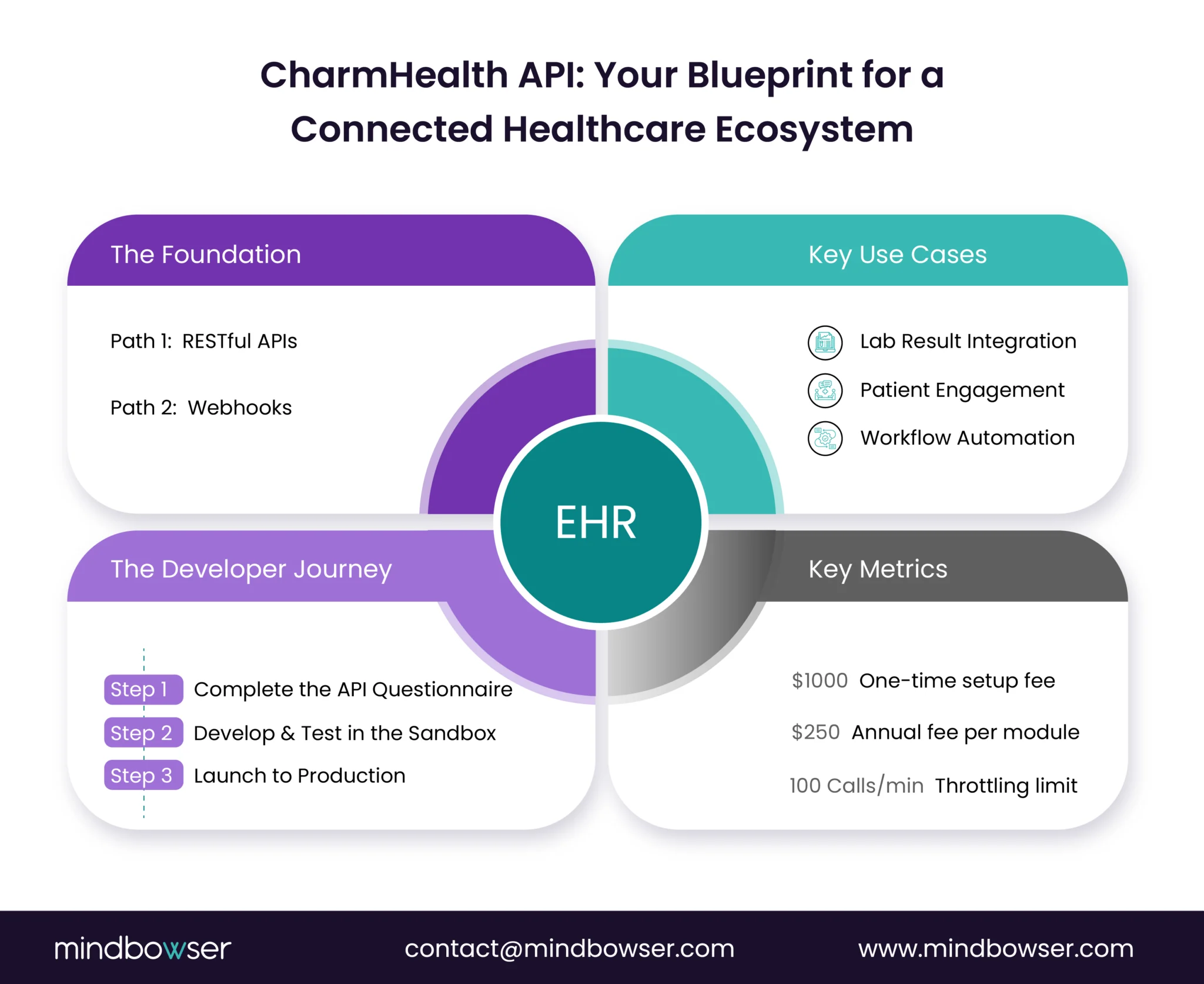
From a technical leadership perspective, the first thing we look for in an EHR is a well-structured, flexible API architecture. The CharmHealth API is built to be a powerful toolkit for developers. It wisely combines a traditional RESTful framework with a modern, event-driven webhook system. This two-part approach enables us to build solutions that can handle both on-demand data requests and real-time synchronization.
2.1. REST APIs and Webhooks: A Two-Part Approach
The core of the Charm API is a RESTful architecture, which utilizes standard HTTP methods, such as GET for retrieving data and POST for sending it. This is a familiar and reliable foundation for any developer. The platform utilizes a versioned URI, such as https://apiehr.charmtracker.com/api/ehr/v1/, which indicates a mature, professionally managed API that can evolve while maintaining compatibility with existing integrations.
In my 16+ years in this industry, I’ve learned that true efficiency comes from avoiding unnecessary work. That’s why the real strength of the Charm API is its support for webhooks. Instead of building an application that constantly “polls” the EHR for new information, webhooks allow CharmHealth to proactively push real-time notifications to your system whenever a specific event happens within the platform.
This is a far more efficient and scalable model. It minimizes the load on both your application and CharmHealth’s infrastructure, which is crucial for managing the API’s throttling limits. Each notification includes a specific HTTP header, x-charm-action, which allows your system to instantly identify the event that triggered it (e.g., Encounter, Sign) and process it correctly, saving valuable development time.
2.2. Webhooks: An Overview of Key Modules
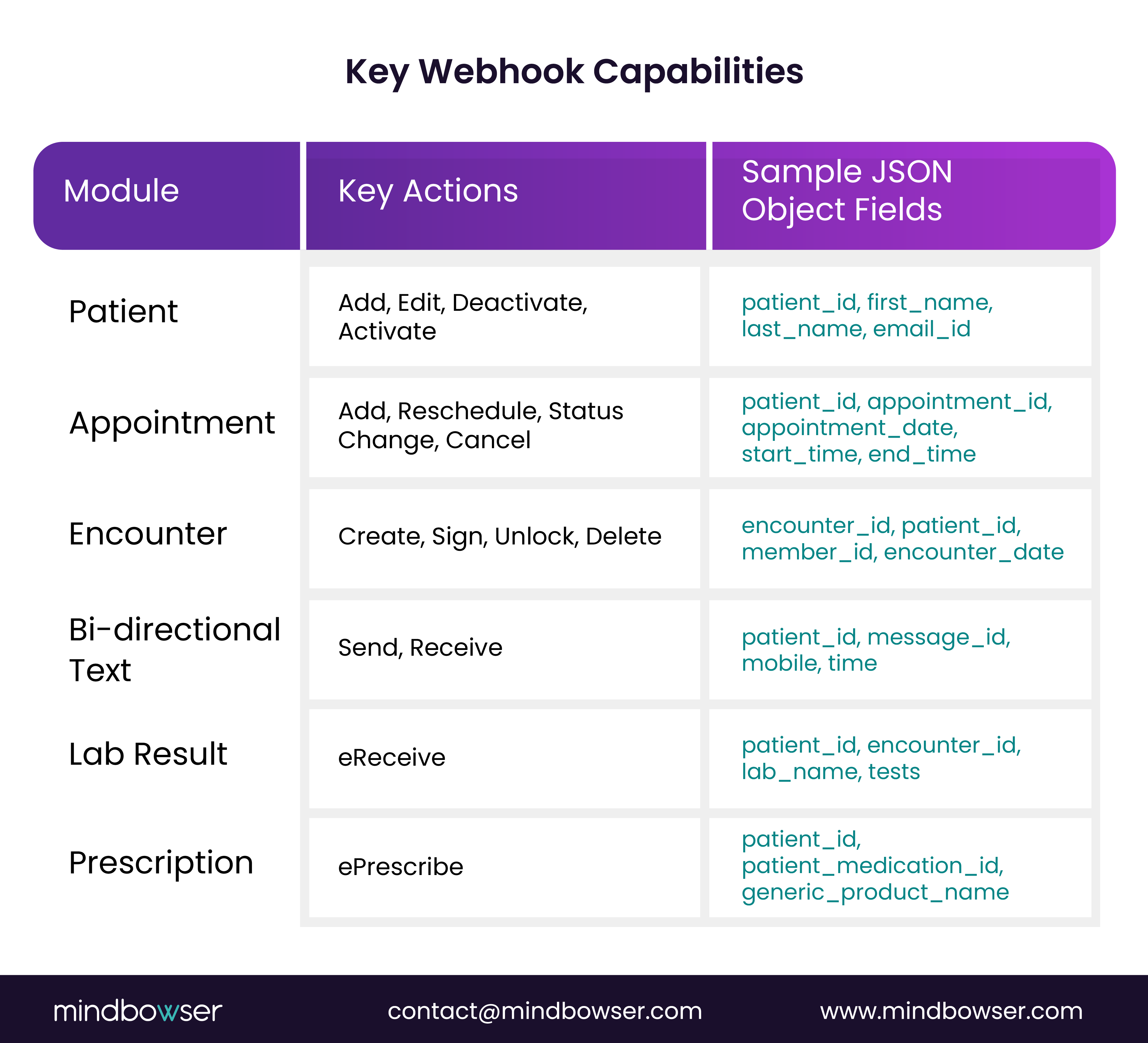
The webhook system is comprehensive, which is exactly what a system integrator looks for. It covers various workflows within the CharmHealth EHR, enabling true, real-time data synchronization. Here are a few examples of the modules and actions supported:
- Patient Management: Webhooks are triggered for key actions like Add, Edit, Deactivate, and Activate a patient. These notifications include essential demographic details like patient_record_id, first_name, and email_id, helping an external system keep a synchronized copy of patient data.
- Appointment Scheduling: The system sends notifications for actions such as Add, Reschedule, Status Change, Edit, and Cancel. These webhooks provide important details like appointment_id and appointment_date, making it possible to build real-time patient portals or automated reminder systems.
- Clinical Documentation and Billing: The Encounter module offers webhooks for Create, Sign, Unlock, and Delete actions. The Encounter. Sign webhook is especially useful for triggering billing or reporting as soon as a provider finalizes a patient’s visit.
Related read: Exploring Healthcare APIs: Fueling Innovation Across the Healthcare Landscape
The following table summarizes some of the key webhook capabilities:
Facing a similar challenge or have a unique use case in mind?
4. Common Use Cases for CharmHealth Integration
Our work with clients has shown us the immense potential of the CharmHealth APIs and webhooks. Here are some of the most common and impactful use cases we’ve seen:
- Lab Result Integration: This was the use case that started our journey. The APIs support writing back data, like lab reports from a third-party source, directly into a patient’s chart. The platform also supports receiving electronic lab results via the eReceive webhook, which speeds up a traditionally manual process.
- Patient Engagement and Communication: By utilizing webhooks for patient and appointment modules, a third-party app can maintain real-time synchronization of patient demographics and schedules. The platform also supports two-way messaging and a virtual appointment bot that can be embedded on a practice’s website to help patients book and reschedule appointments.
For example, in a recent EHR integration project, we implemented HL7-triggered updates and FHIR-based retrieval to eliminate nearly all manual data entry. A similar approach using CharmHealth APIs can speed result uploads, improve accuracy, and support faster clinical decision-making.
- Clinical Workflow Automation: Integrations can trigger actions automatically—for instance, the Encounter. Sign webhook can kick off a billing workflow as soon as a provider finalizes a visit. It also has a PDMP (Prescription Drug Monitoring Program) integration that automates the search for a patient’s controlled substance history, helping prevent opioid abuse.
- Financial and Billing Systems: Webhooks for the Invoice module can be used to sync financial data with external accounting or billing platforms. The platform also integrates with two major clearinghouses, Optum 360 and Change Healthcare.
It’s important to note a limitation: the APIs do not currently support updating pharmacy information.
5. Best Practices for CharmHealth Integration Success
A successful integration isn’t just a technical task; it’s a strategic one. It starts with a clear plan and a collaborative process. Based on my team’s experience, here are some best practices we always follow:
- Be Detailed in Your Scoping: The API Request Questionnaire is not just a formality; it’s a critical tool. Providing a highly detailed and transparent response fosters trust with the CharmHealth team and facilitates a more efficient onboarding process.
- Visualize the Workflow: We always create a clear workflow diagram. This visual blueprint illustrates how data will flow between systems and serves as the definitive reference point for all parties involved.
- Use Validation APIs: The platform offers APIs for data validation and mapping, such as GET /api/ehr/v1/labs/list. Using these APIs to cross-reference and map external data before you send it ensures data integrity and helps your solution stay compliant as data models evolve.
- Plan for Scale: The API has a throttling limit of 100 calls per minute, per module. Utilizing efficient, event-driven webhooks is a smart approach to managing performance and ensuring your application scales smoothly.
- Prepare for the Unexpected: Resilient integrations have standardized error responses with clear codes and comprehensive logging. We always build with disaster recovery in mind, testing regularly to ensure continuous operation.
Talk to Our CharmHealth Integration Experts
6. Deep Dive: A Use Case in Lab Results Management
Let’s revisit our initial client’s problem, the need to write back lab results. This is a clinically important integration point, and the CharmHealth API provides a full suite of tools to handle it.
6.1. Retrieving Lab Results
Retrieving lab results typically begins with a general query to obtain a list, followed by a more specific request for details.
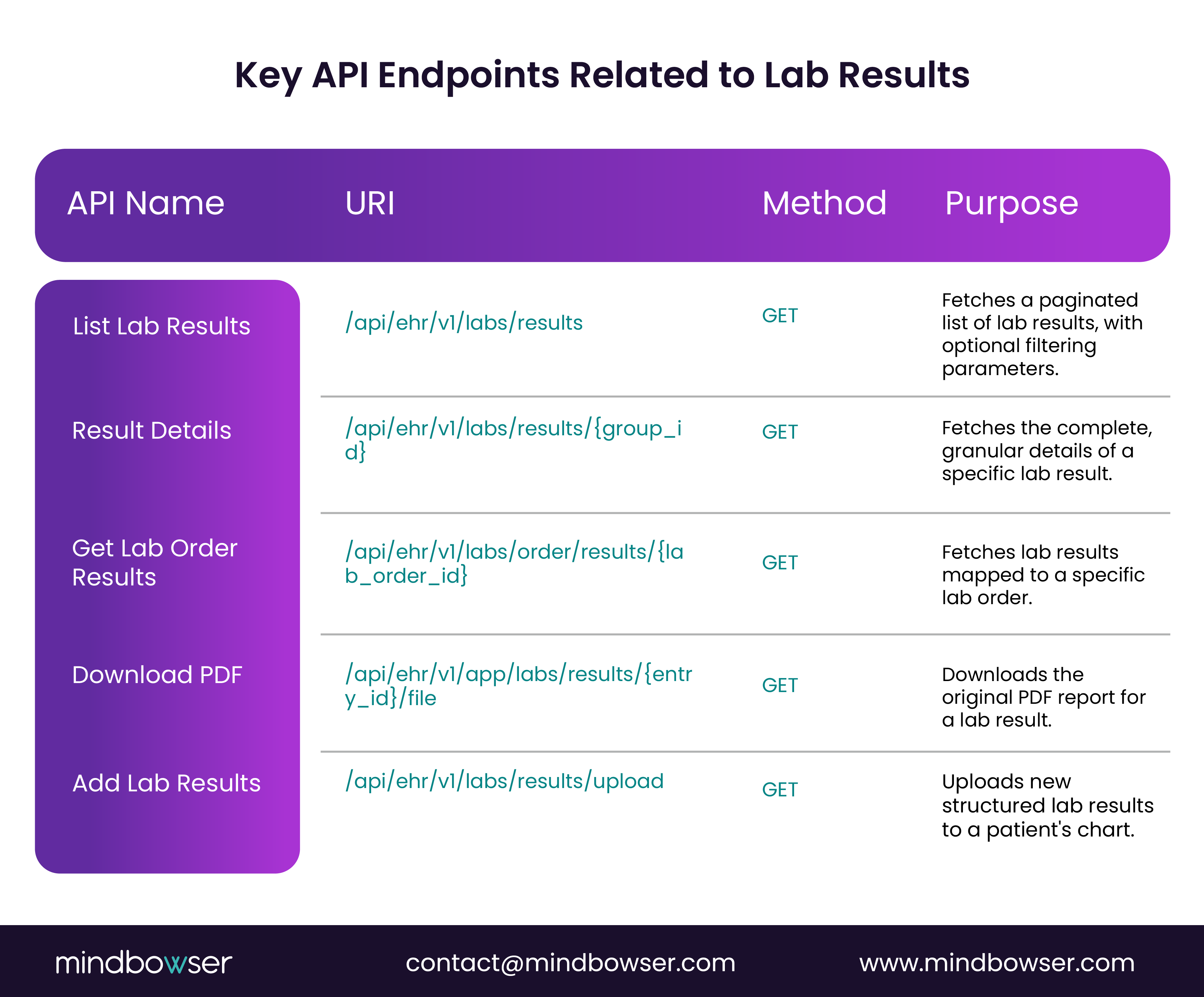
- Listing Results: The GET /api/ehr/v1/labs/results endpoint fetches a paginated list of lab results. You can use query parameters to filter results by patient_id, status, or change the sorting order.
- Getting Details: Once you have a specific result’s group_id, the GET /api/ehr/v1/labs/results/{group_id} endpoint retrieves the full details. This includes the raw test data, reference ranges, and other clinical context in a structured format.
- Downloading the Report: You can also download the original lab report as a PDF using the GET /api/ehr/v1/app/labs/results/{entry_id}/file endpoint.
6.2. The “Write-Back” Capability
A truly powerful integration needs to be able to write data back to the EHR. The Lab Result API has a POST-/api/ehr/v1/labs/results/upload endpoint that lets external systems add new lab results to a patient’s chart. This feature is crucial for third-party lab platforms that require direct submission of results to CharmHealth.
This API requires a patient_id and a complex JSONObject called result_details in its form data. This object is highly detailed, with nested arrays for tests and test_parameters. It includes fields like the measured param_val, recordunit, and ref_min/ref_max, ensuring the data is a complete, contextually rich point that can be used for clinical analysis. The inclusion of fields like loinc_code also shows a commitment to standardized medical terminology, which is essential for data integrity.
The following table summarizes the key API endpoints related to lab results:
7. The Integration Lifecycle: From Idea to Implementation
CharmHealth has a structured process to ensure that all integrations are well-planned, which is something we appreciate as a development partner.
7.1. The API Request Questionnaire
The first step for any developer is to complete the API Request Questionnaire. This is a critical tool that helps both you and the CharmHealth API team understand the project’s scope, feasibility, and business context.
The questions are designed to get key information, such as:
- “What do you want to build with the APIs?” This helps you clearly define your purpose and identify any third-party software that may be involved.
- “What is the API usage rate in terms of requests per minute?” This is a direct measure of the load your integration will place on the system and can lead to important discussions about throttling limits and architecture.
- “Do you intend to sell this solution to other practices on the CharmHealth platform?” This question uncovers the commercial intent, which determines the type of legal and business agreement you’ll need.
Sharing a sequence diagram is also a great way to show that you have a clear plan for how data will flow. This minimizes the risk of scope creep and helps ensure a smoother development process.
How Mindbowser Can Help With CharmHealth Integration?
At Mindbowser, we’ve successfully implemented CharmHealth integrations for diverse healthcare organizations, ranging from small clinics to specialty practices and third-party health tech platforms. Our team understands both the technical and strategic aspects of EHR integration, ensuring your solution is compliant, efficient, and scalable.
We can help you:
- Plan the Integration Strategically – Map workflows, identify modules, and align the integration with your clinical and operational goals.
- Set Up REST APIs and Webhooks – Configure CharmHealth endpoints for secure, reliable, and real-time data exchange.
- Implement Complex Use Cases – From lab result write-backs to billing automation, patient engagement, and specialty-specific workflows.
- Ensure Compliance and Security – Build HIPAA-compliant solutions with strong authentication, encryption, and audit logging.
- Optimize for Performance – Design event-driven integrations that work within API throttling limits while maintaining scalability.
- Provide Ongoing Support – Monitor, troubleshoot, and enhance your integration as your needs evolve.
With our hands-on experience in CharmHealth’s ecosystem, we can accelerate your integration journey, reduce risk, and help you unlock the platform’s full potential for your practice or product.
For teams who’d rather not hand-build and maintain the CharmHealth connection, the same work ships pre-built in ConnectHealth Mindbowser’s healthcare integration platform deployed in your own AWS VPC so patient data never leaves your environment. When a workflow needs custom CharmHealth engineering (like the lab write-back above), our team builds it on the same REST/webhook foundation.
Conclusion
Integrating with CharmHealth doesn’t have to be complex. By combining REST APIs with real-time webhooks, you can create efficient and scalable workflows that enhance patient care and operational efficiency. With the right planning, technical expertise, and attention to compliance, your integration can deliver lasting value for both providers and patients. Mindbowser can guide you through every step to ensure a smooth, strategic implementation.