BLOGS
BLOGS  NEWSROOM
  CASE STUDIES
  WEBINARS
  PODCASTS
  ASSET HUB
  EVENT CALENDAR
























TL;DR
Most EHR implementations run late on the timeline and over on cost.
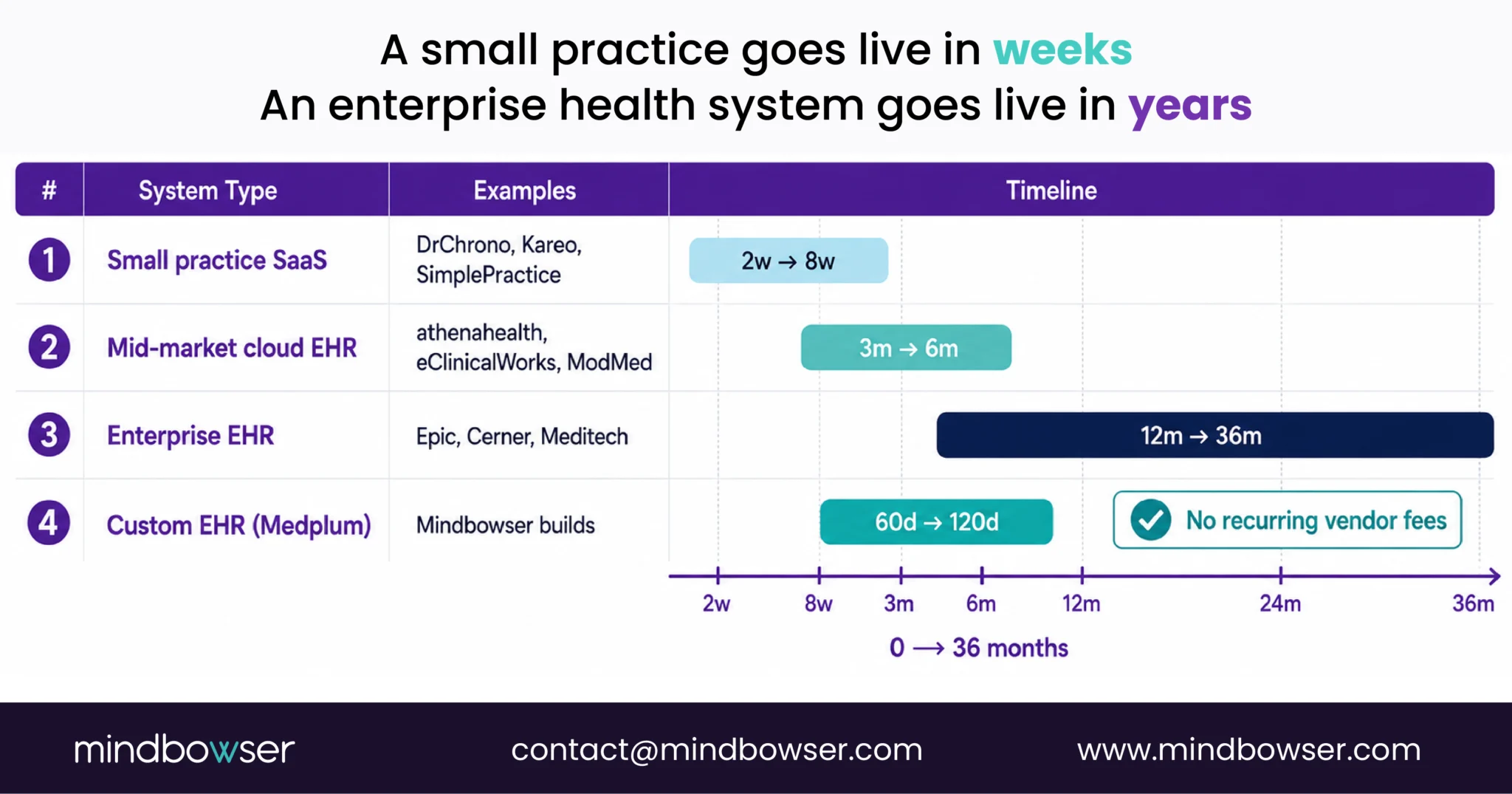
- Small practice (DrChrono, Kareo): 2–8 weeks, $5K–$50K. Mid-market (eCW, athenahealth): 3–6 months, $50K–$500K.
- Enterprise (Epic, Cerner): 12–36 months, $1M–$100M+.
- Custom EHR on Medplum: 60–120 days, $60K–$200K with no recurring vendor fees. The five failure modes account for 80 percent of blown implementations.
Most healthcare leaders underestimate EHR implementation twice. Once on timeline. Once on cost.
The industry pattern is consistent: a vendor quotes 6 months, the project runs 14. A practice budgets $200K, the final invoice is $380K. A hospital goes live on schedule and watches productivity drop 30 percent for the next six months while staff learns a system that doesn’t match how they actually work.
This guide is for the healthcare IT directors, practice administrators, and clinical operations leaders who are about to make that decision, or who are already three months into a project that’s going sideways.
Here’s what EHR implementation actually costs, how long it actually takes, the five failure modes that kill most projects, and when building your own clears your implementation debt permanently.
Quick orientation:
- Small practice (DrChrono, Kareo): 2-8 weeks, $5K-$50K
- Mid-market (eCW, athenahealth): 3-6 months, $50K-$500K
- Enterprise (Epic, Cerner): 12-36 months, $1M-$100M+
- Custom EHR (Medplum-based): 60-120 days, $60K-$200K with no recurring vendor fees
- The 5 failure modes that account for 80 percent of blown implementations are below.
I. What Is EHR Implementation, and Why Do Most Projects Run Late?
EHR implementation is the process of deploying a new electronic health records system into a clinical environment: configuring the software, migrating historical patient data, building interfaces to existing systems (billing, labs, pharmacy, imaging), training staff, and transitioning from the old workflow to the new one.
It sounds like a software project. It isn’t. It’s a workflow transformation project that happens to involve software.
Every other enterprise software implementation (CRM, ERP, HR platform) changes how back-office staff work. EHR implementation changes how physicians, nurses, and clinical staff work while they’re actively treating patients. The margin for error is different. The resistance is different. The compliance requirements are different.
Here’s what makes it uniquely difficult:
- Clinical workflow mapping: Your current workflows were built around your old system, your specialty, your patient population, and the quirks of your staff. A new EHR ships with generic templates. The gap between the template and your workflow is where most implementation pain lives.
- Legacy data migration: Patient records, medication histories, lab results, billing histories- most of it lives in a proprietary format in the old system. Getting it out cleanly, transforming it to the new system’s data model, and validating it for clinical accuracy takes longer than anyone budgets.
- Interface builds: Your EHR needs to talk to your lab system, your pharmacy, your imaging system, your billing platform, your patient communication tool. Each interface is a separate build, a separate test cycle, and a separate point of failure.
- Staff training at scale: A physician needs to learn a new charting system. A nurse needs to learn new medication workflows. A biller needs to learn new charge capture. All of them are doing this while continuing to see patients. Training that isn’t embedded in actual clinical workflows doesn’t stick.
- Regulatory compliance: New ONC requirements under HTI-1 (89 FR 1192) mandate FHIR R4 API support aligned to USCDI v3 data classes. Any new EHR implementation in 2026 has to account for this. If the vendor isn’t ready, you inherit their compliance debt.
HIMSS 2024 data shows 71 percent of health systems now use some form of cloud-based EHR. But most of those implementations took longer and cost more than originally scoped.
II. How Long Does EHR Implementation Actually Take?
“Epic will tell you 18 months. Cerner will say 6. Both are optimistic.”
That’s a quote from a physician-founder who had evaluated both for a rural hospital network. Cerner has lost 50 to 60 small hospitals in the last year because implementation timelines and complexity don’t match what was sold.
Here’s the honest range by system type:
Small practice EHR (DrChrono, Kareo, SimplePractice):
Timeline: 2-8 weeks. Cloud SaaS, minimal data migration, generic templates that mostly fit your workflow. If you’re a solo primary care physician switching from paper, 2 weeks is realistic. If you have 5 years of patient data to migrate and specialty workflows to configure, 8 weeks is more honest.
Mid-market cloud EHR (Athenahealth, eClinicalWorks, ModMed):
Timeline: 3-6 months. Data migration is real. Interface builds take time. Staff training at 10-50 users takes coordination. Athenahealth’s managed model compresses some of this. eCW’s single-tenant architecture adds scope.
Enterprise EHR (Epic, Cerner, Meditech):
Timeline: 12-36 months. Epic doesn’t do fast. For a large health system (200+ beds, multiple facilities), 18-24 months is standard. For an academic medical center with 5,000 users and 20 years of legacy data, 36 months is not unusual.
Custom EHR (Medplum-based, FHIR-native):
Timeline: 60-120 days. We built a precision-medicine platform’s full AI-native EHR on Medplum and GCP in under 90 days. The reason: FHIR-native architecture eliminates the interface-build phase (everything is already FHIR), pre-built components like PHISecure and AI Medical Summary ship ready, and there’s no vendor negotiation cycle slowing down configuration decisions.
What extends any timeline:
- Dirty legacy data requiring pre-migration cleanup (adds 4-12 weeks)
- Customization requirements the vendor didn’t scope at sales (adds 2-8 weeks)
- Staff resistance leading to retraining cycles (adds 4-8 weeks)
- Regulatory review triggered by scope changes (adds 2-6 weeks)
- Interface builds to non-standard systems (adds 2-4 weeks per interface)
Related Read: Types of EHR System
Let's Scope Your EHR Build!
III. What Does EHR Implementation Actually Cost?
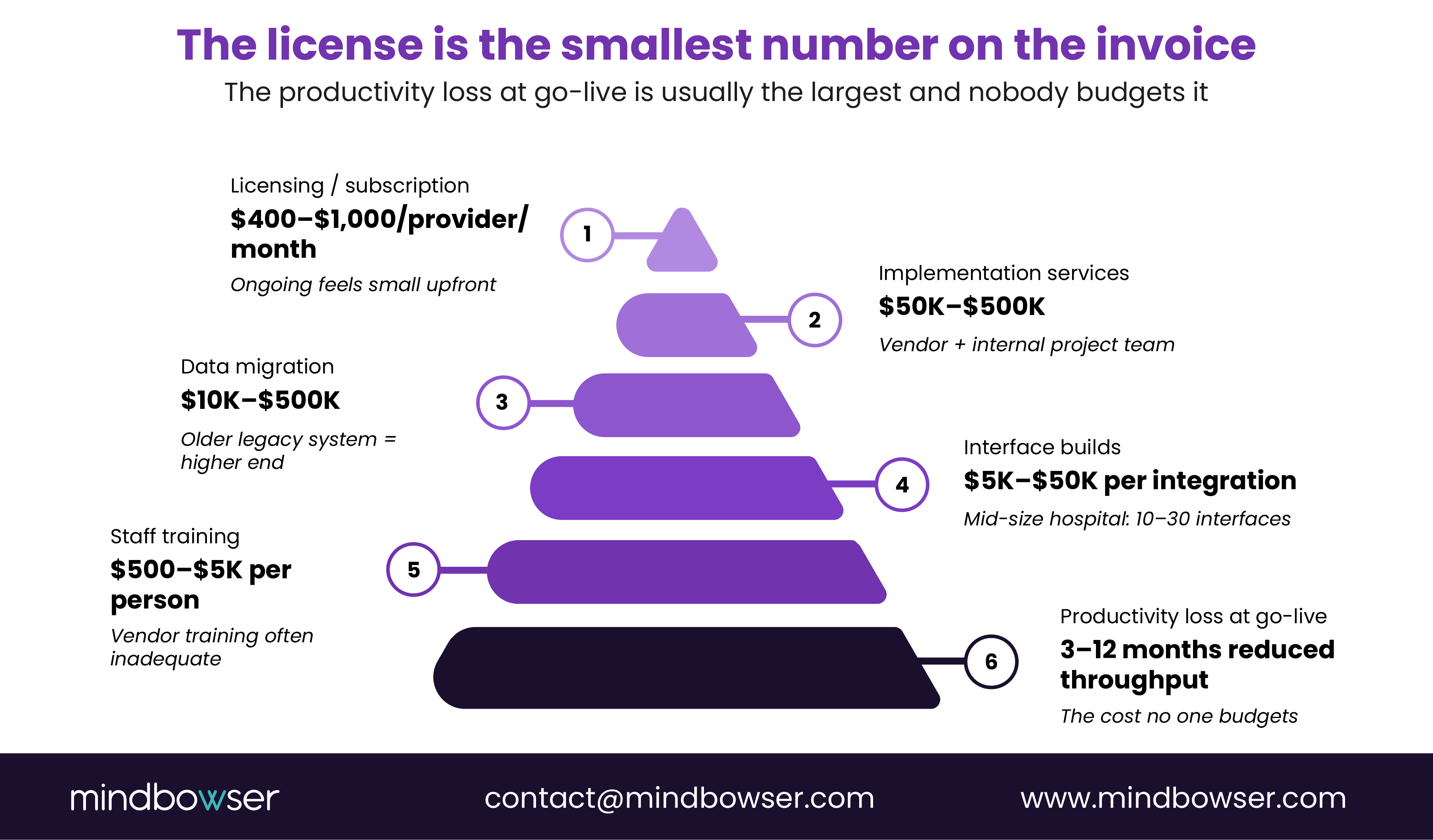
The license is usually the smallest number on the invoice.
Licensing and subscription:
- Small practice SaaS: $200-$500/provider/month ongoing
- Mid-market: $400-$1,000/provider/month
- Epic: $1M-$10M upfront licensing plus 18-22 percent annual maintenance
- Custom build: $60K-$200K one-time, no recurring license
Implementation services:
- Small practice: $5K-$50K (mostly vendor-provided)
- Mid-market: $50K-$500K (vendor plus your internal project team)
- Enterprise: $1M-$20M (dedicated implementation team, 12-36 months of labor)
- Custom build: included in build scope
Data migration:
- Simple (under 5 years, one location): $10K-$30K
- Complex (10+ years, multiple locations, mixed formats): $100K-$500K
- Enterprise legacy system: $500K+
- Custom build: FHIR-native architecture simplifies most data migration significantly
Interface builds:
- Per integration (lab, pharmacy, imaging, billing): $5K-$50K each
- A mid-size hospital typically needs 10-30 interfaces
- Custom build: FHIR-native architecture eliminates most interface builds
Training:
- Per staff member: $500-$5K (vendor training, often inadequate)
- Internal superuser program: $20K-$100K
- Productivity loss during go-live: 3-12 months of reduced throughput. This is the cost no one puts in the budget, and it’s often the largest number on the list
CMS cost report data shows median Health IT designated assets of $1.76M across 441 hospitals reporting non-zero figures. That’s the installed base, not just the implementation cost.
IV. What Are the Most Common EHR Implementation Mistakes?
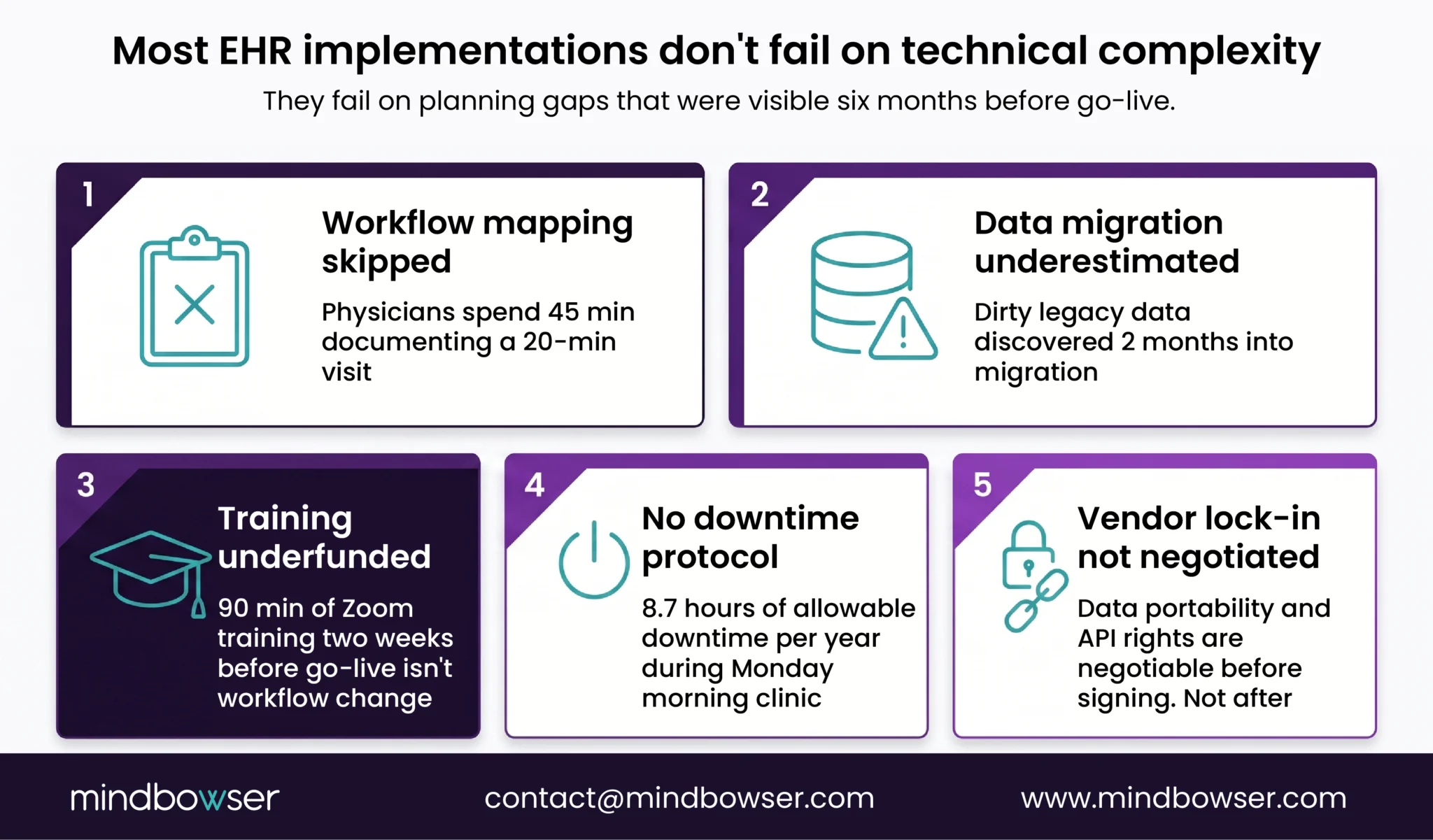
Most EHR implementations fail the same way. Not on technical complexity. On planning gaps that were visible six months before go-live.
Here are the five failure modes that account for the majority of blown implementations.
Failure Mode 1: Workflow mapping skipped
The vendor ships templates. The practice goes live. Three months later, physicians are spending 45 minutes documenting a 20-minute visit because the template doesn’t match their specialty workflow.
The fix: document your current workflows before touching the EHR configuration. Bring clinical staff into the mapping process. Don’t accept generic templates as your final configuration. “System changes feel as expensive and disruptive as a divorce.” That’s a practice operations leader describing what happens when you deploy before the workflow fit was confirmed.
Failure Mode 2: Data migration underestimated
Legacy patient data is dirty. Records are duplicated. Lab results are in a format the new system can’t read. Medication histories have gaps. Most organizations discover this two months into migration, not during planning.
The fix: run a data quality audit on your legacy system before you sign an implementation contract. Know what you’re migrating. Budget for a migration vendor if the volume is high.
Failure Mode 3: Training underfunded
90 minutes of Zoom training two weeks before go-live is not workflow change. Physicians who haven’t clicked through the actual clinical scenarios they’ll face on day one will slow down, get frustrated, and revert to workarounds.
The fix: build a superuser program. Train 10-15 percent of your clinical staff to expert level before go-live. Let them train their peers during the stabilization period. Budget 3x what the vendor quotes for training.
Failure Mode 4: Downtime protocol missing
Your EHR will go down. Cloud vendors promise 99.9 percent uptime. That’s 8.7 hours of allowable downtime per year. If those hours happen during a Monday morning clinic, you need a plan.
The fix: design and test your downtime procedures before go-live. Paper backup workflows for registration, medication administration, and clinical documentation. Make sure every staff member has completed at least one downtime drill.
Failure Mode 5: Vendor lock-in not negotiated before signing
Data export format, API access rights, portability guarantees: these are negotiable before you sign. They’re nearly impossible to negotiate after. Most organizations discover they can’t get their own data out cleanly until they’re trying to switch vendors.
The fix: get data portability terms in the contract. Get API access terms in writing. Ask for examples of recent customer exits and how data migration was handled.
Ready to avoid these before you start? Request an assessment.
V. What Are the Biggest Challenges of EHR Implementation?
The technical challenges are solvable. The human ones aren’t.
Legacy data migration complexity
Format incompatibility is the norm. Patient records in a 20-year-old practice management system are often in a proprietary database with no clean export path. Lab results are in HL7 v2. Imaging reports are in PDFs. Billing histories are in a format your new vendor’s migration tool has never seen.
Add to that: duplicate patients, missing records, and data that technically exists but isn’t clinically accurate. “The billing and clinical modules don’t talk to each other. They were built by separate engineers.” That’s a home health operator describing their current system, and it’s also a description of what happens when you migrate data from a system where clinical and billing were never unified.
Staff resistance
Physicians who trained on a particular EHR over 15 years have workflows that are faster than anything they’ll do in the new system for at least 6-12 months. They know it. They resent the productivity loss. They’ll find workarounds.
The resistance isn’t irrational. It’s a rational response to a real productivity cost. Mitigation: involve clinical staff in the selection and configuration process before the contract is signed.
Workflow redesign
A new EHR ships with templates. Your workflows don’t look like the templates. Most organizations try to configure the EHR to match their workflows. The actual goal is to redesign workflows to match the EHR’s strengths while preserving the clinical outcomes that matter. This requires clinical leadership involvement, not just IT.
Interoperability gaps
Your new EHR doesn’t talk to your lab system. Your imaging vendor uses a non-standard DICOM workflow. Your pharmacy is on a platform the EHR vendor has never integrated with.
The 2025 HIPAA Security Rule update (90 FR 898) adds compliance requirements for exactly this layer: data flowing between systems needs to be encrypted, audited, and tested. Each integration point is a potential security gap and a potential implementation delay.
Compliance and regulatory scope
ONC’s HTI-1 rule (89 FR 1192) means every new EHR deployment in 2026 must demonstrate FHIR R4 API support aligned to USCDI v3. If your vendor isn’t ready, your implementation scope just got larger.
EHR Implementation Checklist: 8 Phases From Requirements to Go-Live
Most EHR implementations fail in the planning, not the technology.
70% of physician EHR dissatisfaction stems from implementation failures, not product shortcomings (AMA, 2023). The tools weren’t wrong. The process was.
This checklist covers the full implementation arc: from initial requirements through 90-day post-go-live optimization. It’s built for three buyer types:
1. Health systems and IDNs evaluating enterprise EHR replacement or consolidation
2. Specialty practices and multi-site groups managing a platform migration
3. Digital health founders building a certified EHR from scratch
How to use this checklist: Work through each phase in order. Complete all items before advancing to the next. Use the RACI matrix in Phase 2 to assign roles. Phase gates are non-negotiable: skipping them creates the exact problems this checklist is designed to prevent.
PHASE 1: Discovery & Requirements Definition
“Build without a requirements doc, and you’ll rebuild. Twice.”
The most expensive implementation error is building the right system for the wrong workflow. The second most expensive is building the wrong system because nobody wrote down what “right” means. Both are avoidable.
• Inventory every system currently storing PHI: EHR, billing, lab, imaging, pharmacy, patient portal, payer integrations
• Run a USCDI v3 gap analysis against your current data model. As of January 2026, all ONC-certified EHR systems must support 94 data elements under USCDI v3. Gaps here become Phase 3 blockers.
• Map all clinical workflows that need EHR support: documentation, ordering, results review, scheduling, billing. Separate what the EHR must do from what it should do from what it doesn’t need to do at all.
• Identify specialty-specific workflow requirements: note any workflow that doesn’t map cleanly to standard EHR templates. These are the Phase 2 build-vs-buy triggers.
• Confirm regulatory requirements inventory: HIPAA, state data residency rules, specialty-specific retention requirements
• Assign implementation stakeholders before Phase 2 begins: clinical champion (physician/CMO), PM with EHR experience, IT lead, PHI custodian
• Write an explicit out-of-scope definition. Scope creep is the primary driver of implementation budget overruns: enterprise EHR implementations average $500K-$5M in Year 1 cost overruns, nearly all tied to scope expansion after contract (Gartner, 2024). Sign-off required before Phase 2 starts.
• Establish your implementation success criteria: record count accuracy, workflow adoption rate, training completion, go-live downtime tolerance.
PHASE 2: Build vs. Buy Decision + Partner Selection
“Choosing wrong here costs more than the build itself.”
Most implementation projects fail because the build-vs-buy decision was never explicitly made. Make the decision deliberately.
• Evaluate all three implementation paths against your Phase 1 requirements:
Path 1: Off-the-shelf EHR (Epic, Oracle Health, athenahealth, MEDITECH, eClinicalWorks) — best for standard workflows, large health system scale
Path 2: Headless EHR build (Medplum, OpenEMR as base) – best for FHIR-native startups, developer teams
Path 3: Full custom EHR – best for specialty workflows no vendor supports, government-scale, orgs building IP
Proof: A national government built a national EHR at a fraction of typical enterprise cost and in a fraction of the time. Epic quoted 18 months for the same scope.
• Use KLAS Research 2025 implementation quality scores as a partner evaluation input
• If selecting a vendor: verify ONC certification status on the ONC CHPL before signing
• Evaluate implementation partner criteria: EHR-specific healthcare experience, FHIR R4 fluency, ONC certification pathway capability, named case studies with verifiable outcomes
• Confirm a Business Associate Agreement (BAA) is executed before any PHI reaches any vendor or implementation partner
• Define the escalation path for implementation decisions
• Document the chosen path and the reasons – this record becomes the Phase 3 architecture brief
PHASE 3: Architecture & Compliance Design
“Your data model is your clinical future. FHIR errors here compound forever.”
• Adopt FHIR R4 as the base architecture standard. Map all must-support elements per US Core 6.1.0 profile before development begins.
• Confirm USCDI v3 compliance across your data model: 94 elements mapped
• Apply HIPAA Security Rule standards: TLS 1.2+ in transit, AES-256 at rest, field-level encryption for SSN and financial data
• Define your ONC certification pathway: 2015 Edition Cures Update or a non-certified architecture
• Activate PHISecure at this phase: encryption key management, PHI field tagging, access audit logging from the start of development forward
• Document all FHIR resource mappings: LOINC for labs/vitals, SNOMED for diagnoses, RxNorm for medications
• Define your infrastructure architecture: cloud-native vs. hybrid, multi-region requirements, data residency constraints
PHASE 4: Development & Configuration
“Build for clinical workflow first. UI second. Performance third.”
• Establish a sprint structure with clinical sign-off gates at each module completion
• Build integration tracks as separate sprint workstreams (lab, e-Rx, imaging, payer each with its own testing milestones)
• Activate ConnectHealth for API orchestration and real-time FHIR field validation, reducing a typical 12-18 month integration build to 4-8 months for most mid-market organizations
• Wire HIPAA-aware code review requirements into the development process
• Build role-based access controls into the data model from Sprint 1, not Sprint 15
• Confirm data model handles unstructured data: scanned clinical documents map to FHIR DocumentReference
• Maintain a decisions log throughout development
PHASE 5: Data Migration & Integration Testing
“Phase 5 is where timelines slip. Plan for 3x longer than quoted.”
• Confirm your pre-migration data quality baseline. Target: <3% duplicate rate before ETL begins. Industry average is 8-12% (AHIMA).
• Execute ETL with full HL7 v2 → FHIR R4 mapping. Run a 10% sample migration first; validate before running the full dataset.
• Validate sample migration: record count match (≤0.01% discrepancy), field-level completeness, no PHI in non-PHI fields
• Conduct a 25-record clinical spot-check
• Test all integrations in staging before go-live: lab orders, e-Rx, imaging viewer, payer eligibility check
• Run a full staging migration (100% of in-scope records) after the 10% sample validates
• Confirm rollback procedure is tested and operational: full restore from backup completes in under 2 hours
PHASE 6: Testing & ONC Certification
“No go-live without clinical sign-off. No exceptions.”
• Run a 5-gate testing sequence in order: Smoke test → Functional test → UAT → Clinical simulation → Performance test
• Confirm ONC 2015 Edition Cures Update certification milestone is met before the go-live date is locked
• Conduct a 25-record final clinical spot-check on the production-equivalent environment
• Run PHISecure final audit before any data reaches the production environment
• Get written sign-off from clinical champion and IT lead before go-live date is confirmed
PHASE 7: Training & Change Management
“41% of providers say training is the #1 critical success factor. It gets 5% of the implementation budget. (Tebra, 2024)”
• Build role-based training tracks before go-live: physicians, nurses, front desk, help desk
• Run workflow simulations, not just demo walkthroughs
• Train and deploy super-users: minimum 1 per 10 end users, on-site during go-live week
• Send patient communications: portal transition notice, 30-day advance notice
• Notify all payer EDI partners of the go-live date; coordinate X12 835/837 cutover timing
• Confirm go-live date with all integration vendors
• Lock the cutover window: off-peak hours, hard rollback trigger documented
• Confirm rollback SLA: full system restore in under 2 hours
PHASE 8: Go-Live & Post-Implementation Optimization
“Implementation doesn’t end at cutover. It ends at 90 days.”
One Mindbowser client reduced operating costs by 30-40% post-implementation. But that outcome came from a structured 90-day optimization program, not from a go-live and handoff.
• Run final delta migration
• Execute cutover: activate target EHR, deactivate source EHR write access simultaneously
• Stand up a 72-hour monitoring command center
• Keep legacy system in read-only access for 30 days
• Run a 30-day clinical data audit: 50 random records, clinician-verified
• Confirm archival protocol for legacy data — check state retention laws (most require 7-10 years for adult records)
• Conduct 60-day and 90-day optimization reviews
• At 90 days, run an AI capability readiness assessment
• Document the implementation outcomes against Phase 1 success criteria
Related Read: Challenges of Implementing EHR
VI. When Does a Custom EHR Implementation Make More Sense Than a Vendor Rollout?
This isn’t the default answer. For most practices and health systems, buying and implementing an existing EHR makes more sense than building.
But there’s a real segment of healthcare operators where custom is the sharper move.
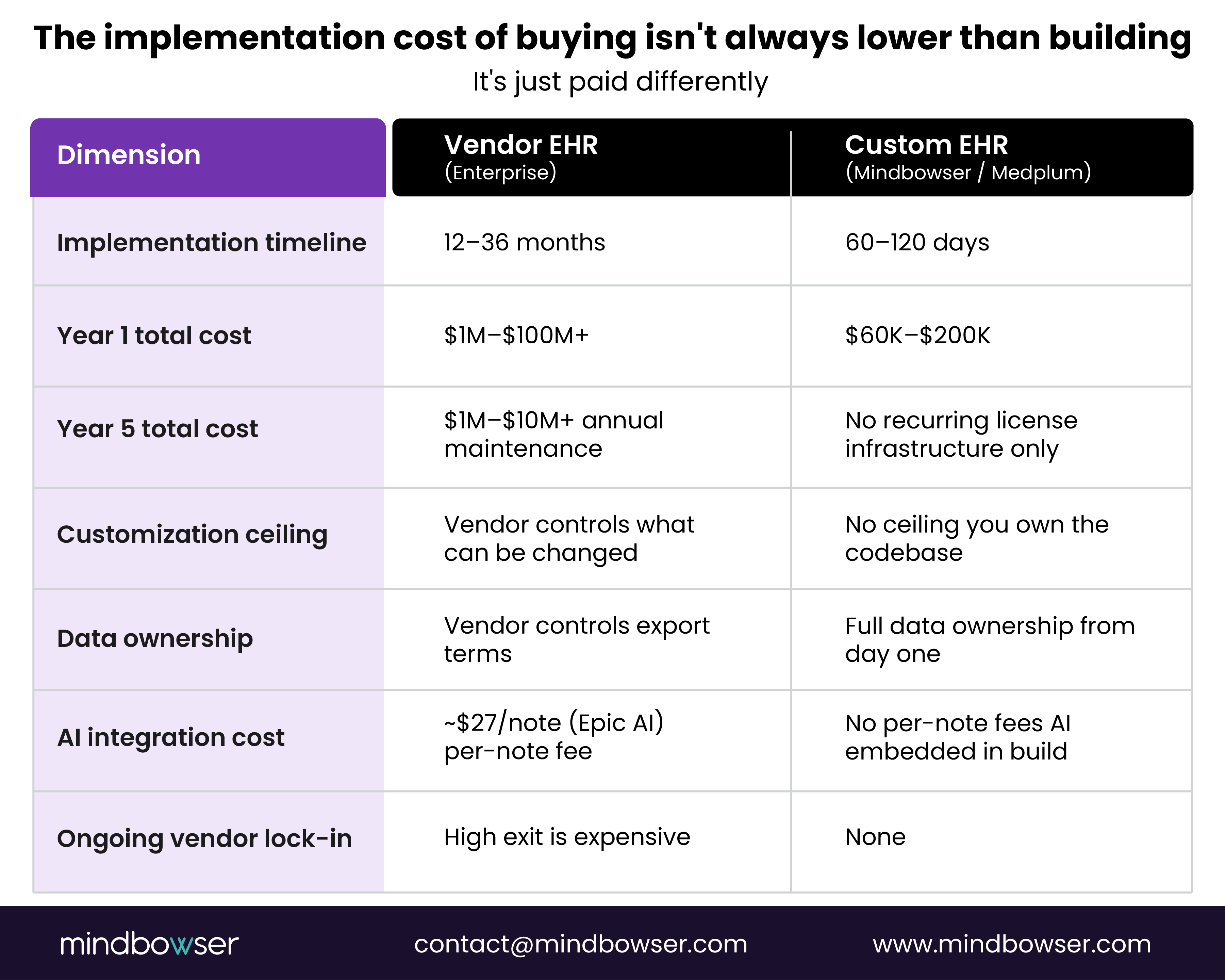
The pain: “Most EMRs add AI on an old system, like remodeling an old house, adding a kitchen, adding a bedroom.” That’s a specialty clinic COO describing why his team spent six months evaluating commercial EHRs and rejected every option. “TherapyNotes is a very closed system. It does not have any open APIs.” That’s a mental health network CEO describing the wall that ended their expansion plans. “Epic charges $27 for each note they create using AI. For a 25-bed hospital, that’s ridiculous.” That’s a physician-founder explaining why a $1M EHR implementation doesn’t end the cost conversation.
The pattern: when the vendor’s architecture limits your clinical workflow, your AI integration, or your data ownership in ways that compound over time, the implementation cost of buying isn’t actually lower than building. It’s just paid differently.
What’s already built:
For a precision-medicine platform, we built a full AI-native EHR on Medplum and GCP in under 90 days: 70 percent reduction in provider documentation time, 60 percent drop in post-visit task delays, 50 percent increase in patient interaction through an AI inbound assistant.
For an EHR platform modernization client, we migrated a legacy EHR from Azure to AWS with a 30-40 percent infrastructure cost reduction and modernized the clinical workflows alongside the migration.
We built a national-scale EHR for an entire country’s public health system on a platform-based approach.
Pre-built components on every custom build:
- PHISecure: HIPAA-compliant data handling layer. Encryption, access control enforcement, audit logging: production-ready.
- AI Medical Summary: Embedded ambient AI documentation. No third-party subscription. No per-note fees.
If your practice needs a healthcare software development partner who understands the clinical layer as well as the engineering layer, that’s the distinction that matters.
For a deeper dive into security requirements during implementation, see the EHR security architecture guide.
VII. Who Should Be on Your EHR Implementation Team
Every EHR implementation guide talks about phases. Fewer talk about who’s accountable for each one. Most of the blown timelines in Section IV above have the same root cause: a full project plan with no name attached to half the decisions in it.
Five roles carry an implementation from kickoff to go-live. Miss one, and the phase it owns becomes the phase that stalls.
• Clinical champion (physician or CMO)
Responsible for workflow sign-off at every phase gate and for resolving clinical disputes before they turn into IT escalations.
• Project manager with EHR-specific experience
Responsible for the master schedule, vendor and internal coordination, and holding the scope line when someone asks for “one more customization” mid-build.
• IT or technical lead
Responsible for infrastructure, integration builds, data migration execution, and the security architecture.
• PHI and compliance custodian
Responsible for HIPAA Security Rule compliance across the build, including the 2025 HIPAA Security Rule update, Business Associate Agreements with every vendor touching PHI, and the access audit trail.
• End-user training lead
Responsible for the superuser program and role-based training tracks. Staffing target: roughly 1 superuser per 10 end users, on-site during go-live week.
RACI at a Glance
| Phase | Responsible | Accountable | Consulted | Informed |
|---|---|---|---|---|
| Discovery and requirements | PM | Clinical champion | IT lead, PHI custodian | Training lead |
| Architecture and compliance | IT lead | PHI custodian | Clinical champion | PM |
| Build and configuration | IT lead | PM | Clinical champion | PHI custodian |
| Testing and certification | Clinical champion | IT lead | PHI custodian | Training lead |
| Training and change management | Training lead | Clinical champion | PM | IT lead |
| Go-live and stabilization | PM | Clinical champion | All roles | All roles |
VIII. When to Hire an EHR Implementation Consultant vs. Build with a Development Partner
An implementation consultant and a development partner solve different problems. Hiring the wrong one for your situation costs months, not just money.
What an implementation consultant actually does
A consultant is vendor-agnostic by design: assess your current environment, run or manage vendor selection, scope the implementation plan, project-manage the rollout of a system someone else builds. Good fit when you’ve already decided to buy an off-the-shelf or mid-market EHR and need a neutral party to manage selection and rollout coordination.
What a development partner actually does
A development partner builds or substantially modifies the system itself: custom EHR development, FHIR-native architecture, integration engineering, ongoing ownership of the codebase after go-live. Good fit when your workflow, AI integration needs, or data ownership requirements don’t fit what any vendor sells.
The honest overlap
Some engagements need both. The question that matters isn’t consultant versus partner; it’s whether you’ve already made your build-vs-buy decision. If you’re still comparing vendors, a consultant’s vendor-agnostic scoping earns its fee. If the honest answer to “does any vendor fit our workflow” is already no, you need a partner who builds, not a consultant who documents why nothing fits.
IX. EHR Implementation Project Plan Template
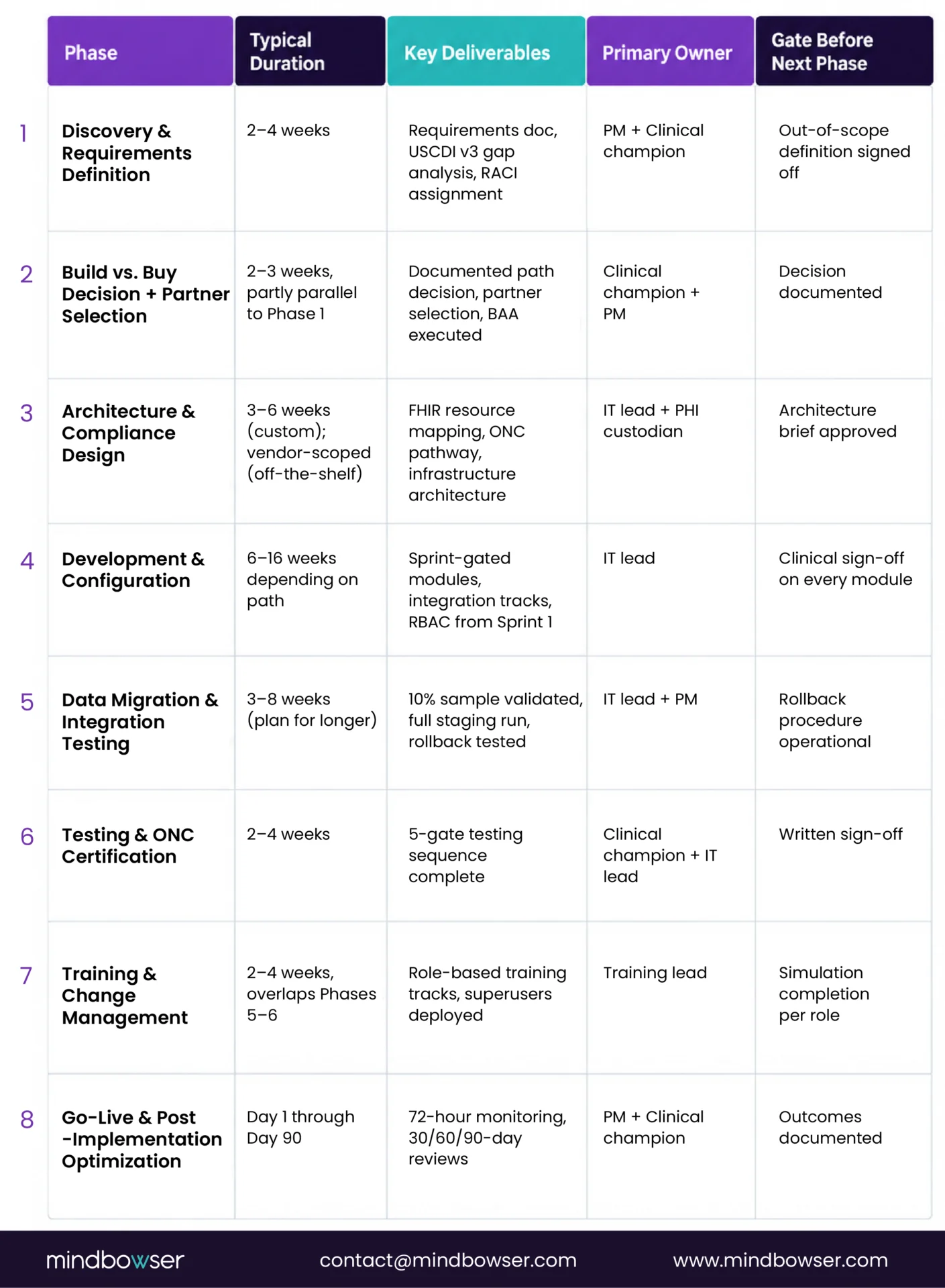
This is the project-plan piece the implementation checklist above points readers to. Same 8 phases, structured here as a plan template with durations and hand-offs.
X. What Does a Custom EHR Implementation Timeline Look Like?
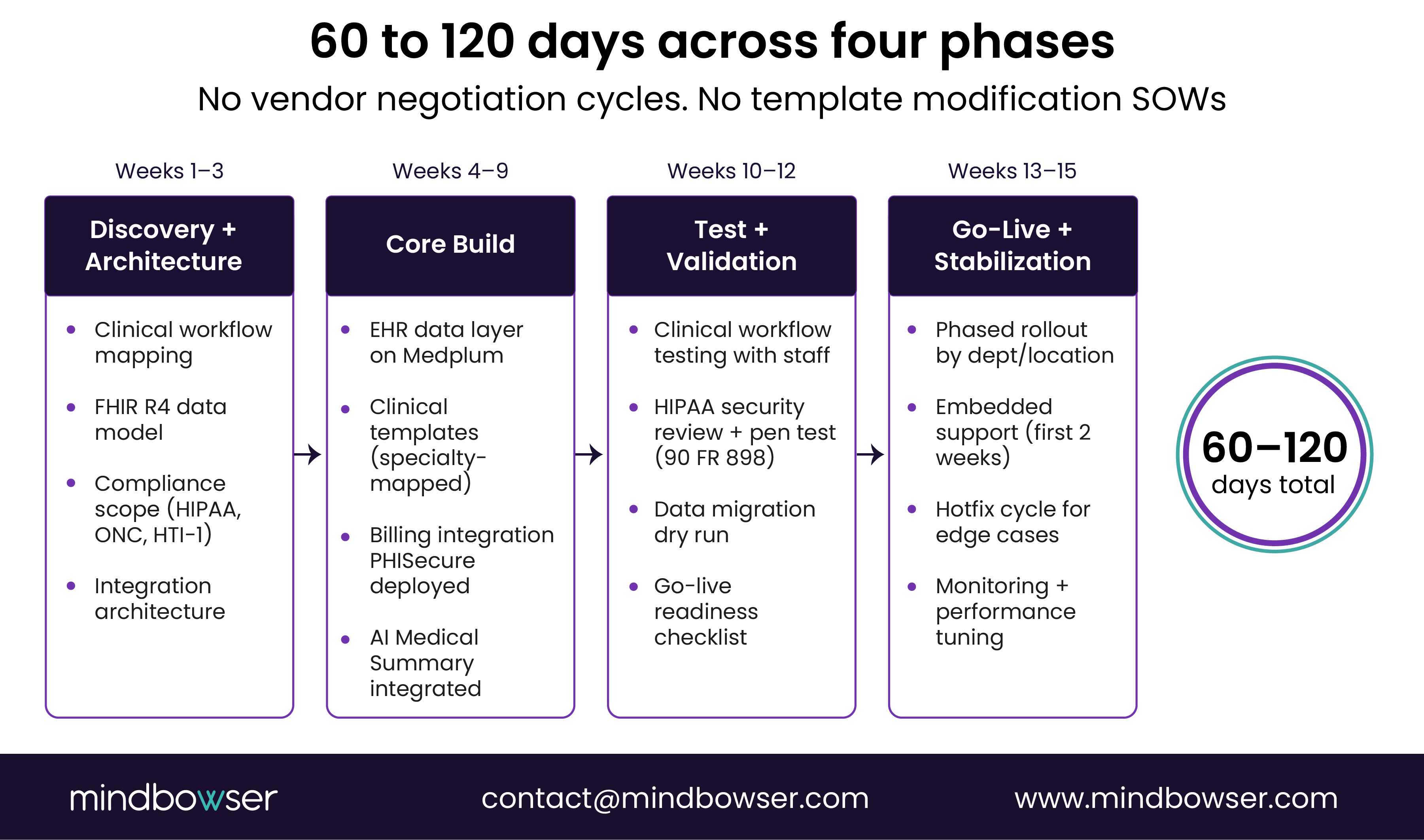
90 days sounds impossibly fast when you’ve been told to budget 18 months for Epic. Here’s what the phases actually look like.
Phase 1: Discovery and Architecture (weeks 1-3)
Clinical workflow mapping with your staff. Data model design in FHIR R4. Compliance scope definition (HIPAA, ONC, state-specific requirements). Integration architecture for existing systems. Go/no-go criteria for each phase.
This is the phase most vendor implementations rush or skip entirely.
Phase 2: Core Build (weeks 4-9)
EHR data layer on Medplum. Clinical templates designed around your actual workflows. Billing integration at the clinical layer. FHIR API exposure for all data classes. PHISecure deployed. AI Medical Summary integrated.
No waiting for a vendor’s configuration team. No negotiation over template modifications. No “that’s a custom development request, here’s the SOW.”
Phase 3: Test and Validation (weeks 10-12)
Clinical workflow testing with actual staff. HIPAA security review and penetration testing (required under 90 FR 898 for new deployments). Data migration dry run. Interface testing. Go-live readiness checklist.
Phase 4: Go-Live and Stabilization (weeks 13-15)
Phased rollout by department or location. Embedded support during the first two weeks of clinical use. Hotfix cycle for edge cases that surface in real clinical workflows. Monitoring and performance tuning.
Total: 10-15 weeks (60-120 days). A typical Epic implementation uses the same four phases and takes 10 times longer at each stage.
For a comparison of the FHIR-native platforms that enable this timeline, see the headless EHR comparison guide.
Implementation Should Reduce Debt
A successful EHR implementation is not measured by the go-live date alone. It is measured by how quickly clinicians regain productivity, how cleanly data moves, how well workflows fit, and how much operational debt the organization avoids after launch. For simple practices, a SaaS EHR may be enough.
For complex workflows, legacy data, AI, or interoperability needs, a FHIR-native custom build can turn implementation from a long vendor rollout into a controlled path toward better care delivery.
Small practice SaaS EHR: 2-8 weeks. Mid-market cloud EHR: 3-6 months. Enterprise EHR (Epic, Cerner): 12-36 months. Custom FHIR-native EHR (Medplum-based): 60-120 days. Key variables: data migration complexity, customization scope, staff training, and interface builds.
Budget $5K-$50K for implementation services plus $200-$500 per provider per month in ongoing licensing. Data migration adds $10K-$30K. Training adds $500-$2K per staff member. The productivity loss during the first 2-3 months after go-live is the cost most practices don’t budget for and is often the largest number.
Five failure modes account for the majority: skipping clinical workflow mapping, underestimating data migration, underfunding training, missing downtime procedures, and failing to negotiate data portability and API access terms before signing.
Implementation is deploying the EHR: data migration, configuration, training, and go-live. Customization is modifying it to match your specific workflows. Commercial vendors charge separately for customization and limit what can be changed. Custom-built EHRs have no customization ceiling because you own the codebase.
Yes, for simple use cases. A solo primary care practice switching from paper to DrChrono or Practice Fusion with no legacy data can be live in 2-3 weeks. Add data migration, specialty configuration, or multiple locations, and 4-8 weeks is more realistic.