BLOGS
BLOGS  NEWSROOM
  CASE STUDIES
  WEBINARS
  PODCASTS
  ASSET HUB
  EVENT CALENDAR

























TL;DR
Epic Community Connect enables smaller providers to access Epic via a host organization.
It reduces cost and speeds deployment, but introduces trade-offs in control and customization.
Success depends on data strategy, governance, and maturity in interoperability.
Most failures stem from legacy data gaps, workflow misalignment, and poor integration design.
Extending Epic through custom integration layers unlocks real ROI.
Looking for a way to leverage Epic’s powerful EHR capabilities without the hefty price tag and long implementation timeline?
Epic Community Connect offers a solution by enabling smaller healthcare organizations to access Epic through a shared infrastructure hosted by a larger organization.
This model reduces costs, accelerates deployment, and enhances care coordination while maintaining the integrity of the healthcare ecosystem.
However, success with Epic Community Connect depends on careful integration, data management, and governance to unlock its full potential.
I. What Is Epic Community Connect? (And Why Health Systems Are Expanding It Now)
A. The Challenge: Expanding Access to Epic Without the $100M Price Tag
Epic Community Connect enables smaller healthcare organizations to access Epic’s comprehensive EHR tools via a shared infrastructure hosted by a larger health system.
This significantly reduces the upfront costs of deploying Epic, which typically requires substantial investment in licensing, infrastructure, and support.
This model allows community hospitals, independent physician groups, and ambulatory practices to leverage Epic’s powerful platform without bearing the full financial burden.
B. Epic Community Connect Defined
Epic Community Connect is a hosted model in which a larger health system (“the host”) extends access to its Epic instance to smaller affiliates. The host manages the software, security, infrastructure, and upgrades, while affiliates gain access to the system and use it with limited customization.
By centralizing the management, this arrangement lowers costs. It simplifies implementation, but it also means that affiliates cannot tailor the system to their specific needs as they could with a full Epic deployment.
C. The Market Context: Why Health Systems Are Expanding Epic Community Connect Now
Several factors are driving the adoption of Epic Community Connect. The transition to value-based care and network expansion requires greater collaboration and interoperability between healthcare organizations, which Epic facilitates.
Additionally, interoperability mandates such as FHIR and TEFCA are pushing health systems to find cost-effective ways to meet regulatory standards.
Epic Community Connect enables health systems to comply with these requirements while providing smaller organizations access to a unified patient record, improving care coordination across the continuum.
II. How Epic Community Connect Works (Architecture + Operating Model)
A. Core Model: Understanding the Host and Affiliate Relationship
In an Epic Community Connect setup, the host organization holds the Epic license and is responsible for managing the infrastructure, security, upgrades, and governance. The affiliate organizations, such as community hospitals or independent practices, access the system through a shared instance.
These affiliates don’t own or manage the Epic software themselves, which drastically lowers the costs associated with full implementation. However, they benefit from the system’s functionality, including tools like clinical documentation workflows, patient engagement platforms, and advanced analytics.
The host organization oversees upgrades and ensures platform security. This arrangement allows smaller affiliates to leverage the power of Epic without the massive investment required for a full implementation. The trade-off, however, is that affiliates face certain limitations in terms of customization and control.
B. Key Components of Epic Community Connect
Understanding the fundamental components of Epic Community Connect is essential to grasping its functionality fully:
- Shared Epic Environment: The host organization manages a single Epic environment that multiple affiliates access. While the affiliates are using the same instance, they typically have limited access to customization, which is one of the main constraints of this model.
- Data Segmentation and Role-Based Access: Epic Community Connect uses data segmentation to ensure each affiliate has access only to the information it needs. Role-based access controls are also implemented to safeguard sensitive data, ensuring that users have access only to information relevant to their roles.
- Integration Layer (HL7, FHIR APIs): The system integrates with external applications and third-party platforms via standardized protocols such as HL7 and FHIR. This ensures that Epic can seamlessly exchange data with other systems, such as billing platforms and lab information systems, to support the affiliate’s operational workflows.
- Support Model (Centralized Ticketing, SLA-Driven): Since the Epic instance is shared across multiple organizations, support services are typically centralized. Affiliates rely on the host for troubleshooting, updates, and issue resolution, with response times governed by Service Level Agreements (SLAs).
C. Content Gap Closure: Addressing Challenges in Multi-Tenant Environments
While Epic Community Connect offers several advantages, it also introduces certain challenges, particularly around governance and integration:
- Multi-Tenant Governance Complexity: Since multiple organizations share the same Epic instance, coordinating governance becomes more complex. The host must manage the shared environment while addressing each affiliate’s unique needs.
- SLA Ownership Across Entities: Service Level Agreements (SLAs) play a crucial role in ensuring smooth operations. However, the ownership of SLAs between the host and affiliates can sometimes lead to misunderstandings or delays, especially when prioritizing issues across organizations.
- Data Ownership vs. Data Access Ambiguity: A critical issue that arises in multi-tenant environments is the ambiguity surrounding data ownership. While affiliates access data, the host organization may technically own it. Clear agreements are needed to define data access, ownership, and usage rights, to avoid conflicts and ensure regulatory compliance.
Understanding these key elements is important for grasping the full scope of Epic Community Connect. Now, let’s dive into the interoperability benefits that make it stand out from other solutions.
III. Interoperability with Epic Modules: The Real Power Behind Community Connect
A. Why This Matters
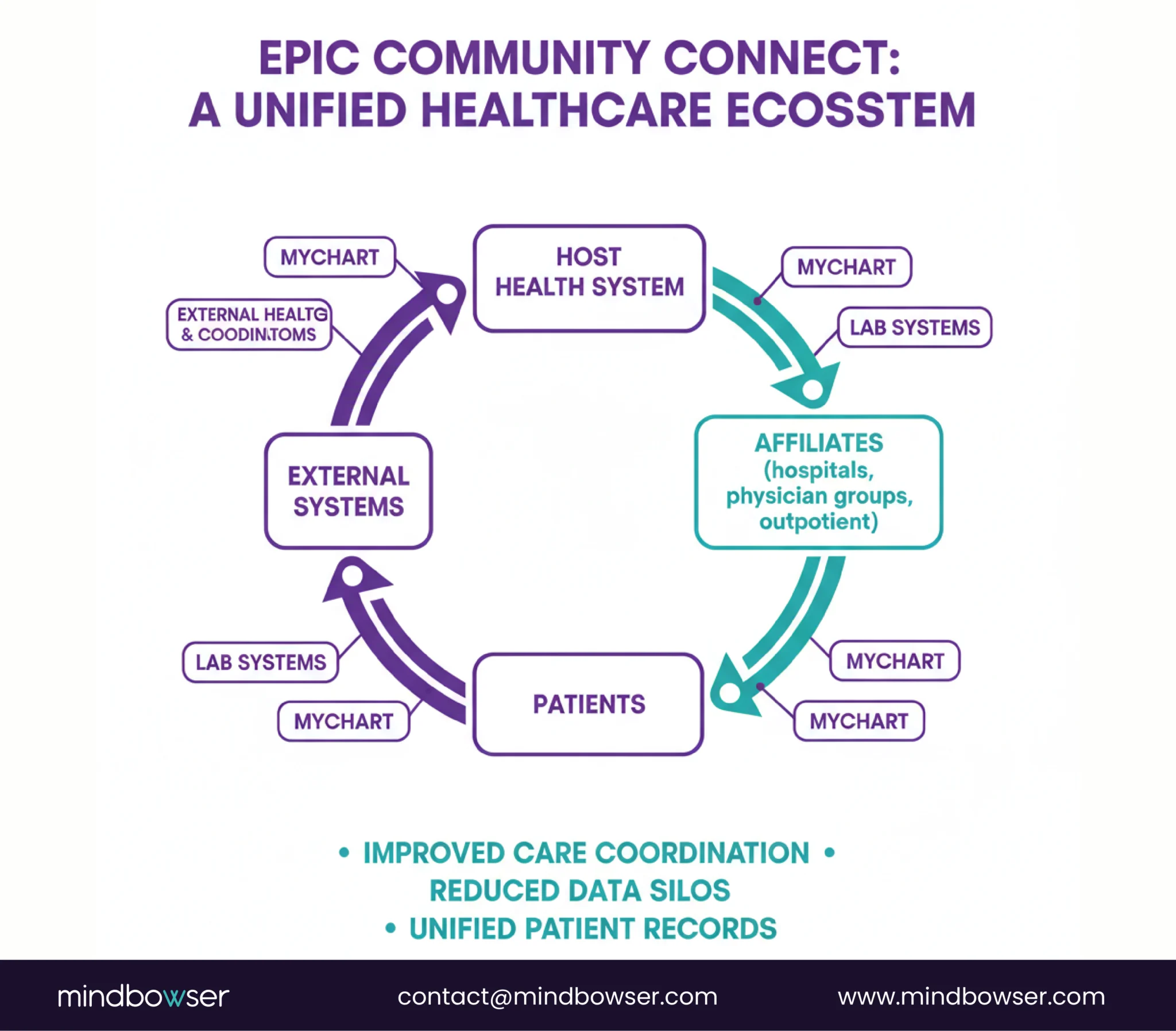
Epic Community Connect goes beyond providing access to Epic, enabling real-time data sharing across care settings and ensuring a unified patient record. This integration reduces fragmentation and improves coordination across ambulatory, inpatient, and emergency departments.
B. Seamless Module-Level Integration
Epic enables seamless data flow across care settings, eliminating barriers between care environments and allowing clinicians to access complete patient information.
C. Core Modules Typically Included
Modules include clinical documentation, CPOE, lab integrations, and patient engagement tools like MyChart, enabling efficient workflows and improved patient engagement.
D. Advanced Data Access & Longitudinal Patient View
Epic’s tools, such as Happy Together, consolidate patient data across multiple organizations, providing clinicians with a unified, longitudinal view of patient health. At the same time, archived integration layers enable access to legacy data without a full migration.
E. Operational & Regulatory Impact
Epic Community Connect helps affiliates meet compliance standards, participate in value-based care programs, and leverage advanced analytics, all without owning the infrastructure.
F. Where Interoperability Breaks Down
Integration gaps, such as misaligned data mapping or incomplete third-party system integrations, can lead to fragmented workflows and hinder seamless interoperability.
IV. Benefits of Epic Community Connect (For Hosts, Affiliates, and Patients)
A. For Affiliates: Lower Cost and Faster Implementation
Epic Community Connect offers smaller organizations, such as independent physician groups and community hospitals, a cost-effective way to leverage the power of Epic without the immense upfront investment required for a full Epic deployment.
This shared instance model significantly reduces the financial burden, as affiliates do not need to purchase their own licenses or manage the infrastructure themselves.
Some key benefits for affiliates include:
- Lower Cost vs Full Epic Deployment: By accessing a shared Epic environment, affiliates avoid the substantial costs of implementing a standalone Epic system, including infrastructure, licensing, and ongoing support.
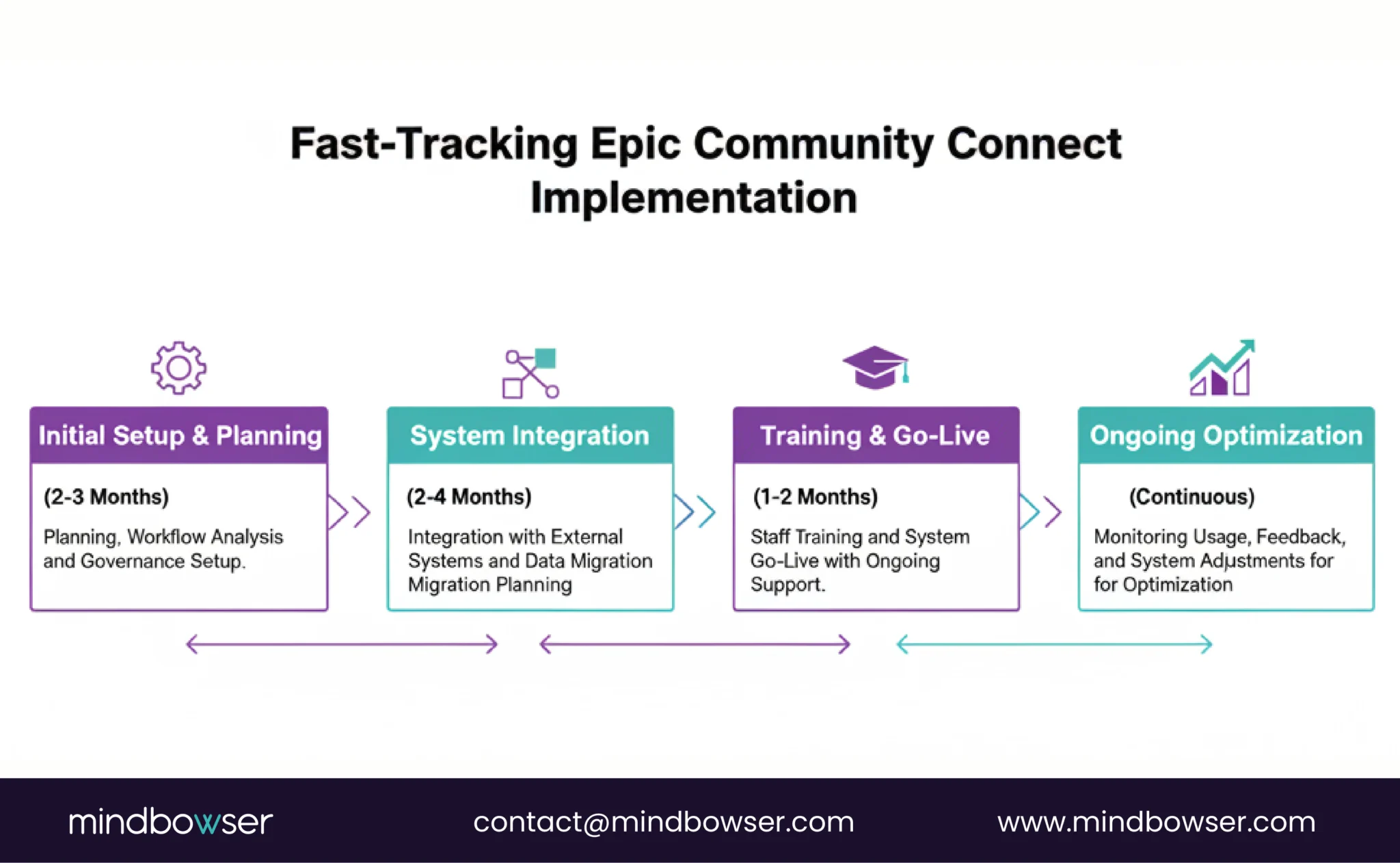
- Faster Implementation Timelines: Traditional Epic implementations can take years to deploy fully. With Epic Community Connect, affiliates can get up and running much more quickly, typically in a matter of months. This accelerated timeline allows healthcare providers to start delivering better care faster and with less disruption to operations.
- Access to Advanced Tools: Despite the cost savings, affiliates still gain access to Epic’s advanced tools, including clinical documentation workflows, MyChart for patient engagement, and comprehensive analytics capabilities. These tools empower smaller healthcare organizations to improve their clinical workflows and enhance the patient experience.
B. For Host Systems: Strengthening Networks and Expanding Influence
For the host organization, typically a larger health system or hospital, the benefits of Epic Community Connect are substantial. By offering Epic access to affiliates, the host can extend its influence and expand its referral network. This strategic approach strengthens the host system’s ecosystem, making it easier to coordinate care and improve the overall quality of services across its network of affiliates.
Key benefits for host systems include:
- Stronger Referral Networks: By connecting affiliates to its Epic instance, the host health system can deepen relationships with smaller organizations. These strengthened connections create opportunities for increased patient referrals, enhancing both the host’s clinical reach and financial bottom line.
- Improved Care Coordination: The unified Epic instance helps facilitate better coordination of care across a network of providers. With all entities sharing the same patient data, there is less room for errors and treatment delays, leading to improved clinical outcomes.
- Expanded Ecosystem Influence: The host health system also gains greater influence in the broader healthcare ecosystem. By providing access to Epic, the host positions itself as a leader in healthcare technology and is better equipped to drive initiatives such as value-based care and integrated care delivery.
C. For Patients: Consistent Care and Better Outcomes
While the operational benefits are critical for healthcare providers, patients also stand to gain significantly from Epic Community Connect. The ultimate goal is always to enhance the patient experience and improve outcomes, and Epic’s interconnected environment plays a vital role in achieving that.
Benefits for patients include:
- Consistent Care Experience: With all affiliates using the same system, patients benefit from a seamless care experience across different settings. Whether they are seeing their primary care doctor, visiting an urgent care clinic, or being admitted to the hospital, their medical record is always up to date and available to the treating clinician.
- Reduced Duplication of Tests: One of the most significant inefficiencies in healthcare is the duplication of tests and procedures. With Epic Community Connect, patient data flows freely across care settings, reducing the likelihood of redundant tests. This not only saves costs but also spares patients from unnecessary procedures.
- Better Clinical Outcomes: With a unified and comprehensive view of the patient’s health history, clinicians can make more informed decisions, leading to better treatment outcomes. Real-time access to patient data reduces errors, enhances clinical decision-making, and ultimately improves patient care.
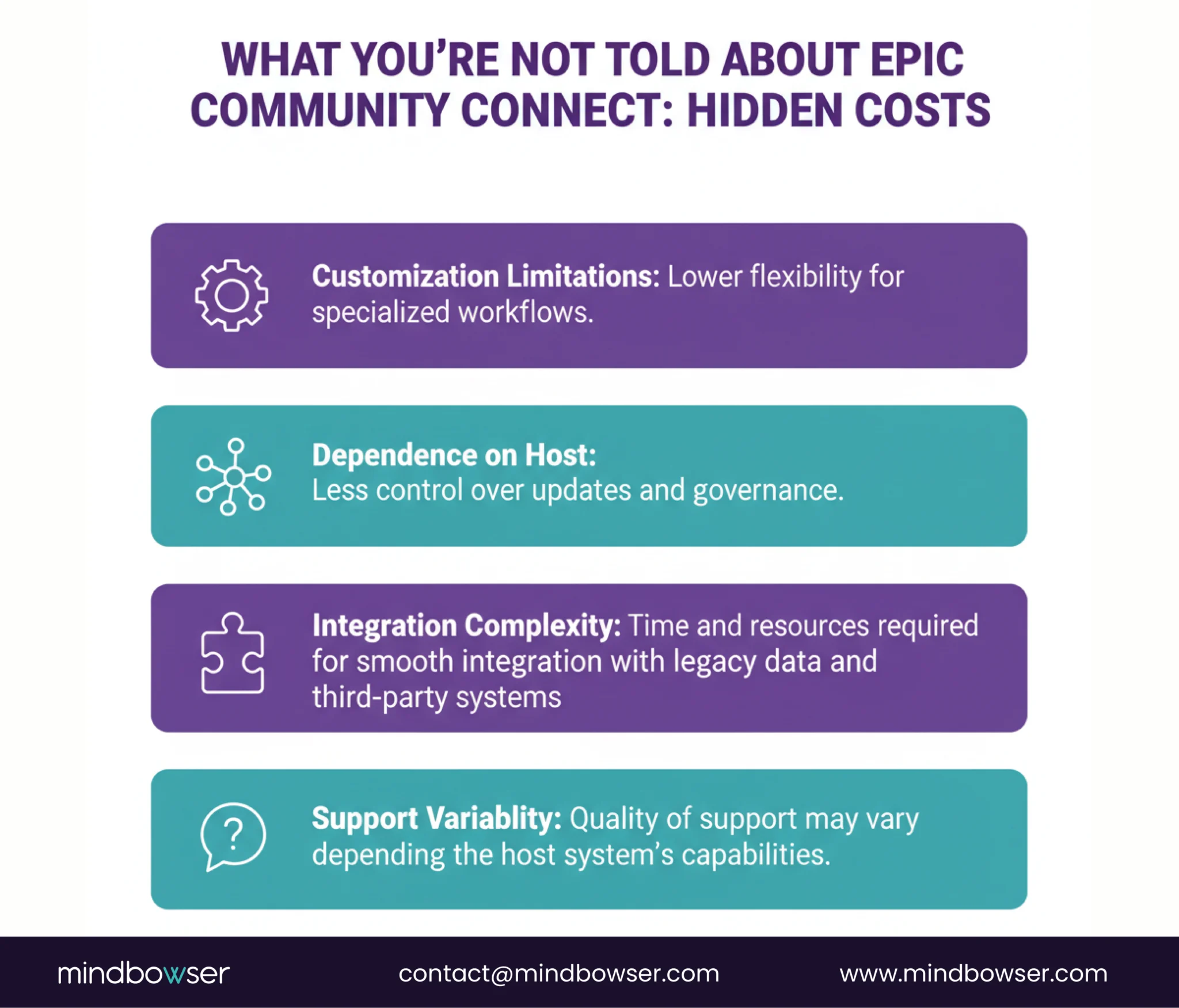
While Epic Community Connect offers numerous advantages, it’s not without its hidden trade-offs. Let’s explore some of the operational, technical, and strategic challenges that most vendors don’t openly discuss in the next section.
Additionally, migrating out of the Epic ecosystem can be complex, costly, and time-consuming. Organizations that want to leave the Community Connect model may face significant obstacles related to data migration, integration rework, and training staff on a new platform. This creates a potential “vendor lock-in” scenario in which the affiliate feels trapped in the Epic ecosystem despite evolving needs.
As we’ve seen, while Epic Community Connect offers substantial benefits, the trade-offs can be significant. Now, let’s dive into a comparison between Epic Community Connect and a full Epic implementation to understand better the differences in terms of cost, control, customization, and more.
V. Epic Community Connect vs Full Epic Implementation
A. Cost
Epic Community Connect is far more affordable than a full Epic implementation. Affiliates share the host organization’s Epic infrastructure, reducing licensing, infrastructure, and maintenance costs. In contrast, a full Epic deployment involves substantial upfront investments, including hardware, software, and IT staff.
B. Control
With Epic Community Connect, the host organization manages the infrastructure, security, and upgrades, leaving affiliates with limited control over system customization and changes. In a full Epic implementation, organizations have complete control over their Epic system, including configuration, updates, and governance, providing greater flexibility and autonomy.
C. Customization
Epic Community Connect allows for limited customization, as affiliates use a shared Epic environment with predefined settings. While this model is cost-effective, it doesn’t cater to the specific needs of specialized care settings. In contrast, full Epic implementations offer extensive customization, allowing organizations to tailor workflows, features, and tools to their unique requirements.
D. Implementation Time
Community Connect offers a faster implementation timeline compared to a full Epic deployment. While full Epic implementations can take several years due to complex infrastructure setups and customization, Epic Community Connect can be up and running within months, enabling affiliates to access Epic’s tools and improve care coordination quickly.
E. IT Ownership
In the Community Connect model, the host organization owns and manages the Epic system, reducing the IT burden on affiliates. They benefit from shared resources and support without investing in infrastructure or internal IT teams. However, with a full Epic deployment, the organization has complete ownership of the system, including its infrastructure, updates, and security, which offers more control but requires more resources to maintain.
VI. Implementation Realities Where Most Projects Fail
A. Legacy Data Management: The Most Common Pitfall
One of the most critical challenges in implementing Epic Community Connect is managing legacy data. Many healthcare organizations struggle with fragmented historical data, where patient records exist across various outdated systems or in formats that don’t integrate well with Epic. Without a solid strategy for data migration or access, these gaps can severely hinder the effectiveness of the new system.
How will you ensure that legacy patient records are accurately incorporated into your Epic Community Connect system?
The lack of a well-defined archival strategy is a common reason for failure in Epic implementations. Affiliates often underestimate the complexity of integrating historical data into a new system, leading to incomplete or inconsistent patient records.
Additionally, missing longitudinal patient context may leave clinicians with a limited understanding of a patient’s health history, leading to potential errors in care.
To overcome this, it’s essential to establish a comprehensive data management strategy before implementation, including deciding which data will be archived, which will be migrated, and how to ensure access to legacy records without disrupting workflows.
B. Workflow Misalignment: Host vs Affiliate Discrepancies
Another significant reason for the Epic Community Connect project failure is workflow misalignment between the host health system and its affiliates. Since the host system controls the Epic instance, it designs workflows that align with its own operational needs. However, affiliates, especially smaller organizations, may have distinct workflows, particularly in specialty care settings, that are not well supported by the default Epic setup.
How do you address potential friction between the host’s workflows and the unique needs of your affiliate practices?
When these workflows don’t align, it creates friction. For example, specialty practices may face challenges in adapting Epic’s general workflows to meet their specific clinical requirements. This mismatch can lead to inefficiencies, increased clinician frustration, and ultimately, lower adoption rates.
To minimize workflow misalignment, it’s crucial to conduct a thorough gap analysis during the planning phase. This ensures that the workflows of all affiliates are accounted for and that Epic’s tools are configured to meet these needs as closely as possible.
C. Integration Complexity: Bridging the Gap with External Systems
The complexity of integrating Epic Community Connect with external systems is another major challenge.
While Epic’s integration layer supports common standards such as HL7 and FHIR, integrating with third-party systems, including lab systems, billing platforms, and digital health tools (e.g., remote patient monitoring), often requires custom work. These integrations must be carefully planned and executed to ensure smooth data exchange.
What strategies will you put in place to ensure that Epic seamlessly integrates with your existing systems and digital tools?
Many projects falter when the integration layer is not sufficiently planned or designed. For example, if patient data from remote monitoring tools like remote monitoring integration tools isn’t properly integrated into the Epic system, clinicians won’t have access to the complete picture of a patient’s health. Inadequate integration can create silos of information, leading to fragmented workflows and poor patient care.
To prevent these integration breakdowns, it’s essential to design a robust integration strategy from the outset, taking into account not only Epic’s internal modules but also the external systems that need to be connected. This involves thorough testing, mapping data accurately across systems, and ensuring all integrations are optimized for real-time data flow.
D. Governance Breakdown: Undefined Ownership and Accountability
Finally, one of the most frequently overlooked reasons for Epic Community Connect project failure is a breakdown in governance. Since multiple entities share the system, defining clear ownership of configuration, updates, and ongoing maintenance is crucial for long-term success. Without defined roles and responsibilities, projects can stall or face delays, as different stakeholders may have conflicting priorities or unclear expectations.
How will you ensure that governance responsibilities are well defined and adhered to throughout the implementation and beyond?
Typically, governance issues arise when organizations fail to assign specific ownership of system updates, data management, or user support. This lack of accountability can result in delays in addressing issues, especially when a problem crosses organizational boundaries.
To mitigate this, establish a multi-tenant governance model early in the project to ensure clear ownership for each aspect of the system. This includes defining roles for the host organization and its affiliates, and outlining who will be responsible for system maintenance, security, data access, and user training.
With the challenges and pitfalls of implementation laid out, let’s turn our attention to best practices that can help ensure a successful Epic Community Connect rollout.
Planning an Epic Community Connect rollout? Let's map your integration path.
VII. Best Practices for a Successful Epic Community Connect Rollout
A. Pre-Implementation: Laying the Foundation for Success
The success of an Epic Community Connect rollout begins long before the system goes live. Careful planning is key to minimizing challenges and ensuring smooth implementation. Start by defining governance structures to establish clear roles and responsibilities for both the host and affiliate organizations. This prevents confusion later on, especially in areas like system updates and data management.
Next, conduct a workflow gap analysis to identify potential misalignments between the host’s workflows and affiliates’ specific needs. This is particularly important for specialty practices, which may have unique requirements. Additionally, design the interoperability architecture upfront to ensure the system integrates smoothly with external tools and legacy data sources.
B. During Implementation: Building for the Future
Once implementation begins, focus on key factors that ensure long-term success. First, standardize data mapping using FHIR-first principles. This ensures that data flows consistently between Epic modules and external systems, which is crucial for interoperability.
Build a modular integration layer to facilitate seamless connections with third-party platforms. Whether it’s a remote patient monitoring tool or a billing system, this integration layer ensures data flows smoothly across systems without disruption.
Lastly, set up an SLA-backed support model to ensure that any issues are quickly resolved, helping minimize downtime.
C. Post-Go-Live: Ensuring Continuous Improvement
After going live, it’s essential to optimize the system based on real-time user feedback continuously. This includes monitoring clinician adoption metrics to track how well the system is being received. If adoption is low, consider additional training or workflow adjustments to improve user experience.
Also, expand interoperability use cases as the system matures. Over time, additional integrations may be necessary to keep pace with evolving healthcare needs. This allows the system to grow with the organization, maximizing its value.
VIII. Legacy Data Strategy The Most Overlooked Success Factor
A. Why Legacy Data Management Matters
The management of legacy data is one of the most critical yet often overlooked factors in the success of an Epic Community Connect rollout.
Clinical accuracy, compliance readiness, and reporting integrity all depend on the ability to access and incorporate legacy patient data into the new system. Without a clear strategy for managing this data, healthcare organizations risk facing fragmented patient records, poor clinical decision-making, and compliance issues.
How will your organization ensure the seamless integration of legacy data into Epic Community Connect without disrupting workflows?
Many healthcare systems fail to account for the complexities of legacy data management early in the implementation process.
Without a solid archival strategy or an access layer, affiliates may struggle to access historical patient records, leading to gaps in care and workflow inefficiencies. Additionally, compliance with regulations such as HIPAA could be jeopardized if historical data isn’t appropriately managed.
A well-thought-out legacy data strategy is essential to ensure a smooth transition and avoid these pitfalls.
B. Recommended Approach: Archive vs. Migrate Strategy
There are two main approaches to handling legacy data in Epic Community Connect: archiving or migrating the data. Each approach has its advantages and challenges, and choosing the right strategy depends on the organization’s specific needs and goals.
1. Archive Strategy: Archiving involves storing legacy data separately from the new system but still allowing access when needed. This approach works well for healthcare organizations that don’t need to access historical data on a day-to-day basis but still need to retrieve it for compliance, reporting, or patient care.
- Benefits: Lower cost, reduced complexity, and less disruption during migration.
- Challenges: Accessing archived data may be slower or more difficult, and organizations must have a solid plan for retrieving it when needed.
2. Migrate Strategy: Data migration involves moving historical patient records into the new system, making them accessible alongside more recent data. This approach ensures a unified patient record but can be complex and costly, especially if the data is fragmented or stored in incompatible formats.
- Benefits: Easy access to a complete, unified patient record within the Epic system.
- Challenges: High costs and potential disruptions during the migration process, especially if the legacy data isn’t properly mapped or cleaned.
Choosing the right approach requires careful consideration of factors such as the volume of legacy data, the organization’s need for historical information, and the available resources for managing the migration process.
C. Unified Patient Data Access Layer: Ensuring Continuous Access to Historical Records
One of the most effective ways to manage legacy data in an Epic Community Connect implementation is to build a unified patient data access layer. This layer provides a bridge between legacy systems and Epic, allowing affiliates to access historical patient data without fully migrating it into the new system.
The key benefits of this approach include:
- Seamless Data Access: Healthcare providers can access both current and historical patient data from a single Epic interface, ensuring that clinicians have a complete view of the patient’s health history.
- Reduced Migration Complexity: By creating an access layer, organizations avoid the challenges of a full data migration, which can be time-consuming and error-prone. This approach allows affiliates to gradually transition their legacy data into Epic as needed, without disrupting workflows.
- Compliance and Reporting Integrity: With a unified access layer, organizations can ensure compliance with regulatory requirements on data retention and patient access. They can also maintain reporting integrity by including all relevant historical and current data in compliance reports and quality metrics.
D. API-Based Retrieval of Legacy Records
Another effective strategy for handling legacy data is to use API-based retrieval to access patient records stored in legacy systems. By leveraging APIs, healthcare organizations can retrieve legacy data as needed and integrate it into the Epic Community Connect environment without migrating all the data upfront.
API-based retrieval offers several advantages:
- Flexibility: APIs enable flexible data access, allowing organizations to retrieve only the data they need at any given time. This reduces the burden of managing large amounts of historical data in the Epic system.
- Real-Time Access: With APIs, legacy data can be accessed in real time, ensuring clinicians have the most up-to-date and complete information during patient care interactions.
- Scalability: API-based retrieval is a scalable solution, making it easier for healthcare organizations to adapt their legacy data management strategy as their needs evolve.
By integrating legacy data through API-based retrieval, organizations can ensure a smoother transition to Epic Community Connect and avoid the complexities and risks associated with full data migration.
Legacy data management is a foundational element for Epic Community Connect success. Now, let’s examine the real-world sentiment from those who have implemented the system what do users actually say about their experiences?
IX. Real-World Sentiment What Users Actually Say
A. Positive Insights: Improved Coordination and Better Than Legacy EHRs
Many organizations that have implemented Epic Community Connect report positive outcomes, particularly improved care coordination and enhanced clinical decision-making.
For affiliates, the ability to use Epic’s advanced tools without the high upfront costs has proven to be a major benefit. Smaller healthcare providers, who once struggled with fragmented, outdated EHR systems, find Epic Community Connect to be a significant upgrade.
How can smaller organizations improve care coordination and clinical outcomes without the large financial burden of traditional Epic deployment?
Many users report that Epic Community Connect offers a more integrated, cohesive system than their legacy EHRs. The unified patient record, advanced data access, and seamless module integration make it easier for clinicians to share information, collaborate across care settings, and make better-informed decisions.
The centralization of patient data and the ability to access real-time information from across the healthcare network also contribute to improved care coordination. For example, smaller hospitals and physician groups can now easily access patient information from the host health system, streamlining transitions of care and reducing the risk of errors.
B. Negative Insights: Limited Flexibility and Support Dependence
On the flip side, some users express frustration with the limitations of customization within Epic Community Connect.
Because the system is shared, affiliates cannot tailor the platform as extensively as they could with a full Epic implementation. For healthcare organizations with specific, complex workflows, such as specialty care providers, this lack of customization can become a significant hurdle.
What happens when the shared system doesn’t fully support the unique needs of specialty practices or certain workflows?
Specialty practices often face challenges when trying to adapt their specific needs to a generalized platform. For example, workflows for oncology, cardiology, or psychiatry may not fit neatly within Epic’s default templates, requiring workarounds that can create inefficiencies and slow down clinician adoption.
Another common complaint is the variable quality of support. Since Epic Community Connect relies on the host organization for technical assistance, the level of support can vary significantly depending on the host’s resources and expertise. Some affiliates report experiencing delays in issue resolution, leading to frustration and downtime.
C. Key Insight: Success Depends More on Host Execution Than Epic Itself
Ultimately, users emphasize that the success of Epic Community Connect is less about the Epic system itself and more about how well the host organization executes the implementation and supports its affiliates.
Strong governance, effective training, and a well-managed integration strategy are crucial for ensuring that the system functions smoothly and meets the needs of all parties involved.
What can organizations do to ensure that their host system is set up for success in managing the Epic Community Connect implementation?
The host organization must take an active role in managing the implementation and providing ongoing support. This includes clear communication with affiliates, efficient management of system updates and upgrades, and timely addressing of technical issues. When the host organization is well-equipped and committed to success, affiliates are more likely to experience a smooth implementation and ongoing satisfaction with Epic Community Connect.
With real-world feedback in mind, it’s time to explore how Mindbowser builds custom EHR solutions with Epic integration capabilities to enhance the Community Connect experience and drive ROI.
X. How Mindbowser Builds Custom EHR with Epic Integration Capabilities
A. The Gap: Community Connect Provides Access, but Not Optimization
While Epic Community Connect allows smaller healthcare organizations to access the powerful Epic system without the cost of full implementation, it doesn’t optimize the system for every organization’s unique needs.
The shared infrastructure model and limited customization can create significant barriers to efficiency, particularly for organizations with specialized workflows or that need more flexibility than Epic Community Connect provides out of the box.
How can you maximize the value of Epic Community Connect without compromising on your organization’s unique requirements?
At Mindbowser, we understand that the key to unlocking the full potential of Epic Community Connect is creating custom integration layers that extend its capabilities without disrupting the host governance or workflow.
By building on Epic, we can tailor the system to meet the specific needs of each affiliate organization, ensuring they get the most value from the Epic platform while adhering to host system governance and security protocols.
B. Our Approach: Custom Integration Layers on Top of Epic
Mindbowser’s approach to extending Epic Community Connect involves creating custom integration layers that connect Epic to other systems, tools, and data sources. These layers help bridge the gap between Epic’s shared environment and the unique needs of each healthcare organization.
Key aspects of our approach include:
FHIR-Based Interoperability Frameworks: We utilize FHIR (Fast Healthcare Interoperability Resources) standards to enable seamless data exchange between Epic and external systems, ensuring that all relevant patient data can be shared in real time across care settings.
Custom Clinical Workflow Engines: Mindbowser builds customized clinical workflow engines that extend Epic’s functionality to better align with the specific needs of specialized care settings. This allows healthcare organizations to maintain their unique workflows while still leveraging the power of Epic.
AI-Powered Modules: We integrate AI-driven tools into Epic to enhance its capabilities and improve clinical decision-making. For example, we offer:
- AI Medical Summary: This module uses artificial intelligence to generate comprehensive patient summaries, making it easier for clinicians to quickly and accurately review patient history.
- CarePlan AI: A smart tool that helps clinicians create personalized care plans by analyzing patient data and recommending best practices based on clinical guidelines.
- AI Readmission Risk: By analyzing patient data, this module predicts the likelihood of readmissions, helping care teams proactively intervene and reduce hospital readmissions.
C. Integration Examples: Seamless Connections with Third-Party Platforms
Mindbowser also ensures that Epic Community Connect can integrate with third-party platforms to enhance the overall care coordination experience. Our custom integration layers allow for the seamless connection of Epic with various external tools, such as:
- RPM Platforms: RPM tools can be integrated into Epic to provide real-time patient data, allowing clinicians to monitor chronic conditions and intervene before issues escalate.
- Medication Adherence Systems (MedAdhere AI): We integrate medication adherence platforms such as MedAdhere AI into Epic, helping providers ensure patients are adhering to prescribed treatments, reducing readmissions, and improving overall health outcomes.
- Care Coordination Dashboards: Our custom dashboards provide a comprehensive view of patient progress across multiple care settings, allowing care teams to easily track patient outcomes, schedule follow-ups, and collaborate with other providers.
D. Outcome: Faster Clinician Adoption, Higher Satisfaction, and Measurable ROI
By extending Epic Community Connect with these custom integration layers, Mindbowser helps healthcare organizations overcome the limitations of the shared Epic environment. The result is faster clinician adoption, improved satisfaction, and measurable ROI.
With better support for specialized workflows, real-time data access, and seamless integration with third-party systems, organizations can deliver more coordinated care, improve patient outcomes, and achieve better financial performance.
Key outcomes include:
- Faster Clinician Adoption: Custom workflows and AI-powered tools make it easier for clinicians to navigate the system and deliver care efficiently, leading to higher adoption rates and greater satisfaction.
- Higher Satisfaction: Both clinicians and patients experience better care coordination and smoother workflows, resulting in higher satisfaction levels across the board.
- Measurable ROI: By reducing readmissions, improving clinical efficiency, and enhancing care coordination, organizations see significant returns on their investment in Epic Community Connect.
With these custom integration capabilities in place, organizations can optimize their Epic Community Connect experience. But is Epic Community Connect truly worth the investment? Let’s explore the ROI breakdown in the next section.
XI. ROI Breakdown: Is Epic Community Connect Worth It?
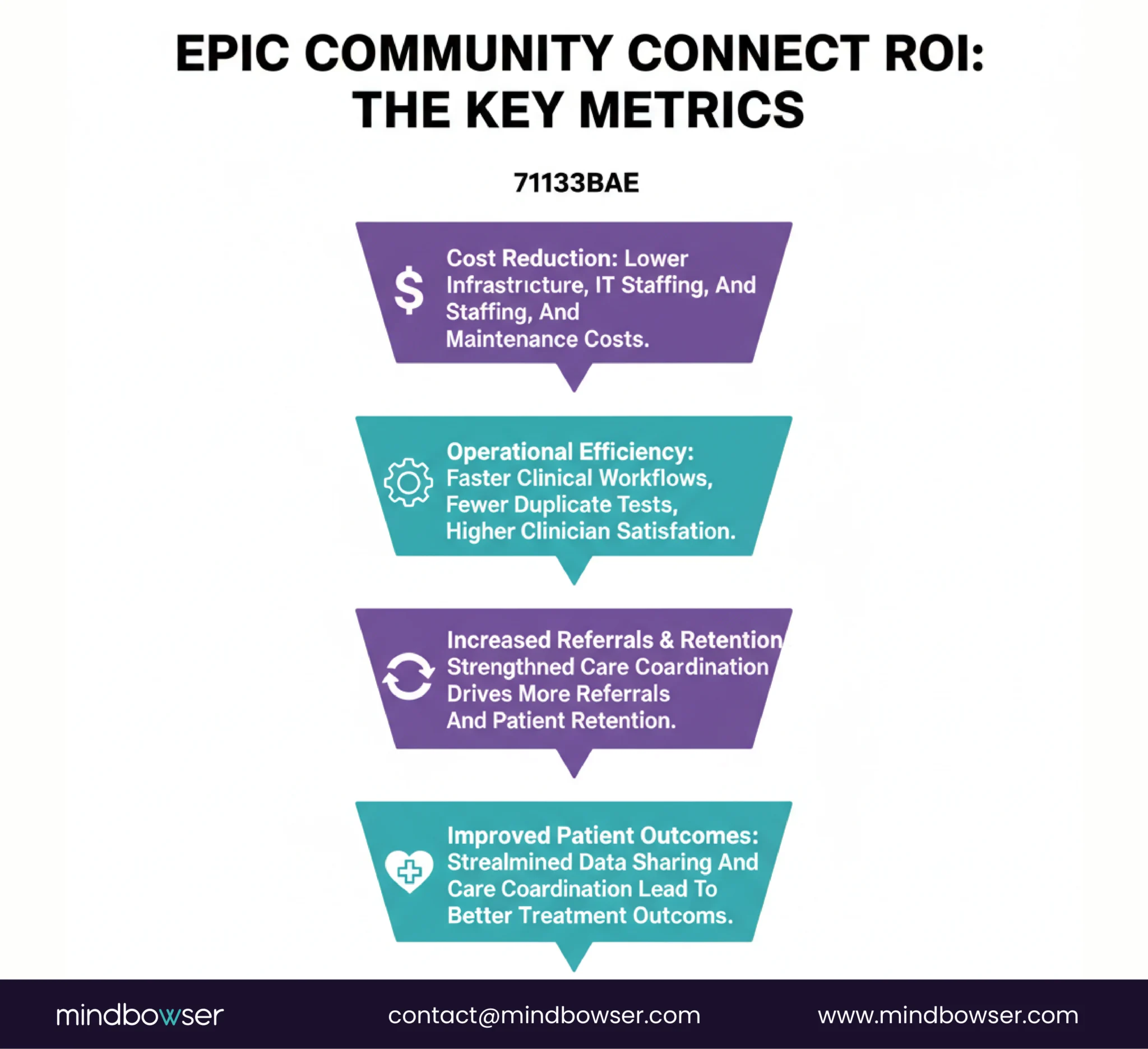
A. Cost Savings: Reducing Infrastructure and Staffing Expenses
One of the most compelling reasons for organizations to consider Epic Community Connect is the significant cost savings compared to a full Epic implementation. The cost savings are driven primarily by reduced infrastructure and staffing needs.
- Reduced Infrastructure Costs: Since the host organization owns and manages the Epic system, affiliates don’t need to invest in expensive hardware, servers, or data centers. This cuts down on capital expenditures and reduces the need for ongoing IT maintenance, which can be a substantial cost for smaller providers.
- Lower Staffing Requirements: With Epic Community Connect, affiliates don’t need to build out a full internal IT team to manage the system. The host organization handles system upgrades, security patches, and troubleshooting. This translates into lower staffing costs for affiliates, allowing them to focus their resources on patient care rather than IT operations.
B. Revenue Impact: Increased Referrals and Improved Retention
Epic Community Connect offers a tangible revenue boost for both host organizations and affiliates by strengthening referral networks and improving patient retention:
- Increased Referrals: By using Epic Community Connect, affiliates become more integrated into the host’s healthcare ecosystem. This deepens relationships and drives more referrals to the host system, benefiting both parties. Affiliates benefit from greater patient flow, while the host system enjoys the financial upside of expanded service offerings.
- Improved Retention: The improved care coordination facilitated by Epic Community Connect also contributes to better patient retention. Patients receive more consistent care across settings, leading to higher satisfaction and reducing the likelihood that they seek care from other providers.
C. Operational Gains: Streamlined Workflows and Better Documentation
Epic Community Connect also provides several operational benefits that contribute to improved efficiency and reduced costs:
- Reduced Duplicate Testing: With a unified patient record spanning multiple care settings, clinicians can easily view a patient’s entire medical history, reducing test and procedure duplication. This not only saves money but also reduces the burden on patients, who no longer need to undergo unnecessary tests.
- Better Documentation Accuracy: The system helps ensure that clinical documentation is more accurate and up-to-date, leading to improved coding and billing accuracy. This reduces the risk of errors and denials, increasing the likelihood of timely and accurate reimbursement.
D. ROI Risks: Weak Interoperability Design and Poor Governance
While the ROI potential of Epic Community Connect is significant, certain risks could impede its realization. The key ROI risks include:
- Weak Interoperability Design: If the integration layer is poorly designed, Epic Community Connect can end up just another fragmented system that fails to improve care coordination. Poor data mapping, incomplete integration with external systems, and mismatched workflows can result in inefficiencies and limited returns.
- Poor Governance: If governance structures are unclear or poorly managed, it can lead to delays in updates, unclear responsibilities for system maintenance, and inconsistent support quality. These issues can ultimately undermine the system’s potential benefits and reduce clinician adoption and productivity.
- Low Adoption: If clinicians are not adequately trained or do not adopt the system effectively, the anticipated productivity gains and efficiency improvements won’t materialize. Continuous clinician engagement and adoption monitoring are essential to avoid low utilization rates.
While the ROI of Epic Community Connect is promising, it ultimately depends on effective implementation, governance, and integration strategies. Now, let’s explore who is best suited for Epic Community Connect and who might be better off with a full Epic implementation.
XII. Who Should (and Shouldn’t) Use Epic Community Connect
A. Ideal Fit: Community Hospitals, Independent Physician Groups, and Ambulatory Networks
Epic Community Connect is particularly well-suited for healthcare organizations seeking to benefit from Epic’s comprehensive suite of tools but unable to justify the costs and complexities of a full Epic implementation.
The following types of organizations are the best candidates for this model:
- Community Hospitals: Smaller community hospitals can leverage Epic Community Connect to gain access to an advanced, integrated EHR system without the financial burden of a full Epic deployment. This allows them to deliver high-quality care while maintaining cost-effectiveness and operational efficiency.
- Independent Physician Groups: Independent practices, which often struggle to afford and manage their own EHR systems, can benefit from Epic Community Connect by integrating seamlessly with their local healthcare network. This facilitates improved care coordination and access to the resources of a larger health system.
- Ambulatory Networks: Ambulatory care settings, which focus on outpatient care, can leverage Epic Community Connect to streamline workflows, improve patient engagement, and enhance clinical outcomes. With faster implementation times and lower costs, ambulatory networks can quickly adopt Epic’s powerful tools.
For these organizations, Epic Community Connect offers a viable pathway to benefit from Epic’s advanced functionality without the overwhelming costs and complexities of a full system implementation.
B. Not Ideal For: Highly Specialized Workflows and Organizations Needing Deep Customization
While Epic Community Connect works well for many smaller organizations, it is not ideal for healthcare providers with highly specialized needs or complex workflows that require deep customization. The following groups may struggle with the limitations of the Community Connect model:
- Highly Specialized Workflows: Organizations that operate with niche or highly specialized clinical workflows, such as those found in oncology, cardiology, or pediatrics, may find that Epic Community Connect does not offer the flexibility required to support their unique needs. Since customization is limited, these practices may find it difficult to adapt the system to their specialized requirements.
- Organizations Needing Deep Customization: For organizations that need full control over their system configuration, data workflows, and user interfaces, Epic Community Connect may feel restrictive. A full Epic implementation allows for a high degree of customization and autonomy, which some organizations may find essential for their operations.
- Systems with Strong IT Maturity: Large organizations with strong IT infrastructures and the resources to manage a full Epic deployment may find that the limitations of Epic Community Connect aren’t sufficient for their needs. These organizations may prefer a full Epic implementation, which provides greater control, flexibility, and the ability to deeply integrate with their internal systems.
C. Strategic Takeaway: A Tailored Decision for Your Organizational Needs
The decision to adopt Epic Community Connect or a full Epic implementation depends on the organization’s size, specialization, and IT maturity.
For smaller, less specialized organizations, Epic Community Connect offers a cost-effective, faster path to access Epic’s powerful EHR system. However, larger organizations or those with complex needs may require the depth and flexibility offered by a full Epic deployment.
Epic Community Connect is an excellent choice for many healthcare providers seeking a cost-effective, integrated solution without the burden of managing a full Epic system. However, for organizations requiring a high level of customization or specialized workflows, a full Epic implementation may still be the better option.
Epic Community Connect: A Strategic Approach to EHR Integration
Epic Community Connect is more than just a cost-effective solution for smaller healthcare providers; it’s a strategic tool that enables seamless integration across healthcare ecosystems.
By leveraging Epic’s capabilities while reducing financial and operational burdens, organizations can enhance care coordination, improve patient outcomes, and drive better clinical efficiency.
However, success depends on designing an interoperable system, effectively managing legacy data, and maintaining robust governance.
For organizations ready to adopt a shared infrastructure, Epic Community Connect offers a powerful, scalable approach to achieving healthcare integration without the high costs and complexity of a full Epic implementation.