BLOGS
BLOGS  NEWSROOM
  CASE STUDIES
  WEBINARS
  PODCASTS
  ASSET HUB
  EVENT CALENDAR

























TL;DR:
EHR integration doesn’t have to mean a $70K project and months of IT work. This guide is built for solo practices – real budget constraints, no in-house IT team, and a need for systems that just work. You’ll get a 7-step blueprint, a breakdown of FHIR-ready EHR options, and a realistic look at what integration actually costs and how long it takes.
Running a solo practice means budget pressure is real, IT support is minimal, and every hour you spend on admin is an hour away from patients. EHR integration for solo providers doesn’t have to mean a six-figure project – the right approach is fast to deploy, affordable, and requires no in-house dev team. Whether you’re managing five patients a day or fifty, the need for connected digital workflows has become non-negotiable.
That’s where EHR integration comes into play.
Integrating an EHR isn’t just about going digital for solo providers—it’s about making every minute count. You need a system that works quietly in the background, keeps records up to date, supports compliance, and helps deliver better care without overwhelming your staff or your budget.
“Physicians in small practices are less likely to have adopted electronic health records (EHRs) compared to those in larger practices. For instance, only 2% of solo practitioners reported having a fully functional EHR system.” - PMC
Our EHR integrations connect your systems to leading EHR platforms without heavy IT involvement. Whether you’re looking to centralize records, automate workflows, or just stop entering the same data twice, we’ve got you covered.
What Is EHR Integration?
EHR integration for solo practices means connecting your digital patient records system with other tools and apps you use every day, like billing software, lab systems, patient portals, and even wearables. It creates a connected workflow that reduces manual data entry, minimizes errors, and saves time.
In simple terms, think of it as syncing your phone’s health app with your smartwatch. Data flows automatically. You don’t have to enter the details twice or juggle between systems. That’s what integration does—it makes everything work together.
What Does EHR Typically Integrate With?
Here are some common systems solo providers connect with for their EHR:
🔸 Patient portals: Allow patients to view records, schedule appointments, and send secure messages.
🔸 Billing and claims: Automate invoice generation, insurance verification, and claim submissions.
🔸 Lab systems: Share and receive lab orders and results in real time without manual uploads.
🔸 Wearables and remote monitoring: Sync data from devices like heart rate monitors or glucometers directly into the patient’s chart.
For solo practices, the right integration accelerator handles FHIR-based API connections out of the box – no custom dev work required on your end.
EHR vs EMR vs Integrated Platforms: What’s the Difference?
Let’s clear the confusion:
🔸 EMR (Electronic Medical Record): A digital version of a patient’s chart in a single clinic. Useful for internal use, but doesn’t readily share info outside your practice.
🔸 EHR (Electronic Health Record): Goes beyond EMR. It includes the full patient history and is built to share data across providers, labs, and billing systems.
🔸 Integrated platforms: These pull everything into one connected experience—appointments, notes, labs, payments, and messaging—all linked through a unified dashboard.
For solo practices, ConnectHealth is an integration accelerator that speeds up building modern, compliant healthcare apps, with REST API support for fast FHIR-based capabilities.
Why Solo Practices Struggle with EHR Integration?
EHR integration for solo practices isn’t just about adding new software—it’s about aligning technology with how providers work. Unlike large healthcare systems, solo practitioners wear multiple hats—delivering care, handling admin, and managing tech decisions on their own. That’s why practical, low-friction integration matters.
Over 75% of physicians who participated in Health Information Exchange (HIE) reported improvements in care quality, efficiency, and patient safety—proof that the right integration can truly elevate solo practice performance.
Here’s why EHR integration becomes a real challenge:
❗ Budget and IT Resource Constraints
Solo practitioners typically operate on lean budgets without access to in-house IT teams. This makes evaluating, implementing, and maintaining complex EHR systems difficult. Most traditional solutions have heavy upfront costs, ongoing maintenance fees, and resource-heavy onboarding processes.
Financial concerns are a significant barrier for solo practitioners. The cost of implementing EHR systems can range from $15,000 to $70,000 per provider, including licensing fees, training, and infrastructure upgrades.” – Simbo AI+1PMC+1
❗ Vendor Complexity and Lack of Customization
Off-the-shelf EHR platforms often fail to match the specific needs of small practices. From rigid workflows to unnecessary modules, solo providers pay for features they don’t use—or struggle with workarounds.
❗ Interoperability Issues With Larger Networks
Referrals, lab connections, pharmacy coordination—solo providers often find themselves disconnected from larger networks due to EHR silos. Poor interoperability limits access to patient data and delays care coordination.
❗ The Hidden Cost of Fragmented Data
When systems don’t talk to each other, data lives in silos—manual data entry, mismatched records, and repeated work increase administrative burnout. Over time, this leads to staff fatigue and reduced patient satisfaction.
Step-by-Step Integration Blueprint
Step 1: Define Integration Goals
Before diving into EHR integration for solo practices, define what success looks like for you. Some common goals include:
🔸 Cutting down on manual data entry
🔸 Automatically syncing lab results
🔸 Supporting virtual care with telehealth features
Speed, affordability, and ease of use often take priority for solo practices. Start small—identify one area where integration can make an immediate difference, then scale gradually. Clear goals give direction and help avoid unnecessary features or costs. This becomes the foundation for all future decisions in the integration journey.
Step 2: Evaluate EHR Systems with FHIR Support
FHIR is the current standard for healthcare data exchange. Think of it as a universal translator that helps different systems speak the same language—fast and securely.
Look for EHRs that are:
🔸 FHIR-ready
🔸 Popular among small practices
🔸 Easy to integrate with modern tools
Related Read: Getting Your Architecture FHIR Ready: A Step-by-Step Guide
EHRs to Consider for Solo Practices
🔸 Epic – While traditionally used by larger setups, Epic now offers Epic Garden Plot for independent practices, including scheduling, charting, and e-prescribing features.
🔸 Cerner by Oracle – This offers FHIR-compatible tools and analytics capabilities. Best for solo practices focused on population health and preventive care through data insights.
🔸 Athenahealth – Cloud-based with an intuitive interface, ideal for practices looking for fast deployment and low IT maintenance.
🔸 eClinicalWorks– Known for its strong FHIR support and interoperability, making data sharing and third-party integrations easier.
🔸 NextGen– A good fit for ambulatory settings with flexible templates and mobile access to simplify daily workflows.
Make sure to verify the EHR vendor’s developer support and documentation. This can impact both the speed and ease of your future integration.
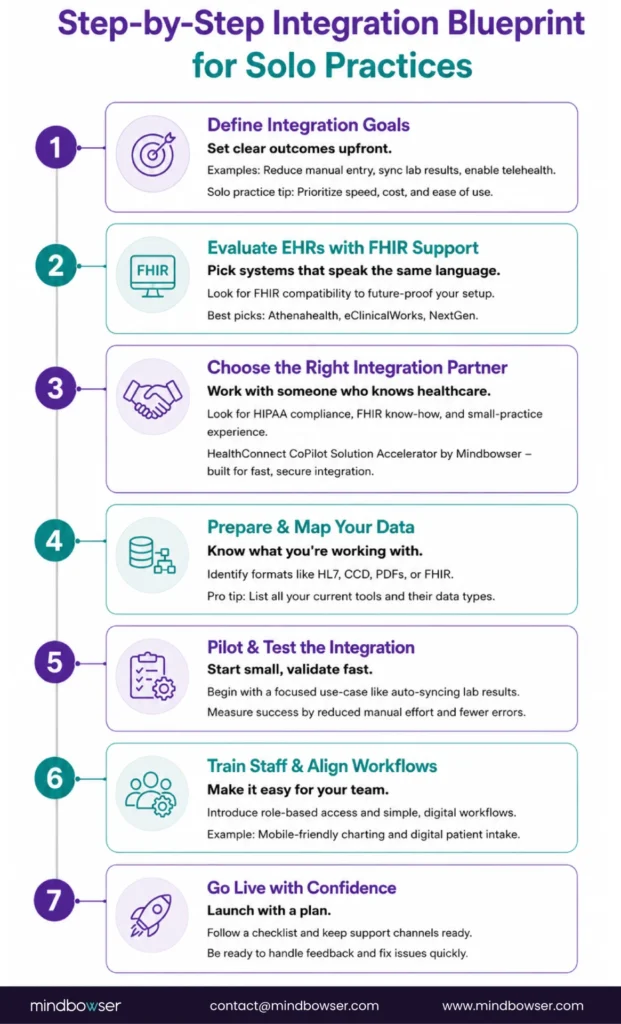
Step 3: Choose the Right EHR Integration Partner
This step often makes or breaks the process. Choose a partner who:
This is where ConnectHealth comes in, Mindbowser’s integration accelerator. It fast-tracks FHIR integration — live in days, not months, and no dev team required on your end.
Our team works closely with your staff to understand specific requirements. We bring deep healthcare domain expertise that simplifies technical complexities.
Step 4: Data Preparation & Mapping
Now’s the time to get your data in order. Every tool—from scheduling software to billing apps—uses different formats like HL7, CCDs, PDFs, or FHIR.
Start by:
🔸 Listing all your tools
🔸 Documenting the type of data they hold
🔸 Mapping how that data should flow into the EHR
Check for outdated, duplicated, or incorrectly formatted entries. Clean data improves the accuracy of the integration and reduces future troubleshooting. ConnectHealth automates much of this mapping for you.ƒ√
Step 5: Pilot Integration & Testing
Don’t go full throttle on day one. Pick one specific use case, like syncing lab results, and run a controlled pilot.
What to track:
🔸 Time saved on manual entries
🔸 Accuracy of synced data
🔸 Error rates before vs. after
Use the pilot to gather real user feedback and make small iterations. Keep your focus on usability and reliability before scaling to other modules. We provide analytics to track success in real time.
Step 6: Staff Training & Workflow Alignment
Once the tech is ready, it’s all about getting your team on board.
🔸 Set up role-based access to maintain data privacy
🔸 Train staff on new workflows—think digital intake forms or mobile-friendly notes
🔸 Encourage small behavior shifts that lead to big productivity gains
Consider mock sessions to help staff get comfortable with the interface. Reinforce the system’s benefits—faster charting, less admin work, and better patient experiences. A well-trained team ensures smoother adoption.
Step 7: Go Live with Confidence
Before launching your new setup, run through a final checklist:
🔸 Data mapping verified
🔸 Key staff trained
🔸 Support contacts ready
Plan your go-live during a quieter period to reduce pressure on staff. Monitor activity closely for the first few days and address issues proactively. With our EHR integration platform, we remain hands-on even after launch to ensure stability and satisfaction.
Example of EHR Integration for Solo Practices
1. Dr. Larka – Podiatrist in Houston, Texas
Dr. Britt Larka, a solo podiatrist in Houston, faced challenges with previous EHR systems that didn’t cater to her practice’s needs. After adopting a specialized EHR, she experienced smooth integration, improved workflow, and better patient care. The system’s specialty-specific content and user-friendly interface allowed her to focus more on patient interactions and less on administrative tasks.
Source: Practice EHR Success Story
2. Dr. Bhattacharya – Solo Family Physician
Dr. Bhattacharya, a solo family physician, adopted an EHR system that simplified both clinical work and billing processes. This integration helped ensure compliance, improved overall efficiency, and made patient care more focused. Dr. Bhattacharya found the EHR system to be a perfect balance between clinical functionality and accurate billing, which is especially important for solo practitioners.
Source: Software Finder Blog
3. Carolinas Coastal Health – Solo Practice in North Carolina
Carolinas Coastal Health, a solo practice in North Carolina, adopted an EHR system that helped them attest to Meaningful Use, improving both care quality and practice efficiency. The integration of the system facilitated better care coordination, allowing the practice to focus more on patient relationships and less on administrative duties. This adoption also led to more efficient workflows, enabling the practice to grow and adapt to changing healthcare regulations.
Source: HealthIT.gov – Solo Practitioner Uses EHR
4. Donna Offield, M.A., LPC – Visually Impaired Provider
Donna Offield, a licensed professional counselor, integrated an EHR system with accessibility features to overcome challenges related to her visual impairment. The system enabled her to manage patient records efficiently, enhancing practice operations and patient care quality. The user-friendly interface and strong support structure provided by the system made her transition to a digital environment smooth and effective.
Source: Valant EHR Case Studies
5. Dr. Turner – Chiropractor
Dr. Turner, a solo chiropractor, transitioned to an EHR system tailored to his practice. The cloud-based platform offered mobility, allowing him to manage patient records and appointments remotely. This shift not only improved operational efficiency but also boosted patient satisfaction, as the system simplified appointment management and enhanced overall patient engagement.
Source: HealthIT.gov – Solo Practitioner Uses EHR
Running a solo practice and need EHR integration that fits your budget and timeline?
Talk to our integration team → Get in Touch
We work exclusively with small and solo practices – no enterprise overhead, no bloated onboarding. Most integrations go live in under 30 days.
Conclusion
EHR integration for solo practices may seem daunting at first, but breaking it down into clear steps can make the process more manageable—and even strategic. From understanding your existing workflows to choosing the right EHR, setting up secure APIs, ensuring HIPAA compliance, testing integration points, and training your team—it’s a journey that can transform your practice’s efficiency and patient care quality.
We built our platform to simplify this entire process for solo providers. You get ready-to-use APIs, compliance-driven modules, and technical support that fits your exact requirements, without the complexity. Our experience in working with solo practitioners ensures that your systems not only talk to each other but also work for you.
The best EHR for independent practices depends on your specialty, budget, and workflow needs. Popular choices include Athenahealth, Kareo, and NextGen for their user-friendly interfaces and customizable features.
EMR integration connects internal records within a single practice, while EHR integration allows for broader data sharing across multiple providers, labs, and health systems for better care coordination.
Large health systems often prefer Epic for its customizability and patient engagement tools, while Cerner is known for faster deployment and strong interoperability features.
Due to its advanced features and scalability, Epic Systems is currently the most widely used EHR in the U.S., especially among large hospitals and healthcare networks.