BLOGS
BLOGS  NEWSROOM
  CASE STUDIES
  WEBINARS
  PODCASTS
  ASSET HUB
  EVENT CALENDAR

























TL;DR
- Pathology EHRs need specimen-first workflows, including barcode tracking, sub-specimen handling, multi-result routing, and CAP/CLIA audit trails.
- Commercial systems like Epic Beaker and Cerner PathNet work well for standard lab workflows but can struggle with multi-site reference labs and complex specimen routing.
- A FHIR-based LIS-EHR integration layer can solve many data flow issues without replacing existing systems, whereas custom development is better suited to labs with more complex workflows.
- AI-enabled pathology EHRs can reduce the documentation burden by drafting structured reports while maintaining physician review, attestation, and compliant result routing.
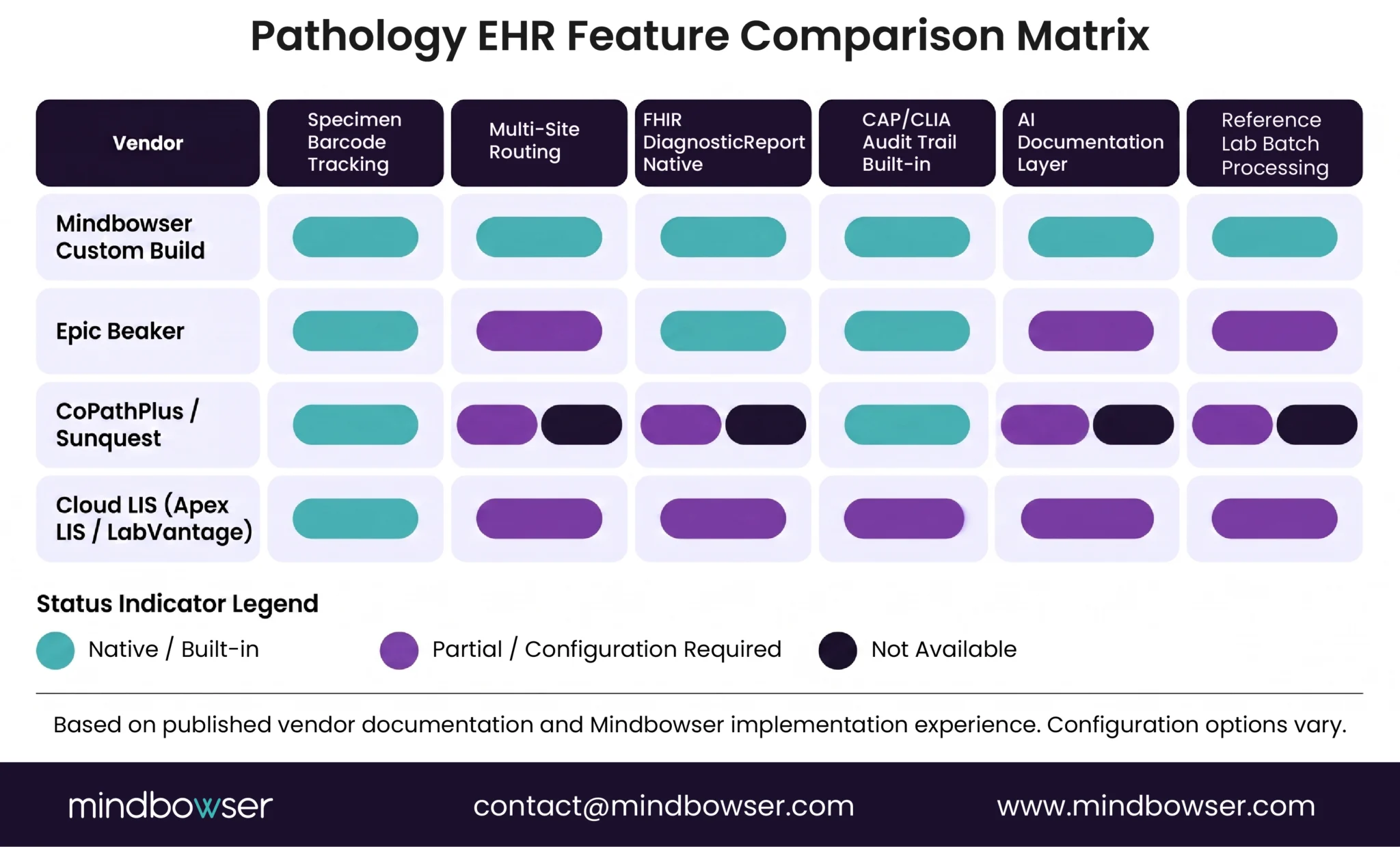
Most pathology labs run on a split system: specimens tracked in a laboratory information system (LIS), clinical results stored in a separate EHR. I’ve watched this create the same manual handoff problem at every lab we’ve integrated with. The two systems don’t talk natively. The result is manual handoffs, provenance gaps, and workflows that stop scaling the moment a lab adds a second site.
This isn’t a minor integration issue. KLAS Research (2024) found that more than 60% of pathology labs operate with separate LIS and EHR systems. When labs grow (adding satellite sites, offering specialty panels, or scaling to reference lab volumes), that fragmentation becomes a patient safety and compliance risk.
This guide covers what makes pathology EHR uniquely complex, how commercial vendor options stack up, and when a custom-built pathology EHR is the right call.
What Makes Pathology Different from Other Specialties for EHR?
Pathology data doesn’t fit neatly into the patient-centric record structure that most EHRs are built around. A patient has one chart. But a pathology specimen can generate multiple sub-specimens, multiple staining protocols, multiple result interpretations, and then a single clinical finding that routes to one or more ordering providers. That’s a fundamentally different data structure from anything a standard EHR was designed to manage.
CAP (College of American Pathologists) accreditation requires integrated tracking from specimen receipt through result reporting through provider delivery, documented and auditable at every step. CLIA (42 CFR 493.1105) mandates result provenance trails in the patient record. These aren’t aspirational standards. They’re enforcement checkpoints that accreditation reviewers actually audit.
Three gaps show up consistently when generic EHRs try to handle pathology:
Specimen barcode tracking: Most EHRs track orders and results, not the physical journey of a specimen. Pathology needs chain-of-custody documentation from collection through processing through archiving. That’s a different data model entirely.
Multi-result routing: A single tissue sample will produce 5-15 distinct diagnostic findings in a complex case. Commercial EHRs route one result to one provider. Pathology workflows require multi-finding reports with multi-provider delivery.
CAP/CLIA audit trails: Accreditation reviewers audit the full specimen-to-result chain. Most EHRs can’t produce that documentation without custom reporting layers built on top.
The core mismatch: EHRs are built for patient encounters. Pathology workflows are built around specimens. That structural difference drives every integration gap downstream.
What Should You Look for When Comparing Pathology EHR Options?
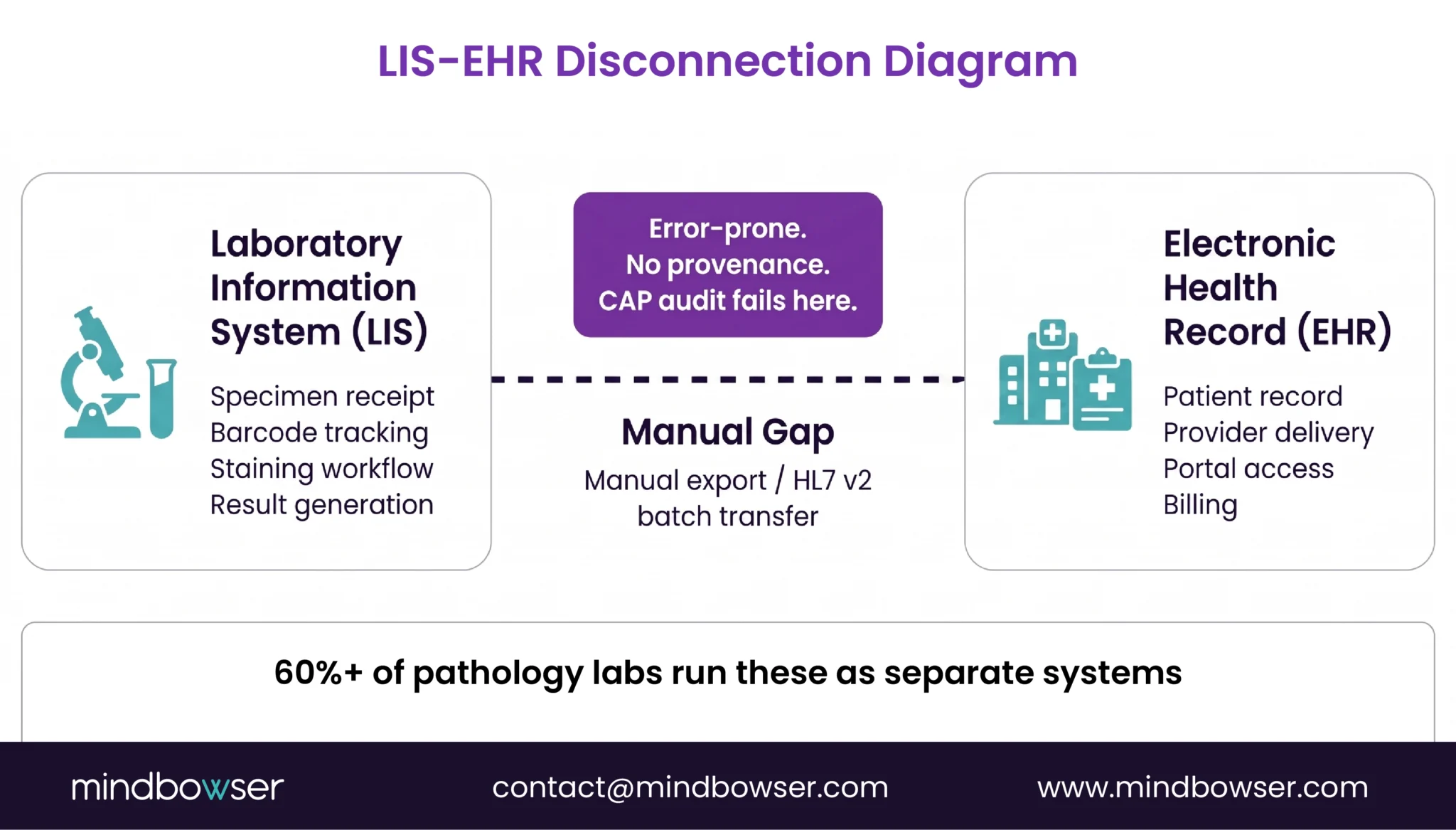
Three vendor categories serve pathology EHR today:
Enterprise EHR with pathology modules (Epic Beaker, Cerner PathNet). Functional for health systems already running Epic or Cerner. Implementation runs 18 months or longer at high cost. Epic Beaker handles standard surgical pathology and cytology workflows well.
But the moment you need multi-site specimen routing or reference lab batch processing, you’re looking at custom configuration that Epic’s team will quote separately and estimate in additional months. Cerner PathNet has a similar ceiling: solid for single-facility lab workflows, complex to extend beyond that.
Standalone LIS vendors (CoPathPlus, Sunquest, Mediware). Strong laboratory information systems, weaker EHR integration. Most offer HL7 interfaces that sync in batch mode rather than real-time, and require middleware to bridge to the clinical EHR. The data flow works, but the integration layer is brittle and needs maintenance every time either system updates.
Cloud-based niche vendors (Apex LIS, LabVantage). Growing rapidly. Most are LIS-first and EHR-adjacent: specimen tracking is solid, clinical integration is lighter. Good starting points for digital health companies building lab-adjacent platforms.
Key evaluation criteria for any pathology EHR:
- Specimen tracking: Barcode automation, multi-site routing, batch result handling, or just order/result pairs?
- LIS integration: HL7 v2 plus FHIR Diagnostic Report support? Real-time or batch? Specimen provenance trails built in?
- Result routing: Multi-provider delivery? Critical value alerting? Lab-specific report templates?
- TAT tracking: Per-specimen turnaround dashboard? Batch benchmarking?
- CAP/CLIA compliance: Built-in audit trail? Accreditation checklist documentation?
- AI documentation: Structured report drafting? Physician attestation workflow?
For EHR integration architecture depth, the FHIR DiagnosticReport resource is the current standard for pathology result delivery, though adoption across LIS vendors is uneven. The gap that shows up across every commercial option is reference lab specimen routing. When 12 satellite collection sites feed a central processing lab, the one-specimen-one-patient-one-result model breaks. And no off-the-shelf EHR handles multi-site specimen routing natively.
When Does Commercial EHR Fall Short for Reference Labs?
Picture a regional reference lab with 12 satellite collection sites across three counties. Every day, specimens travel from satellites to the main processing lab. The main lab handles staining, analysis, and result generation. Results route back to ordering providers across 50+ clinical practices.
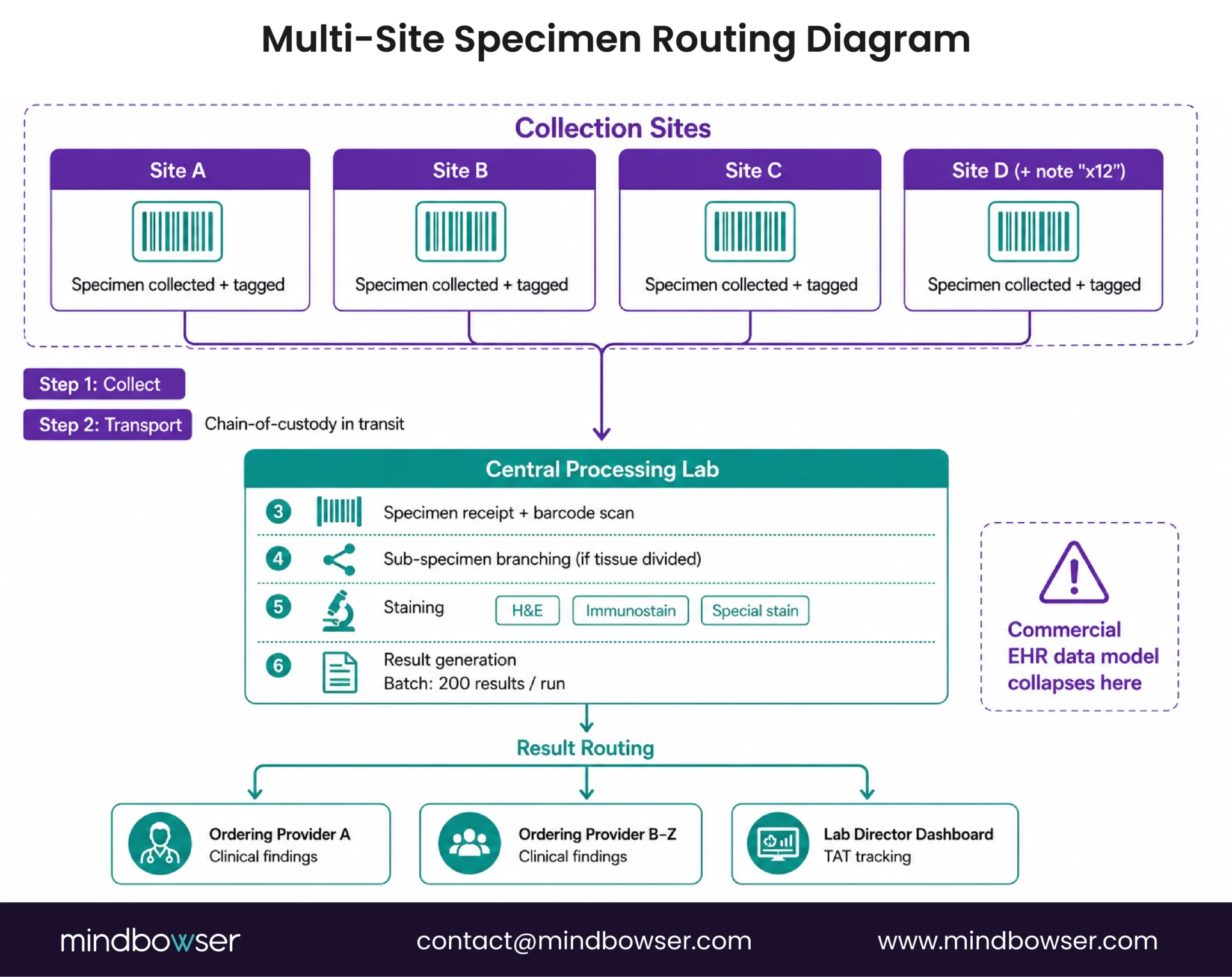
I’ve scoped builds for labs that look exactly like this. The commercial EHR model is: patient, order, result, provider. What it can’t handle runs four levels deeper.
Multi-site specimen routing: Tracking needs to follow a physical object: barcode at collection, chain-of-custody in transit, receipt log at processing, sub-specimen branching when tissue is divided, batch result delivery when staining completes. Commercial EHR logic collapses at the sub-specimen level.
Actually, let me be more specific: it’s not growth that breaks the commercial model, it’s the first time a specimen needs to split into sub-specimens across two processing workflows. That’s the exact moment the one-to-one data model hits its wall.
Specialty staining workflows: Pathologists use internal classification systems: H&E, immunostaining, special stains, frozen section, cytology. These don’t map cleanly to standard SNOMED-CT codes without custom mapping tables. Most commercial systems require manual workarounds to maintain those tables over time.
Batch result processing: A TAT-driven pathology lab may generate 200 results from a single processing cycle. Commercial EHRs are built for individual result delivery, not batch. Automation at 50 specimens, one run, 200 results, automated provider routing is a custom engineering requirement every time.
Digital pathology: FDA guidance on whole-slide imaging is emerging. Most commercial systems are adding digital pathology reactively. A purpose-built system designs the WSI data model from the ground up, including audit-ready image storage and multi-reader annotation workflows that support CAP digital pathology checklist requirements.
The pattern: labs that grow beyond a single site, or add specialty staining complexity, hit a ceiling with commercial options. At that point the question shifts from “which vendor?” to “what do we build?”
If you’re managing a reference lab with satellite sites and you’ve found a commercial EHR that handles multi-site specimen routing without a middleware layer, I’d genuinely want to know which one. We haven’t seen it yet.
Our custom EHR development practice works with reference labs and specialty pathology networks at exactly this decision point.
How Does AI Reduce Pathology Documentation Burden?
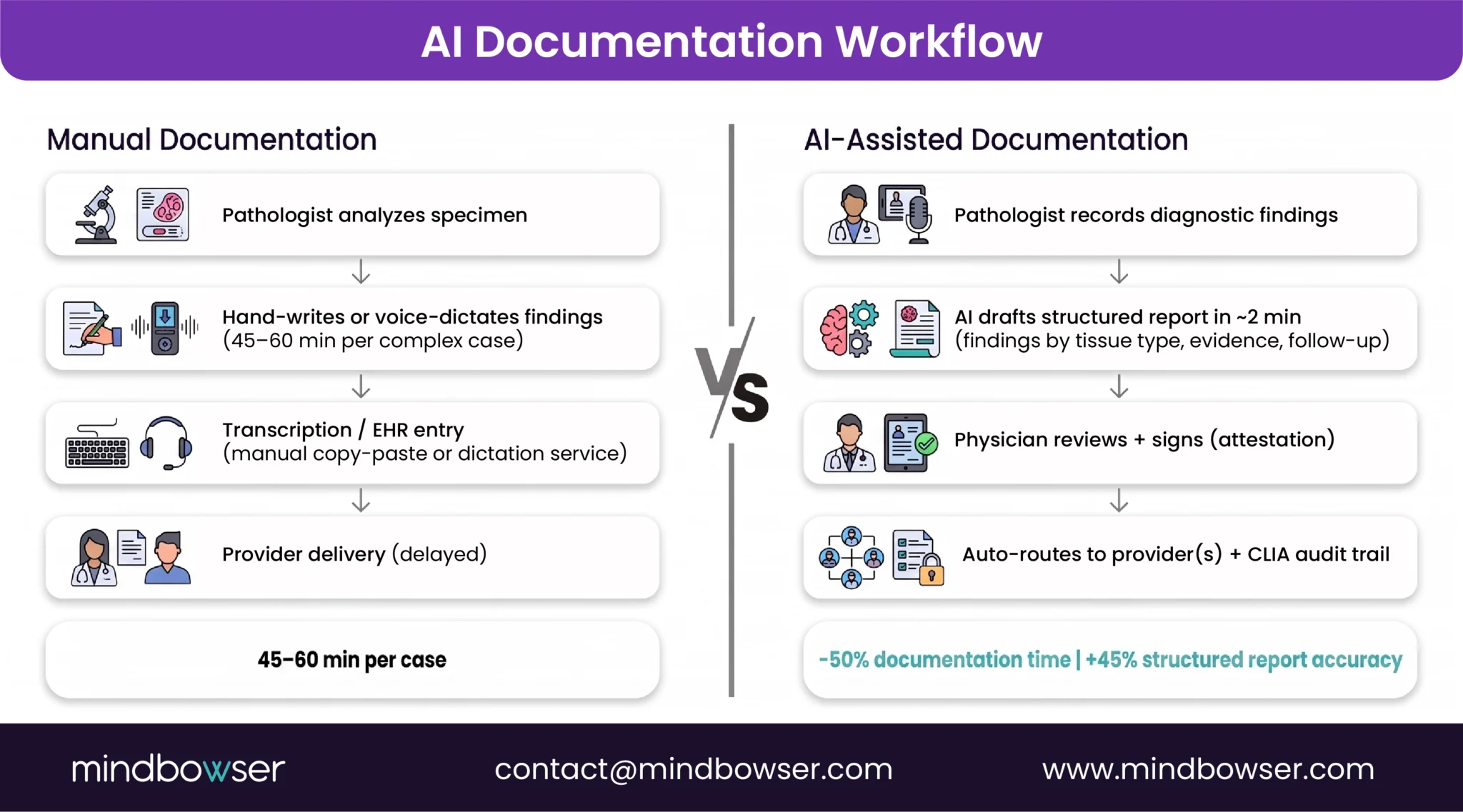
Pathologists spend 30-40% of their day on documentation. A complex case (5-10 diagnostic findings, each with supporting tissue evidence) can take 45-60 minutes to write up accurately. That’s a throughput constraint, not a clinical one.
Our AI Medical Summary accelerator reduces documentation time by 50% and improves structured reporting accuracy by 45%. Those outcomes come from AI-native EHR builds, including a national health system deployment where the same documentation burden applied to complex clinical result interpretation.
How it works in a pathology context:
- Pathologist analyzes the specimen and records diagnostic findings
- AI drafts the structured report: findings by tissue type, diagnostic category, supporting evidence, recommended follow-up
- Physician reviews, edits, and signs. Attestation is required. AI doesn’t replace clinical judgment here.
- Signed result routes automatically to ordering provider(s) with a CLIA-compliant provenance trail
AI-native pathology EHRs that integrate the documentation layer with the specimen tracking layer avoid the most common failure mode: AI tools bolted onto legacy systems that still require copy-paste between the AI draft and the result record. But if you’ve run a pilot of AI documentation tools in a pathology setting, I’d be curious how the pathology-specific terminology held up. General clinical training data doesn’t always transfer cleanly to histopathology report language.
Talk to Experts About Your Pathology EHR Requirements
How Should Pathology EHRs Handle Sensitive Specimen Data?
Pathology data carries a specific privacy burden. Cancer diagnoses, genetic findings, rare disease markers: HIPAA applies at baseline, but pathology data often triggers additional state privacy requirements for genetic information and specific disease categories.
Three security surfaces matter in every pathology EHR build I’ve worked on:
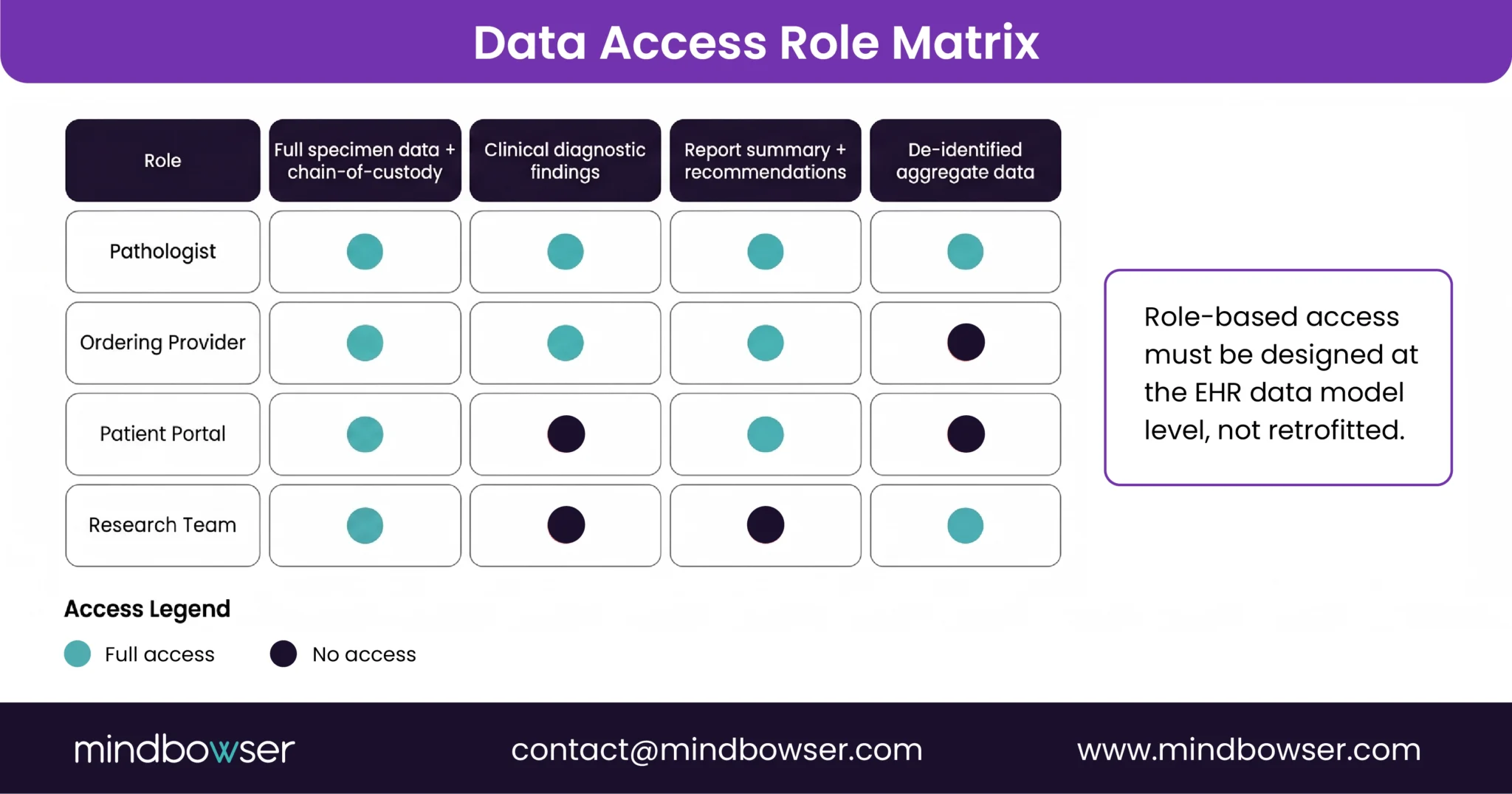
Chain-of-custody audit trails: CLIA requires documented provenance for every specimen and result. Our PHISecure accelerator implements role-based result visibility with tamper-evident audit logs built to CAP accreditation and CLIA 42 CFR 493 requirements.
Multi-provider access control: Pathology results route to multiple stakeholders with different visibility needs. Pathologist sees full specimen data. Ordering provider sees clinical findings. Patient portal shows a summary. Research teams need de-identified data only. Role-based access needs to be designed at the EHR data model level, not retrofitted after the fact.
LIS-EHR data in transit: The most common security gap in legacy lab environments: specimen data traveling between LIS and EHR over unencrypted or insufficiently authenticated connections. Legacy HL7 v2 over plain MLLP is a compliance exposure for any new system. FHIR R4 with OAuth 2.0 and TLS is the current standard we build to.
CAP accreditation includes a data security checkpoint in the Laboratory General checklist. Building to the accreditation spec, not just HIPAA minimum, is the right baseline for any pathology EHR you’re designing for longevity.
How Do You Evaluate a Custom Pathology EHR Partner?
If commercial options don’t fit your reference lab or specialty staining requirements, custom build is a real path. But “custom” means different things depending on where your actual bottleneck is.
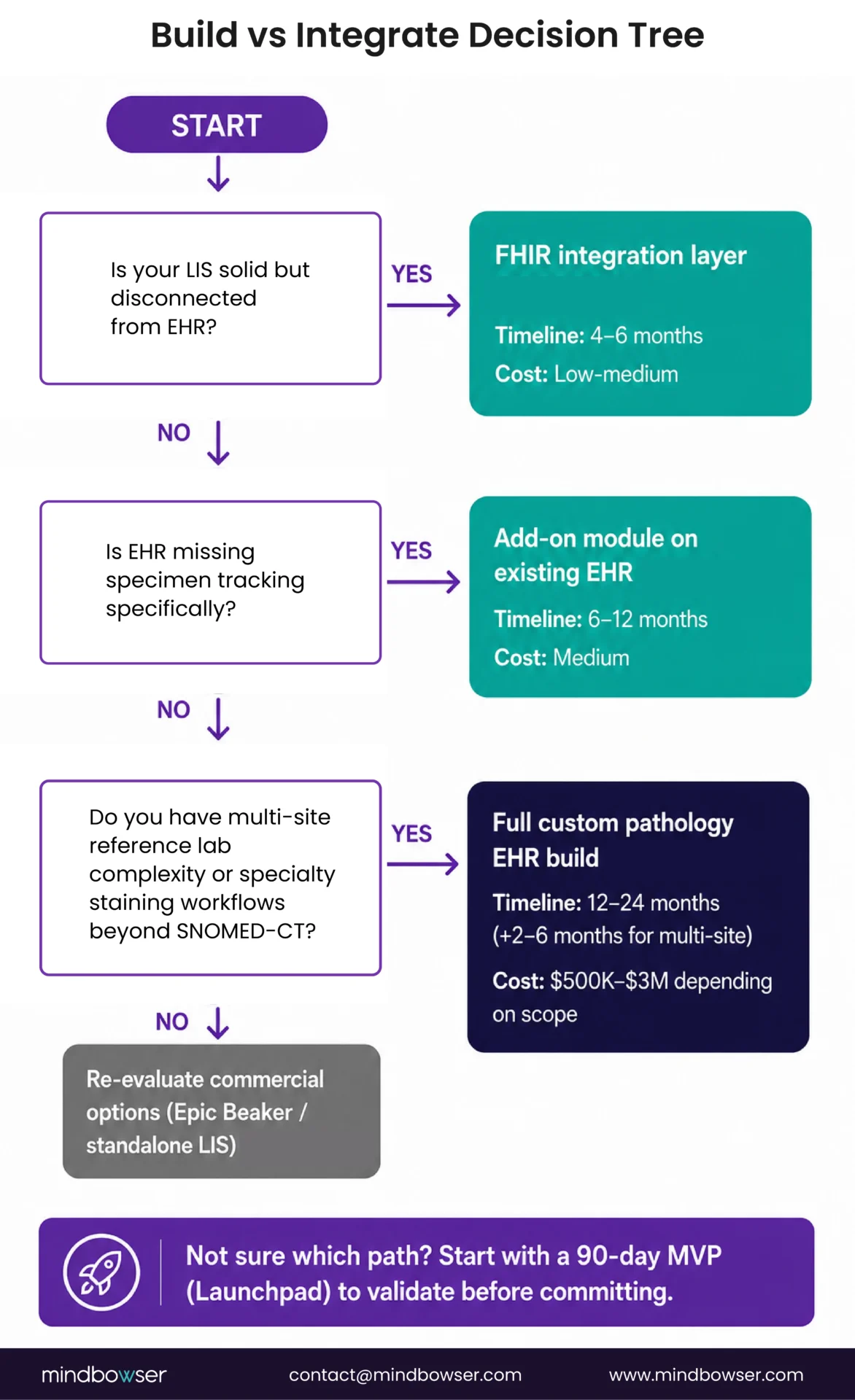
The evaluate EHR development partner question starts with scope. Here’s the decision tree I use:
Is your LIS solid but disconnected from your EHR? That’s an integration problem. A FHIR-based HL7/FHIR integration layer typically takes 4-6 months and solves 80% of your data flow issues without touching either core system.
Is your EHR missing specimen tracking specifically? That’s a module problem. An add-on module on your existing EHR takes 6-12 months and preserves the rest of your EHR investment.
Are both fragmented, and do you have multi-site reference lab complexity? That’s a full custom build. Budget 12-24 months. Multi-site complexity adds another 2-6 months depending on satellite site count.
When I’m evaluating a partner for this kind of work, four things matter more than anything else:
- HL7/FHIR depth: Have they built FHIR DiagnosticReport integrations for lab data before, or are they learning on your project?
- CLIA compliance track record: Can they point to prior builds where 42 CFR 493 requirements were designed in from the start?
- Reference lab experience: Multi-site specimen routing is a specific engineering problem. It’s not a generic healthcare IT capability.
- CAP accreditation support: Can they produce the chain-of-custody documentation an accreditation review requires? Ask to see an example from a prior project.
My read: if you’re a reference lab with more than 8 satellite sites, you’ll hit a ceiling with commercial EHR within 2 years of growth. I could be wrong (the commercial vendors are investing in this space), but I’d plan for custom and be pleasantly surprised rather than the other way around.
For labs that want to validate the approach before committing, our Launchpad accelerator (standardized setup + team onboarding) gets a working pathology EHR proof-of-concept running in 90 days: specimen tracking, order intake, basic result routing. The how to build an EHR playbook covers the full technical architecture for teams earlier in the evaluation process.
How Does Mindbowser Build Custom Pathology EHR Solutions?
We’ve built specimen tracking systems and specialty EHR platforms for diagnostic companies, reference labs, and specialty pathology networks. The EHR capabilities we bring to pathology span custom builds, FHIR-native integration layers, and AI documentation platforms.
HL7/FHIR-native LIS integration: I insist on designing LIS-EHR connections using FHIR R4 DiagnosticReport resources from the start, not as a retrofit. Specimen-to-result provenance tracking is native to the data model, not added in a later phase. That decision alone eliminates the most common audit preparation scramble.
CAP/CLIA compliance by design: Accreditation checklist requirements get designed into the system architecture before any code is written. The audit trail is native, not pieced together during accreditation prep.
Multi-site specimen routing: Satellite-to-main-lab specimen tracking, sub-specimen branching, batch result delivery, and multi-provider routing are standard requirements in our pathology builds. We’ve handled this at national scale: a multi-facility national health system deployment validated the same data flow architecture across multiple facility types, centralized processing, and distributed result delivery. The same patterns apply to a reference lab with 12 satellite sites.
AI documentation layer: The AI Medical Summary accelerator integrates directly with the result documentation workflow: pathologist records findings, AI drafts the structured report, physician attests, signed result routes automatically with a compliant audit trail. The documentation layer and the specimen tracking layer talk to each other from day one.
Our medical specialty EHR development practice serves pathology, oncology, radiology, and other diagnostics-heavy specialties where specimen-to-result complexity exceeds commercial EHR design.
What’s the Right Pathology EHR Path for Your Lab?
Three paths, depending on where you are today:
Evaluating commercial options: Use the feature criteria above as your vendor demo checklist. Push hard on specimen tracking depth, multi-site routing capability, and LIS integration architecture. Ask specifically about FHIR DiagnosticReport support and how the system produces CAP/CLIA audit trail documentation. If the answer involves a professional services engagement to configure those capabilities, that’s your ceiling signal.
Considering integration: If you have a solid LIS but a fragmented EHR connection, a FHIR-based integration layer may solve the majority of your pain in 4-6 months. This is the fastest path if your lab workflows are mostly working and you need better data flow.
Ready to build custom: If you’re a reference lab with multi-site complexity, or a specialty pathology network with staining workflow requirements no commercial system handles, custom build is the right answer. Start with a scoped assessment before committing to a full build. The custom EHR development conversation starts with scope, not technology.
Conclusion
Pathology EHR isn’t a checkbox on a general EHR RFP. It’s specimen tracking, multi-result routing, and CAP/CLIA audit trails, three requirements commercial systems retrofit, and reference labs eventually outgrow. If you’re on a single site with Epic or Cerner already in place, a pathology module gets you most of the way there. The moment specimens start routing across satellite collection sites, or a single tissue sample splits into sub-specimens across two processing workflows, the one-patient-one-result model runs out of runway.
I’ve walked labs through this decision at every stage: some fix the integration layer, some bolt on a module, some rebuild specimen tracking from the ground up. None of those is the wrong call in isolation. What matters is matching the fix to where your fragmentation actually lives, not the size of the vendor logo on the contract.