BLOGS
BLOGS  NEWSROOM
  CASE STUDIES
  WEBINARS
  PODCASTS
  ASSET HUB
  EVENT CALENDAR




















TL;DR
- Elderly RPM programs fail at engagement rates of 20-40% when the UX is designed for tech-comfortable users.
- The same programs hit 70-90% engagement when designed for the actual patient: cellular devices that transmit without a phone, large buttons, proactive care manager outreach in the first 14 days, and deviceless text/phone options for the lowest-tech patients.
- JMIR 2025 data shows elderly RPM reduces unplanned hospitalizations by 57% and ED visits by 62% (JMIR, 2025). We built the TodayHealth platform and hit 90% engagement among elderly users.
- The technology worked because the design started with the patient’s hands, not the engineer’s assumptions.
We built an RPM platform for elderly care patients and hit 90% engagement. The team that built it didn’t start with the device spec. They started by watching a 79-year-old woman try to pair a Bluetooth cuff with her phone for 11 minutes before giving up.
She pressed the pairing button. Nothing happened that she could see. The Bluetooth icon on her phone meant nothing to her. She pressed it again. A different screen appeared. She put the cuff down and said, “I’ll just go to the doctor.”
Those 11 minutes taught us more about elderly RPM than any vendor demo ever has. The problem was never the patient. It was never even the device. It was the assumption that a 79-year-old with arthritis and presbyopia would interact with technology the same way a 35-year-old product designer does.
Why Do Elderly Patients Disengage from RPM?
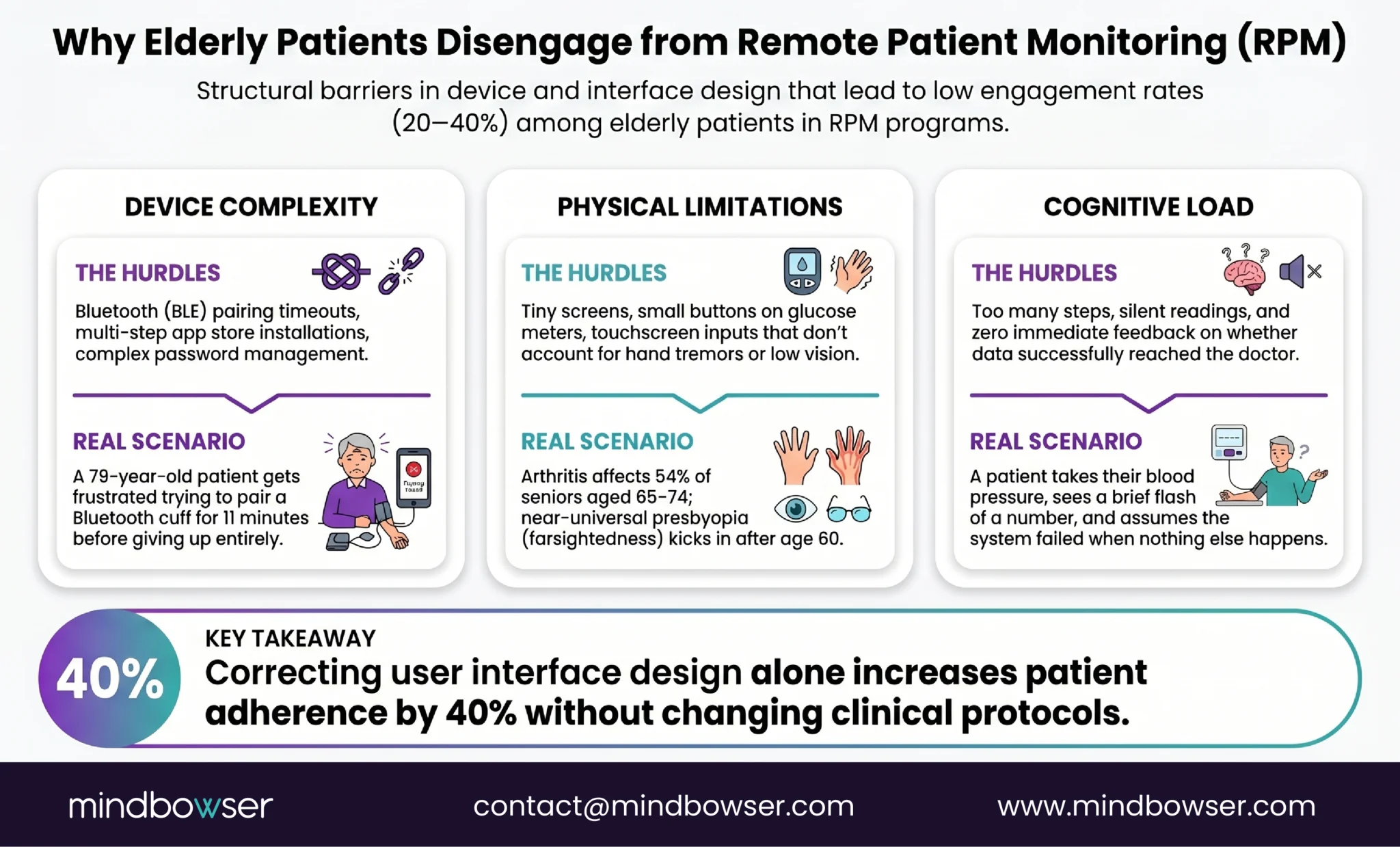
Three barriers, and most programs have all three running at the same time.
Device complexity. Bluetooth pairing is the #1 support ticket across every RPM program we’ve worked with. For elderly patients, it is often the #1 reason they stop using the device entirely. The pairing process assumes the patient has a compatible smartphone, can navigate to Bluetooth settings, can identify the correct device name in a list, and can complete the pairing within the timeout window. Each assumption excludes a percentage of the 75+ population.
App installation is the second wall. Downloading an app requires an app store account (with a password), storage space on the phone, and the ability to find and open the app after installation. For a patient whose grandchild set up their phone two years ago, this is not a minor ask.
Physical limitations. Small buttons on BP cuffs and glucose meters are difficult for arthritic hands. Tiny screens on device displays are unreadable for patients with age-related vision changes. Touch screens that require precise finger placement don’t account for tremor. These are not edge cases. Arthritis affects 54% of adults 65-74. Presbyopia is near-universal after 60.
Cognitive load. Too many steps. Unclear feedback. No confirmation that the reading was captured. The patient takes a blood pressure reading, sees a number flash on the cuff screen for three seconds, and has no idea whether it was sent to anyone. Did it work? Should they do it again? Without clear, immediate, multi-sensory confirmation (visual, audio, and ideally haptic), the patient loses confidence in the process by week two.
A PMC study from 2024 on RPM usability models found that poor user interface design is the primary barrier to adherence, not the underlying technology (PMC, 2024). A Frontiers systematic review from 2025 confirmed that effectiveness depends on usability and support, not technical sophistication (Frontiers, 2025). The research is detailed: simplify the interface, and engagement goes up. The usability model study quantified it: simplified UX increases adherence by 40%.
Forty percent. From design changes alone. No new device. No new clinical protocol. Just a better interface.
What Does a 90% Engagement Rate Look Like?
TodayHealth is an RPM platform we built for elderly care. The engagement rate among elderly users: 90%.
That number gets a reaction every time I share it. The industry benchmark for elderly RPM engagement is 30-50%. Hitting 90% didn’t happen because the device was revolutionary. It happened because of four design decisions made before development started.
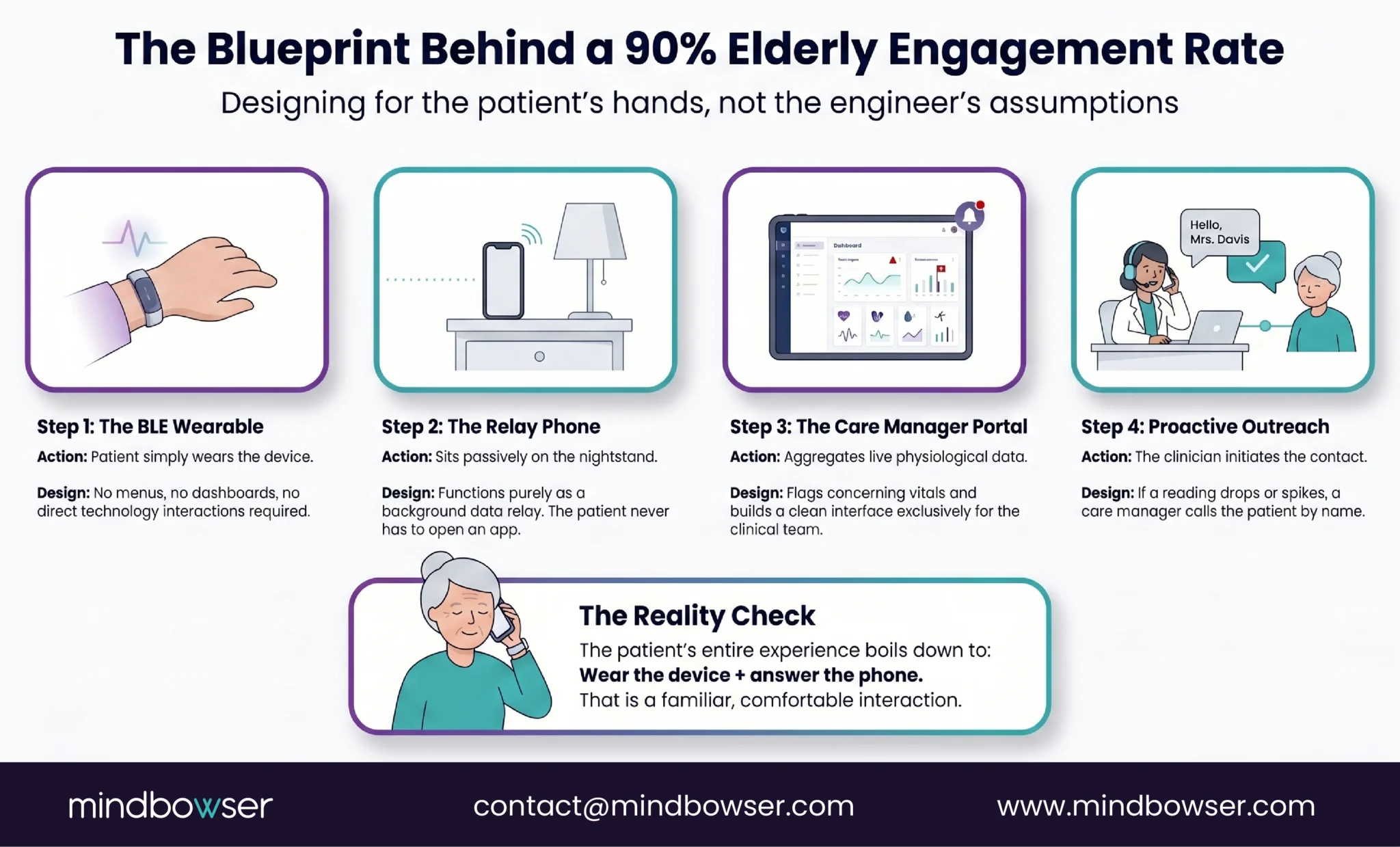
- Decision 1: the patient doesn’t interact with the phone. The BLE wearable auto-transmits to a paired phone that sits on the patient’s nightstand. The patient never opens an app, never checks a dashboard, never navigates a menu. The phone is a relay, not an interface.
- Decision 2: the care manager is the interface. All data flows to a care manager portal. If a reading is concerning, the care manager calls the patient. The patient’s experience of RPM is: wear the device, and occasionally receive a phone call from someone who knows their name and has already looked at their data. That is a familiar interaction for a 78-year-old. Checking a health dashboard is not.
- Decision 3: proactive outreach in the first 14 days. Every patient received a call on day 3, day 7, and day 14 after enrollment. Not automated. A human care manager checking: “Is the device comfortable? Are you wearing it? Do you have questions?” Patients who received this outreach had 3x lower disengagement rates than a control group that received only the standard enrollment call.
- Decision 4: The device setup happens in person. No patient was asked to set up their own device. The care team pre-configured every wearable, paired it with the relay phone, verified data transmission, and handed the patient a working system. The patient’s first interaction was putting on a wearable that already worked.
The contrast with the typical approach is stark. Most RPM platforms are designed around a patient-facing dashboard: glucose trends, medication reminders, exercise tracking, educational content, symptom logging, and appointment scheduling. It looks impressive in a vendor demo. Elderly patients don’t open it after week two. The dashboard serves the product team’s vision of engagement. The care manager call serves the patient’s experience of care.
Cellular Devices vs Bluetooth: Which Wins for Elderly Patients?
Cellular. The data from every elderly RPM program we’ve built or reviewed is consistent on this point.
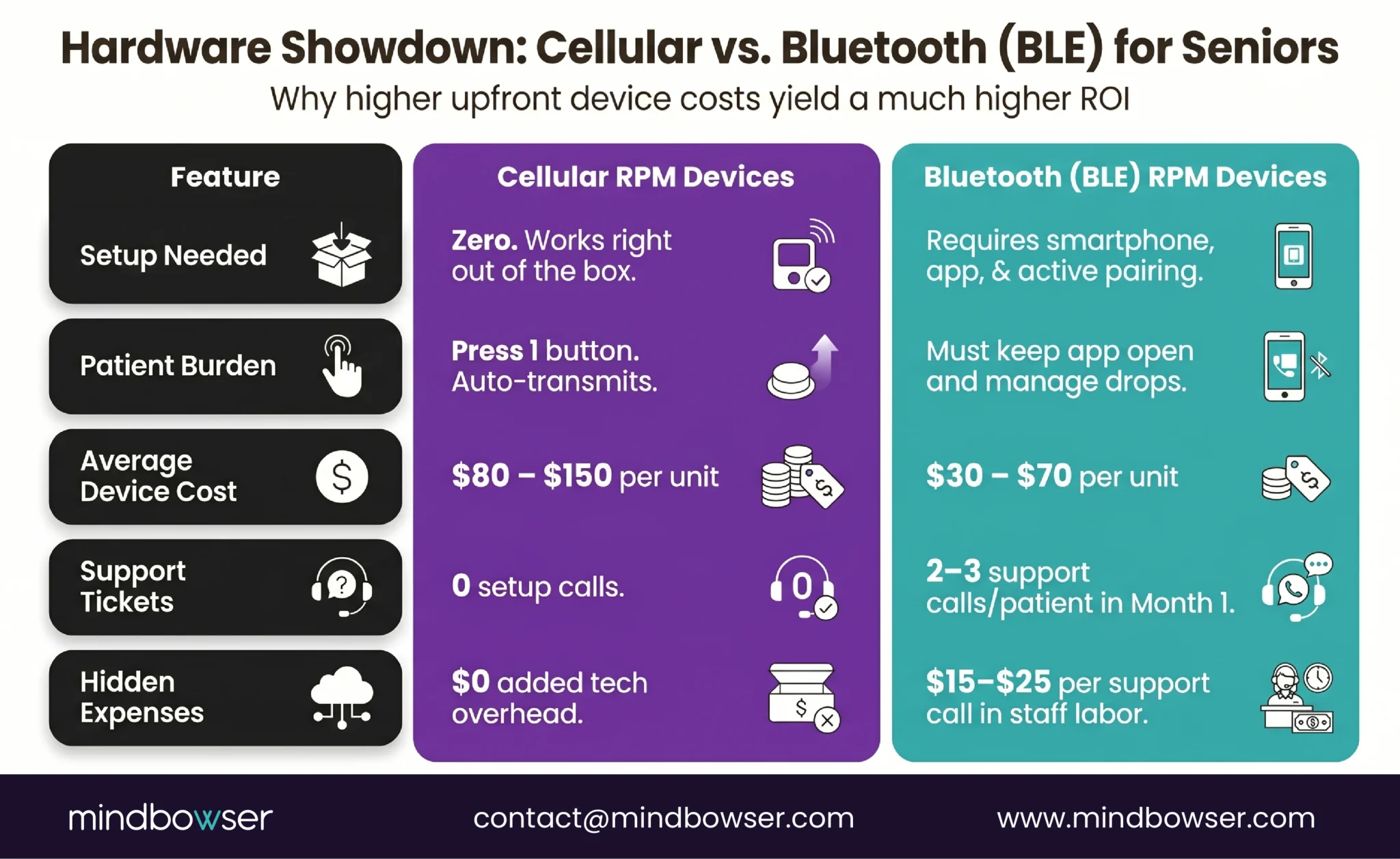
A cellular device transmits the reading directly over the cellular network. No smartphone. No app. No Bluetooth pairing. The patient puts on the cuff or steps on the scale, presses one button, and the reading appears in the care team’s dashboard. The patient’s only requirement is being inside cellular coverage, which in the US covers 99.7% of the population.
A Bluetooth device requires a compatible smartphone within 30 feet, an app that stays running in the background, a Bluetooth connection that stays paired, and a patient who knows what to do when the connection drops. For a 72-year-old with heart failure and a flip phone, this is not a viable workflow.
The cost difference: cellular cuffs run $80-150 per unit versus $30-70 for BLE cuffs. That $50-80 premium per device pays for itself in the first month through eliminated support calls. BLE pairing failures generate an average of 2-3 support calls per patient in the first 30 days for elderly populations. At $15-25 per support call (staff time), the cellular premium is recovered before the second billing cycle.
For specific device models and costs, see our complete remote patient monitoring devices list.
The exception: for patients already using a CGM (Dexcom, Libre) that connects via BLE to their phone, BLE is acceptable because the pairing was established by a clinician and runs continuously. But for devices that require per-use pairing (BP cuffs, glucose meters), cellular is the right choice for 65+ populations.
Design an Elderly RPM That Hits 70-90% Engagement With Your Patient Population
What Is Deviceless RPM and When Does It Make Sense?
Deviceless RPM eliminates the device entirely. The patient interacts through text messages or phone calls.
Lightbeam Health Solutions (which acquired CareSignal) pioneered this model. Here is how it works: automated text messages or interactive voice response (IVR) calls reach the patient on whatever phone they currently own. Smartphone, basic cell phone, or landline. The messages ask condition-specific questions: “How is your breathing today? Press 1 for better, 2 for same, 3 for worse.” The patient responds by text or keypad. Abnormal responses flag the patient for care team follow-up.
The design details matter. Messages are written at or below a sixth-grade reading level. Patients never pay for messages or co-pay fees. No downloads, no passwords, no app searching. No WiFi needed.
The engagement numbers: 6x greater than health apps, and 1 in 2 patients stay engaged for 12 months or longer (Lightbeam, 2025). For the lowest-tech populations, those numbers are remarkable.
When deviceless fits: Patients who refuse any wearable device. Patients with severe cognitive decline for whom a caregiver is not available to manage a device. Rural patients without reliable cellular coverage for device transmission. Initial engagement touchpoint before transitioning patients to device-based monitoring.
When deviceless doesn’t fit: Conditions requiring objective physiological data. Heart failure needs daily weight (self-reported weight is unreliable for fluid retention detection). COPD needs SpO2 readings (a patient cannot accurately self-report oxygen saturation). Diabetes needs glucose values (subjective symptom reporting misses hypoglycemia and hyperglycemia). For these conditions, deviceless RPM captures symptom trends but misses the physiological data that drives clinical decisions.
The best programs layer both. Device-based monitoring for objective vitals. Text/IVR check-ins for symptom tracking, medication adherence, and engagement maintenance on days between device readings. The combination captures the clinical data the care team needs AND maintains the engagement touchpoint the patient responds to.

What UX Design Principles Actually Work for Elderly RPM?
A PMC systematic review from 2025 on age-friendly app design identified the specific interface elements that drive adoption in older adults (PMC, 2025). Here are the design rules we follow, validated by research and refined through our builds.
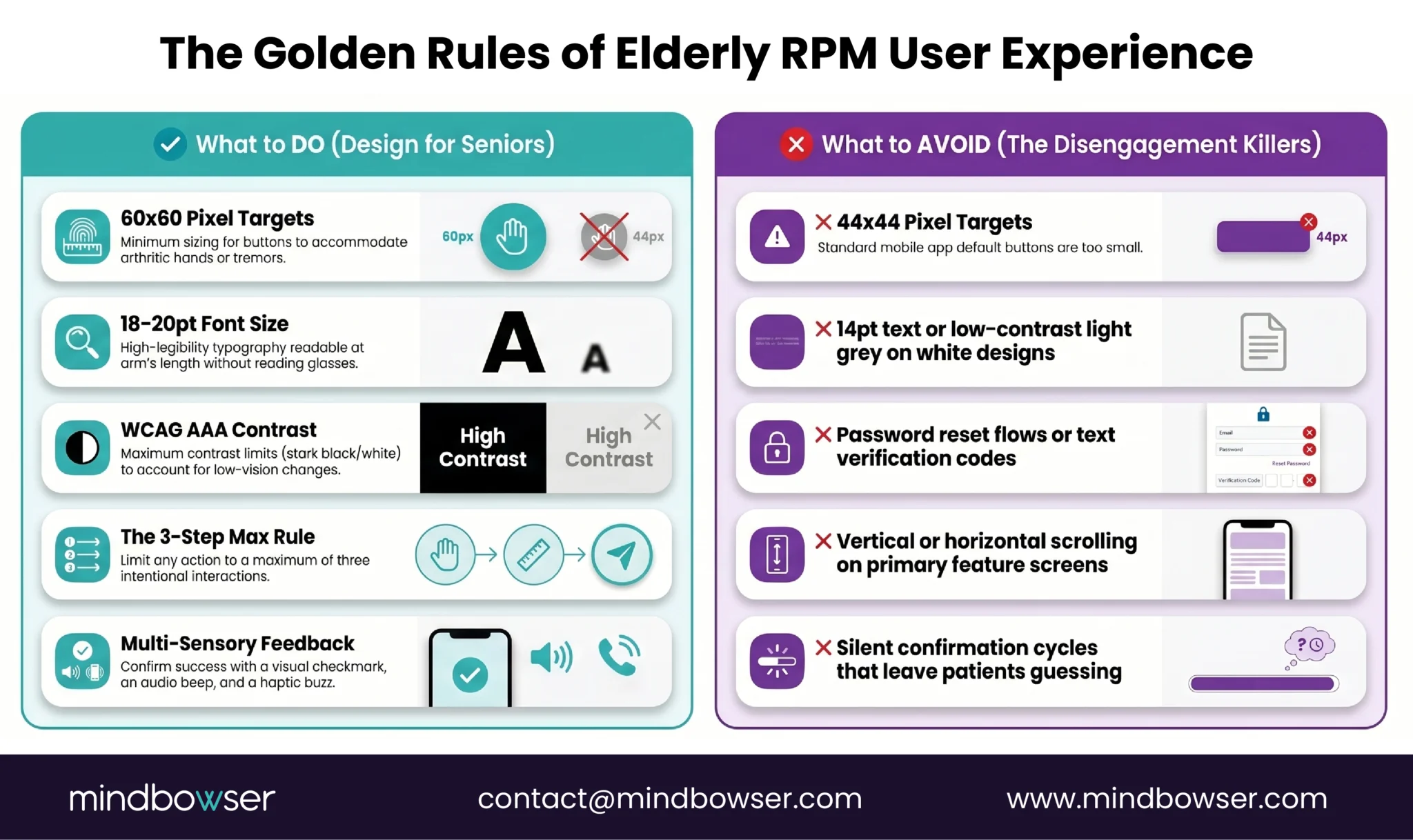
- Touch targets: 60×60 pixels minimum. Apple’s Human Interface Guidelines recommend 44×44 pixels. For elderly users with reduced fine motor control, we design at 60×60. Bigger is always better when arthritic fingers are the input device.
- Font size: 18-20pt minimum. Not 14pt. Not 16pt. Eighteen to twenty. The patient should be able to read the screen at arm’s length without reading glasses if possible.
- High contrast: WCAG AAA. Not just AA. The highest contrast ratio available. White text on dark backgrounds or black text on white, with colored elements only for alerts and confirmations.
- Maximum 3 steps for any task. Take reading: pick up the device, press the button, and see confirmation. Three steps. If any RPM interaction requires more than three deliberate actions from an elderly patient, the interaction needs to be redesigned or eliminated.
- Multi-sensory confirmation. When a reading is captured: screen shows a green checkmark (visual), device beeps once (audio), device vibrates briefly (haptic). The patient knows it worked through three channels simultaneously. A single flash of a number for three seconds is not confirmation.
- No passwords. Biometric login (fingerprint or face) or automatic login on a dedicated device. An elderly patient managing a password for their RPM app will forget it within a week, and password reset flows are engagement killers.
- No scrolling on primary screens. Everything the patient needs should be visible without scrolling. If the content doesn’t fit, there is too much content for this patient population.
- 10-15 minute in-person training at enrollment. The PMC research confirms this is sufficient when the device is pre-configured. The training covers: how to put on the device, how to press the button, and what the confirmation sound/light means. That is the entire training. Three things.
What Does the Clinical Evidence Show for Elderly RPM?
The outcomes data for elderly RPM are stronger than most program directors realize, specifically because the baseline hospitalization rates are higher in elderly populations.
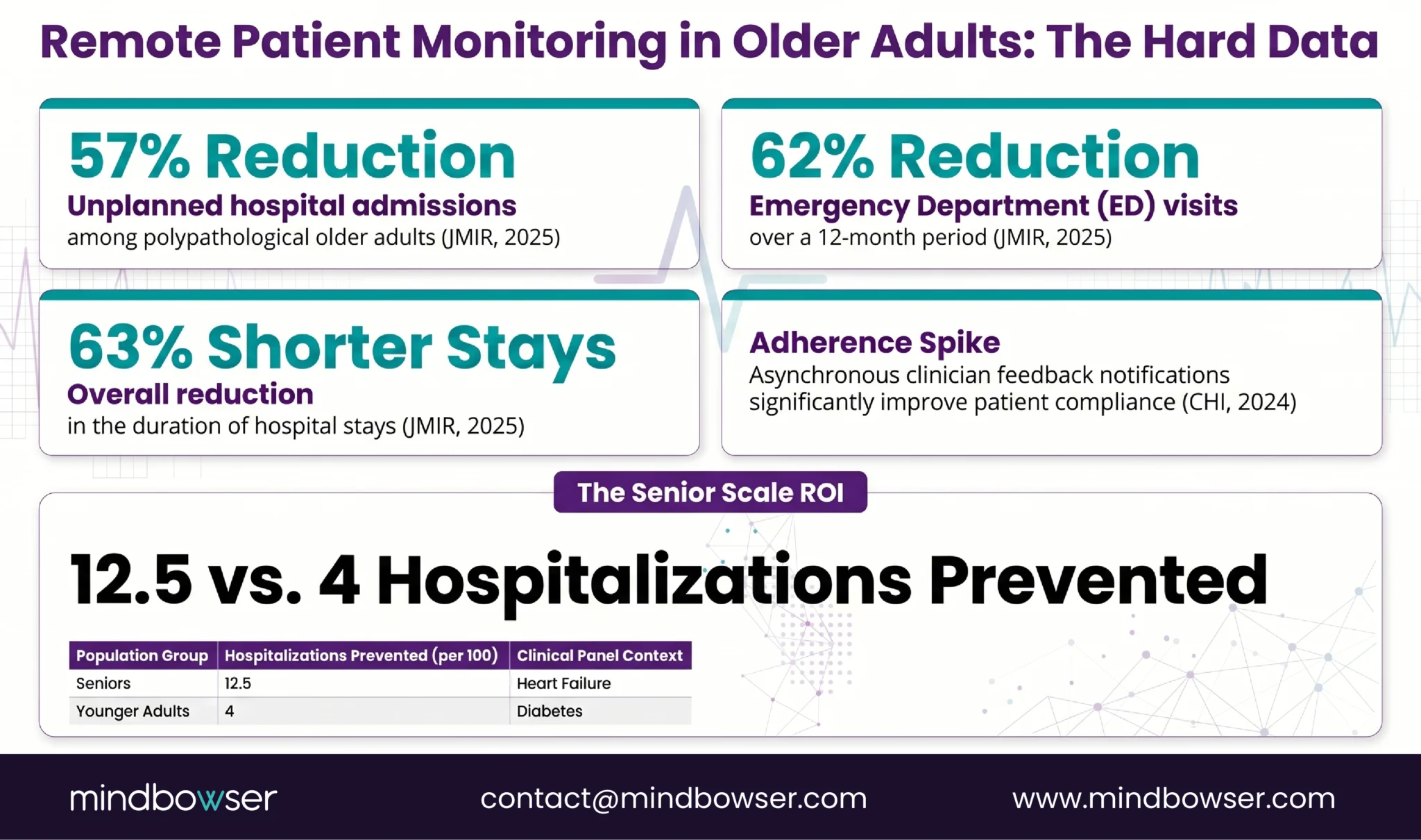
A JMIR 2025 study of polypathological older adults on RPM found significant reductions between baseline and follow-up year: 57% reduction in unplanned hospital admissions (from 0.99 to 0.42 per patient), 49% reduction in hospitalization days, and 62% reduction in ED visits (from 0.99 to 0.37 per patient). These are not small movements. Hospital admissions cut by more than half.
A separate JMIR 2025 multicenter retrospective study showed hospitalization and ED visit rates decreased by 48% between baseline and follow-up periods, with total duration of hospital stays declining by 63%.
A CHI 2024 study on asynchronous messaging in RPM found that patients who received notifications when clinicians reviewed their data showed improved adherence compared to patients who submitted data without feedback. The implication for elderly programs: the proactive outreach model (care manager reviews data, then contacts patient) isn’t just good UX. It is an evidence-based engagement strategy.
The elderly-specific insight that often gets overlooked: the same percentage reduction in hospitalizations translates to more absolute events prevented in elderly populations because their baseline rates are higher. A 50% reduction in readmissions for a 45-year-old diabetes patient panel (baseline rate 8%) prevents 4 hospitalizations per 100 patients. A 50% reduction for an 80-year-old heart failure panel (baseline rate 25%) prevents 12.5 hospitalizations per 100 patients. The ROI per patient is highest in the oldest, sickest population.
How Do You Design an Elderly RPM Program from Day One?
The first 14 days determine everything. After that window, re-engaging a disengaged elderly patient is five times harder than maintaining engagement from the start.
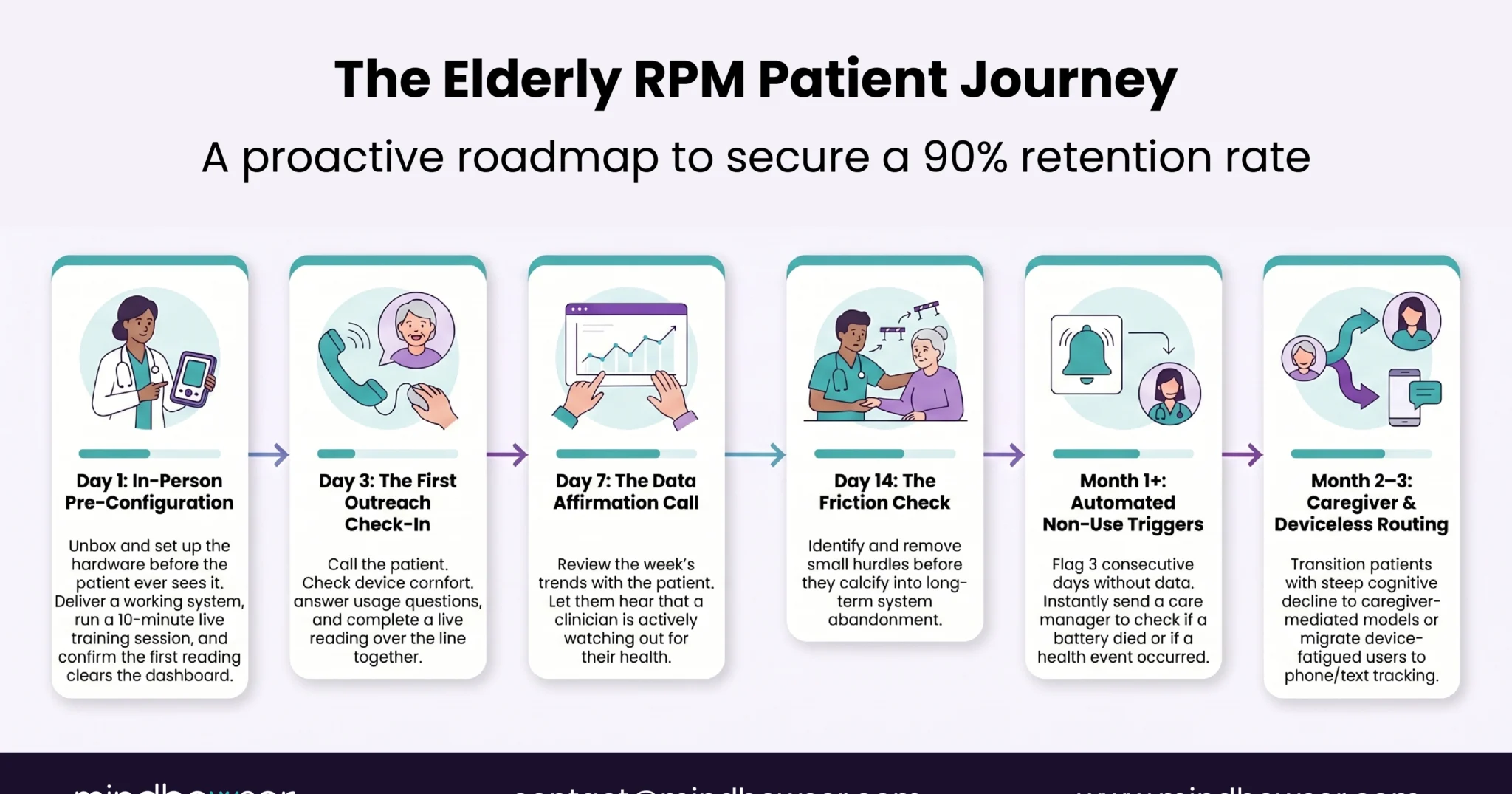
Days 1-7: Setup and first contact.
- Pre-configure every device before handing it to the patient. The patient receives a working system, not a box with instructions
- Enroll in an in-person visit. Not remotely. Not by mail. The care team demonstrates the device, the patient takes their first reading while the team watches, and the team confirms the reading appeared on the dashboard in real time
- Cellular devices for 70+ patients. No exceptions unless the patient already demonstrates smartphone proficiency
- For patients with cognitive decline, identify the caregiver and set up caregiver alerts (readings and notifications go to the caregiver’s phone)
Days 3, 7, 14: Proactive outreach calls.
- Day 3: “Are you wearing the device? Any discomfort? Let’s take a reading together over the phone.” Confirm transmission works
- Day 7: “I’m looking at your readings from this week. Your blood pressure has been [X]. Here’s what that means for you.” The patient hears that someone is watching. That is the engagement mechanism
- Day 14: “How are you feeling about using the device? Anything confusing?” Address friction before it becomes disengagement
TodayHealth’s 90% engagement started in this window. Patients who received all three outreach calls had 3x lower disengagement than patients who received only the enrollment visit.
Month 1: Watch for non-use signals.
- Three or more consecutive days without a reading triggers a care team call, not just an alert in the queue. For elderly patients, non-use usually means the device stopped working (battery died, fell behind the nightstand) or the patient had a health event that prevented use. Either way, a human call resolves it
Month 2-3: Identify the deviceless pathway candidates.
- Some patients will not use any device regardless of design. Route them to text/IVR monitoring through Lightbeam or a similar deviceless program. Partial monitoring through text-based symptom tracking is better than no monitoring after device abandonment
Ongoing: Caregiver involvement.
- For patients with progressive cognitive decline (estimated 6 million Americans with Alzheimer’s and related dementias), the caregiver becomes the RPM user. Design the caregiver workflow: shared dashboard access, alerts to the caregiver’s phone, caregiver training on device management. The patient wears the device. The caregiver manages the technology
Design for the Patient’s Hands, Not the Engineer’s Assumptions
The 90% engagement number from TodayHealth did not come from better technology. It came from better design decisions made before a single line of code was written. The device auto-transmits. The care manager initiates contact. The patient’s role is to wear the device and answer the phone.
Early in my career I assumed the fix for low elderly engagement was “simpler technology.” Simpler is not the right word. The right word is invisible. The best elderly RPM experience is one where the patient barely interacts with technology at all. They wear something comfortable. They receive phone calls from someone who knows their name. Their readings reach the care team without any effort from the patient beyond putting on the device in the morning.
The demographics make this urgent. COPD prevalence hits 10.5% in adults 75 and older. Hypertension prevalence reaches 71.6% in adults 60 and older. Diabetes prevalence is 15.8% across all adults and climbs sharply with age. These patients are in your system. They need monitoring. The only question is whether you design the monitoring for them or design it for a demo and wonder why they stopped using it at week three.
If your RPM engagement numbers drop off a cliff after age 70, we have solved that specific problem. The fix is usually three design changes, not a new platform. Reach out.
Programs targeting patients 70+ should aim for 70-90% sustained engagement. The industry average for elderly RPM is 30-50%, but programs using cellular devices, proactive care manager outreach in the first 14 days, and simplified UX design consistently achieve higher rates. TodayHealth achieved 90% engagement among elderly users through a design-first approach that eliminated patient-facing dashboards in favor of care manager-initiated contact.
Cellular devices are recommended for patients 65 and older. Cellular BP cuffs and scales transmit readings directly over the cellular network without requiring a smartphone, app installation, or Bluetooth pairing. The per-unit cost is $50-80 higher than BLE devices, but the reduction in support calls (BLE pairing is the #1 support ticket for elderly patients) makes cellular devices lower net cost within the first month.
Deviceless RPM uses automated text messages and interactive voice response (IVR) phone calls to monitor patients without shipping any physical device. Lightbeam/CareSignal is the leading provider: patients receive symptom questions via text or phone call and respond by text or keypad. Works on smartphones, basic phones, and landlines. Messages written at 6th-grade reading level. Engagement is 6x greater than health apps with 50% of patients staying engaged 12+ months. Best for patients who refuse or cannot use devices, though it captures subjective symptom data rather than objective physiological measurements.
A 10-15 minute in-person training session at enrollment is sufficient when the device is pre-configured by the care team. Training covers three things: how to put on the device, how to press the button, and what the confirmation sound and light mean. The device should be handed to the patient fully set up and working, not in a box with instructions. Follow up with calls on day 3, 7, and 14 to address any friction early.
JMIR 2025 studies show 57% reduction in unplanned hospital admissions, 49% reduction in hospitalization days, and 62% reduction in ED visits for elderly RPM patients. A separate multicenter study found 48% reduction in hospitalizations with 63% shorter hospital stays. The outcomes are proportionally stronger for elderly patients because their baseline hospitalization rates are higher: a 50% readmission reduction prevents 12.5 hospitalizations per 100 elderly heart failure patients versus 4 per 100 younger diabetes patients.
For patients with cognitive decline or limited technology capability, the caregiver becomes the RPM technology user. Design elements: shared dashboard access so the caregiver can view readings, alert notifications routed to the caregiver’s phone, caregiver training on device management (battery replacement, repositioning, troubleshooting). The patient wears the device. The caregiver manages everything else. For the 6+ million Americans with Alzheimer’s and related dementias, caregiver-mediated RPM is often the only viable monitoring model.