BLOGS
BLOGS  NEWSROOM
  CASE STUDIES
  WEBINARS
  PODCASTS
  ASSET HUB
  EVENT CALENDAR























TL;DR
Epic Canto is Epic’s iPad-based mobile app that enables physicians to access charts, place orders, and manage workflows on the go, improving mobility and decision speed. While it enhances clinician productivity and workflow continuity, it does not replace desktop Epic and comes with device and customization limitations. For healthcare leaders, the real value emerges when Epic Canto is integrated with custom EHR platforms using FHIR, APIs, and interoperability layers, allowing organizations to modernize systems without disrupting clinician experience.
“What happens when clinicians need full EHR access but cannot reach a workstation in time?”
Epic Canto addresses this gap by bringing core Epic workflows onto iPads, enabling real-time clinical decisions anywhere care happens.
As healthcare shifts toward mobile-first and hybrid delivery models, tools like Canto are becoming essential for maintaining workflow continuity and speed.
I. What is Epic Canto?
A. Purpose of Epic Canto
What happens when a physician needs full chart access during rounds but cannot get to a workstation fast enough? Care slows down. Updates wait. Small delays stack into operational drag.
Epic Canto is Epic Systems’ iPad-based mobile application for clinicians, built to extend core EHR access beyond the desktop. It gives physicians a tablet-optimized interface to review charts, manage schedules, respond to messages, and complete common clinical tasks while moving through inpatient and outpatient workflows.
That distinction matters. This is not a stripped-down viewer meant for occasional access. Epic Canto is designed for active clinical use on iPad devices, especially in settings where physicians need broader chart context than a smartphone app can comfortably provide.
Healthcare organizations use it to support secure access outside workstation environments, including bedside care, rounding, on-call review, and remote follow-up. Inova’s physician guidance reflects this mobility-first model, showing how Epic mobile apps support chart review, communication, and workflow continuity away from fixed terminals.
“Mobile EHR access is no longer just about convenience. It is about keeping decision-making close to the patient.”
Clinicians increasingly rely on mobile access to clinical information as care becomes more distributed across locations and teams. That shift is structural, not temporary.
Epic Canto exists to bring deeper Epic workflow access into motion, without asking clinicians to wait for a desk.
B. Epic Mobile Ecosystem
Epic’s mobile strategy is not built around one app. It is built around role, device, and workflow depth.
Within that ecosystem, Epic Canto serves iPad-based physician workflows, while Epic Haiku supports smartphone-based access, and Epic Rover is commonly aligned to nursing and bedside operational tasks. This is why the conversation around Epic Canto vs Haiku should not be reduced to screen size alone. The real difference is workflow scope.
Epic Canto is better suited for physicians who need more room to review charts, navigate patient context, and act during rounds or consults. Epic Haiku is better for fast smartphone interactions such as quick lookups, notifications, and lighter-touch workflow actions. Epic Rover addresses a different operational lane tied to nursing mobility.
Imprivata’s work on mobile access in healthcare reinforces another executive point: secure mobility succeeds when it is paired with strong identity, authentication, and access controls. In other words, mobile EHR value depends on trust as much as speed.
Why does this matter to CIOs and CMIOs? Because mobile app selection is not just a user preference issue. It is a workflow architecture decision.
Epic’s mobile ecosystem separates physician, smartphone, and nursing use cases so each role gets the right level of access in the right context.
C. Why Hospitals Use Epic Canto
Hospitals adopt Epic Canto because clinician movement is constant, but workstation access is not.
During rounds, specialists often need to review labs, medications, allergies, prior notes, and messages between rooms. During off-hours, on-call physicians may need to evaluate a chart or respond to a care question from home. In both cases, the operational problem is the same: clinical work keeps moving, but traditional access points do not.
Epic Canto helps address that gap through:
- Mobile chart review
- Faster clinician communication
- Remote workflow updates
- Decision support access during care delivery
Physicians spend a substantial share of their day in EHR and administrative work relative to direct patient care. That makes workflow design a financial issue as much as a usability one. Every step removed from unnecessary back-and-forth can improve throughput, physician experience, and responsiveness.
The value of leadership is practical. Hospitals use Epic Canto to reduce workflow friction, improve continuity, and keep physicians clinically productive while mobile. Not instead of the core EHR, but as an extension of it.
“Mobile EHR tools do not replace desktop systems. They extend clinical decision-making into real clinical environments.”
Hospitals use Epic Canto because it turns mobile time into usable clinical time.
II. Key Features of Epic Canto
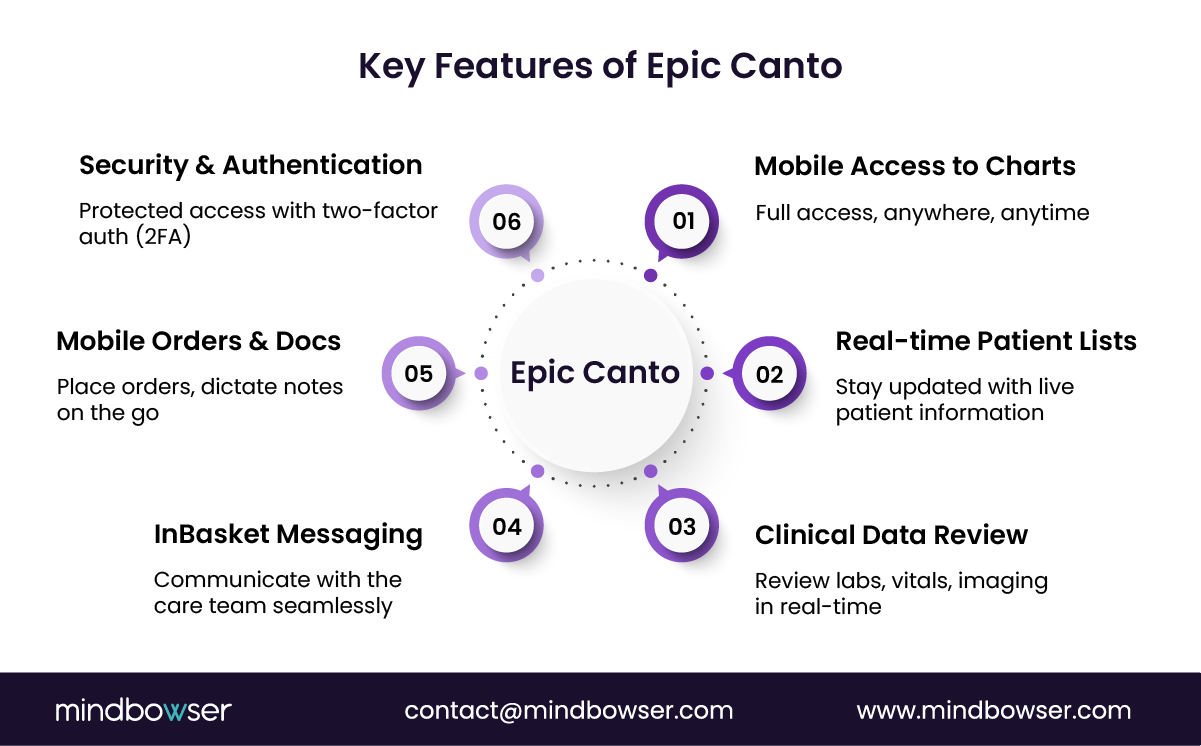
A. Mobile Access to Patient Charts
What if a physician could review a complete patient story before even entering the room?
That changes the quality of every interaction that follows.
Epic Canto enables full mobile access to patient charts, not just summaries or alerts. Clinicians can navigate structured and unstructured data with enough depth to support real decisions, not just quick checks.
This includes:
- Patient summaries for quick clinical context
- Medications and allergies for safety checks
- Clinical notes for historical understanding
Unlike lighter mobile tools, Canto allows physicians to move beyond surface-level insights. The screen size matters here. An iPad provides the real estate needed to interpret trends, compare notes, and assess patient history without constant toggling.
“Mobile access to comprehensive patient data improves point-of-care decision-making and reduces delays tied to workstation dependency.”
Epic Canto turns pre-visit review into a mobile, continuous process instead of a stationary task.
B. Patient Lists and Scheduling
How often do clinicians lose time just navigating between patient lists and schedules?
More than most systems admit.
Epic Canto centralizes patient lists and scheduling into a mobile-first workflow, allowing physicians to manage their day dynamically instead of reacting to static schedules.
Core capabilities include:
- Real-time patient lists aligned to assignments
- Daily schedules with quick navigation
- Patient search for on-demand access
This becomes critical during rounds and cross-team coordination. A physician can move from one patient to the next, update context, and reprioritize without breaking flow.
Less switching. Less searching. More continuity.
Canto keeps schedules and patient context aligned with how clinicians actually move through care environments.
C. Clinical Data Review
What happens when lab results come in while a physician is away from a workstation?
Delay. Or worse, missed context.
Epic Canto provides mobile access to critical clinical data, enabling real-time review and faster intervention decisions.
Clinicians can access:
- Lab results with trend visibility
- Imaging reports for diagnostic insight
- Vital signs for real-time monitoring
- Progress notes for care continuity
This is where mobility directly impacts outcomes. Faster data access means faster interpretation, faster escalation, and faster care adjustments.
A commonly cited industry benchmark shows that timely access to clinical data can significantly improve response times in acute care scenarios, especially in distributed care teams.
“Speed in healthcare is not about moving faster. It is about reducing the time between insight and action.”
Epic Canto compresses the gap between data availability and clinical decision-making.
D. InBasket Messaging and Communication
What breaks down first in complex care environments?
Communication.
Epic Canto integrates InBasket messaging directly into mobile workflows, allowing physicians to stay connected with care teams without returning to desktop systems.
Capabilities include:
- Secure messaging between providers
- Task and result notifications
- Care coordination updates
This reduces dependency on fragmented communication channels like calls, texts, or delayed desktop responses.
Insights from Imprivata highlight that secure mobile communication improves care team responsiveness while maintaining compliance, especially when identity and access are tightly controlled.
The result is simple.
Faster responses. Fewer missed updates.
Canto keeps communication inside the clinical workflow, not outside of it.
E. Mobile Orders and Documentation
Can physicians act on decisions immediately, or do they still need to “get back to a computer”?
That distinction defines workflow efficiency.
Epic Canto enables mobile order entry and clinical documentation, allowing physicians to act the moment a decision is made.
This includes:
- Order placement directly from the iPad
- Voice dictation for faster note entry
- Clinical documentation workflows
- Image capture for visual records
Clinicians spend a disproportionate amount of time documenting care. Mobile documentation does not remove that burden, but it redistributes it into more natural workflow moments.
Think bedside documentation instead of end-of-day backlog.
Canto reduces the delay between clinical decision and clinical action.
F. Security and Authentication
Mobility introduces speed. But what about risk?
Epic Canto is designed with enterprise-grade security controls, ensuring that mobile access does not compromise patient data protection.
Key components include:
- Two-factor authentication (2FA)
- Secure access protocols
- Integration with identity management systems
Imprivata emphasizes that strong identity and authentication layers are critical for secure mobile EHR adoption, particularly in environments with shared devices and remote access.
This is where many mobile strategies fail. Not because of usability, but because of weak identity control.
“Mobility without identity is exposure. Mobility with identity is controlled access.”
Epic Canto balances accessibility with security, making mobile workflows viable at scale.
III. Benefits of Epic Canto for Healthcare Providers
What changes when clinicians are no longer anchored to a workstation?
Throughput improves. Decisions accelerate. Friction drops.
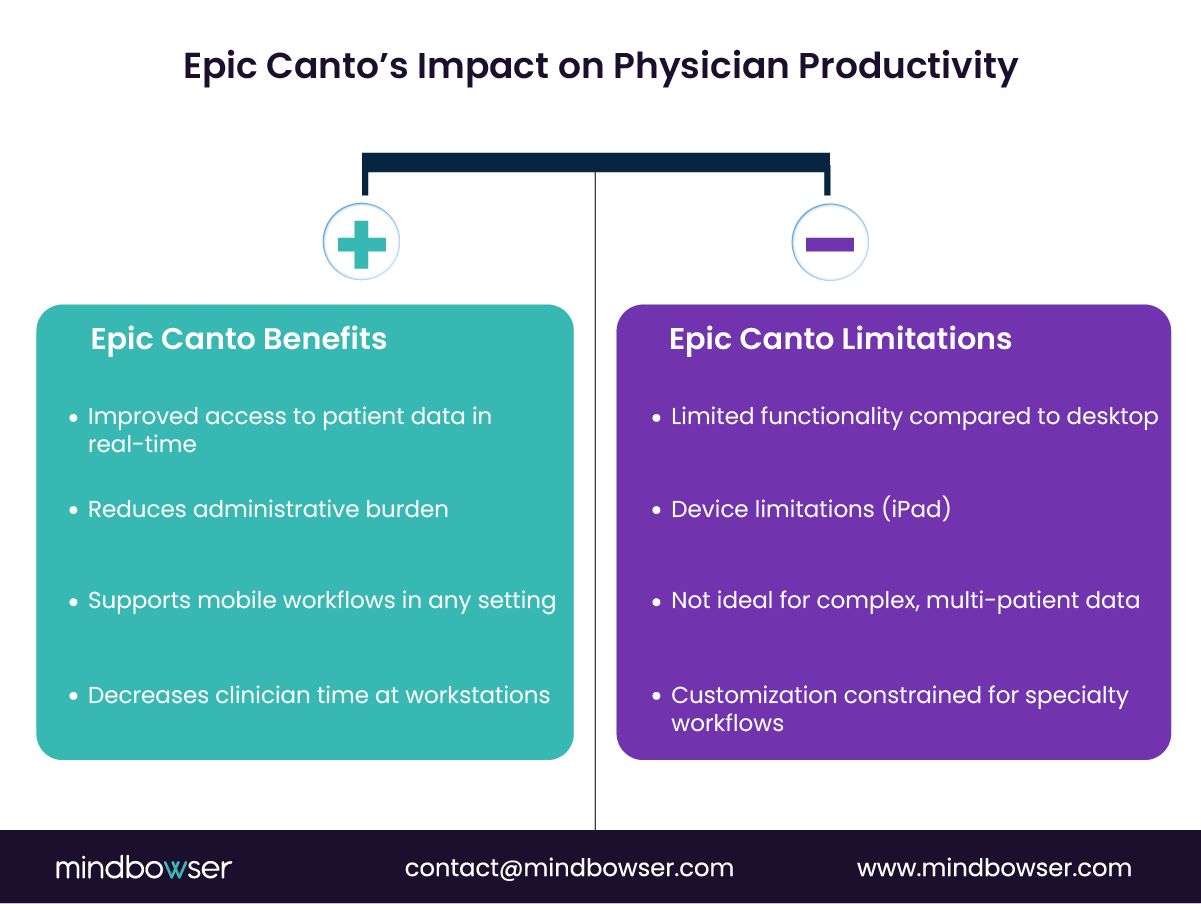
Epic Canto delivers measurable operational benefits by aligning EHR access with how care is actually delivered, not how systems were originally designed.
Let’s break that down.
A. Clinician Mobility and Workflow Continuity
Mobility is no longer a feature. It is infrastructure.
With Epic Canto, physicians can move across care settings without losing access to patient context. Whether during rounds, between consults, or while on call, workflows continue uninterrupted.
Inova’s use of Epic mobile tools highlights this clearly. Physicians can review charts, respond to updates, and act on data without returning to fixed workstations. That reduces dead time between clinical actions.
Less walking back. More forward movement.
“Mobile-enabled clinicians report improved access to patient data and fewer workflow interruptions during care delivery.”
Canto keeps clinicians in motion without breaking the clinical context.
B. Faster Clinical Decision-Making
How much time is lost waiting to access data?
More than most dashboards reveal.
Epic Canto reduces the delay between data access and decision-making. Physicians can review labs, imaging, and notes in real time, even outside traditional care environments.
This matters in both acute and routine care:
- Faster response to abnormal labs
- Immediate review during consults
- Real-time decision support at bedside
“Speed in care is not about rushing. It is about removing waiting.”
Short. Direct.
Canto shortens the path from insight to action.
C. Improved Care Team Collaboration
Where do most care delays originate?
Not in the data. In communication.
Epic Canto strengthens collaboration by embedding communication into the clinical workflow. Through mobile InBasket access and secure messaging, physicians can stay aligned with care teams without switching systems.
Imprivata emphasizes that secure mobile communication improves care coordination while maintaining compliance, especially when paired with strong identity controls.
The effect is immediate:
- Faster response to care updates
- Reduced missed messages
- Better coordination across departments
This is where mobility meets accountability.
Canto keeps care teams connected in real time, not in retrospect.
D. Documentation Efficiency and Reduced Administrative Burden
What if documentation happened during care, not after it?
Epic Canto enables physicians to document closer to the point of care, using features like voice dictation and mobile note entry.
Clinicians spend nearly twice as much time on EHR and administrative tasks compared to direct patient care. That imbalance is one of the core drivers of burnout.
Mobile documentation does not remove the requirement. But it changes when and how the work happens.
- Notes captured during or immediately after encounters
- Reduced end-of-day documentation backlog
- Better accuracy due to real-time context
Canto shifts documentation from a delayed task to an integrated workflow step.
E. Increased Physician Productivity
What happens when small inefficiencies are removed across an entire clinical day?
They compound into meaningful gains.
Epic Canto improves physician productivity by reducing micro-delays across workflows. Each avoided trip to a workstation, each faster response, each real-time update adds up.
Consider the cumulative effect:
- Fewer interruptions during rounds
- Faster patient throughput
- More time available for direct care
Three outcomes. One shift.
Speed, continuity, control.
Canto increases productive clinical time without increasing workload.
IV. Limitations of Epic Canto
If Epic Canto is so effective, why do clinicians still return to desktops?
Because mobility has boundaries.
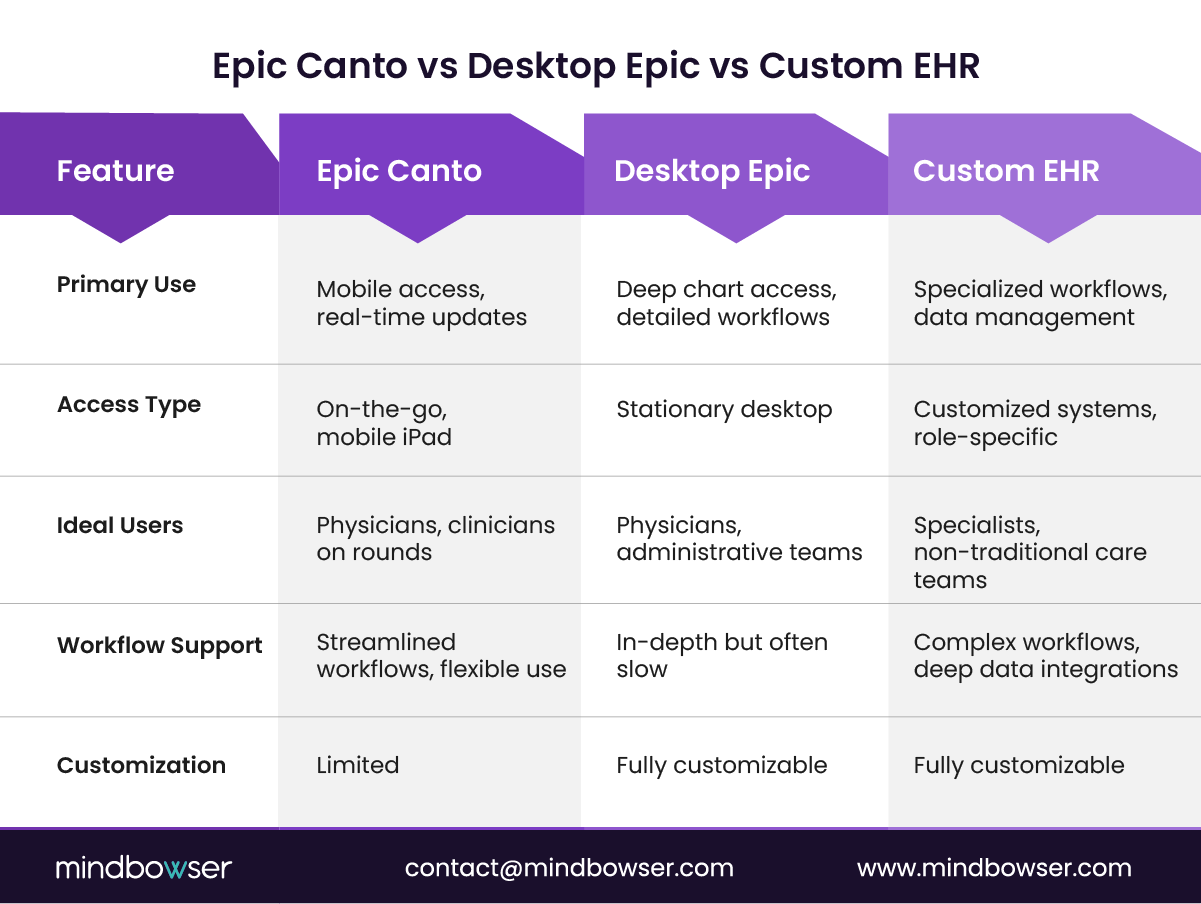
Epic Canto improves access, but it does not fully replace the depth and control of desktop EHR systems. For CIOs and CMIOs, understanding these constraints is critical before positioning Canto as a primary workflow layer.
Let’s unpack where the gaps show up.
A. Device Limitations
The iPad experience is powerful, but still constrained by form factor.
While tablets offer more screen space than smartphones, they still fall short of multi-monitor desktop environments used for complex workflows like:
- Deep chart comparisons
- Advanced order sets
- Multi-patient data analysis
Try reviewing longitudinal patient data across multiple views on a single tablet screen.
It works. But not always comfortably.
This creates a natural ceiling for how much complexity can be handled efficiently on mobile.
Canto is optimized for mobility, not for high-density clinical workflows.
B. Reduced Functionality Compared to Desktop Epic
Can every Epic workflow be executed on Canto?
No. And that is by design.
Epic Canto provides a subset of desktop Epic functionality, focused on high-frequency, high-value clinical tasks. However, certain advanced workflows still require desktop access, including:
- Complex order configurations
- Advanced reporting and analytics
- Specialized administrative workflows
This creates a dual-system reality. Clinicians often start tasks on mobile but complete them on desktop.
A common operational pattern emerges:
Mobile for speed. Desktop for depth.
“Mobile extends the EHR. It does not replace its full capability.”
Canto complements desktop Epic, but cannot fully substitute it.
C. Licensing and Vendor Dependency
Epic Canto is tightly coupled with the Epic ecosystem.
Access, configuration, and feature availability depend on:
- Epic licensing structures
- Organizational Epic deployments
- Version compatibility
This introduces vendor dependency, which can limit flexibility for organizations exploring broader digital transformation strategies.
What happens when a health system wants to introduce custom workflows outside Epic’s native structure?
Integration becomes the path. Not replacement.
For leadership, this is less a technical issue and more a strategic one. Platform decisions influence long-term agility.
Canto’s value is tied to Epic, which can limit independence in broader system design.
D. Customization Constraints
How adaptable is Canto to unique clinical workflows?
Less than many organizations expect.
Epic Canto offers configuration, but limited deep customization compared to custom-built applications. This can be a constraint for:
- Specialty-specific workflows
- Unique care delivery models
- Advanced digital health integrations
Healthcare systems moving toward value-based care, remote monitoring, or AI-driven workflows often require more flexibility than native mobile apps can provide.
This is where the gap becomes visible.
Standard tools support standard workflows.
But healthcare delivery is rarely standard.
Canto supports core workflows well, but customization is limited for advanced or differentiated care models.
V. Epic Canto vs Epic Haiku
If both apps provide mobile access to Epic, why do clinicians use both?
Because context matters. So does depth.
The difference between Epic Canto and Epic Haiku is not just device type. It is workflow intensity.
CIOs and CMIOs often see confusion here during deployment planning. The assumption is that one app can replace the other. In reality, they are designed to complement each other across different clinical moments.
“Mobile strategy fails when tools are chosen by device, not by workflow.”
Let’s break this down clearly.
A. Core Differences in Workflow Design
Epic Canto is built for deeper, session-based workflows.
Epic Haiku is built for quick, interrupt-driven tasks.
That distinction shapes how each tool fits into daily clinical operations.
- Epic Canto (iPad) supports rounding, consults, and extended chart review
- Epic Haiku (smartphone) supports quick lookups, alerts, and rapid communication
Think of it this way:
Canto replaces the need to return to a workstation.
Haiku replaces the need to open a laptop for quick checks.
Short sentence. Clear implication.
Canto and Haiku are not competitors. They are workflow layers.
B. Side-by-Side Comparison
| Category | Epic Canto | Epic Haiku |
| Device | iPad (tablet) | Smartphone (iOS/Android) |
| Primary Use Case | Rounding, consults, deep chart access | Quick access, alerts, communication |
| Workflow Depth | High | Moderate |
| Key Features | Full chart review, order entry, documentation, InBasket | Notifications, quick chart access, messaging |
| Ideal Users | Physicians needing extended interaction | Physicians needing fast, on-the-go access |
This table highlights a key operational truth.
Device choice follows workflow demand. Not the other way around.
C. When to Use Canto vs Haiku
Should organizations standardize on one or deploy both?
The answer depends on workflow diversity.
Use Epic Canto when:
- Physicians need a full patient context during rounds
- Documentation and orders must be completed in-session
- Clinical review requires more screen space and depth
Use Epic Haiku when:
- Physicians need quick updates or alerts on the move
- Communication and messaging are the priority
- Tasks are short, interrupt-driven, and time-sensitive
Imprivata’s perspective on mobile workflows reinforces this dual-app model. Secure, role-based access improves efficiency when tools match the task, not just the user.
Three modes. One ecosystem.
Deep work. Quick work. Task work.
Epic Canto and Haiku work best together, enabling both depth and speed across clinical workflows.
Build a Custom EHR with Epic Integration Capabilities
VI. How Epic Canto Fits into Modern Digital Health Workflows
What happens when care delivery moves beyond hospital walls, but EHR access stays behind?
Workflows fracture. Decisions slow. Coordination weakens.
Epic Canto helps bridge that gap by extending core EHR workflows into mobile, real-world clinical environments. It does not replace systems. It connects them to where care actually happens.
Let’s examine how.
A. Use Cases
Epic Canto is most effective when clinical workflows require both mobility and depth.
1. Rounding and inpatient care
During rounds, physicians move continuously between patients. Epic Canto allows real-time chart review, order entry, and documentation at bedside, reducing the need to return to central workstations.
The result?
Fewer interruptions. Better patient engagement.
2. Telehealth and virtual consults
In hybrid care models, physicians often switch between virtual and in-person interactions. Canto enables quick access to patient data during telehealth sessions, ensuring continuity without workflow disruption.
3. On-call and remote access
What happens at 2 a.m. when a physician needs to review a chart urgently?
Without mobile access, delays are inevitable.
Canto enables secure remote access, allowing physicians to evaluate cases, review labs, and make decisions without being physically present.
4. Remote patient monitoring (RPM)
As RPM programs expand, clinicians must review incoming data outside traditional settings. Canto supports mobile visibility into patient updates, helping clinicians respond faster to changes.
5. Emergency and rapid-response workflows
In high-pressure environments, speed matters. Mobile access to charts, labs, and notes enables faster triage and intervention decisions, especially when time-to-action is critical.
“Mobile-enabled workflows improve responsiveness in time-sensitive care scenarios.”
Epic Canto fits wherever care is mobile, time-sensitive, and decision-heavy.
B. Clinical Impact
Does mobility actually improve care, or just convenience?
The data and workflows suggest more.
Epic Canto reduces friction across clinical workflows by aligning access with movement. That alignment has two direct impacts:
- Reduced workflow interruptions
- Improved continuity of care delivery
When clinicians no longer need to pause, log in, and relocate to access systems, the entire care process becomes more fluid.
Mobile-enabled healthcare workflows can reduce administrative friction and improve care coordination across distributed teams.
But the deeper impact is less obvious.
Continuity.
The ability to carry context from one patient interaction to the next without resetting.
“Continuity is not just about data availability. It is about uninterrupted clinical thinking.”
This is where Canto creates value for leadership. Not just in usability, but in system-wide efficiency.
Epic Canto improves clinical flow by removing access barriers between decision points.
VII. Using Canto Alongside Custom Platforms
Epic Canto gives physicians and advanced practice providers mobile access to patient charts, orders, results, and secure messaging. In many health systems, however, Canto is only one part of a broader digital environment that also includes patient engagement applications, specialty workflows, analytics platforms, remote monitoring tools, and custom clinical software.
The goal is not to replace Canto. It is to ensure that the systems surrounding Epic can exchange the right data with it.
When a health system introduces a custom platform, the integration typically relies on Epic’s interoperability layer:
- FHIR APIs for structured clinical resources such as Patient, Observation, Encounter, MedicationRequest, and DiagnosticReport
- HL7 interfaces for event-driven data exchange, including admissions, discharges, transfers, orders, and results
- SMART on FHIR for applications that launch within an authenticated Epic workflow
- OAuth 2.0 for secure authorization and controlled application access
- Web services and interface engines for workflows that require transformation, orchestration, or routing across multiple systems
For example, a specialty-care application may collect structured patient data outside Epic and return relevant results to the patient chart. A remote monitoring platform may send observations into Epic so clinicians can review them within their usual workflow. An analytics layer may extract approved data for operational or clinical reporting while maintaining governance and auditability.
Canto continues to serve as the physician-facing mobile interface. The integration work happens behind it.
The main implementation challenge is maintaining consistency across systems. Data mappings, patient identifiers, terminology, authentication, error handling, retry logic, and audit trails must all be designed carefully. A technically valid FHIR response is not enough if the receiving workflow presents incomplete, delayed, or poorly mapped information to the clinician.
When clinicians keep Canto but the backend evolves, the connection runs through Epic’s FHIR and HL7 layer. ConnectHealth provides a pre-built Epic integration so custom workflows can reach the Epic environment without requiring a multi-month integration build.
VIII. Future of Mobile EHR Access
What happens when mobile access is no longer an extension of the EHR, but the primary interface?
Workflows shift. Expectations rise. Systems must adapt.
The future of tools like Epic Canto is not just mobility. It is mobile-first clinical operations.
Let’s look at where this is heading.
A. Mobile-First Clinical Workflows
Healthcare is moving toward workflows designed for movement, not locations.
Instead of adapting desktop systems for mobile use, organizations are beginning to design workflows where:
- Clinical decisions happen at the bedside or remotely
- Documentation occurs in real time
- Communication is continuous across devices
A HIMSS-aligned trend shows that mobile-first strategies are becoming central to digital health transformation initiatives, especially in large health systems.
The shift is subtle but powerful.
From “access anywhere” to “designed for anywhere.”
Mobile-first is becoming the default, not the exception.
B. AI-Assisted Clinical Review
What if clinicians did not have to search for insights, but were presented with them?
AI is beginning to layer on top of mobile EHR experiences, including tools like Epic Canto, to:
- Highlight abnormal trends
- Surface relevant patient history
- Recommend next actions
This reduces cognitive load and speeds up decision-making.
AI-enabled healthcare workflows can significantly improve clinical productivity and decision support, particularly in data-heavy environments.
AI does not replace clinicians. It prioritizes what needs attention.
Mobile EHRs will evolve from access tools to platforms for delivering insights.
C. Voice-Driven Documentation
Typing is not the future of clinical documentation. Speaking is.
Mobile platforms are increasingly integrating:
- Voice dictation for notes
- Natural language processing (NLP) for structuring data
- Hands-free workflows during patient interaction
This aligns with how clinicians naturally work.
Imagine completing documentation while walking between patients.
No backlog. No delay.
This works. Period.
Voice will become a primary interface for mobile clinical documentation.
D. Real-Time Monitoring and Continuous Care
What happens when patient data is always streaming?
Care becomes continuous.
Mobile EHR tools will increasingly integrate with real-time monitoring systems, including:
- Remote patient monitoring (RPM) devices
- Wearables and home health tools
- Continuous data feeds into clinical workflows
Clinicians using tools like Epic Canto will not just access static records. They will interact with live patient data streams.
Three shifts. One direction.
Static to dynamic. Episodic to continuous. Reactive to proactive.
Mobile EHR access will evolve into real-time care management platforms.
The Strategic Takeaway for Healthcare Leaders
So, where does Epic Canto fit in the bigger picture of healthcare transformation?
Not as a standalone tool, but as a critical layer in a broader, interoperable ecosystem.
Epic Canto brings mobility to the clinician experience, but real transformation happens when that mobility is connected to custom platforms, interoperable data flows, and evolving care models. For CIOs and CMIOs, the path forward is not choosing between Epic and custom systems. It is designing how they work together. When done right, clinicians keep familiar tools, organizations gain flexibility, and innovation happens without disruption. “The future of EHR is not one system. It is a connected environment.” Epic Canto enables mobile access, custom platforms extend capability, and interoperability ties it all into a scalable, future-ready architecture.