
 BLOGS
BLOGS  NEWSROOM
  CASE STUDIES
  WEBINARS
  PODCASTS
  ASSET HUB
  EVENT CALENDAR
















TL;DR
- Home health monitoring is not hospital RPM with a different address. The visiting nurse has a 30-minute window to set up a device, train a caregiver, verify data transmission, and leave.
- Cellular devices that work without WiFi or smartphones complete setup in 3-5 minutes. BLE devices that require phone pairing take 10-20 minutes and fail in homes without reliable connectivity.
- Nineteen million Americans lack broadband (FCC). Home health patients skew rural and low-income. Device selection for home health must prioritize setup speed, caregiver usability, and connectivity independence over clinical feature depth. The device that works in the patient’s home is the right device.
I’ve watched visiting nurses try to set up BLE blood pressure cuffs in patient homes with no WiFi, no smartphone, and a caregiver who speaks limited English. The vendor demo that looked clean in the conference room didn’t survive the first home visit.
The nurse spent 18 minutes trying to pair the cuff with the patient’s grandson’s phone (the only smartphone in the household). The grandson wasn’t home. The phone was locked. Nobody knew the passcode. The nurse ended up taking a manual reading, writing it on paper, and entering it into the system back at the office. That is not remote monitoring. That is a documentation exercise.
Home health monitoring operates under constraints that standard RPM content never addresses. The setup happens in someone’s living room, not a clinic. The trainer is a visiting nurse with 6 other patients to see that day, not a dedicated RPM coordinator. The user is often a caregiver, not the patient. And the connectivity is whatever that home happens to have, which for 19 million Americans is not broadband.
This guide is about device selection for that reality.
How Is Home Health Device Selection Different from Hospital RPM?
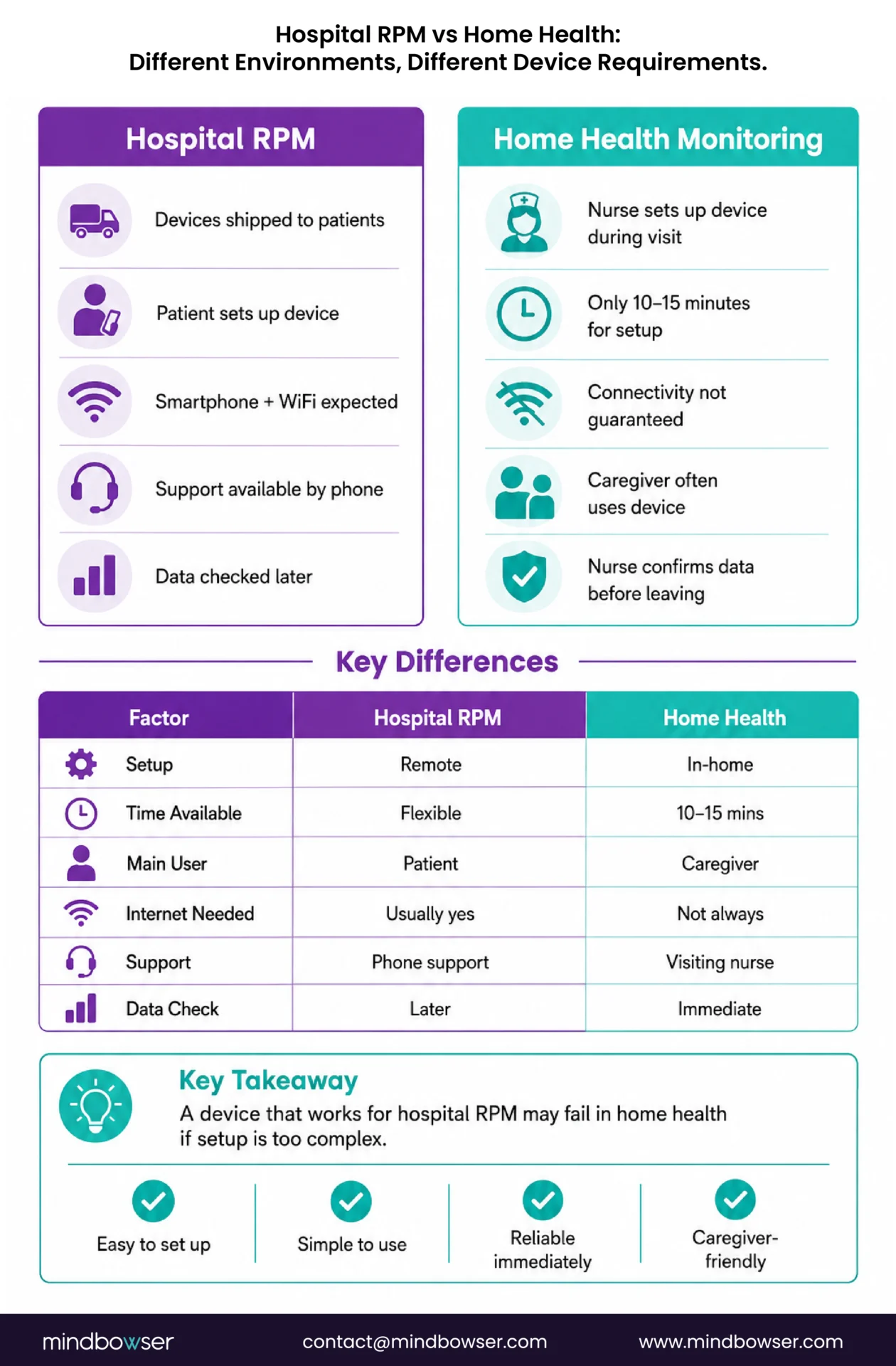
Hospital-based RPM programs ship devices to patients with printed instructions and a phone number for technical support. The patient self-manages setup, often with remote guidance from an RPM coordinator. The assumption: the patient has a smartphone, home internet, and the technical capacity to pair a Bluetooth device.
Home health flips every assumption.
The visiting nurse arrives at the home with a device bag. Setup must happen during the visit, typically within 10-15 minutes of a 30-45 minute total visit. The nurse verifies data is flowing to the monitoring dashboard before walking out the door. If it isn’t flowing, there is no second chance until the next visit (which might be 3-7 days away).
The patient often cannot manage the device independently. Cognitive decline, physical limitations, language barriers, or low health literacy mean the caregiver (spouse, adult child, home health aide) is the actual device user. The caregiver needs to understand one thing: how to confirm the device took a reading. Everything else, trending, alerts, billing, is handled by the agency and the monitoring team.
Which Devices Work Best for Home Health Settings?
The selection criteria, in order of priority for home health: (1) connectivity independence, (2) setup speed, (3) caregiver usability, (4) clinical accuracy, (5) cost.
Clinical accuracy is not first. Every FDA-cleared device in the categories below meets clinical accuracy thresholds. The question is not “does it measure accurately?” The question is “will it reliably transmit data from this patient’s home?”
- Blood pressure cuffs. Cellular first. Tenovi and BodyTrace cellular cuffs transmit without WiFi or a smartphone. The nurse unwraps the cuff, puts it on the patient, presses the button, and watches the reading appear on their tablet dashboard. Three to five minutes. For the rare homes with zero cellular coverage, a BLE cuff paired to the nurse’s tablet works as a fallback (nurse carries the tablet, readings upload through the nurse’s cellular data plan).
- Weight scales. Cellular (BodyTrace) for homes without WiFi. WiFi-connected (Withings Body+) for homes with reliable internet. Daily weight is critical for CHF home health patients (2+ pound gain in 24 hours signals fluid retention). Important: floor surface affects accuracy. Carpet produces inconsistent readings. The nurse must verify that the scale is on a hard, flat surface or provide a hard board for the scale to sit on.
- Pulse oximeters. Two modes. Continuous overnight monitoring (Wellue O2Ring) for COPD patients: the device stays with the patient and automatically records SpO2 during sleep. Spot-check (Nonin 3230) for visit-based readings: the nurse takes SpO2 at each visit and documents it. Leave the continuous device. Carry the spot-check.
- Glucose monitors. For insulin-managed diabetics, CGM (Dexcom G7, Abbott Libre 3) is the gold standard. The visiting nurse applies the first sensor during the home visit (14-day wear for Libre, 10-day for Dexcom G7). The sensor pairs to the patient’s phone or a relay device and transmits automatically after initial setup. For non-insulin Type 2 patients, a cellular glucose meter provides simple daily readings without smartphone dependency.
- Medication management. Smart pill dispensers (Hero, MedMinder) are high-value additions for polypharmacy patients, common in home health. The dispenser alerts caregivers and the care team when doses are missed. Setup requires loading medications during the home visit (15-20 minutes for a complex medication regimen).
- Fall detection. Wearable fall sensors or medical alert devices with automatic fall detection. For home health patients with fall risk, this is a safety layer that runs alongside clinical monitoring.
For full device specifications, vendor details, and costs, see our complete remote patient monitoring devices list.
| Device | Recommended Model | Setup Time | Caregiver Difficulty | Connectivity | Cost/Unit |
|---|---|---|---|---|---|
| BP cuff | Tenovi cellular | 3-5 min | Very low (1 button) | Cellular | $80-120 |
| Weight scale | BodyTrace cellular | 3-5 min | Very low (step on) | Cellular | $80-120 |
| Pulse ox (continuous) | Wellue O2Ring | 5 min | Low (wear at night) | BLE to phone/hub | $100-160 |
| Pulse ox (spot-check) | Nonin 3230 | 2 min | Very low (finger clip) | BLE to nurse tablet | $200-300 |
| CGM | Dexcom G7 / Libre 3 | 10-15 min (first sensor) | Medium (sensor application) | BLE to phone | $65-100/mo |
| Glucose meter | Cellular meter | 3-5 min | Low (test strip) | Cellular | $30-50 |
| Pill dispenser | Hero / MedMinder | 15-20 min (load meds) | Medium | WiFi | $30-60/mo |
What Does Device Setup Look Like During a Home Visit?
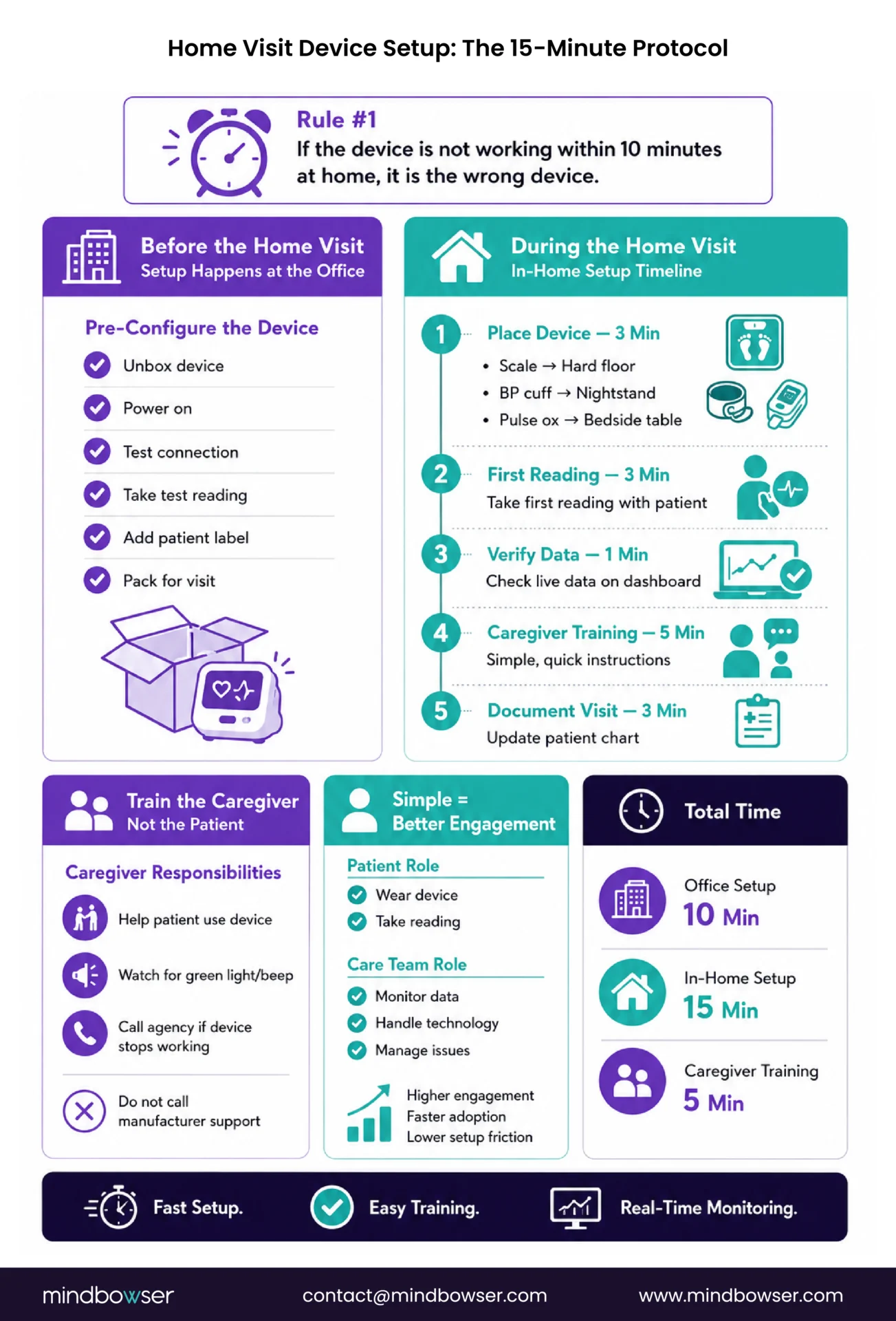
The 10-minute rule: if the device is not transmitting data within 10 minutes of unboxing in the patient’s home, it is the wrong device for home health.
Pre-configure before the visit.
The agency office should be the setup room, not the patient’s kitchen table. Before the home visit, the nurse or a device coordinator should: unbox the device, power it on, verify it connects to the monitoring platform (take a test reading in the office), label it with the patient’s name and ID, and pack it in the nurse’s device bag ready to deploy.
When the nurse arrives at the home, the device is already configured. The setup consists of: place the device (scale on hard floor, cuff on nightstand, pulse ox on bedside table), take the first real reading with the patient, verify the reading appears on the nurse’s tablet dashboard in real time, and train the caregiver.
Caregiver training, not patient training.
In most home health scenarios, the caregiver is the device manager. The patient wears the cuff or steps on the scale. The caregiver watches for the confirmation (green light, beep) and knows to call the agency if the confirmation doesn’t appear for two consecutive days.
The training covers three things: (1) how to help the patient use the device, (2) what the confirmation light/sound means, (3) who to call if it stops working (the agency, not the device manufacturer’s 800 number). Three things. Five minutes. That is the entire caregiver training.
This mirrors TodayHealth’s 90% engagement approach: the patient’s role is minimal (wear the device, step on the scale). The technology is invisible to the patient. The caregiver and the care team handle everything else.
Discuss device standardization and monitoring architecture for your home health agency
How Do You Handle Homes Without WiFi or Reliable Cell Coverage?
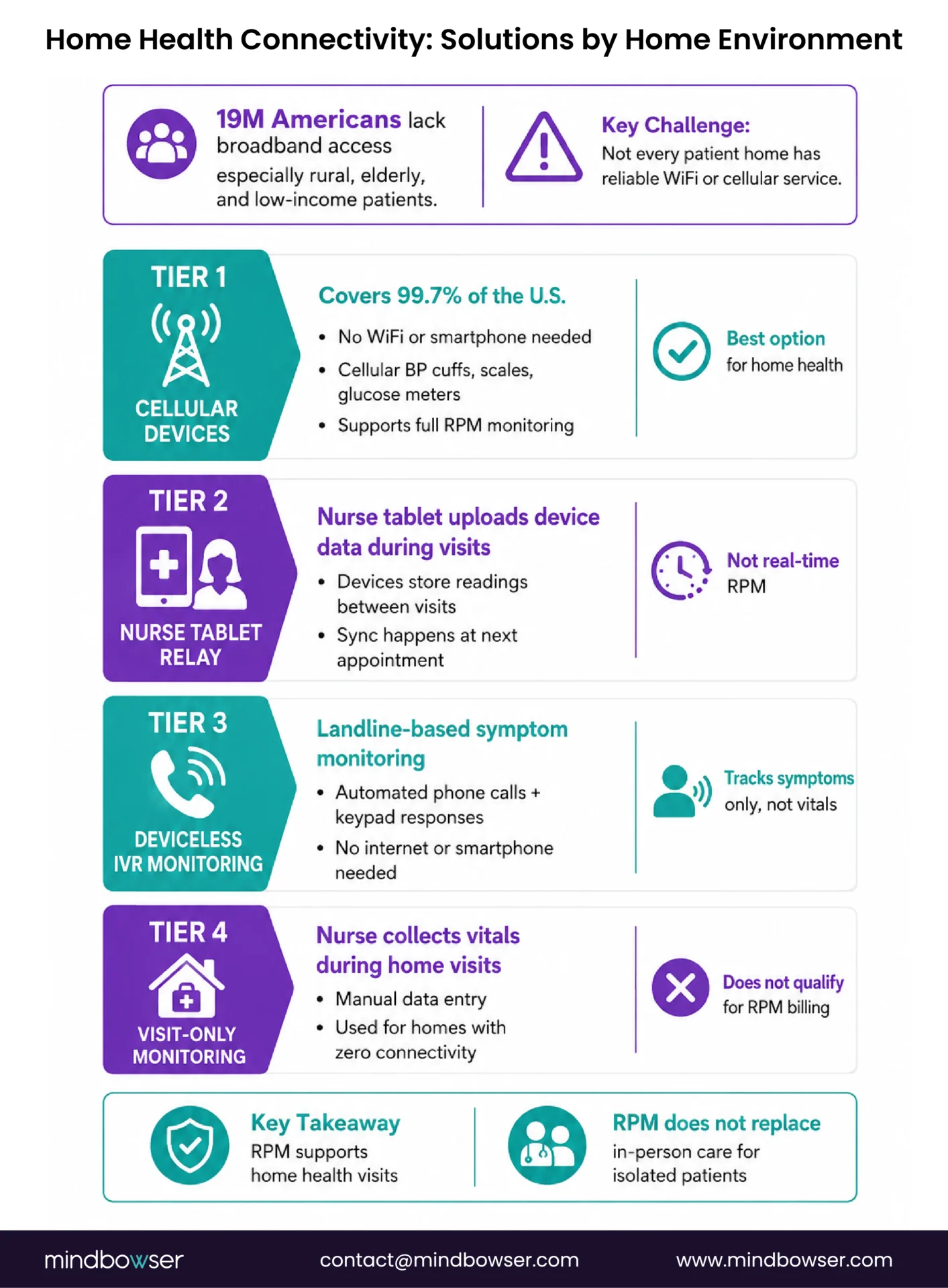
Nineteen million Americans lack broadband internet access. Home health patients skew toward the populations most affected: rural, elderly, low-income. The assumption that every home has WiFi is wrong for a meaningful percentage of the home health population.
- Tier 1: Cellular devices (covers 99.7% of US). Cellular BP cuffs, scales, and glucose meters transmit over the carrier network. No WiFi needed. No smartphone needed. This is the default for home health. Test cellular signal strength at the patient’s home during the first visit (the nurse’s phone signal is a reasonable proxy).
- Tier 2: Nurse-carried tablet relay (for homes with weak cellular). The nurse carries a tablet with its own cellular data plan. BLE devices pair to the nurse’s tablet during the visit. Readings taken during the visit upload through the tablet’s connection. Between visits, the device caches readings locally and the nurse syncs them at the next visit. Not real-time monitoring, but captures data on a visit cadence.
- Tier 3: Deviceless monitoring (for homes with zero connectivity). Lightbeam/CareSignal deviceless RPM works on landlines via IVR phone calls. No internet. No smartphone. The patient or caregiver answers automated symptom questions by pressing phone keys. Not a substitute for device-based physiological monitoring, but better than no monitoring for isolated patients. See our elderly RPM guide for the full deviceless RPM breakdown.
- Tier 4: Visit-only monitoring (last resort). Some patients cannot be remotely monitored regardless of technology. Visiting nurse takes readings at each home visit (2-3x per week), enters them into the monitoring system manually, and the care team reviews trends on the visit cadence. This is not RPM (it doesn’t meet CMS requirements for digital data transmission). It is clinical monitoring without the RPM billing layer.
The honest reality: RPM supplements home health visits. It does not replace them. For the most isolated patients, more frequent in-person visits remain the primary monitoring mechanism.
What’s Different About Home Health Billing vs Standard RPM?
This is where home health agencies often get confused, because the billing structure is different from physician-office RPM.
- Home health agencies bill under Medicare Home Health PPS (Prospective Payment System), a per-episode payment model. The agency receives a lump payment for a 30-day or 60-day home health episode covering all services delivered.
- RPM CPT codes (99453-99458) are physician/practitioner billing codes. The ordering physician or qualifying practitioner bills RPM codes, not the home health agency. This means the home health agency provides the monitoring service (devices, data collection, care coordination) while the physician practice captures the RPM billing revenue.
- The operational model that works: the physician practice orders RPM for the home health patient. The home health agency deploys and manages the devices as part of the home health episode. The physician practice bills RPM codes based on the device data and interactive communication time. Revenue sharing between the physician practice and the home health agency covers the agency’s device and operational costs.
- CCM stacking applies here too. Home health patients with 2+ chronic conditions (most of them) qualify for concurrent CCM (99490). The physician practice bills both RPM and CCM while the home health agency delivers the care coordination. Combined per-patient revenue: $167-184/month from the physician practice, which funds the device deployment the home health agency manages.
CMS expanded RPM billing eligibility for FQHCs and Rural Health Clinics in the 2024 Physician Fee Schedule. If your home health patients are served by an FQHC or RHC, those facilities can now bill RPM directly.
For the full billing structure and program stacking details, see our RPM + CCM stacking revenue guide.
What Device Kit Should a Home Health Agency Standardize?
Standardization reduces complexity, training burden, inventory management, and support costs. Every visiting nurse should carry the same device bag.
Standard kit (covers 80% of home health patients):
- 1 cellular BP cuff ($80-120)
- 1 cellular weight scale ($80-120)
- 1 spot-check pulse oximeter ($200-300)
- Setup supplies: extra batteries, cleaning wipes, patient instruction cards in English and Spanish
Total standard kit cost: ~$360-540 per patient
Condition-specific add-ons (carried as needed, not in every bag):
- COPD patients: continuous overnight pulse oximeter (Wellue O2Ring, $100-160)
- Diabetic patients: CGM sensor application kit (Dexcom G7 or Libre 3 starter, $65-100/month)
- Cardiac patients: ECG patch (Zio or AliveCor, service-based or $79-150)
- Polypharmacy patients: smart pill dispenser (Hero or MedMinder, $30-60/month)
- Fall-risk patients: wearable fall detection sensor ($30-50/month)
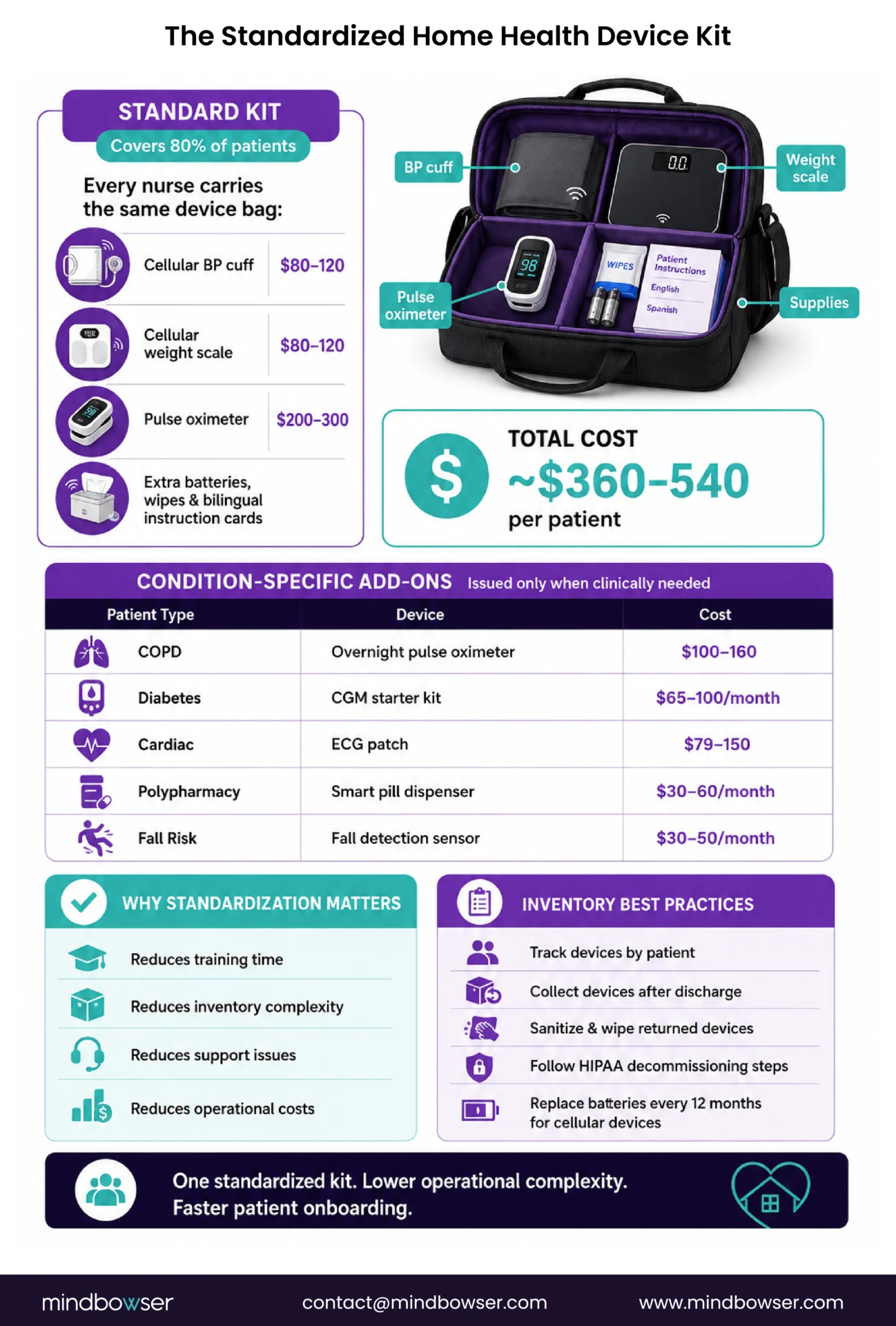
Inventory management matters at scale. Track deployed devices by patient, track returns when patients discharge from home health, inspect and wipe returned devices (HIPAA decommissioning), and replace batteries on a 12-month cycle for cellular devices. The same logistics framework covered in our RPM scaling guide applies here, adapted for the home health agency’s field operations.

The Device That Works in the Patient’s Home Is the Right Device
Vendor demos happen in conference rooms with perfect WiFi, stable Bluetooth, and product managers who know every button. Home health happens in apartments with spotty cell service, patients with tremoring hands, and caregivers learning the device for the first time during a 30-minute visit where the nurse also has to do a clinical assessment, reconcile medications, and document in the chart.
The device that is clinically superior on paper but fails setup in a home visit is the wrong device. The device that measures with slightly less precision but transmits reliably from a rural home with no WiFi and gets used every day by a caregiver who received five minutes of training, that is the right device.
I used to recommend the most clinically sophisticated device for every condition. After watching visiting nurses struggle through complex setups in homes without WiFi, I now recommend the device the nurse can get working in 5 minutes. Clinical sophistication matters less than reliable data flow. A blood pressure reading that reaches the monitoring dashboard every day is more clinically valuable than a reading from a superior device that reaches the dashboard three times a month because the Bluetooth pairing keeps failing.
If your home health agency is evaluating monitoring devices and your field nurses have opinions about what works versus what doesn’t, I’d genuinely like to hear from them. The nurses who deploy these devices daily know more about real-world usability than any spec sheet or conference demo.
The standard home health monitoring kit includes a cellular blood pressure cuff, a cellular weight scale, and a spot-check pulse oximeter. Condition-specific additions include continuous overnight pulse oximeters for COPD patients, CGM sensors for insulin-managed diabetics, ECG patches for cardiac patients, and smart pill dispensers for polypharmacy patients. Cellular devices are preferred because they transmit without WiFi or smartphone dependency, which is critical for the home health population where 19 million Americans lack broadband access.
Home health agencies bill under Medicare Home Health PPS (per-episode payment), not physician fee schedule CPT codes. RPM billing codes (99453-99458) are billed by the ordering physician or qualifying practitioner, not the agency. The operational model: the home health agency deploys and manages devices as part of the care episode, while the physician practice bills RPM codes and shares revenue to cover the agency’s device and operational costs. CMS expanded RPM billing eligibility for FQHCs and RHCs in the 2024 PFS.
Cellular devices (Tenovi, BodyTrace) transmit over the carrier network without WiFi, covering 99.7% of the US population. For homes with weak cellular, a nurse-carried tablet can relay BLE device data through the tablet’s cellular connection during visits. For homes with zero connectivity, Lightbeam/CareSignal deviceless RPM uses landline IVR phone calls for symptom monitoring. Some patients cannot be remotely monitored and require visit-based manual readings.
With pre-configured devices: 3-5 minutes for cellular devices (unbox, place, take first reading, verify on dashboard) plus 5 minutes for caregiver training. Total: 10-15 minutes of in-home device time. BLE devices requiring smartphone pairing take 10-20 minutes and have higher failure rates in home settings. The recommended approach is to pre-configure devices at the agency office before the visit so the nurse brings a working device, not a box with instructions.
The standard kit (cellular BP cuff + cellular scale + spot-check pulse oximeter + supplies) costs $360-540 per patient. Condition-specific add-ons range from $30-160 per device. CGM monitoring adds $65-100 per month per patient. Smart pill dispensers add $30-60 per month. Total monitoring cost including device depreciation and platform subscription typically runs $40-80 per patient per month, which is covered by RPM billing revenue when the physician practice captures CPT 99454 + 99457.