BLOGS
BLOGS  NEWSROOM
  CASE STUDIES
  WEBINARS
  PODCASTS
  ASSET HUB
  EVENT CALENDAR
























TL;DR
Epic Rover is a mobile extension of Epic’s EHR that allows clinicians to scan medications, verify patients, document care, and complete clinical workflows directly from smartphones or tablets. Hospitals adopt the Epic Rover app to improve bedside documentation, strengthen medication safety through barcode verification, and reduce reliance on workstation-based workflows. However, successful deployment requires planning around mobile device management, secure authentication, workflow redesign, and integration with existing Epic modules.
“Are your clinicians still leaving patient rooms to document care, verify medications, or access the EHR?”
For hospital CIOs, CMIOs, and nursing informatics leaders, this workflow gap is a familiar challenge. Mobile clinical tools like Epic Rover are designed to bring EHR access directly to the bedside, allowing clinicians to scan medications, verify patients, and complete documentation from smartphones or tablets. As hospitals look to improve medication safety, simplify workflows, and reduce documentation delays, understanding how Epic Rover fits into the broader Epic ecosystem has become increasingly important.
I. What is Epic Rover?
A. Definition
Epic Rover is a mobile clinical application integrated with Epic’s electronic health record (EHR) that allows clinicians to access patient information, administer medications, document care, and complete clinical workflows from smartphones or tablets.
In practical terms, what is Epic Rover? It is the mobile bedside interface for the Epic EHR ecosystem. Instead of returning to a workstation to document care or verify medications, clinicians can interact with the patient record directly through a handheld device while standing at the bedside.
According to Epic module documentation, Epic Rover functions as a mobile application connected to the broader Epic platform, enabling tasks such as medication administration, specimen collection, and patient documentation through secure mobile access.
By extending EHR access to mobile devices, Epic Rover helps hospitals bring clinical documentation and verification processes closer to the moment care occurs.
B.Key Characteristics
Several characteristics define how epic rover operates within hospital environments.
1. Mobile extension of Epic Hyperspace
The application connects directly to Epic’s core EHR infrastructure, allowing clinicians to access patient charts and clinical workflows from mobile devices.
Used by multiple care team roles
Hospitals typically deploy Epic Rover for a variety of staff members who perform tasks across patient care areas, including:
- Nurses
- Physicians
- Phlebotomists
- Respiratory therapists
- Transport staff
Because these teams frequently move between rooms and departments, mobile EHR access significantly improves workflow efficiency.
2. Cross-platform mobile support
The Epic Rover app runs on both iOS and Android devices. Hospitals usually deploy the application on enterprise-managed smartphones or tablets configured through mobile device management platforms.
3. Requires Epic licensing and configuration
Organizations must license Rover as part of their Epic environment. Deployment also requires configuration of authentication systems, barcode scanning capabilities, and workflow integration with Epic modules.
C. Scenario: Bedside Medication Administration
A nurse enters a patient’s room during a medication round.
Instead of pushing a workstation on wheels into the room, she uses a hospital-issued smartphone running Epic Rover.
She scans the patient’s wristband with the device camera. The Epic Rover app immediately verifies patient identity and displays the scheduled medications. She scans the medication barcode, confirms the correct drug and dosage, administers the medication, and documents vitals in the patient chart.
All of this happens without leaving the bedside.
“Barcode medication administration significantly improves patient safety when scanning occurs directly at the bedside.”
This type of workflow illustrates why Epic Rover has become an increasingly important tool for hospitals seeking to modernize bedside care while maintaining tight integration with their Epic EHR systems.
Epic Rover turns a smartphone into a mobile clinical workstation that travels with the clinician.
II. Why Hospitals Implement Epic Rover?
Hospitals deploy Epic Rover to solve a practical problem: traditional EHR workflows were built around stationary workstations, not mobile care teams. Nurses, physicians, and technicians move constantly between rooms, yet documentation systems historically required them to return to fixed computers.
The result is workflow friction, delayed documentation, and potential patient safety risks.
Mobile EHR tools like Epic Rover address these issues by bringing documentation and verification tasks directly to the bedside.
A. The Problem with Traditional EHR Workflows
Even in hospitals running modern EHR platforms, frontline workflows often rely on workstation-based processes.
1. Workstations on Wheels (WOWs) slow bedside care
Many hospitals deploy mobile carts to move EHR access between rooms. However, WOWs can be bulky, difficult to maneuver in small spaces, and limited in availability during busy shifts.
2. Clinicians leave rooms to chart
When documentation must occur at hallway workstations, clinicians often leave the patient room to complete charting. This can interrupt care delivery and create delays between an action and its documentation.
3. Medication errors remain a safety risk
Medication verification depends heavily on barcode scanning and accurate patient identification. If scanning does not occur directly at the bedside, the risk of mismatches increases.
4. Documentation delays affect compliance
Clinical documentation that occurs after patient care can introduce inconsistencies or missed entries. This becomes particularly important for medication administration records and nursing flowsheets.
These limitations explain why hospitals are exploring mobile solutions such as Epic Rover.
B. Mobile EHR Advantages
The Epic Rover app allows clinicians to perform many EHR tasks directly from a mobile device, reducing reliance on stationary systems.
1. Bedside documentation
Clinicians can enter vitals, medication administration records, and flowsheet data at the moment care is delivered.
2. Faster clinical workflows
Tasks that previously required moving between the patient room and a workstation can now be completed during the interaction itself.
3. Improved care coordination
Real-time documentation ensures that updates to the patient chart are immediately visible to other care team members.
Mobile workflows are particularly valuable during medication administration and specimen collection, where verification steps must occur precisely and consistently.
C. Supporting Data
Research examining emergency department workflows found that barcode medication administration compliance can be more than 11 percentage points higher when mobile devices are used instead of desktop workflows.
This improvement occurs because scanning and verification are completed directly at the bedside rather than at a nearby workstation.
Large health systems have recognized these advantages. Organizations such as CommonSpirit Health, Trinity Health, RWJBarnabas Health, and Rush University Medical Center have implemented Epic Rover to support mobile clinical workflows across their hospitals.
As hospitals continue expanding bedside mobility, tools like Epic Rover are becoming a central component of modern EHR strategies.
III. Key Features of the Epic Rover App
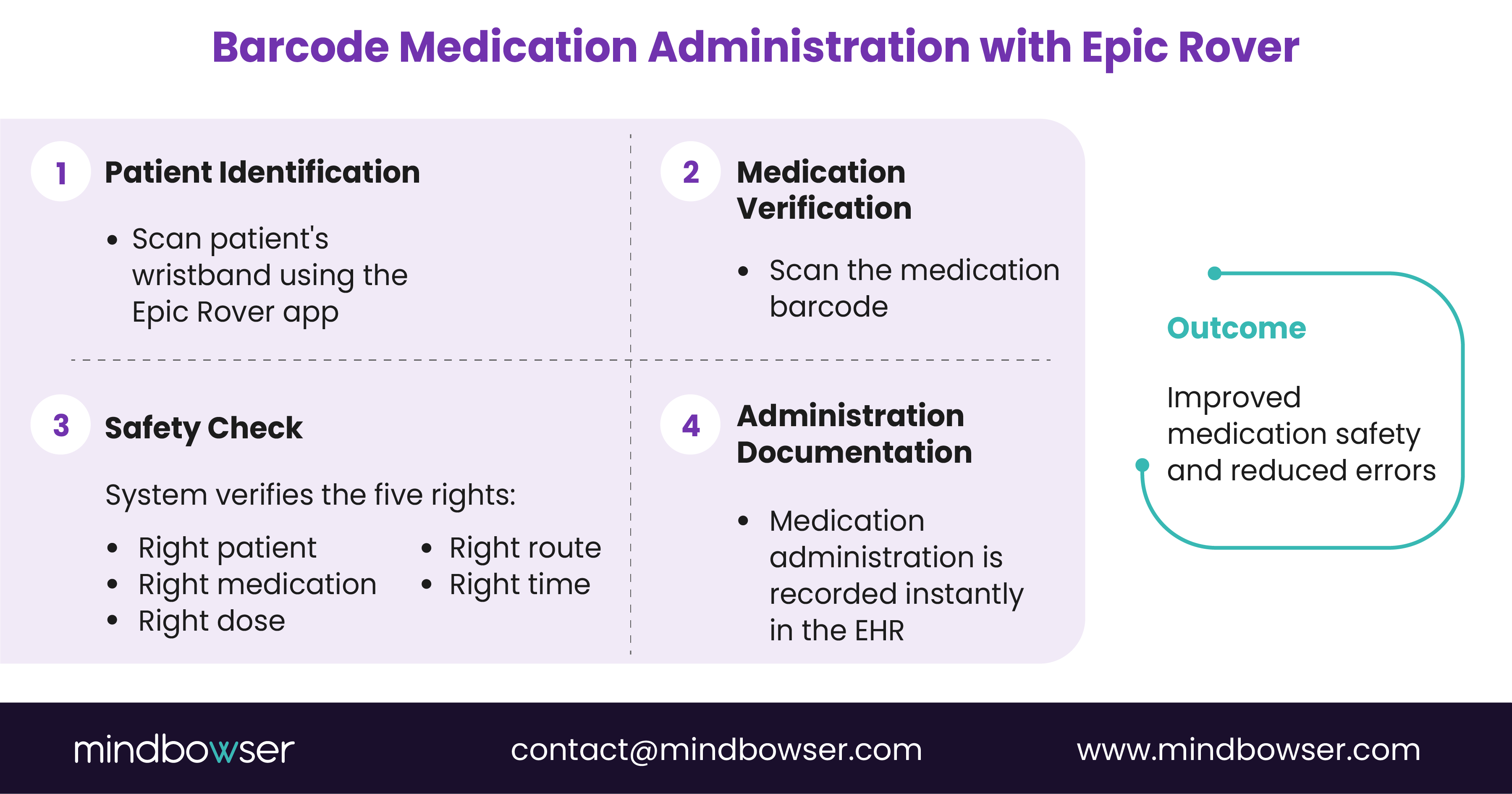
The Epic Rover app enables clinicians to complete several essential clinical workflows from mobile devices. By extending Epic’s EHR to smartphones and tablets, Epic Rover allows patient verification, medication administration, and documentation to occur directly at the bedside.
A. Mobile Patient Chart Access
Clinicians using Epic Rover can quickly access key patient information without returning to a workstation.
1. Patient summaries
Clinicians can review demographics, diagnoses, allergies, and patient status.
2. Laboratory results and vital signs
The system provides access to recent lab results, vitals, and flowsheet data.
3. Medication lists
The Epic Rover app displays active medications and scheduled doses to support treatment verification.
4. Treatment plans
Care plans and updates entered by other clinicians can be reviewed during patient interactions.
B. Barcode Medication Administration (BCMA)
Medication administration is one of the most common uses of Epic Rover.
1. Wristband scanning
Clinicians scan the patient’s wristband to verify identity.
2. Medication barcode scanning
Medications are scanned before administration.
3. Safety verification
The system confirms the five rights of medication administration:
- Right patient
- Right medication
- Right dose
- Right route
- Right time
C. Specimen Collection
Clinicians can scan specimen labels, confirm patient identity, and document collections directly within Epic Rover, helping reduce labeling errors.
D. Clinical Image Capture
The Epic Rover app allows clinicians to capture wound or procedure images and store them directly in the patient’s EHR record.
E. Bedside Documentation
Clinicians can enter vitals, update flowsheets, and document medication administration during patient care.
F. Task Management
Worklists, order alerts, and care reminders help clinicians track tasks while moving between patients.
IV. Who Uses Epic Rover?
Hospitals deploy Epic Rover across multiple clinical roles, particularly among staff who perform bedside tasks throughout the day. Because these professionals move frequently between patient rooms, mobile EHR access helps them complete documentation and verification steps without returning to a workstation.
A. Clinical Staff
Clinical care teams are the primary users of Epic Rover, especially for bedside workflows.
1. Nurses
Nurses commonly use the Epic Rover app for barcode medication administration, vital sign documentation, nursing flowsheets, and patient verification through wristband scanning.
2. Physicians
Physicians may use Epic Rover during rounds to review patient charts, lab results, and treatment plans from mobile devices.
3. Respiratory therapists
Respiratory therapists use Epic Rover to verify patients, review therapy orders, and document treatments at the bedside.
B. Ancillary Staff
Hospitals often extend Epic Rover access to additional care support teams.
1. Phlebotomists
Phlebotomists use the Epic Rover app to verify patients, scan specimen labels, and document collection details.
2. Environmental services staff
Some organizations use mobile workflows to track room cleaning tasks and patient flow updates.
3. Transport teams
Transport staff may use Epic Rover to confirm patient identity and update transport requests.
V. Common Clinical Workflows Powered by Epic Rover
Hospitals deploy Epic Rover primarily to support workflows that occur at the bedside. Mobile access allows clinicians to verify patient information, administer medications, and document care without leaving the patient’s room.
A. Bedside Medication Administration
Medication administration is one of the most common workflows supported by Epic Rover.
1. Wristband scanning
Clinicians scan the patient’s wristband to confirm identity before administering medication.
2. Medication verification
The Epic Rover app allows clinicians to scan medication barcodes and verify the order against the medication administration record.
3. Medication documentation
After administration, the clinician documents the activity directly within Epic Rover, updating the patient record immediately.
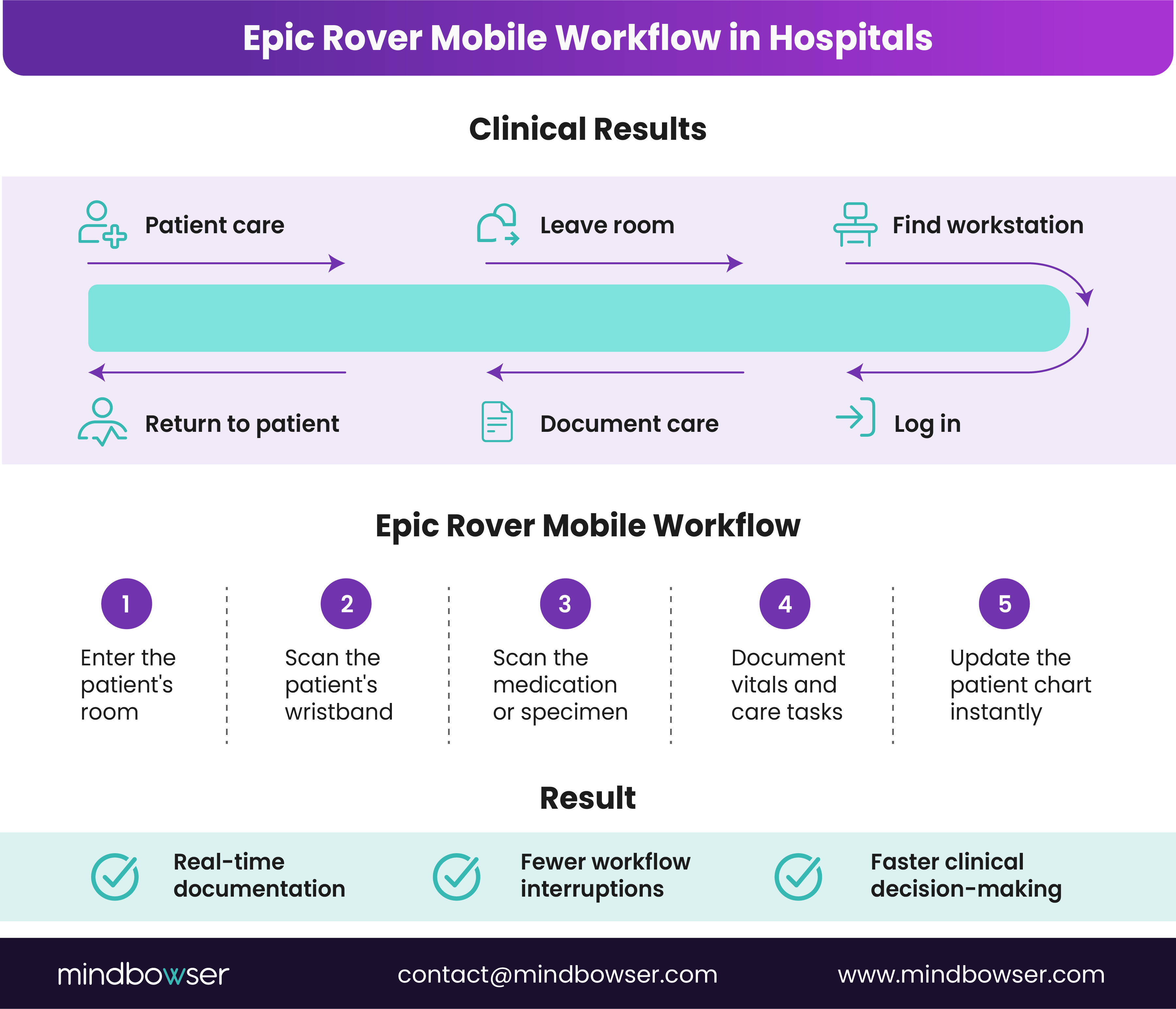
B. Mobile Clinical Rounding
Clinicians may also use Epic Rover during patient rounds.
1. Patient list review
Care teams can review assigned patient lists and summaries from their mobile device.
2. Care plan updates
Lab results, medications, and treatment plans can be reviewed during bedside interactions.
C. Lab and Specimen Collection
1. Barcode matching
Phlebotomists scan specimen labels and patient wristbands using Epic Rover.
2. Collection documentation
Specimen collection details are recorded immediately in the Epic Rover app.
D. Wound Care Documentation
1. Photo capture
Clinicians capture wound images using the mobile device.
2. Chart embedding
Images are automatically stored in the patient’s EHR record.
Rover's BCMA and vitals data integrates with your analytics or custom app via Epic's FHIR/HL7 layer. ConnectHealth ships that Epic connection pre-built, deployed in days.
VI. Epic Rover vs Traditional EHR Workflows
Hospitals historically relied on workstation-based access to electronic health records. Clinicians documented care through desktop systems or workstation-on-wheels carts that traveled between rooms. While functional, these systems often introduce delays and workflow interruptions.
Epic Rover changes this model by allowing clinicians to perform many of the same tasks directly from a mobile device. Instead of returning to a workstation after patient interactions, clinicians can complete documentation and verification steps at the bedside.
The Epic Rover app, therefore, represents a shift toward mobile-first clinical workflows.
A. Device and Mobility
1. Traditional workstation access
Traditional Epic workflows rely on desktop computers or workstation-on-wheels carts. While these systems allow chart access throughout the hospital, they can limit mobility and slow bedside workflows.
Clinicians often need to move between patient rooms and hallway workstations to complete documentation tasks.
2. Mobile device access with Epic Rover
With Epic Rover, clinicians use smartphones or tablets that travel with them throughout their shift. This mobility allows documentation, medication verification, and task completion to occur directly in the patient room.
The result is fewer workflow interruptions and faster chart updates.
B. Medication Verification
1. External scanners in traditional workflows
In traditional workflows, medication verification typically requires an external barcode scanner connected to a workstation.
This process can be cumbersome when clinicians must position equipment near the patient or return to a workstation to scan medications.
2. Camera-based scanning with Epic Rover
The Epic Rover app uses the device camera for barcode scanning. Clinicians can scan wristbands and medication barcodes using the mobile device itself.
This approach simplifies medication verification and supports barcode medication administration directly at the bedside.
C. Documentation Timing
1. Delayed documentation in workstation workflows
When clinicians must return to a workstation after patient care, documentation is often delayed. Notes, medication entries, and flowsheet updates may be completed minutes or hours after care is delivered.
Delayed documentation increases the risk of missing or incomplete entries.
2. Real-time documentation with Epic Rover
With Epic Rover, clinicians can document care activities immediately during patient interactions.
Real-time documentation helps ensure patient records remain accurate and up to date for other members of the care team.
D. Workflow Comparison
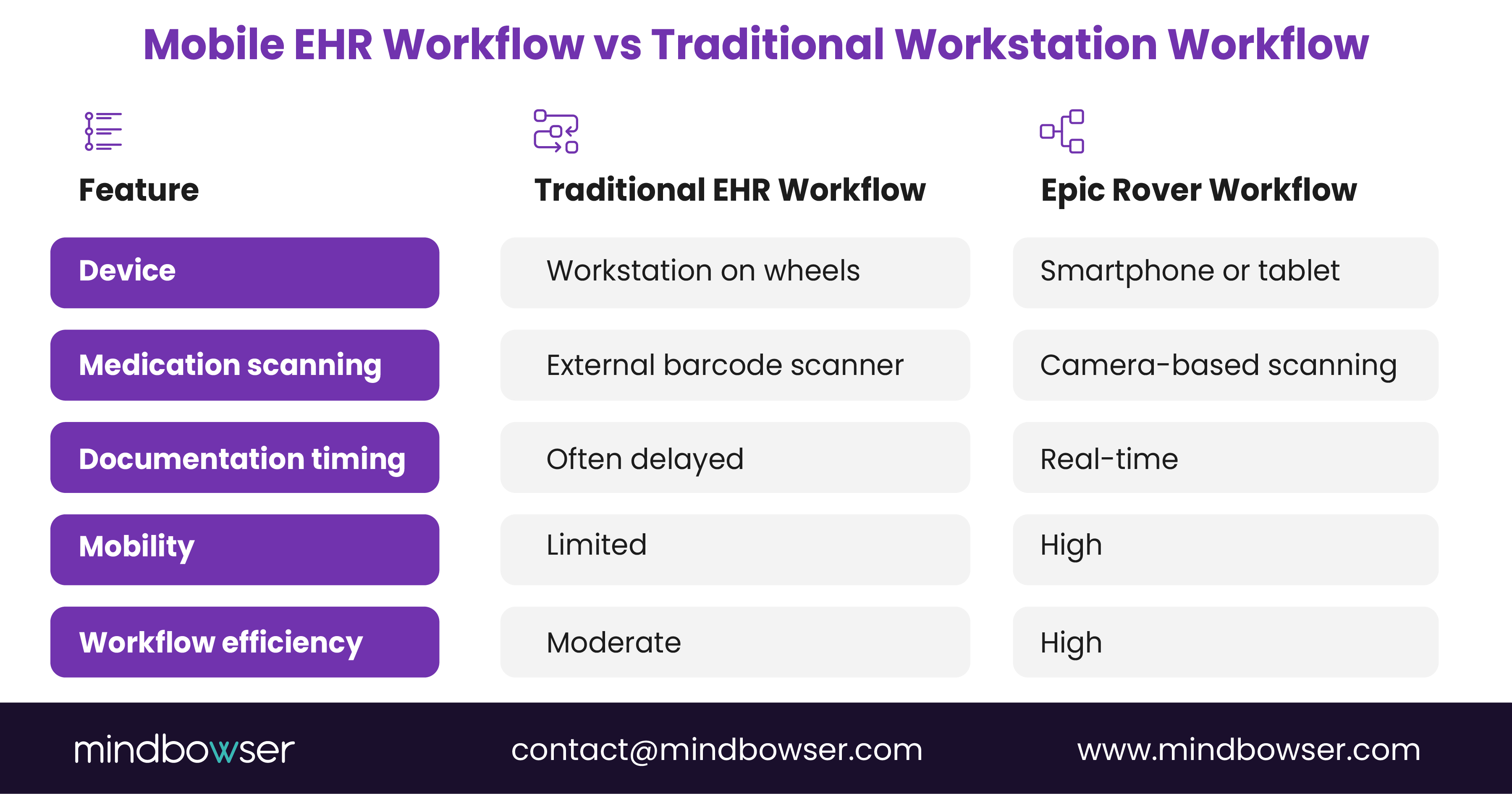
In many hospitals, Epic Rover vs. Haiku comparisons also arise when discussing mobile access. While both applications connect to Epic’s EHR ecosystem, Epic Rover is designed primarily for bedside clinical workflows such as medication administration and specimen collection. In contrast, Haiku focuses more on physician access and chart review.
As hospitals adopt mobile clinical tools, the shift from workstation-based documentation to mobile workflows continues to expand.
Epic Rover vs Haiku: Which Mobile App Is Right for Each Role?
Epic offers different mobile applications for different clinical roles. Epic Haiku is designed primarily for physicians and advanced practice providers, while Epic Rover is built for bedside nursing workflows.
Rover supports point-of-care activities that take place in the patient’s room. Nurses can use it for barcode medication administration, specimen scanning, vitals entry, flowsheet documentation, and wound care workflows. Its native barcode scanning capabilities make it especially relevant for organizations deploying mobile BCMA processes.
Haiku is designed for providers who need fast access to Epic while moving between clinical locations. Physicians and advanced practice providers can use it to review charts, place orders, view results, communicate through secure messaging, and make clinical decisions without returning to a desktop workstation.
| Comparison area | Epic Rover | Epic Haiku |
|---|---|---|
| Primary user | Bedside nurses and clinical support staff | Physicians and advanced practice providers |
| Primary use case | Point-of-care nursing documentation | Mobile chart review and clinical decision-making |
| Key features | BCMA, specimen scanning, vitals, flowsheets, wound documentation | Chart review, ordering, results review, secure messaging |
| Offline mode | Depends on organizational configuration and workflow | Depends on organizational configuration and workflow |
| Licensing context | Enabled as part of an inpatient nursing deployment | Enabled as part of physician mobile access |
If your deployment is nursing-led with a BCMA requirement, Rover is the correct app; if it is provider-led with chart review and ordering needs, Haiku fits.
VII. Benefits of Epic Rover for Healthcare Organizations
Hospitals implement Epic Rover to improve bedside workflows, strengthen medication safety, and simplify clinical documentation. By enabling clinicians to complete tasks directly during patient interactions, the Epic Rover app reduces delays that often occur when documentation happens away from the bedside.
A. Improved Patient Safety
Barcode scanning workflows supported by Epic Rover help reduce medication administration errors.
1. Patient verification
Clinicians scan patient wristbands to confirm identity before administering medication.
2. Medication verification
The system verifies the medication against the patient’s medication administration record.
3. Reduced medication errors
These checks support the five rights of medication administration and help prevent incorrect medication delivery.
B. Faster Clinical Workflows
Mobile access allows clinicians to complete tasks more efficiently.
1. Bedside documentation
Clinicians can enter vitals, medication administration records, and care notes during patient interactions.
2. Reduced workflow interruptions
The Epic Rover app eliminates repeated trips between patient rooms and workstations.
3. Faster task completion
Multiple tasks, such as scanning, verification, and documentation, occur within a single workflow.
C. Higher Documentation Compliance
1. Real-time charting
Care activities can be recorded immediately.
2. Reduced delayed documentation
Mobile documentation decreases the likelihood of incomplete records.
3. More accurate patient records
Real-time updates ensure other clinicians see the latest information.
D. Better Clinician Experience
Mobile workflows supported by Epic Rover reduce reliance on workstation carts and simplify bedside tasks.
E. Operational Efficiency
Hospitals may reduce workstation hardware needs while improving workflow productivity through mobile EHR access.
VIII. Epic Rover Implementation Challenges
While Epic Rover improves bedside workflows, deploying mobile EHR tools across a hospital requires careful planning. Many organizations focus on the features of the Epic Rover app, but real-world implementations often involve infrastructure upgrades, workflow changes, and security planning.
A. Infrastructure Readiness
Hospitals must ensure their technical environment can support mobile EHR workflows.
1. Hospital Wi-Fi coverage
Reliable wireless connectivity is essential for the Epic Rover to function consistently across patient rooms, hallways, and clinical units.
2. Mobile device management (MDM)
Hospitals typically manage devices running the Epic Rover app through enterprise MDM platforms that enforce security policies and manage application access.
3. Battery management
Mobile devices used throughout long clinical shifts must remain charged and readily available.
B. Security and Authentication
Healthcare organizations must ensure secure access to patient records.
1. Identity management
User authentication systems control which clinicians can access Epic Rover.
2. Device security
Hospitals often enforce device encryption, screen lock policies, and secure application containers.
3. HIPAA compliance
Because the Epic Rover app handles protected health information, organizations must maintain audit logs and secure data transmission.
C. Workflow Redesign
Introducing Epic Rover may require updating clinical workflows.
1. Clinician training
Staff must learn mobile documentation and barcode scanning processes.
2. Transition from workstation workflows
Hospitals often redesign medication administration and specimen collection processes when adopting mobile tools.
D. Integration Complexity
Epic Rover must integrate with multiple Epic modules and clinical systems, which may require additional configuration during deployment.
IX. Epic Rover Integration with the Epic Ecosystem
One advantage of Epic Rover is that it operates as a mobile extension of the broader Epic EHR platform. Rather than functioning as a standalone tool, the Epic Rover app connects with multiple Epic modules that support inpatient care, laboratory services, imaging workflows, and home health coordination.
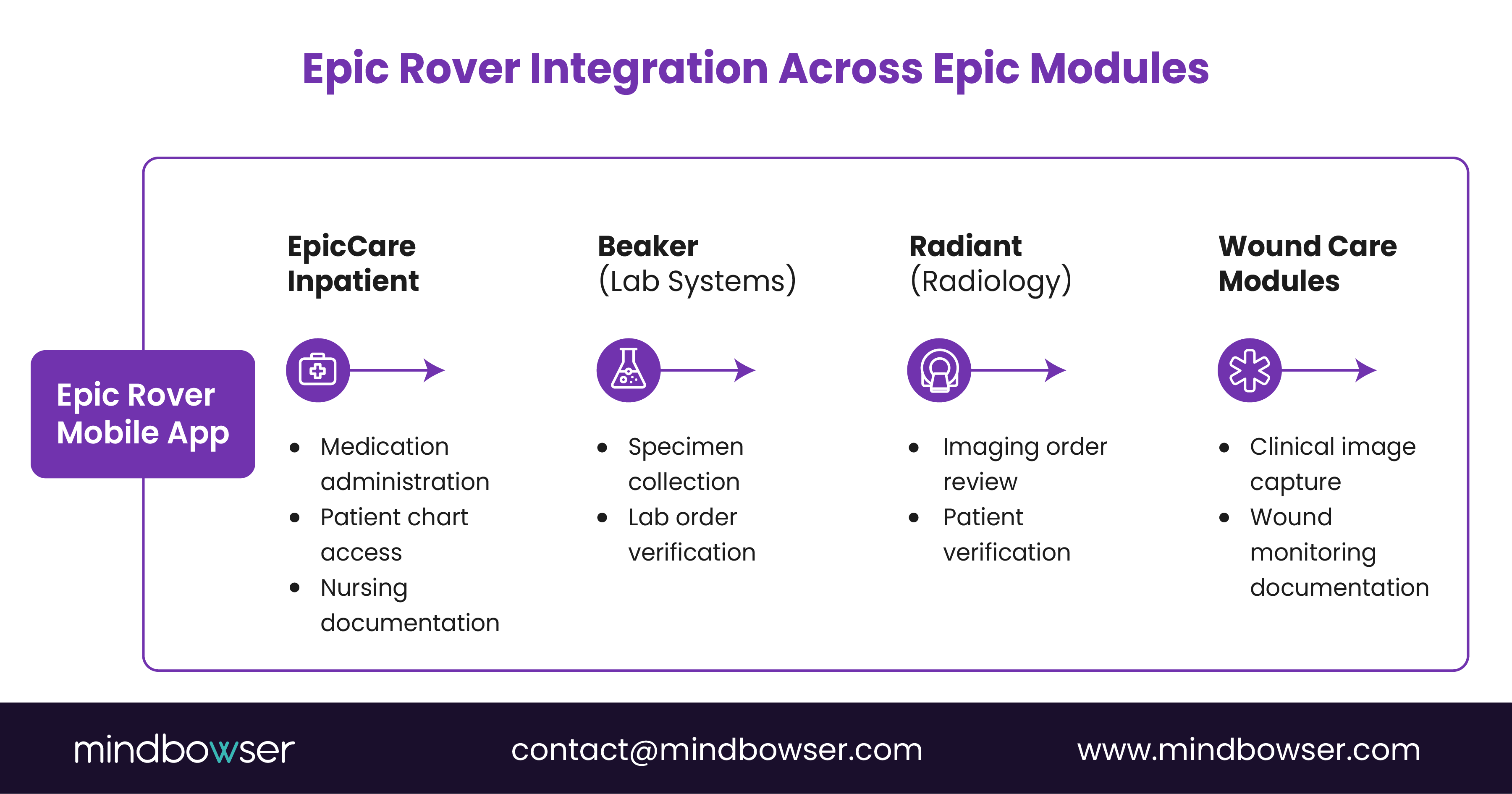
These integrations allow clinicians to complete tasks across different clinical systems while remaining inside the mobile interface.
A. EpicCare Inpatient
EpicCare Inpatient manages core hospital workflows.
1. Patient chart access
Clinicians using Epic Rover can review patient charts, medication administration records, and documentation tied to inpatient care.
2. Medication administration
The Epic Rover app connects with medication administration records, allowing nurses to scan medications and document administration at the bedside.
3. Flowsheet documentation
Vitals and nursing assessments recorded in Epic Rover automatically update the patient record.
B. Epic Beaker (Laboratory Systems)
1. Specimen verification
Clinicians can scan specimen labels in Epic Beaker and confirm patient identity.
2. Collection documentation
Specimen collection details entered in the Epic Rover app are recorded within the laboratory system.
C. Radiant (Radiology Systems)
1. Imaging order review
Clinicians can review radiology orders placed within the Epic system.
2. Patient verification
Mobile access allows staff to confirm patient identity before imaging procedures.
D. Dorothy (Home Health)
1. Care coordination
Clinicians may review care plans and patient information across care settings.
E. Wound Care Modules
1. Image capture integration
Clinicians can capture wound images through Epic Rover, which are automatically stored in the patient’s EHR.
X. Security and Compliance Considerations
Because Epic Rover provides mobile access to patient records, hospitals must ensure that its deployment meets strict healthcare security and regulatory requirements. Mobile EHR access introduces additional risks compared with workstation-based systems, particularly when devices move across units and clinical environments.
To address these concerns, organizations typically implement a combination of mobile device security controls, identity management systems, and compliance monitoring processes when deploying the Epic Rover app.
A. Mobile Device Security
Mobile devices used for clinical workflows must be protected against unauthorized access or data exposure.
1. Mobile Device Management (MDM)
Hospitals typically manage devices running Epic Rover through enterprise mobile device management platforms. These systems allow IT teams to:
- Configure security settings remotely
- Control application access
- Enforce device policies
- Monitor device usage across the organization
MDM platforms help ensure that devices accessing the Epic Rover app remain compliant with hospital security standards.
2. Remote Wipe Capabilities
If a mobile device is lost or stolen, hospitals must be able to remove sensitive data quickly.
Remote wipe functionality allows IT teams to erase hospital data from devices that run Epic Rover, protecting patient information and preventing unauthorized access.
3. Device Authentication
Hospitals often require device-level authentication before clinicians can access the Epic Rover app. This may include passcodes, biometric authentication, or secure device certificates.
These measures help ensure that only authorized users can access patient records.
B. Identity Management
Access to the Epic Rover must be tied to secure user authentication systems.
1. Single Sign-On (SSO)
Many healthcare organizations integrate Epic Rover with enterprise single sign-on platforms. This allows clinicians to access the application without repeatedly entering credentials throughout their shift.
SSO simplifies access while maintaining security controls.
2. Multifactor Authentication (MFA)
Some hospitals require additional authentication steps for mobile EHR access.
Multifactor authentication may include:
- Password or PIN
- Biometric verification
- Authentication tokens
These additional layers reduce the risk of unauthorized access to patient information.
C. HIPAA Compliance
Because Epic Rover handles protected health information, hospitals must ensure that mobile workflows comply with HIPAA privacy and security rules.
1. Encrypted Data Transmission
All communication between the Epic Rover app and the Epic EHR system must occur through encrypted channels to protect patient data during transmission.
2. Audit Trails
Healthcare organizations maintain audit logs that track user activity within Epic Rover, including:
- Patient chart access
- Medication administration documentation
- Clinical image capture
Audit trails help organizations detect unauthorized activity and maintain compliance.
3. Role-Based Access Control
Hospitals configure Epic Rover so that clinicians can access only the information relevant to their role.
For example, nurses may access medication administration records, while other staff may only view limited patient data required for their tasks.
By combining mobile device security, identity management controls, and regulatory compliance safeguards, healthcare organizations can deploy Epic Rover while protecting patient data and maintaining secure access to the Epic EHR system.
XI. Epic Rover ROI for Hospitals
For many healthcare organizations, implementing Epic Rover is tied to measurable operational and clinical outcomes. Mobile EHR access allows clinicians to complete documentation, medication verification, and care tasks directly during patient interactions, improving both efficiency and safety.
A. Operational Benefits
Hospitals often see operational improvements when shifting from workstation-based workflows to mobile documentation using Epic Rover.
1. Reduced workstation hardware costs
Mobile devices may reduce reliance on workstation-on-wheels carts and desktop computers across clinical units.
2. Faster medication workflows
The Epic Rover app allows clinicians to verify medications and document administration within a single mobile workflow.
3. Reduced documentation backlog
Because clinicians document care at the bedside, charting delays and end-of-shift documentation backlogs are reduced.
B. Clinical Benefits
Mobile EHR access also supports safer care delivery.
1. Fewer medication errors
Barcode medication verification within Epic Rover helps ensure the correct medication is given to the correct patient.
2. Faster bedside decision-making
Clinicians can review labs, medications, and patient data immediately during care interactions.
C. Staff Productivity
1. More time with patients
Mobile workflows reduce time spent moving between workstations and patient rooms.
2. Faster task completion
The Epic Rover app combines scanning, documentation, and patient verification within a single device.
XII. Epic Rover Best Practices for Hospitals
The successful deployment of epic rover requires planning beyond installing the application. Hospitals that achieve strong adoption focus on workflow prioritization, clinician training, and infrastructure readiness when rolling out the Epic Rover app.
A. Start with High-Impact Workflows
Organizations often begin with workflows that benefit most from mobile access.
1. Medication administration
Barcode scanning and medication verification are commonly the first workflows deployed with Epic Rover.
2. Specimen collection
Clinicians can verify patients, scan labels, and document specimen collection directly through the Epic Rover app.
B. Provide Clinician Training
1. Hands-on training
Clinicians should practice mobile documentation and barcode scanning workflows before full deployment.
2. Role-specific training
Different clinical roles use Epic Rover in different ways, so training should reflect those workflows.
C. Optimize Wi-Fi Coverage
Reliable network connectivity is essential for the Epic Rover to function consistently across patient care areas.
D. Implement Secure Authentication
Hospitals often use single sign-on or biometric authentication to simplify secure access to the Epic Rover app.
E. Monitor Adoption Metrics
Organizations should track usage patterns and workflow performance improvements after deployment.
XIII. How Mindbowser Builds Custom EHRs with Epic Integration Capabilities?
While Epic provides strong core EHR functionality, many healthcare organizations require additional workflows, analytics, and integrations beyond the standard platform.
Mindbowser helps hospitals extend their digital infrastructure by building custom solutions that integrate with Epic while maintaining secure and compliant data exchange.
A. Custom EHR Extensions
Healthcare organizations often need capabilities that go beyond default EHR configurations.
1. Mobile clinical applications
Mindbowser develops mobile healthcare applications that integrate with Epic environments and complement tools such as Epic Rover.
2. Patient engagement tools
Custom patient applications can support scheduling, care plan tracking, and secure communication with providers.
3. Population health dashboards
Healthcare organizations can monitor quality metrics, patient outcomes, and care management programs through custom analytics platforms.
4. AI-driven clinical insights
AI solutions can analyze clinical data to identify high-risk patients or support earlier interventions.
B. Epic Integration Capabilities
Mindbowser supports secure integrations using healthcare standards such as HL7 and FHIR.
1. API-based Epic extensions
Custom applications can extend Epic workflows while maintaining interoperability.
2. Device and platform integrations
Hospitals can connect medical devices, remote monitoring tools, and third-party systems to their Epic environment.
The Future of Mobile EHR Platforms
Mobile clinical tools such as Epic Rover are becoming a central part of modern hospital infrastructure as healthcare organizations shift toward bedside documentation and mobile workflows.
As hospitals continue investing in digital transformation, mobile EHR platforms are expected to evolve with capabilities such as AI-assisted documentation, voice-enabled workflows, and deeper integration with remote patient monitoring systems.
These advancements will allow clinicians to access patient data, document care, and coordinate treatment directly at the point of care. As a result, technologies like the Epic Rover app are likely to play an increasingly important role in enabling real-time clinical decision-making and improving workflow efficiency across hospital environments.