BLOGS
BLOGS  NEWSROOM
  CASE STUDIES
  WEBINARS
  PODCASTS
  ASSET HUB
  EVENT CALENDAR























TL;DR
- Only 44% of clinicians agree their EHR provides the integration they expect with outside systems (KLAS Arch Collaborative, 2024). RPM data in a separate portal stops getting used by month three.
- The fix: device readings landing as FHIR R4 Observations inside the EHR workflow, mapped to standard LOINC codes, visible in the flowsheet where the physician already works.
- This guide covers the integration architecture for Epic (SMART on FHIR + Interconnect), Cerner/Oracle Health (FHIR R4, DSTU2 deprecated December 2025), and Athena (athenaClinicals API), with the data mapping, authentication patterns, common failure points, and timeline estimates from real builds.
Only 44% of clinicians agree their EHR provides the integration they expect with outside systems. That number comes from the KLAS Arch Collaborative’s 2024 interoperability report, surveying over 500,000 clinicians. Satisfaction with data sharing has barely increased since 2018. And the specific complaint that shows up consistently: external data is available but hard to find, duplicative, inconsistently formatted, and poorly mapped.
We have built RPM-to-EHR integrations across Epic, Cerner, and Athena, and the pattern is the same every time: the RPM data that lives in a separate portal stops getting looked at by month three. The physician has 15 minutes per patient visit. Opening a second application to check RPM readings is a workflow break they will not sustain. By month three, the portal is forgotten. By month six, the care team says “we don’t really use the RPM data during visits.”
The data didn’t fail. The integration did.
This guide is the technical reference we wish existed when we started building these integrations. It covers each major EHR vendor, the FHIR data mapping, the authentication patterns, and the failure points nobody warns you about until you hit them in production.
Why Does RPM Data in a Separate Portal Fail?
The KLAS 2025 Clinician EHR Experience report identified three persistent pain points: excessive documentation burden, overwhelm from patient messaging, and difficulty accessing external patient data due to poor interoperability (KLAS, 2025). RPM data living outside the EHR hits all three: it adds a step to the workflow (access burden), it generates alerts outside the clinical inbox (messaging overwhelm), and it lives in a system the clinician didn’t ask for (external data friction).
The behavioral pattern is predictable. Month one: the physician opens the RPM portal before each visit, reviews 30-day trends, adjusts medications accordingly. Month two: the physician opens it for flagged patients only. Month three: the physician asks the MA to print the readings and put them in the paper chart. Month four: nobody opens it.
The fix is architectural, not behavioral. RPM data must appear inside the EHR as if it were a vital sign taken in the clinic. Same flowsheet. Same vitals trend graph. Same clinical decision support alerts. The physician should not know or care that the blood pressure reading came from the patient’s living room instead of the exam room. The data format, the display location, and the workflow integration should be identical.

That means FHIR Observations, mapped to LOINC codes, written to the EHR through the vendor’s API, and displayed in the flowsheet. Not a PDF. Not a note. Not a message in the inbox. A structured observation in the vitals section.
What Is the Target Architecture for RPM-to-EHR?
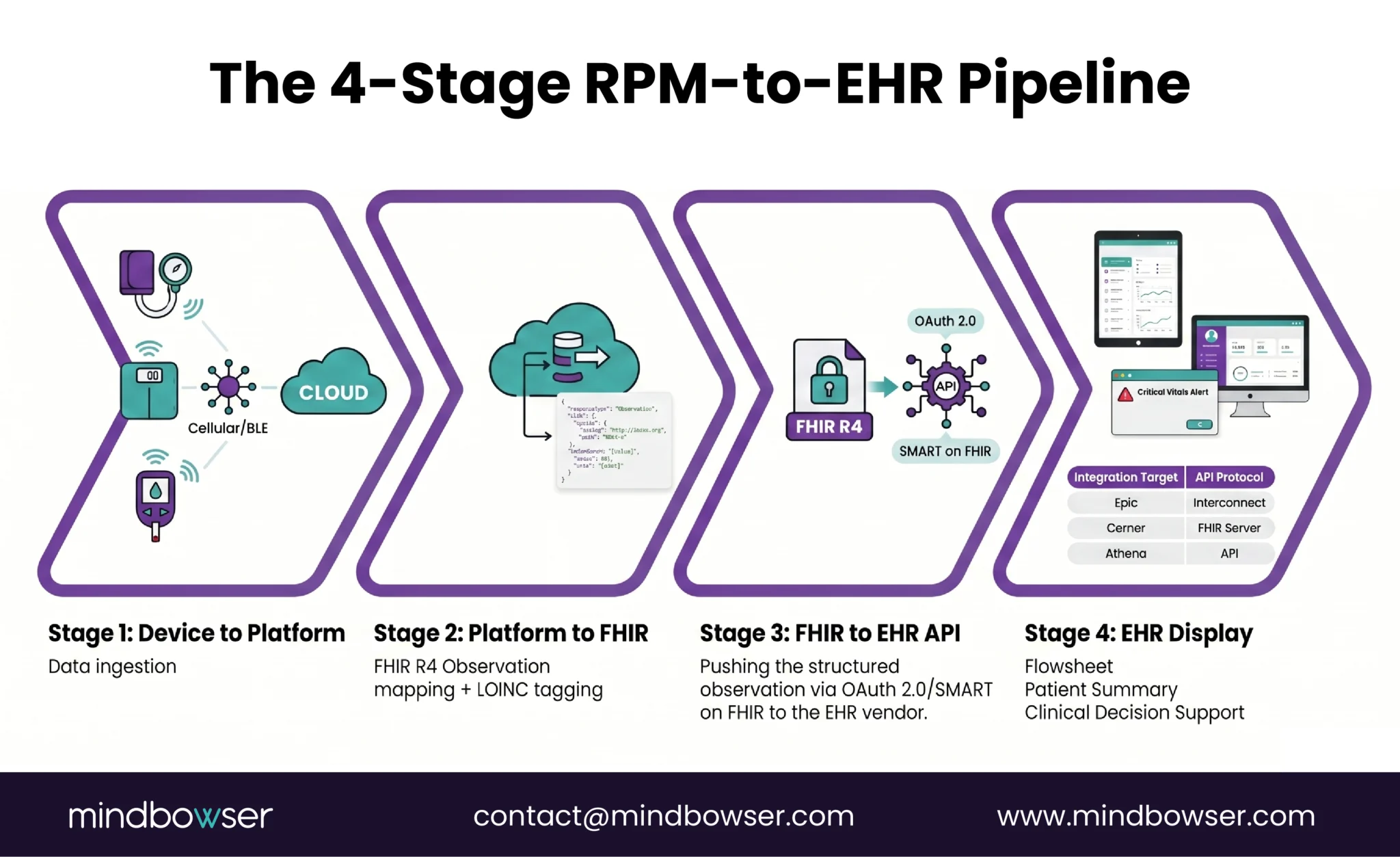
The data pipeline has four stages. Every RPM-to-EHR integration follows this pattern regardless of the EHR vendor.
Stage 1: Device to RPM Platform. The device reading (BP, SpO2, glucose, weight, HR) arrives at the RPM monitoring platform through cellular, BLE, or cloud API. This stage is covered in our RPM devices list.
Stage 2: RPM Platform to FHIR Observation. The RPM platform transforms the device reading into an FHIR R4 Observation resource. This is where the data mapping happens: the raw reading becomes a structured clinical observation with a LOINC code, a value, a unit, a timestamp, and a patient reference.
Stage 3: FHIR Observation to EHR API. The Observation resource is pushed to the EHR through the vendor’s FHIR API (Epic Interconnect, Cerner/Oracle FHIR R4, Athena API). Authentication, authorization, and validation happen at this stage.
Stage 4: EHR Display. The Observation appears in the clinician’s workflow: the flowsheet for vitals trending, the patient summary for at-a-glance review, and optionally in clinical decision support rules that fire alerts when readings cross thresholds.
For the broader interoperability context these standards operate in, see our healthcare interoperability solutions.
The FHIR R4 Observation resource is the standard container. The HL7 FHIR Vital Signs profile defines exactly how vital sign observations should be structured. The LOINC vital signs panel (85353-1) provides the standardized codes. These are not Mindbowser conventions. They are the industry standard that Epic, Cerner, and Athena all support.
How Does RPM Integration Work with Epic?
Epic is the most widely deployed EHR in the US (used by approximately 38% of acute care hospitals and covering roughly 305 million patient records). The integration path is well-documented, but the approval process is rigorous.
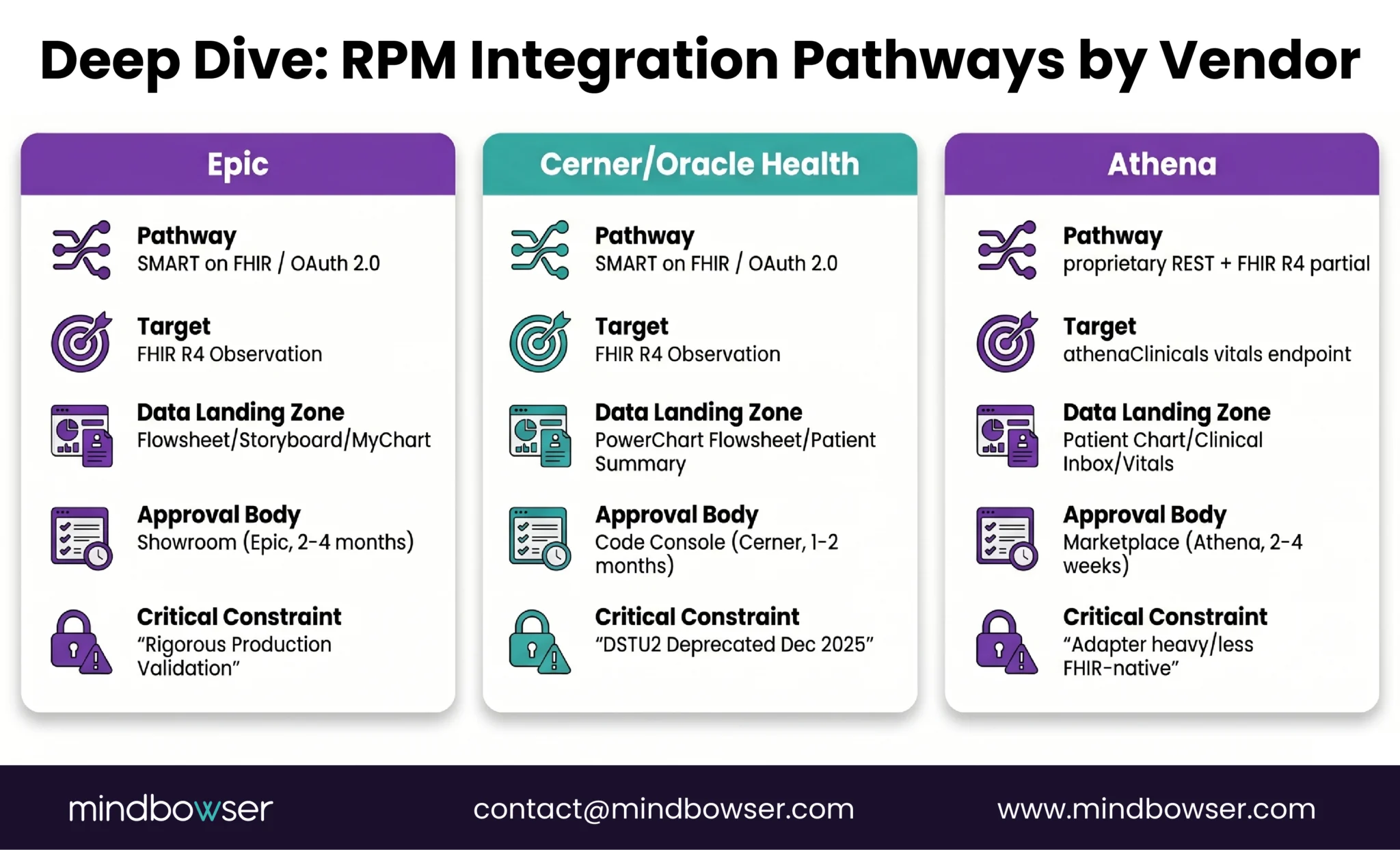
Integration pathway: SMART on FHIR is the primary method for third-party RPM applications. The RPM platform registers as a SMART app, authenticates via OAuth 2.0 through Epic’s authorization server, and writes FHIR Observations through the Epic FHIR Server (fhir.epic.com). Epic Interconnect serves as the integration gateway for non-SMART integrations (HL7 v2, custom APIs).
Where RPM data lands:
- Flowsheet: vital sign readings appear as rows in the patient’s flowsheet, interleaved with clinic readings. This is the primary clinical view
- Storyboard: the patient summary card in Hyperspace can display RPM status and the latest readings
- Activity view: Hyperspace’s activity layer can show RPM monitoring as a care activity
- MyChart: patients can see their RPM readings in MyChart alongside other health data
Authentication: OAuth 2.0 via Epic’s SMART on FHIR implementation. Scopes define what the RPM platform can read and write. The typical scope for RPM: Observation.write, Patient.read, Encounter.read.
Epic App Orchard (now Showroom): RPM integrations can be listed in Epic’s marketplace for discovery by Epic customers. The listing process adds time (2-4 months for review) but provides credibility and distribution.
What we learned from builds: The API surface looks generous on paper. Epic’s FHIR documentation is thorough. The sandbox environment works well. The surprise comes at production approval. Epic’s production validation is strict: every FHIR resource field is validated against their internal schema, rate limits are enforced per customer, and custom extensions that worked in the sandbox may be rejected in production. Plan for 2-4 months from working sandbox integration to production go-live. The gap is not technical. It is a process.
Epic is also preparing FHIR APIs for USCDI v5 data exchange, expanding standardized access to additional data elements. RPM integrations built against FHIR R4 today will be compatible with USCDI v5 requirements.
How Does RPM Integration Work with Cerner (Oracle Health)?
Cerner, now Oracle Health, is the second-largest EHR vendor in the US. The integration environment is in active transition.
Critical 2025-2026 change: Cerner fully deprecated DSTU2 by December 2025 (OSP Labs, 2025). All integrations must use FHIR R4. If your RPM platform was built against DSTU2 Cerner APIs, it needs migration. This is not optional.
Integration pathway: FHIR R4 APIs through Cerner’s Code Console (developer portal). OAuth 2.0 authentication with SMART on FHIR support. The Observation.create endpoint accepts vital sign data in the same FHIR R4 format used by Epic, which means a single FHIR mapping layer can serve both EHRs.
Where RPM data lands:
- PowerChart flowsheet: vital signs appear in the flowsheet alongside clinic readings
- Patient summary: latest readings visible in the chart summary view
- Results review: RPM Observations appear in the results tab with appropriate LOINC categorization
Cerner-specific considerations:
- Code Console approval is generally faster than Epic Showroom (4-8 weeks vs 2-4 months)
- Cerner’s FHIR R4 implementation has different required fields than Epic’s. Both follow the spec, but each vendor interprets “required” and “must support” slightly differently. Test against both validation engines
- The Millennium-to-Oracle Health migration means the underlying infrastructure is evolving. Build against FHIR R4 (not legacy Millennium APIs) to be migration-safe
- Oracle’s acquisition is adding cloud-native capabilities. Expect the API surface to expand in 2026-2027
Talk to Our RPM Integration Team to Accelerate Your RPM-to-EHR Integration
How Does RPM Integration Work with Athena?
Athena (athenahealth) is the dominant EHR for ambulatory and small-to-mid-size practices, exactly the segment where RPM for primary care is growing fastest.
Integration pathway: athenaClinicals API, which is more proprietary than Epic or Cerner’s FHIR implementations. Athena supports FHIR R4 for certain data types but much of the clinical data exchange still flows through their proprietary REST API. The Athena Marketplace provides a partner integration path similar to Epic Showroom.
Where RPM data lands:
- Clinical inbox: RPM readings can flow as clinical messages
- Patient chart: vitals section for structured observations
- Encounters: RPM data can be associated with encounters for documentation continuity
Athena-specific considerations:
- Less FHIR-native than Epic or Cerner. More adapter work required to transform FHIR Observations into Athena’s expected format
- The proprietary API is well-documented but the data model differs from standard FHIR in some areas. Budget additional mapping development time
- Athena’s strength for RPM: the platform dominates in smaller practices and ambulatory settings. These are the practices most likely to be launching RPM programs in 2026 (see our RPM for primary care guide)
- Marketplace listing adds credibility with Athena customers
Timeline: 2-3 months from development start to production. Faster than Epic (less rigorous review process) but the proprietary API mapping adds development time that FHIR-native EHRs don’t require.
What Data Mapping Is Required?
Every RPM vital sign maps to a specific LOINC code within a FHIR R4 Observation resource. This mapping is the same regardless of which EHR you target.
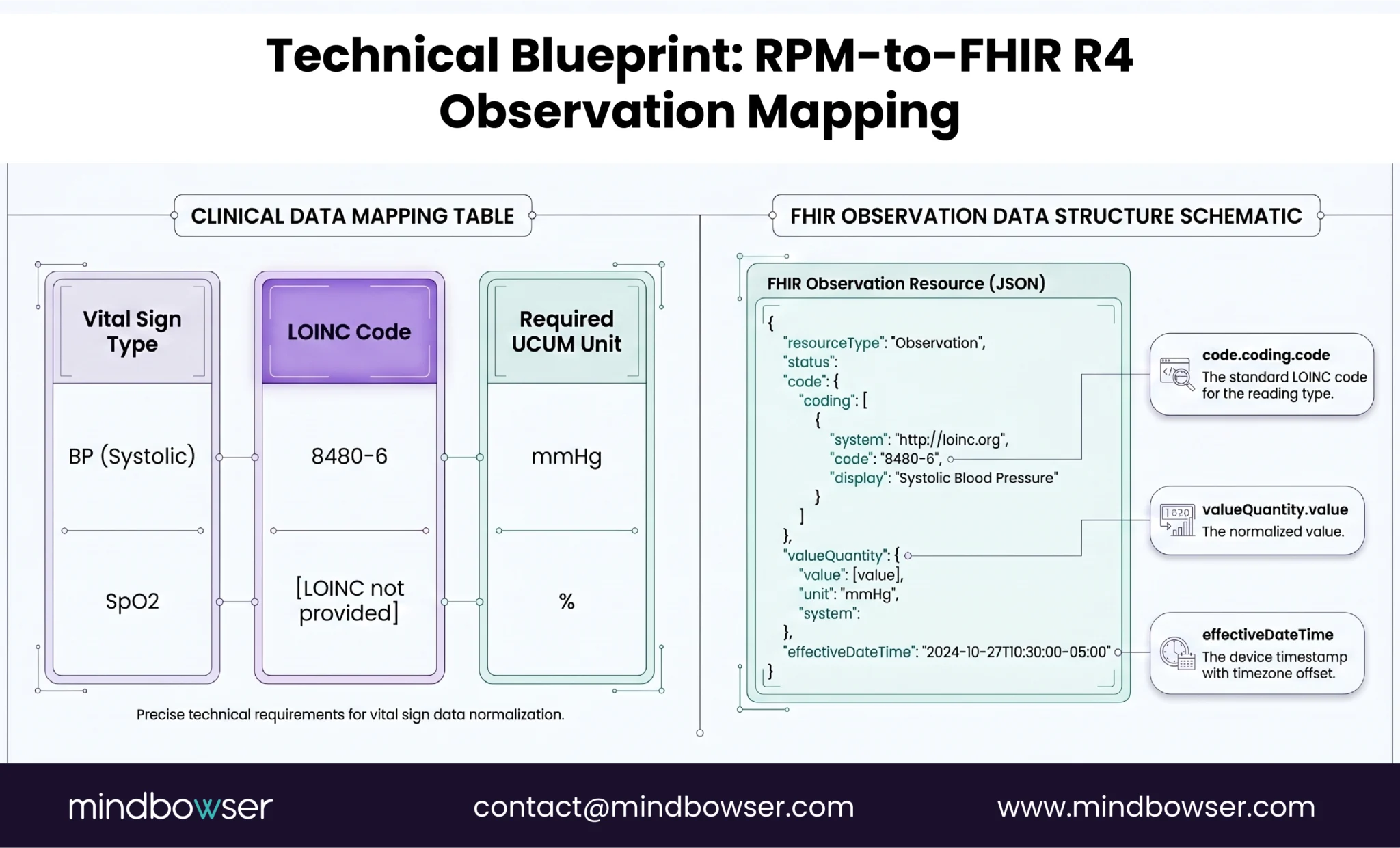
The timestamp problem. This is the mapping issue that breaks more integrations than the data format itself. The device records a reading in the patient’s local timezone. The RPM platform may store it in UTC. The EHR displays it in the clinic’s timezone. If the timestamp conversion is wrong, a blood pressure reading taken at 8 AM in Chicago appears as 6 AM in the EHR for a Denver clinic. Over time, the timestamp drift creates confusion about when readings were taken, undermining clinical trust in the data.
Always store and transmit with timezone offset (ISO 8601 format: 2026-04-16T08:30:00-05:00). Never use bare timestamps without timezone context.
Unit normalization. Some devices report weight in pounds, others in kilograms. Some report glucose in mg/dL, others in mmol/L. The FHIR Observation must use UCUM (Unified Code for Units of Measure). Normalize at the RPM platform layer before writing to the EHR. Do not rely on the EHR to convert units.
What Are the Common Integration Failure Points?
Five failure points, each learned from production incidents.
Sandbox-to-production validation gap. The integration works perfectly in the EHR vendor’s sandbox. First production patient: failure. Epic and Cerner production environments have stricter field validation, tighter rate limits, and data governance rules that the sandbox does not enforce. Always plan for a production validation phase separate from sandbox testing.
OAuth token expiry with silent failure. OAuth access tokens expire (typically 60 minutes for Epic). If the RPM platform does not handle token refresh gracefully, data stops flowing to the EHR with no error visible to the clinical team. The flowsheet simply stops updating. Nobody notices until a physician asks why there are no readings for the past three days, the same erosion pattern that leads to RPM alert fatigue. Implement proactive token refresh and monitoring alerts for failed writes.
API rate limiting during peak hours. EHR APIs have request rate limits. A 1,000-patient RPM program pushing FHIR Observations in real time can hit limits during morning hours (when overnight readings batch-sync). Solution: implement queuing with exponential backoff retry. Spread writes across the day. Prioritize critical alerts over routine readings.
Duplicate observations. A connectivity interruption causes the RPM platform to retry a write. The same reading is pushed twice. The EHR now shows two identical blood pressure readings at the same timestamp. The physician sees what looks like a data error. Trust erodes. Solution: implement idempotency using a unique observation identifier. Before writing, check if the observation already exists.
Timezone misalignment across multi-state programs. A health system spans three time zones. The RPM platform stores readings in UTC. The EHR displays in the clinic’s local time. A patient in Mountain Time takes a reading at 7 AM. It appears as 9 AM in the Eastern Time clinic’s view. Over weeks, the clinician develops a distorted picture of the patient’s daily pattern. We lost two days of patient class mapping on a Cerner build because a PV2 segment we assumed was optional turned out to be functionally required in production. The lesson applies broadly: never trust optional fields or default timezone handling in EHR integration specs.
How Long Does RPM-to-EHR Integration Take?
Timeline varies by EHR vendor and integration method.
| EHR | Method | Development | Approval/Review | Total |
|---|---|---|---|---|
| Epic | SMART on FHIR | 4-8 weeks | 8-16 weeks (Showroom) | 3-6 months |
| Epic | Interconnect (custom) | 6-12 weeks | 4-8 weeks | 2.5-5 months |
| Cerner/Oracle | FHIR R4 (Code Console) | 4-8 weeks | 4-8 weeks | 2-4 months |
| Athena | athenaClinicals API | 6-10 weeks | 2-4 weeks (Marketplace) | 2-3.5 months |
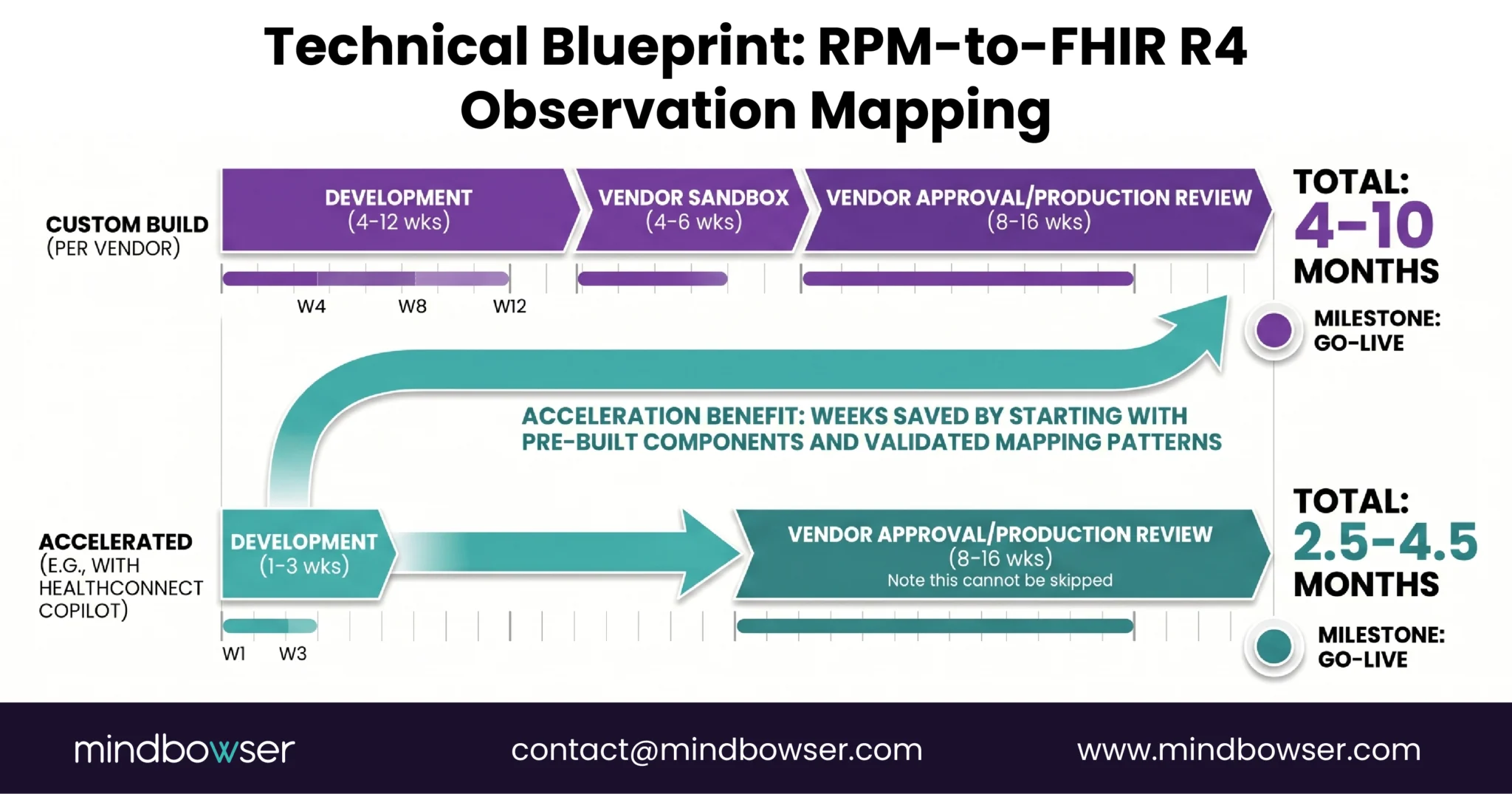
- The Accelerator Path: ConnectHealth provides pre-built FHIR mapping for RPM vital signs and EHR connectors for Epic and Cerner. This compresses the development phase from 4-12 weeks to 1-3 weeks for standard RPM data types (BP, SpO2, glucose, weight, HR). The vendor approval phase cannot be accelerated (it is the EHR vendor’s process), but starting with a pre-validated integration pattern reduces approval rejections.
- The shortcut that exists: if your organization already has a SMART on FHIR app registered with Epic (for any clinical application), adding RPM data flows to that existing registration is weeks, not months. The SMART app is already approved. The FHIR endpoint is already configured. You are adding new Observation types to an existing integration, not building a new one.
Build the Integration Layer or Use Middleware?
Two approaches, each with clear trade-offs.
Native FHIR integration: build direct API connections to each EHR. Write the FHIR mapping layer, handle authentication, manage the vendor approval process for each EHR independently. Maximum control over the data flow, maximum customization of how RPM data appears in the chart. Most engineering effort. Best for organizations using a single EHR vendor.
Middleware (Redox, Health Gorilla, Particle Health): pre-built connectors that normalize the API differences across Epic, Cerner, Athena, and 20+ other EHR vendors. Write once, deploy to many. Faster to multi-EHR support. Adds a dependency (the middleware vendor), a per-transaction cost, and a data hop (device → RPM platform → middleware → EHR instead of device → RPM platform → EHR).
ConnectHealth is Our Approach: pre-built specifically for RPM-to-EHR data flows. It handles FHIR Observation mapping for RPM vital signs, OAuth authentication management (including token refresh), duplicate detection, timezone normalization, and rate-limited write queuing. Connectors for Epic and Cerner are pre-built. Athena support uses the proprietary API adapter.
Decision framework:
- Single EHR (e.g., all Epic): native integration or ConnectHealth. No need for multi-vendor middleware
- Two EHR Vendors (common in multi-site systems): ConnectHealth or middleware. The development savings of a single integration layer justify the abstraction
- Three or more EHR vendors or planning to sell to multiple health systems: middleware (Redox or similar) for broadest vendor coverage. Or ConnectHealth with custom Athena adapter
RPM Data in the EHR Is Not Optional
RPM data outside the EHR is a reporting artifact. RPM data inside the EHR is a clinical tool.
The clinician should see the 30-day blood pressure trend in the same view where they see lab results and the medication list. No tab switching. No portal login. No “let me pull up the RPM dashboard.” The reading from the patient’s living room should sit next to the reading from the exam room, same format, same flowsheet row, same trend graph.
The KLAS data confirms what every clinician already knows: if it is not in the workflow, it does not get used. Forty-four percent satisfaction with EHR integration means 56% of clinicians are working around integration failures every day. RPM data in a separate portal adds to that burden. RPM data in the flowsheet reduces it.
The integration is a one-time investment. For Epic: 3-6 months. For Cerner: 2-4 months. For Athena: 2-3.5 months. With pre-built connectors: weeks. The clinical utility is permanent.
If your RPM data is living in a portal nobody opens, the integration project is shorter than you think and the impact on clinical adoption is larger than you expect. Reach out.
Yes. Epic supports FHIR R4 Observation writes through SMART on FHIR applications and Epic Interconnect. RPM vital signs (BP, SpO2, glucose, weight, heart rate) can appear in the Epic flowsheet, Storyboard summary, and MyChart. The integration requires OAuth 2.0 authentication and registration through Epic Showroom (formerly App Orchard). Development takes 4-8 weeks. Epic approval adds 8-16 weeks. Total timeline: 3-6 months, or 4-8 weeks with a pre-built integration accelerator.
The FHIR R4 Observation resource with the vital-signs category. Each vital sign maps to a specific LOINC code: systolic BP (8480-6), diastolic BP (8462-4), heart rate (8867-4), SpO2 (2708-6), body weight (29463-7), blood glucose (2339-0), respiratory rate (9279-1), body temperature (8310-5). The HL7 FHIR Vital Signs profile defines the required structure. Values use UCUM units (mmHg, %, /min, kg).
Epic: 3-6 months (including 8-16 weeks of Showroom review). Cerner/Oracle Health: 2-4 months (Code Console approval is faster). Athena: 2-3.5 months. These timelines include development and vendor approval. Pre-built integration accelerators (like HealthConnect CoPilot) compress the development phase to 1-3 weeks, but vendor approval timelines cannot be shortened. If your organization already has a SMART on FHIR app registered with Epic, adding RPM data flows is weeks, not months.
When integrated correctly, RPM data appears as structured Observation resources in the EHR flowsheet, the same location as clinic vital signs. This is the target architecture. RPM readings should be interleaved with in-clinic readings in the vitals trend view. Some implementations route RPM data as clinical notes or inbox messages, which is inferior: notes are unstructured, not trended, and not visible in the vitals workflow. Always target flowsheet integration using FHIR Observations.
The standard LOINC panel for vital signs is 85353-1. Individual codes: systolic BP (8480-6), diastolic BP (8462-4), heart rate (8867-4), oxygen saturation (2708-6), body weight (29463-7), blood glucose (2339-0), respiratory rate (9279-1), body temperature (8310-5). These codes are standardized across all EHR vendors. Using the correct LOINC code ensures the reading appears in the right flowsheet row and triggers the correct clinical decision support rules.
Yes. Both Epic and Cerner support FHIR R4 for Observation writes. A single FHIR mapping layer (RPM reading → FHIR Observation with LOINC code) can serve both EHRs. The differences are in authentication (each vendor’s OAuth implementation), validation rules (required vs optional fields differ), and approval processes (Showroom vs Code Console). A middleware layer or pre-built connector like HealthConnect CoPilot normalizes these differences so the RPM platform writes once and the connector handles vendor-specific requirements.
Native FHIR integration means building direct API connections to each EHR vendor, handling authentication, mapping, and write logic per vendor. Maximum control, most engineering effort. Best for single-EHR organizations. Middleware (Redox, Health Gorilla, or HealthConnect CoPilot) provides pre-built connectors that normalize differences across EHR vendors. Write once, deploy to many. Adds a dependency and per-transaction cost but saves months of multi-vendor development. Best for organizations connecting to 2+ EHR vendors or planning to scale across health systems.