BLOGS
BLOGS  NEWSROOM
  CASE STUDIES
  WEBINARS
  PODCASTS
  ASSET HUB
  EVENT CALENDAR























TL;DR
Mobile EHR isn’t desktop EHR on a tablet. It’s offline-first, touch-optimized, camera-integrated, and GPS-enabled. The mHealth apps market hit $49.69 billion in 2026 at 15.2% CAGR. Here’s the architecture: offline FHIR sync, local AES-256 encrypted storage, background sync on connectivity, and 5 field-based use cases from home health nursing to mobile wound care with AI. Plus our proof: a pediatric care platform where 70%+ of families use the mobile app weekly.
A home health nurse walks into a patient’s apartment in rural West Virginia. No WiFi. Cell signal at one bar. She needs to complete an OASIS assessment, document wound measurements with photos, record vitals from a Bluetooth pulse oximeter, and capture the patient’s signature on a consent form.
Then she gets in her car, drives to the next patient, and the data syncs automatically when she hits a stretch of road with signal.
That’s mobile EHR. Not a desktop application squeezed onto a 10-inch screen. A fundamentally different architecture built for clinical workflows that happen outside hospital walls.
The mHealth apps market reached $49.69 billion in 2026, growing at 15.2% CAGR (TATEEDA, 2026). Outpatient FHIR app adoption climbed from 49% in 2021 to 64% in 2024. And CMS now requires payers to report Patient Access API usage metrics starting 2026 — the mobile health infrastructure is being mandated, not just adopted.
I. Why Can’t You Just Put Desktop EHR on a Tablet?
Five reasons. Each one requires a different architectural decision.
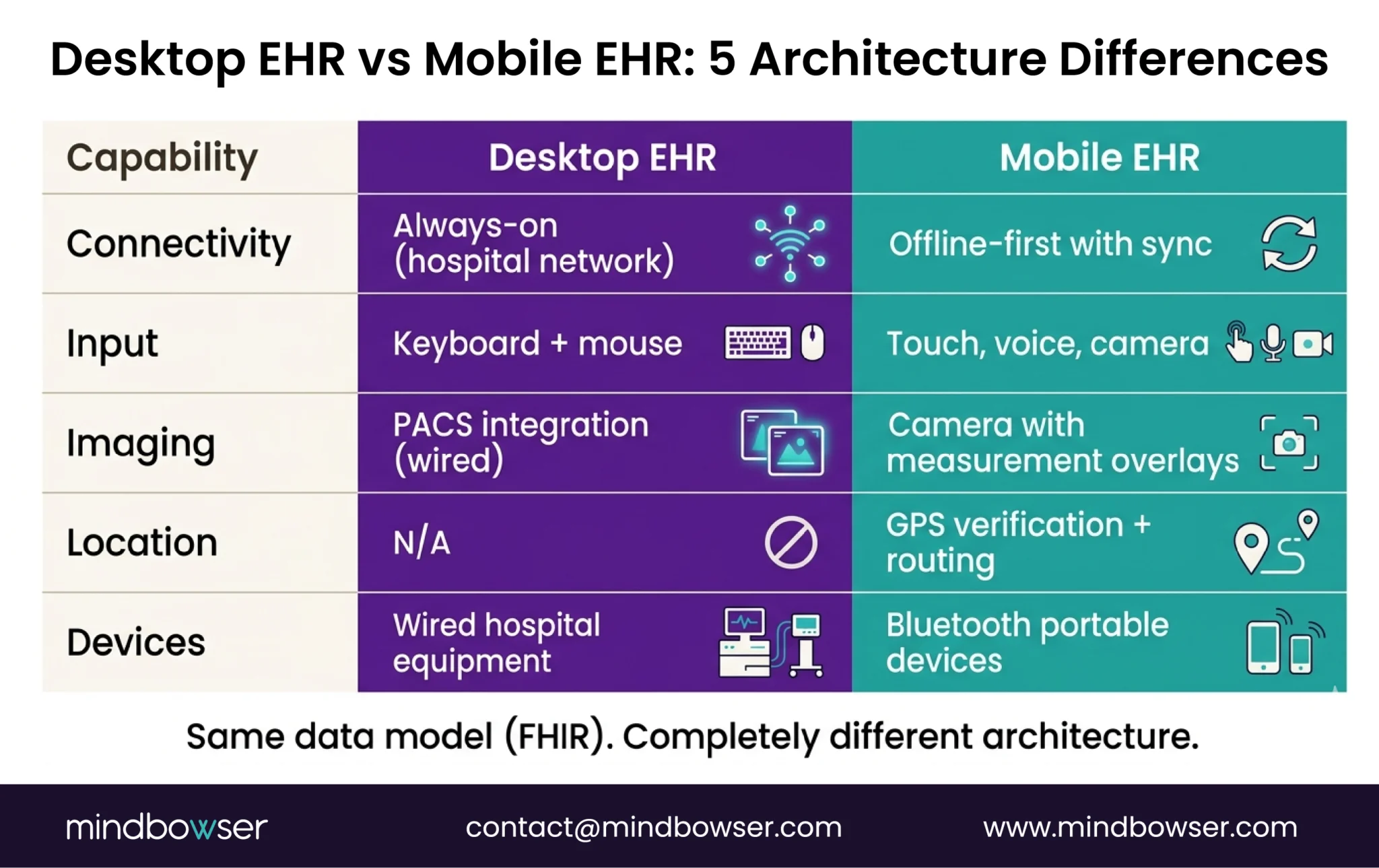
- Offline capability is non-negotiable. Home visits, community health outreach, rural clinics, ambulance rides — clinical care happens where WiFi doesn’t. A mobile EHR that shows a loading spinner when the connection drops is useless in the field. The app must function fully offline and sync when connectivity returns.
- Touch-optimized clinical documentation. Desktop EHR is designed for keyboard and mouse. Clinical notes entered with a physical keyboard at a workstation. Mobile documentation needs: voice-to-text, tap-to-select clinical terms, swipe-based navigation, and forms designed for thumb input on a 6-inch screen. Shrinking desktop forms to mobile doesn’t work. The input model is different.
- Camera integration is a clinical tool. Wound photography with measurement overlays. Consent form capture. Insurance card scanning. Skin condition documentation. Desktop EHR doesn’t have a camera. Mobile EHR treats the camera as a clinical instrument — with HIPAA-compliant storage and metadata tagging.
- GPS and route optimization. Home health agencies manage clinicians visiting 6-8 patients per day across a geographic area. The mobile app needs: GPS-based visit verification (proof the clinician was at the patient’s location), route optimization between visits, and estimated travel time for scheduling. Desktop EHR has no concept of location.
- Bluetooth device integration. Pulse oximeters, blood pressure cuffs, glucometers, weight scales — all connect via Bluetooth to the clinician’s phone or tablet. The mobile EHR receives the reading, maps it to a FHIR Observation resource, and associates it with the current encounter. Desktop EHR integrates with hospital-grade devices via wired connections. Mobile integrates with portable devices via Bluetooth.
The architecture consequence: Every one of these requirements changes the tech stack. Offline-first requires local database + sync engine. Camera requires secure local image storage + PHI metadata. GPS requires background location services. Bluetooth requires device protocol handlers. You can’t retrofit these into a desktop application. You build mobile-first or you don’t build mobile at all.
II. What Does Mobile EHR Architecture Look Like?
Four layers, all designed for disconnected operation.
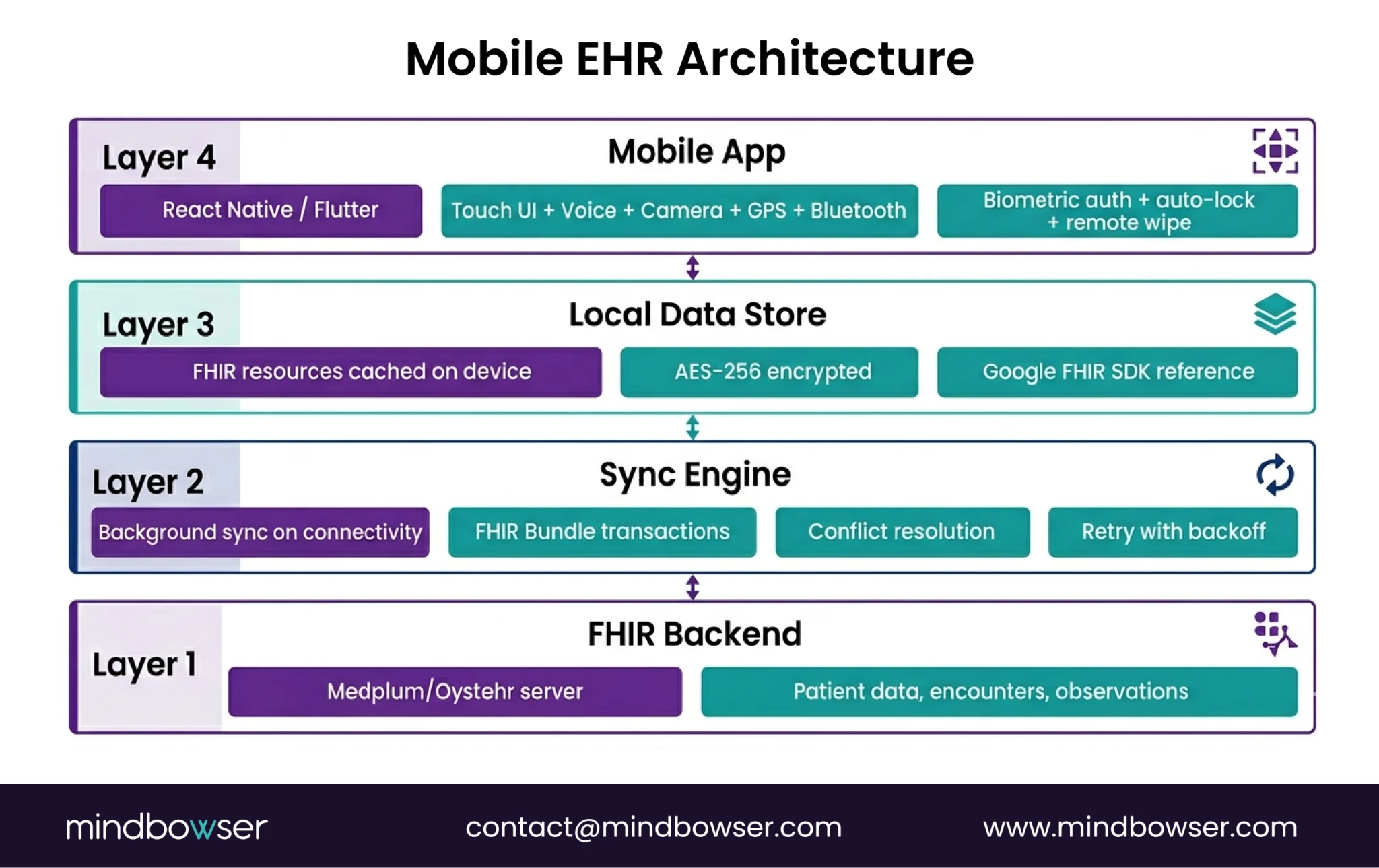
A. Layer 1: Cross-Platform Framework
- React Native or Flutter for iOS + Android from a single codebase
- We typically use React Native for healthcare apps because the Medplum React component library is directly reusable, and the TypeScript ecosystem aligns with FHIR tooling
- Native modules for: camera access, Bluetooth, GPS, biometric auth, local storage
B. Layer 2: Offline-First Local Data Store
This is the core architectural difference from desktop EHR.
- Local FHIR data store on the device — patient demographics, encounter data, observations, medication lists cached locally
- AES-256 encryption for all local PHI — mandatory under HIPAA, non-negotiable under the 2026 Security Rule updates
- Google’s Android FHIR SDK provides a reference implementation: FHIR Engine Library with local FHIR storage, search, and synchronization capabilities
- Data structured as FHIR Bundles for efficient sync
The offline model: Clinician opens the app -> patient data loads from local store (no network needed) -> clinician documents the visit, captures vitals, takes photos -> all data saved locally with timestamps -> when connectivity returns, background sync pushes changes to the FHIR server and pulls any updates from other providers.
C. Layer 3: Sync Engine
- Background sync when connectivity is detected — no manual “upload” button
- Conflict resolution for data modified on both device and server during offline period
- FHIR Bundle transactions for efficient batch sync (one API call syncs an entire encounter’s data)
- Sync status indicators so clinicians know which records have been synced and which are pending
- Retry logic with exponential backoff for unstable connections
D. Layer 4: Mobile Authentication and Security
- Biometric authentication (fingerprint, Face ID) for quick access — clinicians unlock 50+ times per day
- OAuth 2.0 for session management with the FHIR server
- Auto-lock on inactivity (configurable, typically 2-5 minutes for field use — shorter than the 15-minute desktop standard because devices are physically mobile)
- Remote wipe capability if device is lost or stolen
- Certificate pinning for server communication to prevent man-in-the-middle attacks
III. What Are the 5 Mobile EHR Use Cases?
Each use case has unique mobile requirements beyond the baseline architecture.
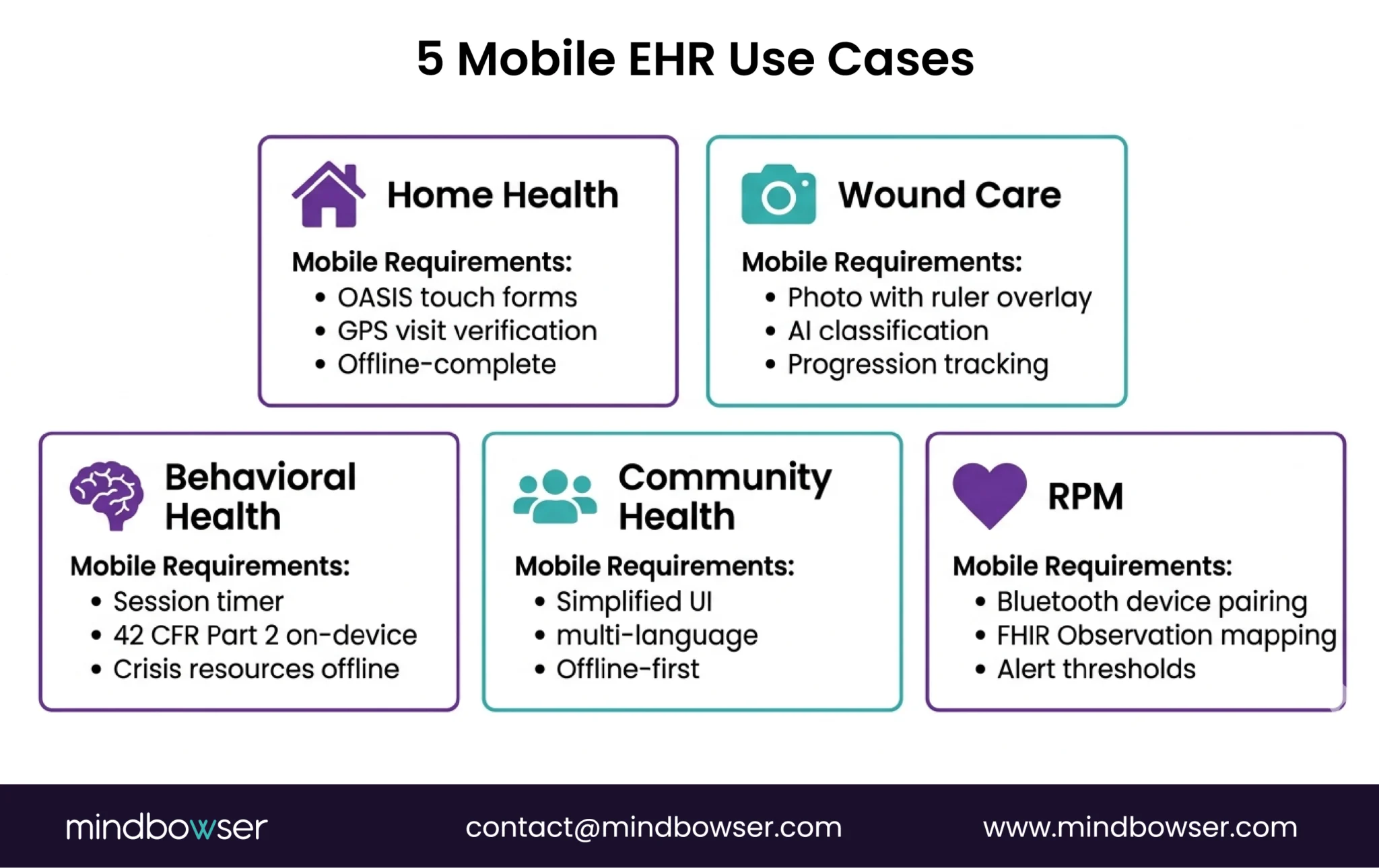
A. Home Health Nursing
What’s unique: OASIS assessment completion in the patient’s home. Visit documentation with start/end times. Medication reconciliation at bedside. Patient education materials delivered on-device.
Mobile-specific requirements:
- OASIS form engine optimized for touch (120+ data points per assessment)
- Visit verification via GPS (proof of presence at patient address)
- Offline-complete capability (entire OASIS can be done without connectivity)
- Signature capture on-screen for consent and visit confirmation
Home health is the single largest driver of mobile EHR demand. See our home health EHR overview for the broader context.
B. Mobile Wound Care
What’s unique: Wound photography with ruler overlay for measurement. Longitudinal wound progression tracking (photo comparison over time). AI-assisted wound classification (pressure injury staging, burn depth estimation).
Mobile-specific requirements:
- Camera integration with measurement calibration
- Secure PHI-compliant photo storage with encounter association
- AI image classification running on-device or via cloud with de-identification
- Side-by-side wound progression viewer
C. Community Health Workers
What’s unique: Community-based screening and referral. Social determinants of health (SDOH) data collection. Follow-up tracking for patients who may not have a fixed address or phone number.
Mobile-specific requirements:
- Simplified UI for non-clinical staff
- Multi-language support
- SMS/WhatsApp integration for patient communication
- Offline-first (community health workers often serve areas with no connectivity)
D. Mobile Behavioral Health
What’s unique: Therapy session documentation. PHQ-9/GAD-7 assessment administration. Crisis protocol access. 42 CFR Part 2 segmented records on mobile.
Mobile-specific requirements:
- Session timer with auto-documentation prompts
- Segmented access controls (42 CFR Part 2) enforced at the device level
- Crisis resource database available offline
- Secure messaging between sessions (not SMS — HIPAA-compliant channel)
E. Mobile RPM Data Collection
What’s unique: Patient-entered vitals from home devices. Continuous monitoring with alert thresholds. Clinician dashboard for remote review.
Mobile-specific requirements:
- Bluetooth pairing with consumer health devices (Withings, Omron, iHealth)
- FHIR Observation resource mapping from device readings
- Alert engine for out-of-range values (configurable thresholds)
- Patient-facing UI (not clinician UI — simpler, larger touch targets, fewer steps)
IV. How Do You Build Mobile EHR on a FHIR Platform?
If you’re building on Medplum or another FHIR-native platform, the mobile architecture connects to the same API that the desktop app uses, but with an additional offline layer.
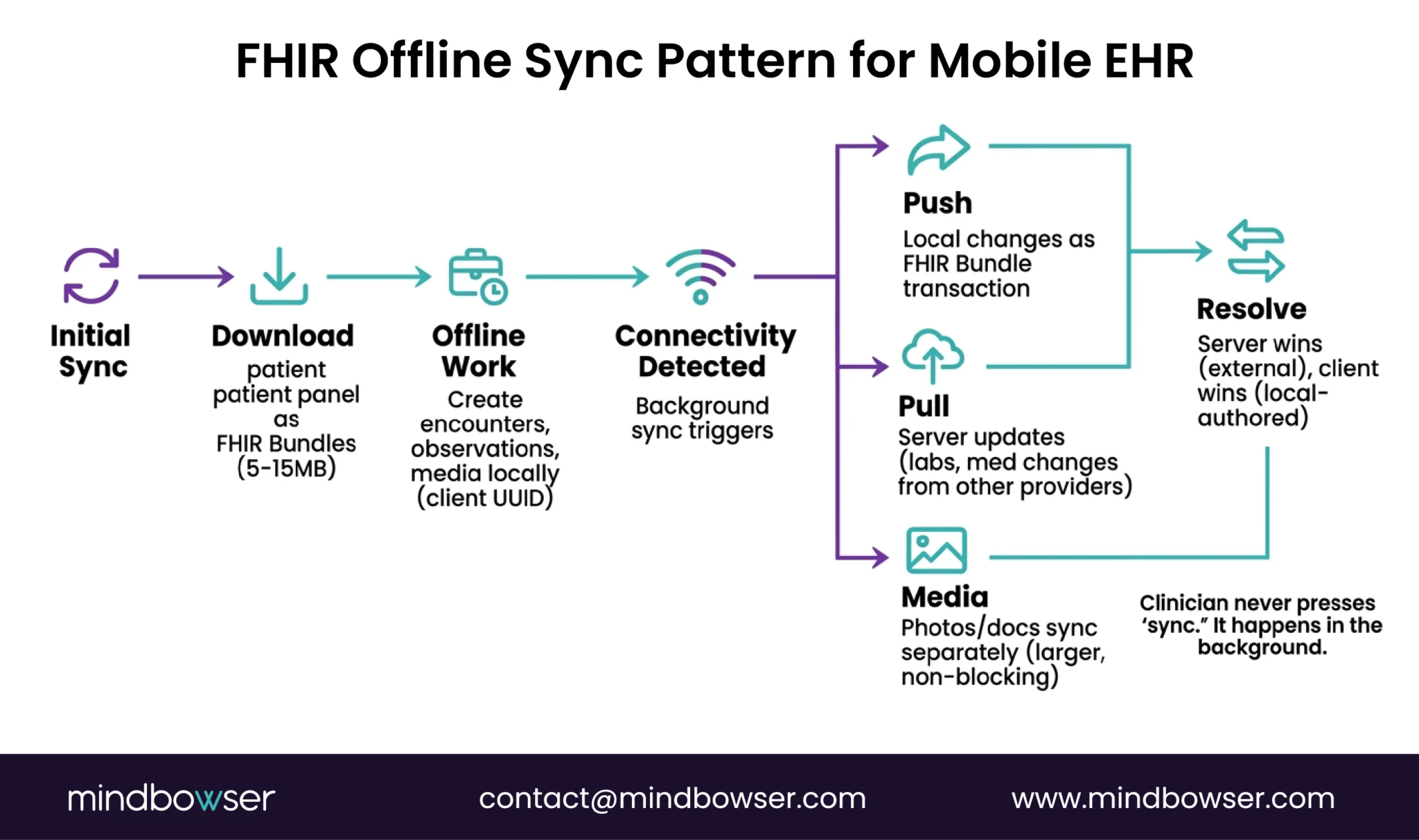
The mobile-specific patterns:
- Initial sync: On first login, download the clinician’s patient panel as FHIR Bundles to the local store. For a home health nurse with 30 active patients, this is typically 5-15MB of FHIR data.
- Encounter creation (offline): Clinician starts a visit. A new Encounter resource is created locally with a client-generated UUID. All observations, notes, and media are associated with this encounter ID locally.
- Sync on connectivity: The background process detects the network. Pushes local changes as a FHIR Bundle transaction. Pulls any server-side updates (lab results, medication changes from other providers). Resolves conflicts (server wins for external data, client wins for locally-authored data).
- Media handling: Photos and documents are stored locally with AES-256 encryption. On sync, they’re uploaded to the FHIR server as DocumentReference resources with binary attachments. Large media files sync separately from clinical data to avoid blocking the critical sync.
- PHISecure for mobile: Our HIPAA-compliant data handling layer extends to mobile — managing local encryption keys, audit logging of on-device PHI access, and secure deletion when a patient is removed from the clinician’s panel.
Our proof: We built a pediatric care platform where 70%+ of families use the mobile app weekly for appointment management, care plan access, and communication with providers. The mobile experience wasn’t an afterthought — it was the primary interface. 45% reduction in scheduling friction because parents could manage appointments, family profiles, and reminders directly from their phone. That’s what mobile-first looks like when the architecture is designed for it.
Building a mobile clinical platform? Tell us about your field workflow, and we’ll scope the mobile architecture — offline sync, device integration, FHIR backend, and estimated timeline. For Medplum-based mobile builds, see our Medplum integration services.
Where Does This Leave You?
Mobile EHR is a different architecture, not a different screen size. The five requirements (offline, touch, camera, GPS, Bluetooth) each change the tech stack. And the five use cases each add specialty-specific mobile requirements on top.
Three things worth remembering:
- Mobile-first, not mobile-adapted. If your mobile app is a responsive version of the desktop, your field clinicians will fight it. Design for offline, touch, and camera from the first wireframe. The architecture decisions are different enough that retrofitting mobile onto a desktop EHR costs more than building mobile-first.
- Offline-first is non-negotiable for field care. Home health, community outreach, rural clinics — connectivity is unreliable. Your mobile EHR must work fully offline with FHIR sync on reconnection. Google’s Android FHIR SDK provides the reference implementation. If your app shows a spinner when WiFi drops, it’s not a mobile EHR.
- Cost: $50K-$200K for a mobile clinical app on a FHIR platform. React Native + Medplum/Oystehr backend + offline sync layer + device integration. Compare to building mobile infrastructure from scratch at $200K-$500K+. The platform handles FHIR storage, auth, and API. You build the mobile-specific layers. Full cost breakdown.
Need a mobile EHR for home health, community care, or field-based clinical workflows? Tell us about your use case. We’ll scope the architecture and estimate the build.
By approach: Platform-based mobile build (React Native + Medplum/Oystehr FHIR backend + offline sync): $50K-$200K depending on use case complexity, number of device integrations, and offline requirements. From-scratch mobile build (custom backend + mobile): $200K-$500K+. FHIR integration alone adds $50K-$100K for simple integrations, $200K+ for complex multi-system (DogTownMedia, 2026). Annual maintenance: 15-25% of build cost. Our pediatric care platform (mobile-first, 70%+ weekly adoption) was built on the platform model.
Yes. The architecture: local FHIR data store on the device (AES-256 encrypted) + background sync engine that pushes/pulls data when connectivity returns + FHIR Bundle transactions for efficient batch sync + conflict resolution (server wins for external data, client wins for locally-authored). Google’s Android FHIR SDK provides a reference implementation with its FHIR Engine Library supporting local storage, search, and synchronization. The entire clinical workflow (documentation, assessments, vitals capture, photo documentation) runs offline. Data syncs automatically in the background — no manual upload step.
React Native is our recommendation for most healthcare mobile apps: single codebase for iOS + Android, TypeScript ecosystem aligns with FHIR tooling (Medplum’s React components are directly reusable), strong native module support for camera/Bluetooth/GPS, and large developer community. Flutter is the alternative for teams preferring Dart, with strong performance and growing healthcare adoption. Native (Swift/Kotlin) is justified only when maximum platform-specific performance is required (e.g., real-time device data processing). For the FHIR backend, a platform like Medplum or Oystehr provides the API layer, and your mobile app connects through standard FHIR R4 REST calls.