BLOGS
BLOGS  NEWSROOM
  CASE STUDIES
  WEBINARS
  PODCASTS
  ASSET HUB
  EVENT CALENDAR






















TL;DR
Canvas Medical is a decoupled EHR with two customization paths: a Python SDK that lets you write plugins running inside the EHR, and a FHIR R4 API for external data access. The SDK is the differentiator — no other EHR platform lets you write Python code that modifies clinical workflows from inside the server. Pricing starts at $3,950/month (Builder plan). Here’s when Canvas beats Medplum, when it doesn’t, and what the plugin architecture actually looks like
If Medplum is the Rails of EHR and Oystehr is the serverless contender, Canvas Medical is the one that took a completely different approach: instead of giving you a FHIR server and saying “build everything,” Canvas gives you a working EHR and says “customize it.”
That’s a fundamentally different proposition. And for the right team, it’s the faster path to production.
The Out-of-Pocket Health analysis called Canvas “a bet on new EMRs.” We’d frame it slightly differently: it’s a bet that most clinical platform builders don’t want to build scheduling, charting, and billing from scratch. They want those out of the box and the ability to deeply customize the 20% that makes their platform different.
I. What is Canvas Medical and How Is It Different?
Canvas Medical is an AI-powered EHR platform(commonly called Canvas Medical EHR) designed primarily for primary care and value-based care organizations
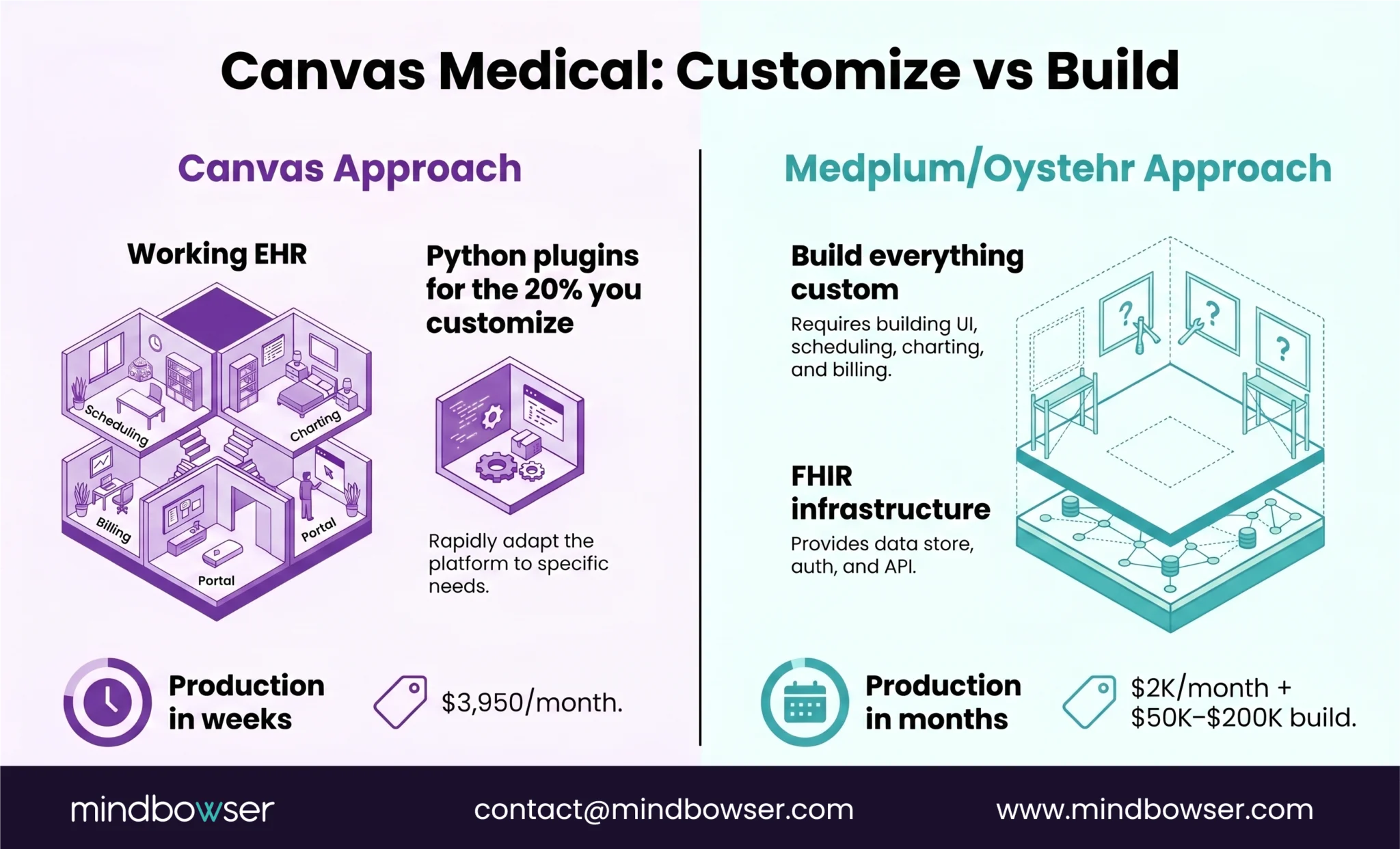
What makes Canvas different from other headless EHR platforms:
- It’s a working EHR, not just infrastructure. When you sign up, you get scheduling, charting, billing, messaging, and a patient portal. Then you customize.
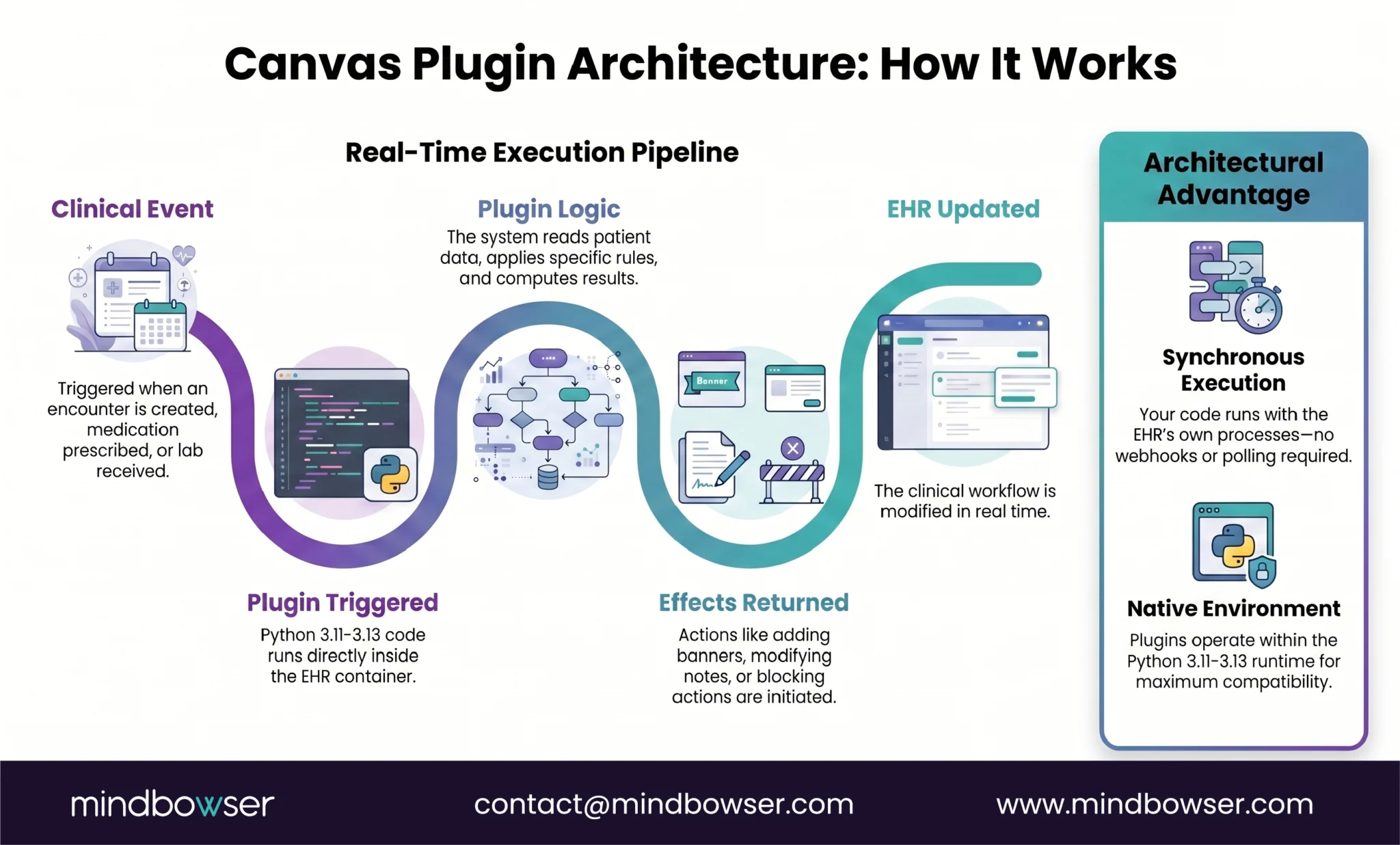
- Python SDK with plugins. Write Python programs that run inside the EHR server container. Not external webhooks. Not API polling. Your code executes synchronously with the EHR’s own processes.
- FHIR R4 API for external integrations — data access, third-party app connections, reporting
- Built-in payments and insurance reimbursement — billing isn’t an integration, it’s native
- AI-assisted plugin development — Canvas offers a Claude Code-powered plugin assistant that goes from idea to deployed plugin in minutes
Key specs:
- FHIR R4 compliant
- Python 3.11-3.13 for SDK development
- Pricing: Builder plan at $3,950/month, Enterprise custom
- ONC certified
- Open source plugin runtime environment
The mental model: Medplum and Oystehr give you a FHIR foundation and say, “build the EHR.” Canvas gives you the EHR and says, “extend it with code.” If your team is 80% satisfied with a commercial EHR and needs to customize the other 20%, Canvas is likely faster than building from scratch on Medplum.
II. What’s the Difference Between Canvas SDK and FHIR API?
Canvas gives you two customization paths. They solve different problems.
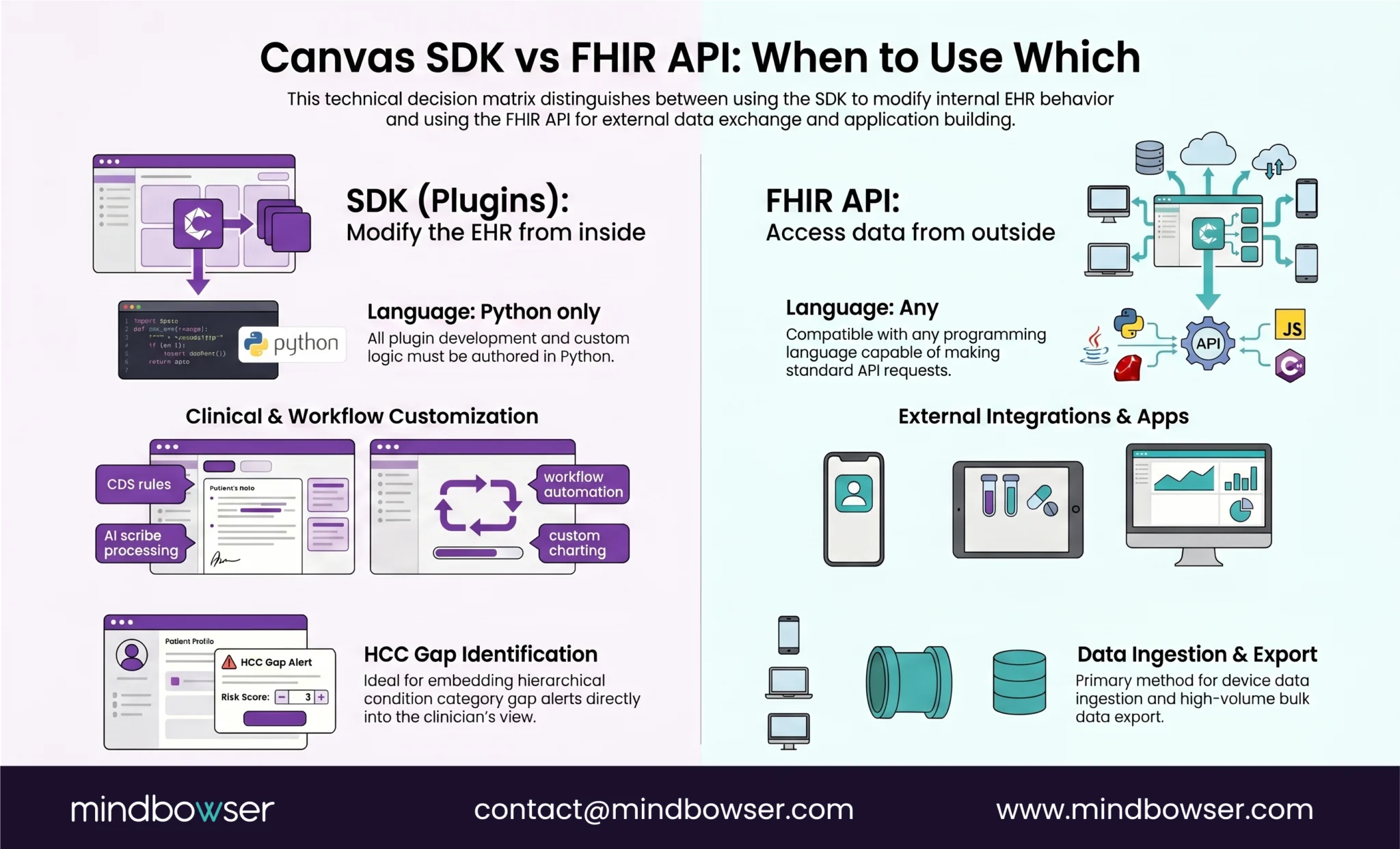
A. The Canvas SDK (Plugins): Modify the EHR from Inside
Plugins are Python programs that execute synchronously inside the Canvas server container. They react to events, read patient data, and return “effects” that alter workflows.
What plugins can do:
- React to clinical events — patient checks in, lab result arrives, medication prescribed, encounter opened
- Read patient data in real time — conditions, medications, allergies, care plans
- Return effects that change behavior — add a banner alert, modify a note, trigger a task, block an action with a reason
- Enforce business rules — “don’t allow this medication if the patient has this condition”
- Implement CDS logic — “flag this HCC code gap based on the patient’s diagnosis history”
Real use cases being built with plugins:
- Identify care gaps based on HCC coding and automatically trigger clinical workflows
- Convert AI scribe output into structured, command-based clinical notes
- Optimize ICD-10 diagnosis code selections in real time
- Auto-generate care plans based on condition combinations
Why this matters: On Medplum or Oystehr, achieving the same result means building a separate application that talks to the FHIR API from the outside. Canvas plugins run inside the EHR. The latency is lower, the integration is tighter, and the development model is simpler for Python teams.
B. The FHIR API: Access Data from Outside
Canvas also provides a standard FHIR R4 API for external access:
- Read patient demographics, encounters, observations, conditions, medications
- Write data from external sources (lab systems, devices, third-party apps)
- Bulk export for reporting and analytics
- Authentication via OAuth 2.0
When to use the FHIR API instead of SDK:
- Your integration is a separate application (mobile app, patient portal, analytics dashboard)
- You need data exchange with external systems (labs, pharmacies, HIEs)
- Your development team isn’t Python — the FHIR API is language-agnostic
- You need bulk data for population health or research
| Use Case | Use SDK (Plugins) | Use FHIR API |
|---|---|---|
| Custom CDS rules inside the EHR | ✓ | |
| External patient app | ✓ | |
| Workflow automation triggered by clinical events | ✓ | |
| Data exchange with external lab | ✓ | |
| Custom charting behavior | ✓ | |
| Analytics dashboard | ✓ | |
| AI scribe post-processing | ✓ | |
| Device data ingestion | ✓ |
If your team is evaluating Canvas for a clinical platform build and needs a technical assessment before committing to $3,950/month, we’ve evaluated Canvas, Medplum, and Oystehr across clinical use cases and can help narrow the decision.
III. How Does Canvas Compare to Medplum and Oystehr?
Three platforms, three philosophies.
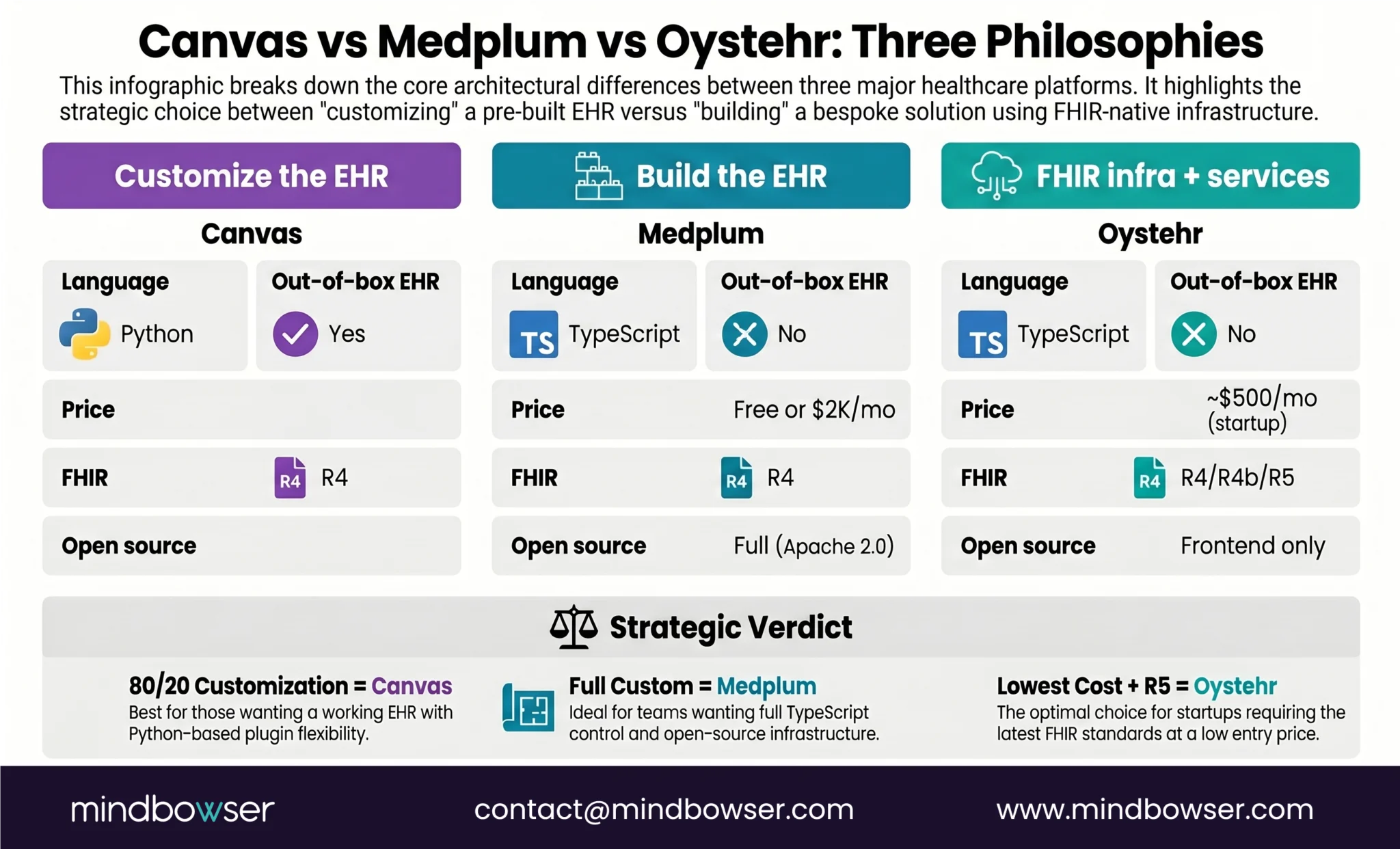
Our honest assessment: Canvas is the right choice when you want a production EHR today and need to customize workflows with Python, not build everything from scratch. The $3,950/month price includes scheduling, charting, billing, and patient portal, things that cost $100K-$200K to build on Medplum or Oystehr. The tradeoff: you’re customizing Canvas’s EHR, not building your own from scratch. If you need full architectural control and IP ownership, Medplum or Oystehr gives you that. If you need a working EHR with deep customization hooks, Canvas gets you there faster.
For the complete headless EHR comparison, including all platforms, see our earlier guide.
IV. What Should Builders Know Before Starting with Canvas?
Practical notes from evaluating the platform:
- Python-first, no exceptions for SDK. If your engineering team writes TypeScript, the plugin system requires a language switch. The FHIR API is language-agnostic, but the deep customization — the part that makes Canvas worth choosing — is Python only. Python 3.11-3.13 required.
- The plugin model is event-driven. You define which events your plugin listens to (encounter created, medication prescribed, lab result received), what data to read, and what effects to return. If you’ve built event-driven systems (Kafka consumers, Lambda triggers, webhook handlers), the mental model will feel familiar.
- Canvas CLI for deployment: Install via pip install canvas. The CLI handles plugin packaging, deployment, and testing. Canvas also offers an AI-assisted development path using Claude Code that can generate plugin scaffolding from a natural language description.
- $3,950/month is the floor for production: The Builder plan includes the full EHR, SDK access, and FHIR API. Enterprise pricing is custom for larger deployments. Compare:
- Canvas: $3,950/month includes EHR + scheduling + charting + billing + portal
- Medplum Cloud: ~$2K/month does not include any EHR UI – you build everything
- Oystehr: ~$500/month at startup volume does not include any EHR UI
The Canvas price includes what you’d spend $100K+ building on other platforms. Factor that into total cost calculations.
- Primary care and VBC are the sweet spot. Canvas was designed for primary care workflows and value-based care models. If your use case is primary care, VBC, or a direct primary care (DPC) model, Canvas’s out-of-the-box workflows will cover 80%+ of what you need. If your use case is highly specialized (fertility, home health, oncology), you may be fighting Canvas’s assumptions rather than benefiting from them.
Canvas SDK or FHIR API — Which Fits Your Workflow?
Canvas Medical occupies a unique position in the headless EHR landscape: it’s the only platform that gives you a production EHR with deep code-level customization via Python.
Three things worth remembering:
- Canvas is “customize the EHR,” not “build the EHR.” If you’re 80% satisfied with a modern EHR and need to deeply customize the other 20% with code, Canvas is faster than building from scratch on Medplum or Oystehr. If you need to build the entire EHR from scratch, Canvas isn’t the right tool.
- Python is non-negotiable for deep customization. The FHIR API is language-agnostic, but plugins — the real differentiator — are Python only. If your team is TypeScript-first, Medplum is a more natural fit.
- $3,950/month buys more than infrastructure. That price includes scheduling, charting, billing, and a patient portal. On Medplum or Oystehr, those would be separate build efforts totaling $100K+. The apples-to-apples comparison isn’t Canvas ($3,950/mo) vs Medplum ($2K/mo) — it’s Canvas ($3,950/mo) vs Medplum ($2K/mo + $100K-$200K in custom UI development).
The Canvas Medical SDK is a Python toolkit for building plugins that run inside the Canvas EHR server. Plugins execute synchronously with the EHR’s own processes — they react to clinical events (encounter created, medication prescribed, lab result received), read patient data in real time, and return “effects” that modify workflows (add alerts, modify notes, trigger tasks, enforce rules). It requires Python 3.11-3.13 and deploys via the Canvas CLI (pip install canvas). The SDK is the deep customization path — the FHIR R4 API provides external data access, but plugins modify the EHR’s behavior from the inside. Canvas also offers AI-assisted plugin development using Claude Code.
Yes. Canvas offers two customization paths: 1. SDK Plugins (Python): Write code that runs inside the EHR server. Customize clinical decision support, automate charting, enforce business rules, implement HCC gap identification, convert AI scribe output into structured notes. Plugins execute synchronously with clinical events for real-time workflow modification. 2. FHIR R4 API: External access for data exchange, mobile apps, analytics dashboards, lab/pharmacy integrations. Language-agnostic (REST API). The SDK is what makes Canvas unique — no other EHR platform offers code-level customization that runs inside the server rather than as an external application.
Choose Canvas when: You want a production EHR with scheduling, charting, billing, and patient portal out of the box AND need to customize 20-30% of workflows with Python code. Best for primary care, VBC, and DPC models. $3,950/month includes the full EHR. Choose Medplum when: You want to build your entire EHR from the ground up with full architectural control. TypeScript team. Need source code ownership (Apache 2.0). Need self-hosting. Best for custom specialty platforms, digital health startups building a product. Free (self-host) or ~$2K/month (cloud) — but you build all UI/workflows yourself ($50K-$200K+ in development). The key question: do you want to customize an EHR (Canvas) or build an EHR (Medplum)?