BLOGS
BLOGS  NEWSROOM
  CASE STUDIES
  WEBINARS
  PODCASTS
  ASSET HUB
  EVENT CALENDAR























TL;DR
83% of data migrations fail or exceed budgets (Gartner, 2024). EHR migrations are worse — you’re moving PHI under HIPAA, across incompatible formats, while patients keep getting treated. We’ve migrated 30TB across 180 production databases for one healthcare platform and built data architectures for country-scale EHR systems. This guide covers the 5 migration types, our 7-step process, real cost and timeline data, and the mistakes that sink most projects.
UPMC is moving 6 million patient records from Oracle Cerner to Epic right now. They’ve enlisted 600 IT professionals and 1,200 clinicians to pull it off. The VA just went live with Oracle Health at four Michigan sites in April 2026 after three years of delays. Epic now holds 42.3% of the US acute care market — up from 39.1% last year — after adding 176 hospitals (Becker’s, 2026).
The migration wave is here. And the question every CTO is asking isn’t whether to migrate. It’s how to do it without losing clinical data, breaking workflows, or ending up in the 83% that fail.
We’ve been on both sides of this:
- We migrated 30TB of EHR data across 180 production databases for a multi-specialty healthcare platform — Azure to AWS
- We assessed and modernized a legacy .NET clinical application for a behavioral health network — 7 data sources consolidated into one patient view
- We built a national health records system for an entire country’s public healthcare infrastructure from a blank data model
Each one taught us something different about what makes clinical data migration succeed or fail. This is that playbook.
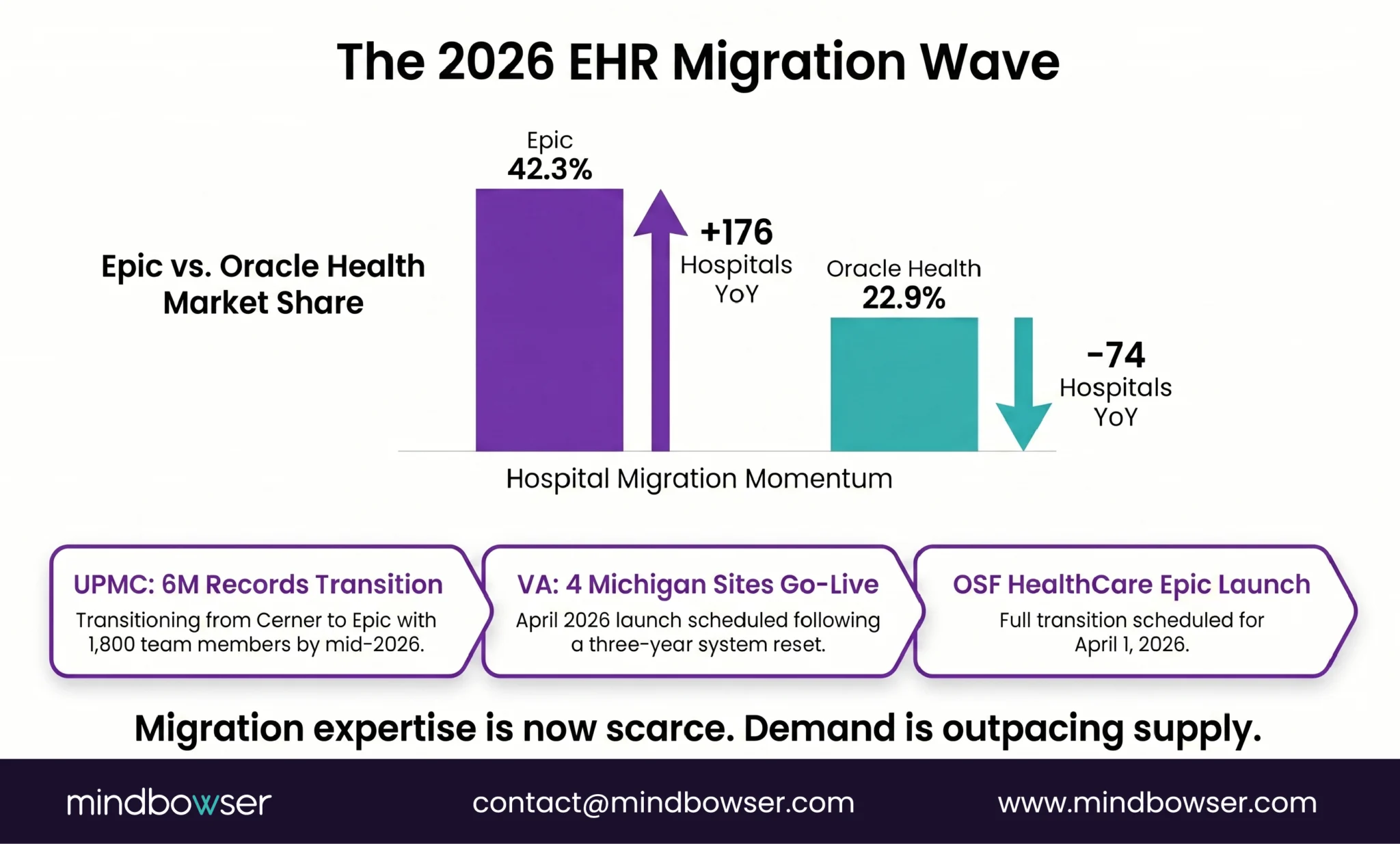
I. Why Is EHR Data Migration Harder Than Regular Database Migration?
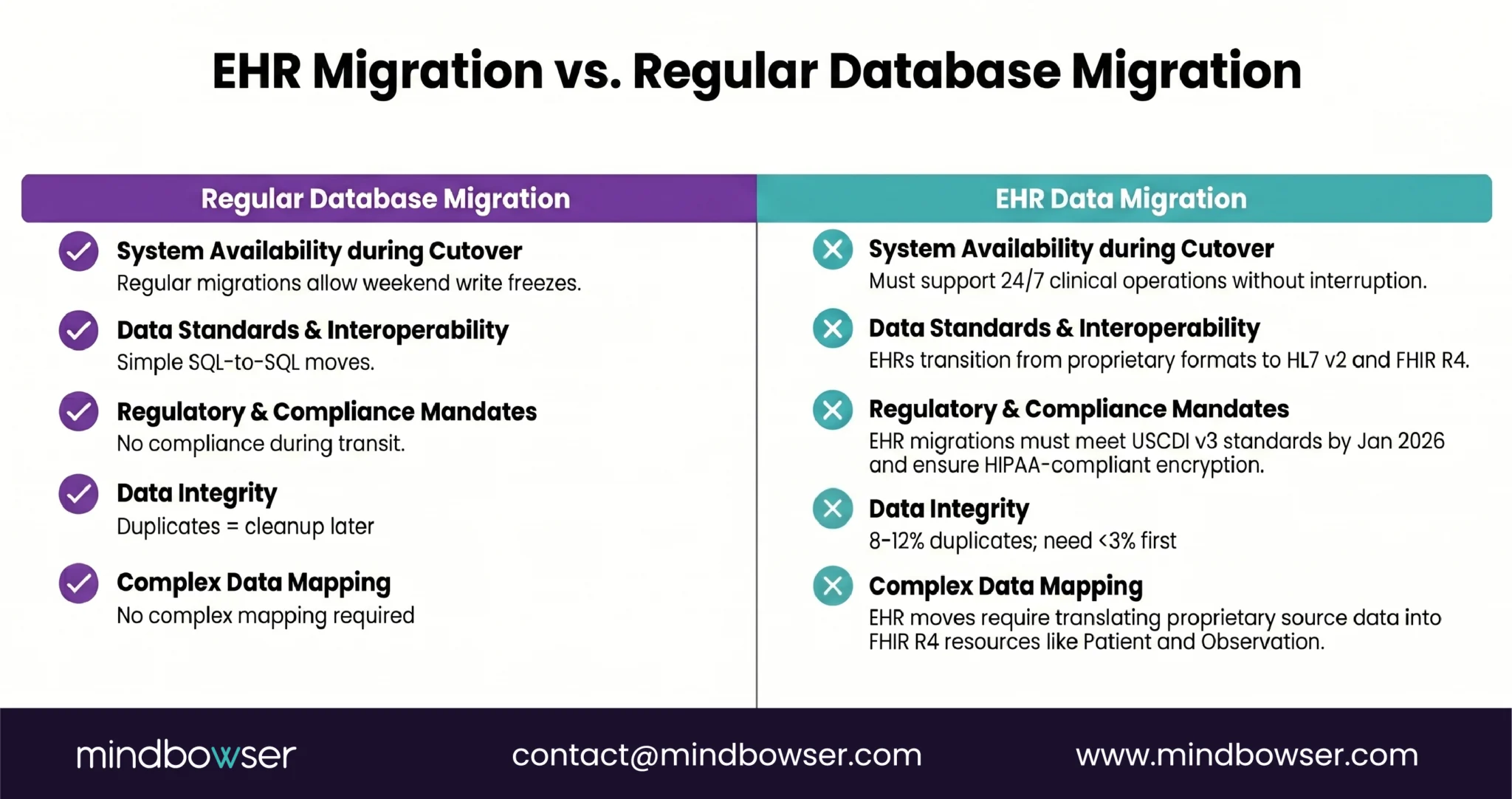
If you’ve migrated a SaaS platform or an e-commerce database, you might think EHR migration is the same problem with more compliance paperwork. It’s not. The data is fundamentally different.
- PHI changes everything. Every record is Protected Health Information under HIPAA. That means encryption in transit (TLS 1.2+), encryption at rest (AES-256), a Business Associate Agreement with every vendor touching the data, and audit logs for every transformation. A regular database migration needs none of this.
- Formats don’t match. Your source system might store allergies as HL7 v2.5.1 AL1 segments. Your target needs FHIR R4 AllergyIntolerance resources. The mapping isn’t one-to-one — it’s a translation exercise with clinical implications.
Get the severity code wrong and a “mild” allergy becomes “life-threatening” in the new system.
- Patients don’t pause care during migration. Unlike a SaaS migration where you can freeze writes for a cutover weekend, clinical systems are 24/7. A patient admitted on Friday night in the old system needs their data accessible on Monday morning in the new system.
- Patient duplicates are everywhere. AHIMA (2023) puts the average duplicate rate at 8-12% across healthcare organizations. EHR systems demand less than 3%. If you migrate without deduplicating, you’ve just moved the mess into a clean house.
- Regulatory pressure is real. USCDI v3 became mandatory in January 2026. If your legacy system doesn’t support the 94 data elements now required, migration isn’t optional. It’s a compliance event.
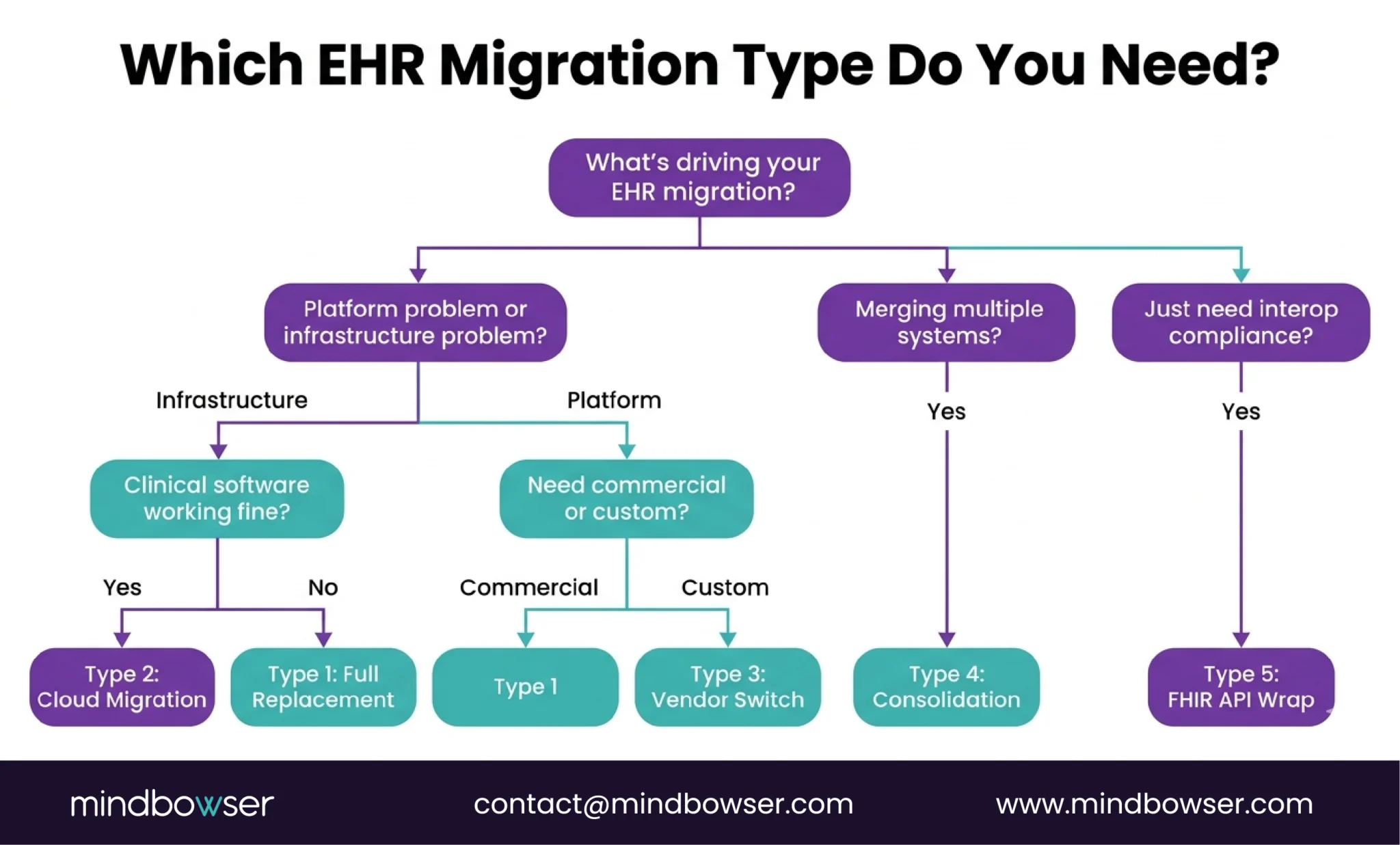
II. What Are the 5 Types of EHR Data Migration?
Not every migration is the same problem. The type determines your timeline, cost, and risk profile.
A. Type 1: Full Replacement (Legacy EHR to Modern EHR)
Rip out the old system, stand up a new one, and move everything. This is what UPMC is doing — 6 million records from Cerner to Epic. Highest risk, highest reward.
- Timeline: 12-24 months for a health system
- Best for: End-of-life platforms or losing vendor support
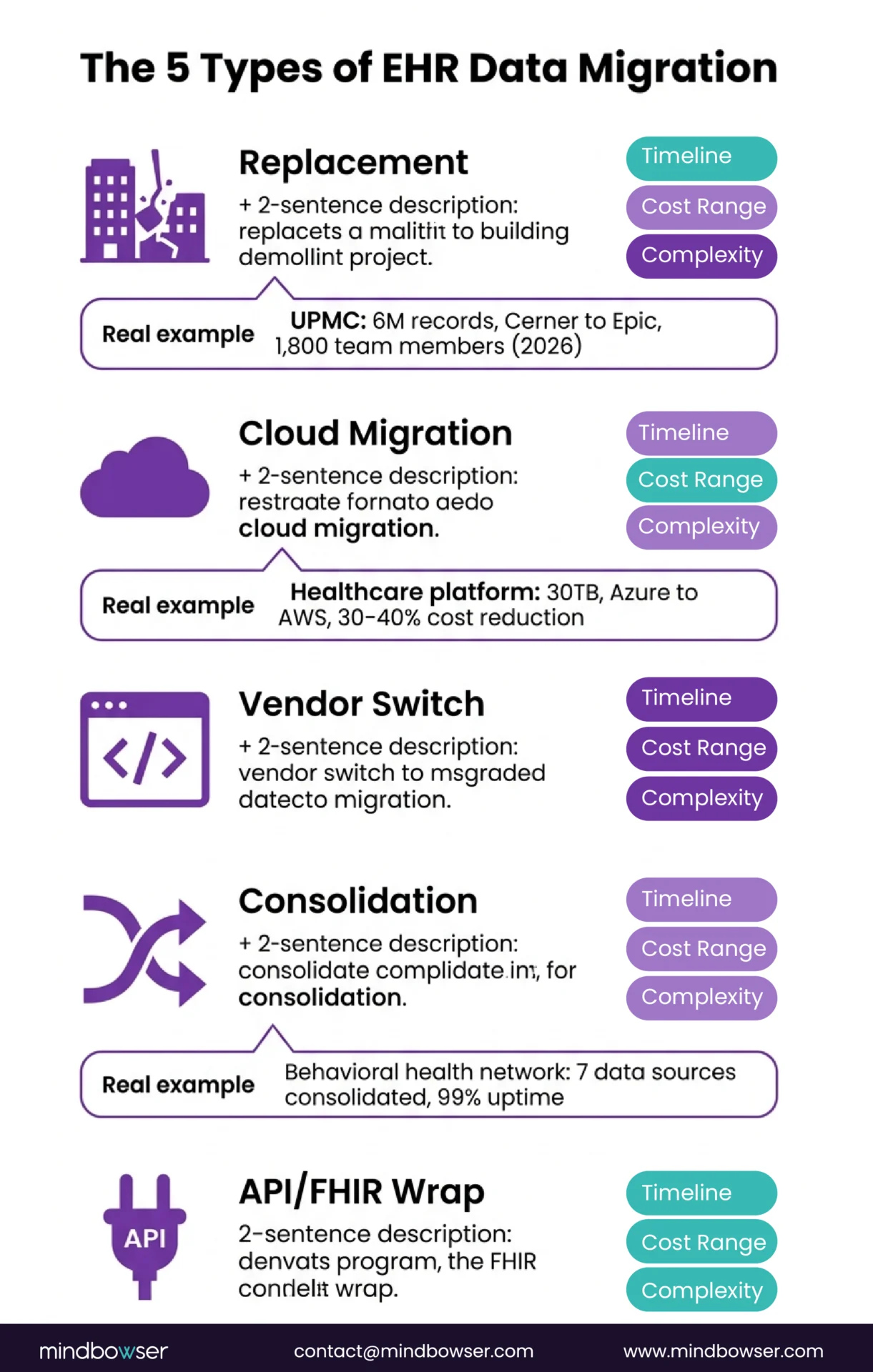
B. Type 2: Cloud Migration (On-Premise to Cloud)
Same application, new infrastructure. We did this for a multi-specialty healthcare platform — migrating from Azure to AWS. The clinical software didn’t change. The hosting, database layer, networking, and cost structure did.
- The numbers: 30TB of data, 180 production databases, 30-40% infrastructure cost reduction
- Timeline: 3-6 months
- Best for: Scaling limits or cost problems, not functionality problems
C. Type 3: Vendor Switch (Commercial to Custom)
Moving from a commercial EHR to a purpose-built platform. Different from Type 1 because the target system doesn’t exist yet – you’re building and migrating simultaneously.
- Timeline: 6-18 months
- Best for: Specialty workflows that don’t fit any commercial template
D. Type 4: Data Consolidation (Multiple Systems to One)
Merging data from multiple sources into a unified platform. We did this for a behavioral health network — 7 clinical data sources consolidated into a single patient view. The challenge isn’t just moving data; it’s reconciling patients who exist in multiple systems with different IDs, different formats, and sometimes different clinical facts.
- Timeline: 4-12 months
- Best for: Post-M&A, or when a health system has accumulated point solutions
E. Type 5: FHIR API Layer Wrap (Keep Legacy, Expose via FHIR)
Don’t migrate the data at all. Instead, build a FHIR R4 API layer on top of the legacy system so modern applications can access the data without moving it. We covered the technical mapping in our HL7 v2 to FHIR conversion guide.
- Timeline: 2-4 months
- Best for: Legacy system works operationally, but can’t meet interoperability requirements
- Lowest risk, lowest cost, but doesn’t solve underlying architecture problems
III. What Does the EHR Data Migration Process Look Like?
Seven steps. Skip one, and you’ll find out at the worst possible time.
A. Step 1: Data Audit and Inventory
Before you move anything, you need to know what you have:
- How many databases?
- What formats (HL7 v2, FHIR, proprietary, flat files)?
- How much unstructured data (scanned documents, free-text clinical notes, PDFs)?
- Where are the duplicates?
Real example: For one cloud migration, the audit revealed ~180 production databases and approximately 30TB of total data including EHR records and telemedicine archives. Knowing that number before we started meant we could plan the right migration tools — AWS Snowball for bulk transfer and DataSync for ongoing synchronization.
B. Step 2: Source-to-Target Data Model Mapping
Map every field in the source system to its equivalent in the target. This sounds straightforward until you realize that “allergies” in System A has 6 fields and “allergies” in System B has 14. Every unmapped field is data that gets lost or corrupted.
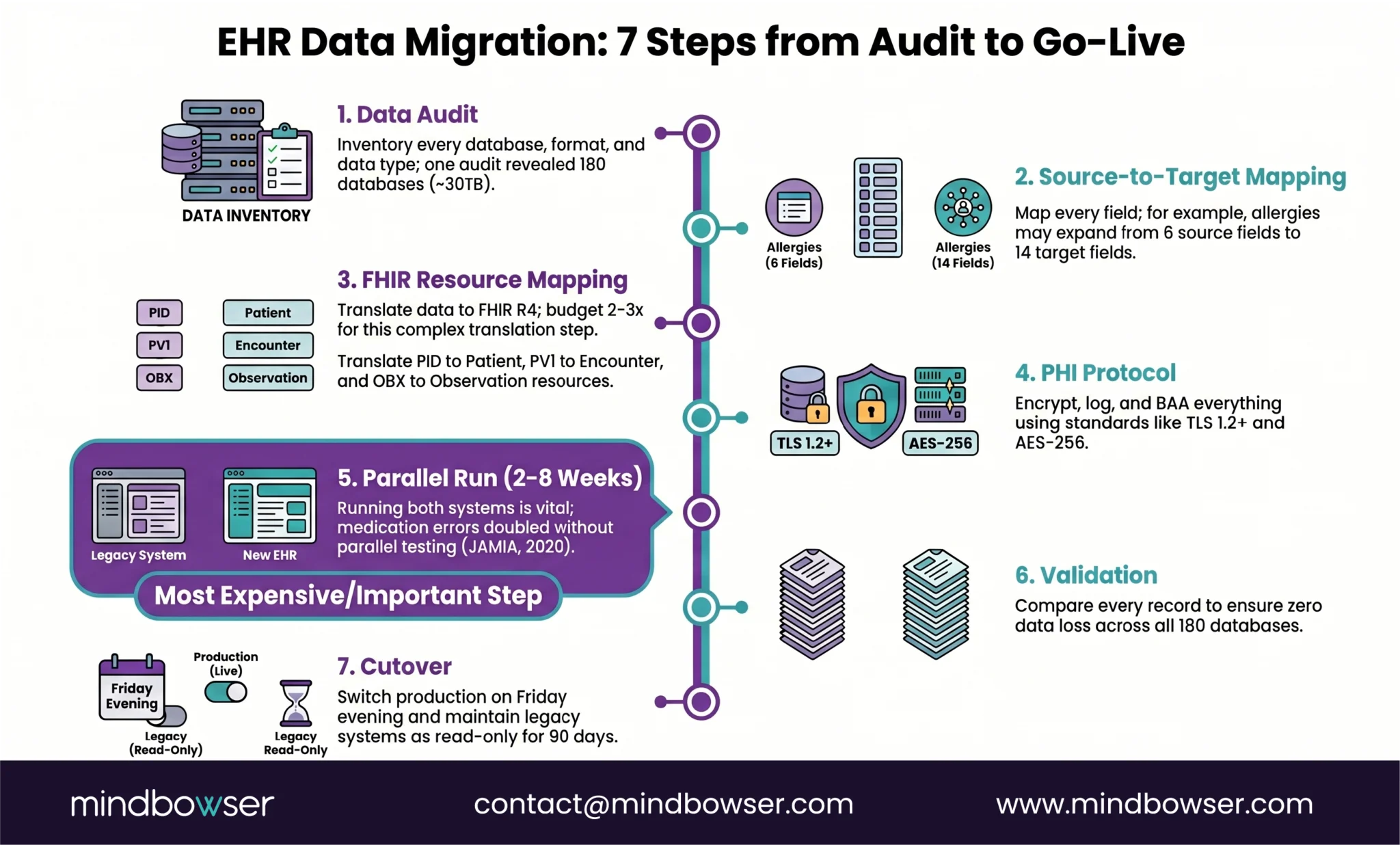
C. Step 3: FHIR Resource Mapping for Structured Data
If your target is FHIR-native (and in 2026, it should be), map your source data to the appropriate FHIR R4 resources:
- PID segments -> Patient resources
- PV1 -> Encounter
- OBX -> Observation
- ORC/RXA -> MedicationRequest/MedicationAdministration
The HL7 v2 to FHIR mapping guide we published covers the technical patterns in detail, including streaming ingestion and batch ETL strategies.
D. Step 4: PHI Handling Protocol
Every transformation, every staging table, every temporary file during migration contains PHI. Your protocol needs:
- Encryption in transit and at rest
- BAA with every vendor and subprocessor
- Access controls on the migration pipeline (not just the production system)
- Audit logging for every record touched
We use our PHISecure layer for this — a HIPAA-compliant data handling framework that sits between source and target during migration.
E. Step 5: Parallel Run
Run both systems simultaneously. New data goes into both. Clinical staff use the old system for care delivery while the new system receives and processes the same data.
Warning: The parallel run is the step most teams want to skip because it’s expensive — you’re paying for two systems. Don’t skip it. A research paper in JAMIA (2020) documented cases where medication dosage errors doubled during EHR transitions that didn’t include adequate parallel testing.
F. Step 6: Validation and Reconciliation
Compare source and target. Every record. Automated reconciliation scripts check:
- Record counts match
- Field values match
- Relationships intact (a patient’s medications still belong to that patient)
- No orphaned records
Real example: On our cloud migration, we validated that database query latency dropped from 120ms to under 80ms (33% improvement) while confirming zero data loss across all 180 databases.
G. Step 7: Cutover and Legacy Decommission
Switch production traffic to the new system. This is typically a planned event — a Friday evening cutover with a rollback window. After cutover, the legacy system moves to read-only mode for a defined period (usually 90 days) before full decommission.
Don’t rush decommission. You’ll need the old system for audit trails and reference queries.
Build Custom EHR
IV. How Much Does EHR Data Migration Cost and How Long Does It Take?
Honest answer: it depends on the type. But here’s what we’ve seen across real projects, not theoretical ranges.
| Migration Type | Timeline | Cost Range | Complexity |
|---|---|---|---|
| Full replacement | 12-24 months | $500K-$5M+ | High — UPMC is using 1,800 people |
| Cloud migration | 3-6 months | $100K-$300K | Medium — one client: 30-40% ongoing savings |
| Vendor switch | 6-18 months | $200K-$750K | High — building + migrating simultaneously |
| Data consolidation | 4-12 months | $150K-$500K | Medium-High — patient matching is the bottleneck |
| FHIR API layer wrap | 2-4 months | $50K-$150K | Low-Medium — no data movement |
The hidden cost nobody budgets for: McKinsey (2024) estimates that up to 40% of an average organization’s total IT budget goes to maintaining technical debt. If your migration is driven by technical debt (and most are), the cost of NOT migrating is the ongoing bleed you’re already paying.
The stat that should scare you: 83% of data migration projects fail or exceed budgets (Gartner, 2024). In healthcare, the stakes are higher because a failed migration doesn’t just cost money — it risks patient safety. That’s why the 7-step process above exists. Every step is a failure prevention mechanism.
Trying to scope a migration and want real numbers, not ranges? Tell us about your current system and we’ll give you a specific estimate based on what we’ve shipped.
V. What Are the Most Common EHR Data Migration Mistakes?
Six mistakes that we see repeatedly. Most of them happen before a single record moves.
A. Migrating dirty data.
If your source system has 10% duplicate patient records, your target system will have 10% duplicate patient records. Clean before you move. The AHIMA (2023) standard is less than 3% duplicates — if your rate is the industry average of 8-12%, deduplication is a prerequisite, not an afterthought.
B. Ignoring unstructured data.
Structured fields (demographics, medications, lab values) get all the attention. But clinical notes, scanned documents, consent forms, and imaging reports are often the majority of the data by volume. If your migration plan only covers structured data, you’ve migrated the skeleton and left the body behind.
C. Skipping the parallel run.
“We’ll test in staging” is not the same as running both systems with real clinical data. Staging environments don’t have the volume, the concurrent users, or the edge cases that production does.
The parallel run is where you discover that your allergy mapping works for 99% of records but fails for the 1% that use non-standard severity codes.
D. Underestimating the HL7 v2 to FHIR mapping effort.
Every health IT leader I know has said some version of “it’s just a format conversion.” It’s not. HL7 v2 is a messaging standard. FHIR R4 is a resource model. The conceptual gap is wider than the technical gap. Budget 2-3x what you think this step will take. Our HL7-to-FHIR mapping guide goes deep on the specific challenges.
E. Not testing with real clinical workflows before cutover.
Your data might migrate perfectly and still break clinical workflows:
- A nurse who used to click 3 times to find a medication list now clicks 7 times
- A physician who had a custom order set loses it in the new system
- A billing team that relied on auto-populated fields now has blank forms
Migration QA must include workflow testing with actual clinicians, not just data validation scripts.
F. Waiting too long to engage cross-functional teams.
Read the challenges of implementing EHR and you’ll see the same pattern: IT plans the migration, clinicians find out at go-live, chaos follows. Clinical, compliance, billing, and training teams need to be at the table from Step 1, not Step 6.
Download the full mistakes cheat sheet: EHR Migration Mistakes to Avoid (PDF) (link to gated/ungated asset)
VI. How Does Mindbowser Handle EHR Data Migration?
We’ve done three fundamentally different types of migration, and the methodology adapts to each.
A. Cloud migration (multi-specialty healthcare platform)
Azure to AWS. 30TB of data including EHR records and telemedicine archives. 180 production databases migrated to AWS RDS with read replicas and KMS encryption. Used AWS Snowball for bulk transfer, DataSync for ongoing sync.
- Result: 30-40% infrastructure cost reduction
- Performance: Database latency improved from 120ms to under 80ms
- Downtime: Zero clinical downtime throughout migration
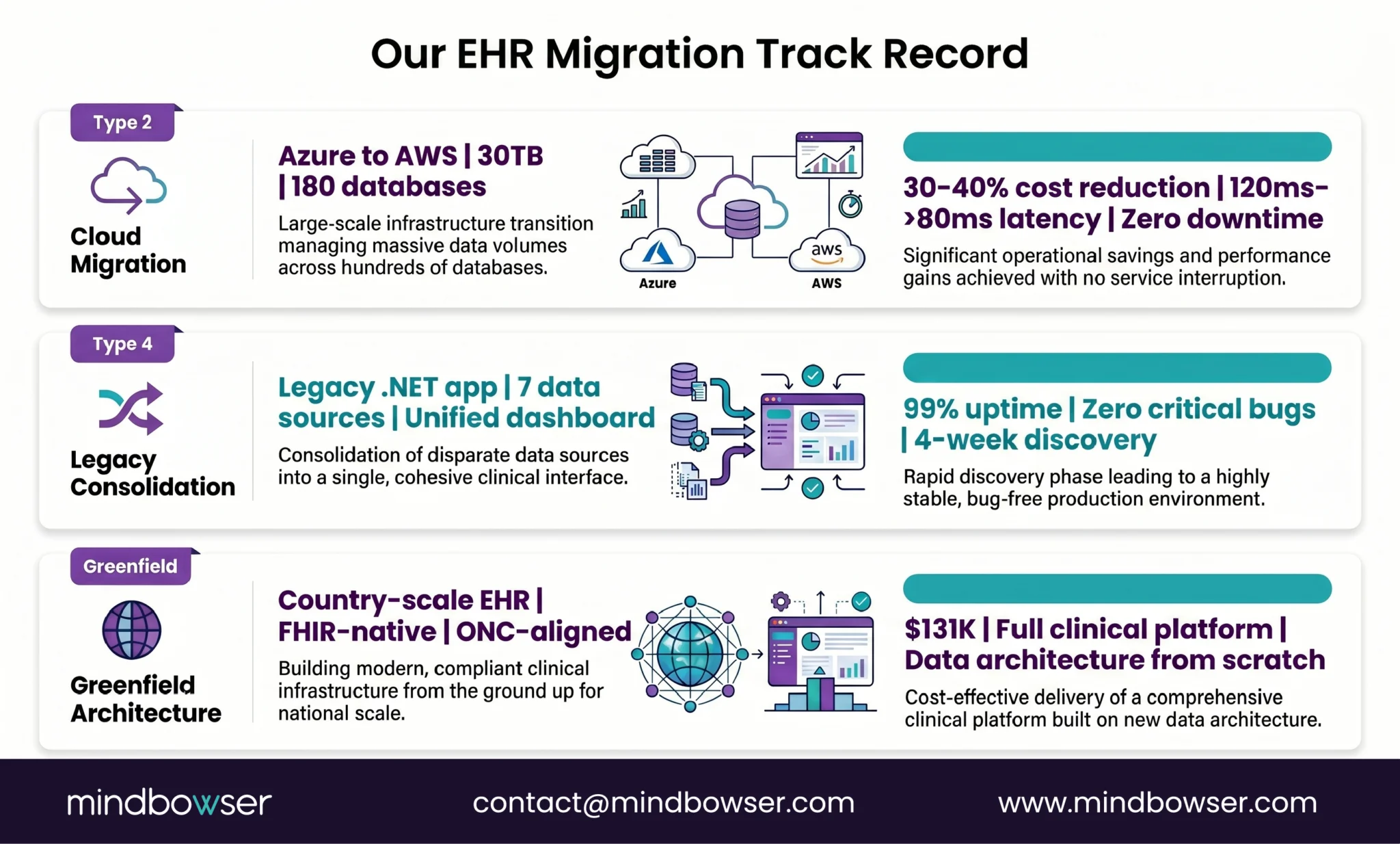
B. Legacy consolidation (behavioral health network)
A legacy .NET clinical application that needed assessment before anyone could decide whether to migrate or rebuild. We ran a 4-week discovery, determined the application was viable for migration, and built a modern data aggregation layer on top — consolidating 7 data sources into 15 clinical cards in a unified dashboard.
- Result: 99% uptime in first 30 days post-launch
- Quality: Zero critical bugs at launch
C. Greenfield architecture (national health records system)
No migration was needed because there was no legacy system. But the data architecture decisions we made for a country-scale EHR: $131K, FHIR-native, ONC-aligned data models, informed how we think about migration targets. When you build the target system correctly, the migration into it is dramatically simpler.
What we use:
- PHISecure: Our HIPAA-compliant data handling layer. Sits between the source and the target during migration. Handles encryption, access controls, and audit logging for every record in transit.
- HealthConnect CoPilot: Pre-built FHIR client with EHR adapters. Speeds up the HL7-to-FHIR mapping and API integration work that’s usually the longest phase.
A former NHS CIO said something on our HealthTech with Purpose podcast that stuck with me: “Focus on people, not technology.” He was talking about a program that connected hundreds of clinical systems into a shared record platform. The tech worked. The project succeeded because they treated it as a people transformation, not a database migration. That’s the lens we bring.
Where Does This Leave You?
EHR data migration isn’t a database copy. It’s an architecture project that touches compliance, clinical workflows, data quality, and organizational change simultaneously.
Three things worth remembering:
- Pick the right migration type first. A cloud migration (Type 2) is a fundamentally different project than a full replacement (Type 1). Don’t scope one and execute the other. The five types above help you name what you’re actually doing.
- The current wave is real. Epic gained 176 hospitals last year. Oracle Health lost 74. UPMC is migrating 6 million records. The VA is going live at new sites. If you’re planning a migration, the competition for experienced teams is intensifying — start scoping now, not next quarter.
- Build the target right. If your target system is USCDI v3 compliant and FHIR-native from day one, you won’t be migrating again in three years when v4 or v5 becomes mandatory. The cheapest migration is the one you don’t have to do twice.
It depends on the type. A FHIR API layer wrap (keeping the legacy system and exposing data via FHIR) can be done in 2-4 months. A cloud migration (same app, new infrastructure) typically takes 3-6 months — we completed a 30TB, 180-database Azure-to-AWS migration within that range. A full replacement (legacy to modern EHR) takes 12-24 months for a health system. UPMC’s Cerner-to-Epic migration is targeting mid-2026 with 1,800 team members.
Ranges by type: FHIR API wrap ($50K-$150K), cloud migration ($100K-$300K), vendor switch to custom ($200K-$750K), full replacement ($500K-$5M+). The biggest cost variable is data volume and format complexity. Our cloud migration client saw 30-40% ongoing infrastructure cost savings, meaning the project paid for itself within 12 months. The cost of not migrating is also real — McKinsey (2024) estimates 40% of IT budgets go to technical debt maintenance.
Yes. It’s a Type 3 migration (vendor switch), which means you’re building the target system and migrating data simultaneously. The key technical challenge is extracting data from Epic’s proprietary format and mapping it to your custom data model — typically FHIR R4 resources. Epic’s FHIR APIs (available since Epic 2020+) make extraction more feasible than it was five years ago. The non-technical challenge is workflow replication: understanding which Epic workflows your clinical staff depends on and ensuring the custom platform handles them.
A parallel run means operating both the old and new EHR systems simultaneously for a defined period, usually 2-8 weeks. New clinical data flows into both systems. Staff continue using the old system for care delivery while the new system processes the same data in parallel. The purpose is to catch data mapping errors, performance issues, and workflow gaps before patient care depends on the new system. It’s expensive (you’re running two systems) but it’s the single most effective risk mitigation step. Research published in JAMIA (2020) documented medication dosage errors that doubled during transitions without adequate parallel testing.