













 BLOGS
 NEWSROOM
 CASE STUDIES
 WEBINARS
 PODCASTS
 ASSET HUB
 EVENT CALENDAR
























TL;DR
- Epic Secure Chat is the messaging tool inside Epic that lets staff message each other from the desktop and Epic’s mobile apps (Haiku, Canto, Rover).
- Authorized staff can review who messaged whom; whether anyone monitors conversations in real time is a policy choice, so tell staff the chats aren’t private.
- Whether chats are part of the medical record and how long they’re kept are set by each organization: published policies range from “not part of the medical record, deleted after 30 days” to “never purged”. Discoverability is set by court rules, so plan for relevant chats to be discoverable whatever a policy calls them.
- Settle retention, staff disclosure and legal hold before go-live, and keep clinically significant content in the chart.
Secure Chat is busier than most compliance plans assume. Across 14 hospitals and 263 clinics on Epic, 32,881 users sent 9,639,149 Secure Chat messages in about six months, and 69% of them were tied to a specific patient’s chart (Baratta et al., Journal of Medical Internet Research, 2023). That’s a lot of patient-linked conversation sitting outside the notes your compliance program was built around.
If you run IT, compliance or health information management at an Epic organization, this page covers whether Secure Chat is monitored, whether it’s part of the medical record, whether it’s discoverable, and what to settle before go-live.
What Is Epic Secure Chat, and How Does It Differ from In Basket?
Secure Chat is the messaging tool built into Epic for one-to-one and group conversations between staff. Health systems describe it as a HIPAA-compliant way to message other Epic users from the desktop and from Epic’s mobile apps, including Haiku, Canto and Rover (Houston Methodist IT). It’s one of the Epic modules teams use every day without treating it as its own governance surface.
In Basket is Epic’s structured inbox: results, orders to co-sign, referrals and patient messages that need an action or documentation. Secure Chat is the conversation that happens between those tasks.
Hospitals put clear limits on it. Catholic Health’s medical staff memo calls Secure Chat for “non-urgent communication” and says it “is not a substitute for clinical decision making, official documentation, or placing orders” (Catholic Health, October 25, 2024). Northwestern Medicine says it “should not be used in emergency situations” (Northwestern Medicine, April 2026.)
| Epic Secure Chat | In Basket | |
|---|---|---|
| What it’s for | Conversation between staff | Structured tasks and messages |
| Message structure | Free text, one-to-one or group | Results, orders, referrals, patient messages |
| Patient linkage | Optional; most messages are chart-linked in the one large study (69%) | Tied to a patient, encounter or order |
| Retention | Set by each organization (published policies: 30 days to never purged) | Follows your organization’s record policies |
| Litigation | Can be discoverable when relevant; plan legal holds for it | Covered by your existing record and legal hold policies |
| Where it runs | Desktop and Epic mobile apps | Desktop and Epic mobile apps |
Is Epic Secure Chat Monitored?
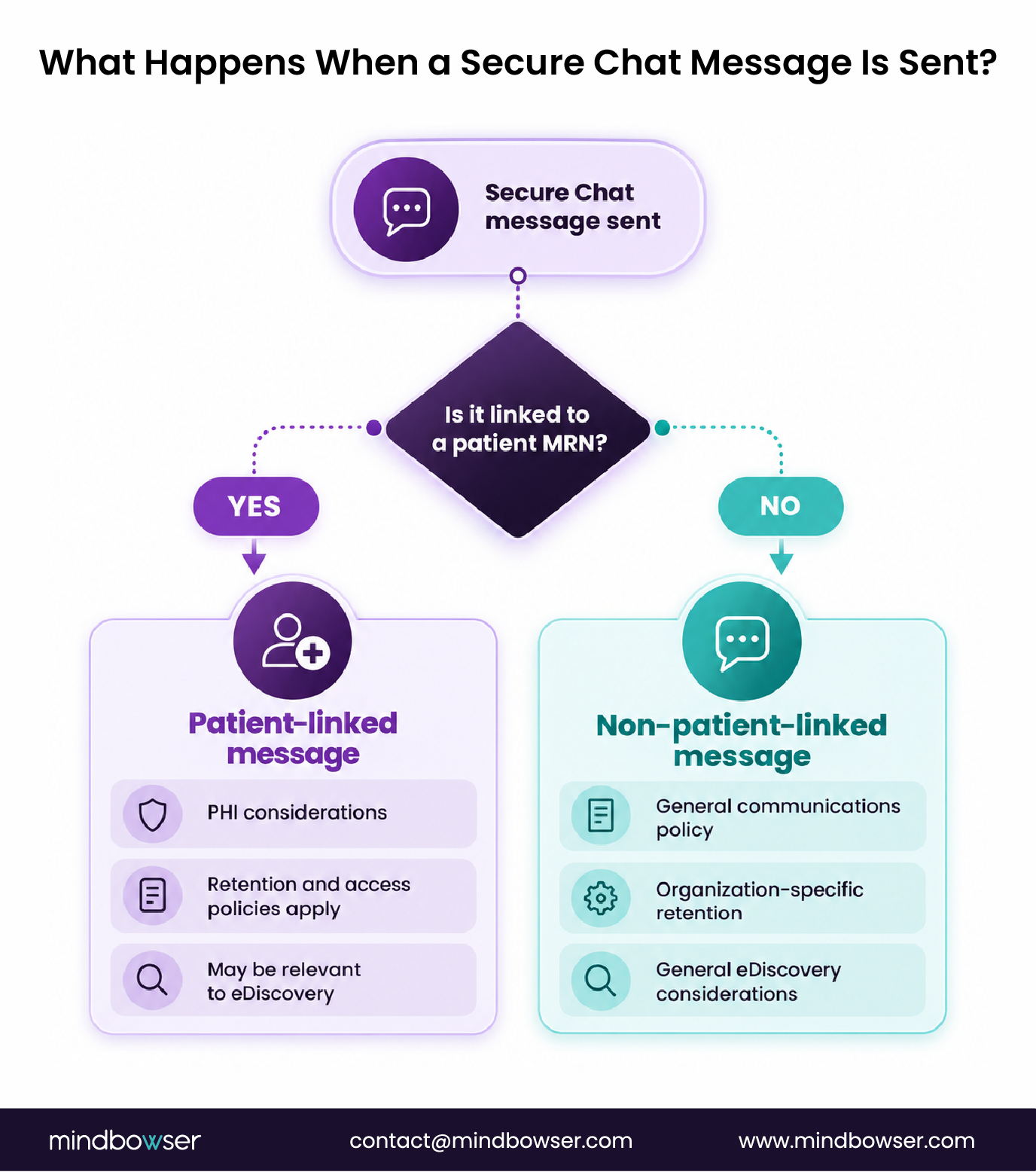
This is the most-searched compliance question about Secure Chat, and the answer depends entirely on how the health system configures the system and what it discloses to staff.
It depends on your organization’s policy and on what you tell staff.
Confirm with your Epic team what your build lets reviewers see (who messaged whom and when, message content, or both) and which security roles can see it. Whether anyone reads conversations in real time is a decision your organization makes, and reviews can also happen after the fact, for example when a complaint, an incident or a legal request prompts one.
So treat staff disclosure as part of the rollout. HIPAA requires you to train your workforce on your privacy policies and procedures (45 CFR 164.530(b)), and Secure Chat belongs in that training: tell people the chats are stored, reviewable and potentially discoverable. Know who you’re training, too. In the large study above, nurses sent about 40% of messages and physicians about 25% (Baratta et al., 2023).
Guidance is the other half. When UNC Chapel Hill rolled out Secure Chat without formal guidelines, 46.21% of staff feedback in its follow-up survey raised safety concerns, including using it for urgent communication (Howard-Williams et al., Quality Management in Health Care, 2025). Publish the rules before go-live, not after.
In practice, most health systems do not have continuous real-time monitoring of Secure Chat conversations. But the technical capability for retrospective review exists by default, and it is always available to appropriately credentialed staff.
The workforce governance implication is the part most teams underestimate. Your staff should be told during onboarding that Secure Chat on a hospital system is not private. This is both a workforce training obligation under 45 CFR 164.530(b) and a policy governance question. The monitoring question is as much about what staff are told as it is about what Epic technically does.
MRN-linked Secure Chat conversations, where the patient record is the context, are subject to the same access, retention, and disclosure rules as other PHI in the patient record. Non-MRN-linked messages (staff communication without patient context) fall under the health system’s general communications policy.
Get Epic Secure Chat compliance-ready
Is Epic Secure Chat Part of the Medical Record, and Is It Discoverable?
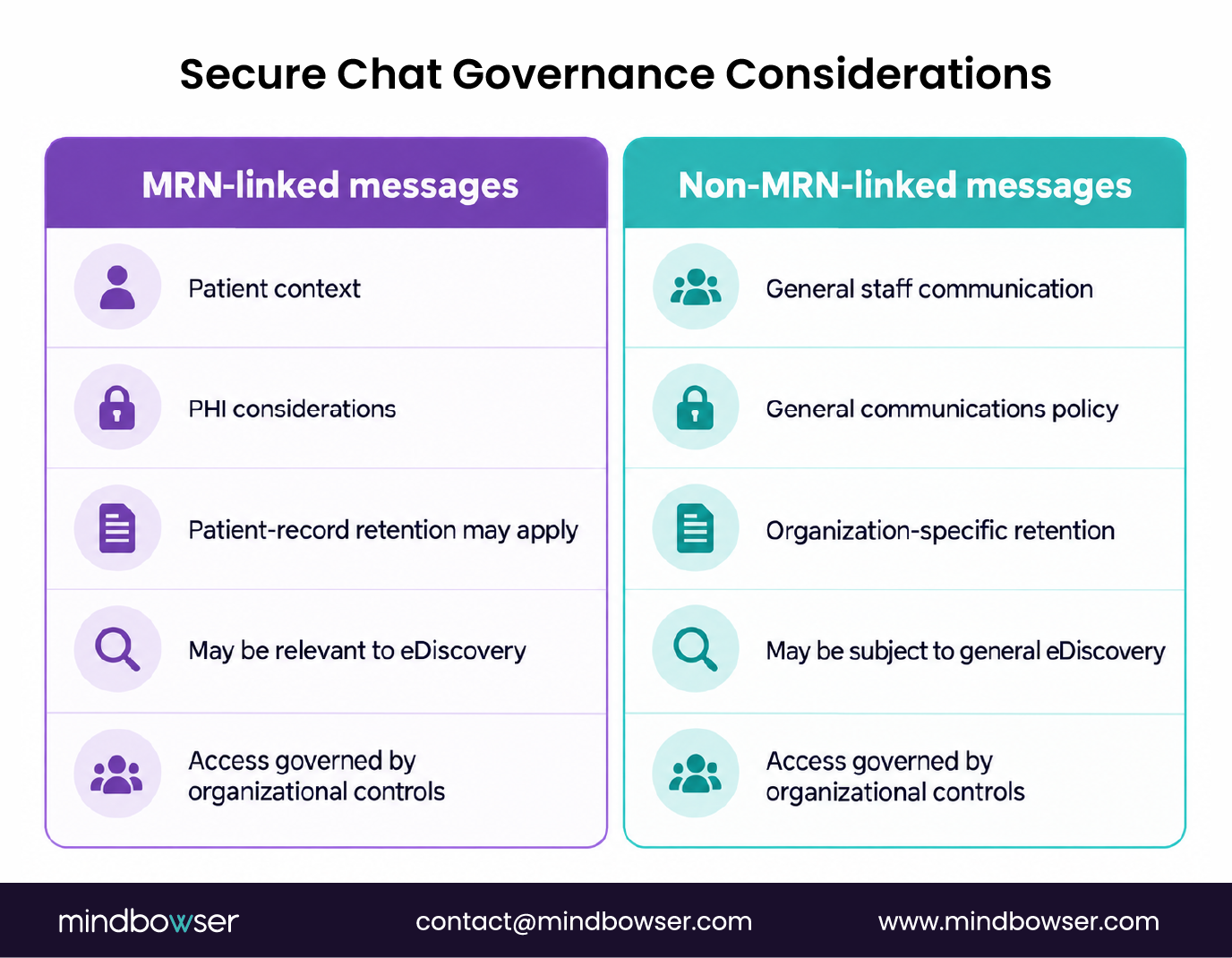
For legal and compliance teams, this is the sharper version of the monitoring question. And the answer is: it depends on whether the message is MRN-linked.
Many published answers state one rule for everyone. Here’s what hospitals actually publish:
• Northwestern Medicine: ‘Secure Chat messages are not part of the patient’s medical record,’ and ‘they are deleted after 30 days’ (April 2026).
• Northwell Health Labs: Secure Chat isn’t part of the record ‘for release of information (ROI) but is discoverable,’ and ‘per policy, Secure Chats are never purged’ (Northwell lab guide).
• Catholic Health: ‘These messages are subject to discovery in legal proceedings,’ and all care and treatment information should be documented in the medical record (October 25, 2024).
Two published retention answers (30 days and never purged) and two plain statements that chats are discoverable. Behind them are three separate questions, and they have different answers:
• Legal health record: Which records count as the legal medical record is set by state law and your organization’s policy. This is where ‘not part of the medical record’ comes from.
• Designated record set: HIPAA’s designated record set (45 CFR 164.501) covers medical and billing records and other records used to make decisions about individuals. It’s what patients can request under the right of access (45 CFR 164.524), and a chat outside the legal record can still fall inside it if it’s used to make decisions about a patient.
• Discovery. Whether a chat must be produced in litigation is set by court rules, not by hospital policy. Under the federal rules, losing relevant electronically stored information that should have been preserved lets a court order measures to cure the prejudice, and harsher sanctions where the loss was intended (Federal Rule of Civil Procedure 37(e)), so an automatic 30-day deletion is only safe if you can pause it for a legal hold.
The questions to put to your legal and HIM teams:
1. Do we treat chart-linked Secure Chat as part of the designated record set, and how do we handle a patient’s access request that covers it?
2. What retention is configured, and does it match our record retention and legal hold policies?
3. Does our legal hold process include Secure Chat, and can IT pause deletion for the people or patients under a hold?
That third question is the common gap. Legal hold plans usually cover email, shared drives and the chart, and a hold that doesn’t name Secure Chat can miss messages before they age out under your retention setting. Law firm Reed Smith’s advice to clinicians is blunt: assume a chat could be read aloud in court, and put anything clinically significant in the chart (Reed Smith).
If an archiving or eDiscovery vendor will receive Secure Chat data, review your business associate agreement obligations for that vendor too.”
Compliance teams reviewing their business associate agreement obligations should explicitly assess whether Secure Chat data flows to any BAA-covered downstream system, particularly if an archiving or eDiscovery platform is in scope.
Start a Conversation, we work with healthcare IT and legal teams on Epic data governance, including Secure Chat audit scope and configuration.
How Do IT Teams Configure and Audit Epic Secure Chat?
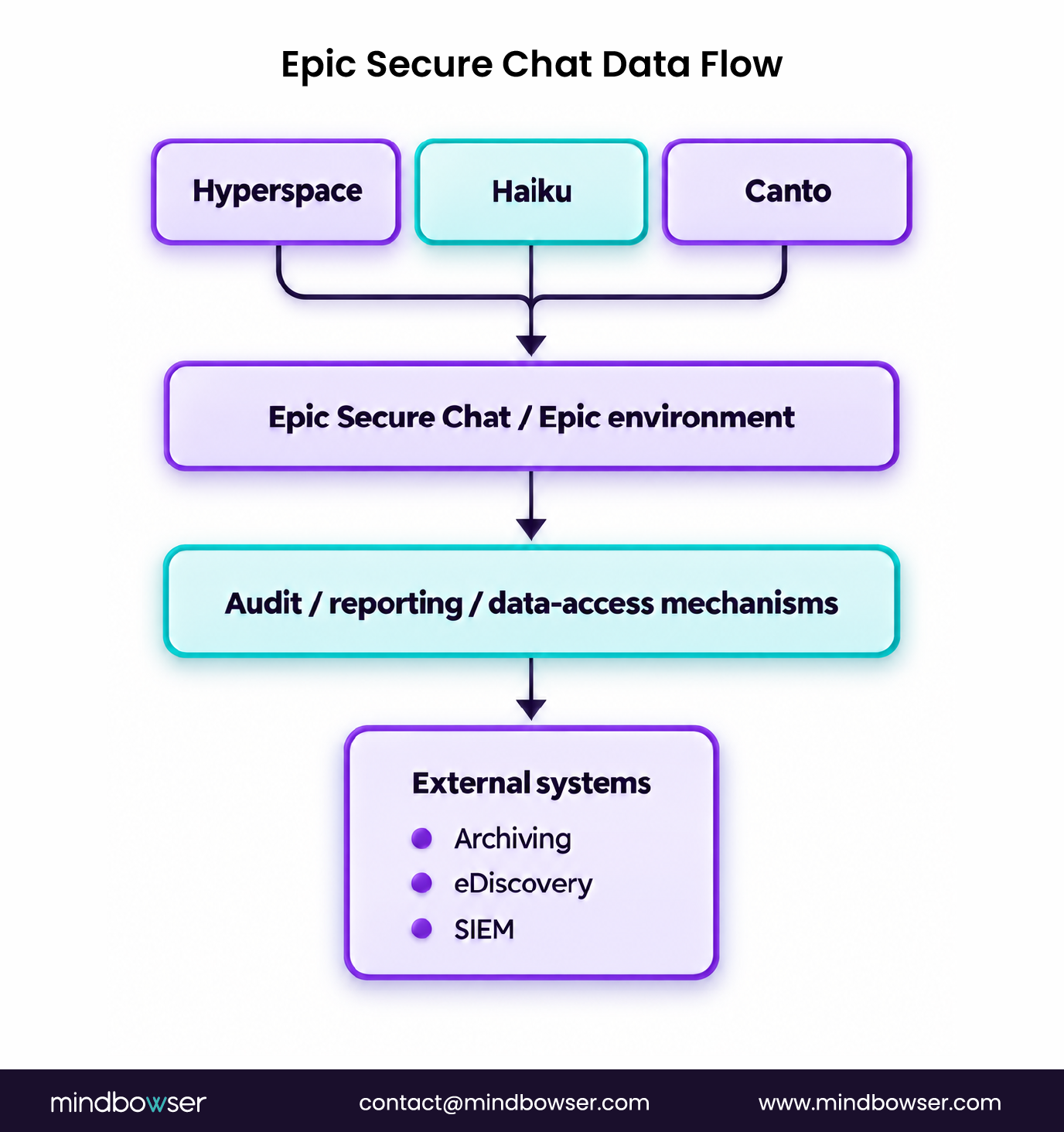
Those compliance questions turn into three configuration decisions you own: what gets retained, who can access the audit logs, and whether Secure Chat data feeds anything outside Epic.
For your Epic team, that becomes a configuration checklist:
• Retention: Find the configured retention period and confirm it matches the written policy. The published range (30 days to never purged) shows how much this varies.
• Chart linkage: Check how users attach a patient to a conversation, and whether your policy treats chart-linked chats differently.
• Audit access: Decide which security roles can review Secure Chat activity. HIPAA requires audit controls that record and examine activity in systems holding ePHI (45 CFR 164.312(b)) and a regular review of information system activity (45 CFR 164.308(a)(1)(ii)(D)), so name who reviews it and how often.
• Legal hold: Confirm IT can suspend deletion for specific users or patients when legal places a hold.
• Exports: If you need chats in an archive, an eDiscovery platform or a SIEM, ask your Epic team which reporting and export options your version supports, and plan the format conversion.
• Mobile devices and attachments: Secure Chat runs on Epic’s mobile apps and can carry photos as well as text (Houston Methodist IT, Secure Chat FAQs). Decide whether personal devices are allowed and how they’re managed, whether message previews show on lock screens, and where attached photos are stored and how long they’re kept.
• Clients: Secure Chat runs across Epic’s desktop and mobile clients; if you’re moving users to Hyperdrive, include messaging in your testing.
Secure Chat exports are a different job from the standard data feeds Epic sends through Epic Bridges, its interface engine, so confirm with your Epic team what export route your version offers and scope it as its own piece of work.
SIEM integration, for organizations that want to monitor Secure Chat access patterns as part of security event monitoring, is possible via Epic’s audit log export. The log format is Epic-native, so expect to parse and transform it before any standard SIEM will take it.
Can Epic Secure Chat Be Integrated with External Messaging or Archiving Platforms?
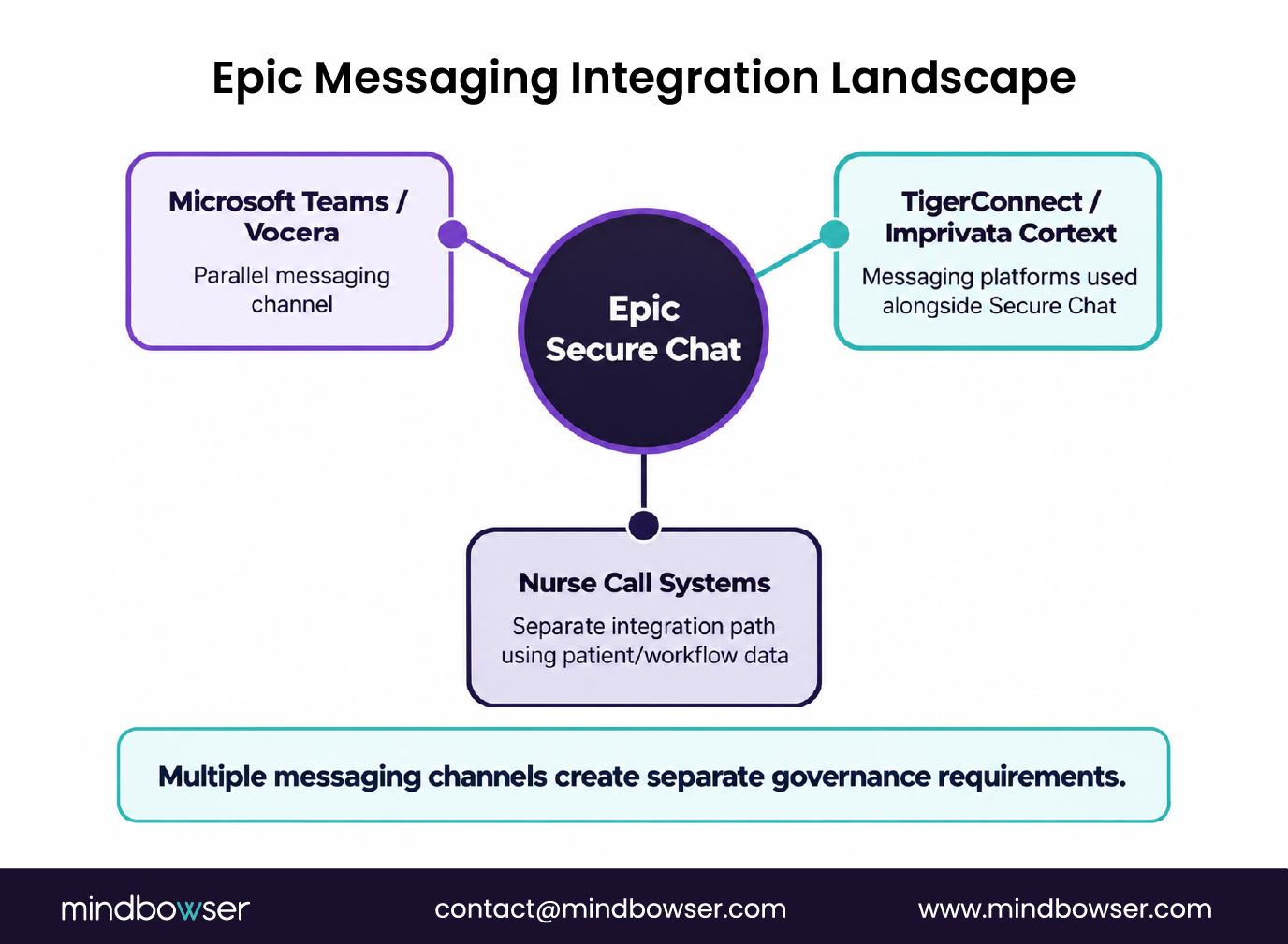
Many hospitals run more than one messaging channel. Secure Chat may sit alongside a clinical communication app, a unified communications platform or a nurse call system, and each one keeps its own messages, audit log and retention setting. That’s the governance problem: the same patient conversation can live in two systems under two policies.
Three things keep it manageable:
1. One policy that says which channel is for what, so clinical conversation doesn’t scatter across tools.
2. One retention and legal hold map that lists every channel, the EHR included.
3. One owner per channel for audit review.
If you need Secure Chat data in an archive or eDiscovery tool, treat it as a scoped build with your Epic team and the vendor, with security review and a BAA in place before any data moves. Mindbowser builds integrations and apps around Epic using FHIR and HL7 (the routes are covered in our guide to Epic EHR integration strategies), and that’s the work our Epic integration team takes on.
What Healthcare IT and Compliance Teams Should Settle Before Epic Secure Chat Goes Live
Secure Chat goes live as a convenience and stays as a record-keeping question. Settle five things first:
- Retention: what’s configured, who owns it, and whether it matches your written record and legal hold policies.
- Staff disclosure: tell users at onboarding that chats are stored, reviewable and may be discoverable.
- Legal hold: name Secure Chat in your hold process, alongside email and the chart, and make sure deletion can be paused.
- Documentation rule: anything clinically significant goes in the chart.
- Mobile use: rules for personal devices, lock-screen previews and patient photos sent in chat.
Get those five in writing before the first message is sent.
Where to go next
- Build around Epic with us: [Epic integration]
- Test an app against Epic data: [SMART Health IT sandbox for EHR integration]
- Talk to us: [Start a Conversation]