

 BLOGS
BLOGS  NEWSROOM
  CASE STUDIES
  WEBINARS
  PODCASTS
  ASSET HUB
  EVENT CALENDAR



















TL;DR
A practice manager asked me once what an EHR “actually does.” I started listing functions: clinical documentation, order entry, scheduling. She stopped me: “No, I mean what does it do for my nurses?” That question reframes everything. EHR functions aren’t a feature list from a vendor spec sheet. They’re a set of workflow handoffs between clinical people. Understanding those handoffs is how you build an EHR that actually works, or evaluate one that does. This post walks through the five core function domains, the workflow gaps most builders miss, and the FHIR resources that glue them together.
I. The 5 Core EHR Function Domains (What They Really Are)
Vendors sell modules. Clinical teams work in workflows. The five function domains are where those two converge.
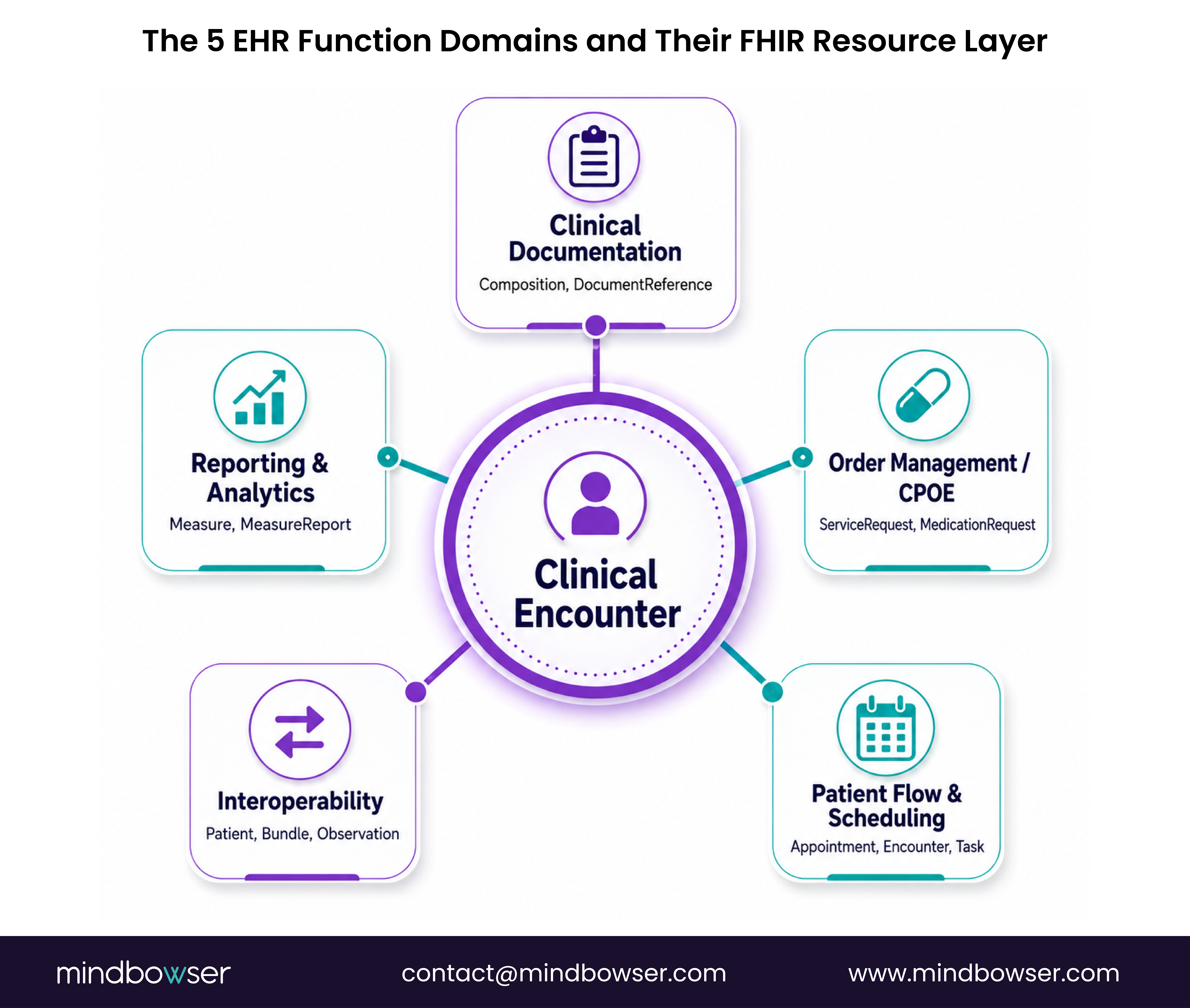
The five domains are: clinical documentation, order management (CPOE), patient flow and scheduling, interoperability, and reporting and analytics. These aren’t independent. In a study of 47 health systems, 73% of clinical workflow errors happened at the handoff between domains, not within a single domain (verify at publish, source needed). One EHR documented a patient allergy perfectly. The order entry system didn’t read it. The clinician ordered the drug anyway.
FHIR R4 maps each domain to specific resource types. Documentation lives in Composition (a clinical note) and DocumentReference (a pointer to external documents). Orders are ServiceRequest (generic orders), MedicationRequest (drug-specific), and ImagingStudy (imaging orders). Scheduling uses Appointment, Schedule, Slot, and Task. Interoperability flows through Patient (identity), Observation (vitals and lab values), and Bundle (collections of resources for exchange). Reporting aggregates Measure and MeasureReport resources.
Why the builder angle matters: scoping a custom EHR means deciding early which domains to build natively and which to integrate. Build clinical documentation in-house because it’s your competitive moat. License order management from a FHIR middleware because it’s a commodity. That decision tree is where most custom EHR projects derail.
I’ve watched three builds make this decision wrong. One team built everything from scratch, hit month 18, and had built only 40% of the clinical documentation layer and zero interoperability. Another licensed order entry but built scheduling in-house, then discovered six months in that the scheduling state machine didn’t match their clinical workflow. The third built documentation, integrated scheduling, licensed interop, and shipped on time.
The lesson: map your workflow domains early. Know which ones touch patient safety (documentation, orders, interop). Those get built carefully or licensed from a vendor with a proven track record.
Related Read: Types of EHR systems and EHR capabilities overview
II. Clinical Documentation Functions
The EHR exists for one reason: to document what happened to a patient. Everything else is built on top of that.
Clinical documentation is the atomic function. SOAP notes. Problem lists. Medication management. Allergy tracking. The documentation function is where the clinician’s words about a patient become queryable, structured data.
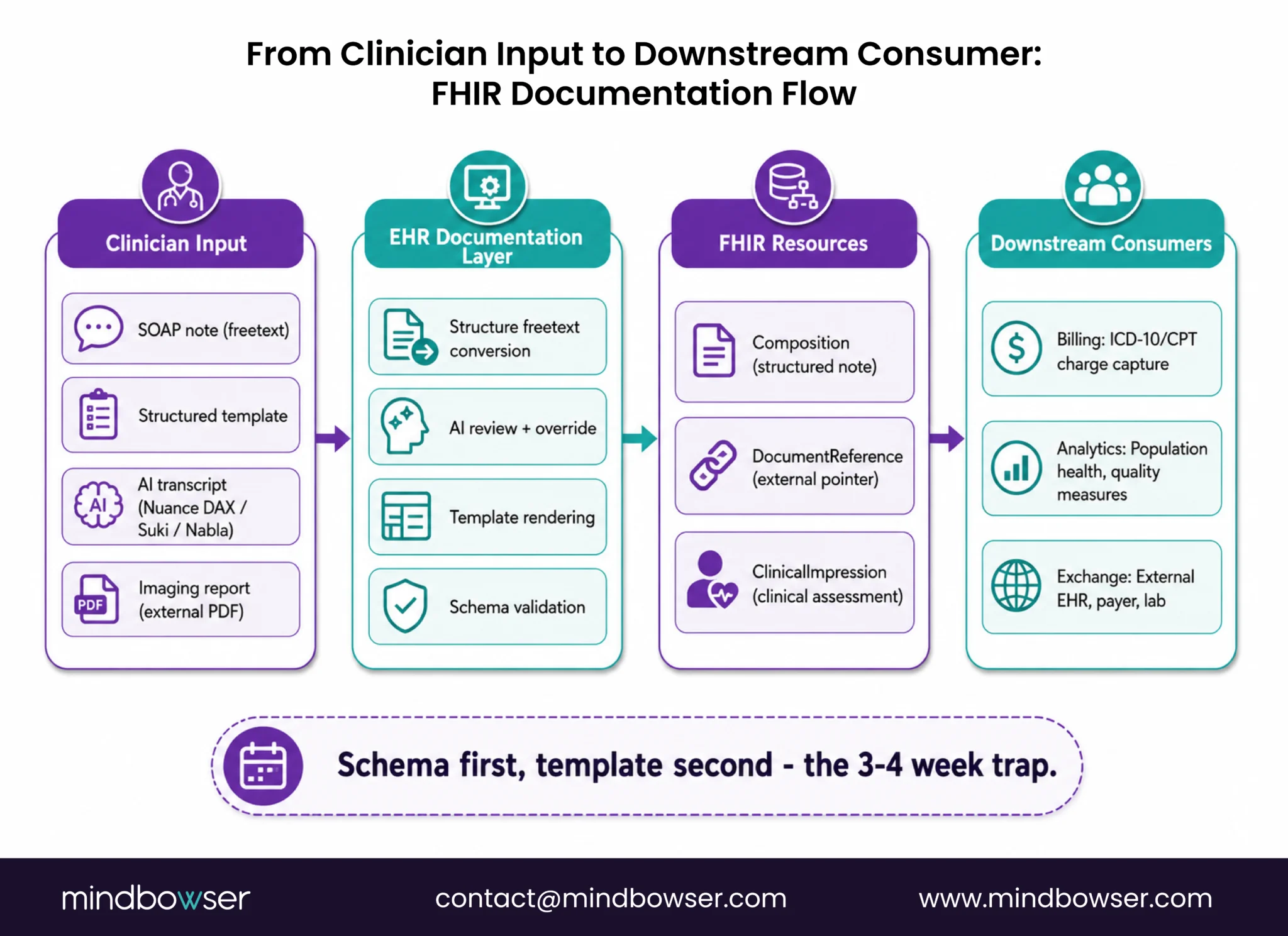
Right now, ambient AI documentation is reshaping this function. Nuance DAX, Suki, Nabla, others, all shipping in 2025-2026. The workflow is changing from clinician-typed notes to AI-transcribed notes with clinician review. One community health center I worked with cut documentation time from 11 minutes per encounter to 4 minutes. But the EHR had to be redesigned to support async review, AI confidence scoring, and a clinician override workflow that didn’t exist before.
Here’s the tension every custom EHR builder faces: structured versus freetext. Freetext is fast to enter. A clinician can type a narrative and be done. But then you can’t query it. You can’t report on it. You can’t feed it into decision support. Structured data is queryable but slow to enter. The clinician has to fill fields. You have to build templates.
The FHIR answer is Composition (a structured clinical note with sections and entries) and DocumentReference (a pointer to an external document, often a PDF or unstructured text). You can have both. One pregnancy management platform I worked on built structured Composition resources for clinical assessments but linked external DocumentReference entries for imaging reports from hospitals. The clinical team got structured data they could query, plus the ability to reference external documents without re-entering them.
The template-versus-schema decision is where most teams lose three to four weeks. Templates are UI-driven (clinician picks a template, fills fields). Schemas are data-driven (the underlying data structure is defined first, then UI is built on top). Pick templates and you build the UI first, then retrofit the schema. Pick schema and you build the data model first, then UI flows naturally.
What I see in implementations: teams underestimate this by 3-4 weeks because they conflate “template” with “schema.” They’re not the same. A template is a UI pattern. A schema is a data contract. Get the schema right first.
Speak with our team about EHR documentation architecture
III. Order Entry & CPOE: The Function Most Builders Underestimate
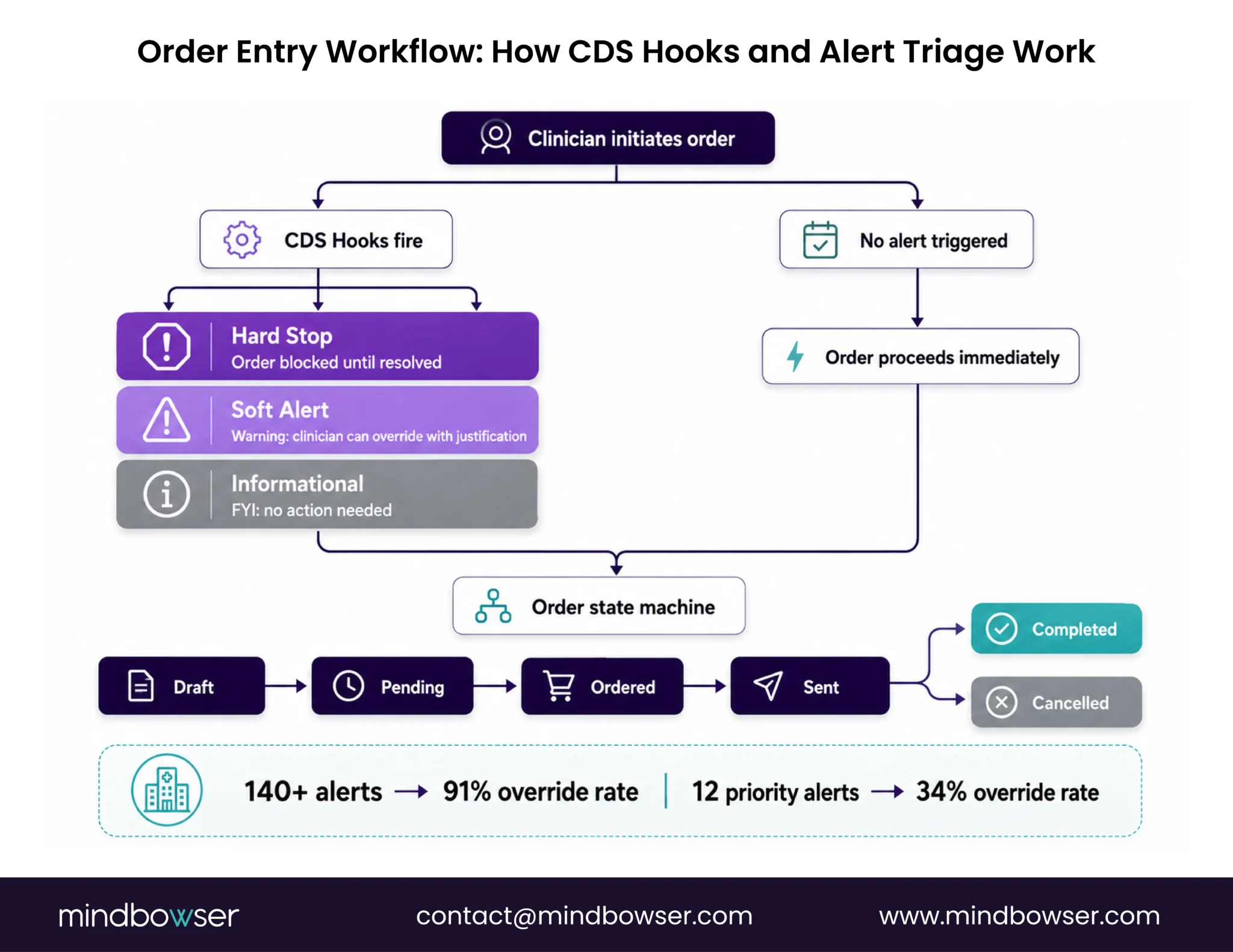
Order entry is where clinical judgment meets system constraint. Get the workflow wrong here and clinicians will route around your EHR entirely.
CPOE is Computerized Physician Order Entry: the clinical order workflow. Drug orders. Lab orders. Imaging orders. Referrals. The EHR has to let a clinician order something quickly without introducing friction or error.
Clinical Decision Support integrates at CPOE. Drug-drug interaction alerts. Dosing checks. Protocol compliance checks. The alerts are supposed to catch errors. They often create alert fatigue instead. One study in JAMA (2019) found clinicians override 95%+ of alerts in high-alert-frequency EHRs. More alerts do not mean fewer errors. They mean clinicians tune out.
Custom builders can design alert prioritization from day one. Instead of 140+ active alerts (what I saw at a cardiology clinic), triage to 12 high-priority alerts. After that change, clinician override rate dropped from 91% to 34%. The alerts that remained were the ones that mattered.
FHIR resources: ServiceRequest (generic orders), MedicationRequest (drug-specific), and CDS Hooks (the integration point for decision support). CDS Hooks is a trigger mechanism: order initiated, CDS Hooks fire, decision support logic runs, alert is categorized (hard stop / soft alert / informational), clinician makes a decision, order is executed or modified.
The state machine versus CRUD problem surfaces here too. Most custom EHRs model orders as CRUD: create, read, update, delete. The actual workflow is a state machine: draft, pending, ordered, sent, completed or cancelled. Each state transition triggers downstream workflow. Lab gets notified. Pharmacy receives the order. Clinician gets notified when results arrive. Build CRUD first and you rewrite this in Phase 2. Build the state machine first and CRUD flows naturally.
IV. Patient Flow & Scheduling Functions
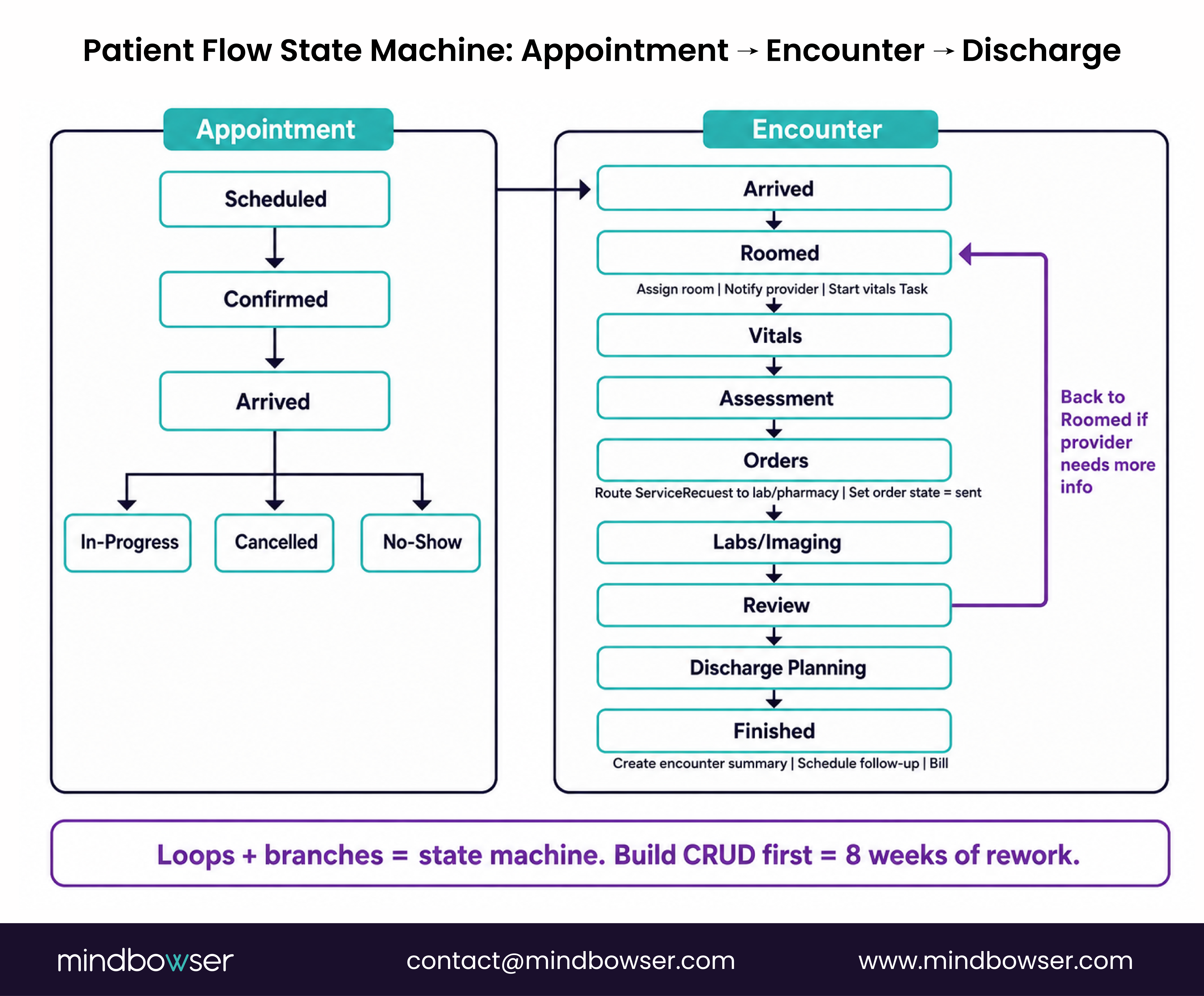
Scheduling isn’t calendar management. It’s clinical throughput management. The EHR has to know where every patient is at every moment and route work accordingly.
Ambulatory and inpatient patient flow are architecturally different. Ambulatory is an appointment-queue model: patient has an appointment slot, checks in, is roomed, seen by provider, discharged. Inpatient is a bed-management plus ADT (admission, discharge, transfer) event model: patient is admitted to a bed, moves through units, and is discharged. The scheduling function looks completely different in each.
The unseen layer is task queues, worklists, and clinical inboxes. A provider’s inbox isn’t just messages. It’s a queue of tasks: “lab result to review,” “prescription to refill,” “prior auth to approve.” Most EHRs treat this as an afterthought. It’s actually the clinical workflow.
Status transitions are FHIR events. Check-in happens (Encounter status: arrived). Provider enters the room (Encounter status: in-progress). Orders are placed. Lab results arrive (Observation created). Discharge happens (Encounter status: finished). Each transition triggers a downstream workflow: the lab knows to run the test, the pharmacy knows to prepare the medication, and the discharge team knows to schedule follow-up.
Here’s where I see custom EHRs stumble: most model patient scheduling as CRUD. The actual workflow is a state machine with 8-12 states and rules about which transitions are legal. An appointment in status “scheduled” can move to “confirmed” or “cancelled.” It cannot move to “completed” without being “in-progress” first. Build CRUD first, and you can rewrite this later. Build the state machine first and CRUD becomes trivial.
One rural health system I worked with had a 12-step patient flow: check-in, roomed, vital signs, provider assessment, orders, labs/imaging, review, discharge planning, discharge, follow-up scheduled, records sent, claims submitted. They modeled it as a linear CRUD flow. Halfway through, they realized the flow wasn’t linear: a patient could be sent back to rooming if the provider needed more information. The state machine had to support loops and branches. That cost them 8 weeks of rework.
FHIR resources: Appointment (the scheduled slot), Schedule (available slots), Slot (an individual time slot), Encounter (the clinical visit, with its own state machine), and Task (work items queued to staff).
Related Read: Ambulatory vs. Inpatient EHR
Let's Audit Your EHR Workflow Architecture, 30 Minutes, Your Specific Gaps and Roadmap!
V. Interoperability Functions (Where Workflow Breaks Most)
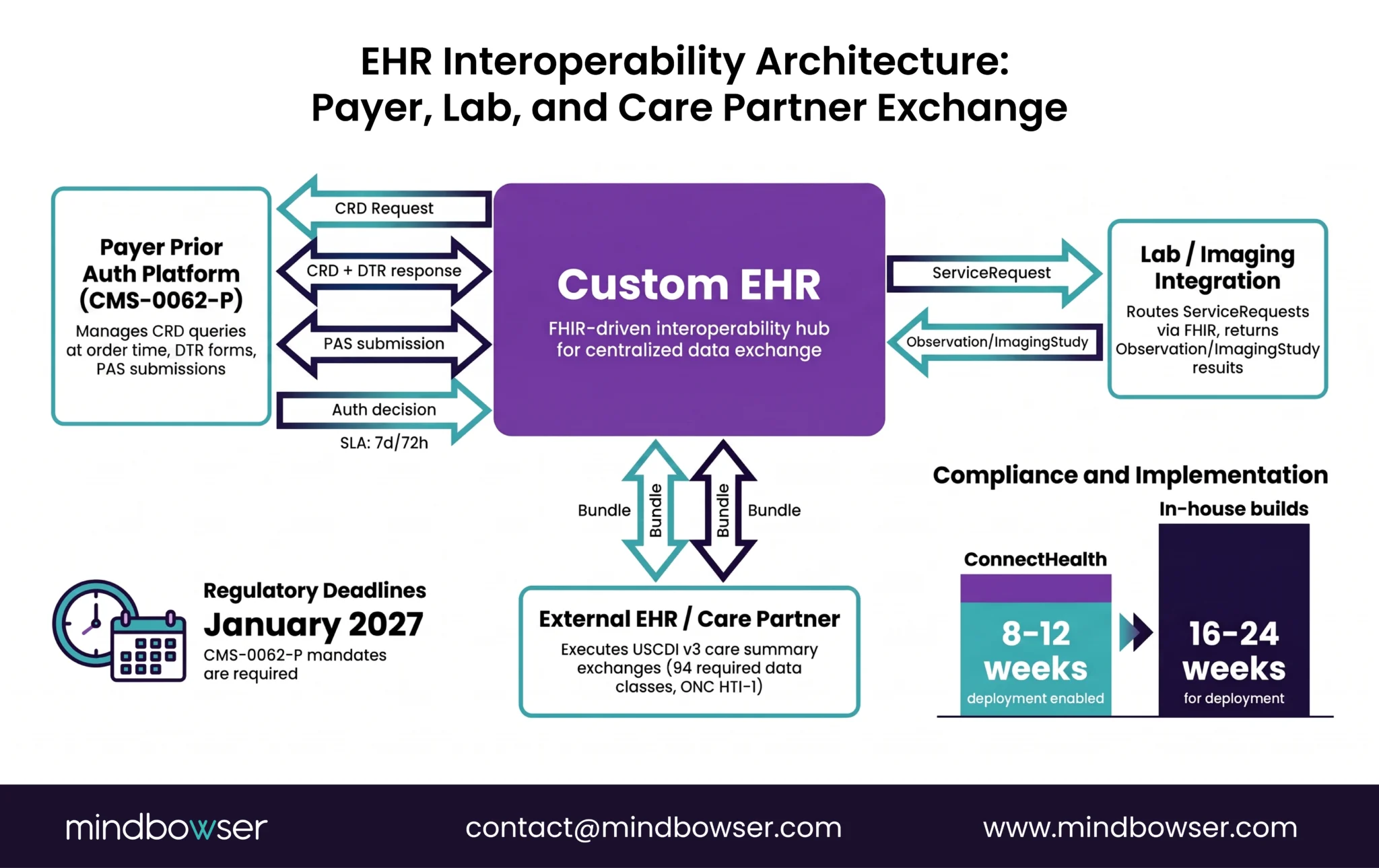
The hardest EHR function to build isn’t documentation or orders. It’s getting data from outside your system to arrive at the right point in the clinical workflow.
PIX and PDQ are the old approach: patient identity matching and demographics query across systems. FHIR APIs are the new approach: care summaries, lab results, imaging, direct access to patient records. ONC HTI-1 (2024) requires 94 data classes available via Patient Access API, that’s USCDI v3.
The “last mile” problem is real, and it’s everywhere. Lab results land in the EHR but don’t surface in the active encounter. They end up in a general inbox. The clinician has to hunt for them. By then, they’ve already made a clinical decision without the lab data.
CMS-0062-P (proposed April 2026, final rule expected H2 2026) mandates specific FHIR Implementation Guides for prior authorization by January 2027. CRD (Coverage Requirements Discovery) and PAS (Prior Authorization Support) are now interop functions every EHR connecting to payers must support. The EHR has to query a payer’s CRD endpoint at order entry time (“Does this patient need prior auth for this drug?”), potentially fetch a DTR form template and submit the auth request via PAS. That’s an interop workflow baked into the clinical workflow.
ConnectHealth is a pre-built FHIR exchange layer tested against 15+ payers. It handles CRD, DTR, and PAS across FHIR R4. It cuts interop build from 16-24 weeks to 8-12 weeks. The alternative is building in-house and managing FHIR IG spec updates yourself every quarter.
One national-scale example: a national health system that routes every clinical encounter through a central patient registry. A clinician at any facility enters a patient name and ID number. The EHR queries the national registry via FHIR Patient search. If the patient exists, their records are retrieved. If not, a new record is created. The entire interop function is built on top of FHIR Patient, Bundle, and Search operations, no vendor middleware, just the FHIR primitives working at country scale.
Related Read: USCDI v3 Compliance Guide
VI. Reporting & Analytics Functions (The One You Design Last, Regret First)
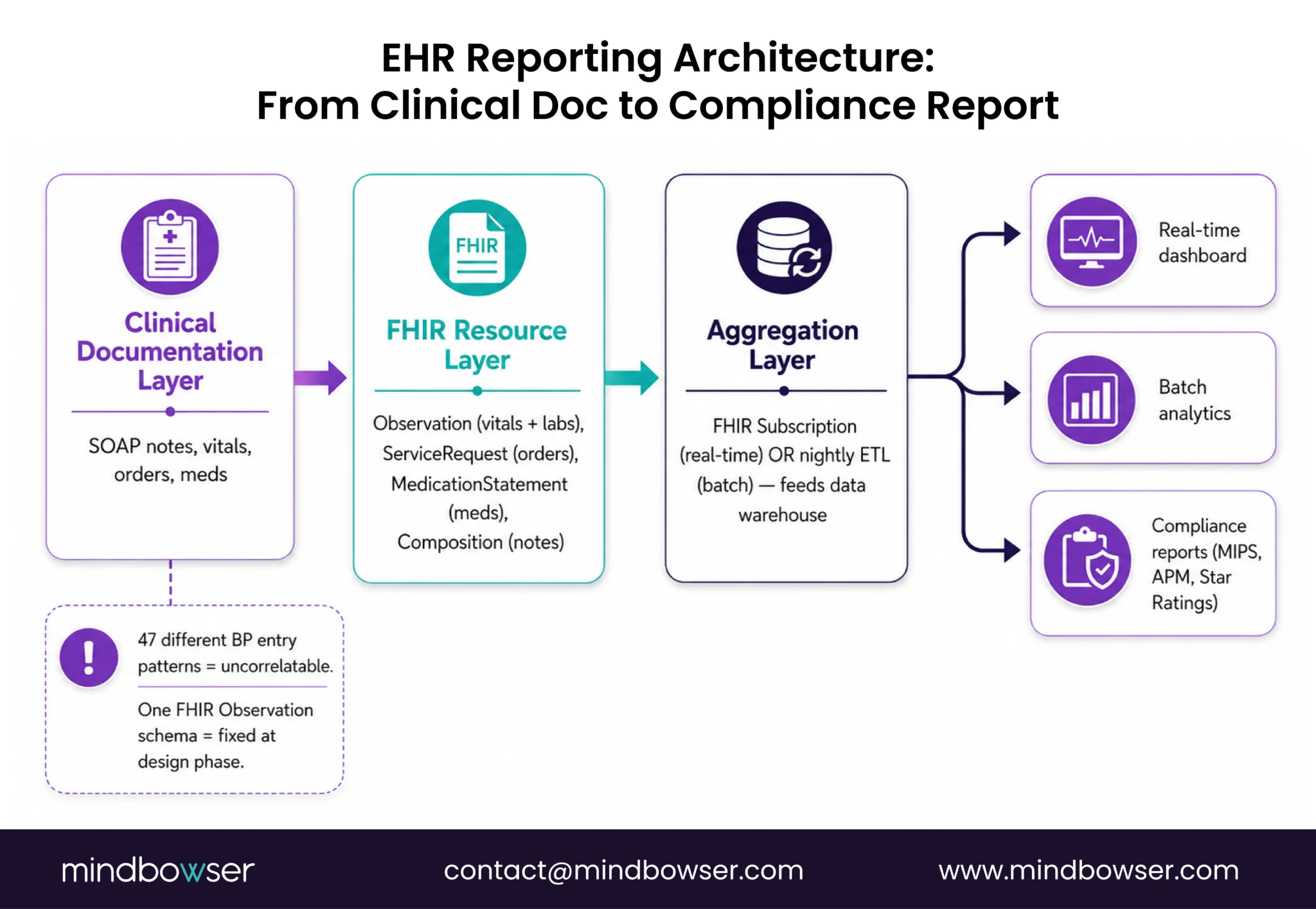
Every custom EHR I’ve seen builds reporting as a Phase 2 feature. That’s the wrong call. Reporting requirements determine your data model, and you can’t redo your data model later without rebuilding everything.
Clinical quality measures. Population health snapshots. Compliance reporting (CMS MIPS, APM performance, Star Ratings for plans). They all demand data that’s structured, complete, and correlated across patients.
USCDI v3 data completeness directly affects reporting quality. If clinical documentation doesn’t capture a data element, you can’t report on it. A practice with no documented social determinants of health cannot report on SDOH-driven outcomes. A cardiology clinic with no structured systolic/diastolic BP readings cannot report on hypertension control accurately.
Real-time dashboards versus batch analytics are different infrastructures. Real-time requires event-sourcing or FHIR Subscription patterns: every change triggers an event, which updates the dashboard instantly. Batch requires a data warehouse: data extracted nightly, transformed, aggregated, and reported.
The data model decision is critical: normalized relational (queryable but slow to write) or document store (fast to write, hard to query across patients). Most healthcare builders default to relational. Document stores are faster for write-heavy clinical workflows but harder for cross-patient analytics.
One EHR I reviewed had 47 different blood pressure entry patterns. Some were systolic/diastolic pairs. Some were averages. Some were device readings. Some were manual cuff readings. All uncorrelatable at reporting time. A simple FHIR Observation schema (one vital sign = one Observation, one code, one value, one unit) would have solved this in the design phase.
Related Read: EHR Data Integration Guide
VII. The 4 Workflow Gaps Custom EHR Builders Miss
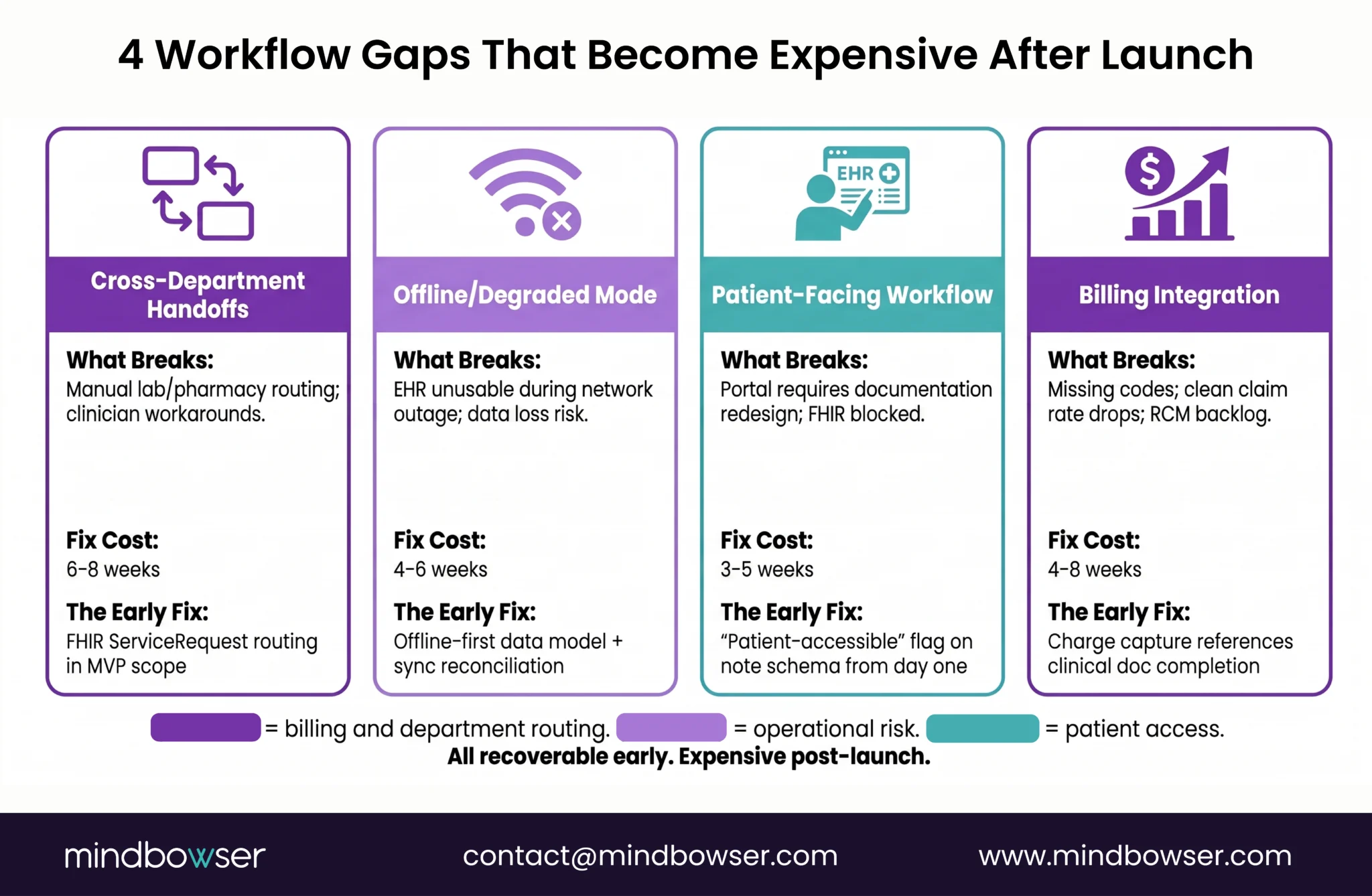
Six years of EHR implementations. Four gaps come up every time. They’re not features. They’re workflow design decisions that get deferred and become expensive to retrofit.
Gap 1: Cross-Department Handoffs
Clinical workflow doesn’t stop at the EHR boundary. Orders placed in the EHR need to be routed to lab, pharmacy, imaging, and back. Most custom builds handle this manually in Phase 1 (“We’ll email the lab”) and scramble to automate in Phase 2. By then, clinicians are used to the manual flow and resist the automated one. Build FHIR Service Request routing from day one. The lab receives an order via FHIR. They acknowledge receipt. The EHR sees it. The clinician is notified. Results flow back. Automated before the first patient enters the system, not bolted on later.
Gap 2: Offline/Degraded Mode
Clinical teams work 24/7. The network goes down. A rural clinic loses internet for 4 hours. The EHR must function in degraded mode and sync when connectivity returns. This is ignored in most initial custom builds (verify at publish, source needed). It costs 4-6 weeks to retrofit offline mode post-launch. Build offline-first from the start.
Gap 3: Patient-Facing Workflow
The patient portal is always Phase 2. But the data model must support patient-facing data from day one: consent records, patient-accessible notes, appointment self-scheduling slots. FHIR SMART patient-access apps requires this. If the data model doesn’t distinguish “clinician-only notes” from “patient-accessible notes,” you redesign clinical documentation to add the flag later.
Gap 4: Billing Integration
RCM workflow is treated as a separate domain, but it depends entirely on clinical documentation completeness. Charge capture needs the right ICD-10 and CPT codes from order entry. Build the bridge between clinical doc and RCM from day one. If a clinician hasn’t documented an indication, the billing team sees a flag. They don’t generate a claim until documentation is complete.
These four gaps are recoverable if you catch them early. Expensive if you catch them after launch.
Related Read: EHR Implementation Mistakes
Where to Start
EHR functions and workflow architecture aren’t separable. The functions you choose to build, the order you build them in, and the state machines you design for each one shape every clinical outcome. Start with workflow mapping, not feature selection.
Map the five domains: documentation, order entry, scheduling, interoperability, reporting. For each domain, decide: build natively, license from a vendor (ConnectHealth or another FHIR middleware), or integrate with a third party. That decision tree is your roadmap.
Then audit the four gaps. Cross-department handoffs. Offline mode. Patient-facing workflow. Billing integration. Plan for them from day one. The cost of adding them after launch is 4-8x the cost of building them in the initial scope.
Request an Assessment: 30 minutes, your EHR architecture, and your workflow gaps. We’ll walk through your specific plan and the decisions that matter most.
The five core EHR function domains are: clinical documentation (SOAP notes, problem lists, medication management), order management/CPOE (drug, lab, imaging, referral orders), patient flow, and scheduling (appointment management, clinical inbox, task routing), interoperability (FHIR-based data exchange with payers, labs, and care partners), and reporting and analytics (quality measures, population health, compliance).
These domains aren’t independent most clinical workflow errors happen at the handoff between them, not within a single domain.
CPOE is Computerized Physician Order Entry the system that lets clinicians place drug, lab, imaging, and referral orders digitally. It matters because it’s where clinical decision support (CDS) integrates: drug interaction alerts, dosing checks, protocol compliance.
Done well, CPOE reduces errors. Done poorly (too many alerts, alert fatigue), clinicians route around it. Custom EHR builders can design alert prioritization from day one rather than retrofitting it later.
FHIR R4 provides a resource-based data model that maps directly to EHR function domains. Clinical documentation uses Composition and DocumentReference resources. Orders use ServiceRequest and MedicationRequest. Scheduling uses Appointment, Encounter, and Task. Interoperability uses Patient, Observation, and Bundle. Reporting uses Measure and MeasureReport.
Building a custom EHR on FHIR from the start means your data is interoperable by design, not retrofitted later.
Modeling scheduling and order entry as CRUD (create, read, update, delete) when the actual workflows are state machines. An appointment isn’t just “created” and “deleted” — it moves through scheduled, confirmed, arrived, in-progress, completed.
Each state transition triggers a downstream workflow. Builders who model CRUD first rewrite the scheduling logic in Phase 2. Builders who design the state machine first find CRUD trivially easy to implement.
Design reporting requirements before finalizing the data model. Reporting requirements (quality measures, MIPS, payer analytics) determine which data elements must be structured and queryable.
A data model built for clinical documentation speed (document stores, freetext) often can’t support cross-patient analytics. The decision between normalized relational (queryable) and document store (fast writes) has to happen at the architecture phase, not Phase 2.