BLOGS
BLOGS  NEWSROOM
  CASE STUDIES
  WEBINARS
  PODCASTS
  ASSET HUB
  EVENT CALENDAR























TL;DR
Gartner puts data migration failure at 83%. In healthcare, it’s worse, stakes include patient safety, HIPAA compliance, and 24/7 system continuity. Five types of EHR migrations exist, each with different timelines and costs: full replacement (12-24 months, $500K-$5M), cloud migration (3-6 months, $100K-$300K), vendor switch to custom (6-18 months, $200K-$750K), data consolidation (4-12 months, $150K-$500K), and FHIR API wrap (2-4 months, $50K-$150K). The process involves seven steps: data audit, source-to-target mapping, FHIR resource mapping, PHI handling protocol, parallel run, validation/reconciliation, and cutover. Most failures aren’t technical, they’re organizational: teams scope the wrong migration type, skip the parallel run to save money, or engage clinicians too late.
You’re not just moving data. You’re moving Protected Health Information under HIPAA. You’re crossing format barriers: HL7 v2 to FHIR, proprietary to standards. You’re doing it while patients don’t stop arriving at the clinic. And if you get it wrong, the stakes aren’t budget overruns or a delayed go-live; it’s clinical workflows breaking or patient records going missing mid-care.
I’ve migrated 30TB across 180 production databases for one client. Consolidated 7 legacy data sources into a unified clinical view for another. Built a national EHR system from the ground up for a third. Each one taught me something different about what actually matters when clinical data moves.
This guide covers the process I run on every migration, the five types so you can name what you’re actually doing, real cost and timeline data (not ranges), and the mistakes that kill most projects before Step 5.
I. Why Is EHR Migration Harder Than Moving Any Other Database?
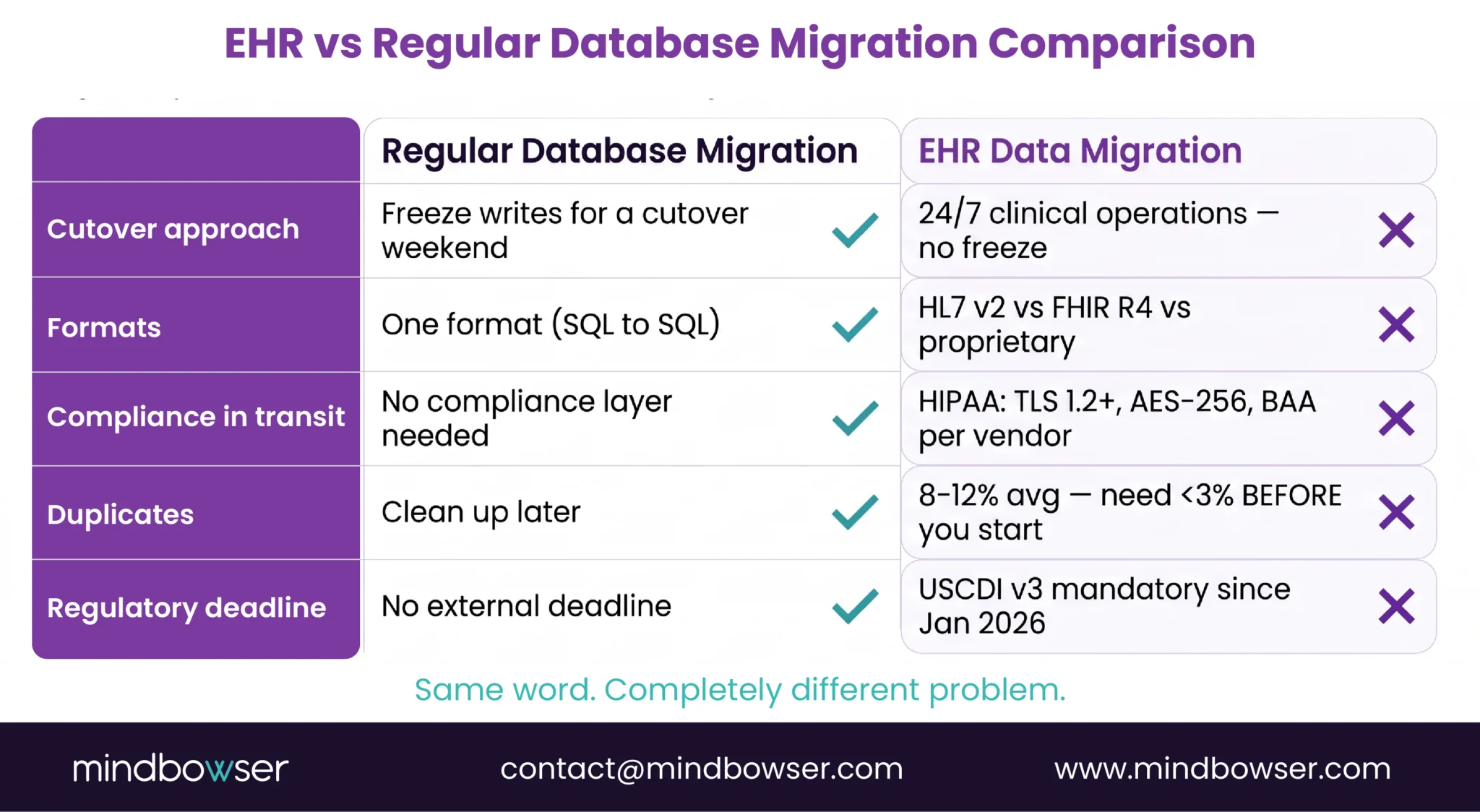
The moment PHI enters the migration pipeline, the rules change.
- HIPAA doesn’t pause for migration. Every file in transit needs encryption (TLS 1.2 minimum). Every staging table needs audit logs. You need a Business Associate Agreement with every vendor touching the data, not just the primary contractor, but their subprocessors too. A regular database migration needs none of this. An EHR migration needs all of it.
- Formats don’t translate cleanly. Your source system stores allergies as HL7 v2.5.1 AL1 segments. Your target needs FHIR R4 AllergyIntolerance resources. That sounds like a simple conversion until you realize HL7 v2 is a messaging standard and FHIR R4 is a resource model; they’re built on different assumptions about how data relates. Get the severity code wrong and “mild” becomes “life-threatening” in the new system. That’s not a data problem; that’s a clinical problem.
- Patients don’t pause for cutover. Unlike a SaaS migration where you freeze the database for a weekend, clinical systems run 24/7. A patient admitted Friday evening in the old system needs their record in the new system Monday morning. The VA’s Oracle Health rollout at Michigan sites (April 2026) had to plan for continuous patient flow; you can’t tell a hospital to stop admitting patients while you migrate.
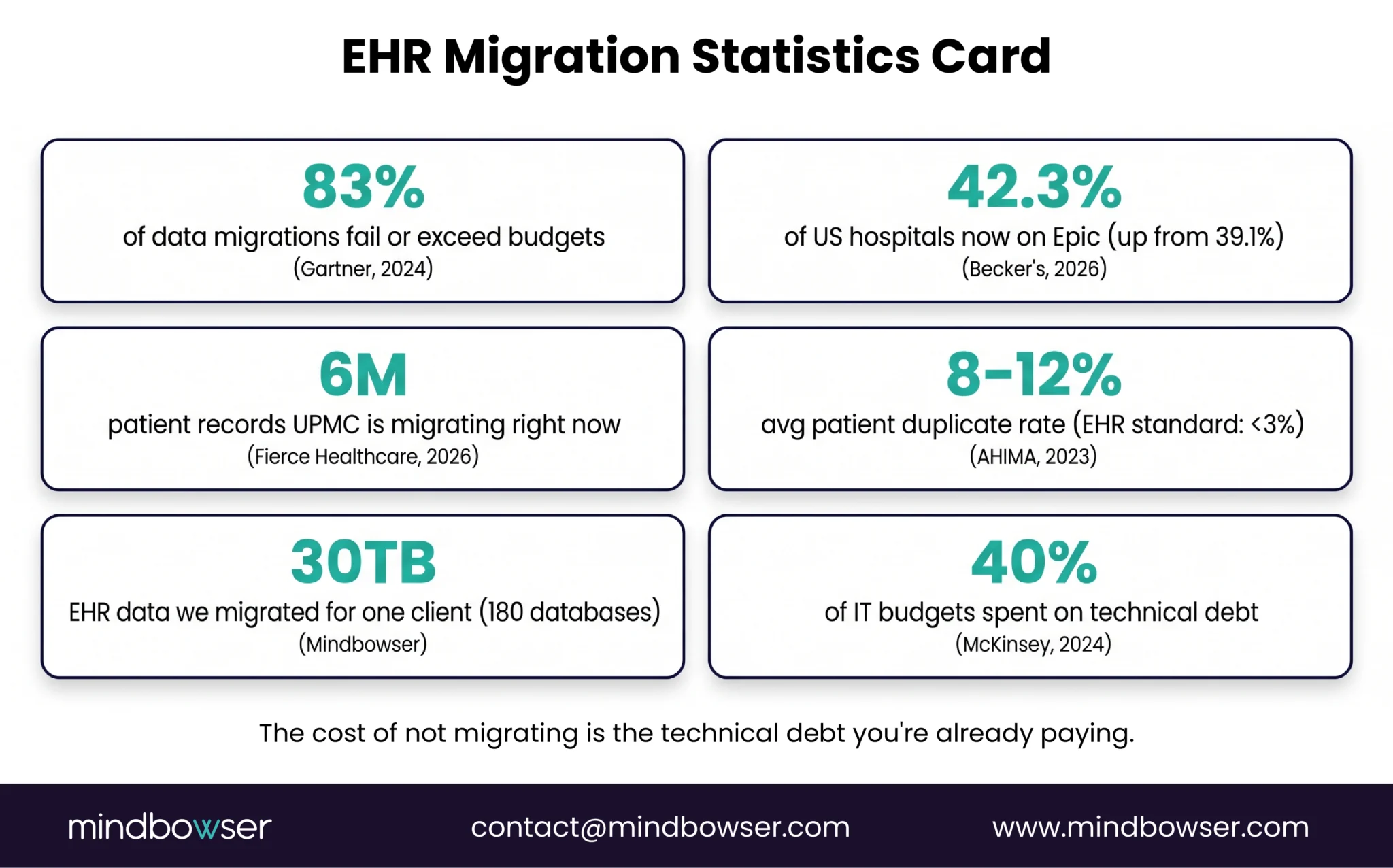
- Patient duplicates are everywhere. AHIMA data (2023) puts the average duplicate rate at 8-12% across healthcare organizations. But modern EHR standards demand less than 3%. If you migrate without deduplicating, you’ve moved the mess into a clean house. Now you have two copies of every tenth patient, and your reconciliation efforts have doubled.
- Regulatory pressure forces the timeline. USCDI v3 became mandatory in January 2026. That’s 94 specific data elements your system now has to support. If your legacy EHR doesn’t support USCDI v3, you can’t comply. Migration stopped being optional and became a compliance event. Health systems have a deadline, not a choice.
The last time I saw a data migration project fail in a way that was purely technical was in 2019. Every failure since then has been organizational: teams didn’t understand the type of migration they were running, or they skipped the parallel run to save money, or they engaged clinicians three weeks before go-live instead of three months before.
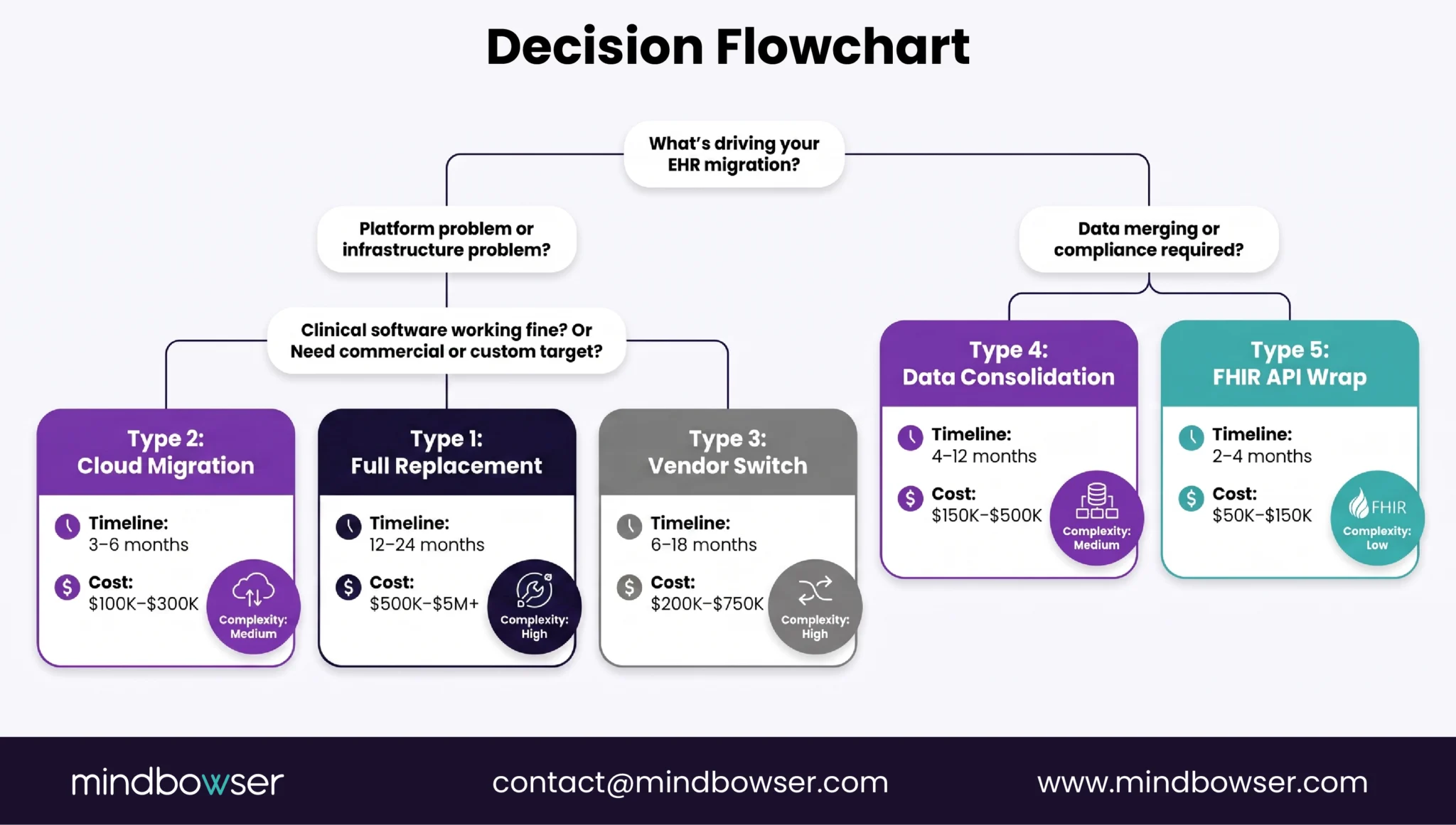
II. What Type of EHR Migration Do You Actually Have?
Most failed migrations I’ve seen were scoped for the wrong type from the start.
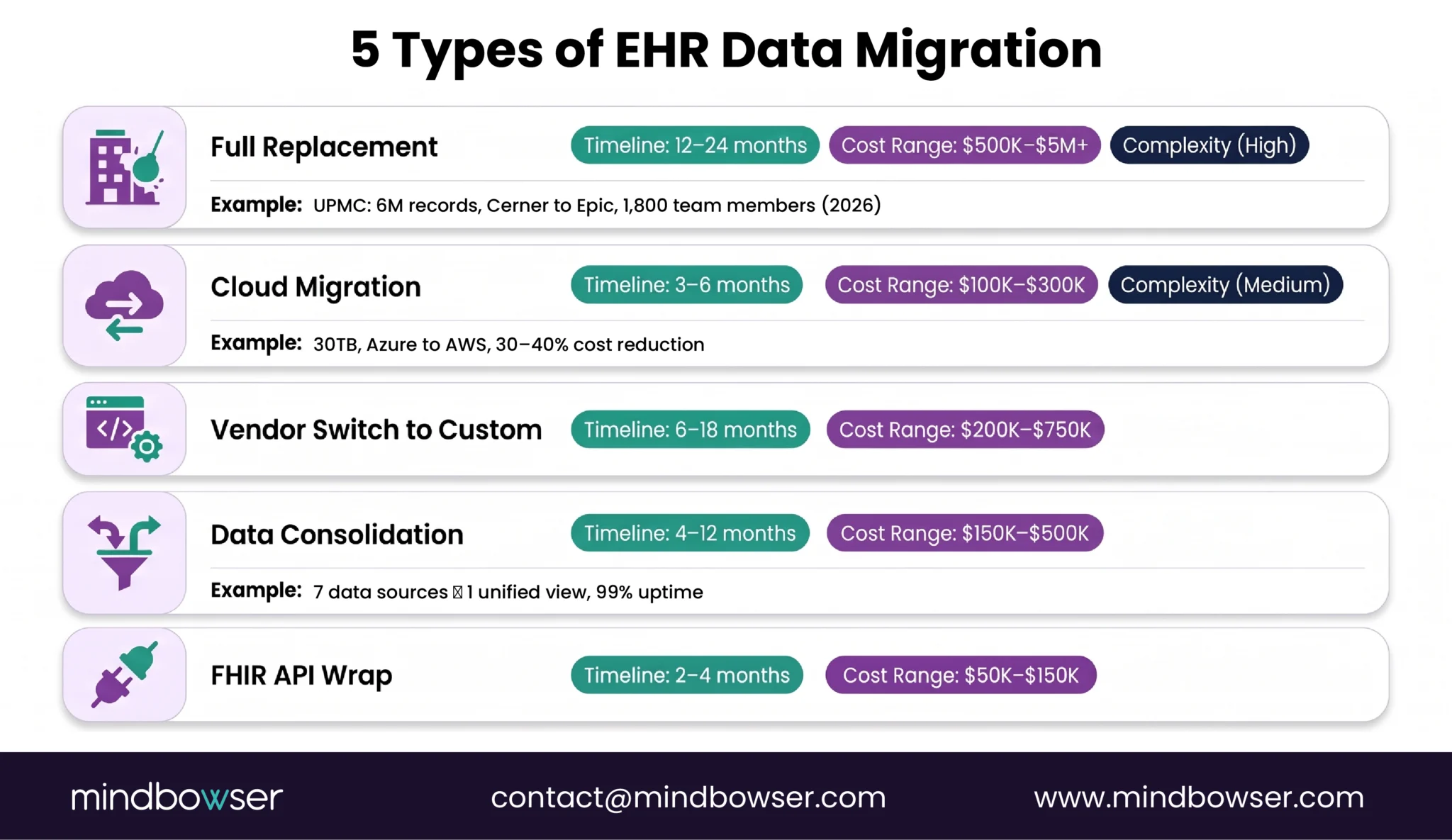
You can’t run a Type 1 project with a Type 2 budget. You can’t scope Type 3 work and execute Type 2 timelines. The five types below aren’t just different sizes of the same problem; they’re different problems entirely. Naming yours first fixes half your planning mistakes.
Type 1: Full Replacement (Legacy EHR to Modern EHR)
Rip out the old system, stand up a new one, move everything.
This is what UPMC is doing right now: migrating 6 million patient records from Oracle Cerner to Epic. They’ve enlisted 600 IT professionals and 1,200 clinicians to pull it off. They’re planning for 12-24 months of work.
- Timeline: 12-24 months for a health system with 200+ providers
- Best for: End-of-life platforms (vendor is sunsetting), losing vendor support, or the legacy system can’t meet modern clinical workflows
- Risk: Highest. You’re replacing the entire clinical backbone.
Type 2: Cloud Migration (On-Premise to Cloud)
Same application, new infrastructure. Your clinical software doesn’t change. The hosting, database layer, networking, and cost structure do.
We did this for a multi-specialty healthcare platform migrating from on-premises Azure to AWS. The clinical application stayed the same. The infrastructure underneath became elastic, cost-efficient, and cloud-native.
Real numbers: 30TB of data, 180 production databases, zero clinical downtime during the migration, and a 30-40% infrastructure cost reduction post-migration. Database latency actually improved from 120ms to under 80ms. That’s not just cost efficiency; that’s a performance win for clinicians.
- Timeline: 3-6 months (depends on data volume and infrastructure complexity)
- Best for: You’re hitting scaling limits or paying too much for on-premise hardware. The software works. The infrastructure doesn’t.
- Risk: Medium. Most of the complexity is infrastructure, not clinical workflow.
Type 3: Vendor Switch (Commercial to Custom)
You’re leaving one commercial EHR and building a purpose-built platform at the same time.
This is fundamentally different from Type 1 because the target system doesn’t exist yet. You’re not just migrating data; you’re designing the data model, the workflows, and the UI while you’re also extracting from your current system. The SERP gap between buying an EHR and building one is massive; if you need a vendor switch, read the build-vs-buy guide first.
- Timeline: 6-18 months (depends on how much custom development)
- Best for: Specialty workflows that don’t fit any commercial template, or you’ve outgrown the commercial EHR’s flexibility
- Risk: High. You’re running two parallel projects: migration and development.
Type 4: Data Consolidation (Multiple Systems to One)
Merging data from multiple sources into a unified platform. We did this for a behavioral health network: 7 clinical data sources consolidated into a single patient view with 15 clinical cards.
The technical challenge isn’t just moving data; it’s reconciling patients who exist in multiple systems with different IDs, different formats, sometimes different clinical facts. The organizational challenge is bigger: which system is the source of truth for medication history? Which one owns the allergy list?
- Timeline: 4-12 months (patient matching and reconciliation are the bottleneck)
- Best for: Post-acquisition consolidation, or when a health system has accumulated too many point solutions
- Risk: Medium-High. Patient matching is never 100% correct.
Type 5: FHIR API Layer Wrap (Keep Legacy, Expose via FHIR)
Don’t migrate the data at all. Instead, build a FHIR R4 API layer on top of your legacy system so modern applications can access the data without moving it.
You keep your legacy EHR running in production. Modern apps and partners hit a FHIR API that translates requests into your legacy system’s format, fetches the data, and returns it as FHIR resources. From the outside, your legacy system looks like a modern FHIR-native platform. You’ve solved the interoperability problem without the risk of data migration.
The HL7 v2 to FHIR mapping work is still real (it’s just API endpoints instead of bulk ETL), but the scale is smaller and the risk profile is much lower.
- Timeline: 2-4 months
- Best for: Your legacy EHR works operationally but can’t meet modern interoperability requirements. You need FHIR access without replacing the system.
- Risk: Lowest. You’re not moving any production data.
Your move: Which of these five matches your situation? If you’re not sure, that’s the first conversation worth having. Scoping the wrong type costs more than any other single decision you’ll make on the project.
III. What Does the EHR Migration Process Actually Look Like?
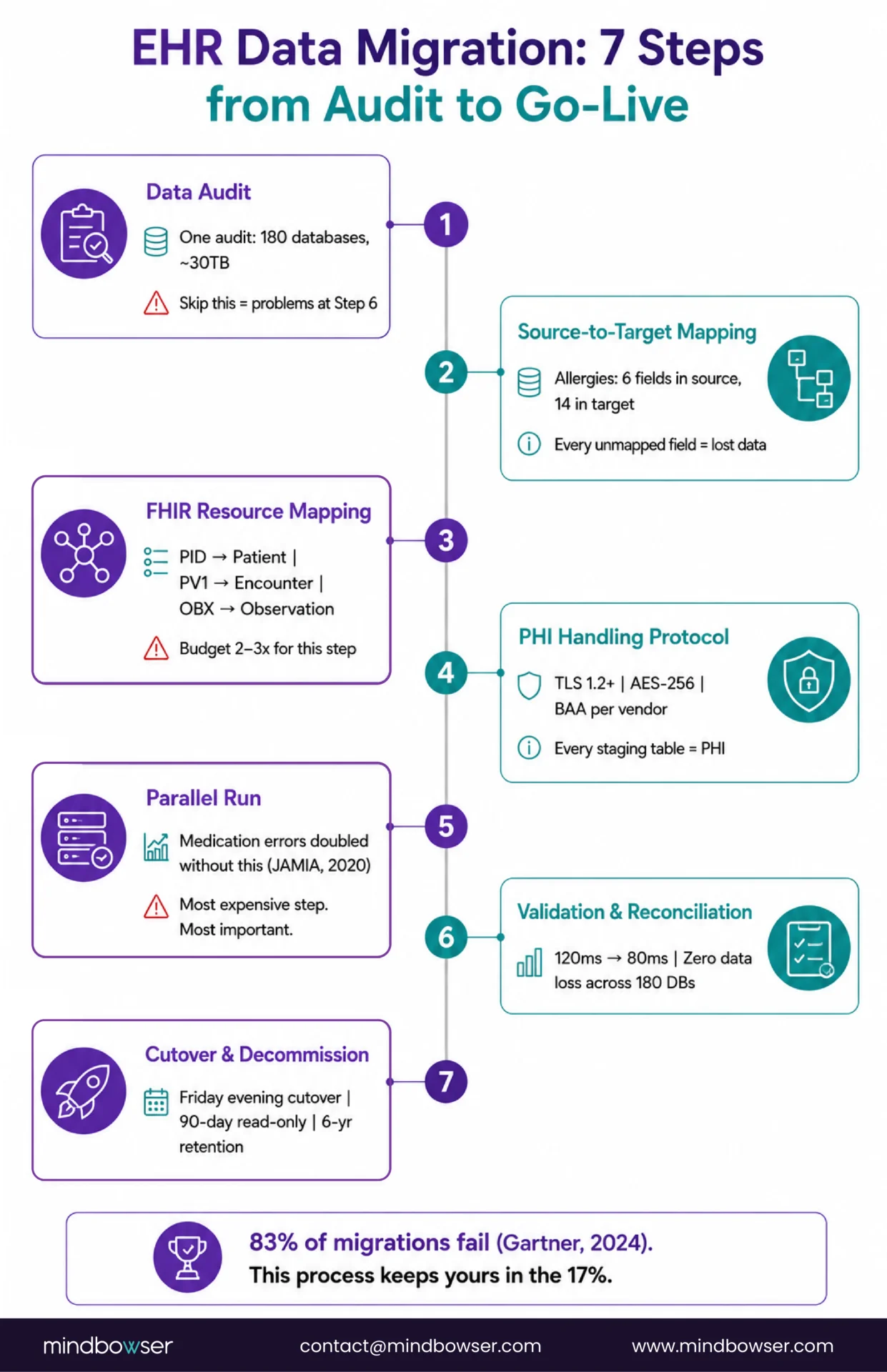
Seven steps. Skip one and you find out at the worst possible time, usually Step 6 or Step 7.
Step 1: Data Audit and Inventory
Before a single record moves, you need to know exactly what you have.
- How many databases? What’s the total data volume?
- What formats? HL7 v2, FHIR, proprietary, flat files, scanned PDFs?
- How much unstructured data? Clinical notes, consent forms, imaging reports are often the majority by volume.
- Where are the duplicates? Where are the orphaned records?
When we started the cloud migration for a multi-specialty platform, the audit revealed 180 production databases and approximately 30TB of total data including EHR records and telemedicine archives. Knowing that number before we started meant we could plan the right tooling from the beginning, AWS Snowball for bulk transfer, DataSync for ongoing synchronization. Walk in without that number and you’re scoping blind.
Step 2: Source-to-Target Data Model Mapping
Map every field in the source system to its equivalent in the target. This sounds straightforward until you find that “allergies” in System A has 6 fields and “allergies” in System B has 14. Every unmapped field is data that either gets lost or gets forced into a field it wasn’t designed for.
The mapping document becomes your migration bible. It’s also your audit trail for regulators.
Step 3: FHIR Resource Mapping for Structured Data
If your target is FHIR-native, and in 2026, it should be, you’re not just mapping fields. You’re mapping data models.
HL7 v2 segments map to FHIR R4 resources. PID segments become Patient resources. PV1 becomes Encounter. OBX becomes Observation. ORC/RXA becomes MedicationRequest and MedicationAdministration. But it’s not a clean one-to-one mapping; the structural assumptions are different.
Step 4: PHI Handling Protocol
Every staging table, every transformation script, every temporary file during migration contains PHI. Not just the final output, every intermediate state.
Your protocol needs:
- Encryption in transit (TLS 1.2 minimum) and at rest (AES-256)
- Business Associate Agreements with every vendor and subprocessor touching the pipeline
- Access controls on the migration environment, not just the production system
- Audit logs for every record touched, retained for 6 years (45 CFR 164.530)
Step 5: Parallel Run
Run both systems simultaneously. New data flows into both. Clinical staff use the old system for care delivery while the new system receives and processes the same data in parallel.
The parallel run is the step most teams want to skip because it’s expensive, you’re paying for two systems. Don’t skip it.
A study published in JAMIA (2020) documented cases where medication dosage errors doubled during EHR transitions that didn’t include adequate parallel testing. The errors didn’t come from bad migration logic, they came from workflow gaps that only show up when real clinicians use the real system with real patient volume.
Two to eight weeks minimum. Four is usually the right number for a mid-sized health system.
Step 6: Validation and Reconciliation
Compare source and target. Every record.
Automated reconciliation scripts verify:
- Record counts match
- Field values match, including calculated fields
- Relationships intact, a patient’s medications still belong to that patient, not someone else’s
- No orphaned records (encounters with no patient, observations with no encounter)
On the cloud migration, we validated zero data loss across all 180 databases while confirming that query latency dropped from 120ms to under 80ms. That second number matters: the reconciliation phase isn’t just about confirming data integrity; it’s your first signal on whether the new system actually performs.
Step 7: Cutover and Legacy Decommission
Switch production traffic to the new system. Plan this as a defined event, typically a Friday evening cutover with a monitored weekend and a rollback window still open Monday morning.
After cutover: the legacy system moves to read-only mode for 90 days minimum. Clinicians will need to query historical records. Auditors will need the old system. HIPAA requires records retained for 6 years after the date of creation or the date when it was last in effect, don’t pull the plug early.
Full decommission happens after the read-only period with a formal data archival. That archive is what satisfies the retention requirement without keeping a full production system alive.
IV: The 7-Phase EHR Migration Checklist
Phase 1: Data Audit & Inventory
- Count all databases; confirm total data volume
- Document all formats: HL7 v2, FHIR, proprietary, flat files, scanned PDFs
- Establish duplicate patient rate baseline (target: <3%; industry avg: 8-12% per AHIMA)
- Identify and scope unstructured data: clinical notes, consent forms, imaging reports
Phase 2: Source-to-Target Data Model Mapping
- Map every source field to its target equivalent
- Flag unmapped fields – document handling decision for each
- Mapping doc becomes migration audit trail for regulators
Phase 3: FHIR Resource Mapping
- Map HL7 v2 segments → FHIR R4: PID→Patient, PV1→Encounter, OBX→Observation, ORC/RXA→MedicationRequest +
- MedicationAdministration
- Verify code systems: LOINC (labs/vitals), SNOMED (diagnoses), RxNorm (medications)
- Document every field with no clean FHIR equivalent
Phase 4: PHI Handling Protocol
- TLS 1.2 minimum in transit across staging tables and transformation scripts
- AES-256 at rest
- BAA executed with every vendor and subprocessor touching the pipeline
- Access controls on the migration environment, not just production
- Audit logs on every record touched; retain 6 years (45 CFR 164.530)
Phase 5: Parallel Run (2-8 weeks; 4 recommended)
- Both systems live simultaneously
- Clinical staff deliver care via old system; new system processes same data in parallel
- Don’t skip this – JAMIA (2020) documented medication error doubles in transitions without parallel testing
Phase 6: Validation & Reconciliation
- Record counts match source (≤0.01% discrepancy)
- Field values match, including calculated fields
- All relationships intact (medications → correct patient, observations → correct encounter)
- No orphaned records
- Confirm performance baseline: query latency, load response
Phase 7: Cutover & Legacy Decommission
- Cutover as a defined event: Friday evening, rollback window through Monday morning
- Legacy system read-only for 90 days minimum post-cutover
- Formal data archival before full decommission (satisfies HIPAA 6-year retention)
- Decommission date confirmed in writing with compliance, clinical, IT leads
Related Read: EHR Data Integration: A Complete Guide for Healthcare Providers
V. How Much Does EHR Data Migration Cost and How Long Does It Take?
The honest answer: it depends on the type. But here’s what actual projects look like, not theoretical ranges.
| Migration Type | Timeline | Cost Range | Key Driver |
|---|---|---|---|
| Full replacement | 12-24 months | $500K – $5M+ | Data volume + clinical complexity |
| Cloud migration | 3-6 months | $100K – $300K | Infrastructure scope |
| Vendor switch to custom | 6-18 months | $200K – $750K | Development + migration parallel |
| Data consolidation | 4-12 months | $150K – $500K | Patient matching complexity |
| FHIR API layer wrap | 2-4 months | $50K – $150K | API endpoints + legacy translation |
Two cost realities nobody puts in the brochure:
The hidden cost of not migrating. McKinsey (2024) estimates up to 40% of an average organization’s total IT budget goes to maintaining technical debt. If your legacy EHR is that technical debt, you’re already paying for the migration, you’re just paying it in maintenance contracts, workarounds, and developer time. The migration cost is the one-time version of what you’re already paying every year.
Failure costs dwarf project costs. Gartner (2024) puts data migration failure at 83%. In healthcare, a failed migration doesn’t just mean a delayed go-live, it can mean clinical data gaps, billing disruptions, and patient safety events. The budget conversation shouldn’t be “how do we cut the migration cost?” It should be “how do we make sure we’re not in the 83%?”
Ready to Scope? Tell Us Your Current System, Data Volume, and Target State!
VI. What Kills Most EHR Migrations?
Six mistakes. Most of them happen before a single record moves.
1. Migrating Dirty Data.
If your source system has a 10% duplicate patient rate, your target will too unless you fix it first. AHIMA (2023) puts the industry average at 8-12% duplicates. Modern EHR standards demand less than 3%. Deduplication isn’t a migration step; it’s a prerequisite. If it’s not done before Step 1, you’ve built your new system on a flawed foundation.
2. Ignoring Unstructured Data.
Structured fields get all the attention in migration planning. But clinical notes, scanned consent forms, imaging reports, and free-text entries are often the majority of the data by volume and they carry clinical meaning that structured fields don’t.
If your migration plan only covers structured data, you’ve migrated the skeleton and left the body behind.
3. Skipping the Parallel Run.
The JAMIA (2020) finding on medication errors during EHR transitions isn’t an edge case it’s the predictable result of going live without running both systems simultaneously. Staging environments don’t replicate the concurrent user load, the edge-case clinical workflows, or the data volume of production. The parallel run is expensive. The alternative is more expensive.
4. Underestimating the HL7 v2 to FHIR Mapping Effort.
Every health IT leader I know has said “it’s just a format conversion.” It is not. HL7 v2 is a messaging standard built on pipe-delimited segments. FHIR R4 is a resource model built on REST and JSON. They encode different semantic assumptions about how clinical data relates. Budget 2-3x what you think this step will take. The technical depth is in the HL7 v2 to FHIR conversion guide.
5. Not Testing With Real Clinical Workflows Before Cutover.
Your data can migrate perfectly and still break clinical operations. A nurse clicks 7 times instead of 3. A physician’s custom order set doesn’t exist in the new system. The billing module doesn’t recognize the new patient ID format. Migration QA must include real clinicians using the real system under realistic conditions not just data validation scripts comparing record counts.
6. Engaging Clinical and Compliance Teams Too Late.
Read a post-mortem on any failed EHR implementation and you’ll find the same pattern: IT planned the migration, clinicians found out eight weeks before go-live. For a fuller picture of why this pattern is so common (and so destructive), the challenges of implementing EHR guide goes deep on the organizational dynamics. Clinical, compliance, billing, and training need a seat at the table from Step 1 not Step 6.
VII. How Mindbowser Approaches EHR Data Migration
Three fundamentally different migration types. Here’s what each one taught us.
Cloud Migration Azure to AWS, 30TB, 180 Databases
A multi-specialty healthcare platform needed to move from Azure to AWS. Same clinical application, new infrastructure. The migration scope: approximately 30TB of data including EHR records and telemedicine archives, spread across 180 production databases.
What we used: AWS Snowball for the bulk transfer (30TB physically moved), DataSync for ongoing synchronization during the transition window, AWS RDS with read replicas and KMS encryption for the database layer, and AWS WAF for the network perimeter.
The result: zero clinical downtime throughout the migration. Infrastructure cost reduction of 30-40% post-migration. Database query latency improved from 120ms to under 80ms a 33% performance gain that wasn’t on the original requirements list but showed up in the reconciliation data.
What it taught us: Cloud migrations look simple on paper because you’re not changing the application. The complexity is in the data pipeline and the validation. Zero data loss across 180 databases isn’t luck it’s reconciliation scripts and a cutover plan that builds in time to actually use them.
Data Consolidation Behavioral Health Network, 7 Sources into One
A behavioral health network had accumulated a legacy .NET clinical application and 6 other data sources over a decade of growth. No single view of the patient existed anywhere in the system.
We started with a 4-week discovery to assess the legacy system. It was viable not a replacement candidate. So we built a modern data aggregation layer on top: 7 clinical data sources consolidated into a unified dashboard with 15 clinical cards. Not a migration in the traditional sense, but a Type 4 consolidation that gave clinicians a single patient view without decommissioning anything.
Results: 99% uptime in the first 30 days post-launch. Zero critical bugs at launch.
What it taught us: Not every consolidation requires migrating to a new system. Sometimes the right answer is an aggregation layer that gives you the unified view you need while the individual systems stay in place.
Greenfield National Health Records System
A country-scale EHR system built from a blank data model. No legacy system to migrate from, which meant no migration. But the architecture decisions made during the design phase determined how hard future migrations into this system would be.
We built FHIR-native and ONC-aligned from day one. USCDI v3 compliant before the mandate. When data eventually needs to flow into this system new hospitals, new clinical programs the migration-in is straightforward because the target was designed to receive data, not just store it.
That’s the insight from greenfield work that applies to every migration: the cost and risk of a migration is largely determined by how well the target system was designed. If you’re choosing a new EHR or building a custom one, read the EHR system architecture playbook before you finalize the data model. It’s cheaper to design for migration than to retrofit for it.
A former NHS CIO said something on the HealthTech with Purpose podcast that I keep coming back to: “Focus on people, not technology.” The tech on that project worked. It succeeded because the team treated it as a people transformation first and a database migration second. That’s the lens I bring to every engagement.
Where Does This Leave You?
EHR data migration isn’t a database copy. It’s an architecture project that touches compliance, clinical workflows, data quality, and organizational change simultaneously.
Three things worth holding onto:
Pick the Right Migration Type First.
A cloud migration is a fundamentally different project than a full replacement. They have different timelines, different costs, different risk profiles, and different skill requirements. Name what you’re actually doing before you scope anything else.
The Wave Is Real.
Epic gained 176 hospitals last year. Oracle Health lost 74. UPMC is moving 6 million records. Competition for experienced EHR migration teams is intensifying the teams that know how to do this well are getting booked up. If migration is on your 18-month roadmap, start scoping now.
Build the Target Right.
A FHIR-native, USCDI v3-compliant target system won’t need another migration in three years. The cheapest migration you’ll ever run is the one you don’t have to repeat. If you’re designing the target from scratch, the EHR system architecture playbook covers the data model decisions that make the migration-in easier.