BLOGS
BLOGS  NEWSROOM
  CASE STUDIES
  WEBINARS
  PODCASTS
  ASSET HUB
  EVENT CALENDAR


























A small redirect bug, three services, and why startsWith is not a security check.
Single sign-on flows usually end the same way: the user logs in, and the identity provider sends them back to the app that asked, along with a session. The URL they’re sent back to is often just a query parameter. In our case, nobody was checking that parameter, and that meant anyone could receive a user’s tokens by sending them a link.
This post covers how we found the gap, why the obvious fixes don’t work, and the pattern we used instead: approve the destination before creating the token, using exact matching on a canonical URL.
Background
Our internal platform has its own login page (Google sign-in or an email OTP). Other internal apps use it for SSO. They send users to the login page with a redirect_uri, and after login the user lands on the app’s callback page with a session:
/login?redirect_uri=https://app.example.com/sso/callback
Three components are involved. The web app (React) hosts the login page. The identity service (Spring Boot) verifies users and creates access and refresh tokens. The Core API (Spring Boot) holds admin-managed settings.
The problem
During a review of the login flow, we traced what happens to redirect_uri. The frontend’s handling came down to this:
if (searchParams.get('redirect_uri') && searchParams.get('source')) {
navigate(`/sso/success?eid=${searchParams.get('redirect_uri')}`, {
state: { accessToken, refreshToken, email, name },
});
}
Whatever URL arrived in the query string received the new session. An attacker does not need direct entry or breach into our infrastructure to cause harm. They only need a victim to click a link.
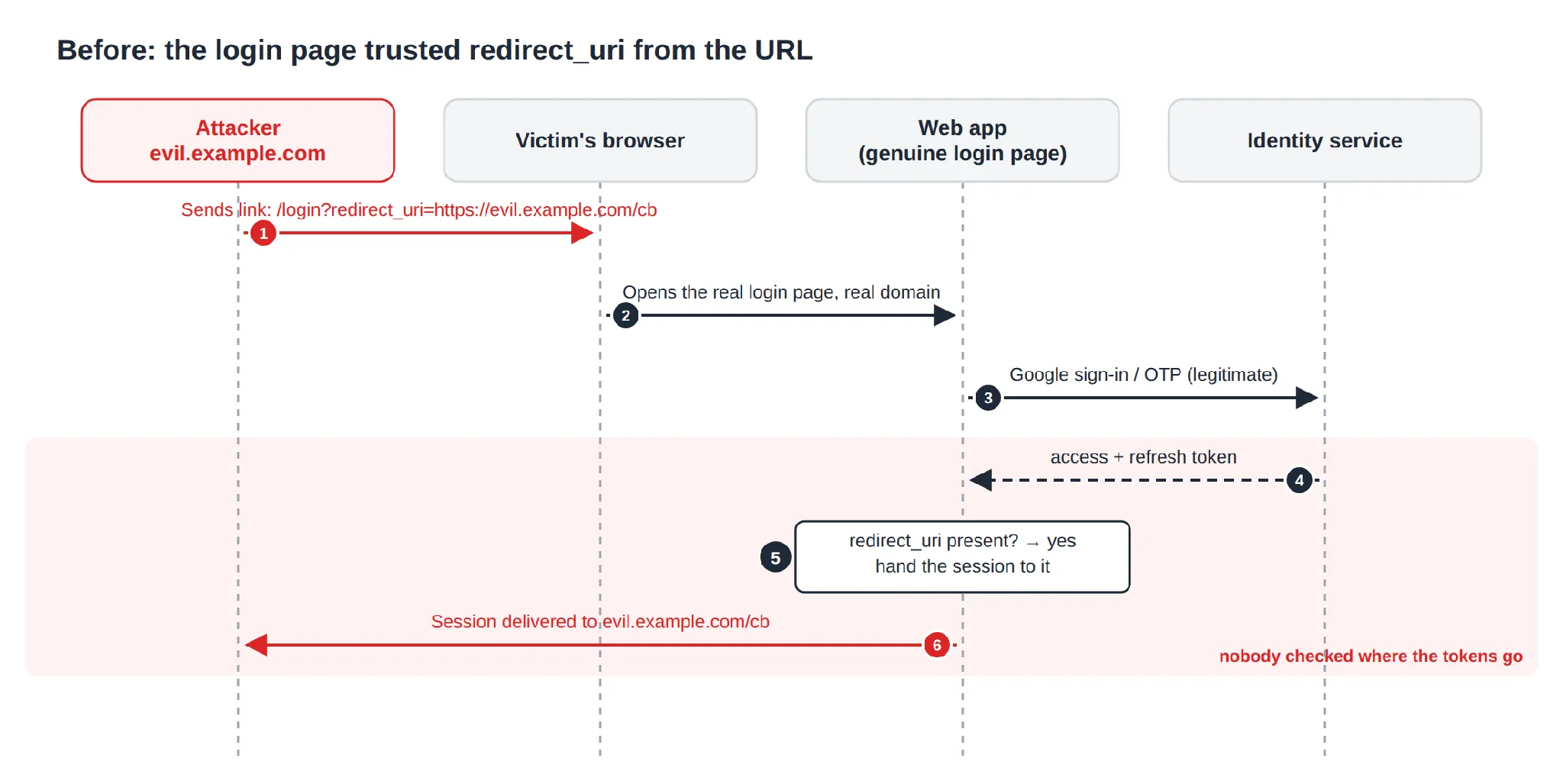
This is an open redirect, a well-known weakness (OWASP has a cheat sheet on it). Here it’s more serious than usual, because the redirect carries credentials with it.
Why nobody noticed
- Every login worked: A redirect flaw is invisible as long as everyone uses legitimate links.
- It looked guarded: The source parameter reads like a gate, but the code only checked that it was present. Adding &source=x gets past it.
- Nobody owned the decision: The frontend chose the destination, the identity service created the tokens, and the Core API held the configuration. Each could reasonably assume someone else was validating the URL.
Tracing further showed three code paths that ended in an SSO redirect: Google sign-in, OTP sign-in, and a silent token refresh when an already logged-in user opens an SSO link. The last one never shows a login form, so a fix that only covered the form would have missed it.
That also answered where the fix belongs. Tokens are created in the identity service, so the destination must be approved there, before the token exists. A check in the browser runs after the tokens have been issued.
Why the obvious fixes fail
The first fix most people reach for is a string check. Suppose the approved callback is https://app.example.com/sso/callback:
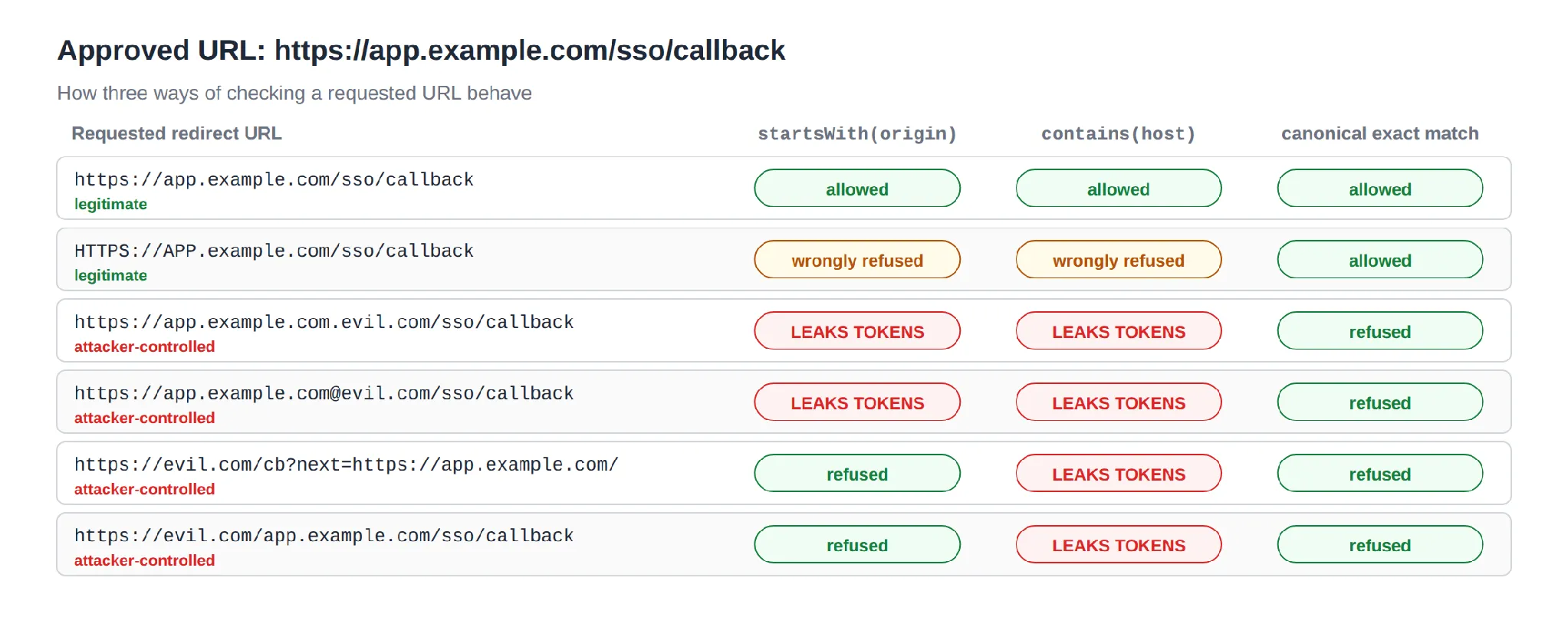
- startsWith accepts app.example.com.evil.com (a different host) and app.example.com@evil.com, where everything before @ is a username and evil.com is the real host.
- contains accepts our host hidden in someone else’s path or query string.
- Suffix or regex rules trust forgotten subdomains, and an unescaped . in a regex matches any character.
String checks also reject things they shouldn’t: HTTPS://APP.example.com/… is the same URL, but a case-sensitive prefix check refuses it. The OAuth 2.0 security best-practice document (RFC 9700) is clear on this: redirect URIs should be matched exactly, never by pattern.
Want Engineering That Treats Security as a First-class Design Constraint? Talk to Our Team.
The fix
An admin keeps a list of approved callback URLs in Settings. When a login includes a redirect, the identity service asks the Core API to verify it before creating any token:
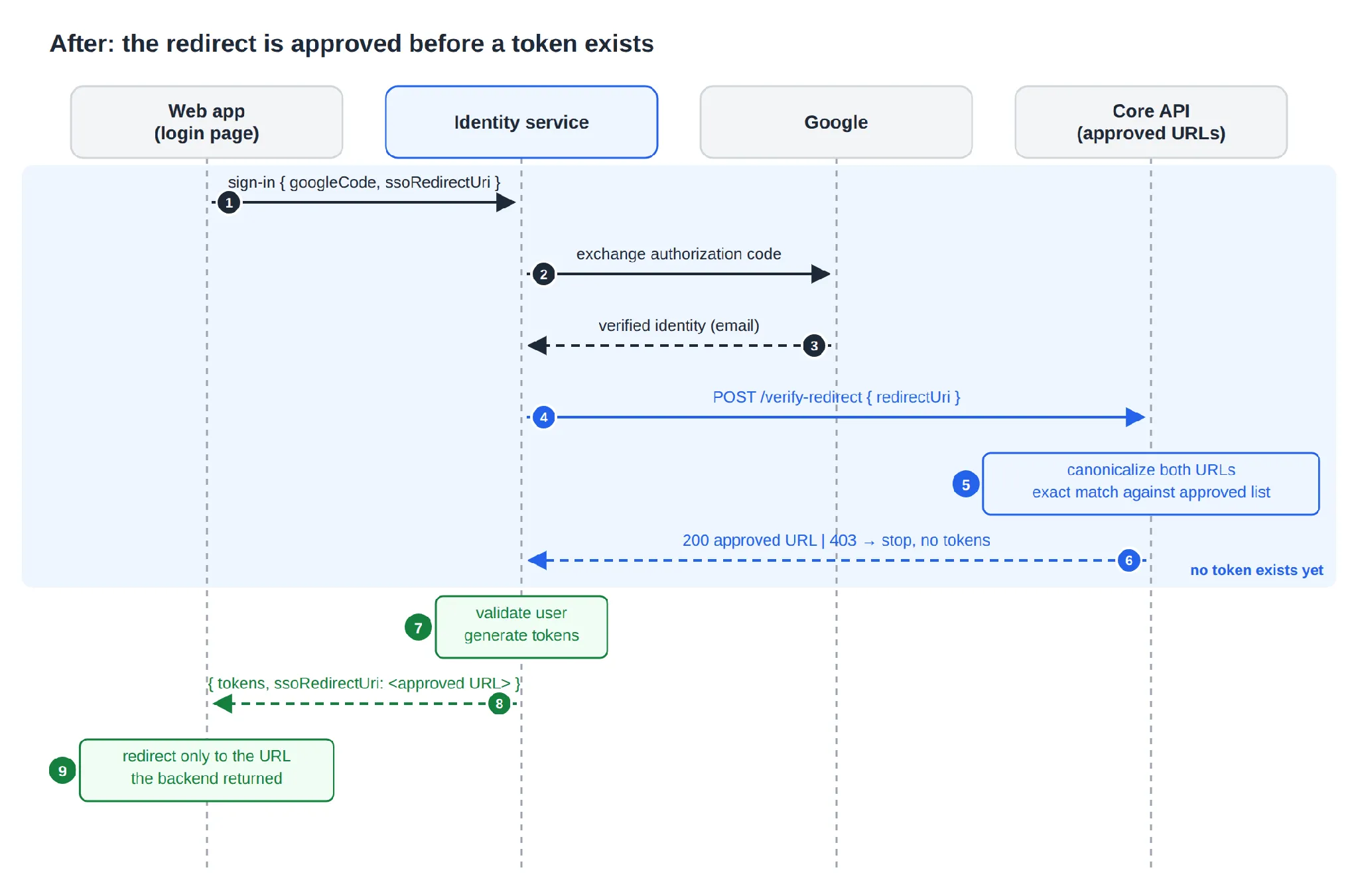
Four rules define the behavior:
- Approve before creating the token. Code exchange → identity → redirect check → user validation → tokens.
- Canonicalize, then compare with equals. No prefixes, wildcards or regex.
- Fail closed. No approved URLs, no match, or a failed verify call all lead to the same result: login refused, no tokens.
- Trust the backend’s answer. The frontend redirects only to the URL the backend returns, never to the raw query parameter.
Logins without a redirect_uri are unchanged.
Implementation
Canonicalizing URLs
Canonicalization turns every spelling of the same URL into one string, so that plain equality becomes a safe comparison:
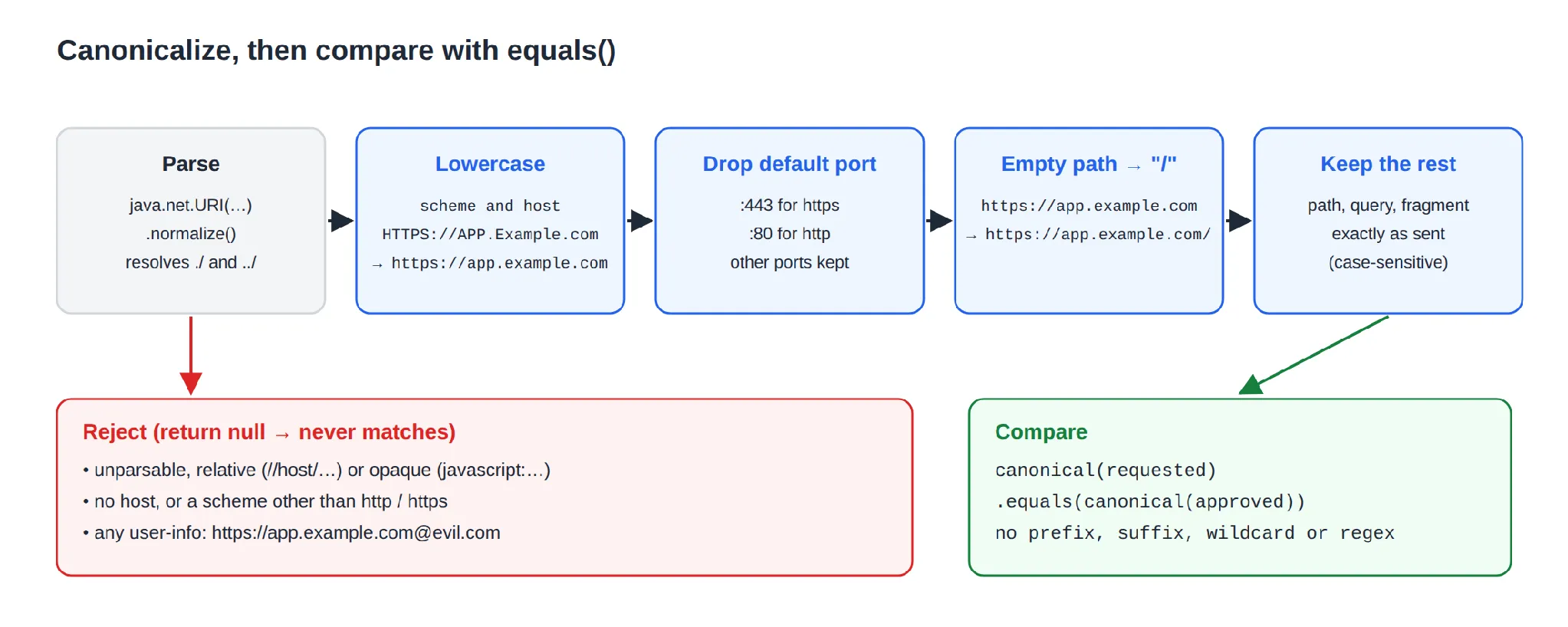
public String normalize(String url) {
  if (url == null || url.isBlank()) return null;
  URI uri;
  try {
    uri = new URI(url.trim()).normalize(); // resolves ./ and ../
  } catch (URISyntaxException e) {
    return null;
  }
  if (uri.getScheme() == null || uri.isOpaque() || uri.getHost() == null
      || uri.getRawUserInfo() != null) return null; // blocks a@evil.com
  String scheme = uri.getScheme().toLowerCase(Locale.ROOT);
  if (!scheme.equals("http") && !scheme.equals("https")) return null;
  StringBuilder out = new StringBuilder(scheme).append("://")
      .append(uri.getHost().toLowerCase(Locale.ROOT));
  if (uri.getPort() != -1 && uri.getPort() != defaultPort(scheme)) {
    out.append(':').append(uri.getPort());
  }
  String path = uri.getRawPath();
  out.append(path == null || path.isEmpty() ? "/" : path);
  if (uri.getRawQuery() != null) out.append('?').append(uri.getRawQuery());
  if (uri.getRawFragment() != null) out.append('#').append(uri.getRawFragment());
  return out.toString();
}
public boolean matches(String requested, String approved) {
  String canonical = normalize(requested);
  return canonical != null && canonical.equals(normalize(approved));
}
A handful of decisions are made intentionally:
- Only the scheme and host components are converted to lowercase.
- User-info and non-http(s) schemes (such as javascript:) are rejected outright.
- Invalid input returns null, and null never matches, so anything we can’t parse is refused.
The Settings screen uses the same method: invalid URLs are rejected with a 400, and valid ones are stored in canonical form.
Placing the check
In the identity service, a single method runs at the start of all three token paths. It returns the approved URL, or throws a 403 so no token is ever created. Two details make this friendlier for users:
- In the OTP path, the check runs before the OTP is consumed, so a bad link doesn’t use up the user’s code.
- If an already logged-in user opens an unapproved link, the frontend shows “This app is not allowed to receive your login” and keeps their session.
The fake source gate was removed, so nobody mistakes it for security later.
Storing approved URLs
Approved URLs live in their own table with soft delete. A partial unique index blocks duplicate active entries but still lets an admin re-add a URL they deleted earlier:
CREATE UNIQUE INDEX uk_sso_setting_active_url
    ON sso_setting (sso_url) WHERE is_deleted = FALSE;
Because URLs are stored canonicalized, HTTPS://APP.example.com/cb and https://app.example.com/cb collide on this index instead of being saved twice.
Rolling it out
Deploying the services in dependency order kept login working at every step: first the Core API (a new endpoint nothing calls yet), then the identity service (which checks only when the new, optional field is present), then the web app. Because the system fails closed, saving the approved URLs has to be part of the release checklist. Until an admin does it, every SSO redirect is refused.
Validation
We ran the canonicalizer against the approved URL https://app.example.com/sso/callback:
| Requested URL | Result | Reason |
|---|---|---|
HTTPS://APP.Example.com/sso/callback | ✅ Allowed | Case is normalized |
https://app.example.com:443/sso/callback | ✅ Allowed | Default port dropped |
https://app.example.com/sso/callback/ | ❌ Refused | Different path |
https://app.example.com/sso/callback?x=1 | ❌ Refused | Extra query |
http://app.example.com/sso/callback | ❌ Refused | Different scheme |
https://app.example.com.evil.com/sso/callback | ❌ Refused | Different host |
https://app.example.com@evil.com/sso/callback | ❌ Refused | User-info |
javascript:alert(1)//app.example.com/sso/callback | ❌ Refused | Not http(s) |
A table like this converts directly into a JUnit @ParameterizedTest, which is the cheapest way to stop anyone from “simplifying” the check back to startsWith.
The end-to-end check is quick. Log in through the approved URL and the app receives the session. Change one character of redirect_uri and the login is refused with no tokens issued. Log in without redirect_uri and nothing has changed.
Key takeaways
- Follow the tokens. List every place a credential is created and every place it’s sent. Bugs live in the gap between the two lists.
- Validate where the asset is created. If the destination isn’t approved, the token should never exist.
- Canonicalize, then use equals. Redirect bypasses exploit the difference between how a URL looks and how it parses.
- Checking that a parameter exists isn’t validation. Remove fake gates so nobody relies on them.
- Fail closed, and document it. A secure default that isn’t in the release notes will be reported as an outage.
Conclusion
The final change was small: one utility, one endpoint, and one check in the right place. The hard part was noticing the bug, because nothing looked wrong. If your application accepts a redirect_uri, returnUrl or next parameter, take ten minutes to find out who validates it, and whether that happens before or after the token exists.