BLOGS
BLOGS  NEWSROOM
  CASE STUDIES
  WEBINARS
  PODCASTS
  ASSET HUB
  EVENT CALENDAR






















TL;DR
Epic device integration succeeds only when values appear in the correct Epic flowsheet rows, with the correct units, at the right time. In practice, you have two main routes into Epic: HL7 ORU R01 via the hospital interface engine, or FHIR Observation, which has write-enabled endpoints. The winning strategy is to maintain a single mapping workbook, align on patient identity and encounter context, and validate against gold datasets so clinicians and IT can trust the data. This guide walks through how to choose your path, design the mapping, and ensure reliable device data flow integration in real hospitals.
Hospital interface/EHR integration led with 40.73% of the Healthcare IT Integration market size in 2024, reflecting the centrality of unified patient records to clinical decision-making
–Mordor Intelligence, Healthcare IT Integration Market Report, 2025
When clinical teams request Epic device integration, they are not seeking technology for its own sake. They are asking for data that appears in Epic where it matters most, in the flowsheet, so anesthesia providers, nurses, and physicians do not waste time copying from monitors.
For a CIO or CTO, the stakes are clear. Without reliable HL7 device integration or FHIR device integration, charting is delayed, billing is inconsistent, and clinicians build workarounds that undermine adoption and ROI.
In practice, what “good” looks like is simple to state but harder to achieve. Each metric appears in the correct Epic flowsheet row, with the correct unit, at the right time, every time. The reality is that hospitals often face mismatches in codes, inconsistent units, or encounter-linkage failures that put compliance and revenue at risk.
The purpose of this article is to cut through the noise and outline two proven routes to Epic device integration: HL7 ORU R01 via the hospital’s interface engine, or FHIR Observation device data via Epic’s APIs.
We will explain how to maintain a single mapping layer, build a workbook that serves as your source of truth, and avoid common pitfalls related to timing, reliability, and identity. If you are leading medical device EHR integration as a technology executive or product founder, this guide provides a roadmap that clinicians and IT professionals can trust.
I. What are the two main routes to get device data into Epic?
When teams start planning epic device integration, the first question is usually: “Do we send this through HL7 or FHIR?” Both routes are valid, but each has its own trade-offs.
The right choice depends on how quickly the hospital wants to go live and what the Epic environment already supports.
A. Route 1: HL7 ORU R01
HL7 ORU R01 has been the backbone of Epic device integration for years. It is mature, widely deployed, and well understood by hospital interface teams.
In this model, each device metric is carried in its own OBX segment. You will see one OBX for heart rate, another for blood pressure, another for SpO₂, and so on. The segments repeat as needed, which makes it straightforward to add new metrics without reinventing the wheel.
Most hospitals already run interface engines such as Cloverleaf, Rhapsody, or InterSystems IRIS. HL7 device integration flows through these engines and lands in Epic’s flowsheets once the mapping is in place. The benefit here is speed. You are building on existing infrastructure.
B. Route 2: FHIR Observation
The newer option for FHIR device integration is to write directly into Epic using the FHIR Observation resource. This is only possible if the hospital has enabled write access on its Epic FHIR endpoints.
The FHIR model is cleaner. Each Observation includes a code, a valueQuantity with UCUM units, an effectiveDateTime, and a patient reference. It is standardized and easier to extend across devices once the framework is set up. For future-facing medical device EHR integration, this is often the preferred approach.
The complexity comes in with authentication and authorization. You need tokens, scopes, and a strategy for secure storage and rotation. Each hospital tenant will have its own credentials, so your integration must be multi-tenant aware from day one.
C. How should you choose between HL7 ORU R01 and FHIR Observation?
Hospital capability and go-live timing drive the decision. If the hospital’s IT team already has a strong HL7 interface environment, HL7 ORU R01 will usually get you into Epic faster. If they are forward-leaning on APIs and want a cleaner model for the future, FHIR Observation device data is the way to go.
The smart play is to design a single mapping layer that supports both HL7 and FHIR device integration. You can start with HL7 today and, as Epic expands write-enabled FHIR coverage, transition without rebuilding your integration.
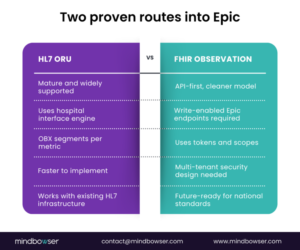 Fig 1: Two Proven Routes Into Epic
Building a Custom Platform? Make It Epic-Ready from Day One
II. How do you design a mapping workbook that everyone can trust?
When integrations fail, it is rarely because of the transport method. It is almost always because teams did not agree on the mapping.
That is why the mapping workbook is the single most important document in any Epic device integration. It becomes the contract between engineers, clinicians, and IT. If the workbook is clean, the integration stands. If it is sloppy, you will spend months chasing errors.
A. Why does the mapping workbook matter so much?
The mapping workbook is your single source of truth. It prevents drift between engineering teams, vendor teams, and hospital stakeholders.
It ensures clinicians, interface analysts, and developers all see the same definitions for each metric. By forcing everyone to align on identifiers, units, and flowsheet rows, you eliminate ambiguity that would otherwise show up as errors in Epic.
B. Which columns should the mapping workbook include?
At a minimum, your mapping workbook should have:
- Metric name
A plain English label, such as “Systolic Blood Pressure”. - Description
How the metric is measured and any special notes, such as whether it is invasive or non-invasive. - UCUM unit
Standard unit coding, such as mm[Hg] for blood pressure or % for oxygen saturation. - LOINC or IEEE 11073 code
The universal identifier, where possible. If none exists, use a local code but document it clearly. - Target Epic flowsheet row
The exact Epic build row where this value should appear. These IDs are often cryptic, so documenting them prevents costly guesswork. - Frequency or sample rate
How often values are sent, for example, every second, every minute, or every 5 minutes. This is critical for performance and storage planning. - Rounding rules
Whether values are rounded, truncated, or averaged before being written into Epic.(shubham cont)
C. How should you handle coding gaps and clinical sign-off?
Not every metric has a LOINC code today. In those cases, pair an IEEE 11073 term with a local code and flag it in the workbook. This allows an LOINC addition to be requested later without breaking the integration.
Always maintain a versioned mapping table to track changes. If someone swaps a flowsheet row or changes a unit, you need an audit trail.
Share a clinician-facing view of the workbook. Anesthesiologists, OR nurses, and critical care staff should confirm the labels, units, and flowsheet destinations before you go live. Their sign-off is what turns a technical mapping into a clinically trusted one.
D. What does a practical example look like?
This simple table can prevent months of rework. With it, engineers know what to send, clinicians know what to expect, and IT knows how to validate.
III. How does HL7 ORU R01 work in practice?
When hospitals ask how device data is transmitted to Epic, the HL7 ORU R01 message is usually the first answer.
It has been around for decades and remains the backbone of clinical system integration. ORU is flexible, supported across interface engines, and already wired into Epic’s flowsheet framework.
If you want to go live quickly, this is where you usually start.
A. What is the typical HL7 ORU R01 message shape?
A typical ORU R01 message contains these segments in order: MSH, PID, OBR, and repeated OBX segments.
- The MSH segment establishes the message header, including the sender, receiver, and message type.
- The PID segment holds patient identifiers such as MRN.
- The OBR segment defines the order context or observation request.
- The OBX segments carry the actual device values. Each metric is its own OBX.
This pattern is central to HL7 device integration with Epic.
B. Which OBX fields are most important for device data flow sheet integration?
For epic device integration using HL7 ORU R01, a few OBX fields do most of the work:
- OBX 3 is the metric identifier. This can be a LOINC code, an IEEE 11073 term, or a local code if no standard exists.
- OBX 5 is the measured value itself, such as “120” for systolic blood pressure.
- OBX 6 defines the units, always in UCUM format. For example, mm[Hg] for blood pressure or % for oxygen saturation.
- OBX 14 carries the observation timestamp. This field ensures that values align correctly with clinical events.
C. How do you manage reliability and timing with HL7 ORU R01?
The most common failure is a mismatch between device time and encounter time. If the timestamps do not align, Epic may reject the data or misfile it. Always synchronize device clocks and confirm encounter linkage.
Some devices send late-arriving values. Your interface engine must handle these gracefully and still file them in the correct flowsheet row.
Reliability is critical:
- Build for ACK handling so every message is acknowledged.
- Retries should be automatic for failed transmissions.
- Use dead letter queues to capture messages that cannot be delivered, so nothing disappears silently.
- Implement idempotency checks to prevent writing the same value twice.
Hospitals will quickly notice if charted data does not match measured data.
D. What does an OR example look like?
In the operating room, neuromuscular monitoring devices measure the Train-of-Four (TOF) ratio and the Post-Tetanic Count (PTC).
Each one is delivered in its own OBX segment. TOF ratio might appear as:
- OBX 3 = local code “TOF”
- OBX 5 = “0.75”
- OBX 6 = {ratio}
- OBX 14 = “20251003103000”
PTC would follow in the next OBX with its own identifier and timestamp. By separating these into individual OBX entries, Epic files them into the correct rows of the anesthesia flowsheet without confusion.
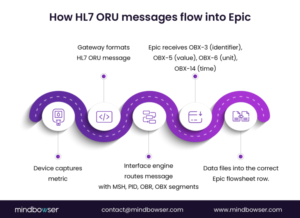 Fig 2: How HL7 ORU Messages Flow into Epic
IV. How does FHIR Observation handle device data?
Hospitals moving toward API-first strategies often request the implementation of FHIR Observation device data for Epic device integration. It is cleaner, more standardized, and aligned with interoperability goals. The challenge is that it requires new disciplines.
You are no longer just pushing messages into an engine. You are calling APIs with authentication, scopes, and audit requirements.
A. Which FHIR Observation fields matter most?
For FHIR device integration into Epic, focus on:
- Code
The standardized identifier for the metric, ideally using LOINC. For example, 8867-4 for heart rate or 8480-6 for systolic blood pressure. - ValueQuantity
Carries both the measured value and the UCUM unit. A heart rate of 72 beats per minute would appear here. - EffectiveDateTime
The measurement timestamp ensures the reading aligns with the clinical context. - Subject
A reference to the patient, often by MRN or FHIR patient ID. - Device reference
An optional field that links the measurement to the actual device or gateway. This improves traceability when troubleshooting.
B. What are the key security and authentication requirements?
Epic requires secure tokens and scopes for write access. Each tenant environment will have its own client ID and secret.
- Tokens must be stored securely, rotated regularly, and never hard-coded.
- Scopes should follow least privilege. Limit permissions to the smallest set possible to prevent the integration from writing outside its intended flow sheet destinations.
- Multi-tenant awareness is essential. If you are serving multiple hospitals, isolate credentials and never mix traffic across tenants.
C. How do you manage idempotency and validation with FHIR?
API based medical device EHR integration must guard against duplicate submissions. Use client-generated identifiers or deduplication keys to prevent duplicate entries from being created during retries.
Every API call should be logged, including request, response, and any errors. These logs become part of the audit trail for IT and compliance teams.
Test with golden datasets. Submit a fixed set of observations and confirm they land in Epic flowsheets exactly as clinicians expect.
Always check Epic’s response payload. Do not assume success unless you receive a proper 201 Created or 200 OK with the resource ID returned.
D. What does a FHIR example look like?
A glucose monitor reading of 110 mg/dL would be sent as:
- Code: LOINC 2339-0
- ValueQuantity: {110, mg/dL}
- EffectiveDateTime: “2025-10-03T14:00:00Z”
- Subject: reference to patient MRN 12345
- Device: reference to the glucose monitor or gateway system
If the token expired, Epic would reject the call. Your integration must capture that error, refresh the token, and retry without data loss. If the call succeeds, Epic responds with the Observation ID. Store that ID so you can confirm the value is present in the flowsheet.V. How do identity and encounters make or break the integration of Epic devices?
If there is one area where integrations quietly fail, it is identity. A perfectly mapped metric and a flawless HL7 or FHIR implementation will still fail if the patient ID or encounter link is incorrect.
When data lands in the wrong chart or disappears because the encounter is missing, clinicians lose trust, and executives see wasted investment.
A. How do you correctly anchor patient identity?
The core anchor is the Medical Record Number (MRN). Every message must include the correct MRN in the hospital’s expected format.
Some hospitals use site-specific or system-specific identifiers in addition to MRN. Capture these early and include them in your mapping workbook.
Always validate patient IDs against the registration system before going live. Even a single mismatch can cause silent data loss.
B. How should device data handle visit context?
Device data must be tied to a visit or encounter number. Without this, Epic has nowhere to place the data.
If you are sending intraoperative metrics, confirm which encounter type Epic expects for OR procedures. Outpatient surgery encounters often differ from inpatient visits.
When you integrate across departments, ensure your messages can carry both the MRN and the encounter ID. Hospitals will test for this.
C. How do you ensure device-patient associations are accurate?
The gateway or middleware must know which device is connected to which patient at all times.
In an OR or ICU, device assignments change frequently. Build workflows for staff to associate or disassociate devices during patient handoff.
If the gateway loses track of assignments, data may be filed under the wrong patient. Epic audit logs will flag these, and IT will demand answers.
D. What happens during clinical transitions?
One of the highest risk scenarios is patient transition, such as moving from the operating room to the PACU.
Each unit may have different flowsheet rows for the same metric. Systolic blood pressure may be recorded in one row in the OR and another in the PACU.
Validate these transitions with clinical champions before deployment. Otherwise, you will face complaints from nurses about “missing data” when, in reality, it was sent to the wrong flowsheet.
V. How do you validate integrations and manage ACKs over time?
After building the mapping and setting up HL7 ORU R01 or FHIR Observation, the next step is proving that the integration works. Hospitals will not trust your solution until they see real values appear in Epic flowsheets exactly where clinicians expect them.
This is where validation, acknowledgments, and monitoring come in.
A. What is a golden dataset, and why do you need one?
A golden dataset is a fixed set of sample records that clinicians approve.
For example, anesthesia may agree that a set of blood pressure, heart rate, and TOF values represents the expected range. These records are then replayed through the integration to confirm that the correct values are placed in the correct Epic rows with the correct units.
Once clinicians approve, this dataset becomes the benchmark for all future changes and upgrades.
B. How do replay tests protect you from regressions?
Replay testing means sending the same known set of HL7 or FHIR messages multiple times to validate consistent results.
If a systolic blood pressure of 120 mmHg appears correctly on day one but moves to the wrong row after a patch, the replay test will reveal it. This practice builds confidence that your integration is stable and resilient.
C. What should you monitor in production?
Monitoring is not optional. You must track HL7 acknowledgments (ACKs) or FHIR response codes for every transaction.
At a minimum, monitor for:
- Message acceptance
- Rejections
- Latency and time to chart
Define clear thresholds for error rates. A 30-minute delay in vital signs is unacceptable in critical care. Build dashboards that show time-to-chart metrics so leadership can see performance in real time.
D. How do you manage drift over time?
Over time, hospitals may change their Epic build. Units may shift from mmHg to kPa, or rounding rules may be updated.
Without drift monitoring, these changes can quietly break your epic device integration. Regularly compare your mapping workbook against live Epic flowsheets to catch changes early. Maintain a version history to demonstrate to auditors that changes were controlled and validated.
Looking to Build a Custom EHR?
VI. What security practices are non-negotiable for Epic device integration?
Every Epic device integration must meet security requirements as stringent as clinical accuracy requirements.
If CIOs and CISOs do not see that your integration protects patient data at every step, they will not allow it into production. Security has to be baked into the design, not added at the end.
A. What are the core security principles?
- Encrypt in transit and at rest.
All HL7 messages and FHIR API calls must run over TLS. Any logs or audit files that contain PHI must be encrypted at rest. - Minimize PHI exposure.
Only send the identifiers required by Epic. Avoid putting names or unnecessary demographics into messages when MRN and encounter ID are sufficient. - Audit everything.
Record every transaction, including who sent it, when it was sent, and how Epic responded. Hospitals will ask for this during compliance reviews.
B. How do you secure agents and gateways?
Device gateways or on-premises agents should communicate only with authorized endpoints. Signed updates must be enforced to prevent tampering with software.
Apply least privilege access. If the agent only needs to write observations, it should not also be able to query other Epic resources.
Keep gateways patched and subject to hospital IT review. They will expect the same level of security as any clinical system.
C. How should FHIR token management work?
Tokens are powerful keys. Store them in secure vaults, not in configuration files or code.
Rotate tokens regularly and set automated alerts for expiration to prevent outages. Limit token scopes to the narrowest set of permissions needed. This reduces risk if a token is ever compromised.
Log all token usage, including which service account used it and for what transaction.
D. How do you align with HIPAA and SOC 2?
Integrations must align with HIPAA technical safeguards. This includes access controls, integrity checks, and transmission security.
Hospitals increasingly expect vendors to carry SOC 2 certification. If you cannot provide SOC 2 reports, you will be seen as a risk.
Document your security controls and include them in your validation plan. Executives appreciate transparency and evidence.
VII. What are the most common questions about Epic device integration?
1. HL7 or FHIR, which should we use first?
Start with the path your hospital IT team can support the fastest. HL7 ORU R01 is often the quickest to implement. FHIR Observation device data is cleaner and future-ready, but requires Epic write endpoints and token management. Design your mapping layer to handle both so you can evolve without rework.
2. How do multiple metrics show up in HL7 ORU R01?
Each metric is placed in its own OBX segment. A blood pressure reading, a heart rate value, and a SpO₂ measurement will all be separate OBX entries with their own timestamps and units. This is the core pattern of HL7 device integration.
3. What if a metric has no LOINC code?
Use an IEEE 11073 identifier paired with a local code. Keep it documented in your mapping workbook. Later, you can submit a request to LOINC for a new code without disrupting production integrations.
4. How do we prove data integrity to hospital IT?
Provide golden datasets approved by clinicians, maintain ACK and response logs for every message or API call, and maintain a clear audit trail. These artifacts demonstrate that data is complete, accurate, and secure.
5. How do we link device data to the right encounter?
Confirm with the hospital which identifiers to use. Typically, this is MRN plus an encounter or visit number. Test against live registration scenarios to ensure device data is consistently written to the correct chart.
What should teams do next?
Epic device integration is not about connecting cables or sending packets. It is about delivering clinical data into the exact Epic flowsheet rows that matter to frontline providers. Both technical routes, HL7 ORU R01 and FHIR Observation, are valid.
The decision often comes down to hospital readiness and timing, but the smart strategy is to support both through a single mapping layer.
The real success factors are not hidden in the protocols. They live in the mapping workbook, in the discipline of identity and encounter handling, in the golden dataset validation, and in security that satisfies both HIPAA and SOC 2.
When these pieces are done right, clinicians stop worrying about copy-pasting from monitors, revenue teams see cleaner claims, and CIOs see a return on their medical device EHR integration investments.
Primary call to action
Get the Epic mapping workbook template and use it to align engineering, IT, and clinical leaders on a common source of truth for device data.
Secondary call to action
Request a pilot plan for Epic device integration that covers HL7 ORU R01, FHIR Observation, validation strategy, and security review so you can move from proof of concept to dependable production.
Epic integration connects external apps and devices to Epic EHR, enabling seamless clinical data flow between systems via HL7 or FHIR protocols.
An integration engineer builds, tests, and maintains HL7 or FHIR interfaces, ensuring Epic accurately receives data from devices and apps.
Register and connect your app to Epic’s FHIR APIs or HL7, then securely map and validate device or clinical data to enable real-time EHR updates.
The Epic tool refers to Epic EHR software and integration modules that support hospitals with clinical workflows and device/app interoperability.
An Epic device is any clinical hardware, such as monitors or pumps, that sends real-time patient data directly to Epic flowsheets via HL7 or FHIR.
Epic is a leading EHR system for hospitals, centralizing patient records, clinical workflows, billing, and integration with external devices and apps.