BLOGS
BLOGS  NEWSROOM
  CASE STUDIES
  WEBINARS
  PODCASTS
  ASSET HUB
  EVENT CALENDAR
























Building an Ambient Documentation Workflow Inside Epic Haiku
Epic Haiku gives mobile clinicians a fast way to move through patient care, but ambient documentation adds a different level of complexity. The application is not simply launched from a browser tab. It runs inside Haiku, depends on Epic-managed session context, receives recording lifecycle events from Epic, and has to return note content in a form that fits directly into the clinician’s workflow.
This article explains what it takes to integrate an external application with Epic Haiku for ambient note generation. It is based on the implementation model documented in the internal Haiku integration materials and focuses on the practical engineering flow: launch, authentication, context handling, recording retrieval, note generation, and handoff back to Epic.
The Problem the Integration Solves
The goal is straightforward: let a clinician start an ambient recording session from Haiku, process the captured audio outside of Epic, and deliver generated note sections back into Epic for review and signing.
The implementation, however, spans multiple systems:
- Haiku hosts the vendor UI in an embedded web view.
- Epic creates and manages the ambient session.
- The vendor backend receives callbacks and downloads recordings.
- External processing services transcribe audio and generate note content.
- Epic ultimately remains the system of record for the reviewed and signed note.
The result is less like embedding a simple app and more like wiring together a mobile launch surface, an OAuth-enabled frontend, a callback-driven backend, and an asynchronous audio-processing pipeline.
What the Architecture Looks Like
At a high level, the integration has four moving parts: the Haiku client, Epic backend services, the vendor integration backend, and the processing layer that turns audio into documentation.

Haiku is responsible for launching the vendor experience in an embedded mobile web view. Epic is responsible for establishing the ambient session, storing recordings, and notifying the vendor when chunks or completed recordings are ready. The vendor backend is responsible for everything orchestration-related: session state, callback handling, audio retrieval, retries, processing coordination, and note submission.
That split is important. The frontend embedded in Haiku and the backend receiving Epic callbacks solve different problems and should be designed independently even though they are part of the same integration.
Where the Workflow Begins
The flow starts when the clinician opens the Ambient activity in Haiku. At that point Epic creates an ambient session and sends the vendor backend an AmbientSessionBegin call. This call is the anchor for the entire session.
It contains the core session context:
- user identifier
- session identifier
- patient identifiers
- encounter identifiers
- callback URL
- optional care context
- optional note type
- optional allowed note sections
That payload should be treated as authoritative. It defines the session the vendor is expected to manage and provides the context needed for both backend processing and frontend launch reconciliation.
Launching the Embedded Experience
After the session is created, Haiku launches the vendor web view. The embedded page is typically opened with a vendor-defined route that includes the ambient session identifier and, when SMART on FHIR is enabled, the standard iss and launch parameters used in an EHR launch.
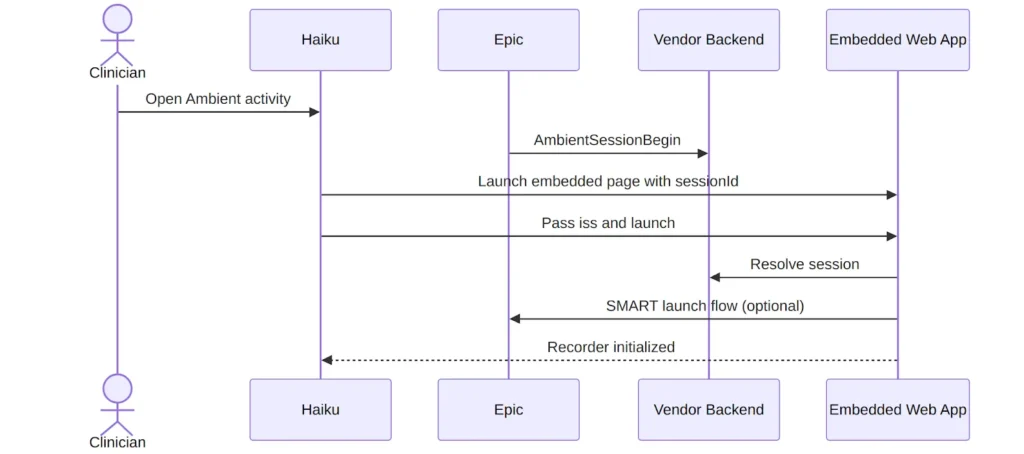
This is where teams often underestimate the mobile constraints. The vendor UI is not running in a full desktop browser. It is running inside an embedded mobile environment that can be backgrounded, interrupted, or terminated by the operating system. Any critical state that exists only in memory inside the web view is fragile by definition.
Why SMART on FHIR Still Matters
The ambient session itself is established through Epic’s callback model, but the embedded frontend may still need direct FHIR access. That is where SMART on FHIR comes in.
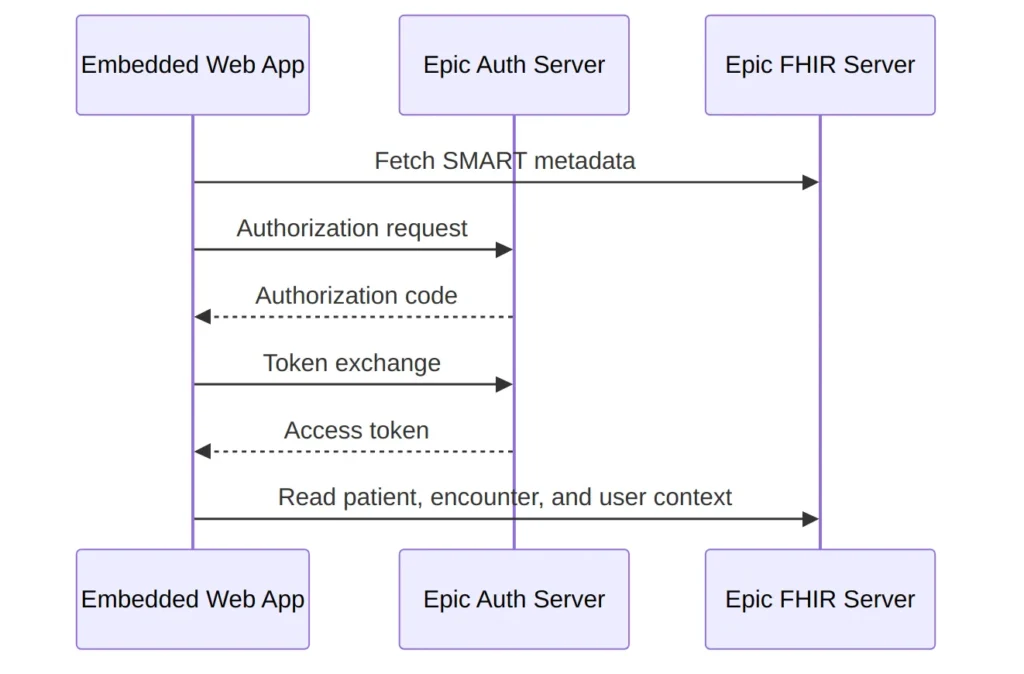
If the embedded app needs to show patient, encounter, or user context directly from Epic, it should use the EHR launch flow:
- Read iss and launch from the Haiku launch URL.
- Discover the SMART configuration from the Epic FHIR server.
- Perform the authorization code flow.
- Exchange the code for a token.
- Use the token for FHIR reads needed by the embedded experience.
A useful design principle here is to keep the responsibilities separate:
- The frontend SMART token is for the embedded user-facing app.
- The backend integration credentials are for callback handling and Epic API operations.
Mixing those models creates unnecessary coupling and usually makes failure handling harder.
Context Is More Than Just Patient and User
One of the more interesting parts of this integration is how much context Epic provides at session start. AmbientSessionBegin can include multiple identifier types for the patient and encounter, not just a single internal ID. It can also include care context, note type, and the set of note sections that are eligible for generation.
That means a robust implementation should not flatten the context too early. Instead, it should preserve the original identifiers and treat the mapping layer as a first-class part of the integration.
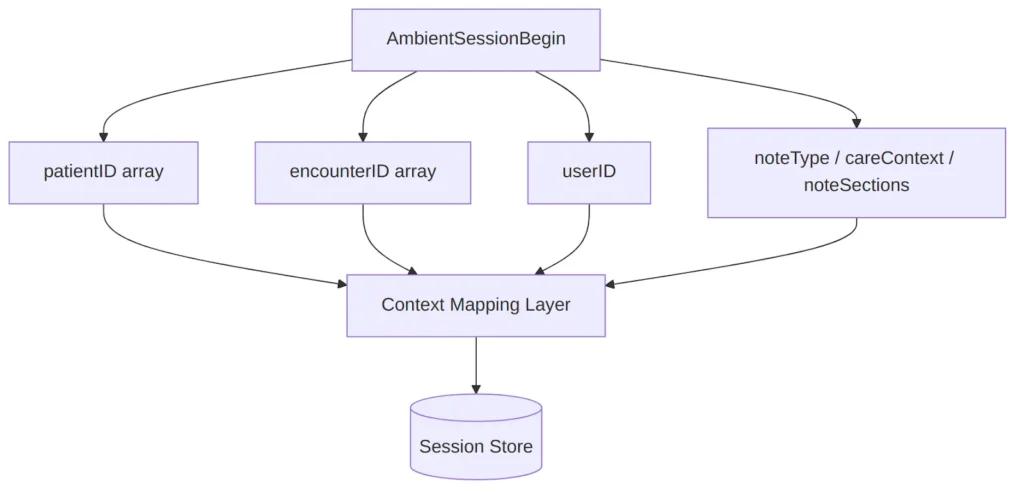
In practice, that session store becomes the backbone of the entire integration. It is where the application keeps the callback URL, current recording version, processing status, allowed note sections, and overwrite protection state after Epic notifies the vendor about clinician edits.
How Recording Actually Moves Through the System
Once the recording starts, Epic stores the audio and notifies the vendor as chunks become available. The vendor then calls back to Epic to download those chunks.
This is a queue-driven workflow, not a synchronous request-response chain. Chunk processing, transcript aggregation, and final note generation should all be designed as asynchronous work with durable state and retries.
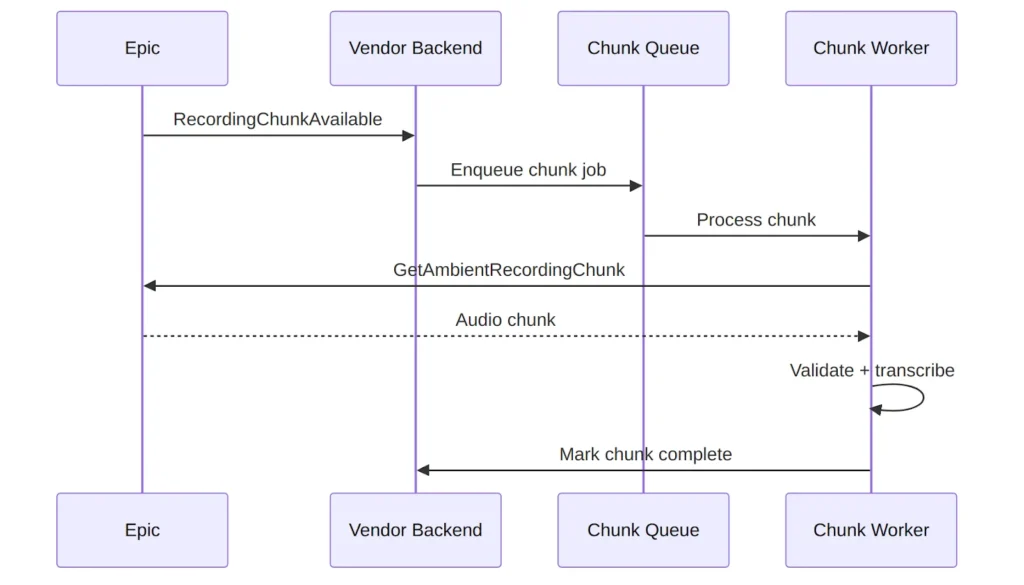
That asynchronous model matters for two reasons.
First, chunk retrieval can fail transiently. A retry strategy with exponential backoff is necessary. Second, note generation should not begin until the backend knows all required chunks for the current recording version have been processed successfully.
Get Started with Epic Haiku Integration Today. Contact Us for a Consultation!
Turning Recordings into Documentation
After the clinician stops recording, or after the session is explicitly finalized, Epic sends a RecordingAvailable notification. At that point the vendor backend decides whether to acknowledge a partial recording set or generate note content.
The implementation model described in the internal materials follows a clean queue pattern:
- AmbientSessionBegin persists session metadata.
- RecordingChunkAvailable enqueues chunk retrieval and transcription.
- RecordingAvailable waits for chunk completion and then either:
- calls AmbientRecordingsProcessed, or
- generates note content and calls DocumentationReady
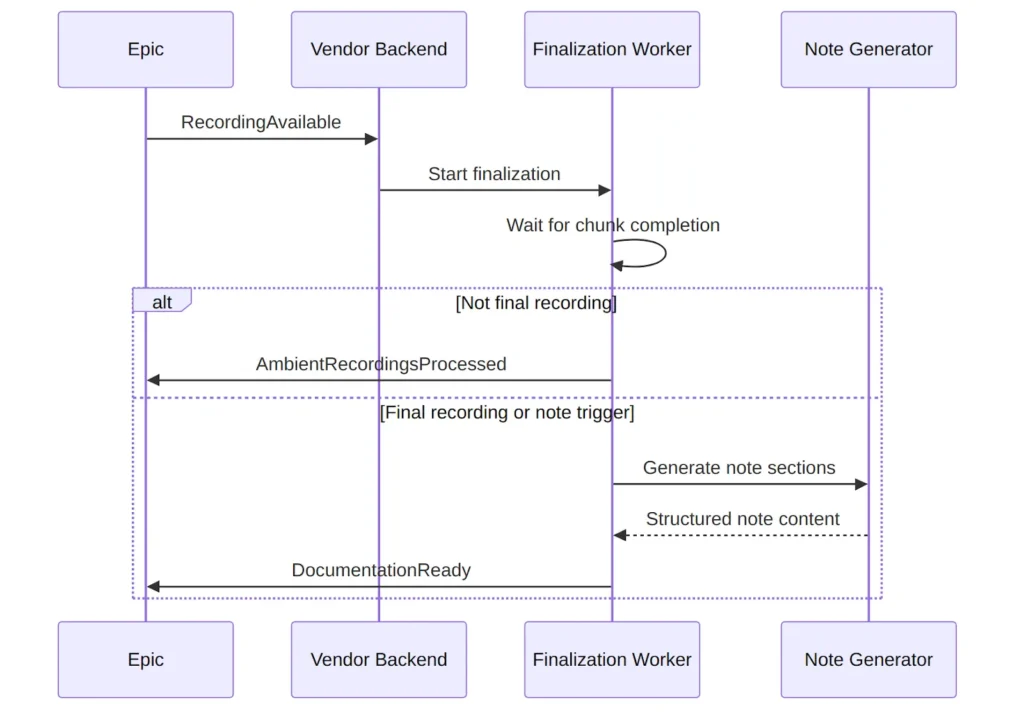
This stage is where operational discipline matters most. Version tracking has to be exact. The note content submitted through DocumentationReady must correspond to the latest recording version being processed. Once Epic accepts that content, earlier recordings up to that version are no longer available for download.
The Note Is Not Finished When the Vendor Sends It
A useful mental model is that the vendor generates documentation, but Epic owns the clinical workflow. The generated sections appear in Epic for clinician review. The clinician may modify the text before signing.
That creates a second lifecycle after note generation:
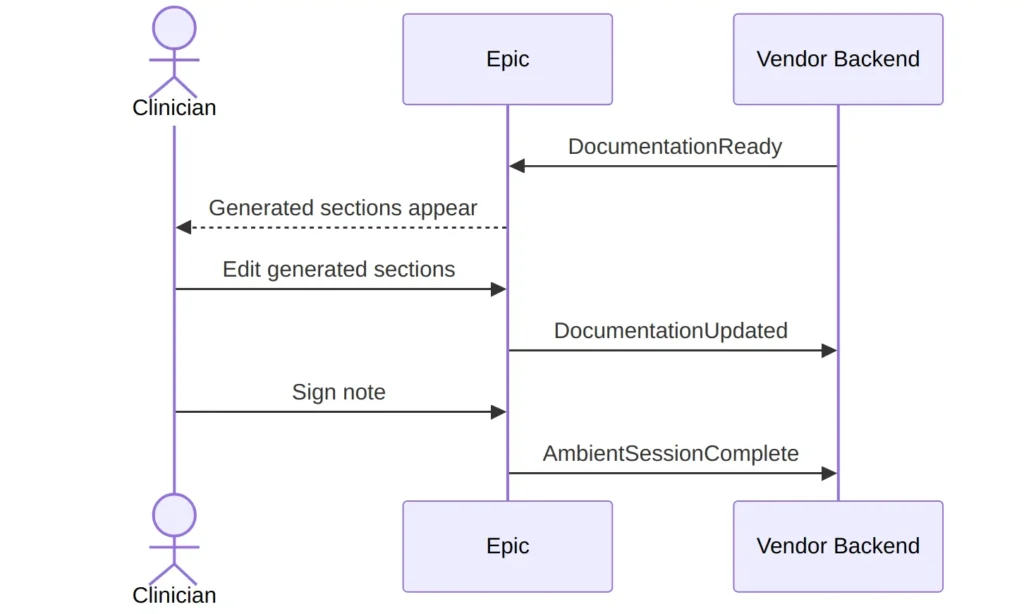
The DocumentationUpdated callback is especially important. Once Epic signals that a clinician manually changed a note section, the vendor should no longer overwrite that section with later generated content. If this rule is ignored, the system risks wiping out user edits, which is both a clinical and trust problem.
Mobile Constraints Change the Design
Teams that are comfortable with web applications often discover that the hardest problems in this integration are not in transcription or FHIR. They are in mobile lifecycle handling.
The embedded Haiku web view can be backgrounded, interrupted, or killed by the operating system. Recording can pause and resume. Navigation away from the activity may need to be blocked while the recorder is active.
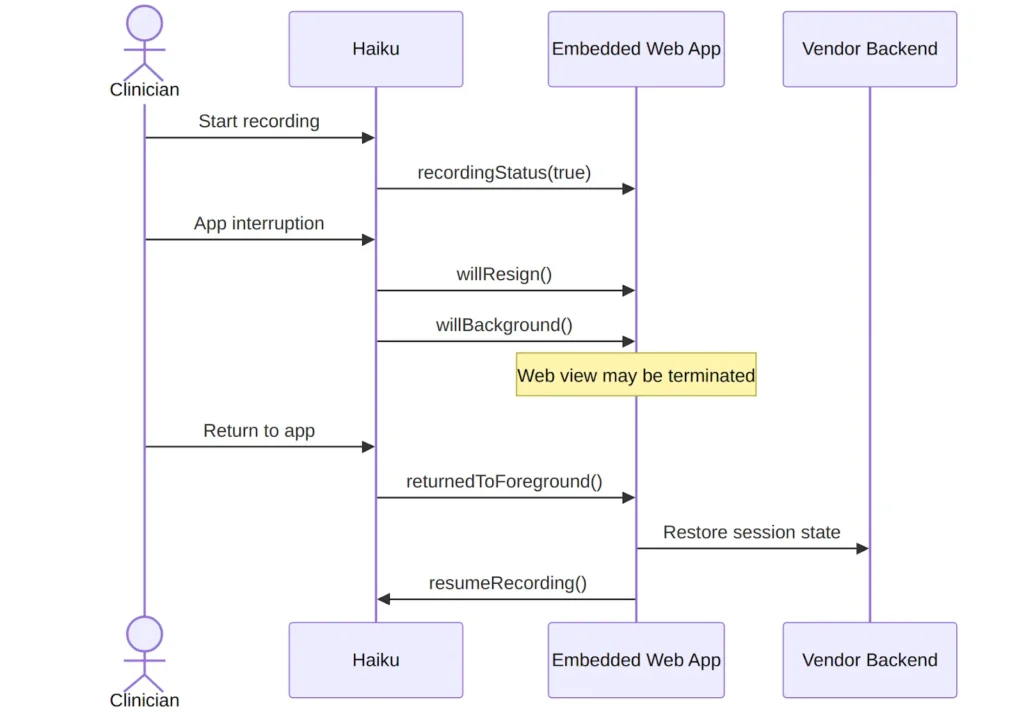
This is why session state must live on the backend, not only in the browser context. It is also why the embedded app should be built around rehydration rather than assuming that once the page loads, it will remain alive for the rest of the workflow.
Where Reliability Work Shows Up
From an engineering perspective, the most reliable implementations tend to share a few characteristics:
- every Epic callback is idempotent
- session state is durable and versioned
- chunk processing is queue-backed
- retryable failures are clearly separated from validation failures
- user-edited note sections are protected from overwrite
- frontend and backend auth models are intentionally separated
The backend also needs enough observability to debug cross-system issues. A single ambient session touches Haiku launch, SMART authorization, Epic callbacks, chunk retrieval, transcription jobs, note generation, and note submission. Without correlation IDs and structured state transitions, production debugging becomes slow and error-prone.
Lessons from the Implementation
The integration materials surface a few lessons that are easy to miss early in design.
The first is that AmbientSessionBegin should be treated as the real session contract. It is not just a notification. It is the authoritative handoff of context and control data from Epic to the vendor.
The second is that mobile web views are an unreliable place to keep critical state. They are a rendering surface, not a source of truth.
The third is that generated documentation is only one step in the workflow. The full implementation must account for what happens after content is submitted, including clinician edits, note signing, and session completion.
Finally, the local SDK notes highlight a more general backend lesson: reusable integration packages need careful dependency boundaries. Duplicate framework instances, especially in NestJS-based packages, can cause subtle exception-handling bugs that only appear when SDK code is consumed by another application. For a callback-heavy integration, those issues are more than cosmetic because they directly affect whether Epic receives the correct HTTP behavior on failure.
Conclusion
An Epic Haiku ambient integration is best understood as a coordination problem across launch context, authentication, mobile runtime behavior, callback orchestration, asynchronous processing, and clinical workflow handoff.
When it is designed well, the clinician experience feels simple: open Haiku, record, review, sign. Under the surface, however, that simplicity depends on a disciplined integration architecture that treats session context as authoritative, processing as asynchronous, note submission as versioned, and mobile state as disposable.
That combination is what turns an embedded app into a reliable ambient documentation workflow.