BLOGS
BLOGS  NEWSROOM
  CASE STUDIES
  WEBINARS
  PODCASTS
  ASSET HUB
  EVENT CALENDAR

























TL;DR
Epic Haiku is a mobile EHR app that gives clinicians fast, secure access to patient data, labs, and communication tools directly from their smartphones. It reduces delays in care by enabling real-time decisions during rounds, between visits, and after hours. While it does not replace the full EHR, its real value comes when integrated with systems like remote monitoring and AI tools that bring actionable insights into mobile workflows.
Are your clinicians still waiting to access the EHR when decisions need to happen now?
In a care environment that moves across floors, facilities, and even homes, delayed access creates delayed outcomes.
Mobile tools like Epic Haiku are changing that by bringing real-time patient data into the clinician’s pocket.
The question is no longer whether to enable mobile access, but how to make it work seamlessly within your workflows.
I. What is Epic Haiku?
A. Definition
What is Epic Haiku in practice? A mobile entry point into the EHR when speed matters most.
Epic Haiku is a secure smartphone application that allows clinicians to access patient data, review results, and communicate with care teams in real time. It is designed for quick actions, not full-system use.
A physician between consults. A nurse coordinating care. An on-call provider at home. Haiku supports all three by delivering focused, immediate access.
This distinction is critical. Haiku is not meant to replicate the full EHR. It removes delays between the question and the answer. Clinicians get what they need, when they need it, without navigating complex workflows.
“I need the right data now. Not everything.”
That mindset defines its design. Epic Haiku is a mobile-first EHR extension built for rapid clinical access and decision support.
B. Role in Epic ecosystem
Epic Haiku serves as the mobile access layer within the Epic ecosystem. It connects clinicians to core systems like Hyperspace while maintaining real-time data consistency. Clinicians can move between desktop and mobile without losing context.
This creates a dual workflow:
- Desktop for deep documentation
- Mobile for rapid review and communication
For example, a physician may review labs on Haiku, respond to a message, and later complete documentation in Hyperspace. The workflow stays continuous.
The risk appears when systems are not aligned. Poor workflow design leads to fragmentation. Strong alignment creates continuous clinical awareness.
“Clinicians think in moments, not systems.”
Epic Haiku extends Epic workflows beyond the workstation, enabling real-time access without disrupting continuity.
C. Devices supported
Epic Haiku is built for smartphones, supporting both iOS and Android. The design prioritizes:
- Fast navigation
- Touch-based interaction
- Focused data display
This is not a reduced desktop experience. It is a mobile-native workflow tool.
Clinicians use it to:
- Check labs quickly
- Review patient lists
- Respond to messages in motion
Research shows clinicians spend a significant portion of their day interacting with EHRs. Mobile access reduces the time lost to login delays and system switching. The tradeoff is intentional. Smaller screens mean prioritized information. Not full visibility. Haiku’s smartphone-first design supports fast decisions in motion, not comprehensive EHR interaction.
D. Primary clinical users
Epic Haiku supports multiple clinical roles, each with different needs.
1. Physicians — Use Haiku for rapid decisions: reviewing labs, responding to alerts, managing patient updates.
2. Nurses — Focus on coordination: checking updates, communicating with care teams, supporting continuity during shifts.
3. Advanced Practice Providers — Bridge mobile and desktop workflows: review patient data, prepare for documentation, coordinate care actions.
Each role values Haiku differently. Speed, coordination, or workflow continuity. Haiku’s value depends on aligning mobile workflows to role-specific needs.
E. Typical environments
Epic Haiku is used across care settings where decisions happen in motion.
1. Hospitals — Supports rounds, quick reviews, and real-time communication without workstation dependency.
2. Clinics — Enables between-visit chart checks and faster patient throughput.
3. Remote care — Allows clinicians to access patient data and respond to alerts from outside the facility.
Care is no longer location-bound. Access must follow the clinician. Haiku enables consistent access across hospital, clinic, and remote environments.
II. Why Mobile EHR Access Is Critical for Modern Healthcare
A. Shift in workflows
Care delivery has moved. The EHR had to follow.
Clinicians no longer work from a single location. They move between patients, departments, and care settings throughout the day. Traditional workflows forced a pattern: See patient → Find workstation → Access data. That model breaks continuity.
Today’s workflows demand:
- Immediate access at the point of care
- Decisions made in real time
- Communication without delay
Mobile tools like Epic Haiku align with this shift by bringing data directly into the clinician’s workflow. The contrast is clear. Desktop supports depth. Mobile supports speed. Both are needed, but without mobile access, clinicians operate in interrupt-driven workflows.
Modern clinical workflows are mobile by nature, and EHR access must align with that reality.
B. Common challenges
What problems does mobile access solve? Three recurring issues.
1. Limited workstation access — Shared terminals create delays. Clinicians wait or postpone actions.
2. Delayed chart review — Accessing patient data requires login, navigation, and context rebuilding. This slows decisions.
3. Communication bottlenecks — Messages go unread. Updates lag. Coordination breaks down.
These are not data problems. There are access problems. “Delays in access become delays in care.” Mobile EHR tools reduce friction by making information available when and where decisions happen.
C. Example scenarios
Where does this make a difference? In everyday decisions.
1. After-hours lab review — A physician receives a critical result at home. With Haiku, they review and act immediately instead of waiting to log in later.
2. Remote alert response — A specialist covering multiple facilities receives an urgent alert. Full patient context is available instantly, enabling faster, more confident decisions.
The difference is not just speed. It is decision quality. Better access leads to better actions. Mobile access reduces decision delays and improves responsiveness in real-world care scenarios.
D. Operational impact
What changes at the system level?
1. Faster decision-making — Shorter access times reduce delays across clinical workflows.
2. Improved care coordination — Real-time messaging and shared context keep teams aligned.
3. Reduced workflow friction — Fewer logins. Less context switching. More continuous flow.
For leadership, this translates to higher efficiency, better clinician experience, and improved care timelines. “Every removed step improves flow.” Mobile EHR access improves speed, coordination, and workflow efficiency when aligned with care delivery.
III. What Clinicians Can Do With Epic Haiku
A. Core capabilities
So what can clinicians actually do inside Epic Haiku during a typical shift? Not everything. But everything that matters in the moment.
This is where many leaders either overestimate or underestimate the tool. Haiku is not built for full documentation workflows. It is built for high-frequency, high-impact clinical actions that happen between formal EHR sessions.
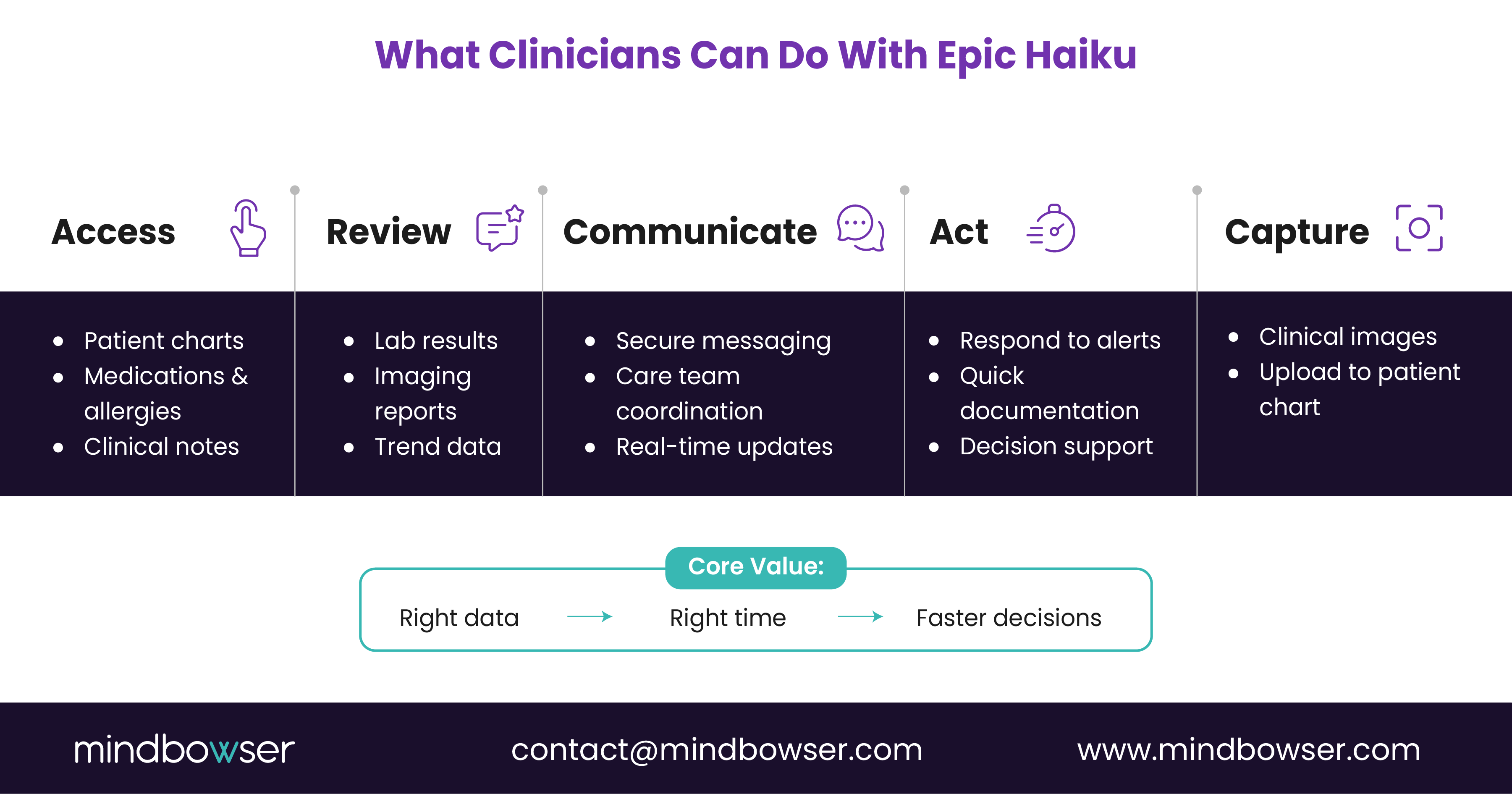
1. Accessing patient charts — At its core, Epic Haiku provides immediate access to patient records. Clinicians can review medications, allergies, problem lists, and clinical notes. This is often the first touchpoint. A physician walking into a consult can quickly scan the patient’s history before entering the room. No workstation. No delay. Context, on demand.
2. Reviewing labs and imaging — This is one of the most used features. Clinicians can view lab results in real time, track trends over time, and access imaging reports. Lab review is among the top mobile EHR activities, especially during rounds and off-hours decision-making. “Fast access to results often drives faster interventions.”
3. Managing patient lists and schedules — Haiku allows clinicians to stay aligned with their daily workload. They can view patient lists, track assigned cases, and check schedules and appointments. This is not just convenience. It supports situational awareness throughout the day.
4. Secure messaging — Communication is where mobile truly shines. With Haiku, clinicians can send and receive secure messages, coordinate with care teams, and respond to updates in real time. This reduces reliance on fragmented tools and keeps communication tied to patient context.
5. Documenting notes — While not as deep as desktop workflows, Haiku does support light documentation. Clinicians can enter brief notes, capture quick updates, and support ongoing care documentation. It is designed for speed, not complexity.
6. Capturing and uploading images — This is a powerful, often underused capability. Clinicians can capture clinical images (e.g., wounds, conditions) and upload them directly into the patient chart.
7. Viewing alerts and notifications — Haiku surfaces critical alerts directly to the clinician. This includes lab alerts, patient status updates, and messages requiring attention. Instead of discovering issues later, clinicians can act in near real time.
Every capability aligns with one principle: Fast access. Quick action. Minimal friction. Not depth. Not complexity. Not full workflow replication. That is intentional.
Here is the strategic takeaway for leaders. Epic Haiku supports the “in-between layer” of clinical work: Between patient visits, between workstation sessions, between critical decisions. Ignore that layer and the workflows fragment. Design for it, and you unlock continuous care flow.
Epic Haiku enables clinicians to access, review, communicate, and act on patient data in real time, making it a critical tool for high-velocity clinical workflows.
Looking to Build a Custom EHR with Epic Integration Capabilities?
IV. Epic Haiku vs Epic Canto: Understanding the Difference
A. Overview
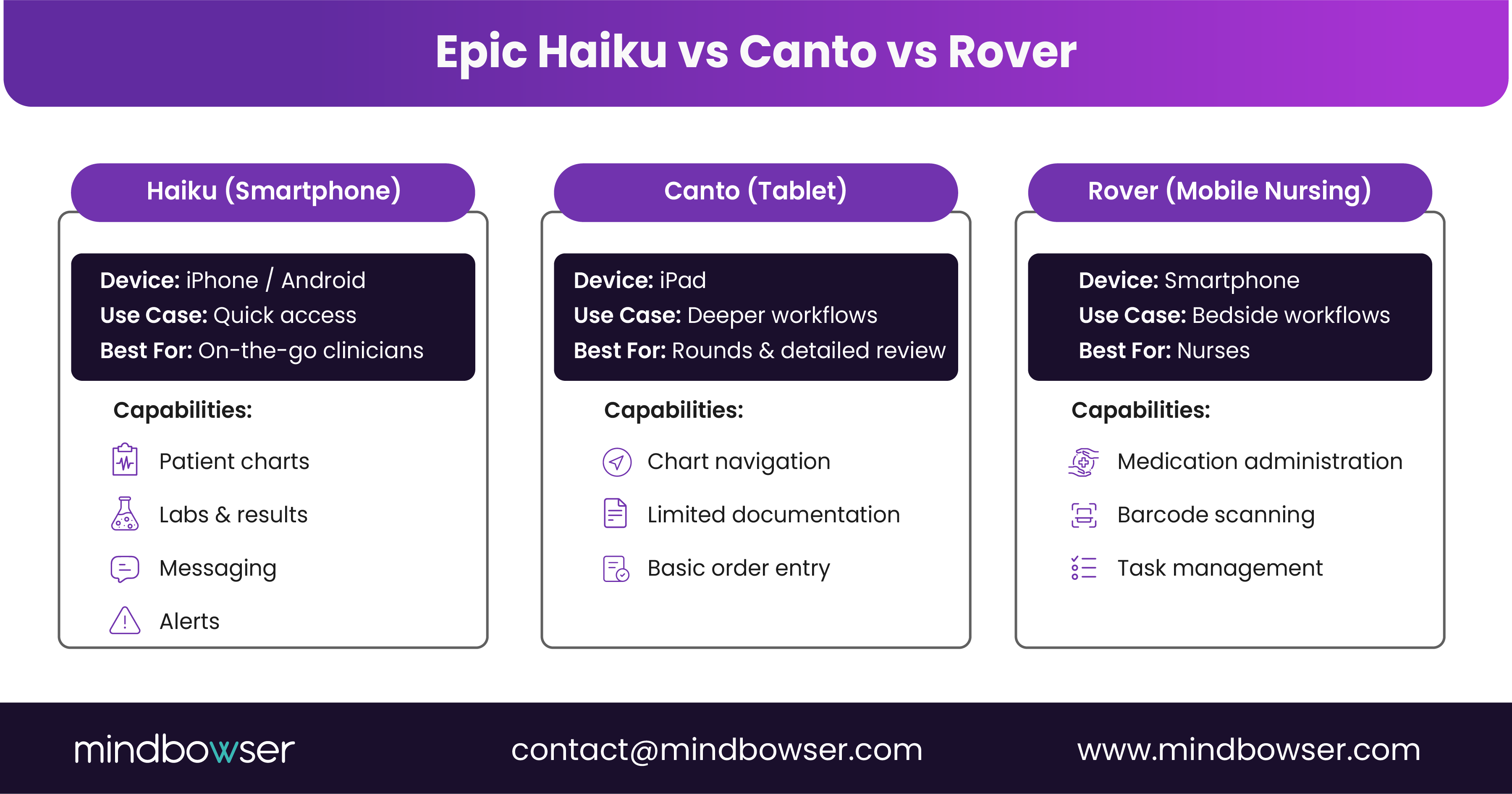
Are Haiku and Canto interchangeable? No. They serve different clinical moments. Epic’s mobile ecosystem includes Haiku for smartphones and quick access, and Canto for tablets and deeper workflows. Same EHR. Different depth. Choosing the right tool depends on how clinicians work, not just what features exist.
B. Device comparison
1. Haiku (smartphones) — Designed for on-the-go access, quick chart review, messaging and alerts. Best for short, frequent interactions.
2. Canto (tablets) — Designed for larger screens, more detailed navigation, limited documentation workflows. Best for longer, focused sessions.
C. Feature differences
Haiku focuses on speed, alerts, and communication. Canto supports deeper chart interaction, more structured workflows, and broader functionality. This is a tradeoff between immediacy and depth.
D. Typical users
Haiku is used by physicians in motion, on-call providers, and clinicians needing fast updates. Canto is used by physicians during rounds, specialists reviewing complex cases, and providers needing more detail on mobile.
E. Deployment strategy
Many organizations deploy both. Haiku for rapid access. Canto for deeper workflows. Success depends on clear workflow alignment. If not defined, clinicians default back to desktop systems.
Haiku and Canto complement each other, and effective use depends on matching each tool to the right clinical context.
V. Where Epic Haiku Fits in the Epic Ecosystem
A. Epic platform overview
Epic is not a single system. It is a connected platform. Understanding where Haiku fits requires looking at the broader landscape.
Key components include:
Hyperspace — The core desktop EHR is used for full clinical workflows, documentation, and order entry.
MyChart — The patient-facing application for engagement, communication, and access to records.
Canto — Tablet-based access for deeper mobile workflows.
Haiku — Smartphone-based access for quick clinical actions and communication.
Each serves a distinct purpose. Together, they form a multi-surface care delivery model.
Related Read: Epic Modules for Mid-Sized Hospitals: Which Ones Matter Most?
B. Workflow connection
How do these systems work together in practice? A clinician may start their day in Hyperspace, transition to Haiku during rounds, and use Canto for detailed reviews on a tablet. The workflow is not linear. It moves across devices. Desktop for depth. Mobile for speed. Tablet for balance.
The key is continuity. The same patient record follows the clinician across every touchpoint. “Care workflows move. Systems must keep up.”
C. Data synchronization
One of Epic’s core strengths is real-time data consistency. Whether a clinician reviews a chart in Hyperspace, sends a message in Haiku, or updates information via Canto, the data remains synchronized across the system. There is no duplication. No version confusion. This ensures accurate decision-making, consistent patient context, and reliable communication across teams. For CIOs, this reduces integration risk within the Epic environment itself.
D. Mobility role
So what is Haiku’s specific role in this ecosystem? It is the access accelerator. Haiku does not replace Hyperspace. It reduces dependency on it for time-sensitive actions. It allows clinicians to stay connected outside workstation environments, act on information without delay, and maintain workflow continuity across settings.
But it also highlights a limitation. Haiku is only as powerful as the workflows and systems connected to it. Here is the strategic insight. Epic provides the core system. Haiku provides access. But real differentiation comes from what sits around it. That is where custom platforms enter the picture.
Epic Haiku acts as the mobile access layer within the Epic ecosystem, enabling continuous workflows while relying on the core EHR for depth and structure.
VI. Limitations of Epic Haiku Healthcare Leaders Should Understand
A. Platform limitations
Is Epic Haiku enough on its own? No. And expecting it to be creates downstream friction. Haiku is a mobile extension of Epic. It is not a full EHR environment.
Clinicians cannot perform complex order entry workflows, deep documentation, or administrative configurations. Those still require Hyperspace or, in some cases, Canto. This creates a natural boundary. Haiku is built for access and action, not full control.
B. Workflow gaps
Where do clinicians feel the gaps most? In depth-heavy tasks. For example, detailed clinical documentation, multi-step order sets, and administrative workflows. A physician may review a patient on Haiku but still needs to return to a desktop to complete documentation. This creates a split workflow. Mobile for speed. Desktop for completion.
If not managed well, this split can lead to redundant steps, context switching fatigue, and delays in closing the loop. “Partial workflows can still slow full outcomes.”
C. Customization constraints
Epic environments are structured. That brings consistency, but also limits flexibility. Haiku follows Epic’s design standards. Organizations have a limited ability to customize mobile workflows independently. This means you cannot easily tailor experiences for niche specialties, workflow innovation is tied to Epic’s roadmap, and rapid experimentation is constrained. For CIOs and CMIOs, this becomes a strategic consideration.
D. Integration challenges
What happens when you need Haiku to interact with external systems? This is where complexity increases. While Epic supports interoperability through FHIR APIs and Epic Showroom, mobile workflows are not always seamlessly extended. Challenges include integrating third-party tools into clinician workflows, ensuring real-time data exchange, and maintaining usability across systems. Without thoughtful design, integrations remain technically connected but operationally disconnected.
E. Strategic implication
This leads to a key realization. Epic Haiku solves for access. It does not solve for end-to-end workflow orchestration, advanced digital health use cases, or cross-platform care coordination. That is why leading organizations do not stop at deployment. They extend. They build custom care coordination layers, AI-driven decision support tools, and remote monitoring integrations all connected back into Epic.
Here is the leadership takeaway. If you treat Haiku as a complete solution, you limit its impact. If you treat it as a foundation, you unlock new possibilities.
Epic Haiku has clear limitations as a mobile extension, and healthcare organizations must extend it with custom platforms to achieve full workflow and integration value.
VII. How Healthcare Organizations Extend Epic Haiku With Custom Platforms
A. Need for digital ecosystems
If Epic Haiku handles access, what handles everything else? This is where digital ecosystems come in. Modern healthcare delivery is no longer driven by a single system. It is driven by connected capabilities: Remote monitoring. AI-assisted decisions. Patient engagement tools. Care coordination platforms.
Haiku gives clinicians visibility. But these systems generate the insights. That gap matters. A clinician may see a patient’s vitals in Haiku. But where did that data come from? A wearable. An RPM platform. A third-party system. Without integration, that data stays fragmented. With integration, it becomes actionable.
“Access without context limits decisions. Context creates impact.”
B. Types of integrations
1. Care coordination platforms — These tools manage transitions of care across teams and settings. When integrated, alerts and updates surface inside clinician workflows, care gaps are visible in real time, and care coordination improves across departments. An example of this would be within Epic’s own ecosystem, Epic Compass Rose.
2. Patient engagement apps — These platforms capture patient-reported data, communication, and adherence signals. Integration allows clinicians to view patient inputs directly within Epic workflows and enables faster follow-ups based on real-time engagement.
3. Remote patient monitoring systems — RPM platforms collect continuous data from devices. When connected, vitals and trends flow into Epic, clinicians can review insights via Epic Haiku, and early intervention becomes possible. This is where mobility and monitoring intersect.
4. AI tools — AI-driven systems support clinical decision support, risk prediction, and documentation assistance. Integrated workflows ensure AI insights appear at the point of care and clinicians act without switching systems.
C. Workflow interaction
How do clinicians actually use these integrations with Haiku? Not by opening five different apps. The goal is simple. Bring insights into the same workflow surface. A physician opens Haiku and sees an alert generated by an RPM system, reviews patient data already synced into Epic, and acts immediately without leaving the workflow. No toggling. No delays. This is where integration design matters most. Poor integration creates noise. Good integration creates clarity.
D. Interoperability importance
Everything depends on interoperability. Standards like FHIR APIs, HL7 messaging, and Epic Showroom integrations make it possible to connect external platforms to Epic. But technology alone is not enough. You need clean data flows, real-time synchronization, and workflow-aligned interfaces. Otherwise, systems connect, but workflows remain broken.
Here is the strategic shift. Epic Haiku is not the destination. It is the access point. The real value comes from what flows through it. Organizations that invest in connected ecosystems see better clinical visibility, faster interventions, and stronger care coordination. Those who do not remain limited to basic mobile access.
Healthcare organizations extend Epic Haiku by integrating custom platforms that bring real-time insights into clinician workflows, turning mobile access into actionable care delivery.
VIII. Architecture for Integrating Custom Platforms With Epic Mobile Workflows
A. Architecture overview
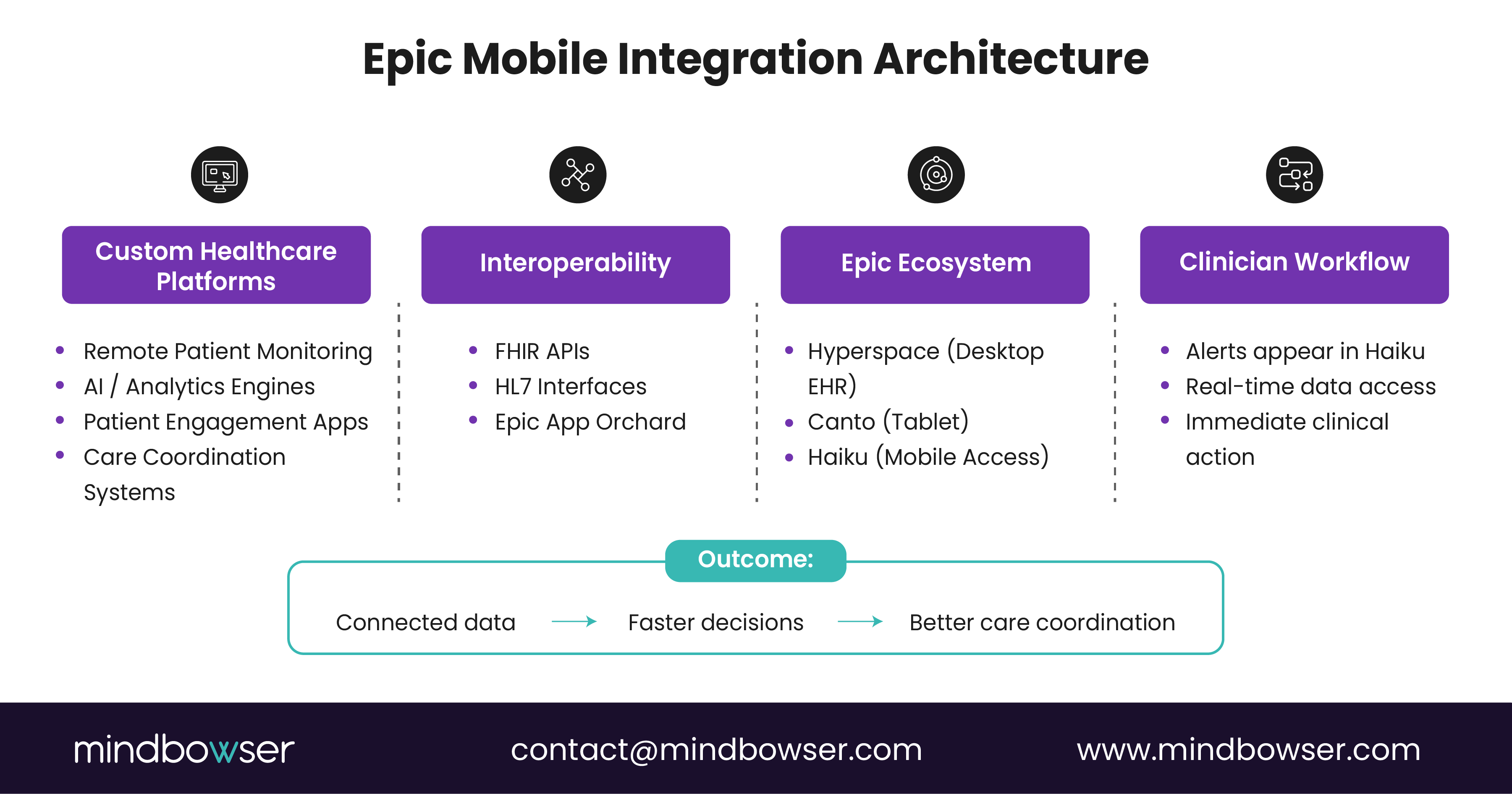
What does a real integration architecture look like behind Epic Haiku? Not a single connection. A layered system designed for reliability, security, and clinical usability. Think in three layers.
1. Layer 1: Custom healthcare platform — This is where innovation happens. It includes patient-facing apps, remote monitoring devices, AI analytics engines, and care coordination systems. These platforms generate data and insights. But on their own, they sit outside the core clinical workflow. That is the problem. Without integration, clinicians must leave Epic to access them. That rarely happens in high-pressure environments.
2. Layer 2: Interoperability layer — This is the connector. Key technologies include FHIR APIs for real-time data exchange, HL7 interfaces for structured messaging, and Epic Showroom for validated integrations. This layer ensures data flows securely into Epic, systems remain synchronized, and external insights are mapped correctly to patient records. But here is the catch. Poorly designed interoperability creates latency or data mismatch. That erodes clinician trust fast. “Integration is not about connection. It is about reliability.”
3. Layer 3: Epic ecosystem — This is where clinicians interact. It includes core EHR in Hyperspace, mobile access via Haiku, and tablet workflows via Epic Canto. Once data flows into Epic, it becomes part of the clinician’s natural workflow. That is the goal. No extra logins. No switching systems. Just contextual access inside the tools they already use.
B. Data flow
How does data actually move across these layers? A simple flow looks like this: A patient uses a remote monitoring device → Data is processed by a custom platform → Insights are pushed via FHIR into Epic → Clinician receives an alert in Haiku → Action is taken immediately. From device to decision in minutes. That is the difference between connected care and fragmented care.
Now step back. This architecture is not optional anymore. As healthcare systems adopt remote care models, AI-driven insights, and distributed care teams, they need a reliable, scalable way to bring everything into the EHR workflow.
IX. Use Cases for Epic Haiku With Custom Digital Health Platforms
A. Key use cases
1. Remote patient monitoring — A patient with chronic heart failure is monitored at home. Vitals flow from devices into an RPM platform. Data is analyzed and pushed into Epic. A clinician receives an alert in Haiku. They review trends instantly and intervene before escalation. No clinic visit. No delay. This shifts care from reactive to proactive.
2. AI clinical decision support — AI models identify risk patterns such as sepsis or readmission probability. Instead of sitting in a separate dashboard, insights are integrated into Epic, alerts surface in Haiku, and clinicians act within their existing workflow. Faster signal. Faster response. “Insights only matter when they reach the point of care.”
3. Care coordination — Transitions between departments or facilities often create gaps. With integrated coordination platforms, updates are shared across teams, notifications appear in real time, and clinicians stay aligned without chasing information. Haiku becomes the communication layer tied to patient context.
4. Population health management — Population health tools identify high-risk cohorts. When integrated with Epic Slicer Dicer, risk flags are visible within Epic, clinicians can review patient data on Haiku, and outreach decisions happen faster. This connects macro-level insights to micro-level action.
5. Documentation support — AI-assisted documentation tools reduce manual effort. While full documentation happens in desktop workflows, key summaries and prompts can surface in mobile. Clinicians review and act without losing context. This reduces cognitive load during transitions.
6. Real-time alerts — Alerts from multiple systems converge into one workflow. Instead of fragmented notifications, clinicians receive consolidated alerts, context is immediately available in Haiku, and actions happen without switching systems. Clarity replaces noise.
Now look at the pattern across all use cases. Data is generated outside Epic. Insights are processed externally. Action happens inside Epic and Haiku. That is the model.
Here is the leadership takeaway. Use cases drive adoption. Not features. If Epic Haiku is positioned as just a mobile viewer, usage stays limited. If it becomes the front door to actionable insights, it transforms workflows.
The highest-value use cases for Epic Haiku emerge when custom platforms feed real-time insights into mobile workflows, enabling faster, more informed clinical decisions.
X. Security and Compliance Considerations for Mobile EHR Access
A. Compliance
Can mobile EHR access meet strict healthcare compliance requirements? It has to. There is no middle ground. Epic Haiku can be deployed as part of a HIPAA-aligned mobile access strategy when organizations enforce strong authentication, device security, and governance controls, ensuring that patient data is accessed securely, communication is encrypted, and audit trails are maintained. This is critical because mobile access expands the surface area of risk. Every device becomes a potential access point.
“Mobility increases access. It also increases responsibility.”
For CIOs and CMIOs, compliance is not just about the app. It is about the entire access ecosystem around it.
B. Security practices
1. Multi-factor authentication (MFA) — Clinicians must verify identity beyond passwords. This reduces risk from stolen credentials and unauthorized access attempts.
2. Device security — Mobile devices must meet enterprise security standards. This includes device encryption, screen locks and biometric access, and mobile device management (MDM) policies. Lost device. No data exposure. That is the goal.
3. Encryption — All data accessed through Haiku is encrypted in transit and at rest within secure environments. This ensures patient data remains protected across networks.
C. Mobile risks
Where do organizations get exposed? Not in the core platform. On the edges. Common risks include use of unsecured personal devices, weak authentication practices, inconsistent policy enforcement, and data exposure through screenshots or local storage. This is where governance matters. Technology alone does not prevent risk. Policy and enforcement do.
Now step back. Mobile EHR access is secure when devices are controlled, access is verified, and data is protected end-to-end. Without that, risk increases quickly. Leadership takeaway. Security should not slow adoption. It should enable it.
Organizations that implement strong mobile security frameworks see higher clinician trust, faster adoption, and reduced compliance risk. Epic Haiku can meet strict healthcare security and compliance standards, but only when supported by strong authentication, device management, and governance practices.
XI. When Healthcare Organizations Should Build Custom Epic Integrations
A. Indicators
When does it make sense to go beyond Epic Haiku and invest in custom integrations? Not for every organization. But for many, the signals are clear.
1. Digital health products are part of your strategy — If your organization is building or deploying patient-facing apps, virtual care platforms, or chronic care programs, then Epic alone will not cover the full experience. You need integration to ensure patient-generated data flows into clinician workflows and engagement tools connect to care delivery. Without that, digital investments stay siloed.
2. Device and remote monitoring integrations are growing — As RPM adoption increases, so does data volume. If clinicians must log in to separate systems or manually reconcile data, adoption drops. Integration ensures device data appears in Epic, alerts reach clinicians via Haiku, and action happens without friction. This is where ROI becomes visible.
3. AI tools are being introduced — AI without workflow integration creates noise. If your organization is using predictive analytics, clinical decision support models, or documentation automation, then those insights must surface inside Epic workflows. Otherwise, clinicians ignore them.
“AI only works when it meets clinicians where they are.”
4. Patient engagement ecosystems are expanding — Messaging, adherence tracking, and remote follow-ups. These systems generate valuable signals. But if those signals are not visible in Epic, care teams miss context and follow-ups get delayed. Integration connects engagement to action.
5. Specialty workflows require flexibility — Certain specialties need workflows that go beyond standard EHR capabilities. Examples include oncology care pathways, behavioral health coordination, and post-acute care transitions. Custom platforms allow organizations to design workflows that fit these needs, then connect them back into Epic and Haiku.
Now step back. These indicators point to one thing. Healthcare delivery is expanding beyond the core EHR. Epic remains the system of record. But it is no longer the only system of engagement or intelligence. Here is the strategic question for leaders. Are your clinicians switching systems to get work done? If yes, integration is not optional.
Healthcare organizations should build custom Epic integrations when digital health tools, devices, AI, and specialty workflows extend beyond what Epic Haiku and the core EHR can support on their own.
XII. How Mindbowser Helps Healthcare Organizations Integrate With Epic
A. Capabilities
Building integrations is not the hard part. Building the right ones is. This is where many healthcare organizations struggle. They connect systems, but workflows remain fragmented. Data flows, but clinicians do not act on it.
Mindbowser approaches this differently.
1. Strategy consulting — Before writing a single line of code, the focus is on workflow design. Where are decisions delayed? What data is missing at the point of care? Which workflows should be mobile-first? This ensures integrations are tied to clinical outcomes, not just technical feasibility.
2. Custom healthcare platforms — Mindbowser builds platforms tailored to care coordination, patient engagement, remote monitoring, and specialty workflows. Each solution is designed to connect back into Epic, ensuring clinicians do not leave their primary workflow environment.
3. FHIR and HL7 integration expertise — Interoperability is the backbone. Mindbowser uses FHIR APIs for real-time data exchange, HL7 for structured messaging, and Epic Showroom frameworks for validated integrations. The goal is simple. Reliable data flow without latency or mismatch.
4. AI workflow integration — AI tools are only valuable when they are used. Mindbowser integrates predictive models, clinical decision support, and documentation assistance directly into Epic workflows so that insights surface where clinicians already work, including mobile access via Haiku.
5. Remote patient monitoring (RPM) integration — RPM platforms generate continuous patient data. Mindbowser ensures device data flows into Epic, alerts reach clinicians in real time, and mobile workflows via Haiku support immediate action. This closes the loop between home-based care and clinical intervention.
6. Scalable architecture — Healthcare systems evolve. Integrations must keep up. Mindbowser designs architectures that support future integrations, handle growing data volumes, and maintain performance across systems. Built once. Expanded over time.
B. Mobility support
How does this translate into better use of Epic Haiku? Mindbowser aligns integrations with mobile-first clinical workflows. That means alerts from external systems surface in Haiku, clinicians access insights without switching tools, actions happen in real time instead of after delays, and this turns Haiku from a viewing tool into an action layer.
Here is the difference. Without integration, Haiku provides access. With Mindbowser-led integration, Epic Haiku enables decisions. That is where ROI shows up.
Mindbowser helps healthcare organizations design and integrate custom platforms with Epic, ensuring that tools like Epic Haiku deliver real clinical and operational impact through connected, workflow-driven solutions. Book a call to begin your custom integration journey!
XIII. The Future of Mobile EHR: AI, Automation, and Mobile Care
A. Trends
Where is mobile EHR headed next? Not just smaller screens. Smarter workflows. Three shifts are already reshaping how tools like Epic Haiku will be used.
1. AI-driven clinical decision support — AI is moving closer to the point of care. Instead of sitting in dashboards, insights will surface directly in mobile workflows, trigger alerts based on risk patterns, and guide next-best actions in real time. For clinicians, this means fewer manual reviews and faster decisions.
2. Ambient documentation — Documentation is one of the biggest burdens in healthcare. Emerging tools now capture conversations, convert them into structured notes, and reduce manual entry. While full documentation may remain on desktop, mobile tools like Haiku will play a role in reviewing summaries, validating outputs, and keeping workflows moving. Less typing. More care.
3. Wearables and continuous data streams — Patient data is no longer episodic. It is continuous. Wearables and connected devices generate real-time vitals, behavioral data, and longitudinal health trends. This data will increasingly flow into Epic and surface through mobile tools. Clinicians will not just review past data. They will monitor patients continuously.
4. Mobile-first care models — Care delivery itself is shifting. From facility-based care to distributed, hybrid, and home-based care. In this model, mobile access is not optional. It is foundational. “Care is becoming mobile first. Systems must follow.”
B. Epic evolution
Epic continues to expand its mobile capabilities. We are seeing improved mobile interfaces, expanded feature sets in Haiku and Canto, and better support for integrations via APIs. But the core direction is clear. Epic is strengthening its platform. Organizations are extending it. That combination defines the future.
Here is the strategic insight. The EHR will remain the system of record. Mobile will become the system of action. And AI will become the system of guidance. Three layers. One workflow.
The future of Epic Haiku lies in AI-driven insights, automation, and mobile-first care models, where clinicians act faster with better context directly from their mobile workflows.
Final Perspective for Healthcare Leaders
Epic Haiku reflects a larger shift in healthcare delivery. Care is no longer tied to desktops or locations. It moves with clinicians, and the EHR must move with it. Haiku enables that access, but access alone is not enough. The real advantage comes when mobile workflows are connected to the right data, insights, and systems through thoughtful integration.
Organizations that align mobility, interoperability, and workflow design will move faster, coordinate better, and deliver care with fewer delays. Those that do not will continue to operate in fragmented, slower systems.
The difference is not technology. It is how you design it to support care.