ConnectHealth logo
Enterprise support

Support that works
inside your cloud.

ConnectHealth runs in your own cloud account, so patient data never leaves your environment. This page explains who looks after what, how we respond when something goes wrong, and how much access ConnectHealth has.

Runs in your cloud account No patient data held by ConnectHealth Two support tiers Production access only under a BAA
Who owns what

We Look After the Platform. You Keep Control of the Cloud It Runs In.

Because ConnectHealth is deployed in your account, responsibility is shared. Knowing who owns each part keeps issues moving to the right team.

ConnectHealth team

The ConnectHealth platform

  • Bug fixes in the core platform
  • New releases and security updates
  • A connector library for EHRs and health systems that grows with your network, with new systems added as your customers need them
  • Documentation and how-to guidance
Your team, guided by ConnectHealth

Your environment

  • Your cloud account, network and access settings
  • Encryption keys and capacity limits
  • Workflows configured on the platform
  • Your downstream apps and webhooks

You keep control. We provide setup guides, recommended settings and hands-on help, so your team is never working this out alone.

Outside parties

Systems you connect to

  • EHRs and health systems
  • Payers and clearinghouses
  • AI model providers
  • Your cloud provider
Where things run

We Build in the Sandbox. Production Stays Yours.

Outside your account

ConnectHealth team

Integration engineers who build, test and fix.

Your cloud account
Test data only

Sandbox

Where every workflow is built and tested, and where we reproduce and fix issues.

Patient data

Production

Live connections to EHRs and your systems. Changes are released only after sandbox testing.

Where patient data lives

Patient Data Stays in Your Account. ConnectHealth Never Holds a Copy.

ConnectHealth processes patient data inside your cloud account. ConnectHealth never hosts or stores it, and only sees it through Enterprise production access you approve, under a BAA.

Runs in your account

The platform runs in private networks inside your cloud account, with no public address.

Encrypted with your keys

Stored data is encrypted with keys managed in your cloud account. No one can use them unless your access policies allow it.

Nothing sent to us

No patient data leaves your account for ConnectHealth systems, on either tier.

Audit trail you control

Access and transactions are recorded in audit logs in your account. Workflows can add their own audit steps, so you decide what is logged and where.

Fine-grained access

When access is needed, you grant it through your cloud's access policies, limited to the ConnectHealth resources and actions required. You can revoke it at any time.

One door, and you hold it

Our engineers see patient data only through Enterprise production access, under a signed BAA, with access you approve.

What we see when we troubleshoot
  • Workflow and step names
  • Error codes and reasons
  • Timings and run references
  • Connection status per EHR
What we never see without a BAA
  • Patient names, dates of birth, record numbers
  • Readings, notes or other clinical values
  • Contents of messages sent to or from EHRs
  • Anything outside the access you grant
Support tiers

Two Tiers, Matched to How Critical Your Integrations Are

Standard

Included in every subscription

For standard integrations and environments that are not mission critical.

Hours
9:00 AM to 5:00 PM Eastern, Monday to Friday, excluding US holidays
Channel
Support portal and email
Scope
Bug fixes in the core platform, documentation, how-to questions
Access
Sandbox only. No ConnectHealth access to production.
Enterprise Premier

Premium add-on or custom private offer

For mission-critical deployments, larger health systems and teams that need round-the-clock cover.

Hours
24x7x365 for Severity 1. Business hours for everything else.
Channels
Support portal and email, a dedicated Slack or Teams channel, and a 24x7 critical incident line that pages our on-call engineer
Scope
Everything in Standard, plus a named technical account manager, priority bug fixes, priority on new EHR and health system connections, quarterly architecture reviews and FHIR / HL7 mapping guidance
Access
Sandbox by default. Production access available under a signed BAA.
StandardEnterprise Premier
Bug fixes in the core platformIncludedPriority routing
Documentation and how-to questionsIncludedIncluded
New EHR and health system connectionsIncludedPriority
Named technical account managerNoYes
Quarterly architecture reviewsNoOn request
FHIR / HL7 mapping guidanceNoYes
24x7 critical incident line with on-call pagingNoYes
ConnectHealth access to productionNoneWhen needed, approved by you
Business Associate AgreementNot requiredSigned with your organization
Patient data held by ConnectHealthNoneNone
Severity and response times

How Quickly We Respond Depends on the Impact

You set the severity when you raise a ticket, using the definitions below.

SeverityStandardEnterprise Premier
Severity 1 · HighestProduction is down or unreachable, or critical workflows have stopped with no workaround.4 business hours1 hour, 24x7
Severity 2 · HighOperations are badly degraded or major features are unavailable. A workaround exists but is hard to sustain.8 business hours4 hours, 24x7
Severity 3 · MediumNon-critical functions are impaired, issues are intermittent, or you have a deployment question.2 business days1 business day
Severity 4 · LowCosmetic issues, enhancement requests and documentation questions.Best effort2 business days

Response time is how long it takes a ConnectHealth engineer to acknowledge your ticket and start working on it. Time to resolve can depend on others, such as your cloud provider, an EHR outage or your network settings.

Application availability · BYOC model

A Clear Availability Commitment for Your ConnectHealth Software

ConnectHealth operates inside your own cloud environment. For Enterprise Premier and Custom Tier customers, the Application Availability SLA is 99.9% per calendar month, provided the underlying infrastructure in your account is healthy and operational.

Enterprise Premier & Custom Tier
99.9%

Monthly application availability

Application Availability means the core ConnectHealth software processes are running, can accept API requests, and can execute workflow logic, assuming the underlying customer-provided infrastructure is operational.

Service credits when availability falls short

Eligible Enterprise customers may receive Service Credits according to the monthly application-availability result.

Monthly availabilityService credit
99.0% to below 99.9%5% of monthly fee
Below 99.0%10% of monthly fee

Our Jira Service Management portal is the system of record for all support requests on both tiers. Other channels are used only where agreed in writing.

What is excluded? Downtime caused by underlying cloud or infrastructure outages, changes to your access roles, network security rules or encryption keys, inadequate compute or storage resources, external EHR or health-system failures, customer-configured workflow errors, or third-party webhook/downstream app failures does not count toward this SLA and does not qualify for service credits. These scenarios are described further under “Outside our control.”

How issues get fixed

Most Issues are Fixed Without Anyone Seeing Patient Data

Production failures usually follow known patterns: a changed field, an expired login, or an EHR rejecting a value. The error and the failed step are enough to find the cause.

  1. The failure is recordedThe platform logs the failed step and reason, with patient details hidden.
  2. You raise a ticketYour admin copies the run reference, such as run_8f2c41, and the error details from the ConnectHealth dashboard.
  3. We reproduce itIn the sandbox, using a test record of the same shape.
  4. The fix is releasedTested in the sandbox, then released by your team or ours.
  5. Failed messages are handledAs the workflow is designed to, for example retried from a queue or resent once the fix is live.

When the issue depends on one patient record

Both tiers

Guided by us

Your admin shares their screen with patient details hidden, and we walk them through the fix. We don’t access your data.

or
Enterprise Premier

Direct access under BAA

Our engineer works in production with time-limited access that your team approves and your cloud account logs.

What support covers

Support Keeps the Platform Running. New Work Is Planned Separately.

Covered by your support tier
  • Bugs in the ConnectHealth platform
  • New releases and security updates
  • How-to questions and documentation
  • Mapping guidance and architecture reviews on Enterprise
Planned as engineering hours
  • Building new workflows and custom nodes
  • Changes and fixes to workflows, including those ConnectHealth built for you
  • Debugging inside your database or EHR on Standard
  • Custom journeys for your own customers

We share an estimate before work starts and begin only once you approve it.

Outside our control

Some Issues Sit With Other Parties

ConnectHealth runs in your account and connects to systems we do not operate. When one of these is the cause, we help you find it, and the fix sits with the owner.

Cloud provider outages

Failures in regions, compute, containers, networking or other cloud services the platform needs.

Changes to your settings

Edits to the access roles, network rules or encryption keys ConnectHealth relies on.

Capacity limits

Compute or storage limits set too low for your message volume.

Outside systems

EHRs, health systems, payers, clearinghouses or AI models going down or changing without notice.

Workflow setup

Stalled or misrouted messages caused by how a workflow is configured.

Your downstream apps

Limits, throttling or downtime in the apps and webhooks that receive data.

What we need from you

Four Things That Keep Support Fast

  • A supported versionThe current release or one of the two major releases before it.
  • A trained administratorAt least one person who knows your cloud environment and works with our team.
  • The run reference and error detailsCopied from the ConnectHealth dashboard in your account. The failed step and reason are usually enough for us to reproduce the issue in the sandbox, without access to your production environment.
  • Approved access, on EnterpriseTemporary, logged access through a fine-grained access policy, limited to ConnectHealth resources, when a production fix needs it.

Additional cloud responsibilities

Secure troubleshooting access: When remote troubleshooting requires access to ConnectHealth instances, provide temporary, secure, limited access (for example, scoped access roles or a secure bastion host). Production access remains subject to the approval and BAA conditions explained above.

Customer cloud responsibility: Support covers ConnectHealth software, not general cloud networking, network peering limits, or cloud billing issues. Your team remains responsible for the underlying cloud environment.

For platforms serving clinics and practices

One Team, Under Your Name.

If you serve your own customers, ConnectHealth works as an extension of your team. We join your customer calls and EHR go-lives under your name, and take on the integration work. You keep the relationship. Your customers see one team: yours.

Youown the customer relationship
Togethercustomer calls and go-lives, under your name
ConnectHealthEHR setup, vendor approvals and integration work
AI-First EHR Integration Platform

Meet ConnectHealth - EHR Integration That Ships in Days

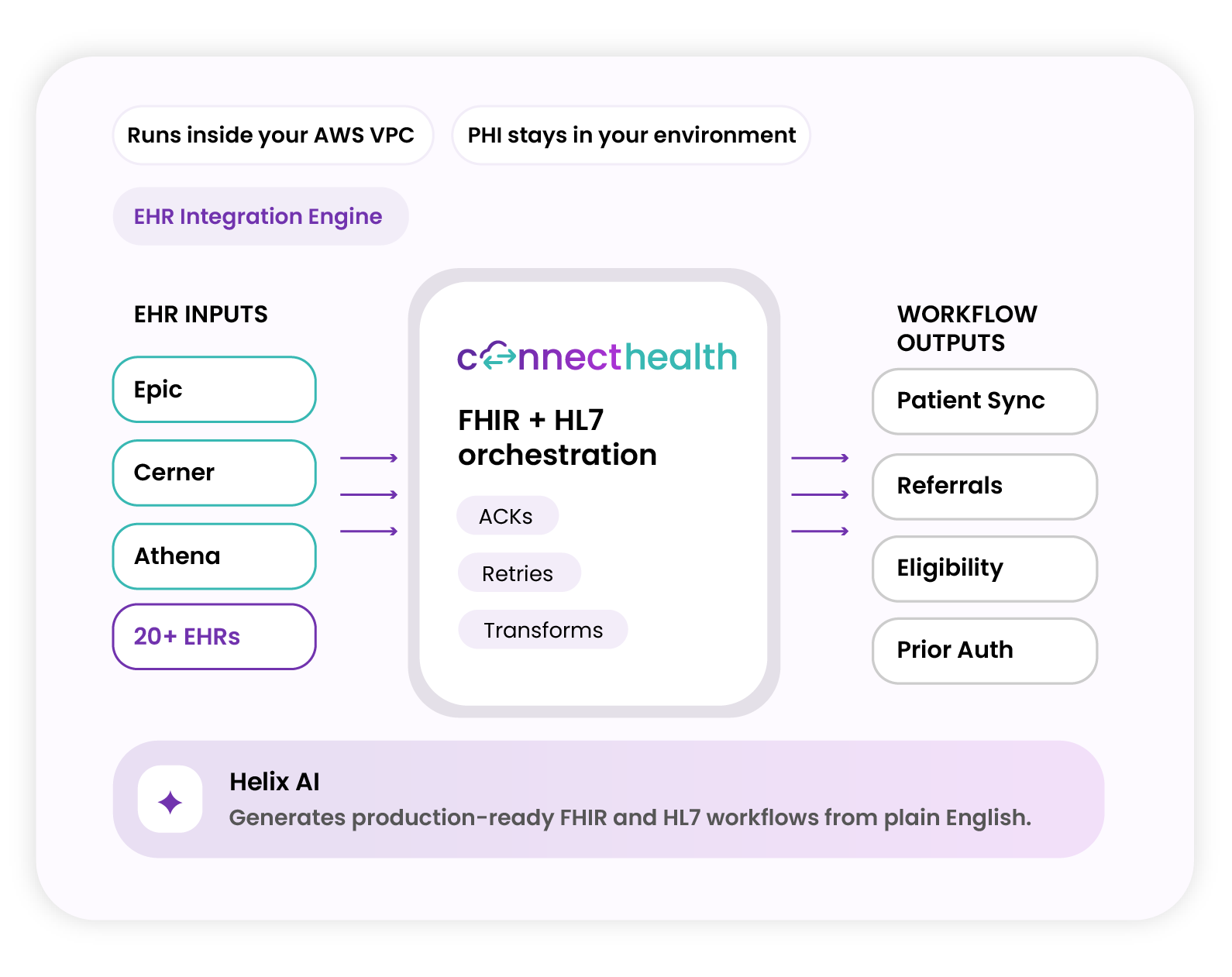
ConnectHealth is Mindbowser’s AI-first healthcare integration engine. Connect to Epic, Cerner, Athena, and 20+ EHRs, deployed inside your own cloud so PHI never leaves your environment. Helix AI generates production-ready FHIR and HL7 workflows from plain English. No custom code. Predictable pricing. Sandbox in minutes.

20+ EHRs Your cloud FHIR + HL7
ConnectHealth EHR integration platform

Questions security and IT teams ask

Yes, on Enterprise Premier when you want our engineers to work in production. On Standard, ConnectHealth does not create, receive, store or send patient data for you.

Only your team by default. On Enterprise, named ConnectHealth engineers can be given temporary access through your cloud's fine-grained access policies. You approve it, your account logs it, and you can revoke it at any time.

It depends on how the workflow is built. ConnectHealth workflows can include retries, queues and failure alerts, so a workflow writing data into an EHR can hold messages and retry them once the EHR is back. We help you design this handling when each workflow is built, and help confirm the cause during an outage.

ConnectHealth deploys into your own cloud account. Ask us about the providers available for your setup.

Yes. Most teams start on Standard and move up as their integrations become critical to operations.

Your cloud marketplace typically notifies you when a new version is available, and we keep you informed with regular release updates. You choose when to update, and we can apply it for you when you are ready. Staying on the current release or one of the two major releases before it keeps you supported.

Let’s #Transform Healthcare,# Together.

Partner with us to design, build, and scale digital solutions that drive better outcomes.

Location

Global Tech Teams LLC, 525 Washington Blvd, Industrious at Newport Tower, Jersey City, NJ 07310, United States.

Contact

+1 408 786 5974
contact@mindbowser.com
BOOK A QUICK CONSULTATION

Have a Healthcare Project in Mind?

Let’s discuss your goals, workflows, and next steps in a focused consultation call.

Calendar icon Schedule a Call

Contact form