BLOGS
BLOGS  NEWSROOM
  CASE STUDIES
  WEBINARS
  PODCASTS
  ASSET HUB
  EVENT CALENDAR

























Most developers learn about stacks and queues once, pass the exam, and then forget them. They feel like “interview stuff” useful for a whiteboard, useless on the job.
That belief is wrong.
If you have ever built an undo button, hit a back button, scheduled a background email, or wondered why your (setTimeout) ran after your (Promise), you have already used stacks and queues. You just did not call them by name.
This post shows you the real places these two data structures show up in everyday React and Node.js work. No heavy theory, plenty of examples, and code you can actually use.
A Two-Minute Refresher (No Jargon)
Before the use cases, here is all the theory you need.
A stack works like a pile of plates. You add a plate on top, and you take a plate off the top. The last item you put in is the first one you take out. This is called LIFO, which stands for Last In, First Out.
A queue works like a line at a coffee shop. The first person to join the line is the first person served. The first item you put in is the first one you take out. This is called FIFO, which stands for First In, First Out.
That is the whole idea. A stack flips the order; a queue keeps the order. Everything below is just these two rules applied to real problems.
Stack Use Cases in React
1. Undo and Redo (The Classic)
Every editor needs undo and redo, whether it is a notes app, a form builder, or a drawing tool. A stack is the natural fit.
You keep two stacks. One holds past states (the “undo” pile). One holds states you undid (the “redo” pile). When the user makes a change, you push the old state onto the undo stack. When they hit undo, you pop the top state off and move it to the redo stack.
Here is a small, working example using a React hook:
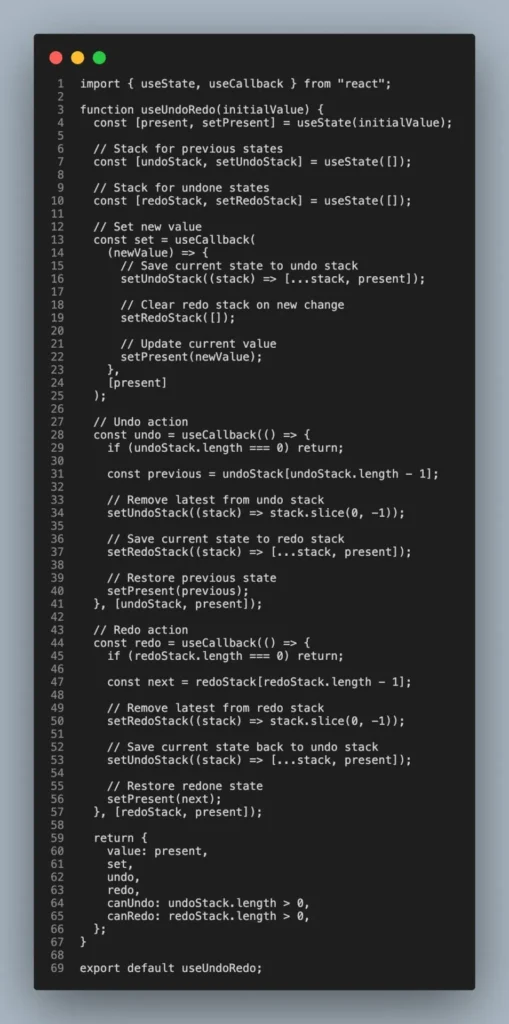
Notice the stack operations: push (add to the end of the array) and pop (remove from the end). That “last in, first out” behaviour is exactly what makes undo feel natural, because you always undo the most recent thing first.
2. Navigation History and the Back Button
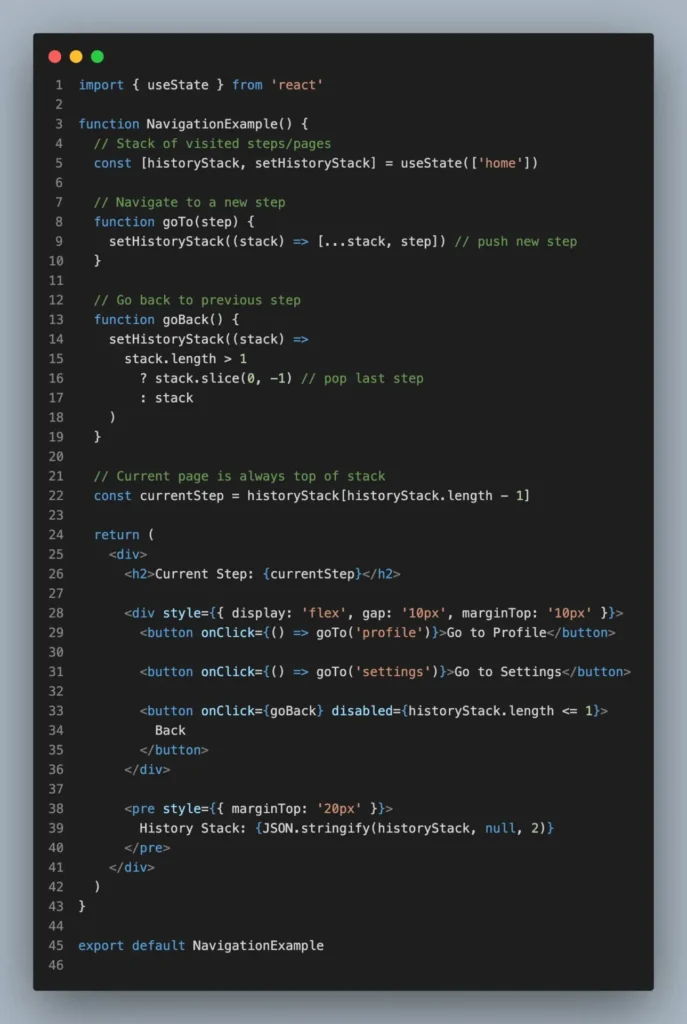
Think about how the browser back button works. Each page you visit gets pushed onto a stack. When you press back, the current page is popped off, and you land on the previous one.
React apps that use client-side routing rebuild this idea. A wizard or multi-step form often keeps a stack of visited steps so the “back” button returns the user to the exact step they came from, not just step number minus one.
3. Stacked Modals and Overlays
Open a modal. From inside it, open a confirmation dialog. Now press Escape. Which one should close? The top one. Then Escape again closes the next. This is a stack.
Keeping open modals in a stack lets you close them in the correct order and manage focus and z-index cleanly. Each new modal is pushed on top; each Escape or close pops the top one.
Queue Use Cases in React (and the Browser)
4. The Event Loop: Microtasks vs Macrotasks
Here is a question that confuses many developers. What does this print?
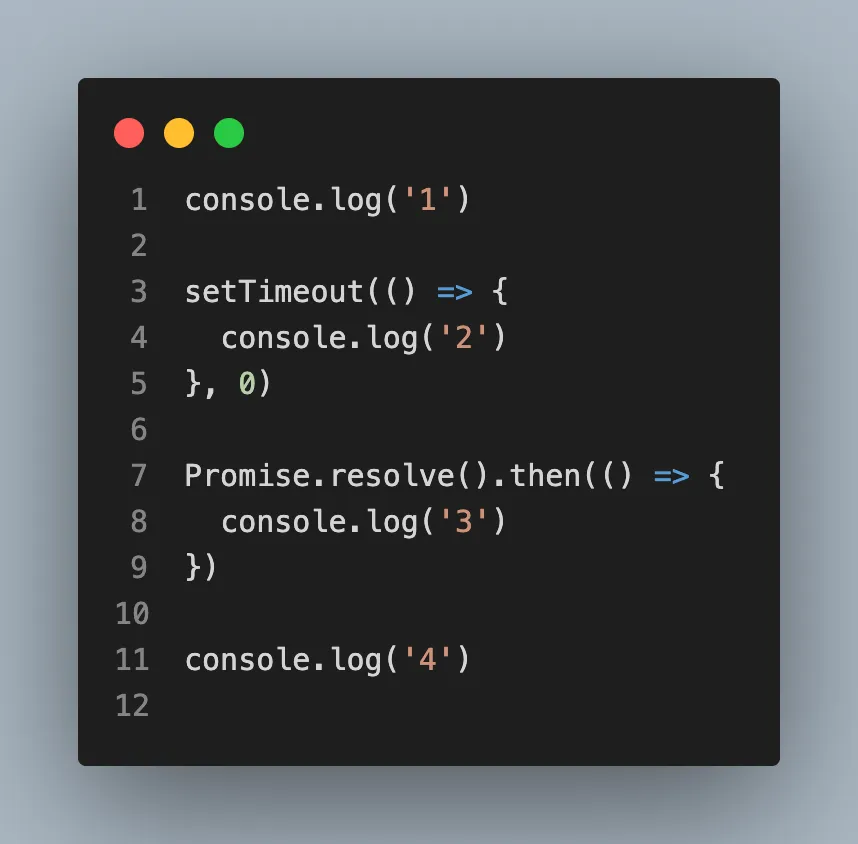
The answer is (1), (4), (3), (2), not (1), (2), (4), (3)
The reason is queues. JavaScript has two important queues. The macrotask queue holds things like (setTimeout) callbacks. The microtask queue holds things like resolved (Promise) callbacks. After the main code runs, the engine drains the entire microtask queue first, then takes one macrotask.
So 3 (a microtask) jumps ahead of 2 (a macrotask), even though setTimeout was written first. Both queues are FIFO, first in, first out, but the microtask queue has higher priority. Understanding this single idea fixes a huge number of “why did my code run in the wrong order” bugs.
5. Animation and Update Batching
React batches state updates and processes them in order rather than re-rendering on every single setState. Browser animations work the same way through requestAnimationFrame, which lines up callbacks to run before the next paint. In both cases, work is added to a queue and processed in the order it arrived, which keeps the UI smooth instead of janky.
Building scalable React or Node.js applications? Talk to our team about the right architecture for your use case.
Stack and Queue Use Cases in Node.js
6. The Call Stack (Where Your Errors Come From)
That “stack trace” you read when something crashes? That is a literal stack. Every time a function calls another function, the new call is pushed onto the call stack. When a function finishes, it is popped off.
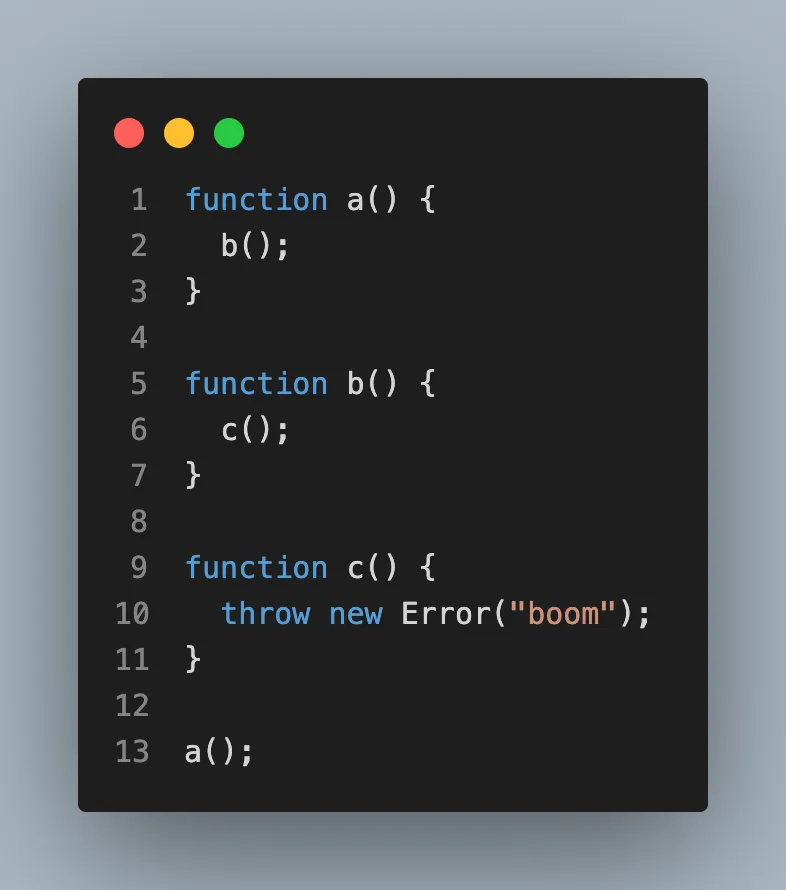
The error message lists entries going from the top of the stack to the bottom. Reading a stack trace top to bottom tells you the exact path of calls that led to the crash. If a function calls itself forever, the stack fills up, and you get the famous “Maximum call stack size exceeded” error.
7. Background Jobs and Task Queues
This is where queues earn real money in production.
Imagine a user signs up, and you need to send a welcome email, resize their profile photo, and update analytics. You do not want to make the user wait while all that happens. Instead, you push these tasks into a queue and respond to the user immediately. A separate worker process pulls jobs off the queue one by one and does the slow work in the background.
In real Node.js apps, this is usually done with a library like BullMQ backed by Redis. But the core idea is a plain queue. Here is a stripped-down version so you can see the FIFO logic clearly:
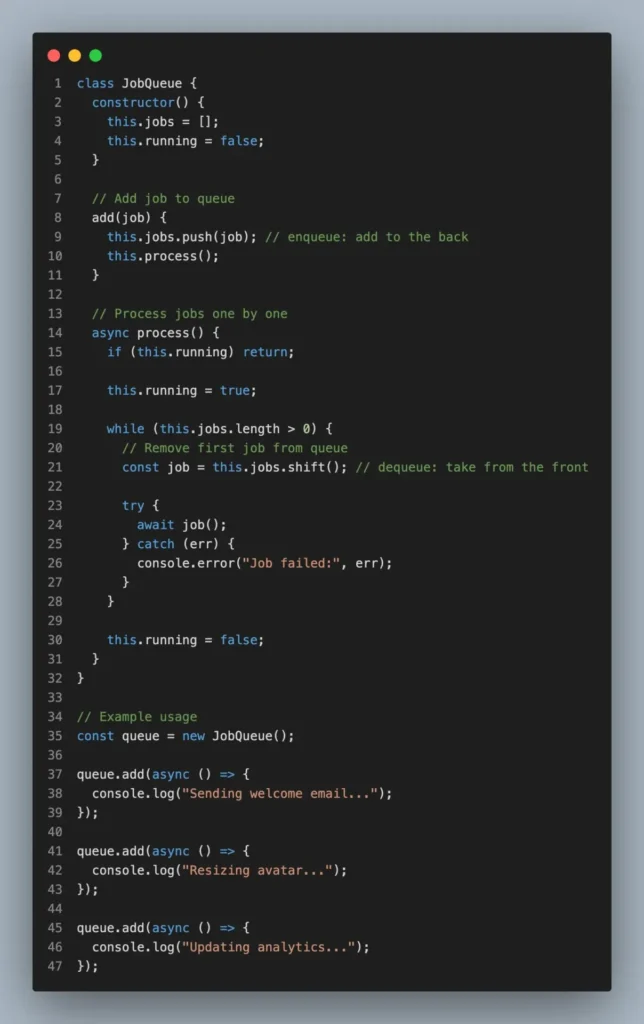
The two key methods are push (enqueue, add to the back) and shift (dequeue, take from the front). First job in is the first job done, exactly like the coffee shop line.
8. The Event Loop Phases
Node.js runs on the same event loop idea as the browser, with its own set of queues for timers, I/O callbacks, and more. Each phase has a queue of callbacks that Node processes in order before moving on. This is why Node can handle thousands of connections at once without one slow request blocking everyone else. Slow work waits politely in line instead of freezing the whole server.
How to Spot Them in Your Own Code
You rarely write a Stack class from scratch in real projects. Instead, you recognise the pattern and use a plain JavaScript array:
- Stack: use array.push() to add and array.pop() to remove. Both work on the end of the array.
- Queue: use array.push() to add and array.shift() to remove. shift() pulls from the front.
For large, high-performance queues, shift() can get slow because it re-indexes the array, so production systems use dedicated tools like Redis or BullMQ. But for everyday app logic, arrays are perfectly fine.
Conclusion
Stacks and queues are not abstract exam topics. They are quietly running underneath your undo button, your back navigation, your Promise ordering, your background email jobs, and your server’s ability to handle traffic without falling over.
Once you start seeing the LIFO and FIFO patterns, you will spot them everywhere, and you will write cleaner, more predictable code because you understand why things run in the order they do.
The next time you reach for a messy workaround to manage ordering in React or Node.js, pause and ask one question: newest first, or oldest first? The answer usually points straight to a stack or a queue.
Happy Coding!