
















 BLOGS
BLOGS  NEWSROOM
  CASE STUDIES
  WEBINARS
  PODCASTS
  ASSET HUB
  EVENT CALENDAR















#EHRs#

Live in weeks. Deploy in as little as 6 days. Up to 90% faster than a custom build.
ConnectHealth brings EHRs, ADT feeds, RPM devices, referrals, eligibility tools, payer systems, care plans, and dashboards into one AI workflow automation layer.
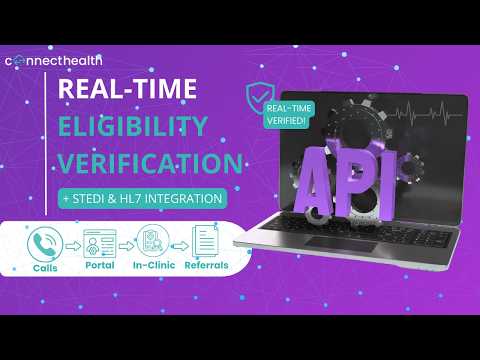
See how ConnectHealth connects intake data, eligibility checks, and workflow routing so care teams can reduce manual follow-ups and move patients forward faster.
Build Care Workflows in Plain English
No HL7 Expertise Needed
Helix is ConnectHealth’s AI workflow builder. Describe what you need in plain language: “notify the care coordinator when a patient is admitted, flag if high-risk for readmission,” and Helix configures the data flows, trigger logic, and routing across Epic, Cerner, or any connected EHR.
No HL7 coding. No consultant. No integration sprints.
1. Describe the workflow in business terms
2. Helix clarifies if needed, then generates the full multi-node workflow
3. You review, approve, and go live in days
Traditional path: 3–6 months, $50K–$200K+.
With Helix: your team builds it, live in days.
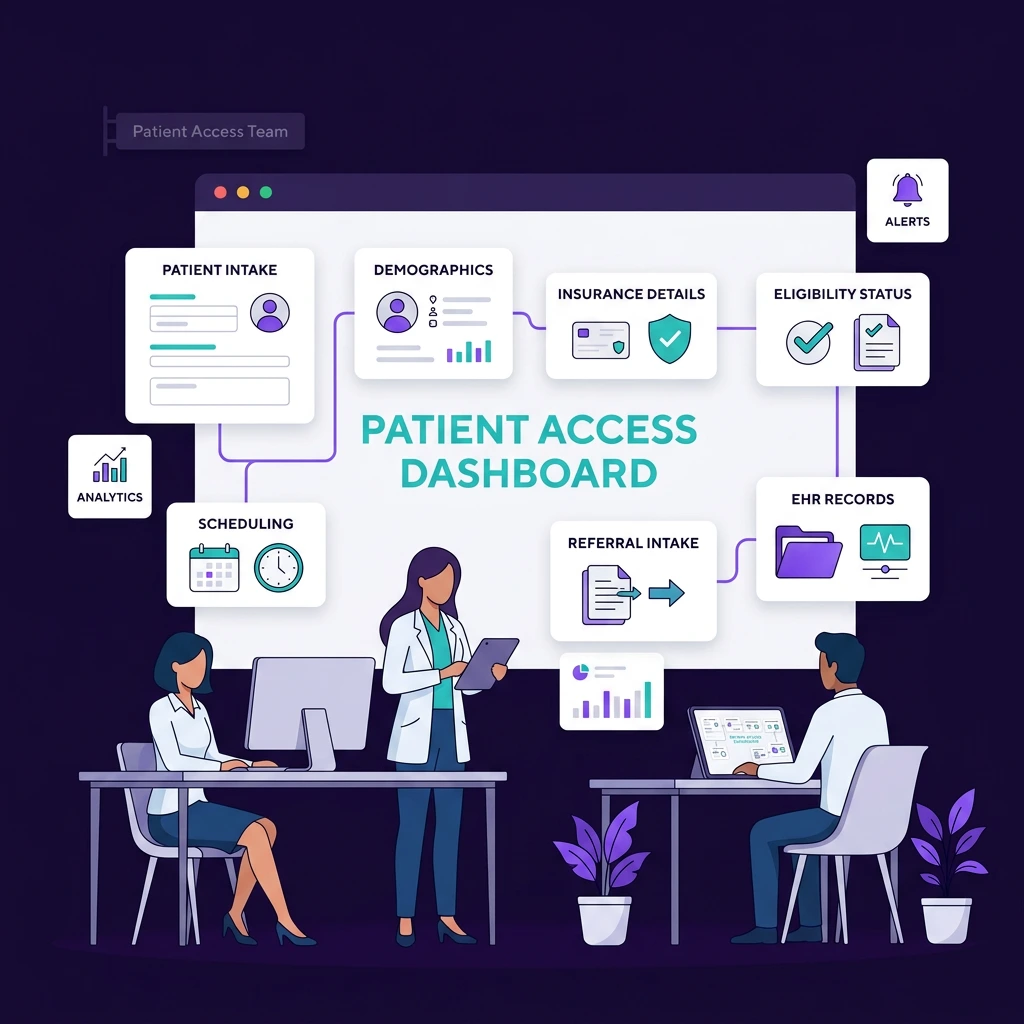
For teams managing intake, eligibility, scheduling, demographics, and referral entry.
ConnectHealth helps automate the movement of patient information across intake forms, eligibility tools, EHR records, scheduling systems, and care team workflows.
What teams can automate
• Patient intake workflows
• Eligibility and benefits checks
• Demographic updates
• Referral intake
• Scheduling handoffs
• Missing information alerts
• EHR updates after intake completion
Outcome
Patient access teams spend less time chasing information and more time moving patients forward.
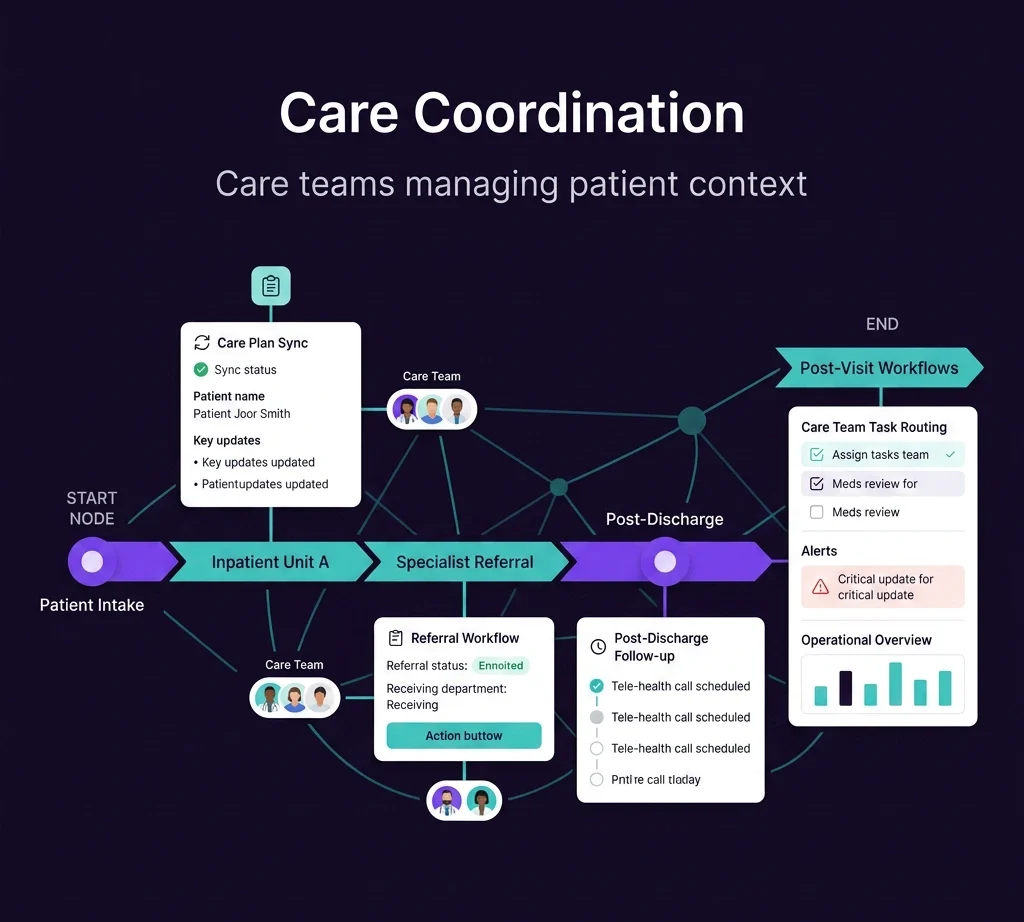
For care teams managing patients across departments, locations, programs, and post-visit workflows.
ConnectHealth helps sync patient context, care plans, alerts, referrals, and follow-up tasks into automated workflows.
What teams can automate
• Care plan updates
• Follow-up task routing
• Post-visit workflows
• Care team alerts
• Escalation workflows
• Cross-team handoffs
• Patient status updates
Outcome
Care teams get the context they need without searching across disconnected systems
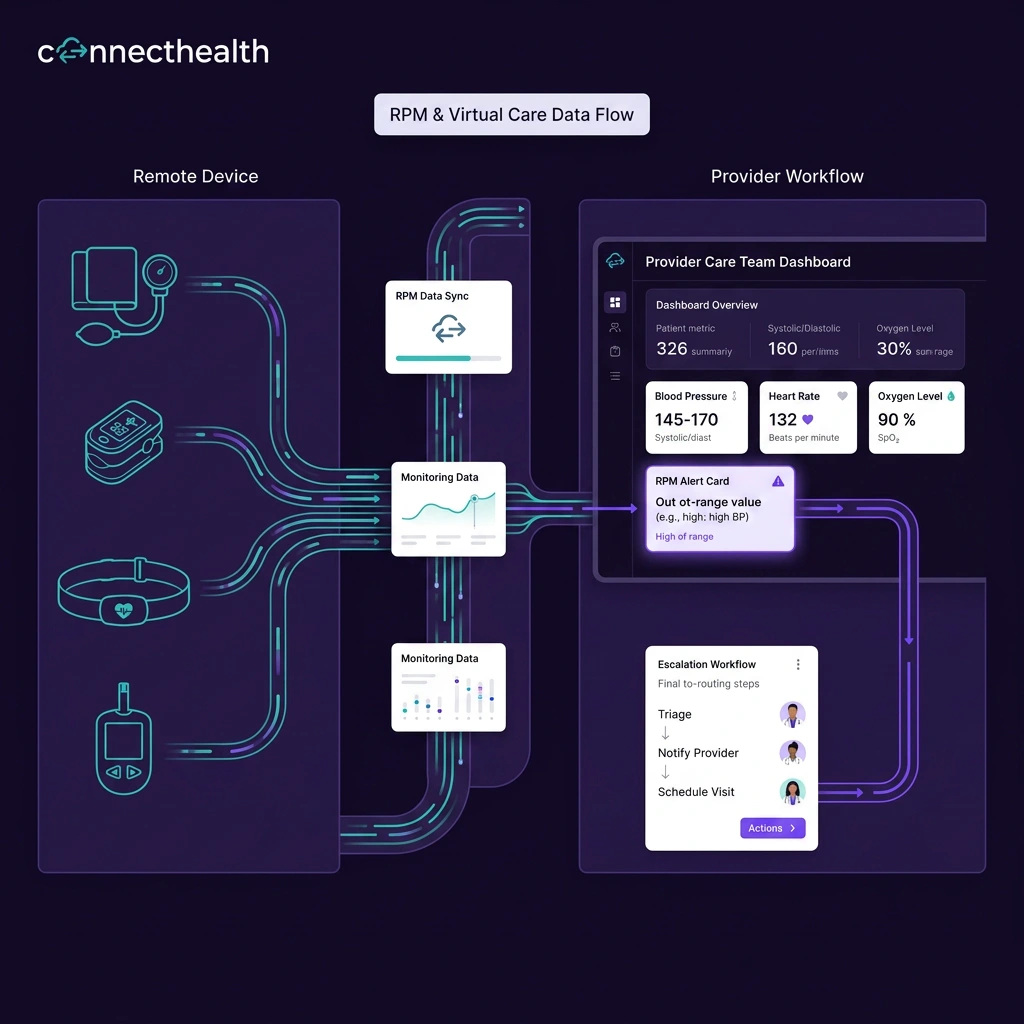
For organizations running remote monitoring, chronic care, hospital-at-home, post-op recovery, or virtual care programs.
ConnectHealth helps bring RPM readings, device alerts, thresholds, and monitoring events into care workflows.
What teams can automate
• RPM alert routing
• Device data workflows
• Threshold-based escalation>br>
• Care team notification
• Monitoring task creation
• EHR and dashboard updates
• Patient follow-up triggers
Outcome
Remote monitoring becomes part of the care workflow, not another dashboard teams must manually monitor.
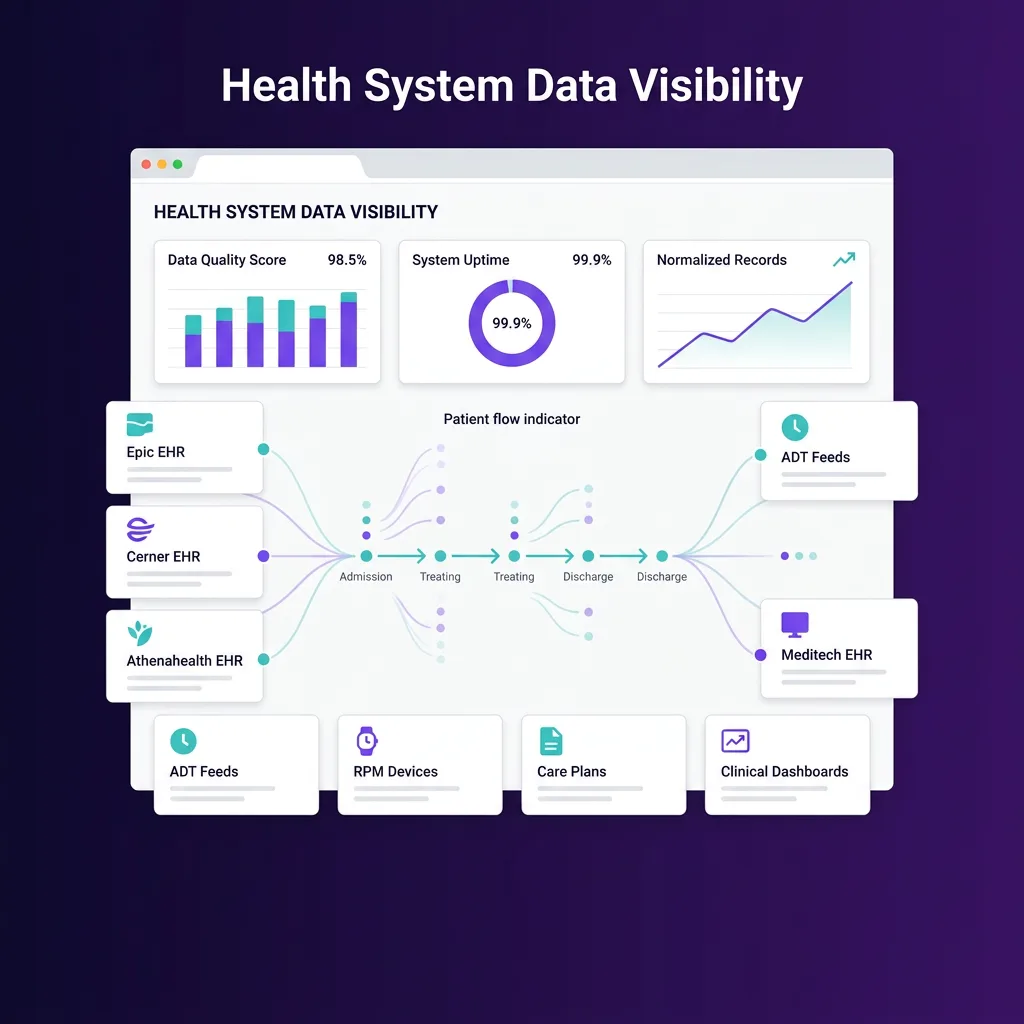
For health systems using admission, discharge, and transfer events to coordinate care.
ConnectHealth helps turn ADT events into workflow triggers.
What teams can automate
• Admission follow-up workflows
• Discharge coordination
• Transfer notifications
• Post-discharge outreach
• Care management tasks
• Referral triggers
• Dashboard updates
Outcome
ADT events move from passive data streams to active care coordination workflows.
Most hospitals and clinics already have the systems they need.
The challenge is getting those systems to work together without creating more manual work.
ConnectHealth connects to the systems behind care delivery, including:
#EHRs#
#ADT feeds#
#RPM devices#
#Patient intake tools#
Scheduling systems
Referral systems
Eligibility platforms
Payer systems
#Labs#
#Care plan systems#
#Clinical dashboards#
#Operational tools#
A connection moves data.
A workflow moves care.
ConnectHealth is designed to help hospitals and clinics turn system events into action.

An appointment request can trigger an intake workflow.

An eligibility result can update a patient access task.

An ADT event can launch a discharge follow-up workflow.

An RPM alert can route to the right care team.

A care plan update can sync across teams.

A referral can move from intake to scheduling to follow-up without manual chasing.
Launch reusable workflows for common care operations.
Examples include:
• Patient intake automation
• Eligibility workflow automation
• Referral workflow automation
• ADT workflow automation
• RPM workflow automation
• Care coordination workflows
• Discharge follow-up workflows
• Care plan update workflows
• Clinical dashboard workflows
Design and adapt workflows visually across healthcare systems.
Teams can define how data moves, what triggers action, who receives the next step, and where updates should go.
Use it to map:
• Intake workflows
• Referral pathways
• Escalation logic
• ADT event handling
• RPM alert routing
• Care team task flows
• Dashboard update rules
ConnectHealth uses AI to help understand workflow context, route information, and support care operations.
This helps teams move from static data exchange to intelligent workflow movement.
AI can help support:
• Context-aware task routing
• Workflow prioritization
• Alert triage support
• Care team handoff summaries
• Missing information identification
• Next-step recommendations
• Operational workflow monitoring
ConnectHealth connects with EHRs, ADT feeds, devices, payer systems, dashboards, and operational tools so automated workflows can run across the systems teams already use.
This includes support for healthcare standards and patterns such as:
• FHIR
• HL7
• APIs
• EHR connections
• ADT feeds
• RPM data workflows
• Payer and eligibility data
• Dashboard data flows
Standardize data from EHRs, ADT feeds, RPM devices, payer systems, and operational tools so workflows can run on clean, usable context.
This helps teams avoid broken handoffs caused by inconsistent data formats, missing fields, and disconnected system logic.
Use it to support:
• Patient identity matching
• EHR data normalization
• ADT event mapping
• RPM reading standardization
• Eligibility response mapping
• Care plan data alignment
• Dashboard-ready workflow data
Deploy ConnectHealth in the customer’s AWS environment for stronger control over infrastructure, data ownership, and deployment architecture.
This helps healthcare organizations modernize workflows without moving to a shared black-box environment.
Use it to support:
• Customer-controlled deployment
• PHI-sensitive workflows
• AWS-based infrastructure
• Data ownership controls
• Scalable workflow operations
• Secure care automation
• Enterprise deployment needs
A patient logistics platform processing thousands of transport requests
came to us with fragmented scheduling and intake forms that took 15–20
minutes to complete manually.
#After integrating with Epic via ConnectHealth:#
#✓ #70% reduction in service request time (15–20 min → under 5 min)
#✓ #40% increase in operational efficiency
#✓ #Real-time transport tracking embedded directly inside Epic
A health platform connecting with 7,000+ provider endpoints needed to
unify wearable data, EHR records, and lab reports into one workflow.
#After deploying ConnectHealth with WearConnect:#
#✓ #60% reduction in time doctors spend reviewing lab reports
#✓ #90% accuracy in AI-generated health predictions
#✓ #45% increase in patient app engagement post-automation

Reduce intake-to-schedule delays by 60–70% with automated eligibility verification and pre-filled intake workflows. No manual data entry, no phone tag.
Every admission, discharge, and transfer triggers the right workflow automatically. High-risk patients flagged. Care coordinators notified. Nothing falls through.
Device readings route directly into clinical workflows, not into a queue someone checks at the end of the day. Alert response time drops from hours to minutes.
With 150+ pre-built components, most organizations go live with their first integration in days. New integrations reuse the same logic, no rebuild from scratch.
API changes in Epic or Cerner are absorbed at the ConnectHealth integration layer. Your workflow logic stays intact. No emergency dev cycles when a vendor updates their schema.
Nurses and coordinators spend hours every shift on manual data entry, system switching, and routing tasks that automation handles in seconds. ConnectHealth eliminates the busywork so care teams stay focused on patients not paperwork.
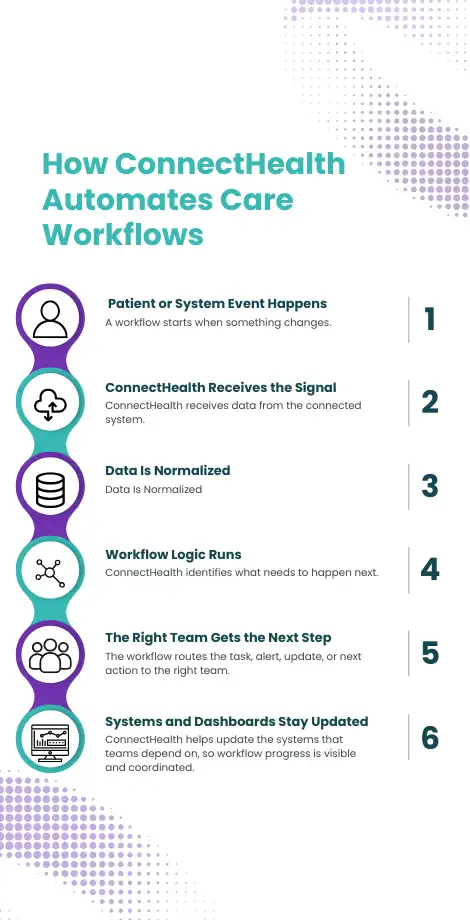

A workflow starts when something changes, such as a patient submitting an intake form, a referral arriving, an eligibility check being required, an admission or discharge event being received, an RPM alert crossing a threshold, a care plan being updated, or a dashboard needing an updated workflow status.

ConnectHealth receives data from the connected system. This may include data from EHRs, ADT feeds, RPM devices, payer systems, labs, scheduling systems, referral tools, or dashboards.

ConnectHealth standardizes the information so it can be used inside a workflow. This helps reduce the friction created by fragmented data, disconnected tools, and multi-system environments.

ConnectHealth identifies what needs to happen next, such as creating a patient access task, routing a referral to the right team, triggering discharge follow-up, escalating an RPM alert, updating a care plan workflow, sending status to a dashboard, or notifying the right care team.

The workflow routes the task, alert, update, or next action to the right team. This may be patient access, care coordination, virtual care, clinical operations, discharge planning, or leadership.

ConnectHealth helps update the systems that teams depend on, so workflow progress is visible and coordinated. The result is less manual chasing and better movement across the care journey.
Launch ConnectHealth in your AWS environment so your organization keeps stronger control over infrastructure, data, and deployment architecture.
Connect the systems your teams already use, including EHRs, ADT feeds, RPM devices, eligibility tools, referrals, care plans, payer systems, and dashboards.
Start with one high-friction workflow.
#Examples:#
• Patient intake
• Eligibility
• Referrals
• ADT discharge follow-up
• RPM alert routing
• Care coordination
• Clinical dashboard updates
Then scale what works across teams, departments, and care programs.
A quick look at how we help organizations transform ideas into outcomes.

A multi-site provider reduced coding denial rates by 76% after deploying a custom clinical platform with automated billing workflows and EHR-integrated documentation. Claim turnaround time cut in half.

Mindbowser created an advanced way to track healthcare records, that saves medical data in one place, promoting transparency in the EHR Platform.
Hospitals and clinics are managing more than one EHR workflow. Patient intake, referrals, eligibility, ADT events, RPM alerts, care plans, discharge follow-ups, and dashboards all need to move across different systems. But most teams still rely on manual handoffs to keep that work moving. #Where workflow pressure shows up:#
Teams wait for missing information before the next step can move.
Staff move across tools to understand what happened and what needs action.
Device data creates signals, but teams still need to review and route them manually.
Admissions, discharges, and transfers create updates, but not always the next workflow step.
Collaborating with Industry Leaders for Smarter Healthcare


























Healthcare workflow automation helps hospitals, clinics, and care teams automate manual processes across patient intake, eligibility, referrals, ADT events, RPM alerts, care coordination, discharge follow-up, and dashboards.
PHI stays within your AWS VPC. ConnectHealth deploys entirely inside your infrastructure, your data never moves to our servers or shared cloud environments. Helix AI processes workflow logic locally. SOC 2 Type II and HIPAA safeguards apply end-to-end, with full audit logging on every data interaction.
API changes are absorbed at the ConnectHealth integration layer your workflow logic stays intact. If a connected system goes down, ConnectHealth queues events, retries with exponential backoff, and alerts your team. No broken handoffs, no silent failures, no data loss.
Most organizations go live with their first workflow within days of setup. We integration configuration, workflow mapping, and system testing. Your care teams don't change the tools they use, they just start getting faster, cleaner handoffs through the systems they already work in. Ongoing: unlimited workflow changes are included in your plan, and Helix lets your team build new ones without engineering.
Traditional integration platforms focus on connecting systems and moving data. ConnectHealth focuses on what happens next. It connects systems in the background, then helps care teams automate workflows, route tasks, trigger actions, and keep operations moving.
No. ConnectHealth works with your existing EHR and surrounding systems. It helps automate workflows across those systems without replacing them.
Hospitals can automate workflows for intake, eligibility, referrals, ADT events, RPM alerts, care coordination, discharge follow-up, care plans, and clinical dashboard updates.
Yes. ConnectHealth can use ADT events such as admissions, discharges, and transfers to trigger care coordination tasks, follow-ups, alerts, and dashboard updates.
Yes. ConnectHealth can help route RPM readings, alerts, thresholds, and monitoring events into care team workflows.
Yes. ConnectHealth can support referral intake, routing, status tracking, follow-up tasks, and dashboard visibility.
We don’t just deliver solutions we build partnerships that drive transformation. With a proven track record in healthcare technology, we understand the industry’s unique challenges and offer customized solutions to help you achieve breakthroughs.

Deep healthcare knowledge ensures technology aligns with real-world clinical workflows, driving impact.

Pre-built components reduce engineering time by 30-40%, helping you get to market quickly.

AI models are trained on your local data in your secure cloud environment.

Proven integrations ensure seamless connectivity with EHRs, payers, and digital health ecosystems.

Delivered 50+ healthcare solutions across 10+ countries, representing our ability to provide a diverse healthcare ecosystem.

Reduced the development time by 40% by implementing customized solutions for every challenge.

We deliver 100% ownership with a perpetual license for IP and code, enabling seamless data integration. Ensure full control and flexibility.

Ensure seamless integration with your systems and scalability to adapt to evolving needs.

Our 50+ prebuilt frameworks accelerate the development process and reduce time-to-market by 30%.

The specialized AI tools are customized to address healthcare challenges, significantly improving diagnostic efficiency by 25%.

Stay informed with our hub, offering insights and thought leadership to empower your team.

Achieved 90+ NPS with a user-centric approach ensuring seamless adoption and superior experience.

Leverage automation to reduce errors by 60%, boost efficiency, and enhance care quality.

Our clear, open pricing ensures you understand your investment without hidden costs or surprises.

From leading hospitals to digital-health companies, Mindbowser powers real-world healthcare transformation.









HIPAA-ready builds with controlled PHI access, secure environments, and disciplined engineering practices. Designed to reduce vendor risk and speed up onboarding.
Independent audit of security controls operating over time.

PHI safeguards built into access, environments, and release workflows.

Data handling built for modern privacy expectations.

Role-based access with controlled PHI exposure.

Code reviews, dependency checks, and security gates.

Secure integrations designed for traceability and reliability.

 Encryption in transit and at rest
 Role-based access and least privilege
 Secure SDLC with code reviews
 Pen testing based on scope and risk
Partner with us to design, build, and scale digital solutions that drive better outcomes.
Global Tech Teams LLC, 525 Washington Blvd, Industrious at Newport Tower, Jersey City, NJ 07310, United States.
Let’s discuss your goals, workflows, and next steps in a focused consultation call.
 Schedule a Call