

















 BLOGS
BLOGS  NEWSROOM
  CASE STUDIES
  WEBINARS
  PODCASTS
  ASSET HUB
  EVENT CALENDAR
























Quarkus is a Kubernetes-native Java framework designed for microservices and cloud-native applications. It offers fast startup times, low memory footprint, and excellent developer experience. In this blog, we will explore how to build a CRUD API using Quarkus, leveraging Hibernate ORM with Panache for database operations. Additionally, we will compare Quarkus with Spring Boot and explain Quarkus-specific annotations relevant to the CRUD API implementation.
Setting Up the Quarkus Project
To begin building your CRUD API, create a new Quarkus project using the following command:
mvn io.quarkus.platform:quarkus-maven-plugin:3.19.1:create \
   -DprojectGroupId=org.quarkus \
   -DprojectArtifactId=quarkus-crud-operations \
   -DclassName="org.quarkus.resource.EmployeeResource" \
   -Dpath="/employees"
This generates a basic Quarkus project with RESTEasy dependencies.
Configuring Dependencies
pom.xml
<dependencies>
    <dependency>
        <groupId>io.quarkus</groupId>
        <artifactId>quarkus-arc</artifactId>
    </dependency>
    <dependency>
        <groupId>io.quarkus</groupId>
        <artifactId>quarkus-hibernate-orm-panache</artifactId>
    </dependency>
    <dependency>
        <groupId>io.quarkus</groupId>
        <artifactId>quarkus-jdbc-postgresql</artifactId>
    </dependency>
    <dependency>
        <groupId>io.quarkus</groupId>
        <artifactId>quarkus-rest-jackson</artifactId>
    </dependency>
</dependencies>
Configuring the Database
application.properties
quarkus.datasource.db-kind=postgresql
quarkus.datasource.username=postgres
quarkus.datasource.password=postgres
quarkus.datasource.jdbc.url=jdbc:postgresql://localhost:5432/company_db
quarkus.hibernate-orm.database.generation=update
This configuration connects our Quarkus application to a PostgreSQL database.
Related read: Mastering GraphQL Server Integration with Node.js and PostgreSQL
Defining the Entity
We use Hibernate ORM with Panache to define our Employee entity. Panache simplifies entity management compared to traditional JPA.
package org.quarkus.entity;

import jakarta.persistence.*;
import jakarta.validation.constraints.*;
import lombok.*;

@Entity
@Data
@NoArgsConstructor
@AllArgsConstructor
public class Employee {

   @Id
   @GeneratedValue(strategy = GenerationType.IDENTITY)
   public Long id;

   public String name;

   public String department;

   public double salary;
}
Annotations Used:
▪️@Entity – Marks the class as a JPA entity.
▪️@Id – Identifies the primary key.
▪️@GeneratedValue(strategy = GenerationType.IDENTITY) – Uses an auto-incrementing primary key.
Repository Layer
Quarkus allows defining repositories using Panache, making queries more concise.
package org.quarkus.repository;

import io.quarkus.hibernate.orm.panache.PanacheRepository;
import jakarta.enterprise.context.ApplicationScoped;
import org.quarkus.entity.Employee;

import java.util.List;

@ApplicationScoped
public class EmployeeRepository implements PanacheRepository<Employee> {
    public List<Employee> findByDepartment(String department) {
        return find("department", department).list();
    }
}
Annotations Used:
▪️@ApplicationScoped – Marks the bean as application-wide.
▪️PanacheRepository – Simplifies JPA repository operations.
Service Layer
This layer contains business logic and transactional operations.
package org.quarkus.service;

import jakarta.enterprise.context.ApplicationScoped;
import jakarta.transaction.Transactional;
import java.util.List;
import java.util.Optional;

import org.quarkus.entity.Employee;
import org.quarkus.repository.EmployeeRepository;

@ApplicationScoped
public class EmployeeService {

    private final EmployeeRepository employeeRepository;

    public EmployeeService(EmployeeRepository employeeRepository) {
        this.employeeRepository = employeeRepository;
    }

    public List<Employee> getAllEmployees() {
        return employeeRepository.listAll();
    }

    public Optional<Employee> getEmployeeById(Long id) {
        return employeeRepository.findByIdOptional(id);
    }

    public List<Employee> getEmployeesByDepartment(String department) {
        return employeeRepository.findByDepartment(department);
    }

    @Transactional
    public Employee addEmployee(Employee employee) {
        employeeRepository.persist(employee);
        return employee;
    }

    @Transactional
    public boolean updateEmployee(Long id, Employee updatedEmployee) {
        Employee employee = employeeRepository.findById(id);
        if (employee != null) {
           employee.name = updatedEmployee.name;
           employee.department = updatedEmployee.department;
           employee.salary = updatedEmployee.salary;
           return true;
        }
        return false;
     }

     @Transactional
     public boolean deleteEmployee(Long id) {
         return employeeRepository.deleteById(id);
     }
}
Annotations Used:
▪️@Transactional – Marks methods as part of a transaction.
Build Reliable, Secure, and Scalable APIs With Our Engineering Team
REST API Controller
This exposes CRUD operations using JAX-RS.
package org.quarkus.resource;

import jakarta.ws.rs.*;
import jakarta.ws.rs.core.MediaType;
import jakarta.ws.rs.core.Response;
import java.util.List;
import java.util.Optional;
import org.quarkus.entity.Employee;
import org.quarkus.service.EmployeeService;

@Path("/employees")
@Produces(MediaType.APPLICATION_JSON)
@Consumes(MediaType.APPLICATION_JSON)
public class EmployeeResource {

     private final EmployeeService employeeService;

     public EmployeeResource(EmployeeService employeeService) {
         this.employeeService = employeeService;
     }

@GET
public List<Employee> getAllEmployees() {
     return employeeService.getAllEmployees();
}

@GET
@Path("/{id}")
public Response getEmployeeById(@PathParam("id") Long id) {
    Optional<Employee> employee = employeeService.getEmployeeById(id);
    return employee.isPresent() ? Response.ok(employee.get()).build()
            : Response.status(Response.Status.NOT_FOUND).build();
}

@POST
public Response addEmployee(Employee employee) {
    employeeService.addEmployee(employee);
    return Response.status(Response.Status.CREATED).build();
}

@PUT
@Path("/{id}")
public Response updateEmployee(@PathParam("id") Long id, Employee employee) {
    boolean updated = employeeService.updateEmployee(id, employee);
    return updated ? Response.ok().build() : Response.status(Response.Status.NOT_FOUND).build();
}

@DELETE
@Path("/{id}")
public Response deleteEmployee(@PathParam("id") Long id) {
    boolean deleted = employeeService.deleteEmployee(id);
    return deleted ? Response.ok().build() : Response.status(Response.Status.NOT_FOUND).build();
 }
}
Annotations Used:
▪️@Path – Defines the REST endpoint.
▪️@GET, @POST, @PUT, @DELETE – Define HTTP operations.
▪️@Produces & @Consumes – Specify data formats.
▪️@PathParam – Extracts path variables.
Running the Application
To start the Quarkus application, use the following command:
mvn quarkus:devThis runs the application in development mode with live reload enabled.
Testing the API (cURL)
1. Create an Employee
curl -X POST "http://localhost:8080/employees" \
-H "Content-Type: application/json" \
-d '{"name": "John Doe", "department": "IT", "salary": 75000}'
2. Get All Employees
curl -X GET "http://localhost:8080/employees"3. Update an Employee
curl -X PUT "http://localhost:8080/employees/1" \
-H "Content-Type: application/json" \
-d '{"name": "Jane Doe", "department": "HR", "salary": 80000}'
4. Delete an Employee
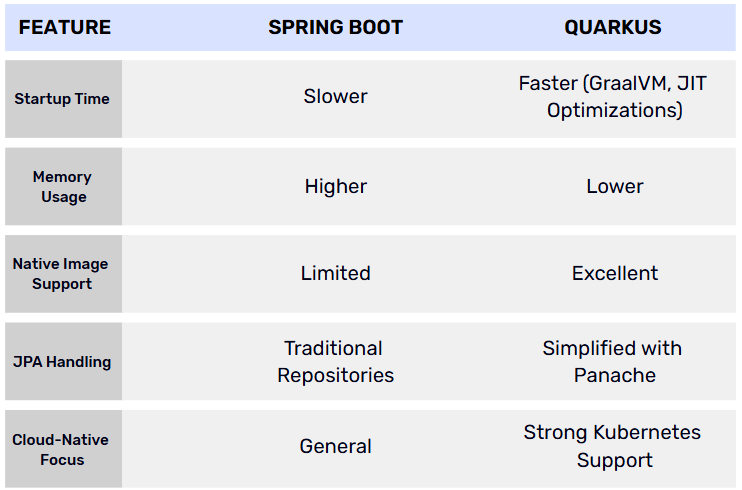
curl -X DELETE "http://localhost:8080/employees/1"Spring Boot vs. Quarkus Comparison

Conclusion
Quarkus provides a powerful alternative to Spring Boot, especially for microservices and cloud-native applications. With features like Panache, fast startup times, and lower resource consumption, it is an excellent choice for modern Java applications.
By following this guide, you will have a working Quarkus-based CRUD API ready to build on and extend for real-world use cases.


