BLOGS
BLOGS  NEWSROOM
  CASE STUDIES
  WEBINARS
  PODCASTS
  ASSET HUB
  EVENT CALENDAR























TL;DR:
Electronic Health Records (EHRs) are at the heart of modern healthcare applications. If you’re building a React Native app that needs to integrate with patient health data, Cerner (now part of Oracle Health) offers a powerful and widely-used EHR system with a well-documented FHIR-based API. This blog walks you through the essentials of cerner ehr integration in your React Native application.
What is Cerner EHR?
Cerner is one of the leading EHR platforms used globally by hospitals and clinics. It provides APIs that allow third-party apps to:
- Access patient demographics
- Fetch clinical documents
- View allergies, conditions, medications, and more
- Schedule appointments and retrieve encounters
Cerner APIs are FHIR-based (Fast Healthcare Interoperability Resources) and conform to HL7 standards, ensuring interoperability. That’s why cerner ehr integration has become a top requirement for developers working on healthcare apps.
Prerequisites
Before starting the integration, make sure you have:
- A React Native project set up
- Familiarity with OAuth 2.0 flows
- Developer access to Cerner’s sandbox
You’ll also need tools like:
- Axios or Fetch for API calls
- React Navigation (for OAuth redirection)
Having these prerequisites in place ensures a smooth start with integration.
Related read: Use of React Native in Healthcare Applications
Choose React Native to Reshape Your Healthcare Application
Getting Started
Step-by-Step Integration:
I will provide you with detailed screenshots on how to create the Cerner Client ID and Application ID.
1. Login to Cerner and Click on the New Application

2. Fill the Form According to Your Requirement
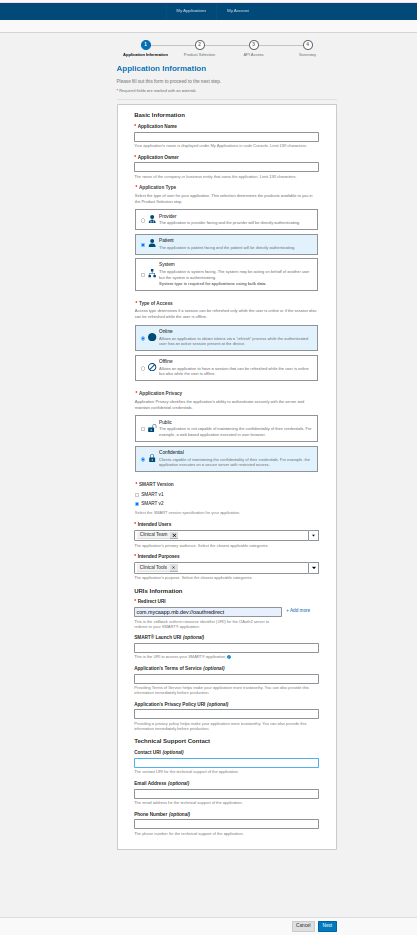
3. Production Session Form
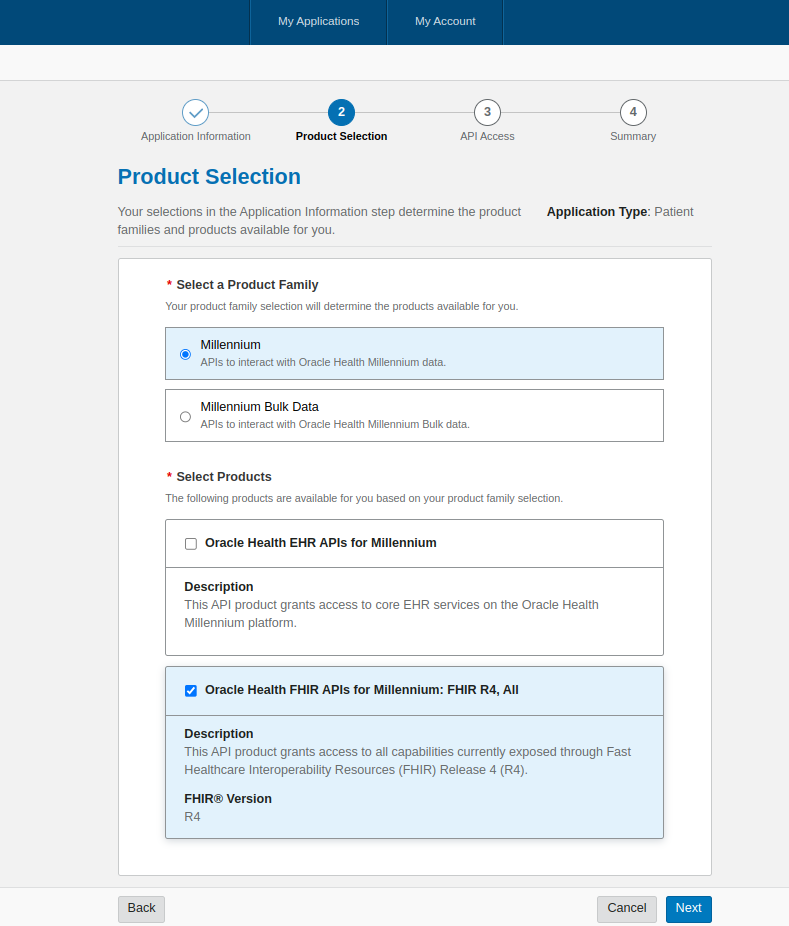
4. Check the “Check-box” According to Your API Requirement.
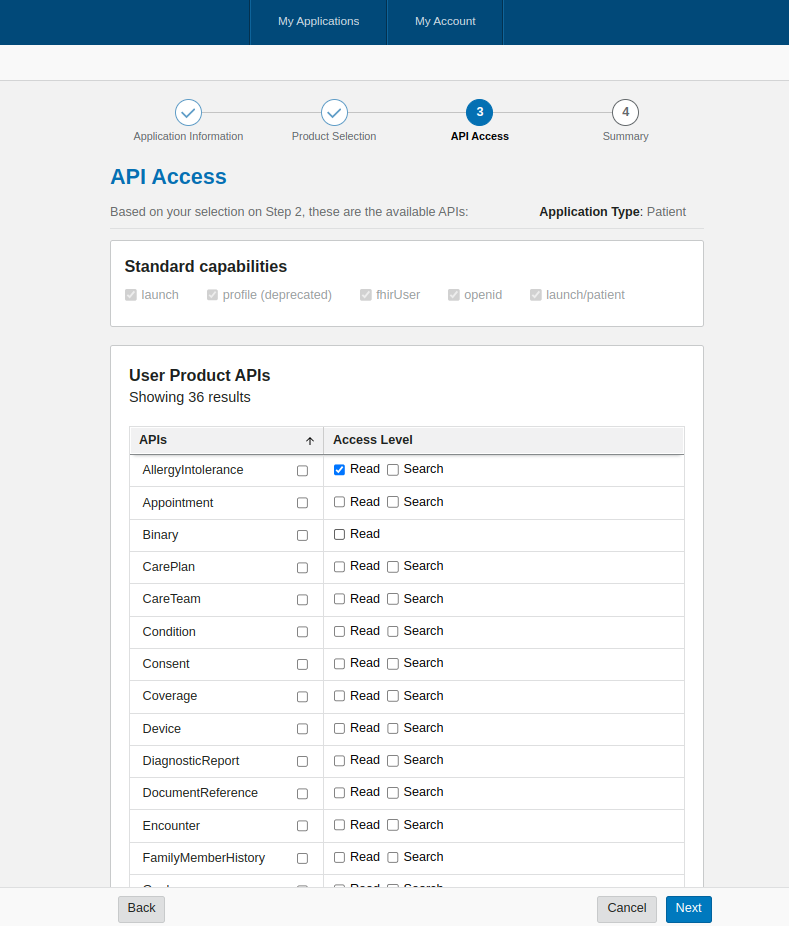
5. Check Summary
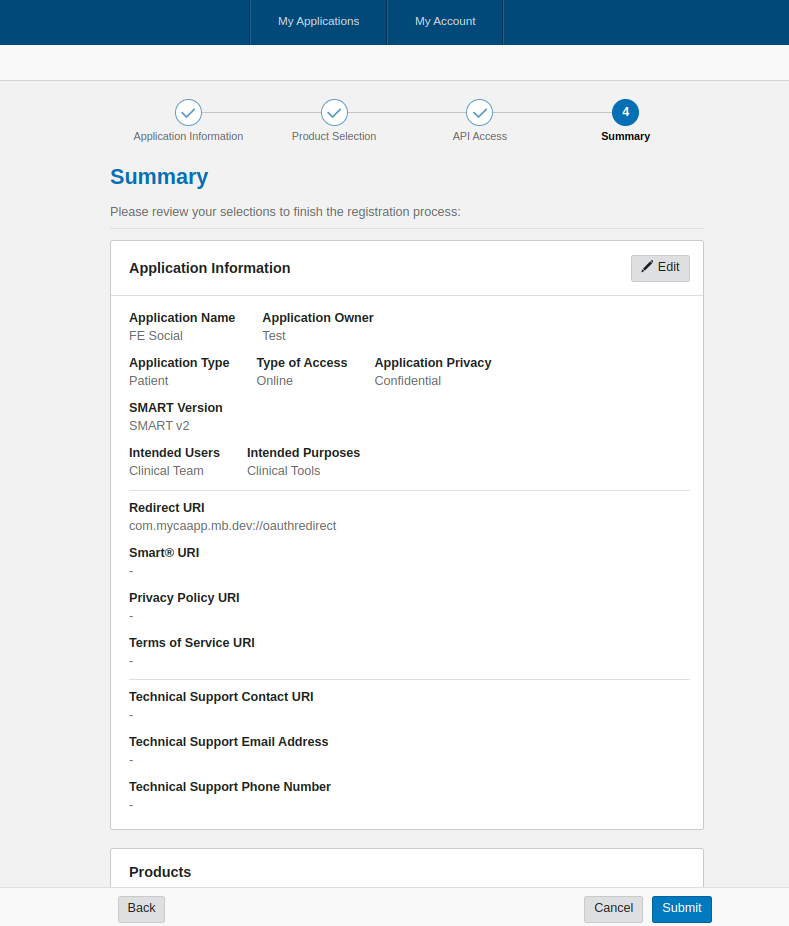
6. Finally, You can get Your Client Id and Application Id
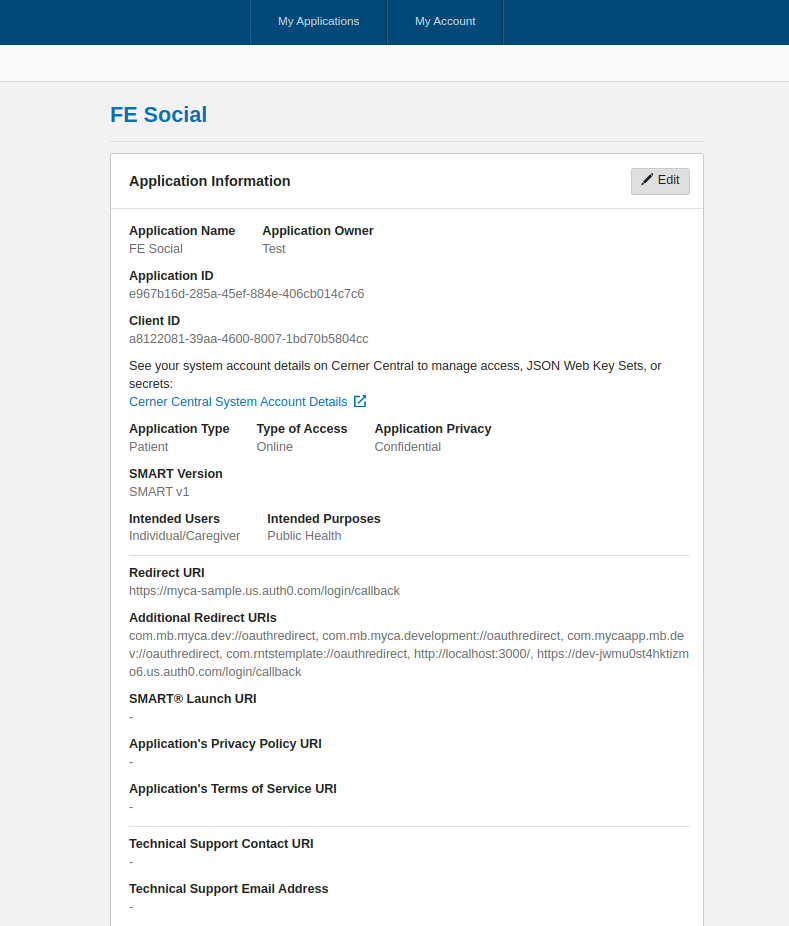
Register Your App with Cerner
Sign up on code.cerner.com and register your app. You will get:
- client_id
- client_secret (if using confidential apps)
- redirect_uri
- Choose “SMART on FHIR” as the launch context for most health apps.
Set Up OAuth 2.0 in React Native
Cerner uses OAuth 2.0 for authentication. In React Native, use the react-native-app-auth library:
npm install react-native-app-authMake a setup of the app auth
Then Configure:
import {authorize} from 'react-native-app-auth';

const config = {
issuer: 'https://authorization.cerner.com',
clientId: 'YOUR_CLIENT_ID',
redirectUrl: 'com.yourapp://callback', // Deep link setup
scopes: ['openid', 'profile', 'launch', 'patient/*.*', 'offline_access'],
serviceConfiguration: {
authorizationEndpoint: 'https://authorization.cerner.com/authorize',
tokenEndpoint: 'https://authorization.cerner.com/token',
},
};
Authorize the User:
const handleLogin = async () => {
try {
const result = await authorize(config);
console.log(result); // Includes accessToken, refreshToken
} catch (error) {
console.error('Auth error:', error);
}
};
Common Use Cases
Get patient profile,Get condition, List of :
| Feature | API Endpoint |
| Get patient profile | /Patient/:id |
| Get conditions | /Condition?patient=:id |
| List allergies | /AllergyIntolerance?patient=:id |
These are the typical endpoints developers call while querying Cerner’s FHIR APIs to access patient records.
Caveats and Best Practices
- Use HTTPS for all API calls.
- Handle scopes and permissions properly – Cerner is strict.
- For production, apps must go through Cerner validation.
- Always use secure token storage (e.g., Keychain/Keystore).
Adhering to these guidelines ensures your cerner integration is safe, compliant, and production-ready.
Resources
- Cerner Code Developer Portal
- SMART on FHIR
- FHIR Specification
- react-native-app-auth GitHub
Conclusion
Done right, Cerner integration gives your React Native app real-time patient data, clinical summaries, and decision support securely and to standard. For backend (no-user) sync, see our NestJS system-to-system guide. And if you’d rather not build and maintain the OAuth, token, and FHIR-mapping layer yourself, ConnectHealth ships a pre-built Cerner connector that runs in your own AWS VPC.